
 Member
 aluna
alunaLabplot-Aplicación de análisis y visualización de datos

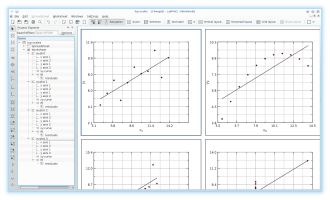
- Gestión de datos basada en proyectos.
- Project-explorer para la gestión y organización de objetos creados en diferentes carpetas y subcarpetas.
- Hoja de cálculo con funcionalidad básica para el ingreso manual de datos o para la generación de números aleatorios uniformes y no uniformes.
- Importación de datos ASCII externos en el proyecto para su posterior edición y visualización.
- Exportación de hoja de cálculo a un archivo ASCII.
- La hoja de trabajo como principal objeto principal para gráficos, etiquetas, etc., admite diferentes diseños y funciones de zoom.
- Exportación de la hoja de trabajo a diferentes formatos (pdf, eps, png y svg).
- Gran variedad de capacidades de edición para las propiedades de la hoja de cálculo y sus objetos.
- Gráficos cartesianos, creados a partir de conjuntos de datos importados o creados manualmente o mediante ecuación matemática.
- La definición de fórmulas matemáticas se apoya en el resaltado y finalización de la sintaxis y en la lista de constantes y funciones matemáticas y físicas agrupadas temáticamente.
- El análisis de los datos trazados es compatible con muchas funciones de zoom y navegación.
- Ajustes lineales y no lineales a los datos, se predefinen varios modelos de ajuste y se pueden proporcionar modelos personalizados con un número arbitrario de parámetros
Para instalar LabPlot en openSUSE accedemos a la siguiente URL:
https://software.opensuse.org/package/labplot-kf5
y seleccionamos la versión de openSUSE que estemos utilizando (Leap, Tumbleweed) con la tecnología 1 Click Install y seguimos las instrucciones de instalación.
#HaveALotOfFun #DivierteteMucho

Virtual Machine Manager with QEMU/KVM on openSUSE Tumbleweed

Bzip2 in Rust: porting the randomization table
Here is a straightforward port of some easy code.
randtable.c has a lookup table with seemingly-random
numbers. This table is used by the following macros in
bzlib_private.h:
extern Int32 BZ2_rNums[512];

#define BZ_RAND_DECLS                          \
   Int32 rNToGo;                               \
   Int32 rTPos                                 \

#define BZ_RAND_INIT_MASK                      \
   s->rNToGo = 0;                              \
   s->rTPos  = 0                               \

#define BZ_RAND_MASK ((s->rNToGo == 1) ? 1 : 0)

#define BZ_RAND_UPD_MASK                       \
   if (s->rNToGo == 0) {                       \
      s->rNToGo = BZ2_rNums[s->rTPos];         \
      s->rTPos++;                              \
      if (s->rTPos == 512) s->rTPos = 0;       \
   }                                           \
   s->rNToGo--;
Here, BZ_RAND_DECLS is used to declare two fields, rNToGo and
rTPos, into two structs (1, 2). Both are similar to this:
typedef struct {
   ...
   Bool     blockRandomised;
   BZ_RAND_DECLS
   ...
} DState;
Then, the code that needs to initialize those fields calls
BZ_RAND_INIT_MASK, which expands into code to set the two fields to
zero.
At several points in the code, BZ_RAND_UPD_MASK gets called, which
expands into code that updates the randomization state, or something
like that, and uses BZ_RAND_MASK to get a useful value out of the
randomization state.
I have no idea yet what the state is about, but let's port it directly.
Give things a name
It's interesting to see that no code except for those macros uses
the fields rNToGo and rTPos, which are declared via
BZ_RAND_DECLS. So, let's make up a type with a name for that.
Since I have no better name for it, I shall call it just
RandState. I added that type definition in the C code,
and replaced the macro-which-creates-struct-fields with a
RandState-typed field:
-#define BZ_RAND_DECLS                          \
-   Int32 rNToGo;                               \
-   Int32 rTPos                                 \
+typedef struct {
+   Int32 rNToGo;
+   Int32 rTPos;
+} RandState;

...

-      BZ_RAND_DECLS;
+      RandState rand;
Since the fields now live inside a sub-struct, I changed the other
macros to use s->rand.rNToGo instead of s->rNToGo, and similarly
for the other field.
Turn macros into functions
Now, three commits (1, 2, 3) to turn the
macros BZ_RAND_INIT_MASK, BZ_RAND_MASK, and BZ_RAND_UPD_MASK
into functions.
And now that the functions live in the same C source file as the
lookup table they reference, the table can be made static const to
avoid having it as read/write unshared data in the linked binary.
Premature optimization concern: doesn't de-inlining those macros
cause performance problems? At first, we will get the added overhead
from a function call. When the whole code is ported to Rust, the Rust
compiler will probably be able to figure out that those tiny functions
can be inlined (or we can #[inline] them by hand if we have proof,
or if we have more hubris than faith in LLVM).
Port functions and table to Rust
The functions are so tiny, and the table so cut-and-pasteable, that it's easy to port them to Rust in a single shot:
#[no_mangle]
pub unsafe extern "C" fn BZ2_rand_init() -> RandState {
    RandState {
        rNToGo: 0,
        rTPos: 0,
    }
}

#[no_mangle]
pub unsafe extern "C" fn BZ2_rand_mask(r: &RandState) -> i32 {
    if r.rNToGo == 1 {
        1
    } else {
        0
    }
}

#[no_mangle]
pub unsafe extern "C" fn BZ2_rand_update_mask(r: &mut RandState) {
    if r.rNToGo == 0 {
        r.rNToGo = RAND_TABLE[r.rTPos as usize];
        r.rTPos += 1;
        if r.rTPos == 512 {
            r.rTPos = 0;
        }
    }
    r.rNToGo -= 1;
}
Also, we define the RandState type as a Rust struct with a
C-compatible representation, so it will have the same layout in memory
as the C struct. This is what allows us to have a RandState in
the C struct, while in reality the C code doesn't access it
directly; it is just used as a struct field.
// Keep this in sync with bzlib_private.h:
#[repr(C)]
pub struct RandState {
    rNToGo: i32,
    rTPos: i32,
}
See the commit for the corresponding extern
declarations in bzlib_private.h. With those functions and the table
ported to Rust, we can remove randtable.c. Yay!
A few cleanups
After moving to another house one throws away useless boxes; we have to do some cleanup in the Rust code after the initial port, too.
Rust prefers snake_case fields rather than camelCase ones, and I
agree. I renamed the fields to n_to_go and table_pos.
Then, I discovered that the EState struct doesn't actually use the
fields for the randomization state. I just removed them.
Exegesis
What is that randomization state all about?
And why does DState (the struct used during decompression) need the
randomization state, but EState (used during compression) doesn't
need it?
I found this interesting comment:
      /*--
         Now a single bit indicating (non-)randomisation.
         As of version 0.9.5, we use a better sorting algorithm
         which makes randomisation unnecessary.  So always set
         the randomised bit to 'no'.  Of course, the decoder
         still needs to be able to handle randomised blocks
         so as to maintain backwards compatibility with
         older versions of bzip2.
      --*/
      bsW(s,1,0);
Okay! So compression no longer uses randomization, but
decompression has to support files which were compressed with
randomization. Here, bsW(s,1,0) always writes a 0 bit to the file.
However, the decompression code actually reads the blockRandomised
bit from the file so that it can see whether it is
dealing with an old-format file:
GET_BITS(BZ_X_RANDBIT, s->blockRandomised, 1);
Later in the code, this s->blockRandomised field gets consulted; if
the bit is on, the code calls BZ2_rand_update_mask() and friends as
appropriate. If one is using files compressed with Bzip2 0.9.5 or
later, those randomization functions are not even called.
Talk about preserving compatibility with the past.
Explanation, or building my headcanon
Bzip2's compression starts by running a Burrows-Wheeler Transform on a block of data to compress, which is a wonderful algorithm that I'm trying to fully understand. Part of the BWT involves sorting all the string rotations of the block in question.
Per the comment I cited, really old versions of bzip2 used a randomization helper to make sorting perform well in extreme cases, but not-so-old versions fixed this.
This explains why the decompression struct DState has a
blockRandomised bit, but the compression struct EState doesn't
need one. The fields that the original macro was pasting into
EState were just a vestige from 1999, which is when Bzip2 0.9.5 was
released.

Mise à jour des packages Mesa, VirtualBox, Ceph et NetworkManager dans Tumbleweed

Trois instantanés openSUSE Tumbleweed ont été publiés au cours des quatre premiers jours de juin, ce qui entraîne plusieurs mises à jour des paquets dans cette rolling-release.
L'instantané 20190604 apportait le paquet babl 0.1.64, améliorant la cohérence du code, la prise en charge de l'intégration continue (CI) de [gitlab](https://gitlab. com), ainsi que des améliorations d’autotools et meson build. Un accident dans la dénomination a entraîné le passage de la version 0.3.2 de bubblewrap à la version 0.3.3. Cependant, bubblewrap 0.3.3. a corrigé une vulnérabilité (CVE), fourni quelques corrections plus petites et ajouté l’API (Application Programming Interface) JSON qui permet de lire le code de sortie du processus interne. GNU Compiler Collection 8 a eu quelques mises à jour qui comprenaient quelques correctifs dont un rendant les constructions sans profilage reproductibles. La bibliothèque Generic Graphics Library gegl 0.4.16 a également ajouté le support de gitlab CI et utilise un allocateur personnalisé pour les données de mosaïque, qui aligne les données et les allocations de groupes dans des blocs ; ceci a été réalisé sur Linux en utilisant l'extension GNU malloc_trim pour permettre de forcer l'invocation de la fonction de récupération de place d'allocateurs, malloc, présente au sein de la glibc. La version 6.0.8 d’Oracle virtualbox corrigeait un crash lors de la mise hors tension d’une machine virtuelle sans contrôleur graphique et la version 1.20.5 de xorg-x11-server en corrigeait certains types d'entrées. L’instantané a actuellement une cote de 96, selon l'évaluateur d’instantané.
L'instantané 20190603 a mis à jour Mesa et Mesa-drivers en version 19.0.5 améliorant certaines parties du code et des pilotes.
NetworkManager 1.16.2 a corrigé certaines autorisations erronées du fichier /var/lib/NetworkManager/secret_key.
La mise à jour de la version mineure de Ceph a désactivé l'[Optimisation du temps de liaison](https://stackoverflow.com/questions/23736507/is-there-a-rreason-why-not-to -use-link-time-optimization-lto) dans le fichier spec lors de son utilisation.
GNOME 3.32.2 comportait plusieurs mises à jour et correctifs de packages, notamment le correctif d'une régression qui entraînait la disparition de la catégorie "Fonts" (Polices).
Tumbleweed a zappé la série 1.3.0 de Flatpak pour fournir directement à la version 1.4.0. Les principales modifications depuis la version 1.2.4 concernent l'utilisation améliorée des Entrées/Sorties pour les applications installées sur le système et le nouveau format des dépôts préconfigurées.
Glib2 2.60.3 a mis à jour les traductions et fourni diverses corrections au support des petites clés/valeurs dans [GHashTable](https://developer.gnome.org/glib/stable /glib-Hash-Tables.html). Le langage de script php7 7.3.6 a ajouté une curl_version manquante et corrigé plusieurs autres bugs.
L’instantané a actuellement une côte de 95, selon l'analyseur d’instantané (http://review.tumbleweed.boombatower.com/).
L'instantané qui a commencé le mois, 20190601, a mis à jour le [Noyau Linux](https: //www.kernel. org /) en version 5.1.5, ce qui corrigeait un bogue de perte de données. Flatpak-builder 1.0.7 a corrigé quelques détails sur la façon de créer des validations de plate-forme afin de résoudre les problèmes liés à la mise en cache de polices. La visionneuse d'images de GNOME gthumb 3.8.0 faisait partie des autres mises à jour de paquet contenues dans l'instantané en compagnie de ibus-libpinyin 1.11.1, libopenmpt 0.4.5, qalculate 3.2. 0, rdesktop 1.8.6, qui corrigeait le code du protocole gérant les nouvelles licences, et yast2-support 4.1.1. L’instantané a actuellement une cote de 90, selon l'analyseur d’instantané (http://review.tumbleweed.boombatower.com/).
Tags: opensuse

Μέλλον της κοινότητας openSUSE! Foundation; Κάτι άλλο;

Είναι από καιρό σαφές ότι η διανομή openSUSE υποφέρει από έλλειψη ενεργού συμμετοχής. Χωρίς την ισχυρή υποστήριξη της SUSE, που βλέπει την openSUSE ως το δοκιμαστικό έδαφος για την εταιρική διανομή SUSE Linux Enterprise, η δωρεάν openSUSE ενδέχεται να μην υπάρχει πια. Ως επί το πλείστον, η openSUSE αποτελείται από τον πυρήνα και τα πακέτα του SUSE Linux Enterprise.
Αλλά αυτή η εξάρτηση από την SUSE υπερβαίνει τα όρια, για ορισμένα μέλη της κοινότητας. Στο φετινό συνέδριο openSUSE, το openSUSE board, συζήτησε πώς να δημιουργήσει μια δομή ανεξάρτητη από την SUSE. Αυτό προηγήθηκε σε συνεδριάσεις του board (δείτε τις συζητήσεις εδώ, κυρίως 2,16,30 Μαρτίου). Επίσης αναπτύσσεται αναλυτικά σε άρθρο στο LWN.
Δείτε την συζήτηση στο συνέδριο:
Σίγουρα δεν πρόκειται να γίνει απολύτως ανεξάρτητη από την SUSE, επειδή αυτή τη στιγμή δεν είναι δυνατό. Αντίθετα, ανεξάρτητα από τα οικονομικά οφέλη της SUSE, ένα κομμάτι του board πρέπει να είναι σε θέση να δέχεται δωρεές και να χρησιμοποιούνται τα έσοδα κατάλληλα.
Τα μέλη της κοινότητας φοβούνται ότι η SUSE μπορεί να παραιτηθεί από τις προηγούμενες δεσμεύσεις της στο openSUSE, για παράδειγμα, αν η εταιρεία πωληθεί. Η προηγούμενη σχέση με την SUSE θεωρείται θετική και δεν πρέπει να τερματίζεται από την κοινότητα (δείτε την σχετική συζήτηση που έχει ξεκινήσει στις λίστες της κοινότητας). Επίσης έχει ξεκινήσει και συζήτηση στο Github σχετικά με το branding. Ο οργανισμός που θα ιδρυθεί, ενδεχομένως ως ίδρυμα βάσει του γερμανικού νόμου, θα πρέπει ωστόσο να εξασφαλίσει μια χαμηλότερη εξάρτηση από την SUSE και, κατά συνέπεια, να είναι πιο ανθεκτική στο μέλλον.
Η μορφή που θα υιοθετήσει τελικά ο οργανισμός εξακολουθεί να είναι ανοιχτή. Ωστόσο, υπάρχουν πολλοί υποστηρικτές για την ίδρυσή του και οι φωνές τους ακούγονται ελάχιστα. Ωστόσο, ο Richard Brown, πρόεδρος του board της openSUSE, λέει ότι δεν βιάζεται και μπορούν να πάρουν το χρόνο τους για να βρουν τη βέλτιστη λύση.
Ο χρόνος θα δείξει!!!
Feren OS | Review from an openSUSE User
Bedrock Linux: Strangest Linux Distro Ever?
What is Bedrock Linux?
From their website:
Bedrock Linux is a meta Linux distribution which allows users to utilize features from other, typically mutually exclusive distributions. Essentially, users can mix-and-match components as desired. For example, one could have:
- The bulk of the system from an old/stable distribution such as CentOS or Debian.
- Access to cutting-edge packages from Arch Linux.
- Access to Arch’s AUR.
- The ability to automate compiling packages with Gentoo’s portage
- Library compatibility with Ubuntu, such as for desktop-oriented proprietary software.
- Library compatibility with CentOS, such as for workstation/server oriented proprietary software.
All at the same time, all working together like one, largely cohesive operating system.
So, what is this thing? Bedrock Linux is a package manager compatibility overlay. Ever wanted to use CentOS or Arch packages on your Debian system? Bedrock Linux will let you do that.
Strata
A stratos in Bedrock Linux is a package management overlay. For example, if you want to add a CentOS Strata, you run:
$ sudo brl fetch centos
The BRL app will then download yum and it’s required apps and libraries into the overlay. Once it’s done you can then yum install whatever you want.
Have multiple versions of the same package? Use:
$ strat [stratus name] [packagename]
For example with the Nano editor:
tux@debian:~$ strat arch nano -V
GNU nano, version 4.2
(C) 1999-2011, 2013-2019 Free Software Foundation, Inc.
(C) 2014-2019 the contributors to nano
Email: nano@nano-editor.org Web: https://nano-editor.org/
Compiled options: --enable-utf8
tux@debian:~$ strat debian nano -V
GNU nano, version 2.7.4
(C) 1999..2016 Free Software Foundation, Inc.
(C) 2014..2016 the contributors to nano
Email: nano@nano-editor.org Web: https://nano-editor.org/
Compiled options: --disable-libmagic --disable-wrapping-as-root --enable-utf8
tux@debian:~$ strat centos nano -V
GNU nano version 2.3.1 (compiled 04:47:52, Jun 10 2014)
(C) 1999, 2000, 2001, 2002, 2003, 2004, 2005, 2006, 2007,
2008, 2009 Free Software Foundation, Inc.
Email: nano@nano-editor.org Web: http://www.nano-editor.org/
Compiled options: --enable-color --enable-extra --enable-multibuffer --enable-nanorc --enable-utf8
There are problems
It’s not as easy as it sounds. In order to install Bedrock Linux, you must have a compatible base OS. Here is the list that’s currently on the website:
| Distro |
Hijack-able |
Fetch-able |
Maintainer |
|---|---|---|---|
| Alpine Linux | Yes | Yes | paradigm |
| Arch Linux | Yes | Yes | paradigm |
| CentOS | Known issues | Yes | paradigm |
| Clear Linux | Mixed reports | Experimental support | N/A |
| CRUX | Known issues | No | N/A |
| Debian | Yes | Yes | paradigm |
| Devuan | Needs investigation | Yes | paradigm |
| Elementary OS | Yes, but limited testing | No | N/A |
| Exherbo | Yes | In development | Wulf C. Krueger |
| Fedora | Yes | Yes | paradigm |
| Gentoo Linux | Yes | Yes | paradigm |
| GoboLinux | Known issues | No | N/A |
| GuixSD | Needs investigation | No | N/A |
| Manjaro | Yes, but pamac/octopi broken | No | N/A |
| Mint | Needs investigation | No | N/A |
| MX Linux | Known issues | No | N/A |
| NixOS | Known issues | No | N/A |
| OpenSUSE | Yes | Experimental support | N/A |
| OpenWRT | Needs investigation | Experimental support | N/A |
| Raspbian | Yes | Yes | paradigm |
| Slackware Linux | Known issues | Experimental support | N/A |
| Solus | Yes | Experimental support | N/A |
| Ubuntu | Yes | Yes | paradigm |
| Void Linux | Yes | Yes | paradigm |
Hijack-able distros are suitable base installations. Fetch-able distros can be used as overlays.
However this isn’t entirely true or at least not up to date. My first attempt was with OpenSUSE Tumbleweed. After installing, it failed to boot. My second attempt was with Fedora 30. Same resume. It worked on the third try with vanilla Debian. Finally, while Fedora is listed as fetch-able, I couldn’t install it because the brl application couldn’t find a suitable mirror.
Should I give it a try?
Yes! It’s a very interesting project, but don’t do it on any machine where you need your data to be protected. A spare VM is the ideal platform until it becomes more stable.
Bzip2 uses Meson and Autotools now — and a plea for help
There is a lot of activity in the bzip2 repository!
Perhaps the most exciting thing is that Dylan Baker made a merge request to add Meson as a build system for bzip2; this is merged now into the master branch.
The current status is this:
- Both Meson and Autotools are supported.
- We have CI runs for both build systems.
A plea for help: add CI runners for other platforms!
Do you use *BSD / Windows / Solaris / etc. and know how to make Gitlab's CI work for them?
The only runners we have now for bzip2 are for well-known Linux distros. I would really like to keep bzip2 working on non-Linux platforms. If you know how to make Gitlab CI runners for other systems, please send a merge request!
Why two build systems?
Mainly uncertainty on my part. I haven't used Meson extensively; people tell me that it works better than Autotools out of the box for Windows.
Bzip2 runs on all sorts of ancient systems, and I don't know whether Meson or Autotools will be a better fit for them. Time will tell. Hopefully in the future we can have only a single supported build system for bzip2.

openSUSE 15.0 to 15.1 Upgrade notes
Bzip2 repository reconstructed
I have just done a git push --force-with-lease to bzip2's master
branch, which means that if you had a previous clone of this
repository, you'll have to re-fetch it and rebase any changes you may
have on top.
I apologize for the inconvenience!
But I have a good excuse: Julian Seward pointed me to a repository
at sourceware where Mark Wielaard reconstructed a commit
history for bzip2, based on the historical tarballs starting from
bzip2-0.1. Bzip2 was never maintained under revision control, so the
reconstructed repository should be used mostly for historical
reference (go look for bzip2.exe in the initial commit!).
I have rebased all the post-1.0.6 commits on top of Mark's repository; this is what is in the master branch now.
There is a new rustify branch as well, based on master, which is where I will do the gradual port to Rust.
I foresee no other force-pushes to the master branch in the future. Apologies again if this disrupts your workflow.
Update: Someone did another reconstruction. If they weave the histories together, I'll do another force-push, the very last one, I promise. If you send merge requests, I'll rebase them myself if that happens.