
Chun-Hung sakana Huang
posted in
繁體中文
at
 sakana
使用 gcsfuse 掛載 google cloud storage with openSUSE Leap 小記
使用 gcsfuse 掛載 google cloud storage with openSUSE Leap 小記
OS: openSUSE Leap 15 in Azure
今天要來實驗 gcsfuse 掛載 google cloud storage
gcsfuse 介紹:
Cloud Storage FUSE 是一種開發原始碼 FUSE 轉接器,可讓您在 Linux 或 macOS 系統上掛接 Cloud Storage 值區做為檔案系統,還可讓應用程式透過標準檔案系統語意上傳和下載 Cloud Storage 物件。Cloud Storage FUSE 可以在連結 Cloud Storage 的任何地方執行,包括 Google Compute Engine VM 或內部部署系統
要掛載 google cloud storage, 首先必須要建立一個 google cloud storage
參考之前的文章
建立 google cloud storage
> gsutil mb -l asia-east1 gs://test20190521
Creating gs://test20190521/...
要掛載 google cloud storage, 必須要有相關驗證以及權限, 配合 gcsfuse 大概會有兩種方式
- 使用 google 驗證
- 使用 服務帳戶金鑰
今天要嘗試的是使用服務帳戶金鑰的方式
建立服務帳戶
登入 GCP console -- > IAM 與管理員
點選 服務帳戶
點選 CREATE SERVICE ACCOUNT
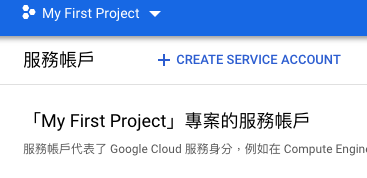
輸入帳戶名稱 / 說明
-- > 建立

選取服務帳戶權限 -- > 繼續
這邊我是給到 Storage Object Admin
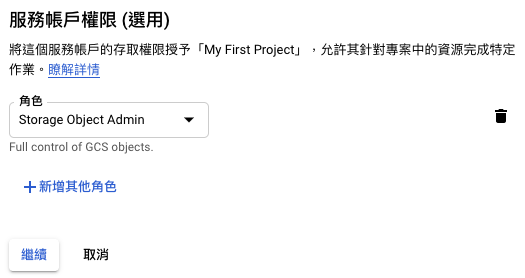
點選 建立金鑰

選取金鑰類型, 我這邊選取 JSON
點選 建立

下載金鑰到機器上面
點選 完成
將 key 複製到 openSUSE /root 目錄下
- 例如 $ scp steadfast-oadmin-adf10.json YOUR_USER@SERVER_IP:/home/YOUR_USER
- steadfast-oadmin-adf10.json 是剛剛的金鑰
安裝 gcsfuse 套件
在 openSUSE Leap 15 in Azure
參考
> sudo zypper install curl fuse
> curl -L -O https://github.com/GoogleCloudPlatform/gcsfuse/releases/download/v0.17.0/gcsfuse-0.17.0-1.x86_64.rpm
> sudo rpm --install --nosignature -p gcsfuse-0.17.0-1.x86_64.rpm
觀察系統資訊
> df -h
Filesystem Size Used Avail Use% Mounted on
devtmpfs 803M 0 803M 0% /dev
tmpfs 820M 0 820M 0% /dev/shm
tmpfs 820M 17M 803M 3% /run
tmpfs 820M 0 820M 0% /sys/fs/cgroup
/dev/sda2 29G 1.6G 28G 6% /
/dev/sda1 1014M 91M 924M 9% /boot
/dev/sdb1 40G 49M 38G 1% /mnt/resource
tmpfs 164M 0 164M 0% /run/user/1000
建立掛載目錄
# mkdir /mnt/gstorage
掛載 google cloud storage
# gcsfuse --key-file /root/steadfast-oadmin-adf10.json test20190521 /mnt/gstorage/
Using mount point: /mnt/gstorage
Opening GCS connection...
Opening bucket...
Mounting file system...
File system has been successfully mounted.
- Bucket 前面不需要加上 gs://
再次觀察系統資訊
# df -h
Filesystem Size Used Avail Use% Mounted on
devtmpfs 803M 0 803M 0% /dev
tmpfs 820M 0 820M 0% /dev/shm
tmpfs 820M 25M 795M 4% /run
tmpfs 820M 0 820M 0% /sys/fs/cgroup
/dev/sda2 29G 1.7G 28G 6% /
/dev/sda1 1014M 91M 924M 9% /boot
/dev/sdb1 40G 49M 38G 1% /mnt/resource
tmpfs 164M 0 164M 0% /run/user/1000
test20190521 1.0P 0 1.0P 0% /mnt/gstorage
最後就是把 gcsfuse 指令放到類似 rc.local , 做成 systemd 服務或是 利用 crontab 使用 @reboot 方式讓他開啟的時候掛載起來 :)
~ enjoy it
Reference:

Aaron Luna
posted in
Español
at
 Member
Mejoras en openSUSE Leap 15.1 8a. parte

Mejoras en openSUSE Leap 15.1 - (8a. parte)
GNU OctaveLos científicos, ingenieros y desarrolladores ahora pueden trabajar con GNU Octave versión 5.1, que incluye toneladas de correcciones de errores, API mejorada y alineación de comandos con el soporte de Matlab y HiDPI para el sistema de trazado.
servidor synapse matrix.orgEl servidor de referencia de Matrix.org - Synapse 0.28.1 está incluido. La versión incluye una actualización de seguridad para lo siguiente:
Sujeta los valores permitidos de la profundidad del evento recibido sobre la federación para que sea [0, 2 ^ 63 - 1]. Esto mitiga un ataque en el que los eventos maliciosos inyectados con profundidad = 2 ^ 63 - 1 hacen que las habitaciones (rooms) queden inutilizables. La profundidad se utiliza para determinar el orden cosmético de los eventos dentro de una sala, por lo que la ordenación de los eventos en dicha sala usará por defecto el uso de stream_ordering en lugar de la profundidad (topological_ordering). Esta es una solución temporal para mitigar el abuso en la naturaleza, mientras se implementa una solución larga para mejorar la forma en que se usa el parámetro de profundidad. Los detalles completos en https://docs.google.com/document/d/1I3fi2S-XnpO45qrpCsowZv8P8dHcNZ4fsBsbOW7KABI
Pin Twisted a <18.4 hasta que dejemos de usar la API _OpenSSLECCurve privada.
Sujeta los valores permitidos de la profundidad del evento recibido sobre la federación para que sea [0, 2 ^ 63 - 1]. Esto mitiga un ataque en el que los eventos maliciosos inyectados con profundidad = 2 ^ 63 - 1 hacen que las habitaciones (rooms) queden inutilizables. La profundidad se utiliza para determinar el orden cosmético de los eventos dentro de una sala, por lo que la ordenación de los eventos en dicha sala usará por defecto el uso de stream_ordering en lugar de la profundidad (topological_ordering). Esta es una solución temporal para mitigar el abuso en la naturaleza, mientras se implementa una solución larga para mejorar la forma en que se usa el parámetro de profundidad. Los detalles completos en https://docs.google.com/document/d/1I3fi2S-XnpO45qrpCsowZv8P8dHcNZ4fsBsbOW7KABI
Pin Twisted a <18.4 hasta que dejemos de usar la API _OpenSSLECCurve privada.
Pagure Git hosting forge server
El software de servidor forjado Pagure Git forge se incluye por primera vez.Pagure ofrece una solución fácil, personalizable y liviana para configurar su propio servidor de repositorio Git con todas las funciones. Es similar a otras opciones populares basadas en Git, permitiendo a los desarrolladores y colaboradores compartir y colaborar en código y contenido. Sin embargo, también tiene algunas características únicas que no se encuentran en ninguna otra opción de Git que proporcione la base para el desarrollo y el desarrollo de código de software descentralizado y federado.
Se incluye la versión 5.5 y se proporciona un tema con sabor a openSUSE como predeterminado.
El software de servidor forjado Pagure Git forge se incluye por primera vez.Pagure ofrece una solución fácil, personalizable y liviana para configurar su propio servidor de repositorio Git con todas las funciones. Es similar a otras opciones populares basadas en Git, permitiendo a los desarrolladores y colaboradores compartir y colaborar en código y contenido. Sin embargo, también tiene algunas características únicas que no se encuentran en ninguna otra opción de Git que proporcione la base para el desarrollo y el desarrollo de código de software descentralizado y federado.
Se incluye la versión 5.5 y se proporciona un tema con sabor a openSUSE como predeterminado.
Gestor de paquetes DNFDNF es una herramienta de gestión de paquetes de alto nivel y resolución de dependencias de próxima generación que rastrea su ascendencia a dos proyectos: YUM (Yellowdog Updater, Modified) y libsolv. DNF se desprendió de YUM hace varios años para reescribirlo para usar libsolv y reestructurar masivamente el código base para que hubiera una API sana disponible tanto para la extensión de DNF (a través de complementos y enlaces) como para construir aplicaciones sobre la misma (como interfaces gráficas y marcos de automatización del ciclo de vida del sistema).
DNF proporciona lo siguiente a través de YUM: una API de Python mantenida y documentada, informes de problemas mejorados, seguimiento avanzado de dependencias débiles, soporte para dependencias ricas e información más detallada de las transacciones mientras se realizan acciones.
La API de DNF Python es estable y compatible, mientras que las API subyacentes libdnf y hawkey (tanto C como Python) son inestables, y es probable que cambien en futuras versiones.
DNF no está configurado actualmente con los repositorios de openSUSE para la administración de software de forma predeterminada.
openSUSE Leap 15.1 - 1a. parte
openSUSE Leap 15.1 - 2a. parte
openSUSE Leap 15.1 - 3a. parte
openSUSE Leap 15.1 - 4a. parte
openSUSE Leap 15.1 - 5a. parte
openSUSE Leap 15.1 - 6a. parte
openSUSE Leap 15.1 - 7a. parte
DNF proporciona lo siguiente a través de YUM: una API de Python mantenida y documentada, informes de problemas mejorados, seguimiento avanzado de dependencias débiles, soporte para dependencias ricas e información más detallada de las transacciones mientras se realizan acciones.
La API de DNF Python es estable y compatible, mientras que las API subyacentes libdnf y hawkey (tanto C como Python) son inestables, y es probable que cambien en futuras versiones.
DNF no está configurado actualmente con los repositorios de openSUSE para la administración de software de forma predeterminada.
openSUSE Leap 15.1 - 1a. parte
openSUSE Leap 15.1 - 2a. parte
openSUSE Leap 15.1 - 3a. parte
openSUSE Leap 15.1 - 4a. parte
openSUSE Leap 15.1 - 5a. parte
openSUSE Leap 15.1 - 6a. parte
openSUSE Leap 15.1 - 7a. parte
Aaron Luna
posted in
Español
at
Mejoras en openSUSE Leap 15.1 7a. parte
Mejoras en openSUSE Leap 15.1 - (7a. parte)
Aplicaciones
Multimedia
VLC
VLC 3.0.6 es la segunda versión de la rama "Vetinari" para este popular reproductor multimedia. VLC es un marco y reproductor multimedia multiplataforma de código abierto y gratuito que reproduce la mayoría de los archivos multimedia, así como DVD, CD de audio, VCD y varios protocolos de transmisión. VLC 3 activa la decodificación de hardware de forma predeterminada para obtener una reproducción de 4K y 8K. La versión secundaria más nueva corrige un bloqueo importante de 3.0.5. Los siguientes artículos fueron agregados en la versión 3.0.6:
- Mejoras para soporte HDR en AV1
- Añadir soporte para decodificación de 12 bits de AV1
- Arregle el soporte HDR en AV1 cuando el contenedor proporciona los metadatos
Visita aquí para más información sobre los codecs.
GNU Health
GNU Health, el sistema de gestión hospitalaria y de salud galardonado, viene en la versión 3.4.x. Esta versión presenta el Servidor de federación, gnuhealth-thalamus.
Hemos agregado un script de configuración para GNU Health llamado openSUSE-gnuhealth-setup, para facilitar la configuración de un nuevo sistema para usuarios menos experimentados.
En caso de que esté actualizando GNU Health desde una versión anterior, asegúrese de seguir la documentación en / usr / share / doc / packages / gnuhealth / upgrade
¡Como de costumbre, GNU Health también está disponible en la Raspberry Pi!
GNU Health, el sistema de gestión hospitalaria y de salud galardonado, viene en la versión 3.4.x. Esta versión presenta el Servidor de federación, gnuhealth-thalamus.
Hemos agregado un script de configuración para GNU Health llamado openSUSE-gnuhealth-setup, para facilitar la configuración de un nuevo sistema para usuarios menos experimentados.
En caso de que esté actualizando GNU Health desde una versión anterior, asegúrese de seguir la documentación en / usr / share / doc / packages / gnuhealth / upgrade
¡Como de costumbre, GNU Health también está disponible en la Raspberry Pi!
OnionShare
OnionShare es una aplicación Python que te permite compartir archivos de forma segura a través de la red Tor.
OnionShare es una aplicación Python que te permite compartir archivos de forma segura a través de la red Tor.
Sincronizando
¡Ahora los usuarios pueden compartir archivos con un Syncthing aún más estable y confiable! El software de uso compartido descentralizado ahora ha ganado soporte para Go 1.12, proporcionando cambios en la API para los desarrolladores, más integración con Docker y un trabajo en curso para ser totalmente compatible con TLS 1.3 en la versión 1.1.1.
Qué más hay de nuevo
Se encuentra disponible una actualización de pila de gráficos completamente nueva con la distribución estable de GNU / Linux de código abierto basada en la comunidad y la empresa, Leap 15.1. El hardware de gráficos compatible con el kernel 4.19 de Linux se respaldó para el lanzamiento de Leap 15.1, que admite más controladores de gráficos para la unidad de procesamiento de gráficos (GPU) y un mejor soporte para las tarjetas Vega de AMD.
La virtualización de GPU se ha vuelto bastante popular entre proveedores como AMD, Intel y Nvidia, y Leap 15.1 ayuda a brindar estas soluciones de implementación y soporte para entornos virtualizados y de nube.
Se encuentra disponible una actualización de pila de gráficos completamente nueva con la distribución estable de GNU / Linux de código abierto basada en la comunidad y la empresa, Leap 15.1. El hardware de gráficos compatible con el kernel 4.19 de Linux se respaldó para el lanzamiento de Leap 15.1, que admite más controladores de gráficos para la unidad de procesamiento de gráficos (GPU) y un mejor soporte para las tarjetas Vega de AMD.
La virtualización de GPU se ha vuelto bastante popular entre proveedores como AMD, Intel y Nvidia, y Leap 15.1 ayuda a brindar estas soluciones de implementación y soporte para entornos virtualizados y de nube.
Java
openSUSE incluye Java OpenJDK 11 (11.0.2) como versión predeterminada. Java OpenJDK 10 (10.0.2) y OpenJDK 1.8 (1.8.0_201) también están disponibles.
Compatibilidad con el cifrado AES con HMAC-SHA2 para Kerberos 5 definido en RFC 8009
Compatibilidad con el cifrado AES con HMAC-SHA2 para Kerberos 5 definido en RFC 8009
Se admiten los tipos de cifrado Kerberos 5 de aes128-cts-hmac-sha256-128 y aes256-cts-hmac-sha384-192 definidos en RFC 8009. Estos tipos de cifrado están habilitados de forma predeterminada. El orden de preferencia predeterminado es "aes256-cts-hmac-sha1-96 aes128-cts-hmac-sha1-96 aes256-cts-hmac-sha384-192 aes128-cts-hmac-sha256-128 des3-cbc-sha1 arcfour- hmac-md5 des-cbc-crc des-cbc-md5. "
Los usuarios pueden usar las configuraciones default_tkt_enctypes y default_tgs_enctypes en el archivo krb5.conf para modificar la lista.
openSUSE Leap 15.1 - 1a. parte
openSUSE Leap 15.1 - 2a. parte
openSUSE Leap 15.1 - 3a. parte
openSUSE Leap 15.1 - 4a. parte
openSUSE Leap 15.1 - 5a. parte
openSUSE Leap 15.1 - 6a. parte
openSUSE Leap 15.1 - 8a. parte
openSUSE Leap 15.1 - 1a. parte
openSUSE Leap 15.1 - 2a. parte
openSUSE Leap 15.1 - 3a. parte
openSUSE Leap 15.1 - 4a. parte
openSUSE Leap 15.1 - 5a. parte
openSUSE Leap 15.1 - 6a. parte
openSUSE Leap 15.1 - 8a. parte
Aaron Luna
posted in
Español
at
Mejoras en openSUSE Leap 15.1 6a. parte
Mejoras en openSUSE Leap 15.1 - (6a. parte)
Tecnologías openSUSE
Kubic
Snapper
Snapper ahora puede reportar el espacio utilizado único para cada actualización instantánea. Vease esta publicación para más detalles.
YaST
Mejoras al instalador
openSUSE Leap 15.1 será el primer sistema operativo multipropósito que admita una experiencia de instalación de Linux completamente estándar en Raspberry Pi. No se puede instalar una ISO específica personalizada, no se debe copiar una imagen precocida al sistema ... simplemente tomando la imagen ISO openSUSE no modificada estándar para ARM e instalándola como lo haría en cualquier otra computadora. Para obtener más detalles y algunos consejos útiles, se puede consultar la sección correspondiente en el blog del equipo YaST.
De manera más general, ahora es posible configurar un sistema sin contraseña de forma inmediata especificando durante la instalación la clave SSH que se usará para autenticar al usuario root.
La propuesta de partición predeterminada se ha mejorado mucho para comportarse mejor en varios escenarios que no fueron tan bien apoyados en Leap 15.0. Esto incluye discos pequeños, sistemas con varios discos o sistemas que utilizan la tecnología Intel Rapid Start.
Además, ahora es posible elegir con un solo clic durante la instalación el backend de la red (wicked vs NetworkManager) que se usará en el sistema final instalado.
YaST Look & Feel
La apariencia general de YaST en Leap 15.1 ha recibido una pequeña renovación. Comenzando con un nuevo conjunto de iconos, no solo en el Centro de Control de YaST sino también dentro de todos los módulos de YaST, con el Partitioner como uno de los ejemplos más claros.
Durante la instalación, la barra lateral muestra todo el flujo de trabajo de la instalación e indica que el paso actual está de vuelta, haciendo que la instalación sea más ecológica de nuevo.
El soporte para HiDPI (es decir, pantallas 4K) también se ha mejorado.
También relacionado con el área de apariencia y diseño, pero en la interfaz de modo de texto (ncurses), el soporte para idiomas CJK también se ha mejorado mediante el uso de fbiterm. Esto también afecta de alguna manera a los usuarios de otros idiomas (que no son CJK) porque implica el uso de una fuente de consola diferente. Ver más detalles en esta sección del blog del equipo YaST.
La apariencia general de YaST en Leap 15.1 ha recibido una pequeña renovación. Comenzando con un nuevo conjunto de iconos, no solo en el Centro de Control de YaST sino también dentro de todos los módulos de YaST, con el Partitioner como uno de los ejemplos más claros.
Durante la instalación, la barra lateral muestra todo el flujo de trabajo de la instalación e indica que el paso actual está de vuelta, haciendo que la instalación sea más ecológica de nuevo.
El soporte para HiDPI (es decir, pantallas 4K) también se ha mejorado.
También relacionado con el área de apariencia y diseño, pero en la interfaz de modo de texto (ncurses), el soporte para idiomas CJK también se ha mejorado mediante el uso de fbiterm. Esto también afecta de alguna manera a los usuarios de otros idiomas (que no son CJK) porque implica el uso de una fuente de consola diferente. Ver más detalles en esta sección del blog del equipo YaST.
Nueva funcionalidad de YaST
La administración de los servicios del sistema en YaST se ha renovado para aprovechar muchas de las funciones que ofrece Systemd en esa área. Eso incluye la administración de servicios activados por socket o una integración más estrecha con el diario Systemd. Para más detalles, se puede consultar esta publicación y su seguimiento.
Firewalld reemplazó a SuSEfirewall2 como el firewall predeterminado de openSUSE en Leap 15.0. Ahora YaST está totalmente adaptado y el módulo Firewall de YaST se puede usar para modificar la configuración de Firewalld. Como siempre, tanto en modo gráfico como de texto (a diferencia de otras herramientas disponibles para configurar Firewalld).
El módulo de administración de configuración de YaST, que permite la integración de YaST (automático) con sistemas de administración de configuración como Salt o Puppet, se ha mejorado considerablemente en Leap 15.1. Especialmente su soporte para SUMA Salt Parametrizable Formulas. Se puede consultar esta entrada para saber por qué esto es tan bueno y cómo funciona.
Además de hacer posible especificar la clave SSH del usuario raíz durante la instalación (consulte la subsección anterior), YaST ahora puede administrar las claves SSH para todos los usuarios en su módulo clásico de "Administración de usuarios y grupos".
El particionador ahora puede formatear directamente discos completos, crear software RAID de MD sobre discos sin particiones, crear particiones dentro de un MD RAID definido por software y muchas otras combinaciones. Veáse la sección titulada Cambios en la IU del particionador para liberar el poder de almacenamiento en el blog del equipo YaST para una revisión completa que incluye varias capturas de pantalla y videos.
Además de abrir nuevas posibilidades con las tecnologías ya compatibles, YaST Partitioner ofrece ahora la posibilidad de configurar dispositivos bcache. Veáse más detalles en su espacio dedicado.
La administración de los servicios del sistema en YaST se ha renovado para aprovechar muchas de las funciones que ofrece Systemd en esa área. Eso incluye la administración de servicios activados por socket o una integración más estrecha con el diario Systemd. Para más detalles, se puede consultar esta publicación y su seguimiento.
Firewalld reemplazó a SuSEfirewall2 como el firewall predeterminado de openSUSE en Leap 15.0. Ahora YaST está totalmente adaptado y el módulo Firewall de YaST se puede usar para modificar la configuración de Firewalld. Como siempre, tanto en modo gráfico como de texto (a diferencia de otras herramientas disponibles para configurar Firewalld).
El módulo de administración de configuración de YaST, que permite la integración de YaST (automático) con sistemas de administración de configuración como Salt o Puppet, se ha mejorado considerablemente en Leap 15.1. Especialmente su soporte para SUMA Salt Parametrizable Formulas. Se puede consultar esta entrada para saber por qué esto es tan bueno y cómo funciona.
Además de hacer posible especificar la clave SSH del usuario raíz durante la instalación (consulte la subsección anterior), YaST ahora puede administrar las claves SSH para todos los usuarios en su módulo clásico de "Administración de usuarios y grupos".
El particionador ahora puede formatear directamente discos completos, crear software RAID de MD sobre discos sin particiones, crear particiones dentro de un MD RAID definido por software y muchas otras combinaciones. Veáse la sección titulada Cambios en la IU del particionador para liberar el poder de almacenamiento en el blog del equipo YaST para una revisión completa que incluye varias capturas de pantalla y videos.
Además de abrir nuevas posibilidades con las tecnologías ya compatibles, YaST Partitioner ofrece ahora la posibilidad de configurar dispositivos bcache. Veáse más detalles en su espacio dedicado.
AutoYaST
AutoYaST no se ha quedado atrás en ninguno de los cambios realizados en las otras partes de YaST. Esta versión incluye soporte para toda la funcionalidad agregada al particionador de YaST (desde el uso directo de discos a bcache y todo lo demás), soporte para especificar claves SSH para autenticar a los usuarios, una nueva sintaxis para indicar qué servicios deben iniciarse a pedido ( activación del socket) y la posibilidad de configurar Firewalld. Ver detalles sobre todas estas funcionalidades en la sección de YaST.
Además, AutoYaST presenta una integración perfecta con el módulo de administración de configuración de YaST, para combinar AutoYaST con Salt (o cualquier otro sistema de administración de configuración compatible) para disfrutar lo mejor de ambos mundos.
openSUSE Leap 15.1 - 1a. parte
openSUSE Leap 15.1 - 2a. parte
openSUSE Leap 15.1 - 3a. parte
openSUSE Leap 15.1 - 4a. parte
openSUSE Leap 15.1 - 5a. parte
openSUSE Leap 15.1 - 7a. parte
openSUSE Leap 15.1 - 8a. parte
AutoYaST no se ha quedado atrás en ninguno de los cambios realizados en las otras partes de YaST. Esta versión incluye soporte para toda la funcionalidad agregada al particionador de YaST (desde el uso directo de discos a bcache y todo lo demás), soporte para especificar claves SSH para autenticar a los usuarios, una nueva sintaxis para indicar qué servicios deben iniciarse a pedido ( activación del socket) y la posibilidad de configurar Firewalld. Ver detalles sobre todas estas funcionalidades en la sección de YaST.
Además, AutoYaST presenta una integración perfecta con el módulo de administración de configuración de YaST, para combinar AutoYaST con Salt (o cualquier otro sistema de administración de configuración compatible) para disfrutar lo mejor de ambos mundos.
openSUSE Leap 15.1 - 1a. parte
openSUSE Leap 15.1 - 2a. parte
openSUSE Leap 15.1 - 3a. parte
openSUSE Leap 15.1 - 4a. parte
openSUSE Leap 15.1 - 5a. parte
openSUSE Leap 15.1 - 7a. parte
openSUSE Leap 15.1 - 8a. parte
Aaron Luna
posted in
Español
at
Mejoras en openSUSE 15.1 - Leap 5a. parte
Mejoras en openSUSE 15.1 - Leap (5a. parte)
ThunderBird
Mozilla Thunderbird es una aplicación de correo electrónico gratuita que es fácil de configurar y personalizar. Está cargado de grandes características. El Leap 15.1 se envía con Thunderbird 60. Algunas de las nuevas características de Thunderbird 60 son:
Al escribir un mensaje, un botón de eliminar ahora permite la eliminación de un destinatario. Este botón de eliminar se muestra cuando se desplaza el selector A / Cc / Bcc.
Temas de luz y oscuridad
Los temas de WebExtension ahora están habilitados en Thunderbird
Navegadores y búsqueda web
Mozilla Thunderbird es una aplicación de correo electrónico gratuita que es fácil de configurar y personalizar. Está cargado de grandes características. El Leap 15.1 se envía con Thunderbird 60. Algunas de las nuevas características de Thunderbird 60 son:
Al escribir un mensaje, un botón de eliminar ahora permite la eliminación de un destinatario. Este botón de eliminar se muestra cuando se desplaza el selector A / Cc / Bcc.
Temas de luz y oscuridad
Los temas de WebExtension ahora están habilitados en Thunderbird
Navegadores y búsqueda web
Cromium
En Chrome 73, hay soporte añadido para:
En Chrome 73, hay soporte añadido para:
- Crear contenido portátil más fácil con intercambios HTTP firmados.
- El cambio dinámico de estilos se hace mucho más fácil con hojas de estilo construibles.
Firefox
Firefox es creado por Mozilla, una organización global sin fines de lucro dedicada a poner a los individuos en control en línea. La versión Leap 15 se envía con la versión de soporte extendido (ESR) de Firefox 60. La ESR tiene una superposición de dos ciclos (al menos 12 semanas) entre el momento de una nueva versión y el final de la vida útil de la versión anterior para permitir las pruebas y certificación antes de desplegar una nueva versión. El mantenimiento de cada ESR, a través de lanzamientos puntuales, se limita a vulnerabilidades de seguridad de alto impacto y alto impacto y, en casos excepcionales, también puede incluir lanzamientos fuera de horario que aborden vulnerabilidades de seguridad en vivo. Backports de cualquier mejora funcional y / o arreglos de estabilidad no están en el alcance.
Mozilla confía en los usuarios de Firefox ESR para proporcionar comentarios sobre las nuevas versiones de ESR. Durante los dos primeros ciclos, informe cualquier error sobre regresiones de compatibilidad web, problemas de estabilidad, etc.
Firefox es creado por Mozilla, una organización global sin fines de lucro dedicada a poner a los individuos en control en línea. La versión Leap 15 se envía con la versión de soporte extendido (ESR) de Firefox 60. La ESR tiene una superposición de dos ciclos (al menos 12 semanas) entre el momento de una nueva versión y el final de la vida útil de la versión anterior para permitir las pruebas y certificación antes de desplegar una nueva versión. El mantenimiento de cada ESR, a través de lanzamientos puntuales, se limita a vulnerabilidades de seguridad de alto impacto y alto impacto y, en casos excepcionales, también puede incluir lanzamientos fuera de horario que aborden vulnerabilidades de seguridad en vivo. Backports de cualquier mejora funcional y / o arreglos de estabilidad no están en el alcance.
Mozilla confía en los usuarios de Firefox ESR para proporcionar comentarios sobre las nuevas versiones de ESR. Durante los dos primeros ciclos, informe cualquier error sobre regresiones de compatibilidad web, problemas de estabilidad, etc.
Entornos de escritorio
Enlightenment
El administrador de ventanas y el entorno de escritorio de Enlightenment son realmente rápidos, configurables y estéticos. Este paquete proporcionará la última versión publicada de Enlightenment, a diferencia de e16 o e17. Enlightenment 0.22.3 es una versión de corrección de errores y estabilidad para la serie Enlightenment 22 Release. Es la misma versión que se encuentra en la primera versión de Leap 15.
GNOME
La versión 3.26 de Manchester GNOME está en Leap 15.1 una vez más. Hubo una serie de mejoras visuales altamente visibles para GNOME 3.26 que incluían una transición de ventanas más suave al maximizar, desaproximar o al ajustar a la mitad de la pantalla. GNOME 3.26 introdujo un nuevo diseño en la aplicación Configuración. La cuadrícula de iconos anterior se ha ido y, en su lugar, una barra lateral permite cambiar entre diferentes áreas. La nueva barra lateral hace que sea mucho más fácil y rápido navegar por la aplicación de configuración y ubica las configuraciones más utilizadas al alcance de la mano. También significa que la ventana de Configuración ahora es más grande y se puede cambiar de tamaño, lo cual es más cómodo en muchas situaciones.
Ahora se proporciona soporte para máquinas que tienen dos tarjetas gráficas. Si se tiene este hardware y control conmutado instalado, se puede seleccionar qué GPU usar cuando inicie una aplicación. Los ajustes también darán información en ambas tarjetas gráficas. GNOME 3.26
En la Web, el navegador de GNOME, ahora es posible sincronizar con nuestros marcadores, contraseñas e historial del navegador, utilizando el servicio Firefox Sync. Esto hace posible mantener una copia de seguridad en línea de esta información y también compartirla con el escritorio y el dispositivo móvil de Firefox.
La versión 3.26 de Manchester GNOME está en Leap 15.1 una vez más. Hubo una serie de mejoras visuales altamente visibles para GNOME 3.26 que incluían una transición de ventanas más suave al maximizar, desaproximar o al ajustar a la mitad de la pantalla. GNOME 3.26 introdujo un nuevo diseño en la aplicación Configuración. La cuadrícula de iconos anterior se ha ido y, en su lugar, una barra lateral permite cambiar entre diferentes áreas. La nueva barra lateral hace que sea mucho más fácil y rápido navegar por la aplicación de configuración y ubica las configuraciones más utilizadas al alcance de la mano. También significa que la ventana de Configuración ahora es más grande y se puede cambiar de tamaño, lo cual es más cómodo en muchas situaciones.
Ahora se proporciona soporte para máquinas que tienen dos tarjetas gráficas. Si se tiene este hardware y control conmutado instalado, se puede seleccionar qué GPU usar cuando inicie una aplicación. Los ajustes también darán información en ambas tarjetas gráficas. GNOME 3.26
En la Web, el navegador de GNOME, ahora es posible sincronizar con nuestros marcadores, contraseñas e historial del navegador, utilizando el servicio Firefox Sync. Esto hace posible mantener una copia de seguridad en línea de esta información y también compartirla con el escritorio y el dispositivo móvil de Firefox.
KDE
Plasma 5.12 LTS es la segunda versión de soporte a largo plazo del equipo de Plasma 5. Leap 15.1 incluye la misma versión LTS. El equipo ha estado trabajando duro, centrándose en la velocidad y la estabilidad para esta versión. El tiempo de arranque en el escritorio se ha mejorado al revisar el código para cualquier cosa que bloquee la ejecución. El equipo ha estado evaluando y corrigiendo errores en todos los aspectos de la base de código, ordenando las ilustraciones, eliminando los casos de esquina y asegurando la integración entre el escritorio. Por primera vez, ofrecemos nuestra integración de Wayland en el soporte a largo plazo, por lo que se puede estar seguro de que continuaremos brindando correcciones de errores y mejoras a la experiencia de Wayland.
La versión 5.12.8 agrega seis meses de nuevas traducciones y correcciones de los colaboradores de KDE. Las correcciones de errores son típicamente pequeñas pero importantes e incluyen:
Plasma 5.12 LTS es la segunda versión de soporte a largo plazo del equipo de Plasma 5. Leap 15.1 incluye la misma versión LTS. El equipo ha estado trabajando duro, centrándose en la velocidad y la estabilidad para esta versión. El tiempo de arranque en el escritorio se ha mejorado al revisar el código para cualquier cosa que bloquee la ejecución. El equipo ha estado evaluando y corrigiendo errores en todos los aspectos de la base de código, ordenando las ilustraciones, eliminando los casos de esquina y asegurando la integración entre el escritorio. Por primera vez, ofrecemos nuestra integración de Wayland en el soporte a largo plazo, por lo que se puede estar seguro de que continuaremos brindando correcciones de errores y mejoras a la experiencia de Wayland.
La versión 5.12.8 agrega seis meses de nuevas traducciones y correcciones de los colaboradores de KDE. Las correcciones de errores son típicamente pequeñas pero importantes e incluyen:
Plasma-pa: arregla la conexión a PulseAudio con Qt 5.12. Commit
Sistema de datos meteorológicos: bbc, envcan, noaa: varias correcciones para actualizar los analizadores.
SDDM KCM: corrige la sesión de inicio de sesión automático. Commit.
Sistema de datos meteorológicos: bbc, envcan, noaa: varias correcciones para actualizar los analizadores.
SDDM KCM: corrige la sesión de inicio de sesión automático. Commit.
Frameworks 5.55.0
Los frameworks (marcos) de KDE son más de 70 bibliotecas adicionales a Qt que proporcionan una amplia variedad de funciones comúnmente necesarias en bibliotecas maduras, revisadas por pares y bien probadas con términos de licencia amigables. Los KDE Frameworks más nuevos han realizado cambios en varios paquetes que incluyen Baloo, Breeze Icons, Extra CMake Modules, KActivities, KCodecs, KConfig, KIO, Kirigami, KRunner, KWayland y más.
openSUSE Leap 15.1 - 1a. parte
openSUSE Leap 15.1 - 2a. parte
openSUSE Leap 15.1 - 3a. parte
openSUSE Leap 15.1 - 4a. parte
openSUSE Leap 15.1 - 6a. parte
openSUSE Leap 15.1 - 7a. parte
openSUSE Leap 15.1 - 8a. parte
Aaron Luna
posted in
Español
at
Mejoras en openSUSE Leap-15.1 4a.parte
Mejoras en openSUSE Leap 15.1 (4a.parte)
LIbreOffice
LibreOffice es una suite de oficina de código abierto y gratuita, un proyecto de The Document Foundation. LibreOffice es un paquete de oficina completo que incluye un procesador de textos, una hoja de cálculo, un programa de presentación y mucho más. Este paquete proporciona sólo el marco básico. Debe instalar los módulos adicionales para obtener la funcionalidad requerida, consultamos los paquetes: - libreoffice-base - libreoffice-calc - libreoffice-draw - libreoffice-impress - libreoffice-math - libreoffice-writer Algunas características opcionales son proporcionadas por paquetes adicionales, para ejemplo: - libreoffice-mailmerge - libreoffice-filters - libreoffice-kde4 - libreoffice-gnome También se proporcionan localizaciones en idiomas diferentes al inglés, por ejemplo: - libreoffice-l10n-de - libreoffice-l10n-fr - libreoffice-l10n- eso
Se puede encontrar más información sobre las nuevas funciones incluidas en la versión de LibreOffice en Leap 15.1 en las Notas de la versión:
LibreOffice es una suite de oficina de código abierto y gratuita, un proyecto de The Document Foundation. LibreOffice es un paquete de oficina completo que incluye un procesador de textos, una hoja de cálculo, un programa de presentación y mucho más. Este paquete proporciona sólo el marco básico. Debe instalar los módulos adicionales para obtener la funcionalidad requerida, consultamos los paquetes: - libreoffice-base - libreoffice-calc - libreoffice-draw - libreoffice-impress - libreoffice-math - libreoffice-writer Algunas características opcionales son proporcionadas por paquetes adicionales, para ejemplo: - libreoffice-mailmerge - libreoffice-filters - libreoffice-kde4 - libreoffice-gnome También se proporcionan localizaciones en idiomas diferentes al inglés, por ejemplo: - libreoffice-l10n-de - libreoffice-l10n-fr - libreoffice-l10n- eso
Se puede encontrar más información sobre las nuevas funciones incluidas en la versión de LibreOffice en Leap 15.1 en las Notas de la versión:
Writer
- La información sobre herramientas en línea sobre los cambios rastreados ahora son opcionales (Herramientas ▸ Opciones er Escritor ▸ Vista) y no se muestran cuando la vista ▸ Seguimiento de cambios está desactivada; Comando UNO .uno: ShowInlineTooltips ("Información sobre herramientas") disponible para personalización tdf # 114523
- Los estilos de lista básicos se agregaron al submenú Estilos en el menú contextual. tdf # 85940
- Se agrege la opción de número de página de inserción a los menús de encabezado y pie de página. tdf # 92685
- Ahora es posible generar una línea de firma usando Insertar ▸ Línea de firma
- La configuración localizada ahora está fija, pero es posible que aún vea valores inesperados si se cambió esta configuración manualmente en el pasado, o incluso si simplemente se sigue utilizando una instalación de usuario preexistente. En cualquier caso, verificamos si estas configuraciones tienen los valores adecuados ahora para nuestras necesidades y las cambiamos si es necesario en el cuadro de diálogo Herramientas ▸ Opciones:
Tools ▸ Options ▸ Writer ▸ General ▸ Settings ▸ Tab stops should default to 7.4 mm for Chinese (locale “zh-CN”) and to 12.5 mm for all other locales.
Tools ▸ Options ▸ Writer ▸ AutoCaption ▸ Caption Order should default to “Numbering first” for Hungarian (locale “hu”) and to “Category first” for all other locales.
Calc
- La capacidad de guardar un archivo Calc en formato Excel 2003 XML se ha movido del menú Archivo ▸ Guardar al menú Archivo ▸ Exportar. El formato XML de Excel 2003 se selecciona de una lista de formatos disponibles en el cuadro de diálogo Guardar como.
- El manejo de imágenes en Calc ha sido muy mejorado.
- Las imágenes ancladas a las celdas de Calc ahora pueden ser ordenadas.
- Se han modificado los tipos de ancla tdf # 114552. Ahora hay tres opciones:
Anchor to cell -> Image will just move with the cell (new)
Anchor to cell (resize with cell) -> Image will move and resize with the cell
Anchor to page -> independent of any cells
Impress y Draw
- Los menús de Draw se reorganizaron y con la adición de un nuevo menú de Página.
- Corrija el orden de paréntesis / paréntesis incorrecto en el párrafo de derecha a izquierda en Impress, juzgando la dirección de escritura del texto del párrafo en lugar del contenido solo.
Nuevos estilos de dibujo y limpieza de estilos heredados.
openSUSE Leap 15.1 - 1a. parte
openSUSE Leap 15.1 - 2a. parte
openSUSE Leap 15.1 - 3a. parte
openSUSE Leap 15.1 - 5a. parte
openSUSE Leap 15.1 - 6a. parte
openSUSE Leap 15.1 - 7a. parte
openSUSE Leap 15.1 - 8a. parte
Aaron Luna
posted in
Español
at
Mejoras en openSUSE Leap-15.1 3a. parte
Mejoras en openSUSE 15.1 - Leap (3a. parte)
OpenStack
Leap 15.1 tiene varios paquetes OpenStack para que los administradores puedan controlar grandes grupos de recursos de computación, almacenamiento y redes.
El paquete openstack-utils es una utilidad para ayudar en la configuración y configuración de los paquetes OpenStack.
openstack-config - Manipula los archivos ini de openstack
openstack-db: configura o elimina la base de datos para un servicio específico
openstack-demo-install: configure todos los servicios en un solo nodo para realizar pruebas
openstack-status: proporciona una descripción general del estado de los servicios instalados
Las macros de OpenStack RPM son necesarias para crear paquetes de OpenStack y los paquetes como las extracciones de openstack-suse en otros paquetes de utilidad que son principalmente útiles para el empaquetado de OpenStack. Algunos incluso se usan solo en tiempo de construcción.
Leap 15.1 tiene varios paquetes OpenStack para que los administradores puedan controlar grandes grupos de recursos de computación, almacenamiento y redes.
El paquete openstack-utils es una utilidad para ayudar en la configuración y configuración de los paquetes OpenStack.
openstack-config - Manipula los archivos ini de openstack
openstack-db: configura o elimina la base de datos para un servicio específico
openstack-demo-install: configure todos los servicios en un solo nodo para realizar pruebas
openstack-status: proporciona una descripción general del estado de los servicios instalados
Las macros de OpenStack RPM son necesarias para crear paquetes de OpenStack y los paquetes como las extracciones de openstack-suse en otros paquetes de utilidad que son principalmente útiles para el empaquetado de OpenStack. Algunos incluso se usan solo en tiempo de construcción.
Sistema de impresión
Leap 15.1 tiene CUPS 2.2.7. CUPS es un sistema de impresión modular que permite que una computadora actúe como un servidor de impresión. Una computadora que ejecuta CUPS es un host que puede aceptar trabajos de impresión de las computadoras cliente, procesarlos y enviarlos a la impresora adecuada. CUPS consta de una cola de impresión y un programador, un sistema de filtro que convierte los datos de impresión a un formato que la impresora entenderá y un sistema back-end que envía estos datos al dispositivo de impresión. CUPS utiliza el Protocolo de impresión de Internet (IPP) como la base para administrar los trabajos de impresión y las colas. También proporciona las interfaces de línea de comando tradicionales para los sistemas de impresión System V y Berkeley, y brinda soporte para el protocolo Line Printer Daemon de Berkeley y soporte limitado para el protocolo de bloque de mensajes del servidor (SMB). CUPS viene con una interfaz basada en web incorporada.
Contenedores
Leap 15.1 está repleto de varias tecnologías de contenerización como Singularity, que brindan contenedores y reproducibilidad a la computación científica y al mundo de la computación de alto rendimiento (HPC). Singularity apareció por primera vez en la distribución Leap en Leap 42.3 y proporciona funcionalidad para construir contenedores mínimos más pequeños y ejecuta los contenedores como entornos de aplicación única. Otro paquete oficial en Leap 15.1 es libcontainers-common, que permite la configuración de archivos y páginas de manual compartidas por herramientas basadas en las bibliotecas github.com/containers, como Buildah, CRI-O, Podman y Skopeo.
openSUSE Leap 15.1 - 1a. parte
openSUSE Leap 15.1 - 2a. parte
openSUSE Leap 15.1 - 4a. parte
openSUSE Leap 15.1 - 5a. parte
openSUSE Leap 15.1 - 6a. parte
openSUSE Leap 15.1 - 7a. parte
openSUSE Leap 15.1 - 8a. parte
Leap 15.1 está repleto de varias tecnologías de contenerización como Singularity, que brindan contenedores y reproducibilidad a la computación científica y al mundo de la computación de alto rendimiento (HPC). Singularity apareció por primera vez en la distribución Leap en Leap 42.3 y proporciona funcionalidad para construir contenedores mínimos más pequeños y ejecuta los contenedores como entornos de aplicación única. Otro paquete oficial en Leap 15.1 es libcontainers-common, que permite la configuración de archivos y páginas de manual compartidas por herramientas basadas en las bibliotecas github.com/containers, como Buildah, CRI-O, Podman y Skopeo.
openSUSE Leap 15.1 - 1a. parte
openSUSE Leap 15.1 - 2a. parte
openSUSE Leap 15.1 - 4a. parte
openSUSE Leap 15.1 - 5a. parte
openSUSE Leap 15.1 - 6a. parte
openSUSE Leap 15.1 - 7a. parte
openSUSE Leap 15.1 - 8a. parte
Aaron Luna
posted in
Español
at
Mejoras en openSUSE Leap-15.1 2a. parte

Mejoras en openSUSE Leap-15.1-2a.parte
systemd
Leap 15.1 tiene la versión systemd 234. Esta es la misma versión que estaba en Leap 15.0. La siguiente información pertenece a la versión 234:
Se ha agregado soporte para la creación dinámica de usuarios durante la vida útil de un servicio. Si se especifica DynamicUser = yes, las ID de usuario y grupo se asignarán desde el rango 61184..65519 durante la vida útil del servicio. Se pueden resolver utilizando el nuevo módulo NSS nss-systemd.so. El módulo debe estar habilitado en /etc/nsswitch.conf. Los servicios que se inician de esta manera tienen PrivateTmp = y RemoveIPC = habilitados, de modo que todos los recursos asignados por el servicio se eliminarán cuando finalice el servicio. También tienen ProtectHome = solo lectura y ProtectSystem = estricto habilitado, por lo que no pueden realizar modificaciones permanentes en el sistema.
MemoryLimit = y la configuración de la unidad relacionada ahora opcionalmente tienen especificaciones de porcentaje. El porcentaje se toma en relación con la cantidad de memoria física en el sistema (o, en el caso de los contenedores, la cantidad de memoria asignada). Esto permite escalar los recursos del servicio cuidadosamente con la cantidad de RAM disponible en el sistema. De manera similar, la opción RuntimeDirectorySize = de systemd-logind ahora también tiene valores de porcentaje opcionalmente.
Leap 15.1 tiene la versión systemd 234. Esta es la misma versión que estaba en Leap 15.0. La siguiente información pertenece a la versión 234:
Se ha agregado soporte para la creación dinámica de usuarios durante la vida útil de un servicio. Si se especifica DynamicUser = yes, las ID de usuario y grupo se asignarán desde el rango 61184..65519 durante la vida útil del servicio. Se pueden resolver utilizando el nuevo módulo NSS nss-systemd.so. El módulo debe estar habilitado en /etc/nsswitch.conf. Los servicios que se inician de esta manera tienen PrivateTmp = y RemoveIPC = habilitados, de modo que todos los recursos asignados por el servicio se eliminarán cuando finalice el servicio. También tienen ProtectHome = solo lectura y ProtectSystem = estricto habilitado, por lo que no pueden realizar modificaciones permanentes en el sistema.
MemoryLimit = y la configuración de la unidad relacionada ahora opcionalmente tienen especificaciones de porcentaje. El porcentaje se toma en relación con la cantidad de memoria física en el sistema (o, en el caso de los contenedores, la cantidad de memoria asignada). Esto permite escalar los recursos del servicio cuidadosamente con la cantidad de RAM disponible en el sistema. De manera similar, la opción RuntimeDirectorySize = de systemd-logind ahora también tiene valores de porcentaje opcionalmente.
De manera similar, TasksMax = también toma valores de porcentaje ahora. El valor se toma en relación con el número máximo configurado de procesos en el sistema. El máximo de tareas por servicio se ha cambiado al 15% con esta funcionalidad. (Efectivamente, esto es un aumento de 512 → 4915 para las unidades de servicio, dada la configuración pid_max predeterminada del kernel).
La configuración del archivo de la unidad SystemCallFilter = obtuvo soporte para conjuntos de filtros de llamadas del sistema predefinidos y nombrados. Por ejemplo, SystemCallFilter = @ clock es ahora una forma efectiva de hacer que todas las llamadas del sistema relacionadas con el cambio de reloj no estén disponibles para un servicio. Se definen una serie de grupos predefinidos similares. Escribir filtros de llamadas al sistema para servicios del sistema se simplifica sustancialmente con este nuevo concepto. En consecuencia, todos los servicios de larga duración propios de systemd ahora habilitan el filtrado de llamadas al sistema basado en esto, de forma predeterminada.
Se ha agregado una nueva configuración de servicio MemoryDenyWriteExecute =, tomando un valor booleano. Si está activado, un servicio ya no puede crear asignaciones de memoria que se puedan escribir y ejecutar al mismo tiempo. Esto mejora la seguridad de los servicios donde está habilitado, ya que se vuelve más difícil escribir dinámicamente y luego ejecutar la memoria en los procesos de servicio explotados. Esta opción se ha habilitado para todos los servicios de larga duración propios de systemd.
La configuración del archivo de la unidad SystemCallFilter = obtuvo soporte para conjuntos de filtros de llamadas del sistema predefinidos y nombrados. Por ejemplo, SystemCallFilter = @ clock es ahora una forma efectiva de hacer que todas las llamadas del sistema relacionadas con el cambio de reloj no estén disponibles para un servicio. Se definen una serie de grupos predefinidos similares. Escribir filtros de llamadas al sistema para servicios del sistema se simplifica sustancialmente con este nuevo concepto. En consecuencia, todos los servicios de larga duración propios de systemd ahora habilitan el filtrado de llamadas al sistema basado en esto, de forma predeterminada.
Se ha agregado una nueva configuración de servicio MemoryDenyWriteExecute =, tomando un valor booleano. Si está activado, un servicio ya no puede crear asignaciones de memoria que se puedan escribir y ejecutar al mismo tiempo. Esto mejora la seguridad de los servicios donde está habilitado, ya que se vuelve más difícil escribir dinámicamente y luego ejecutar la memoria en los procesos de servicio explotados. Esta opción se ha habilitado para todos los servicios de larga duración propios de systemd.
La jerarquía de cgroup unificada agregada en Linux 4.5 ahora es compatible. Usamos systemd.unified_cgroup_hierarchy = 1 en la línea de comando del kernel para habilitar. Además, se ha agregado la compatibilidad con el controlador cgroup "io" en la jerarquía unificada, de modo que la "memoria", "pids" y "io" son ahora los controladores que son compatibles con la jerarquía unificada.
Se ha agregado un nuevo comando "systemctl revert" que se puede usar para revertir a la versión del proveedor de un archivo de unidad, en caso de que se hayan realizado cambios locales agregando entradas o anulando el archivo de unidad.
Se ha agregado un nuevo comando "systemctl revert" que se puede usar para revertir a la versión del proveedor de un archivo de unidad, en caso de que se hayan realizado cambios locales agregando entradas o anulando el archivo de unidad.
PHP 7
PHP7 es un lenguaje de secuencias de comandos incrustado HTML del lado del servidor diseñado principalmente para el desarrollo web, pero también se usa como un lenguaje de programación de propósito general. La versión 7.2.5 que se encuentra en Leap 15.1 y 15.0 incluye la implementación estándar de PHP, Zend PHP. Se incluyen el binario de línea de comandos de PHP y el archivo de configuración (php.ini). Este paquete debe estar instalado para poder utilizar PHP. Además, se pueden instalar módulos de extensión y módulos de servidor (por ejemplo, para Apache). Documentación adicional está disponible en el paquete php-doc.
Aaron Luna
posted in
Español
at
Mejoras en openSUSE Leap 15.1 1a. parte

Mejoras en openSUSE 15.1 - Leap (1a. parte)
Las siguientes lineas contienen algunos detalles sobre las novedades de esta versión de openSUSE. ¿Demasiada información? Esta es sólo la 1a. parte de la información que tenemos sobre openSUSE Leap 15.1. Echa un vistazo a las características destacadas.
Las siguientes lineas contienen algunos detalles sobre las novedades de esta versión de openSUSE. ¿Demasiada información? Esta es sólo la 1a. parte de la información que tenemos sobre openSUSE Leap 15.1. Echa un vistazo a las características destacadas.
Sistema operativo base
Kernel de linux
Leap 15.1 utilizará el kernel de Linux 4.12. El hardware de gráficos compatible con el kernel 4.19 de Linux se incluyó en el puerto para el lanzamiento de Leap 15.1, que admite más controladores de gráficos para la Unidad de procesamiento de gráficos (GPU) y un mejor soporte para las tarjetas Vega de AMD. El kernel cambia a CONFIG_PREEMPT_VOLUNTARY https://bugzilla.suse.com/show_bug.cgi?id=1125004
Una lista de características prominentes y detalles complejos se pueden encontrar en kernelnewbies.org.
Soporte de hardware
Leap 15.1 funciona con X86_64 y los escenarios de implementación se pueden ejecutar para físicos, virtuales, de host e invitados, y en la nube. Los puertos para otras arquitecturas como ARM64 y POWER estarán disponibles en la comunidad.
Colección de compiladores GNU
GNU Compiler Collection 8 está disponible además de GCC 7.
Mejoras generales
- Mejoras de optimización inter-procedimiento:
- Las métricas de estimación de tiempo de ejecución rediseñadas conducen a suposiciones más realistas que impulsan las heurísticas de la línea de entrada y la clonación.
- El paso ipa-pure-const se extiende para propagar el atributo malloc, y la opción de advertencia correspondiente -Wsuggest-attribute = malloc emite un diagnóstico para las funciones que se pueden anotar con el atributo malloc.
- Perfil de mejoras de optimización impulsada:
- Nueva infraestructura para la representación de perfiles (tanto estimados estáticamente como retroalimentación del perfil) que permite la propagación de información adicional sobre la confiabilidad del perfil.
- Una serie de mejoras en el perfil de actualización del código resuelve los problemas encontrados por el nuevo código de verificación.
- Detección estática de código que no se ejecuta en una ejecución válida del programa. Esto incluye rutas que activan un comportamiento indefinido, así como llamadas a funciones declaradas con el atributo frío. Recientemente, el atributo noreturn no implica todos los efectos de frío para diferenciar entre exit (que es noreturn) y abortar (que además no se ejecuta en ejecuciones válidas).
- -Freorder-blocks-and-partition, una función de división de cuerpos en regiones frías y calientes, ahora está habilitada de forma predeterminada en -O2 y superior para x86 y x86-64.
- Mejoras de optimización de tiempo de enlace:
- Hemos mejorado significativamente la información de depuración de los objetivos ELF utilizando DWARF al preservar adecuadamente la información específica del idioma.
- Se presenta una nueva opción -fcf-protection = [full | branch | return | none] para ejecutar la instrumentación de código para aumentar la seguridad del programa al verificar que las direcciones de destino de las instrucciones de transferencia de flujo de control (como la llamada de función indirecta, el retorno de función, el salto indirecto) ) son validos. Actualmente, la instrumentación solo es compatible con objetivos x86 GNU / Linux. Consulte la guía del usuario para obtener más información sobre la sintaxis de la opción y la sección "Nuevos objetivos y mejoras específicas del objetivo" para IA-32 / x86-64 para obtener más detalles.
- La opción -gcolumn-info ahora está habilitada de forma predeterminada. Incluye información de columna además de solo nombres de archivos y números de línea en la información de depuración DWARF.
- El paso de optimización de nido de bucle de base poliédrica -floop-nest-optimic ha sido revisado. Todavía se considera experimental y no puede dar como resultado ninguna mejora en el tiempo de ejecución.
- Se han agregado dos nuevos pasos de optimización de nido de bucle clásico. -floop-unroll-and-jam realiza el desenrollado del bucle externo y la fusión de las copias del bucle interno. -Floop-intercambio intercambia bucles en un nido de bucle para mejorar la localidad de datos. Ambos pasos están habilitados de forma predeterminada en -O3 y superior.
- El paso de optimización del nido de bucle clásico -free-loop-distribution se ha mejorado y habilitado de forma predeterminada en -O3 y superior. Admite la distribución de nidos de bucle en algunos escenarios restringidos; también es compatible con la distribución de bucle más interna cancelable con control de versiones de bucle en las comprobaciones de alias en tiempo de ejecución.
- La nueva opción -fstack-clash-protection hace que el compilador inserte sondas cada vez que el espacio de la pila se asigna de forma estática o dinámica para detectar de manera confiable los desbordamientos de la pila y así mitigar el vector de ataque que se basa en saltar sobre una página de protección de la pila como lo proporciona el sistema operativo. Redes
Leap 15.1 ahora usará Network Manager de manera predeterminada para computadoras portátiles y de escritorio; Anteriormente, solo las computadoras portátiles estaban predeterminadas en Network Manager. Las instalaciones del servidor continuarán por defecto en Wicked. Un cambio que se aplica tanto a Wicked como a Network Manager es que /etc/resolv.conf, yp.conf y algunos otros archivos son un enlace a un archivo en / run, que son actualizados por netconfig. Esta versión ha agregado algunos controladores WiFi populares para chipsets inalámbricos más modernos; cuyos beneficios reflejan el uso dinámico de WiFi y con la configuración de redes privadas virtuales.
Leap 15.1 ha recibido todos los backports necesarios y utiliza el mismo Kernel de Enterprise Linux que utiliza SUSE. Leap tiene la protección contra choques, que fue importante para una vulnerabilidad de "Choque de pila" que expuso otras distribuciones.
OpenSSL
OpenSSL fue actualizado a 1.1.0i. Los siguientes fueron cambios importantes de la versión openSSL 1.1.0h en Leap 15.0:
 Client DoS due to large DH parameter (CVE-2018-0732)
   Cache timing vulnerability in RSA Key Generation (CVE-2018-0737)
dehydrated / letencrypt
Dehydrated es un cliente para letsencrypt. La integración de SUSE proporciona plantillas para Apache, nginx y lighttpd. También admite la emisión basada en DNS, incluida la compatibilidad con certificados comodín.
Dehydrated es un cliente para firmar certificados con un servidor ACME (actualmente solo proporcionado por Let´s Encrypt) implementado como un bash-script relativamente simple.
Utiliza la utilidad openssl para todo lo relacionado con el manejo real de claves y certificados, por lo que necesita tenerlo instalado.
openSUSE Leap 15.1 - 2a. parte
openSUSE Leap 15.1 - 3a. parte
openSUSE Leap 15.1 - 4a. parte
openSUSE Leap 15.1 - 5a. parte
openSUSE Leap 15.1 - 6a. parte
openSUSE Leap 15.1 - 7a. parte
openSUSE Leap 15.1 - 8a. parte
Lubos Lunak
posted in
English
at
Linux perf and KCachegrind
If you occassionally do performance profiling as I do, you probably know Valgrind's Callgrind and the related UI KCachegrind. While Callgrind is a pretty powerful tool, running it takes quite a while (not exactly fun to do with something as big as e.g. LibreOffice).
Recently I finally gave Linux perf a try. Not quite sure why I didn't use it before, IIRC when I tried it somewhen long ago, it was probably difficult to set up or something. Using perf record has very little overhead, but I wasn't exactly thrilled by perf report. I mean, it's text UI, and it just gives a list of functions, so if I want to see anything close to a call graph, I have to manually expand one function, expand another function inside it, expand yet another function inside that, and so on. Not that it wouldn't work, but compared to just looking at what KCachegrind shows and seeing ...
When figuring out how to use perf, while watching a talk from Milian Wolff, on one slide I noticed a mention of a Callgrind script. Of course I had to try it. It was a bit slow, but hey, I could finally look at perf results without feeling like that's an effort. Well, and then I improved the part of the script that was slow, so I guess I've just put the effort elsewhere :).
And I thought this little script might be useful for others. After mailing Milian, it turns out he just created the script as a proof of concept and wasn't interested in it anymore, instead developing Hotspot as UI for perf. Fair enough, but I think I still prefer KCachegrind, I'm used to this, and I don't have to switch the UI when switching between perf and callgrind. So, with his agreement, I've submitted the script to KCachegrind. If you would find it useful, just download this do something like:

Recently I finally gave Linux perf a try. Not quite sure why I didn't use it before, IIRC when I tried it somewhen long ago, it was probably difficult to set up or something. Using perf record has very little overhead, but I wasn't exactly thrilled by perf report. I mean, it's text UI, and it just gives a list of functions, so if I want to see anything close to a call graph, I have to manually expand one function, expand another function inside it, expand yet another function inside that, and so on. Not that it wouldn't work, but compared to just looking at what KCachegrind shows and seeing ...
When figuring out how to use perf, while watching a talk from Milian Wolff, on one slide I noticed a mention of a Callgrind script. Of course I had to try it. It was a bit slow, but hey, I could finally look at perf results without feeling like that's an effort. Well, and then I improved the part of the script that was slow, so I guess I've just put the effort elsewhere :).
And I thought this little script might be useful for others. After mailing Milian, it turns out he just created the script as a proof of concept and wasn't interested in it anymore, instead developing Hotspot as UI for perf. Fair enough, but I think I still prefer KCachegrind, I'm used to this, and I don't have to switch the UI when switching between perf and callgrind. So, with his agreement, I've submitted the script to KCachegrind. If you would find it useful, just download this do something like:
$ perf record -g ...$ perf script -s perf2calltree.py > perf.out$ kcachegrind perf.out