
 Member
 federico1
Thessaloniki GNOME+Rust Hackfest 2018
A couple of weeks ago we had the fourth GNOME+Rust hackfest, this time in Thessaloniki, Greece. This is the beautiful city that will host next year's GUADEC, but fortunately GUADEC will be in summertime!
We held the hackfest at the CoHo coworking space, a small, cozy office between the University and the sea.
Every such hackfest I am overwhelmed by the kind hackers who work on [gnome-class], the code generator for GObject implementations in Rust.
Mredlek has been working on generalizing the code generators in gnome-class, so that we can have the following from the same run:
-
Rust code generation, for the GObject implementations themselves. Thanks to mredlek, this is much cleaner than it was before; now both classes and interfaces share the same code for most of the boilerplate.
-
GObject Introspection (
.gir) generation, so that language bindings can be generated automatically. -
C header files (
.h), so the generated GObjects can be called from C code as usual.
So far, Rust and GIR work; C header files are not generated yet.
Mredlek is a new contributor to gnome-class, but unfortunately was not
able to attend the hackfest. Not only did he rewrite the gnome-class
parser using the new version of syn; he also added support for
passing owned types to GObject methods, such as String and
Variant. But the biggest thing is probably that mredlek made it a
lot easier to debug the generated Rust source; see the documentation
on debugging for details.
Speaking of which, thanks to Jordan Petridis for making the documentation be published automatically from Gitlab's Continuous Integration pipelines.
Alex Crichton kindly refactored our error propagation code, and even
wrote docs on it! Along with Jordan, they updated the
code for the Rust 2018 edition, and generally wrangled the build
process to conform with the lastest Rust nightlies. Alex also made
code generation a lot faster, by offloading auto-indentation to an
external rustfmt process, instead of using it as a crate: using the
rustfmt crate meant that the compiler had a lot more work to do.
During the whole hackfest, Alex was very helpful with Rust questions
in general. While my strategy to see what the compiler does is to
examine the disassembly in gdb, his strategy seems to be to look at
the LLVM intermediate representation instead... OMG.
And we can derive very simple GtkWidgets now!
Saving the best for last... Antoni Boucher, the author of relm, has
been working on making it possible to derive from gtk::Widget. Once
this merge request is done, we'll have an example of
deriving from gtk::DrawingArea from Rust with very little code.
Normally, the gtk-rs bindings work as a statically-generated binding
for GObject, which really is a type hierarchy defined at runtime. The
static binding really wants to know what is a subclass of what: it
needs to know in advance that Button's hierarchy is Button → Bin →
Container → Widget → Object, plus all the GTypeInterfaces supported
by any of those classes. Antoni has been working on making
gnome-class extract that information automatically from GIR files, so
that the gtk-rs macros that define new types will get all the
necessary information.
Future work
There are still bugs in the GIR pipeline that prevent us
from deriving, say, from gtk::Container, but hopefully these will be
resolved soon.
Sebastian Dröge has been refactoring his Rust tools to create GObject subclasses with very idiomatic and refined Rust code. This is now at a state where gnome-class itself could generate that sort of code, instead of generating all the boilerplate from scratch. So, we'll start doing that, and integrating the necessary bits into gtk-rs as well.
Finally, during the last day I took a little break from gnome-class to work on librsvg. Julian Sparber has been updating the code to use new bindings in cairo-rs, and is also adding a new API to fetch an SVG element's geometry precisely.
Thessaloniki
Oh, boy, I wish the weather had been warmer. The city looks delightful to walk around, especially in the narrow streets on the hills. Can't wait to see it in summer during GUADEC.
Thanks
Finally, thanks to CoHo for hosting the hackfest, and to the GNOME Foundation for sponsoring my travel and accomodation. And to Centricular for taking us all to dinner!
Special thanks to Jordan Petridis for being on top of everything build-wise all the time.


Updating the website
Update 03-04-2020
The website Fossadventures is now powered by the free Nisarg theme. Cannyon has served me well, but the problem with the premium theme is that it doesn’t automatically update. The Nisarg theme has many similar features and is free. It is also much faster to load. And it works better for mobile phones.
Original article
The website Fossadventures.com features a new look. After a successful start of the website, it was time to make it look even better! The website was using the free Cannyon theme. The updated website is now powered by Cannyon Premium. Updating the theme was not as easy as this might appear from the marketing materials: “Premium version is full compatible with free version. If you switch the free theme to premium you don’t lose data or options”. I expected some kind of ‘pro license key’ that would unlock additional features in the installed theme.
Instead, I got a download link to a ZIP file that contains the premium theme. To get this zip file onto my WordPress instance, I needed to increase the maximum upload size from 2 MB to 6MB. This required me to adjust the values in the PHP.ini file. Tutorials are plenty on the internet. However, my first few attempts didn’t work so well. I ended up searching all PHP.ini files on my openSUSE server and adjusting the values in all files. This resolved my first obstacle.
Next I moved the zip file to the correct location (wp-content/themes/) on the server and installed the theme. This was when I discovered that I needed to reconfigure all of my settings. And that the theme has 2 places for customization. There is a part under the Appearance –> Customize section. And there is a specialized part under the myTheme.es section.

After a bit of work, the site now features an updated look. The landing page shows featured images per blog post. And instead of viewing the full text, it only shows an boxed preview of the text. This makes it easier to scroll through the latest posts.

The hard work is not done yet. After checking Google PageSpeed Insights, it appears that this Premium theme is much slower than the Free one. Some CSS stylesheets are very large in size! My first reaction was to look at WordPress plugins that could optimize the website speed. I am now experimenting with:
Full use of Autoptimize removes all CSS and makes the website look like an early 90’s website (only text, no layout, no pictures). Enabling only the HTML and the JavaScript optimizations, but leaving out the CSS optimizations brings the site back to an acceptable state. These 2 optimizations do improve the page speed. So this is a gain at least.
Asset CleanUp makes it possible to prevent certain CSS sheets from loading. However, this plugin will also break the site. So for me personally, this is a plugin I will likely remove.

Through all this experimentation, I have learned that I still need a very small part of the stylesheets, when Google suggests to “Defer unused CSS”. Chromium has a handy tool that shows the parts of the CSS that are used and the parts that are not. My next challenge will be to produce minimized versions of these CSS stylesheets, that contain only the lines that are actually used. Likely I will break the site again, but I will make backups of the original versions. As usual, I will use this blog to write updates that might help other people from making the same mistakes.

Published on: 27 november 2018

The psychology behind why humans suck at reading performance data
People often think that performance testing frameworks exist because machines are good at finding patterns in performance data and humans are not.
Actually, humans are very good at finding patterns in data. In fact, we’re too good. We see patterns in data where none exist because our minds are hardwired to notice them. Detecting patterns and ascribing meaning to them was once thought to be a psychotic thought process linked with schizophernia, but psychologists now understand it to be an evolutionary skill which allows us to make predictions about the world we inhabit.
But those pattern recognition skills that helped our ancestors find food in the wild have all kinds of consequences ranging from the bizarre (sometimes we see faces in clouds) to the downright illogical (thinking a coin that has turned up heads for the last few flips is likely to be heads next time).
And it’s because of this cognitive bias that we are really bad at reading and comparing performance numbers without the help of performance analysis tools – our brains simply cannot view the data without trying to find patterns.
For long-running performance tests, it’s common to run the test case standalone, outside of the test suite, for example when changing the code in between runs. But if you’ve ever eyeballed a test result instead of using the reporting framework of your chosen test suite, you’ve potentially fallen victim to this quirk of human nature.
Measuring performance is hard. Let the machines help.
Qactus 1.0 is out!
Here is the next generation of Qactus – it is now an OBS client and not just an OBS notifier.
The main feature of this release is an OBS browser for exploring and maintaining projects/packages; you can branch or create a project or a package, upload, download or delete files, or check the build log of your favourite package!
Changes in a nutshell:
– New: OBS browser
– New: build log viewer
– New: system proxy support
– Improved request state editor: coloured SR diffs, a tab for SR build results
– Bugs fixed, several small enhancements
And here is the mandatory screenshot 

RPM packages are being built and will be available soon.
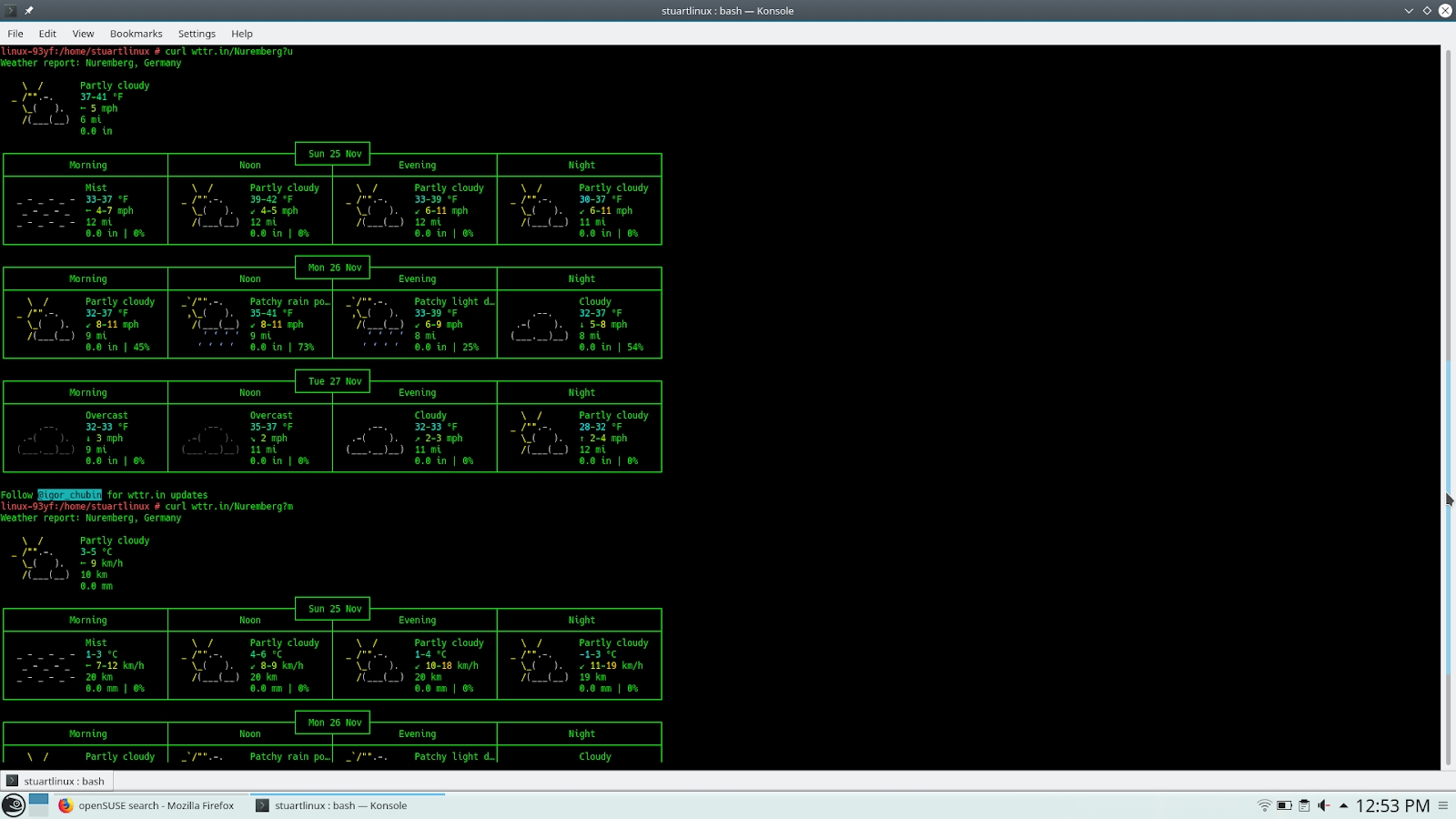
curl wttr.in: Obten el pronóstico del tiempo desde la línea de comandos
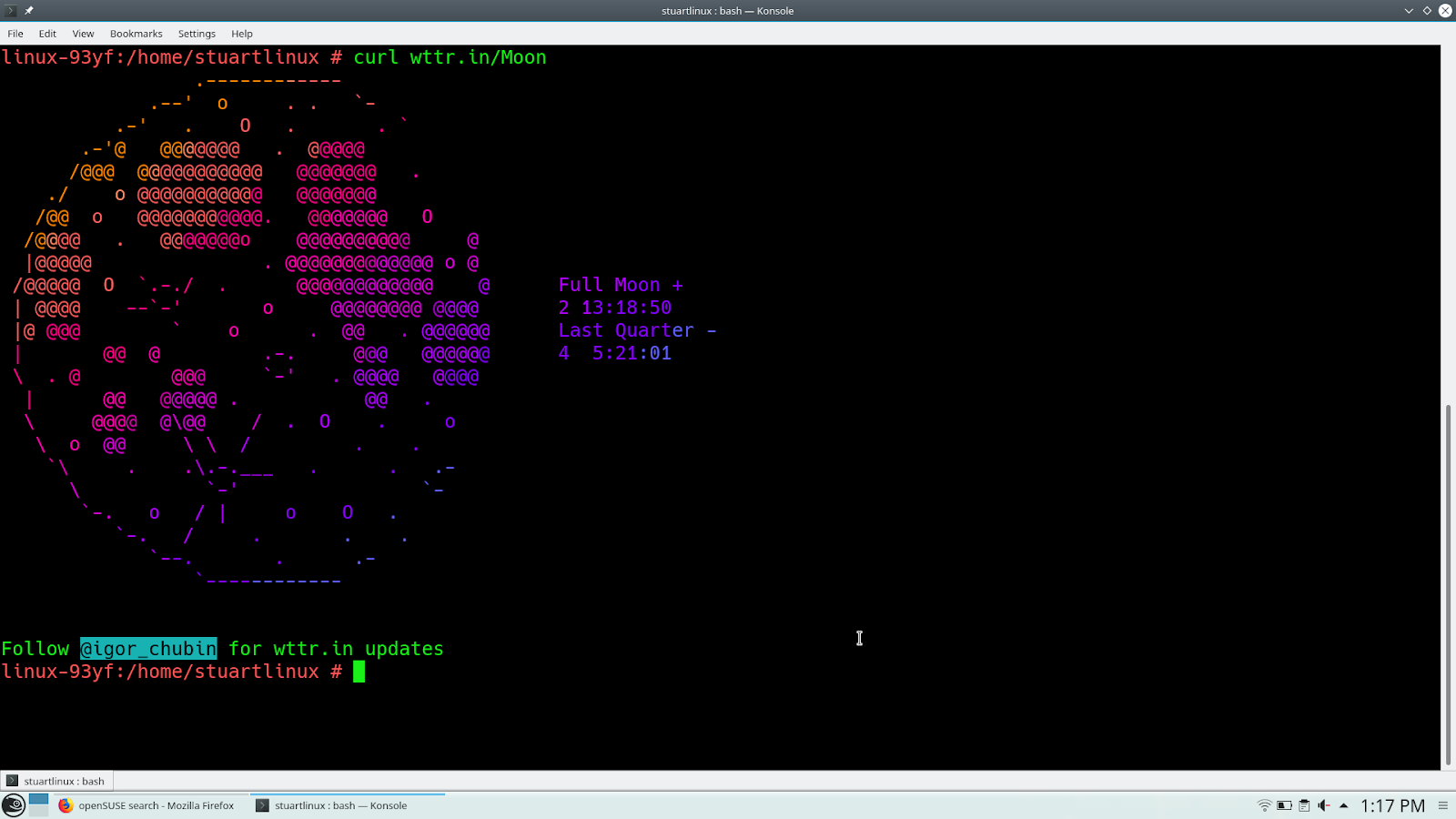
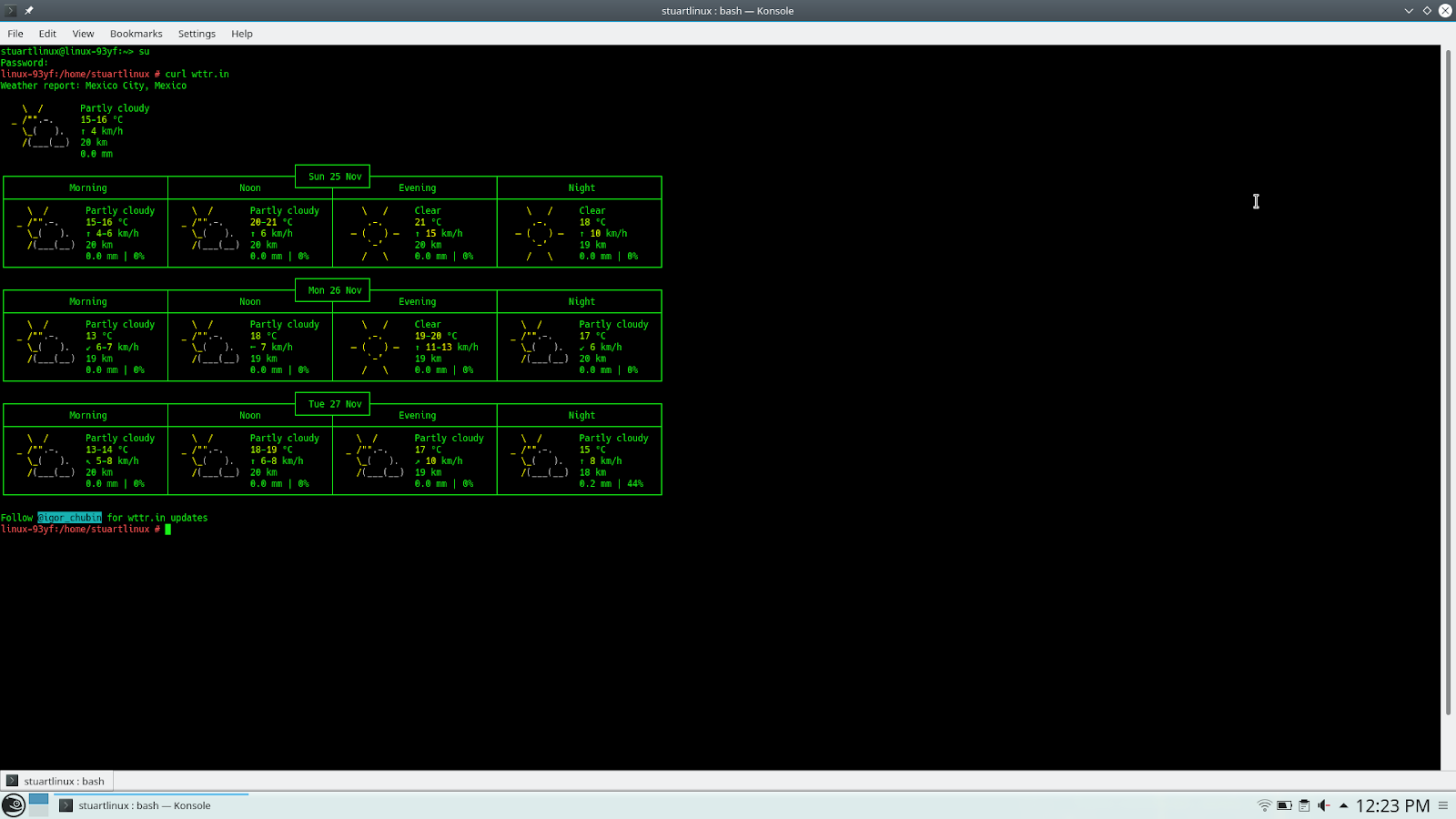
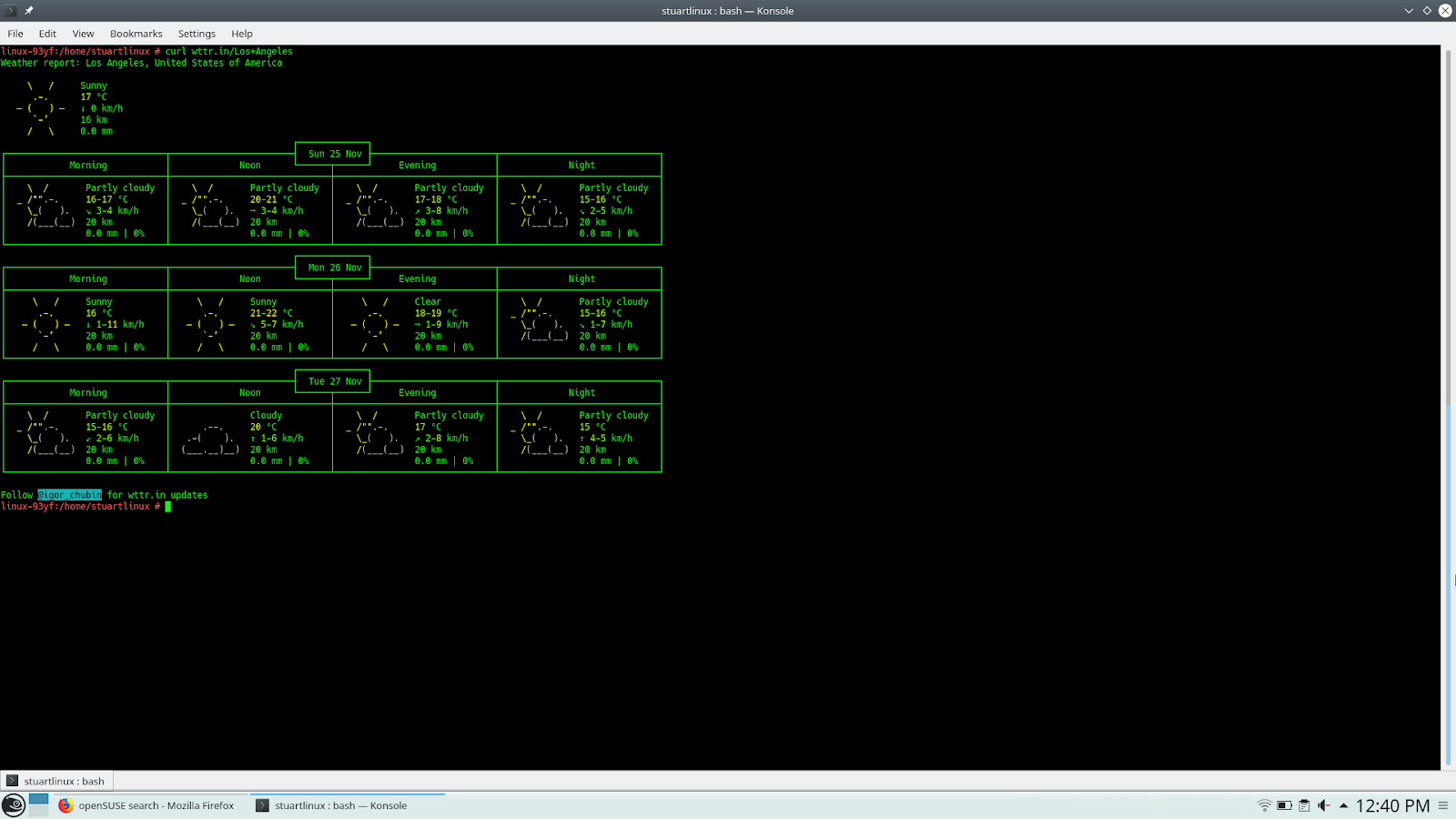
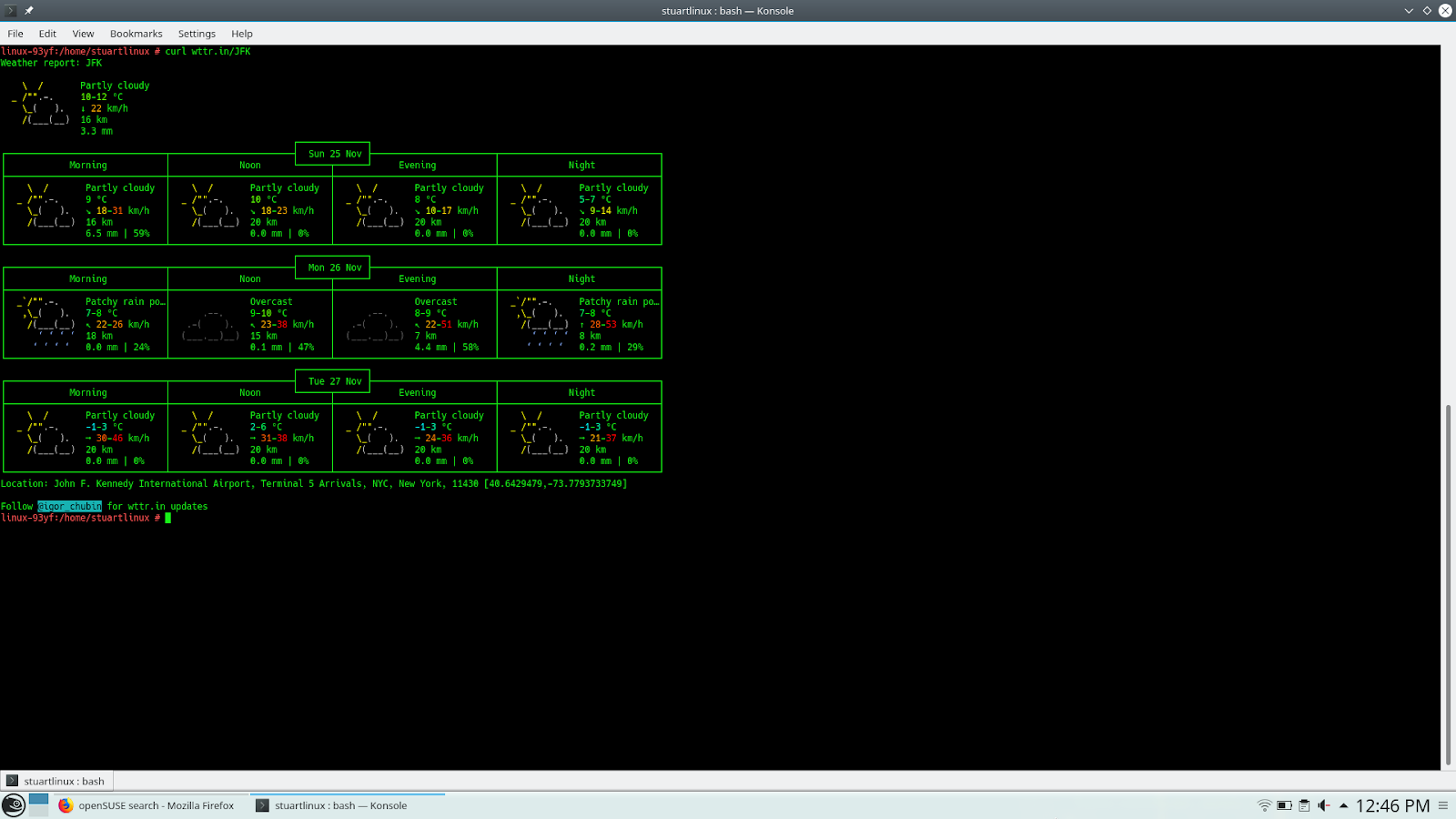
Por defecto, wttr.in mostrará las temperaturas en las unidades (C o F) utilizadas en nuestra ubicación real. Básicamente, en Estados, obtendrás Fahrenheit, y en todos los demás se presentará en Celsius (Centígrados). Puedes cambiar eso agregando? U para ver Fahrenheit o? M para ver Celsius.

NeptuneOS | Review from an openSUSE User
Flashing Linksys E2000 Router with DD-WRT

Different indentation styles per filetype
For my hacking, I love to use the KDevelop IDE. Once in a while, I find myself working on a project that has different indentation styles depending on the filetype — in this case, C++ files, Makefiles, etc. use tabs, JavaScript and HTML files use 2 spaces. I haven’t found this to be straight-forward from KDevelop’s configuration dialog (though I just learnt that it does seem to be possible). I did find myself having to fix indentation before committing (annoying!) and even having to fix up the indentation of code committed by myself (embarrassing!). As that’s both stupid and repetitive work, it’s something I wanted to avoid. Here’s how it’s done using EditorConfig files:
- put a file called
.editorconfigin the project’s root directory - specify a default style and then a specialization for certain filetypes
- restart KDevelop
Here’s what my .editorconfig file looks like:
# EditorConfig is awesome: https://EditorConfig.org

# for the top-most EditorConfig file, set...
# root = true

# In general, tabs shown 2 spaces wide
[*]
indent_style = tab
indent_size = 2

# Matches multiple files with brace expansion notation
[*.{js,html}]
indent_style = space
indent_size = 2
This does the job nicely and has the following advantages:
- It doesn’t affect my other projects, so I don’t have to run around in the configuration to switch when task-switching. (Editorconfigs cascade, so will be looked up up in the filesystem tree for fallback styles.
- It works across different editors supporting the editorconfig standards, so not just KWrite, Kate, KDevelop, but also for entirely different products.
- It allows me to spend less time on formalities and more time on actual coding (or diving).
(Thanks to Reddit.)

Change in Professional Life
This November was very exciting for me so far, as I was starting a new job at a company called Heidolph. I left SUSE after working there for another two years. My role there that was pretty far away from interesting technical work, which I missed more and more, so I decided to grab the opportunity to join in a new adventure.
Heidolph is a mature German engineering company building premium laboratory equipment. It is based in Schwabach, Germany. For me it is the first time that I am working in company that doesn’t do only software. At Heidolph, software is just one building block besides mechanical and electronic parts and tons of special know how. That is a very different situation and a lot to learn for me, but in a small, co-located team of great engineers, I am able to catch up fast in this interesting area.
We build software for the next generation Heidolph devices based on Linux and C++/Qt. Both technologies are in the center of my interest, over the years it has become more than clear for me that I want to continue with that and deepen my knowledge even more.
Since the meaning of open source has changed a lot since I started to contribute to free software and KDE in particular, it was a noticeable but not difficult step for me to take and move away from a self-proclaimed open source company towards a company that is using open source technologies as one part of their tooling and is interested in learning about the processes we do in open source to build great products. An exciting move for me where I will learn a lot but also benefit from my experience. This of course that does not mean that I will stop to contribute to open source projects.
We are still building up the team and look for a Software Quality Engineer. If you are interested in working with us in an exciting environment, you might wanna get in touch.