
 Member
 federico1
Propagating Errors
Lately, I have been converting the code in librsvg that handles XML
from C to Rust. For many technical reasons, the library still uses
libxml2, GNOME's historic XML parsing library, but some of the
callbacks to handle XML events like start_element, end_element,
characters, are now implemented in Rust. This has meant that I'm
running into all the cases where the original C code in librsvg failed
to handle errors properly; Rust really makes it obvious when that
happens.
In this post I want to talk a bit about propagating errors. You call a function, it returns an error, and then what?
What can fail?
It turns out that this question is highly context-dependent. Let's say a program is starting up and tries to read a configuration file. What could go wrong?
-
The file doesn't exist. Maybe it is the very first time the program is run, and so there isn't a configuration file at all? Can the program provide a default configuration in this case? Or does it absolutely need a pre-written configuration file to be somewhere?
-
The file can't be parsed. Should the program warn the user and exit, or should it revert to a default configuration (should it overwrite the file with valid, default values)? Can the program warn the user, or is it a user-less program that at best can just shout into the void of a server-side log file?
-
The file can be parsed, but the values are invalid. Same questions as the case above.
-
Etcetera.
At each stage, the code will probably see very low-level errors ("file not found", "I/O error", "parsing failed", "value is out of range"). What the code decides to do, or what it is able to do at any particular stage, depends both on the semantics you want from the program, and from the code structure itself.
Structuring the problem
This is an easy, but very coarse way of handling things:
gboolean
read_configuration (const char *config_file_name)
{
    /* open the file */

    /* parse it */

    /* set global variables to the configuration values */

    /* return true if success, or false if failure */
}
What is bad about this? Let's see:
-
The calling code just gets a success/failure condition. In the case of failure, it doesn't get to know why things failed.
-
If the function sets global variables with configuration values as they get read... and something goes wrong and the function returns an error... the caller ends up possibly in an inconsistent state, with a set of configuration variables that are only halfway-set.
-
If the function finds parse errors, well, do you really want to call UI code from inside it? The caller might be a better place to make that decision.
A slightly better structure
Let's add an enumeration to indicate the possible errors, and a structure of configuration values.
enum ConfigError {
    ConfigFileDoesntExist,
    ParseError, // config file has bad syntax or something
    ValueError, // config file has an invalid value
}

struct ConfigValues {
    // a bunch of fields here with the program's configuration
}

fn read_configuration(filename: &Path) -> Result<ConfigValues, ConfigError> {
    // open the file, or return Err(ConfigError::ConfigFileDoesntExist)

    // parse the file; or return Err(ConfigError::ParseError)

    // validate the values, or return Err(ConfigError::ValueError)

    // if everything succeeds, return Ok(ConfigValues)
}
This is better, in that the caller decides what to do with the
validated ConfigValues: maybe it can just copy them to the
program's global variables for configuration.
However, this scheme doesn't give the caller all the information it would like to present a really good error message. For example, the caller will get to know if there is a parse error, but it doesn't know specifically what failed during parsing. Similarly, it will just get to know if there was an invalid value, but not which one.
Ah, so the problem is fractal
We could have new structs to represent the little errors, and then make them part of the original error enum:
struct ParseError {
    line: usize,
    column: usize,
    error_reason: String,
}

struct ValueError {
    config_key: String,
    error_reason: String,
}

enum ConfigError {
    ConfigFileDoesntExist,
    ParseError(ParseError), // we put those structs in here
    ValueError(ValueError),
}
Is that enough? It depends.
The ParseError and ValueError structs have individual
error_reason fields, which are strings. Presumably, one could have
a ParseError with error_reason = "unexpected token", or a
ValueError with error_reason = "cannot be a negative number".
One problem with this is that if the low-level errors come with error messages in English, then the caller has to know how to localize them to the user's language. Also, if they don't have a machine-readable error code, then the calling code may not have enough information to decide what do do with the error.
Let's say we had a ParseErrorKind enum with variants like
UnexpectedToken, EndOfFile, etc. This is fine; it lets the
calling code know the reason for the error. Also, there can be a
gimme_localized_error_message() method for that particular type of
error.
enum ParseErrorKind {
    UnexpectedToken,
    EndOfFile,
    MissingComma,
    // ... etc.
}

struct ParseError {
    line: usize,
    column: usize,
    kind: ParseErrorKind,
}
How can we expand this? Maybe the ParseErrorKind::UnexpectedToken
variant wants to contain data that indicates which token it got that
was wrong, so it would be UnexpectedToken(String) or something
similar.
But is that useful to the calling code? For our example program, which is reading a configuration file... it probably only needs to know if it could parse the file, but maybe it doesn't really need any additional details on the reason for the parse error, other than having something useful to present to the user. Whether it is appropriate to burden the user with the actual details... does the app expect to make it the user's job to fix broken configuration files? Yes for a web server, where the user is a sysadmin; probably not for a random end-user graphical app, where people shouldn't need to write configuration files by hand in the first place (should those have a "Details" section in the error message window? I don't know!).
Maybe the low-level parsing/validation code can emit those detailed errors. But how can we propagate them to something more useful to the upper layers of the code?
Translation and propagation
Maybe our original read_configuration() function can translate the
low-level errors into high-level ones:
fn read_configuration(filename: &Path) -> Result<ConfigValues, ConfigError> {
    // open file

    if cannot_open_file {
        return Err(ConfigError::ConfigFileDoesntExist);
    }

    let contents = read_the_file().map_err(|e| ... oops, maybe we need an IoError case, too)?;

    // parse file

    let parsed = parse(contents).map_err(|e| ... translate to a higher-level error)?

    // validate

    let validated = validate(parsed).map_err(|e| ... translate to a higher-level error)?;

    // yay!
    Ok(ConfigValues::from(validated))
}
Etcetera. It is up to each part of the code to decide what do do with lower-level errors. Can it recover from them? Should it fail the whole operation and return a higher-level error? Should it warn the user right there?
Language facilities
C makes it really easy to ignore errors, and pretty hard to present
detailed errors like the above. One could mimic what Rust is actually
doing with a collection of union and struct and enum, but this
gets very awkward very fast.
Rust provides these facilities at the language level, and the idioms
around Result and error handling are very nice to use. There are
even crates like failure that go a long way towards
automating error translation, propagation, and conversion to strings
for presenting to users.
Infinite details
I've been recommending The Error Model to anyone who comes into a discussion of error handling in programming languages. It's a long, detailed, but very enlightening read on recoverable vs. unrecoverable errors, simple error codes vs. exceptions vs. monadic results, the performance/reliability/ease of use of each model... Definitely worth a read.

Pop!_OS | Review from an openSUSE User
CrossOver Linux Use and Review on openSUSE

Ciano, una opción sencilla para convertir tus archivos multimedia
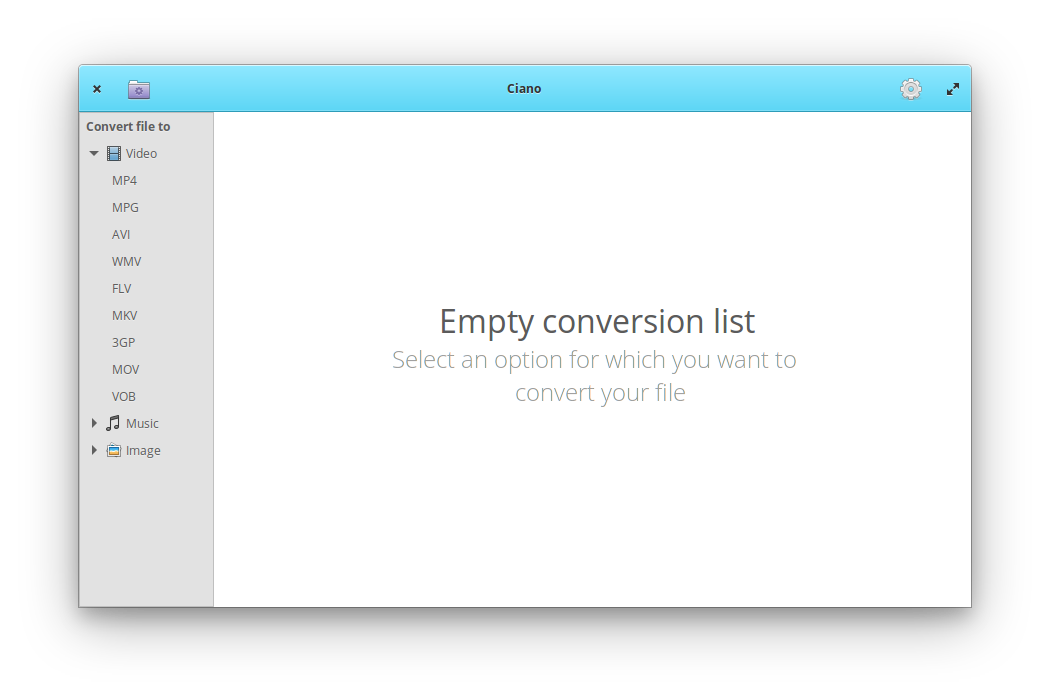
Centrado en la simplicidad, Ciano ofrece un nuevo enfoque para usar FFmpeg, sin la necesidad de escribir una sola línea de código. Además, cuenta con soporte para muchos codecs y contenedores como MPEG4, MPEG, FLV, AVI, OGG, GIF, VOB, MP3, WMA y muchos más.

Instalar Ciano en openSUSE
Para instalar Ciano, accesa a https://software.opensuse.org/package/ciano y selecciona tu versión de openSUSE en la tecnología 1 Click Install

openSUSE-Pakete für den Client und das Dateisystem von Keybase
Keybase gehört zu den Diensten, die zwar irgendwie wahnsinnig nützlich sind, denen der breite Erfolg bisher aber leider verwehrt wurde. Das Kernfeature besteht darin, dass es einen Weg bietet eine verschlüsselte Kommunikation mit Personen aufzubauen von denen man nur einen Social-Media-Account kennt. Durch das Verfahren, einen Beweis über die Eigentümerschaft des Schlüssels im Social-Media-Account zu hinterlegen, kann man diesen, anders als Schlüsseln welche man von einem PGP-Keyserver erhalten hat, recht gut Vertrauen. Leider bietet allerdings Keybase kein Installationspaket seiner Software für openSUSE an, so dass ich nun selber Pakete erstellt habe.
Die grundlegenden Funktionen von Keybase sind über das Kommandozeilenwerkzeug keybase verfügbar.
Dieses wird vom Paket keybase-client bereitgestellt und lässt sich in Tumbleweed durch ein einfaches sudo zypper install keybase-client installieren.
Für Leap 15.0 ist das Paket leider nur als Versuchspaket verfügbar, welches sich am besten per 1-Klick-Installation von software.opensuse.org installieren lässt.
Außerdem bietet Keybase noch zwei weitere nützliche Funktionen.
Mit dem dazugehörigen Dateisystem lassen sich Daten verschlüsselt und signiert mit anderen Nutzer tauschen.
Auch öffentlich lassen sich darüber Dateien anbieten.
Diese erscheinen dann unter https://<nutzername>.keybase.pub, und sind natürlich nicht verschlüsselt sondern nur signiert.
Hierfür wird das Paket kbfs benötigt.
Ist diese installiert, kann man per systemctl --user start kbfs das Dateisystem starten, welches dann unter ${XDG_RUNTIME_DIR}/keybase/kbfs erscheint.
Die zweite nützliche Funktion ist es Git-Repositories verschlüsselt in Keybase abzulegen.
Hierzu wird das Paket kbfs-git benötigt.
Sobald diese installiert ist, und das Dateisystem aktiv, kann Git auf Repositories welche das Protokoll keybase nutzen zugreifen.
Die Verwaltung erfolgt hierbei über das Kommando keybase git.
Excellent SMTP Relay & Blast Email Dashboard : Dari Ide Hingga Eksekusi
LATAR BELAKANG
Salah satu layanan utama di Excellent adalah layanan SMTP Relay. Layanan ini berfungsi sebagai server relay/penerus email dari klien yang ditujukan pada pihak eksternal. Pengguna layanan ini terdiri dari berbagai latar belakang, antara lain :
- Pengguna layanan Excellent Managed Services Mail Server. Untuk meningkatkan kualitas dan performa sistem, kami memisahkan layanan SMTP routing ke eksternal termasuk layanan anti spam agar spesifikasi sistem secara penuh digunakan untuk layanan email
- Klien yang IP public-nya terkena blacklist pihak tujuan
- Klien yang hanya punya IP dynamic
- Klien yang terkena limit pengiriman email oleh pihak ISP
- Klien yang capek karena email terkadang tidak sampai ditujuan dan tidak diketahui penyebabnya
- Klien yang sebel karena email yang dikirim malah masuk ke folder spam di pihak tujuan
- Klien yang ingin menyembunyikan posisi server mereka atas pertimbangan keamanan sistem. Port-port yang dibuka dibatasi hanya untuk IP tertentu, misalnya port incoming hanya diperbolehkan untuk email yang berasal dari layanan anti spam Excellent, port 25 outgoing diblock dan koneksi ke server SMTP Excellent diset menggunakan port yang tidak umum
Layanan SMTP Relay ini awalnya dimulai dari 1-2 server. Menggunakan server yang ditempatkan di co-location server. Awal-awal diimplementasikan, domain Excellent sendiri yang menjadi kelinci percobaan. Sebelum menjadi produk untuk dijual, kami harus memastikannya bisa berjalan sesuai harapan. Bagaimana mungkin kami menjual produk terkait email kalau email kami sendiri kerap bermasalah.
Layanan yang awalnya ditujukan untuk kepentingan internal ini terus dimonitor stabilitas dan performanya. Setelah cukup percaya diri, layanan ini kemudian mulai diimplementasikan disisi server managed services. Perlu berbagai langkah preventif dan korektif untuk memastikan bahwa IP public server selalu terjaga aman tanpa mengurangi fleksibilitas sistem. Jumlah server terus ditambah seiring dengan penambahan jumlah klien. Kami juga menyiapkan server pada posisi lokasi geografis berbeda sebagai antisipasi jika ada gangguan di lokasi tertentu.

INISIASI AWAL
Setelah berjalan beberapa lama, pada sesi brainstorming internal ada usulan untuk membuat dashboard smtp relay, dengan beberapa latar belakang pertimbangan, antara lain :
- Dengan dashboard smtp relay, klien bisa melakukan tracking log pengiriman email secara mandiri, tidak perlu melakukan request ke team support Excellent. Klien terpenuhi kebutuhannya dan disisi lain team support Excellent terlepas dari pekerjaan yang tidak memberikan nilai tambah
- Lebih mudah mengecek perkembangan kualitas layanan. Data-data klien tercatat lebih rapi, dilengkapi dengan detail nama perusahaan, contact person, no kontak/HP/telp, alamat email dan lain-lain. Mudah juga melakukan broadcast pemberitahuan ke seluruh klien
- Pembuatan laporan bisa lebih mudah dilakukan. Mengetahui klien mana yang over usage, klien mana yang terkena lock karena melakukan spamming maupun klien yang terkena suspend karena overdue tagihan lebih mudah dikelompokkan
- Bisa membuat skema level layanan, misalnya klien level premium bisa melakukan attachment sekian MB namun klien level silver hanya bisa mengirim attachmen lebih kecil. Demikian juga untuk trafik email, bisa dicheck dengan mudah
- Lebih mudah diintegrasikan. Bisa dibuat standard knowledge base untuk proses setup disisi klien, termasuk nantinya dikembangkan untuk API aplikasi. Team juga bisa membuat script auto install untuk mempermudah setting disisi klien
- Klien bisa mengecek status pengiriman email per jam, per hari, per minggu hingga per bulan. Berapa email yang terkirim dan berapa yang gagal termasuk data user-user yang mengirim email terbanyak yang bisa menjadi informasi awal indikasi spamming (atau melakukan blast)
- Bisa dilengkapi dengan feature pengecekan SPF, DKIM, DMARC dan lain-lain yang bisa meningkatkan kualitas reputasi pengiriman email pihak klien
Untuk merealisasikan hal ini, ada 2 pilihan yang tersedia, yaitu merekrut team developer aplikasi atau meminta pihak vendor software membuatkannya untuk Excellent. Kedua pilihan memiliki kelebihan dan kekurangan masing-masing. Jika merekrut team developer, mungkin akan butuh waktu untuk pengembangan namun bisa lebih fleksibel dalam menentukan prioritas dan cakupan pekerjaan yang akan dilakukan, sedangkan jika diserahkan kepada pihak vendor, prosesnya diharapkan bisa lebih cepat namun tentu saja harus ditentukan Scope of Works-nya secara lebih detail.
Setelah mempertimbangkan kelebihan dan kekurangan masing-masing, kami memilih vendor software untuk membuatkannya. Kebetulan saya mengenal seorang rekan yang memiliki kapabilitas mengenai hal ini. Ia sering membaca tulisan saya di blog, kemudian tertarik untuk resign dari kantor dan membangun usaha dibidang software development. Setelah berjalan beberapa lama, overhead cost-nya tidak bisa ditutup dari pendapatan sehingga akhirnya ia kembali bekerja di sebuah perusahaan. Meski demikian ia terus keep contact dengan saya. Tahun lalu ia berdiskusi kembali dengan saya mengenai problem dikantornya, dimana sebagian besar uang perusahaan dipakai founder untuk mengembangkan usaha lain sampai-sampai usaha utama terseok-seok dan banyak team programmernya yang resign.
Mendengar hal itu, saya tawarkan padanya, bagaimana jika saya berinvestasi saja. Saya berinvestasi pada kualitas personal dia. Selain mencari order dari pihak eksternal, sekalian saja perusahaan yang baru ia bangun mendapat order dari Excellent. Jadi meski saya memiliki investasi di kedua perusahaan, hubungan ordernya murni professional. Ia setuju dan saya diberikan alokasi sekitar 40% saham. Dengan skema ini, pengembangan dashboard smtp relay Excellent dimulai.

EKSEKUSI IDE
Untuk mendapatkan gambaran mengenai aplikasi dashboard smtp relay yang akan dikembangkan, saya meminta team Excellent mengadakan pertemuan beberapa kali membahas skema dan featurenya. Ada banyak usulan dan saran termasuk diskusi teknis saat sesi ini. Misalnya jika script robot monitoring Excellent melakukan lock account klien yang terindikasi spamming, maka datanya harus bisa ditangkap oleh aplikasi dan diinformasikan ke pihak klien. Diskusi juga mencakup pembahasan mengenai skema aplikasi master-klien, yaitu berupa 1 dashboard untuk team Excellent sebagai admin dan 1 dashboard untuk pihak klien.
Setelah beberapa waktu, dibuatkan 1 buah mockup yang kemudian ditest dan divalidasi terus menerus. Semua kekurangan diperbaiki. Feature yang penting dilengkapi. Menu yang kurang jelas dikoreksi. Mungkin saat-saat seperti ini membuat team developer sebel karena requestnya jadi banyak. Apalagi ada juga request-request dari pihak klien yang ingin suatu laporan tertentu yang jika ditelusuri lebih jauh, muaranya bisa disiapkan via aplikasi.
Setelah dirasa mencapai level beta, aplikasi mulai difungsikan. Untuk kelinci percobaan, team membuat mail server dengan domain masing-masing dan digenerate account relay-nya via dashboard. Informasi yang terkirim via email dicheck ulang apakah narasinya sudah tepat. Apakah deskripsinya tidak membingungkan. Apakah display name sender-nya sudah benar. Pengecekan juga dilakukan di dua sisi dashboard. Disisi dashboard admin sudah benar, apakah disisi klien sudah benar juga.
Testing dilanjutkan dengan pengiriman email. Apakah lognya sudah terpusat. Apakah lognya bisa diparsing dengan benar. Bagaimana cara tahu suatu email dianggap bounced atau delivered. Disini team engineer Excellent yang masih muda berdiskusi dengan team software devs agar algoritma yang ada dan dijelaskan oleh team engineer bisa diterjemahkan ke logika programming.
Setelah fase beta selesai ditest, prosesnya dilanjut dengan memasukkan beberapa list klien prioritas kedalam dashboard smtp relay. Proses pengecekan diulangi dan hal-hal yang masih bermasalah terus diperbaiki sampai kami cukup puas untuk menerapkannya secara massal.
Yang pertama dimasukkan kedalam dashboard adalah klien-klien yang murni langganan smtp relay. Setelah capek harus memasukkan data satu persatu, team engineer berdiskusi lagi dengan team software devs untuk menyediakan menu bulk import. Untuk menu disiapkan dan team engineer diminta membuat list klien dalam bentuk spreadsheet dengan format tertentu. Setelah semua dimasukkan, sistem dimonitoring kembali selama beberapa waktu.
Setelah sistem berjalan lancar, seluruh klien Excellent managed services dimasukkan kedalam database dashboard. Dengan demikian, secara resmi dashboard smtp relay Excellent diluncurkan.

Masukan-masukan dari pengguna layanan mulai muncul. Misalnya ada kebutuhan tambahan informasi subject agar proses tracking log lebih mudah dilakukan. Team engineer Excellent mengaktifkan feature ini disisi mail server, kemudian mencari cara untuk melakukan parsing datanya. Data yang sudah diparsing nantinya akan diolah oleh team software devs untuk diproses menjadi log tracking disisi aplikasi.

Saat ini dashboard smtp relay sudah berjalan selama beberapa waktu. Proses pengembangan dan monitoring aplikasi tetap dijalankan. Ibarat bayi baru lahir, team Excellent merawatnya secara hati-hati dan belajar melakukan scaling seiring dengan penambahan jumlah klien. Hidup team Excellent jadi lebih berwarna dengan adanya dashboar smtp relay 
Jika tertarik mencobanya atau mengalami kendala pengiriman email atau berjuang mengatasi spam yang sering melakukan broadcast ke pihak eksternal, bisa kok melakukan trial aplikasi. Silakan meluncur ke sini : Layanan Excellent SMTP Relay

gentoo eix-update failure
Summary
If you are having the following error on your Gentoo system:
Can't open the database file '/var/cache/eix/portage.eix' for writing (mode = 'wb')
Don’t waste your time, simply the /var/cache/eix directory is not present and/or writeable by the eix/portage use
mkdir -p /var/cache/eix
chmod +w /var/cache/eix*
Basic story is that eix will drop privileges to portage user when ran as root.
Dieser Rattenfänger befreit Mäuse
Seit letzter Woche ist Piper in openSUSE Tumbleweed als Paket enthalten. Piper erlaubt es für eine ganze Reihe Spielermäuse diese auch unter Linux ganz genau so zu konfigurieren, wie es sonst die nur unter Windows verfügbaren Programme der Hersteller tun.
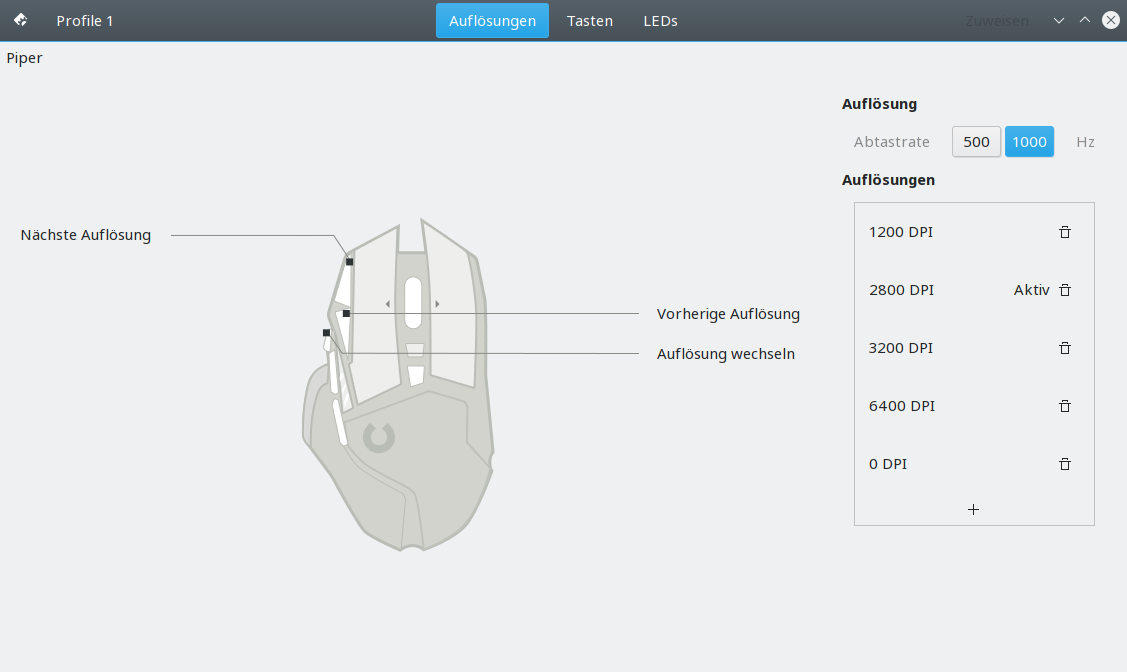
Bei meiner Logitech G502 kann ich mit Piper nicht nur grafisch zwischen den einzelnen Profilen wechseln, sonder ich kann auch für jedes Profil die Auflösungsstufen, die Tastenbelegung und die LEDs konfigurieren.
Zur Installation muss das Paket piper ausgewählt werden, entweder in der grafischen Paketverwaltung, per 1-Klick-Installation auf software.opensuse.org oder auf der Kommandozeile:
sudo zypper install piper
In openSUSE Leap ist Piper aktuell leider nicht nutzbar. Der darunterliegende Service Ratbagd hatte seine Sicherheitsbegutachtung beim Release von Leap 15.0 leider noch nicht abgeschlossen. Mit der kommenden Version 15.1 sollte der Nutzung von Piper auf Leap dann aber auch nichts mehr im Wege stehen.

Control del volumen del móvil desde el ordenador
Guarda eso de abajo en bin como volumen4adb y hazlo ejecutable ( chmod +x ~/bin/volumen4adb )
Asigna a la combinación de teclas «Alt+q» al comando ~/bin/volumen4adb subir
Asigna a la combinación de teclas «Alt+a» al comando ~/bin/volumen4adb baja
Asigna a la combinación de teclas «Alt+s» al comando ~/bin/volumen4adb silencio
Cuando tengas el teléfono conectado con el cable microusb al ordenador Alt+q y Alt+a suben y bajan el volumen y Alt+s lo silencia durante 84 segundos, que es el que tiempo que dura la publicidad de Spotify. Ahora que no oigo publicidad de regatón soy mejor persona y menos agresiva.
#!/bin/bash

pausa=84

d=$(adb devices| grep "device$"| sed -r 's/([0-9a-z])(.)/\1/g')

if [ "x$d" != "x" ]; then

    vactual=$(adb shell dumpsys audio|grep -A 4 "- STREAM_MUSIC:" | tr -d '\n\r' |sed -r 's/.8 (headphone): ([0-9])./\1/g')

    #echo "Volumen actual : $vactual"

  if [ "$1" == "silencio" ]; then

    adb shell service call audio 3 i32 3 i32 1 i32 1

    (for n in $(seq 1 $pausa); do  echo "scale=2; (100 / $pausa)$n" | bc ; sleep 1; done ) | zenity --text="Esperando $pausa segundos..." --progress --percentage=0 --auto-kill  --auto-close --no-cancel

    adb shell service call audio 3 i32 3 i32 "$vactual" i32 1

    exit 0

  fi

  if [ "$1" == "sube" ]; then

    vdestino=$(echo "$vactual + 1" | bc)

    if [ $vdestino -ge 15 ]; then vdestino="15"; fi

    adb shell service call audio 3 i32 3 i32 "$vdestino" i32 1

    #echo "Subiendo a $vdestino"

    exit 0

  fi

  if [ "$1" == "baja" ]; then

    vdestino=$(echo "$vactual - 1" | bc)

    if [ "$vdestino" -le 0 ]; then vdestino=0; fi

    adb shell service call audio 3 i32 3 i32 "$vdestino" i32 1

    # echo "Bajando a $vdestino"

    exit 0

  fi

  if [ "$1" == "playpause" ]; then

    adb shell input keyevent 85

  fi

else

    exit 1

fi
También asigné Alt-x a ~/bin/volumen4adb playpause pero sólo funciona al pausar, no al hacer replay, ignoro el motivo.
GSoC 2018 Mentor Summit
David Kang and I attended two weeks ago (12-14 Oct) the Google Summer of Code (GSoC) Mentor Summit in California representing openSUSE. :sunny: Here is our report of the conference.
It was an incredibly well organized event with a busy schedule. It was our first summit (we try that different openSUSE mentors/org admins go every year) and we enjoyed it a lot and found it really useful. Apart from attending many sessions about open source, mentoring and GSoC, we had the opportunity to meet and have interesting conversations with other org admins and mentors, as well as with the Google open source team and other Googlers. In total 314 mentors and org admins from 42 countries attended the events. This was a great chance to collect chocolate from all around the world for the chocolate bar table, which has already become a tradition at the summit. :chocolate_bar:


The summit follows the unconference format, which means that the sessions are decided and organized by the attendees. Those are the most outstanding sessions from the ones David and I attended:
Lightning talks
There were about 2 hours reserved for 3 minutes lightning talks, in which around 50 different organization presented their students’ work. The only rule was that the part about the organization itself couldn’t be longer than 1 minute (ideally 30 seconds). We liked the original idea of clapping when the 3 minutes were over to avoid that the speaker continue speaking - we should steal it for the Lightningbeers in the next openSUSE conference :wink:
There were a lot of great talks about successful histories. I especially liked the ones where the students themselves presented their work in a video. I gave a talk focused on the feedback we gave to all our students, including rejected and unsubmitted proposals, and how we try to bring those students in our community and encourage them to keep contributing. I was not sure if the talk was appropriated, taking into account that the rest of the talks were about the students’ projects. But many people come to me after the talk to say they liked it a lot and got some ideas for next year, so it seems it was. :smile:
You can find the slides of all the given lightning talks (including mines) in this Google Drive folder.
GSoD
Google is considering starting a new mentoring program: Google Season of Docs, the “GSoC for Documentation”. It was discussed whether mentoring orgs would be interested in a program of this kind and Google asked for feedback on the idea.
Apart from the fact that the program would be focused on documentation and not on code, there are other important differences. The participants would be experience technical writers (>1 year experience) and not students. As it is expected that the participants already have a full time job, the commitment would be less (~10 hours a week). Because of the same reason, the technical writers wouldn’t receive any stipend, as the students do. According to the Google team, it would be the experience they would gain though GSoD and not the money which would motivate them to participate. This was the most unclear and longest discussed part.
Recruiting, motivating and retaining mentors to your org
I found this a very appealing session, as the number of mentors in openSUSE has decreased this year to the point that we considered not to participate in GSoC due to the lack of mentors/projects. (Maybe someone reading this wants to get involved next year? - Just write me an email, comment in this blog post or check openSUSE mentoring page!)
The session was driven by Martin from Jenkins, and it was a enriching conversation between different orgs, which presented their problems, solutions and asked questions.It was curious how similar the difficulties of openSUSE and Fedora are (although not surprisingly because of the similarities of the two projects). Both communities are big and diverse, but they do not manage to get a lot of mentors involved in GSoC. Some people gave us some ideas, such as introducing non-technical mentors and having at least 2 mentors per project, but I still don’t have the feeling we found the magic solution. :sweat:
Notes of the session can be found in this Google document.
Patch Rewards
Aleksandr Dobkin, from Google, gave a talk about the Patch Reward Program, which rewards proactive security improvements in several open source projects like Chromium and Angular. Rewards for qualifying submissions range from from 500$ to 20000$, depending on the complexity and impact of the patch. In the future, they want to expand the list of in-scope projects and define specifics tasks and bounties for them.
Life after GSoC
The Googlers Cat and Josh led this session, in which we did some brainstorming and listen to other organizations’ experiences. David found interesting that most of the attendees agreed that responsibilities need to be given to the students in order to keep them motivated and engaged with the project.
Notes of the session can be found in this Google document.
Open Source Licensing
This session was supposed to be hold by the Googler Hilary Richardson, but she arrived late and it ended being a shared session with the Software Freedom Conservancy. It was an introduction to licenses, but although I had expected it to be more advance, there was some topics (some of which came up thanks to audience questions) which I didn’t know about and which I found interesting. For example, that you shouldn’t use the WTFPL (Do What the Fuck You Want To Public License) as it doesn’t include no-warranty disclaimer.
Spanish mentors meet-up
There was a meet-up of GSoC Spanish mentors and as both David and I are from Spain, we couldn’t miss it. We presented our projects, spoke about things we are doing to spread open source in Spain, such as talks at universities, and discussed what else could be done. We set a mailing list up to keep sharing ideas, material, etc.
GSoC Feedback
Google open source team organized a session where the mentors and org admin could give them feedback about things that could be improved. I suggested something that openSUSE Asian community suggested to me in the last openSUSE.Asia: creating a poster which summarize the reasons to become a GSoC mentor and that should ideally include some visual reinforcement (like an infographic). It should catch people attention so that non-native speakers get interested enough to read the extensive documentation. (BTW, there are two videos from Google in that direction: Organizations Apply and Being a Great Google Summer of Code Mentor). I also suggested that it is clarified in the GSoC documentation that mentors and org admins are volunteers, as we had cases were students were unpolite or impatient and I think it was because they don’t know the conditions in which the mentors are helping them.
Notes of the session can be found in this Google document.
Beyond GSoC: how can Google help open source?
Google wanted to know what else they can do for open source. Most of the requests were related to founding and cloud credits. I used the opportunity to ask for a plain text option in the Gmail Android client which allows me to write to this mailing list with my phone (I know there are other clients…) and to mention the poster again when other people requested help from Google to recruit mentors.
Notes of the session can be found in this Google document.
Improving mentor/mentee relations
This session was about how to improve the relationships between mentors and mentees, potentiating engagement after GSoC. Most of the attendees were org admins and they gave us some tips to help mentees to get involved in the community and also to improve the communication with his mentor. Some of the concrete suggestions were:
- Make everything public (conversation with the mentor, doubts, discussion, etc.) using the IRC channel.
- Have regular meetings, at least 1 per week.
- Set availability time box of the mentor/mentee.
- Encourage to ask first to the community.
Open Source Metrics
It was a really cool session by CHAOSS and Google about measuring all data we can and how to turn the numbers into something useful. For instance, it was interesting the discussion about how to measure the open source culture in a project: how many people say thank you, time to answer, PRs and issues closed, etc. I also liked some of the original examples presented by Felipe Hoffa (Developer Advocate at Google) such as using number of page visits vs StackOverflow questions. I recommend to check the fhoffa/analyzing_github repository.
Notes of the session can be found in this Google document.
Post-mortem: why a student fail? Hear from an student and org admin
Emmanuel from Public Lab told us about his experience when he was a GSoC student and why he succeeded the first year and why not in the second year. The difference was that he had a good guidance: his mentor was very accessible and close to him. The second time, the communication was bad: he didn’t receive any warning about doing something wrong and his mentor wasn’t there for him when he needs him. After all, he ended being a successful GSoC mentor.
Failing students
It was a conversation trying to answer questions like: Why and how fail a student? How do you protect the future reputation of the student? What to do when the problem is the mentor?
We spoke about problems with really difficult solution and it was inspiring to hear other people approaches and ideas. Something that I found useful for us was the fact that some orgs are enforcing having 3 mentors per project. I think it is a good recommendation as it can save a lot of troubles from the admins perspective, it is good for the student and more fun for the mentors. However, I think we should enforce 2 mentors, but not 3. If the mentors think it is doable with 2 mentors, we should trust them. It would anyway be difficult to get 3 mentors for some of the project. Another great idea is that, in case the mentors disappear by any reason and you don’t know where to get more mentors from, write the GSoC mailing list. There are a lot of people working in diverse projects and someone may be able to help.
Notes of the session can be found in this Google document.
Quality of the software, when should we release?
This session was held by people from MuseScore, who wanted to discuss when a product is good enough to release. One of procedures that David founded interesting two approaches mentioned to release:
- Time box: having a LTS version (~ 1 year) and a monthly one. The monthly one includes the most recent changes although the bugs are also backported to the LTS version. (Tumbleweed vs Leap :stuck_out_tongue_winking_eye:)
- Feature based
Burnout
In this session, conducted by Valorie from KDE, we discussed how to identify a burnout in others and in ourselves and what to do when it happens (in general and in the GSoC context). Burnout is severe and we need to help our colleagues/mentors if we realise of it (signs: stressed, angry, grumpy, territorial, drowsy) and to step out when it happens to us (if it is important someone else will do it).
Suggestions for next year
All in all, those are my suggestions for next GSoC (they come from diverse places: the sessions, conversations with other people, etc.), in case openSUSE participates again (I hope so :wink:):
- Make a call for mentors sharing the video and other material from Google
- Make compulsory to have at least two mentors per project. It is more fun and secure (in case the mentor disappear for any reason, the organization need to look for another mentor)
- For projects too specialized or which require concrete knowledge, ask for a third person who could help with the mentoring in case something happens (just as backup and not being compulsory).
- Make compulsory that the students blog posts have a CC license (preferably CC-BY)
- Encourage collaboration between students and mentors in the same org, for example doing video conference with several students working in similar projects.
- Ask the mentors to complete evaluations 24 before the evaluation closes. This way the admins can complete the evaluation in the last day if the mentors haven’t done it.
Hope you have enjoyed reading the report. Remember that if you want to mentor next year in GSoC, you are more than welcome! Just write me an email, comment in this blog post or check openSUSE mentoring page.
About me
My name is Ana and I am mentor and organization admin for openSUSE at GSoC, openSUSE Board member, Open Build Service Frontend Engineer at SUSE and open source contributor in projects inside and outside openSUSE.