
 Member
 federico1
Three big things happening in librsvg
I am incredibly happy because of three big things that are going on in librsvg right now:
-
Paolo Borelli finished porting all the CSS properties to Rust. What was once a gigantic
RsvgStatestruct in C is totally gone, along with all the janky C code to parse individual properties. The process of portingRsvgStateto Rust has been going on since about two months ago, and has involved many multi-commit merge requests and refactorings. This is a tremendous amount of really good work! The result is all in Rust now in aStatestruct, which is opaque from C's viewpoint. The only places in C that still require accessors to theStateare in the filter effects code. Which brings me to... -
Ivan Molodetskikh, my Summer of Code student, submitted his first merge request and it's merged to master now. This ports the bookkeeping infrastructure for SVG filters to Rust, and also the
feOffsetfilter is ported now. Right now the code doesn't do anything fancy to iterate over the pixels of Cairo image surfaces; that will come later. I am very happy that filters, which were a huge barrier, are now starting to get chipped away into nicer code. -
I have started to move librsvg's old representation of CSS properties into something that can really represent properties that are not specified, or explicitly set to
inheritfrom an SVG element's parent, or set to a normal value. Librsvg never had a representation of property values that actually matched the SVG/CSS specs; it just knew whether a property was specified or not for an element. This worked fine for properties which the spec mandates that they should inherit automatically, but those that don't, were handled through special hacks. The new code makes this a lot cleaner. It should also make it easier to copy Servo's idioms for property inheritance.

NO_NEW_PRIVS: avoiding privilege escalation
Ceph Day London 2018 Recap
 Some days since the Ceph and CloudStack Day in London last month now. It was a great event, great presentations and a lot of networking with the local community.
You can find my presentation on "Email Storage with Ceph" online as also the break slides with some impressions from some of the last few Ceph events.
Some of the other presentations can be found here and some pictures from the day in this album.
Hooking up instantiated services with RPM
We already mentioned Instantiated Services a few times. However, there is one question we did not yet cover:
How to hook up those instances with our package manager
For a normal service file this is pretty easy. Such a service can be handled as follow in the spec file:
%pre
%service_add_pre superduper.service

%post
%service_add_post superduper.service

%preun
%service_del_preun superduper.service

%postun
%service_del_postun superduper.service
That is it. It will do all the things we want.
Reducing the number of image copies in GNOME
Our graphics stack that deals with images has evolved a lot over the years.
In ye olden days
In the context of GIMP/GNOME, the only thing that knew how to draw RGB
images to X11 windows (doing palette mapping for 256-color graphics
cards and dithering if necessary) was the GIMP. Later, when GTK+ was
written, it exported a GtkPreview widget, which could take an RGB
image buffer supplied by the application and render it to an X window
— this was what GIMP plug-ins could use in their user interface to
show, well, previews of what they were about to do with the user's
images. Later we got some obscure magic in a GdkColorContext
object, which helped allocate X11 colors for the X drawing primitives.
In turn, GdkColorContext came from the port that Miguel and I did of
XmHTML's color context object (and for those that remember, XmHTML
became the first version of GtkHtml; later it was rewritten as a port
of KDE's HTML widget). Thankfully all that stuff is gone now; we can
now assume that video cards are 24-bit RGB or better everywhere, and
there is no need to worry about limited color palettes and color
allocation.
Later, we started using the Imlib library, from the Enlightenment project, as an easy API to load images — the APIs from libungif, libjpeg, libpng, etc. were not something one really wanted to use directly — and also to keep images in memory with a uniform representation. Unfortunately, Imlib's memory management was peculiar, as it was tied to Enlightenment's model for caching and rendering loaded/scaled images.
A bunch of people worked to write GdkPixbuf: it kept Imlib's concepts of a unified representation for image data, and an easy API to load various image formats. It added support for an alpha channel (we only had 1-bit masks before), and it put memory management in the hands of the calling application, in the form of reference counting. GdkPixbuf obtained some high-quality scaling functions, mainly for use by Eye Of Gnome (our image viewer) and by applications that just needed scaling instead of arbitrary transformations.
Later, we got libart, the first library in GNOME to do antialiased vector rendering and affine transformations. Libart was more or less compatible with GdkPixbuf: they both had the same internal representation for pixel data, but one had to pass the pixels/width/height/rowstride around by hand.
Mea culpa
Back then I didn't understand premultiplied alpha, which is now ubiquitous. The GIMP made the decision to use non-premultiplied alpha when it introduced layers with transparency, probably to "avoid losing data" from transparent pixels. GdkPixbuf follows the same scheme.
(Now that the GIMP uses GEGL for its internal representation of images... I have no idea what it does with respect to alpha.)
Cairo and afterwards
Some time after the libart days, we got Cairo and pixman. Cairo had a different representation of images than GdkPixbuf's, and it supported more pixel formats and color models.
GTK2 got patched to use Cairo in the toplevel API. We still had a dichotomy between Cairo's image surfaces, which are ARGB premultiplied data in memory, and GdkPixbufs, which are RGBA non-premultiplied. There are utilities in GTK+ to do these translations, but they are inconvenient: every time a program loads an image with GdkPixbuf's easy API, a translation has to happen from non-premul RGBA to premul ARGB.
Having two formats means that we inevitably do translations back and forth of practically the same data. For example, when one embeds a JPEG inside an SVG, librsvg will read that JPEG using GdkPixbuf, translate it to Cairo's representation, composite it with Cairo onto the final result, and finally translate the whole thing back to a GdkPixbuf... if someone uses librsvg's legacy APIs to output pixbufs instead of rendering directly to a Cairo surface.
Who uses that legacy API? GTK+, of course! GTK+ loads scalable SVG icons with GdkPixbuf's loader API, which dynamically links librsvg at runtime: in effect, GTK+ doesn't use librsvg directly. And the SVG pixbuf loader uses the "gimme a pixbuf" API in librsvg.
GPUs
Then, we got GPUs everywhere. Each GPU has its own preferred pixel format. Image data has to be copied to the GPU at some point. Cairo's ARGB needs to be translated to the GPU's preferred format and alignment.
Summary so far
-
Libraries that load images from standard formats have different output formats. Generally they can be coaxed into spitting ARGB or RGBA, but we don't expect them to support any random representation that a GPU may want.
-
GdkPixbuf uses non-premultiplied RGBA data, always in that order.
-
Cairo uses premultiplied ARGB in platform-endian 32-bit chunks: if each pixel is 0xaarrggbb, then the bytes are shuffled around depending on whether the platform is little-endian or big-endian.
-
Cairo internally uses a subset of the formats supported by pixman.
-
GPUs use whatever they damn well please.
-
Hilarity ensues.
What would we like to do?
We would like to reduce the number of translations between image formats along the loading-processing-display pipeline. Here is a plan:
-
Make sure Cairo/pixman support the image formats that GPUs generally prefer. Have them do the necessary conversions if the rest of the program passes an unsupported format. Ensure that a Cairo image surface can be created with the GPU's preferred format.
-
Make GdkPixbuf just be a wrapper around a Cairo image surface.
GdkPixbufis already an opaque structure, and it already knows how to copy pixel data in case the calling code requests it, or wants to turn a pixbuf from immutable to mutable. -
Provide GdkPixbuf APIs that deal with Cairo image surfaces. For example, deprecate
gdk_pixbuf_new()andgdk_pixbuf_new_from_data(), in favor of a newgdk_pixbuf_new_from_cairo_image_surface(). Instead ofgdk_pixbuf_get_pixels()and related functions, havegdk_pixbuf_get_cairo_image_surface(). Mark the "give me the pixel data" functions as highly discouraged, and only for use really by applications that want to use GdkPixbuf as an image loader and little else. -
Remove calls in GTK+ that cause image conversions; make them use Cairo image surfaces directly, from GdkTexture up.
-
Audit applications to remove calls that cause image conversions. Generally, look for where they use GdkPixbuf's deprecated APIs and update them.
Is this really a performance problem?
This is in the "excess work" category of performance issues. All those conversions are not really slow (they don't make up for the biggest part of profiles), but they are nevertheless things that we could avoid doing. We may get some speedups, but it's probably more interesting to look at things like power consumption.
Right now I'm seeing this as a cool, minor optimization, but more as a way to gradually modernize our image API.
We seem to change imaging models every N years (X11 -> libart -> Cairo -> render trees in GPUs -> ???). It is very hard to change applications to use different APIs. In the meantime, we can provide a more linear path for image data, instead of doing unnecessary conversions everywhere.
Code
I have a use-cairo-surface-internally branch in
gdk-pixbuf,
which I'll be working on this week. Meanwhile, you may be interested
in the ongoing Performance Hackfest in Cambridge!

Grid Autosport auf openSUSE 42.3
Grid Autosport ist ein zwar älteres, aber immer noch exzellentes Rennspiel das zwar kein definitiv Arcaderacer ist, einen aber auch nicht mit einem Hardcoresimulationsanspruch erschlägt. Ähnlich wie Gran Tourismo findet es einen exzellenten Mittelweg und ist, im Gegensatz zu diesem, auch auf Linux spielbar. Es eignet sich somit also auch für ein kurzes Rennen in der Mittagspause, was nicht heißt, dass man keine Stunden darin versenken kann. Leider lässt es sich unter openSUSE 42.3 aber nachdem man es per Steam heruntergeladen hat nicht direkt starten.

Das Problem
Nach dem Start rödelt der rechner kurz, es kommt aber kein Spielfenster hoch. Startet man Steam aus einer Konsole, so erscheint dort beim Versuch das Spiel zu starten folgendes:
>>> Adding process 17089 for game ID 255220
>>> Adding process 17089 for game ID 255220Installing breakpad exception handler for appid(steam)/version(1506500000)
/ephemeral/steam/marix/steamapps/common/GRID Autosport/bin/GridAutosport: /home/marix/.local/share/Steam/ubuntu12_32/steam-runtime/amd64/lib/x86_64-linux-gnu/libssl.so.1.0.0: no version information available (required by /ephemeral/steam/marix/steamapps/common/GRID Autosport/bin/GridAutosport)
/ephemeral/steam/marix/steamapps/common/GRID Autosport/bin/GridAutosport: /home/marix/.local/share/Steam/ubuntu12_32/steam-runtime/amd64/lib/x86_64-linux-gnu/libcrypto.so.1.0.0: no version information available (required by /ephemeral/steam/marix/steamapps/common/GRID Autosport/bin/GridAutosport)
/ephemeral/steam/marix/steamapps/common/GRID Autosport/bin/GridAutosport: /home/marix/.local/share/Steam/ubuntu12_32/steam-runtime/amd64/lib/x86_64-linux-gnu/libssl.so.1.0.0: no version information available (required by /ephemeral/steam/marix/steamapps/common/GRID Autosport/bin/../lib/x86_64/libcurl.so.4)
/ephemeral/steam/marix/steamapps/common/GRID Autosport/bin/GridAutosport: /home/marix/.local/share/Steam/ubuntu12_32/steam-runtime/amd64/lib/x86_64-linux-gnu/libssl.so.1.0.0: no version information available (required by /ephemeral/steam/marix/steamapps/common/GRID Autosport/bin/../lib/x86_64/libcurl.so.4)
/ephemeral/steam/marix/steamapps/common/GRID Autosport/bin/GridAutosport: /home/marix/.local/share/Steam/ubuntu12_32/steam-runtime/amd64/lib/x86_64-linux-gnu/libcrypto.so.1.0.0: no version information available (required by /ephemeral/steam/marix/steamapps/common/GRID Autosport/bin/../lib/x86_64/libcurl.so.4)
>>> Adding process 17090 for game ID 255220
/ephemeral/steam/marix/steamapps/common/GRID Autosport/bin/GridAutosport: relocation error: /ephemeral/steam/marix/steamapps/common/GRID Autosport/bin/../lib/x86_64/libcurl.so.4: symbol ENGINE_load_builtin_engines, version OPENSSL_1.0.0 not defined in file libcrypto.so.1.0.0 with link time reference
Game removed: AppID 255220 "GRID Autosport", ProcID 17086
Hier liegt also eine Inkompatibilität zwischen der vom Spiel mitgebrachten Curl-Bibliothek und den von Steam mitgebrachten Bibliotheken SSL und Crypto vor.
Die Lösung aus dem Netz
Beim Googeln findet sich schnell eine Lösung welche vorschlägt libcrypto.so.1.0.0 aus der Steam-Runtime entfernen.
Dies löst auch das Problem mit Grid Autosport.
Allerdings hat diese Lösung auch Nachteile.
Da die Steam-Runtime modifiziert wird ist damit zu rechnen, dass das nächste Steam-Update die Dateien wiederherstellt und man die Datei erneut entfernen muss.
Außerdem kann es damit zu Problemen in anderen Spielen kommen welche sich auf die von Steam mitgelieferte Version verlasen.
Die bessere Lösung
Die obige Lösung weißt aber bereits den Weg zu einer besseren Lösung, denn sie funktioniert deshalb, weil openSUSE bereits kompatible Versionen der beiden Bibliotheken enthält. Tatsächlich betrifft dieses Problem einige Spiele welche von Feral Interactive portiert wurden. So ist auch Dirt Rally von diesem Problem betroffen. Für dieses Spiel findet sich eine Lösung welche sich Analog auch auf Grid Autosport anwenden lässt:
- Ins Spielverzeichnis wechseln:
cd <steam library>/steamapps/common/Grid\ Autosport/lib/x86_64. - Dort auf die libcrypto des Systems linken:
> ln -s /lib64/libcrypto.so.1.0.0
> ln -s /lib64/libssl.so.1.0.0
Diese Lösung ist besser, weil sie nur das einzelne Spiel betrifft und nicht global die Steam-Runtime beschädigt. Sie hat allerdings den Nachteil, dass sie kaputt gehen kann falls Steam mal die Dateien anfasst, z.B. bei einem Update. Updates von Grid Autosport sind aber deutlich seltener als solche von Steam selbst, und auf meinem System hat der Fix auch schon einige Patches überlebt.

GNOME.Asia Summit 2018 Call for Papers is now open
GNOME.Asia Summit 2018 Call for Papers is now open
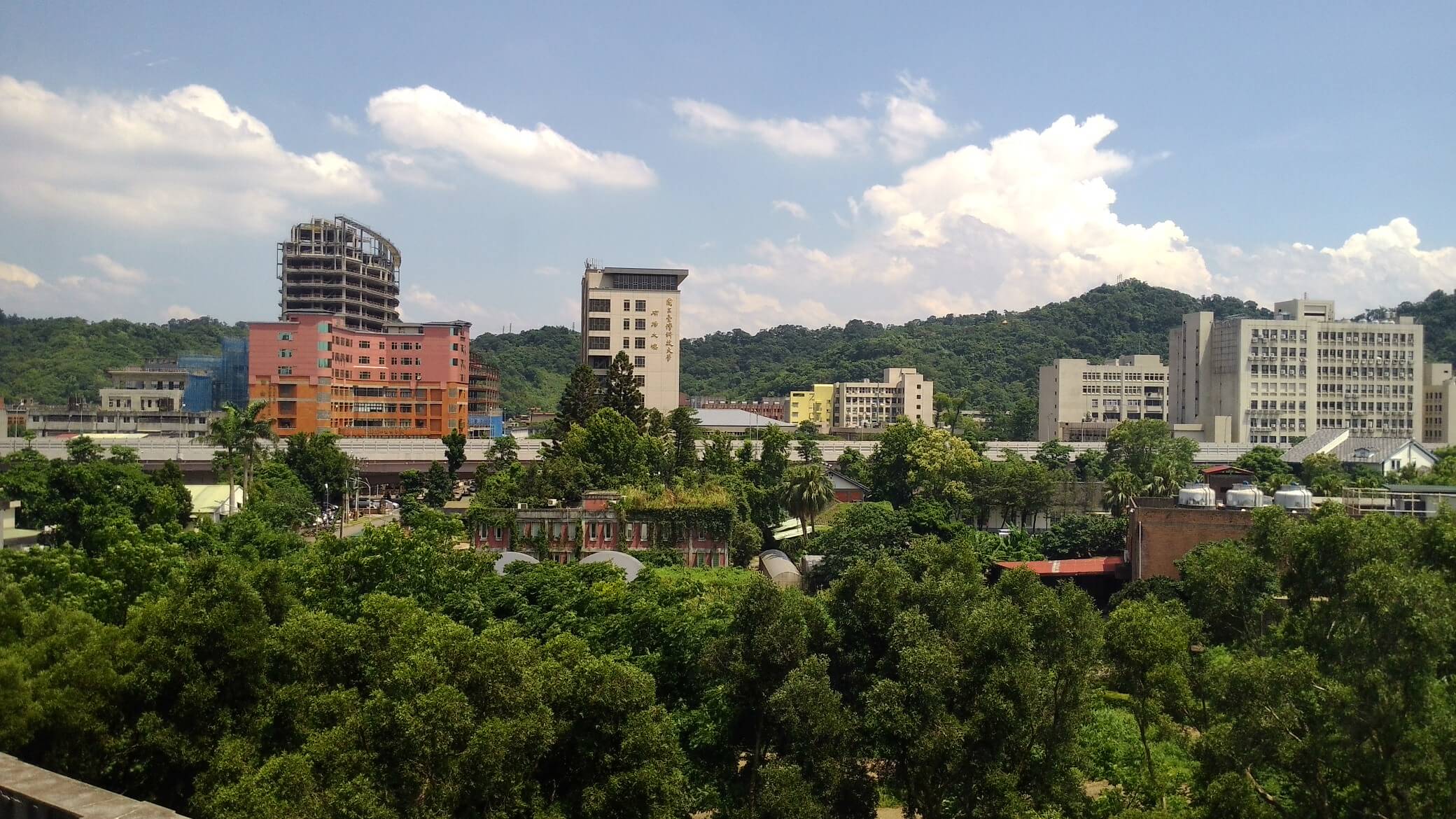
picture from Chi-Hung Lin – https://www.flickr.com/photos/92585929@N06/27325096293, CC BY-SA 2.0
Important Information
- The deadline:
- Submission: 2018-05-20
- Notification of acceptance: 2018-06-01 until 2018-06-05
- Full programme published: Early July
- Conference:
- Conference date: Aug 11th – 12th , 2018
- Venue: National Taiwan University of Science and Technology, Taipei, Taiwan.
- Latest developments
- Writing applications for GNOME 3
- UI design
- QA and testing
- Accessibility
- Human Interface Engineering (Icons and Graphic Design)
- Marketing/Engagement
- Asia success stories / Local GNOME Projects
- GNOME and Education
- FOSS outreach programs, including Google Summer of Code
- Developing GNOME on mobile devices (smart phones, tablets)
- Developing GNOME on embedded systems or open hardware
- Linux kernel and development
- The development and promotion of open-source operating systems
- About Debian, Fedora, openSUSE, Ubuntu, FreeBSD, and other distributions
- The development and promotion of other open-source projects
- The Knowledge and Spirit of Open Source
- Open Source stories of your own
- How to optimize the process and improve efficiency with the help of open-source tools
- How to engage non-technical clightning talksontributors in Open Source Projects
- How to engage more female contributors in Open Source Projects
- Artificial Intelligence
- DevOps with AI
- Deep Learning
- AR & VR
- Big Data
- Distributed systems
- Open Source DevOps
Docker with openSUSE Leap 15


-
run execute docker
-
--rm Automatically remove the container when it exits
-
-i Keep STDIN open even if not attached
-
-t Allocate a pseudo-TTY

openSUSE Leap 42.3 on Google Cloud Platform (GCP)
Anyway, its been a good 4+ years since my last entry and the longest hiatus... glad and grateful to say that I am now working for Google. My personal Linux passion is still very much alive and personal bias towards all things SUSE (more openSUSE since 2011).
Problem Statement:
So, it is May 2018 and I am little disappointed that openSUSE Leap did not make it to the out-of-the-box public images on Google Cloud Platform (GCP). However, it is listed in the "Community supported images" category.PS: I'm placing my vain hope that Leap 15 will make it though...
This blog entry describes the steps to create a vanilla openSUSE Leap 42.3 VM on GCP and thereafter, create a custom image from this said VM so you can easily/quickly create openSUSE Leap 42.3 VMs for other workloads in the future through the GCP Web Console.
From this point on, I will assume you have a GCP account and therefore access to GCP consoles etc. It is not difficult to start with Google Cloud Platform, just go to https://cloud.google.com/free/ to get a Free Tier account.
Create an openSUSE Leap 42.3 VM on GCP:
- Login to your GCP console and your project (default or otherwise).
- From Menu (top-left), Compute Engine -> VM instances
- Note that openSUSE is not listed as an Operating System image when you try to create a new VM. This is well documented at the Images section of the Compute Engine topic.

- Launch the Cloud Shell within the console, on the top-right.

- Find the available community supported openSUSE Leap image with the following command input to the Cloud Shell.
-
gcloud compute images list --project opensuse-cloud --no-standard-images

- Create a VM with the openSUSE Leap 42.3 image in the Singapore datacenter (or any Zones that is closest to you)
- gcloud compute instances create osleap423 --image-family opensuse-leap --image-project opensuse-cloud --zone asia-southeast1-a
- For Reference, the available parameters for gcloud compute instances create at this link - https://cloud.google.com/sdk/gcloud/reference/compute/instances/create
- Verify that the VM has been created in the console

- SSH into your newly created openSUSE Leap 42.3 VM to download and apply the latest updates/patches. Click the SSH button (see screenshot above).
- Once you SSH into your VM, zypper up.


- Reboot the VM to test all updates are working.
- Reboot: sudo reboot. You will lose SSH connection, naturally.
- Sign back in via SSH button... it may take a few tries as the VM is rebooting.
- Sign out of SSH: exit
- Shutdown the VM. Select the VM (checkbox) from the Console and Click STOP.


Create a custom image in your GCP Project for Re-use later:
- From the GCP console, navigate to Compute Engine -> Images
- Click [+] CREATE IMAGE

- Put in the name of your new image (eg. my-opensuse-leap-423) and select Source as Disk and Source disk as the boot disk from the right VM (eg. osleap423).

- (Optional) You can click the command line link at the bottom to note the equivalent Cloud Shell command. This is useful if you want to script actions for future re-use and not use the web-console.
- Once your custom image is created, you will be able to select it for the next VM you wish to create.


 |
 |