
 Member
 Ilmehtar
Hackweek 0x10 Conclusion
Well it’s over, SUSE’s 16th hackweek. Here’s a quick post to sum up how my Hackweek went compared to my plans.
Small Bits and Pieces
I had a few small things on my list to look at. I didn’t get around to look at WeKan, but I understand other colleagues did and got it working on openSUSE. I plan to learn from them about whether or not the tool has much potential for my user cases.
I did get around to having fun with the large interactive whiteboard in SUSE’s Nürnberg office. Working with a bunch of colleagues we had a lot of fun, first booting it with SLE 15 Beta 2 but deciding that running an Enterprise operating system wasn’t really the best idea and replacing that with openSUSE Tumbleweed.
We found both Linux distributions booted a lot faster than Windows and had exceptionally good support for all of the involved hardware (including the touchscreen). However, just like Windows, it seems with this specific embedded system in the touch screen, we couldn’t get the embedded HDMI interface to set the resolution to 4K, despite the screen supporting 4K. Given this wouldn’t work in either Windows or *SUSE Linux after a day of hacking around we gave up and the screen is likely to be sent back to the manufacturer.
What about Kubic Desktop?
So my big idea was taking the container focused openSUSE Kubic and seeing if I could turn it into a GNOME powered Chromebook-like operating system, with user applications coming from Flatpak.
The short version is IT WORKS
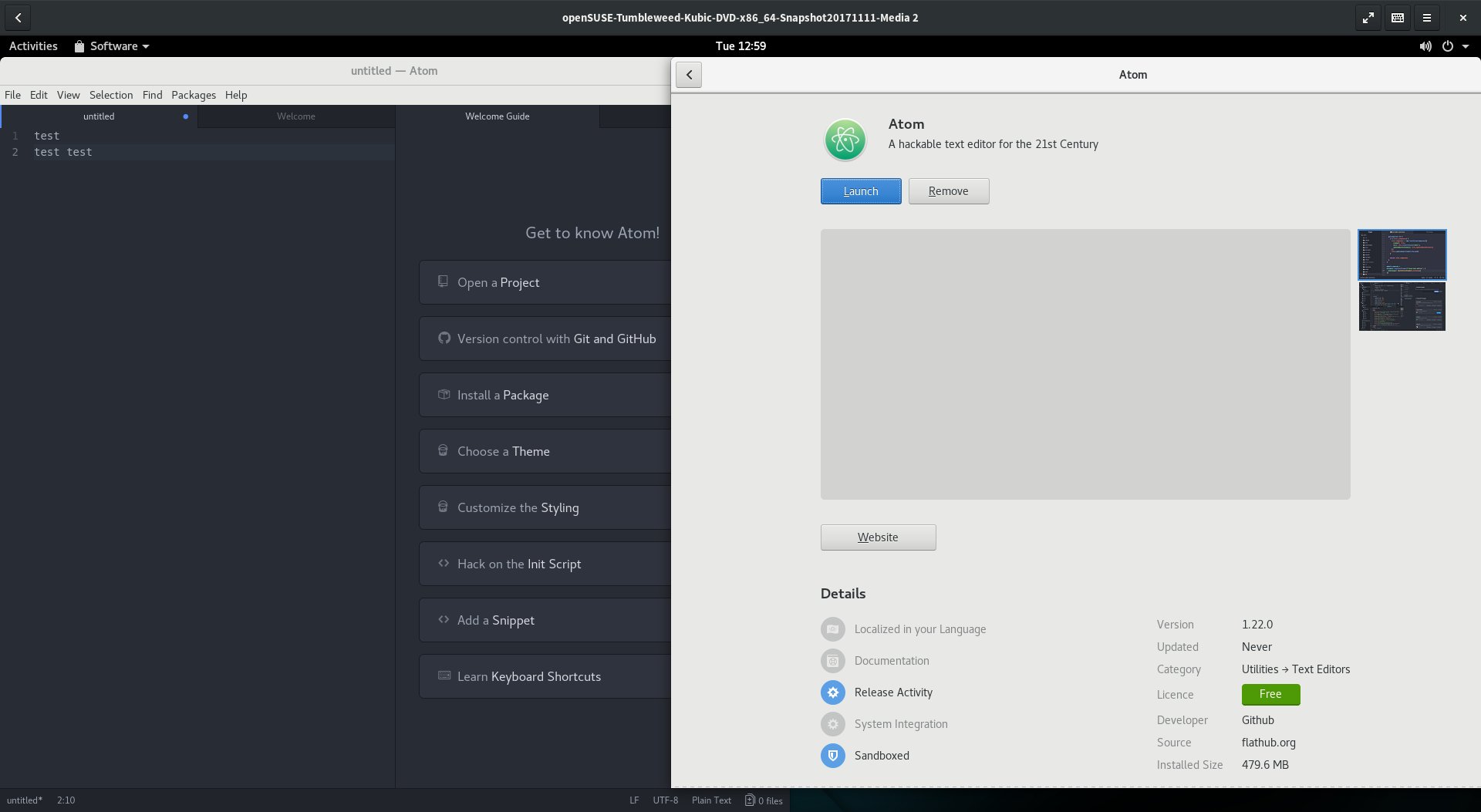
It was an interesting journey. On the Kubic side of things I quickly abandoned the idea of building everything ‘clean’ in OBS first and instead just took the existing Tumbleweed Kubic Media and manually hacking the resulting installation into something that I wanted.
Our support for transactional updates got a very good workout, being used and abused to install well over 1606 packages from Tumbleweed onto the Kubic host to provide a fully fledged desktop install.
It surprised me how little I had to modify, with minor tweaks to the btrfs subvolume configuration required to get gdm working. I learned alot about PackageKit and gnome-software getting it configured just the way I wanted.
By the end, my resulting prototype VM was so promising I repeated the process on my GPD Pocket. I’m now running a Kubic Desktop installation, with automated operating system updates, and if an update ever did go wrong would have seamless rollback to the exact state of the system root filesystem.
It was really nice to prove that, even though the project as a whole is still in a very early stage, Tumbleweed Kubic is a powerful flexible platform for hacking on and getting used to this new, transactional way of looking at an operating system and it’s software management.
With a little more time and polish, I’m supremely confident we could build this into a ‘grandmother-friendly’ openSUSE desktop operating system, where the user wouldn’t even need to know that such a thing as a ‘root account’ existed, but they would still benefit from the fully tested rolling nature of openSUSE Tumbleweed.
A journey into Flatpaks
A fancy desktop operating system is nothing without apps. And as this idea aimed to have a system where it’s users shouldn’t need to worry about doing something as root, I needed a solution that provided apps that could be installed and run reliably in userspace.
As openSUSE does not (yet) have support for isolated snaps (due to Canonicals AppArmor patches still not fully available in the upstream Kernel), that left AppImage and Flatpak for consideration as a source of these applications.
As AppImage has a pretty terrible user experience story, without any kind of standard ‘AppStore’ interface, requiring users download executables from random websites, then to chmod a+x a file in the commandline before executing said file, that ruled them out as an option for this project; Though it was nice to see an AppImage running first time on the first Kubic Desktop prototypes.
But as originally planned, Flatpak seemed to have the answers to everything I needed. With solid gnome-software integration I knew I could build something that would offer users all of the applications in Flathub. Despite my previous concerns of these technologies I had high hopes.
“Everything is possible if you think in Opportunities”
The slogan attributed to the international purveyor of furniture in flat-packed form, Ikea, is really appropriate for Flatpak.
After a few days of playing with Flatpaks, I’m starting to see the opportunities and possibilities. It was really nice to be able to easily install Atom, Signal, and more with ease, when due to issues like licenses & crazy build environment requirements we haven’t (yet) been able to offer that software as part of openSUSE Tumbleweed.
But the ecosystem as a whole is flawed, possibly broken, and is in no way a software delivery system I can put any faith in at the moment. Flatpaks like Audacity would totally fail to start, claiming not to be able to read configuration files that were clearly present on the system. Other Flatpaks like Gydl complained about a lack of network, which was clearly a fault of that specific application when others were streaming YouTube just fine. And applications like libreoffice are clearly advertised on Flathub, just to not appear in gnome-software due to missing metadata.
With so many failures on a relatively small software selection, Flathub really, desperately, need to impose quality controls on their repository and stop shipping broken packages. And when they do, as they are right now, they need to have a way of actually reporting bugs against those packages. It’s nice their website has a guide on how to report Legal or Security issues, but that’s no good if users can’t get the apps to work in the first place.
As I played around with apps I got the feeling more and more that applications needed much tinkering and tuning to be able to fully support the Flatpak-way of doing things, and I think that is going to hold the Flatpak ecosystem back, unless tools like gnome-builder somehow become the predominant tooling for application development on Linux.
I was also dreadfully dissapointed with the performance, with applications taking significantly longer to load on my GPD Pocket compared to the same app provided by openSUSE Tumbleweeds rpms. On faster machines I didn’t notice, but it really put a dent in my idea of using Flatpaks for ‘netbook’ style usecases.
So I see the potential there, but at the moment I’m left feeling it will be unrealised potential.
With all that said, I’d like to extend a huge thank you to the folks in #flatpak IRC on Freenode. They were very friendly, a huge help, and I do believe they will work hard to address these problems I bumped into. Who knows, I may even help them out, they certainly are a nice enough bunch that I feel obligated to do so no matter what happens to the “Kubic Desktop”.
Next Steps
As you will see from the instructions below, installing your own Kubic Desktop isn’t a trivial process at the moment. If I have time, or if others feel like moving this idea forward with me, we really need to look into the following:
- Polishing the Product & Image definitions in OBS for Kubic to remove as many of the installation steps below as possible. This would either mean extending the existing images & installation routine to support a Kubic desktop, or producing new images for a Kubic desktop.
- As part of the above, remove the conflicts that stop additional patterns being installed with the openSUSE-TW-Kubic product.
- Make libzypp-plugin-appdata a recommended dependency so that a system can run with only flatpaks showing in gnome-software instead of always showing the distribution packages also.
- To get a complete GNOME installation I chose to use openSUSE’s “gnome” pattern. Finding (or tuning) a GNOME pattern that just installs GNOME without any applications would be nicer, as right now they clutter the installation more than I envision for the idea.
- Fix the transactional-update tool to support all of zyppers additional commandline switches (like –from when using ‘dup’).
- Working with Flathub so they can setup openQA and start testing their Flatpaks before distributing them.
Install your own Kubic Desktop
These instructions aren’t for the faint of heart, but if you’d like to setup your own prototype Kubic desktop to play with you can follow the guide below
- Download the latest snapshot of Tumbleweed Kubic and boot the media, choosing the ‘Installation’ option
- Follow the installation wizard as normal, but customise the Partition configuration. You need a
btrfsroot filesystem with two additional subvolumes@/var/lib/gdmand@/var/lib/flatpak - Choose to install a
Plain System - Once installed and rebooted, login as root and run the following command;
zypper ar http://download.opensuse.org/tumbleweed/repo/oss tw-repo - Edit
/etc/zypp/zypp.confand setsolver.onlyRequires = false - Run
transactional-update pkg in patterns-gnome-gnome flatpak gsettings-backend-dconf - Accept any dependency warnings but choosing option
1and deinstalling the problematic packages - Once installed then reboot - transactional updates don’t apply until the next reboot.
- Once rebooted, run the following commands
-
systemctl set-default graphicalto set the system to boot into a graphical mode in the future -
useradd -m $USERNAMEwith$USERNAMEbeing whatever you want your useraccount to be called to create a user account -
passwd $USERNAMEto set the password for that user account -
rm -Rf /var/cache/app-infoto remove any trace of AppData from the official Tumbleweed repos to force gnome-software to rely only on Flatpak -
transactional-update shellto create an interactive shell that will let you modify the otherwise read-only root filesystem -
rpm -e --nodeps libzypp-plugin-appdatato remove the libzypp plugin that creates the app-info AppData -
zypper al libzypp-plugin-appdatato prevent anything installing that package again -
exitto exit the interactive shell and create a snapshot which will effectively be a custom ‘transactional update’ next time you reboot - then reboot to activate the above changes
-
- You should now be presented with standard gdm login screen with your
$USERNAMEaccount being offered, login - Before doing anything else, run the following commands to setup access to flatpak and tune gnome-software to run how we want it
gsettings set org.gnome.software install-bundles-system-wide falsegsettings set org.gnome.software allow-updates falsegsettings set org.gnome.software download-updates falsegsettings set org.gnome.software enable-software-sources falsegsettings set org.gnome.software first-run trueflatpak remote-add --user --if-not-exists flathub https://flathub.org/repo/flathub.flatpakrepo
- Now load up “Software” in GNOME and enjoy your experimental Kubic Desktop experience
- To update the system just run
transactional-update dupas root, or ideally put it in a cron job/systemd timer and forget about it and trust it to do everything automatically for you
If you are interested in working on this idea and taking it beyond the fun little experiments I’ve started here, please feel free to get in touch using the links at the bottom of this blog.
Thanks for reading!

OpenStack Summit Sydney - Slides and Videos

Hackweek 0x10 - Day 0
It’s here again, SUSE’s 16th Hackweek. A week where all of SUSE Engineering is given time away from their regular grind to work on whatever they want. And of course as this is SUSE we’re talking about, a lot of Hackweek involves the openSUSE Community also.
My Plans for Hackweek 0x10
This Hackweek I have a few small things I hope to spend a little bit of time on, and one huge exciting project I intend to throw most of my efforts in
In SUSE’s Nürnberg office there is a rather large, impressive interactive whiteboard/touchscreen for SUSE Engineering to use. However it’s currently running an inferior operating system, but seems to be reasonably hackable with easy access to the Intel-based embedded PC as part of the screen. So I’m keen to grab openSUSE Leap and make the big screen great again.
I also hear a few people will be looking at WeKan as a possible open alternative to Trello. As I’m not a huge fan of Trello, but interested in using Kanban Boards for organising a lot of what I’m doing, I plan on seeing how hard it is to get WeKan running on openSUSE if I have time; Which is unlikely, because..
The Big Idea - Kubic Desktop
These days I’m working on openSUSE Kubic. While the Project is still in its early stages, we have an exciting platform designed to run containers, with a rolling OS, safely and smoothly updated with atomic, transactional updates.
But my hackweek idea is to take these basic attributes of Kubic and repurpose them as a desktop. An Kubic Desktop should be able to provide a nice reliable GNOME environment, which can be reliably and automatically updated.
It could be a perfect way of leveraging all the existing technologies openSUSE has with Tumbleweed, OBS, and openQA to build a linux operating system which might be useful in “Chromebook”-like usecases.
The openSUSE distributions are sometimes criticised as not being suitable for “your grandmothers desktop”, which is often a fair critism and one that openSUSE shouldn’t be ashamed of - it’s not our communities core areas of interest. But a Kubic desktop could be an answer to leverage what we’re best at for that very scenario.
The only obvious problem is going to be “user space” applications. Installing packages is not a trivial task when the OS is locked down like an appliance. So for that, because I’ve already decided Kubic will have a GNOME desktop and it’s closely aligned with my favourite desktop, I’m going to try use Flatpak.

Why not?
Everybody should know that I am not a great fan of Flatpak or similar approaches to containerised application packaging.
But doing stuff that is weird, unusual, new, and sometimes counterinuative to everything you think is ‘right’ is exactly the sort of thing Hackweek is about.
So I’m excited about learning what I’m going to learn over these next days. Whether I learn to love Flatpak or find a new bunch of concerns about such technologies remains to be seen.
Will probably be a few days before I get around to the Flatpak part of the equation - first steps will be setting up a project in OBS and building basic OS images based on Tumbleweed’s GNOME LiveCD’s, but with Kubic’s read-only filesystem and transactional updates.
Expect updates to this blog once I have something fun to share.
Have a lot of fun!

Understanding Go panic output
My code has a bug. 😭
panic: runtime error: invalid memory address or nil pointer dereference
[signal SIGSEGV: segmentation violation code=0x1 addr=0x30 pc=0x751ba4]
goroutine 58 [running]:
github.com/joeshaw/example.UpdateResponse(0xad3c60, 0xc420257300, 0xc4201f4200, 0x16, 0x1, 0x0, 0x0, 0x0, 0x0, 0x0, ...)
        /go/src/github.com/joeshaw/example/resp.go:108 +0x144
github.com/joeshaw/example.PrefetchLoop(0xacfd60, 0xc420395480, 0x13a52453c000, 0xad3c60, 0xc420257300)
        /go/src/github.com/joeshaw/example/resp.go:82 +0xc00
created by main.runServer
        /go/src/github.com/joeshaw/example/cmd/server/server.go:100 +0x7e0
This panic is caused by dereferencing a nil pointer, as indicated by the first line of the output. These types of errors are much less common in Go than in other languages like C or Java thanks to Go’s idioms around error handling.
If a function could fail, the function must return an error as its
last return value. The caller should immediately check for errors
from that function.
// val is a pointer, err is an error interface value
val, err := somethingThatCouldFail()
if err != nil {
    // Deal with the error, probably pushing it up the call stack
    return err
}

// By convention, nearly all the time, val is guaranteed to not be
// nil here.
However, there must be a bug somewhere that is violating this implicit API contract.
Before I go any further, a caveat: this is architecture- and operating system-dependent stuff, and I am only running this on amd64 Linux and macOS systems. Other systems can and will do things differently.
Line two of the panic output gives information about the UNIX signal that triggered the panic:
[signal SIGSEGV: segmentation violation code=0x1 addr=0x30 pc=0x751ba4]
A segmentation fault (SIGSEGV) occurred because of the nil pointer
dereference. The code field maps to the UNIX siginfo.si_code
field, and a value of 0x1 is SEGV_MAPERR (“address not mapped to
object”) in Linux’s siginfo.h file.
addr maps to siginfo.si_addr and is 0x30, which isn’t a valid
memory address.
pc is the program counter, and we could use it to figure out where
the program crashed, but we conveniently don’t need to because a
goroutine trace follows.
goroutine 58 [running]:
github.com/joeshaw/example.UpdateResponse(0xad3c60, 0xc420257300, 0xc4201f4200, 0x16, 0x1, 0x0, 0x0, 0x0, 0x0, 0x0, ...)
        /go/src/github.com/joeshaw/example/resp.go:108 +0x144
github.com/joeshaw/example.PrefetchLoop(0xacfd60, 0xc420395480, 0x13a52453c000, 0xad3c60, 0xc420257300)
        /go/src/github.com/joeshaw/example/resp.go:82 +0xc00
created by main.runServer
        /go/src/github.com/joeshaw/example/cmd/server/server.go:100 +0x7e0
The deepest stack frame, the one where the panic happened, is listed
first. In this case, resp.go line 108.
The thing that catches my eye in this goroutine backtrace are the
arguments to the UpdateResponse and PrefetchLoop functions,
because the number doesn’t match up to the function signatures.
func UpdateResponse(c Client, id string, version int, resp *Response, data []byte) error
func PrefetchLoop(ctx context.Context, interval time.Duration, c Client)
UpdateResponse takes 5 arguments, but the panic shows that it takes
more than 10. PrefetchLoop takes 3, but the panic shows 5. What’s
going on?
To understand the argument values, we have to understand a little bit about the data structures underlying Go types. Russ Cox has two great blog posts on this, one on basic types, structs and pointers, strings, and slices and another on interfaces which describe how these are laid out in memory. Both posts are essential reading for Go programmers, but to summarize:
- Strings are two words (a pointer to string data and a length)
- Slices are three words (a pointer to a backing array, a length, and a capacity)
- Interfaces are two words (a pointer to the type and a pointer to the value)
When a panic happens, the arguments we see in the output include the “exploded” values of strings, slices, and interfaces. In addition, the return values of a function are added onto the end of the argument list.
To go back to our UpdateResponse function, the Client type is an
interface, which is 2 values. id is a string, which is 2 values (4
total). version is an int, 1 value (5). resp is a pointer, 1
value (6). data is a slice, 3 values (9). The error return value
is an interface, so add 2 more for a total of 11. The panic output
limits the number to 10, so the last value is truncated from the
output.
Here is an annotated UpdateResponse stack frame:
github.com/joeshaw/example.UpdateResponse(
    0xad3c60,      // c Client interface, type pointer
    0xc420257300,  // c Client interface, value pointer
    0xc4201f4200,  // id string, data pointer
    0x16,          // id string, length (0x16 = 22)
    0x1,           // version int (1)
    0x0,           // resp pointer (nil!)
    0x0,           // data slice, backing array pointer (nil)
    0x0,           // data slice, length (0)
    0x0,           // data slice, capacity (0)
    0x0,           // error interface (return value), type pointer
    ...            // truncated; would have been error interface value pointer
)
This helps confirm what the source suggested, which is that resp was
nil and being dereferenced.
Moving up one stack frame to PrefetchLoop: ctx context.Context is
an interface value, interval is a time.Duration (which is just an
int64), and Client again is an interface.
PrefetchLoop annotated:
github.com/joeshaw/example.PrefetchLoop(
    0xacfd60,       // ctx context.Context interface, type pointer
    0xc420395480,   // ctx context.Context interface, value pointer
    0x13a52453c000, // interval time.Duration (6h0m)
    0xad3c60,       // c Client interface, type pointer
    0xc420257300,   // c Client interface, value pointer
)
As I mentioned earlier, it should not have been possible for resp to
be nil, because that should only happen when the returned error is
not nil. The culprit was in code which was erroneously using the
github.com/pkg/errors Wrapf() function instead of Errorf().
// Function returns (*Response, []byte, error)

if resp.StatusCode != http.StatusOK {
    return nil, nil, errors.Wrapf(err, "got status code %d fetching response %s", resp.StatusCode, url)
}
Wrapf() returns nil if the error passed into it is nil. This
function erroneously returned nil, nil, nil when the HTTP status
code was not http.StatusOK, because a non-200 status code is not an
error and thus err was nil. Replacing the errors.Wrapf() call
with errors.Errorf() fixed the bug.
Understanding and contextualizing panic output can make tracking down errors much easier! Hopefully this information will come in handy for you in the future.
Thanks to Peter Teichman, Damian Gryski, and Travis Bischel who all helped me decode the panic output argument lists.
Update
From the Go 1.17 release notes:
The format of stack traces from the runtime (printed when an uncaught panic occurs, or when runtime.Stack is called) is improved. Previously, the function arguments were printed as hexadecimal words based on the memory layout. Now each argument in the source code is printed separately, separated by commas. Aggregate-typed (struct, array, string, slice, interface, and complex) arguments are delimited by curly braces. A caveat is that the value of an argument that only lives in a register and is not stored to memory may be inaccurate. Function return values (which were usually inaccurate) are no longer printed.
And from the 1.18 release notes:
Go 1.17 generally improved the formatting of arguments in stack traces, but could print inaccurate values for arguments passed in registers. This is improved in Go 1.18 by printing a question mark (
?) after each value that may be inaccurate.
A colleague recently had a crash similar to our example above. The relevant methods looked like this:
func (s *Service) GetCount(repo string) (count int64, errors []error)
func (s *Service) request(method string, url string, body []byte) (status int, response []byte, errors []error)
where s.GetCount(...) calls s.request(...).
The stack trace looked like this:
github.com/example/service.(*Service).request(0x0, {0x118368d?, 0xc000cd9b20?}, {0xc000588180?, 0x1?}, {0x0, 0x0, 0x0})
	/go/src/github.com/example/service/service.go:38 +0xdc
github.com/example/service.(*Service).GetCount(0xc000896700?, {0xc00084bed0?, 0x1ba03c0?})
	/go/src/github.com/example/service/service.go:69 +0xdc
You can see right away that the new output is a big improvement. The aggregated types (strings and slices in this example) are grouped together. Return values are omitted entirely.
Here it is again with my annotations:
github.com/example/service.(*Service).request(
    0x0,                          // *Service receiver, nil pointer (!)
    {0x118368d?, 0xc000cd9b20?},  // method string: pointer and length
    {0xc000588180?, 0x1?},        // url string: pointer and length
    {0x0, 0x0, 0x0}               // body []byte: pointer, length, capacity
)
	/go/src/github.com/example/service/service.go:38 +0xdc

github.com/example/service.(*Service).GetCount(
    0xc000896700?,                // *Service receiver, pointer
    {0xc00084bed0?, 0x1ba03c0?}   // repo string: pointer and length
)
	/go/src/github.com/example/service/service.go:69 +0xdc
Pretty clearly here you can see that the nil *Service receiver in the call to request is the problem. Something on line 38 is trying to dereference it and causing the crash.
But wait. GetCount calls request and its receiver is not nil (0x0). What’s going on?
The release notes above say that the stack trace could include “inaccurate values for arguments passed in registers” and signifies this by putting a question mark after such values.
GetCount does nothing with the receiver value other than passing it along to the request method. This means that when GetCount gets the receiver passed in as a register, it does not need to load it into RAM and we get the potentially inaccurate value in our stack trace.
request does do something with the value – dereferences it – requiring it to be loaded into RAM. That’s why the value is accurate in the request stack frame.

Dell Precision 5520 Touchpad; openSUSE TW and Leap with libinput
1) Make sure you remove all synaptics packages. There should be maybe 4 or 5 installed by default
# rpm -qa | grep synaptics
2) Make sure that you have libinput and friends installed (The following outputs are from TW)
# rpm -qa | grep libinput
libinput-udev-1.9.0-1.1.x86_64
libinput-tools-1.9.0-1.1.x86_64
libinput10-1.9.0-1.1.x86_64
libinput10-32bit-1.9.0-1.1.x86_64
xf86-input-libinput-0.26.0-1.1.x86_64
# rpm -qa | grep xinput
xinput-1.6.2-1.7.x86_64
# rpm -qa | grep xdotool
xdotool-2.2012+git.20130201.65cb0b1-7.2.x86_64
3) Execute the following if you don't have some of them installed.
# zypper in libinput-udev libinput-tools libinput10 libinput10-32bit
xf86-input-libinput xinput xdotool
Reboot!
4) Now your ready to setup some properties for your Touchpad. First lets find
out which ID is yours.
# xinput list | grep Touchpad
⎜ ↳ DLL07BF:01 06CB:7A13 Touchpad id=14 [slave pointer (2)]
On mine the id=14 from the output above. We can use this id to set some properties for the touchpad. There are 3 properties which make sense to me to have enabled in Linux.
Enabling of two-finger and three-finger clicking for the touchpad. This will allow you to use two-finger for left click and three-finger for middle mouse button actions in Linux such as paste. To enable this use the below command. Notice that I use the 14 which is the id from the previous command in the command options.
# xinput set-prop 14 "libinput Click Method Enabled" 0 1
Another one I like and some might not is the enablement of the natural scrolling ability. To enable this run the following command.
# xinput set-prop 14 "libinput Natural Scrolling Enabled" 1
I also found that my mouse was not moving quite as fast as I would have liked so I changed the pointer speed.
# xinput set-prop 14 "libinput Accel Speed" 1
Those 3 properties I really like to use. However there are quite a few others you can tweak and tune. Use the following command to get a full list of the properties available to the trackpad. Again makind sure to use your id in the command options.
# xinput list-props 14
If you really like the tapping options you can enable those. Yuk!
There is a small GUI utility you can install called lxinput which has some basic stuff, but not feature complete. Both Gnome and KDE are integrating the ability to use the libinput drivers for the touchpad and both are not feature complete yet. In KDE Plasma you can set the Accel Speed from your System Settings.
To enable some libinput persistence between reboots and sleep modes you can add the following to your xorg configuration.
Edit /etc/X11/xorg.conf.d/40-libinput.conf (This is a default file that's installed with openSUSE)
Modify the Input Class that's labeled with an identifier of "touchpad catchall" to look like the below. Notice I removed the Tapping Option
Section "InputClass"
Identifier "libinput touchpad catchall"
MatchIsTouchpad "on"
MatchDevicePath "/dev/input/event*"
MatchProduct "DLL07BF:01 06CB:7A13 Touchpad"
Driver "libinput"
Option "ClickMethod" "clickfinger"
Option "NaturalScrolling" "false"
Option "AccelSpeed" "1"
EndSection
References:
https://wayland.freedesktop.org/libinput/doc/latest/faq.html
man libinput 4
Enjoy!
Linux: личный опыт в этом году
Хочу поделиться своим опытом тестирования дистрибутивов Linux в медленно уходящем 2017 году. Напомню, что мой профиль использования — это классическое настольное применение, также известное как desktop computing. Если говорить конкретно, то свою тестовую машину я использую для интернет-сёрфинга, проигрывания медиа-контента, каталогизации фотографий, а также для написания, сканирования и печати документов. Существенный момент: я регулярно пишу обзоры новинок открытого ПО, которые вы можете читать в журнале Linux Format, поэтому для меня жизненно важно иметь возможность устанавливать самые новые программы. Если есть готовые бинарные сборки — хорошо, нет — не беда, я могу и сам собрать что угодно из Github.com.
С точки зрения «железа», использовалась следующая конфигурация:
- Intel Core i3 2105 с материнской платой DH67BL-B3;
- Встроенная графика Intel HD 3000 Graphics;
- 8 Гб ОЗУ (DDR3/1333)
- Intel SSD 120GB
В качестве подопытных операционных систем выступали интересующие меня дистрибутивы Linux: openSUSE 42.3, elementaryOS 0.4.1, Rosa Fresh R9, Mageia 6. Каждая из этих систем прожила в моём компьютере не менее 2 месяцев и оценивалась с точки зрения удобства, функциональности и эстетики. Ниже я поделюсь своими впечатлениями о каждой из них.
openSUSE 42.3
Данный дистрибутив имеет массу преимуществ для тех, кто по тем или иным причинам, предпочитает RPM-системы. Здесь есть очень удобный и надёжный инсталлятор от Suse Enterprise Linux (SLE) и довольно толковый центр управления YaST. Я сознательно выбрал более консервативную и стабильную версию Leap вместо всегда супер-свежей Tumbleweed по простой причине: в Leap я могу подключить дополнительные репозитории и обновить множество компонентов до самых свежих версий, получив на выходе нечто похожее на Tumbleweed. Но при этом, если что-то пойдёт не так, я всегда могу временно отключить такие репозитории и откатиться обратно. Не стоит забывать, что команда ‘zypper dup’ не столько обновляет пакеты, сколько приводит их в соответствие с текущим набором включённых репозиториев, то есть, её можно использовать и для даунгрейда (отката). Я установил новые версии для Qt5, KF5, KDE, KDE Extras, настроил себе более свежий компилятор GCC 7, перешёл на свежую версию ядра. У меня появилась самая новая версия рабочего стола KDE Plasma 5, которая автоматически обновлялась почти без моего участия. В openSUSE имеется отличная интеграция PackageKit и Zypper, поэтому для установки обновлений достаточно пару раз щёлкнуть мышью по значку в системном лотке. Даже пароль вводить не нужно!
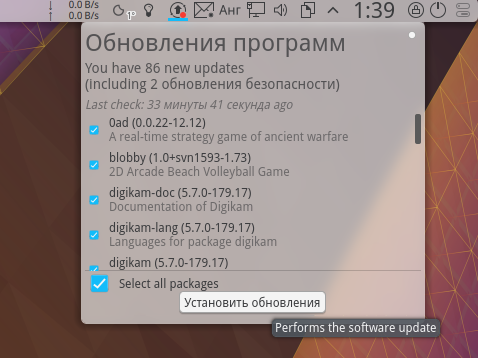
- Что и говорить, обновления в openSUSE ставить легко и приятно, однако за последствия никто не отвечает…
Однако, со временем стали вылезать недостатки такой системы: приверженность самым новым версиям вышла мне боком. То и дело после очередного обновления что-нибудь отваливалось или начинало работать не так. Либо Segmentation fault, либо частые падения самой оболочки Plasma (да, она всё ещё падает иногда!), либо временная потеря функциональности (Virtualbox может не работать с самым новым ядром). Проблемы можно обычно решить с помощью маневрирования с репозиториями, но со временем, опять же, дистрибутив превращается в гремучую смесь пакетов от разных поставщиков. Поддерживать стабильность вручную оказалось довольно трудозатратно. Всё таки, openSUSE Leap наиболее надёжен именно в своём изначальном виде, со стандартным набором репозиториев (плюс можно безболезненно использовать Packman), но тогда он теряет важную для меня особенность — свежесть пакетов. Оставаться на Qt 5.6 и GCC 4.8 для меня неприемлемо: я знаю дюжину проектов на Github, которые нельзя скомпилировать с этим устаревающим инструментарием.
Есть и ещё одна особенность проекта openSUSE, которая меня расстраивает. Дело в том, что инфраструктура проекта работает слишком уж нестабильно и непредсказуемо. По выходном где-то раз в месяц останавливается сервис software.opensuse.org, якобы на «плановые работы». Несколько раз я сталкивался с неработающим сервисом OBS и по будним дням – вместо страницы поиска пакетов вылетал Error 404. У openSUSE имеется два датацентра: один в Нюрнберге (Германия) и второй где-то в США. Стабильность работы обоих отражает общую картину с обеспечением качества (quality assurance, QA) в openSUSE – лично я не вижу ни стабильности, ни качества, но зато воочию наблюдаю постоянно прерывающийcя uptime.
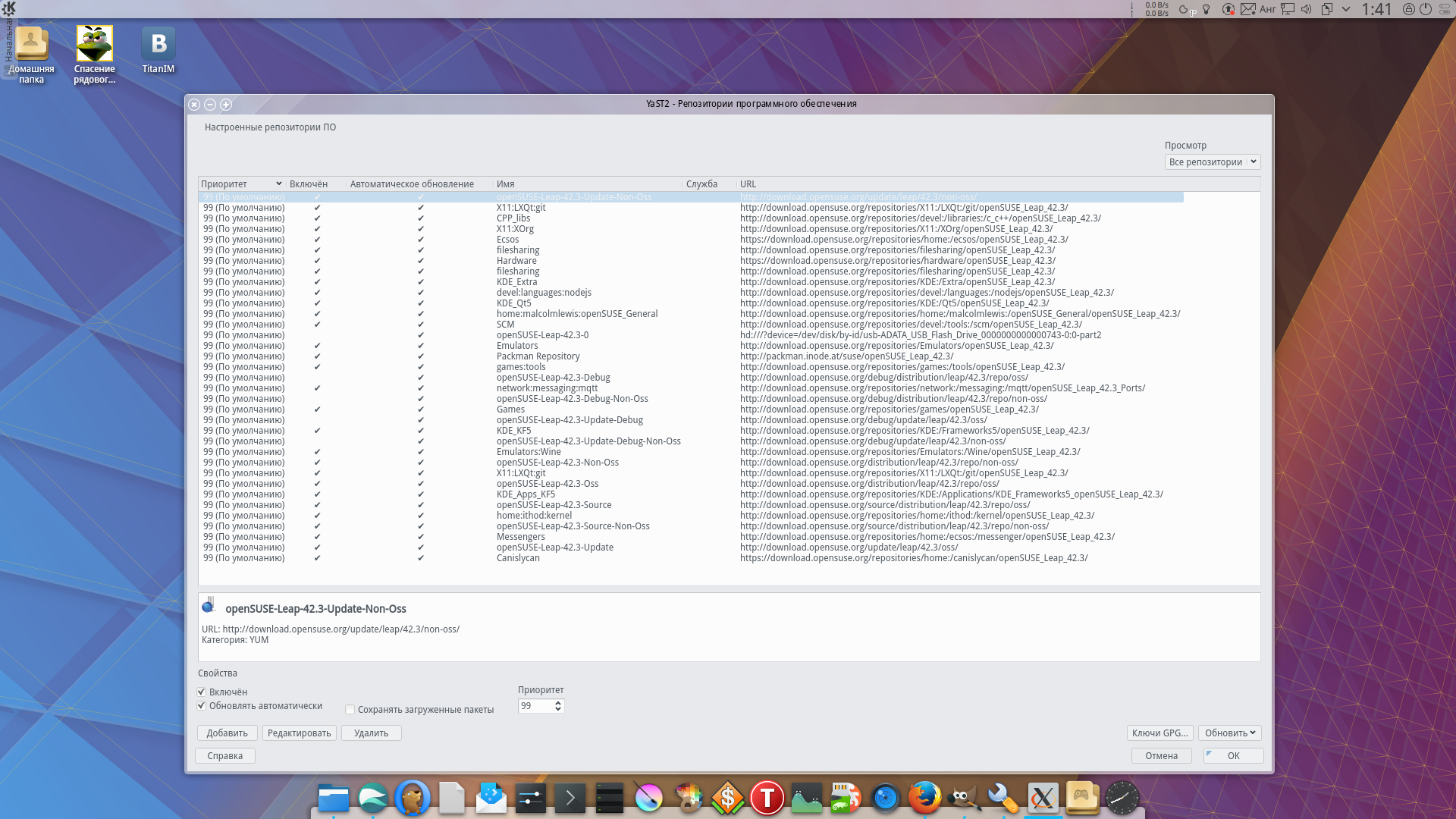
При «настольном» использовании система обрастает репозиториями как снежный ком. Ну, по крайней мере, у меня 
По этим причинам я в итоге принял решение перенести openSUSE 42.3 в виртуальную среду VirtualBox и использовать этот дистрибутив по мере надобности. Мне по-прежнему нравится очень удобная функция Zypper, позволяющая мигом установить все зависимости для сборки того или иного пакета:
sudo zypper --si d <package>
Пользовательская аудитория у openSUSE всё ещё значительная, и в частных репозиториях на OBS можно найти очень много интересных программ, которые уже кто-то успел собрать.
elementaryOS 0.4 «Loki»
Это один из самых популярных отпрысков Ubuntu. Система очень хорошо себя зарекомендовала у новичков в мире Linux, и вполне заслуженно, как мне кажется. Система elementaryOS 0.4 «Loki» основана на Ubuntu 16.04 LTS и отличается повышенной стабильностью, надёжностью и увеличенным сроком поддержки. Последнее особенно удобно: можно один раз установить Loki в качестве запасной ОС и вспомнить о ней пару лет спустя. После установки всех накопившихся обновлений с системой не случится ничего страшного, всё продолжит работать как часы. Вроде бы, ничего особенного, но многие другие Linux не переносят такого к себе отношения. Очень круто и удобно то, что elementaryOS полностью совместима с Ubuntu, а значит я могу подключить любой PPA-репозиторий для Ubuntu, и он гарантированно будет работать. Де-факто Ubuntu является наиболее распространённым дистрибутивом Linux в мире, и для него создано множество таких частных PPA-источников. Почти любая Linux-версия какой-либо программы имеется в уже собранном виде в чьём-то PPA, а значит мне не нужно возиться со сборкой исходников. Это удобно.
Одной из причин, почему я использую elementaryOS, а не саму Ubuntu, является рабочий стол Pantheon, который является оригинальной разработкой проекта elementary. Он основан на библиотеках GTK3 и Granite, и включает в себя отдельные элементы Gnome 3 (хотя их тут немного). Pantheon очень быстр и по своему поведению напоминает пресловутую macOS, как внешне, так и идеологически.
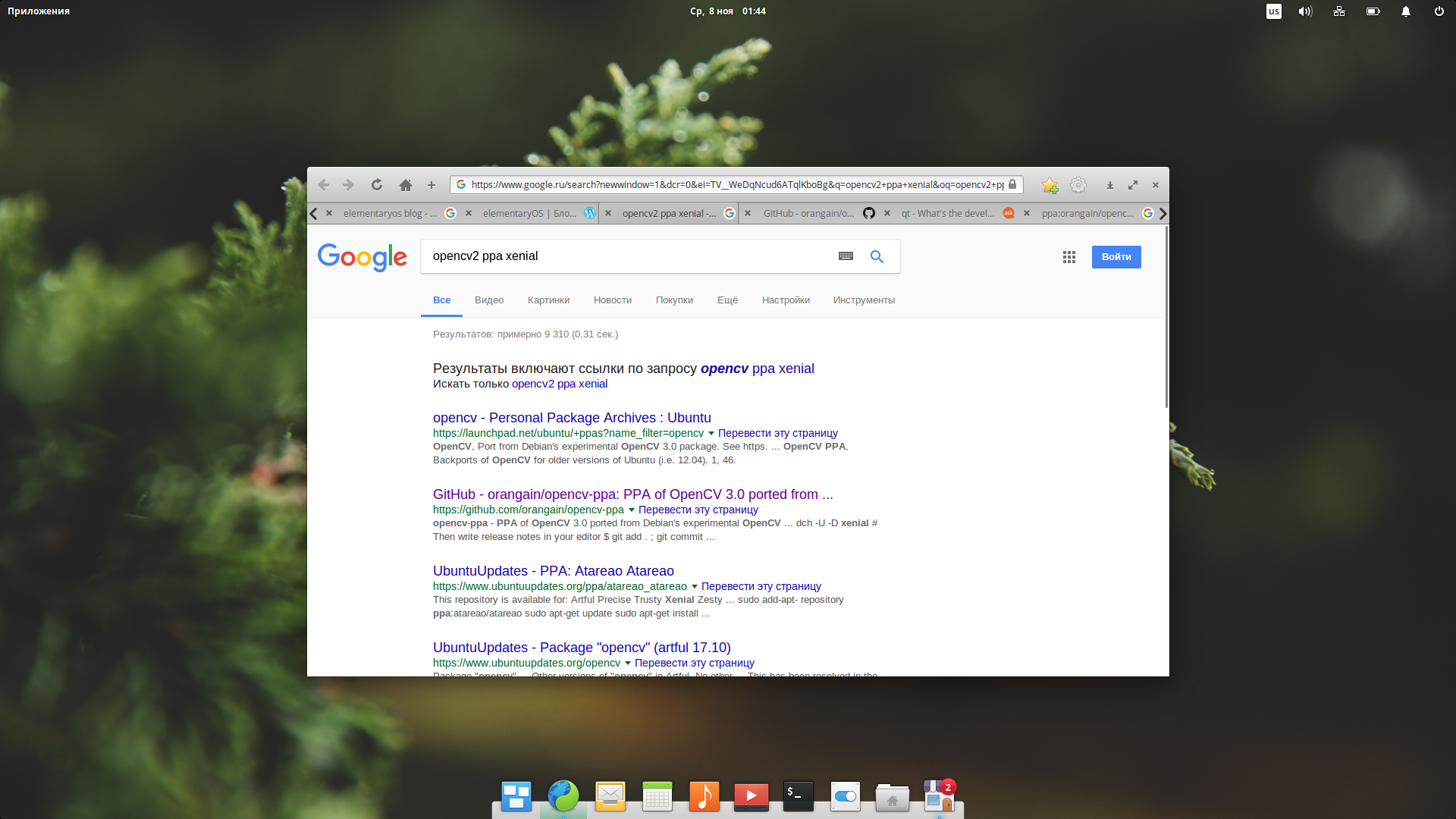
Вроде бы всё чисто и аккуратно, но активная вкладка в браузере очень слабо выделена, из-за чего работать неудобно. В дизайне elementaryOS не очень хорошо обстоят дела с контрастностью элементов.
Несмотря на то, что я не являюсь поклонником Debian и deb-дистрибутивов, наличие на компьютере elementaryOS для меня полезно, так как на свете существует некоторое число программ, которые очень легко установить в Ubuntu-подобных ОС, и очень трудно собрать где-либо ещё. Хороший пример: игра Machines vs. machines, которая опирается на QML-модули к Qt5, написанные в Canonical специально для Ubuntu. Это также относится к целому пласту программ, написанных в то время, когда в Canonical ещё делал ставку на Unity и Mir, и разрабатывал много специфических для Ubuntu компонентов. Другой пример – замечательный каталогизатор заметок Outwiker, который очень легко поставить из PPA и довольно муторно собирать вручную.
elementaryOS 0.4 могла бы быть идеальной настольной системой, но увы, она имеет свои недостатки, которые раскрываются после первых дней интенсивного использования. Во-первых, не все компоненты от Ubuntu 16.04 можно заменить более свежими версиями, и если программа требует самую новую GTK3, то мне гораздо проще накатить новейшую Fedora и собрать всё там, вместо ломания стабильной, но устаревшей GTK3 в elementaryOS. Во-вторых, кажущееся удобство рабочего окружения оборачивается совершенно дикими проблемами при каждодневной работе. Копирование файлов в Pantheon-files, каталогизация фотографий штатным приложением, веб-сёрфинг в Midori и Epiphany (Gnome Web) – всё это очень неудобно. Мало функций, мало настроек, невозможно что-либо изменить и перенастроить. Дополнительное наблюдение, которое, впрочем, относится не столько к elementaryOS 0.4, сколько ко всем рабочим окружениям на GTK3 – это крайне скудная и ограниченная функциональность прикладных программ. Я уже писал заметку о возмутительно убогом индикаторе погоды от проекта elementary, но с остальными приложениями из нового elementary AppCenter ситуация та же. Когда я подбираю свободные приложения для своей рубрики в журнале, я всегда отмечаю убожество и ограниченность программ на GTK3. Почти все они примитивны до безобразия, и при том часто ещё и нестабильно работают. Напротив, самые лучшие, развитые и функциональные приложения часто написаны на C++ и имеют интерфейс на Qt. Такое вот наблюдение
Наконец, я отмечаю всё возрастающую жадность разработчиков elementaryOS в отношение пользовательских донатов. Принцип Pay what you want – пример отвратительной жадности и истончающейся связи этих ребят с реальностью. Они заставляют ничем не виноватых людей чувствовать себя нищебродами каждый раз когда требуется скачать из AppCenter «условно-бесплатную» программу (с лицензией GPLv3, между прочим). Разумеется, это вовсе не означает что весь дистрибутив Loki 0.4 из-за этого плох.
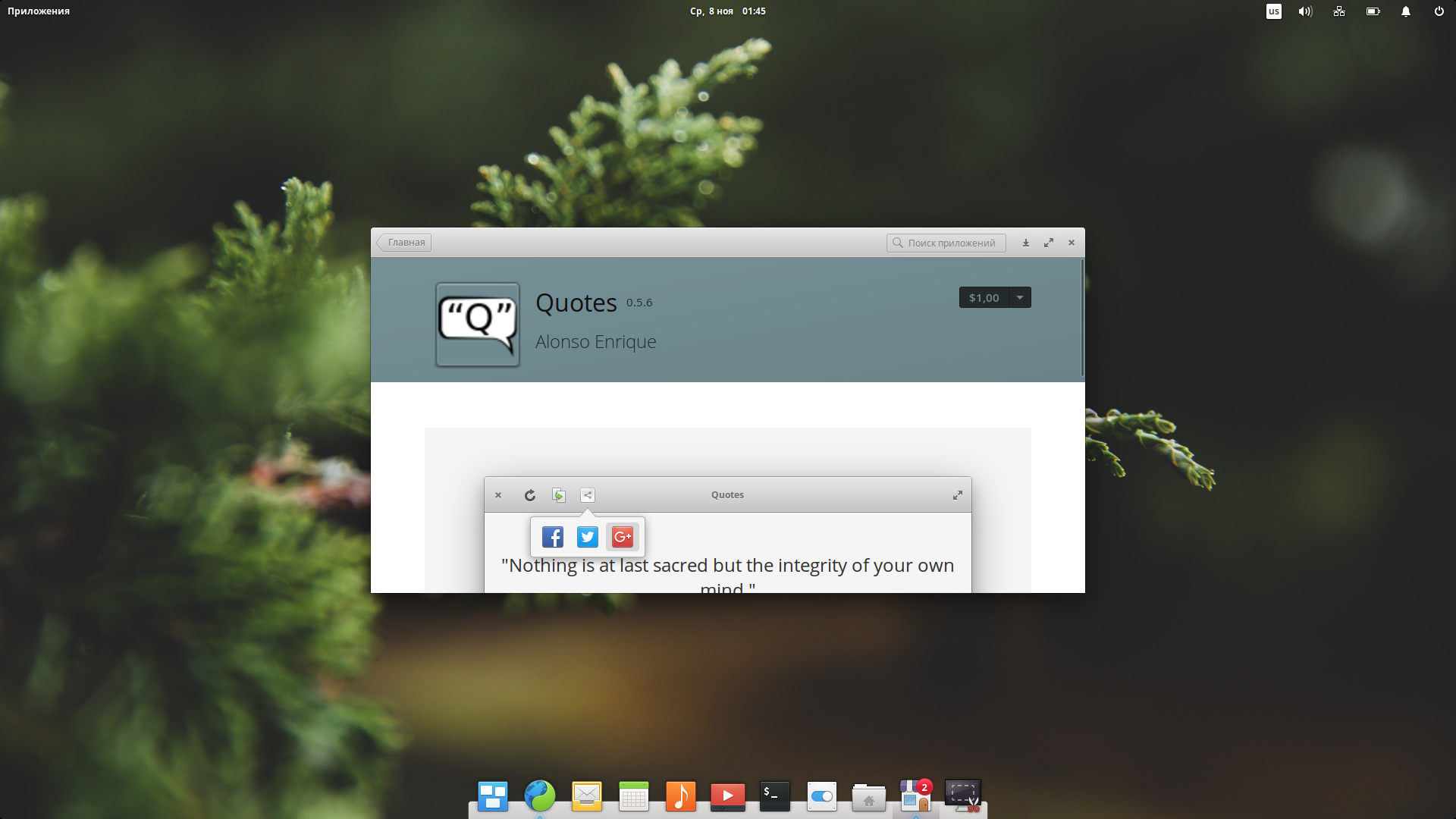
Мы напишем недопрограмму на Vala и GTK3, а вы нам дадите немного денег. Видимо, в мире хипстеров растёт напряжение из-за недостатка донатов…
В итоге, elementaryOS живёт у меня на запасной разделе моего SSD и используется время от времени, в зависимости от задач и настроения.
Rosa Fresh R9
Мои отношения с этим российским дистрибутивом начались в 2012 году, когда в мае проект Rosalab презентовал версию Rosa Marathon. Этот релиз планировали поддерживать и обновлять аж 5 лет, что являлось прямым ответом на Ubuntu 12.04 LTS от британской Canonical. Увы, история Rosa Linux продолжила своеобразное «хождение по мукам» своего прародителя – французской Mandriva Linux. В 2011-2013 годах Rosa имела мощную финансовую подпитку от фонда NGI, организованным бывшим министром связи РФ Леонидом Рейманом. У компании имелся шикарный офис в Сколково и большой штат сотрудников. Именно в это время под руководством UX-дизайнера Кирилла Монахова был создан прекрасный набор фирменных значков Rosa и куча интересных модификаций для KDE. Многое из этого используется в дистрибутиве до сих пор.

Отличная фирменная тема значков — это именно то, что меня всегда привлекало во внешнем виде Rosa Linux
Любопытно, что «тучные» годы Rosa Lab совпали с волной неистовой критики дистрибутива со стороны анонимусов и прочих человекоподобных с сайта Linux.org.ru. Дистрибутив ненавидели за то, что под него якобы попилили неисчислимые суммы бюджетных денег, а также за то, что он русский, а всё русское по определению толковым быть не может. Время показало, что оба обвинения были напрасными. С некоторых пор Rosa Linux существует под крылом НТЦ ИТ «Роса», имеет очень скромный штат сотрудников (не знаю, сколько их там точно, но вряд ли больше 10-15 человек) и в основном развивается за счёт образовавшегося сообщества. Интересно, что в наши дни у дистрибутива вполне неплохая репутация у Интернет-пользователей, никто Росу больше не ненавидит, но зато и будущее дистрибутива немного туманно: лично я боюсь, что проект может в любой момент умереть, и сообщество просто не справится с его поддержкой (например, кто-то должен оплачивать размещение сборочной среды ABF в датацентре).
После Rosa Marathon стартовала проект Rosa Fresh – версия дистрибутива с полускользящим режимом поддержки и обновления. «Полу-» означает, что в рамках базовой платформы у вас есть полноценная роллинг версия, а для перехода между платформами всё же рекомендуется устанавливать систему с нуля. Были выпущены две базовых платформы: 2014.1 и 2016.1, последняя является актуальной на данный момент.
Итак, какими особенностями обладает Rosa Fresh R9, основанная на платформе 2016.1?
- Интеграцией дополнительных инструментов настройки (drak-приложений, унаследованных от Mandriva) в стандартный центр настройки KDE Plasma. Для сторонних программ сделаны соответствующие KCM-обёртки;
- Свежими версиями рабочих окружений и прикладных программ. Версии пакетов в Rosa могут немного отставать от upstream, но зато в дистрибутиве организовано более толковое и тщательное тестирование новых функций. Если новая версия Plasma 5 несёт в себе регрессии и новые ошибки, пользователи Rosa получат её позднее, когда ошибки будут исправлены в корректирующих минорных релизах. Это не очень удобно для тех кому нужен bleeding edge (таким лучше подойдёт Manjaro или тот же Tumbleweed), но зато обеспечивает отличную стабильность системы. Однажды установленная Rosa Fresh может работать годами без сбоев;
- Наличием огромного количества дополнительного ПО в репозитории Contrib. Стандартная поставка Rosa уже включает задействованный репозиторий Contrib, который по своему «богатству» не уступает, а иногда и превосходит знаменитый AUR от проекта Arch Linux. Я говорю сейчас не о формальном количестве пакетов, а о наличии всяких редких штук, вроде VoltAir, OilWar, Softmaker Freeoffice, которые сложно найти где-то ещё в готовом виде. В отличие от россыпи PPA-репозиториев в Ubuntu или частных OBS в openSUSE, содержимое Contrib централизованно пересобирается и тестируется средствами сборочной фермы ABF, что положительно сказывается на стабильности программ;

Хотите поиграть в эту игру? Ставьте Rosa Fresh!
- Возможностью скачать свежий промежуточный образ системы вместо того, чтобы накатывать огромный пласт обновлений поверх оригинального релизного образа. Это не полноценные nightly builds, но очень близко к ним. Это именно то, чего мне так не хватает в других дистрибутивах, особенно когда под рукой нет быстрого безлимитного Интернета (бывает и такое!);
- Наличием дружного и адекватного сообщества на официальном форуме проекта. Активность там умеренная, и, к примеру, сообщество Ubuntu будет гораздо многочисленнее и более разговорчивым, однако форум Росы гораздо толковее, чем форум openSUSE, и бесконечно лучше того, что происходит в русском сообществе elementaryOS (напомню: ребята там зачем-то специально забросили свой форум и переместились в Telegram-канал, где быстро скатились в привычный для телеграма шлак).
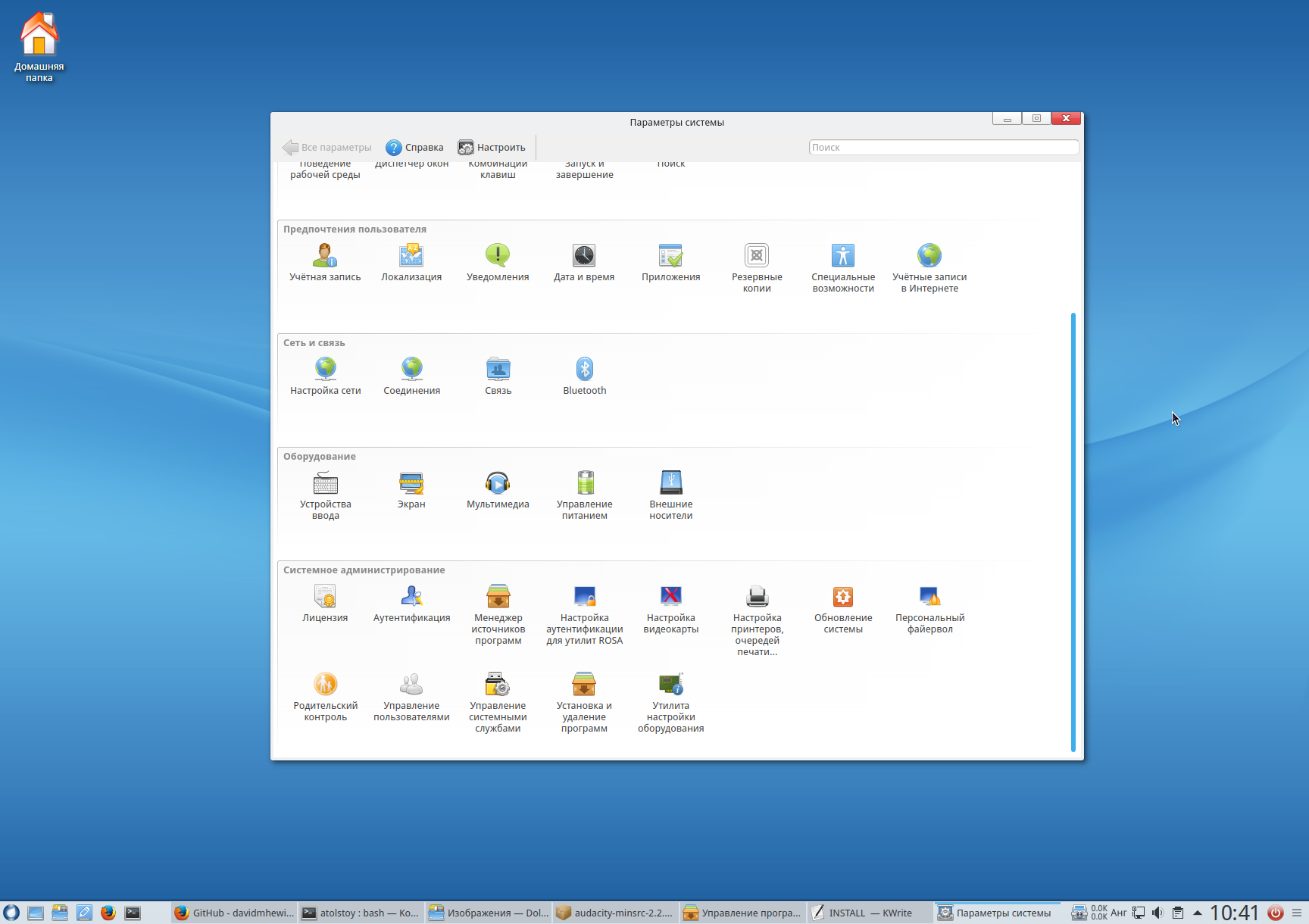
В разделе «Системное администрирование» содержатся инструменты, которые в других дистрибутивах разбросаны где попало.
В Росе довольно удобно заниматься сборкой программ из исходного кода, так как, с одной стороны, у нас есть здесь практически все инструменты и библиотеки для сборки (актуальных версий), а с другой, имеется довольной развитый инструментарий URPM, который содержит все неоходимые мне функции. Например, аналогом “zypper –si d” здесь выступает “urpmi –buildrequires”, а вместо “zypper dup” можно использовать “urpm-reposync”.
Разумеется, у Росы имеются и недостатки. Помимо неустойчивого положения дистрибутива и непонятных перспектив (а точнее – молчания со стороны НТЦ ИТ «Роса»), я бы отметил довольно архаичный инсталлятор и заброшенность прежних разработок (например, проигрыватель Rosa Media Player больше не развивается). Но в реальной эксплуатации это всё мелочи.
Rosa R9 является сейчас моей основной системой, и она меня полностью устраивает. Мне нравится то, что инфраструктура сборки этого дистрибутива находится на территории России, и помимо моей личной позиции, тут есть и практическая сторона: никакой тропический ураган или санкции США на реэкспорт ПО не могут повлиять на доступность Росы. Если вопрос с «американскими сервисами» был чисто политическим и никак не отразился в итоге на доступе к ним в РФ, то в конце августа этого года я лично столкнулся с тем, что моя Russian Fedora Remix 26 (какая ирония!) не могла достучаться до списка зеркал именно тогда, когда мне срочно нужно было сделать “sudo dnf update” – в это время в городке Ралейф бушевал ураган «Харви», который на несколько часов обесточил датацентр Red Hat. После этого я задумался: хочу ли я, чтобы мою работу с Linux определяли ураганы в стране вероятного противника? 
Mageia 6
Напоследок напишу немного о Mageia Linux. Это ещё один потомок почившей Mandriva Linux и в некотором смысле конкурент Rosa Linux. Я никогда особо интенсивно не использовал Mageia, так как в данном дистрибутиве исторически всегда наблюдались разброд, шатания и срывы сроков. Но я добросовестно прожил некоторое время с Mageia 6, так как в ней имеется портированный из Fedora пакетный менеджер DNF. С моей точки зрения, DNF является более перспективной технологией, чем URPM, и мне очень жаль, что в Росе пока нет DNF. Я пробовал портировать его самостоятельно, но это оказалось трудным заданием, и пока что я застрял где-то на сборке библиотеки Hawkey. В общем, я снимаю шляпу перед разработчиками Mageia за то, что они проделали отличную работу. Более того, в Mageia имеется графический интерфейс для DNF под названием Dnfdragora. Эта программа использует libYui и может интегрироваться с GTK3, Qt5 и ncurses. Такие штуки вызывают у меня зависть и восхищение!
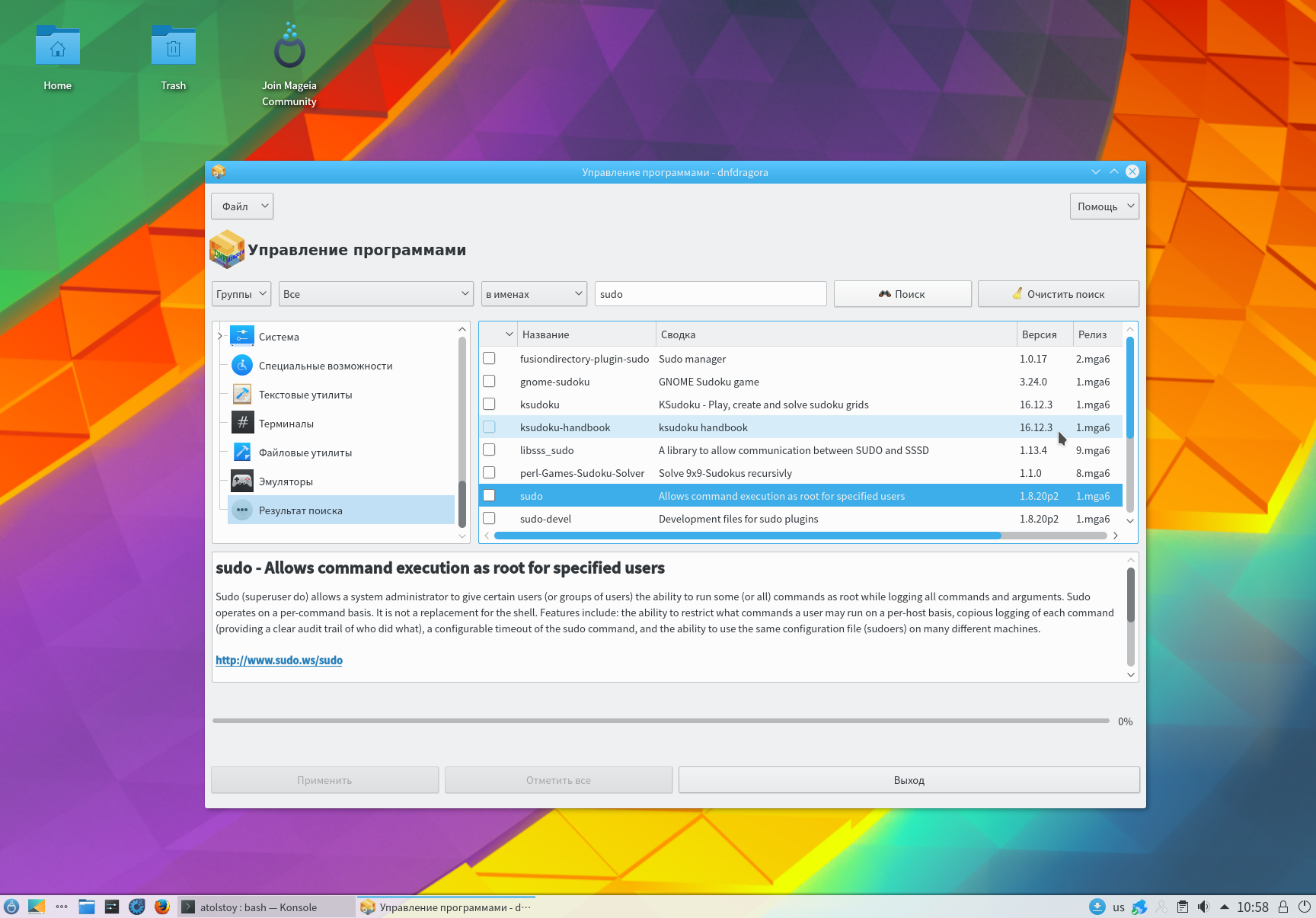
Современный и быстрый менеджер пакетов, плюс отличный интерфейс к нему — это, безусловно, сильный ход разработчиков Mageia.
Что касается самого дистрибутива, то для начала я советую прочитать обзор от Dedoimedo. Сразу скажу, что с выводами этого уважаемого автора с согласен лишь отчасти. В принципе, Mageia 6 вполне можно использовать в качестве основной системы, особенно если вам нужен проприетарный драйвер Nvidia, однако я легко могу перечислить и недостатки данного дистрибутива:
- Крайне скудное наполнение стандартных репозиториев (и небогатый выбор сторонних). Я уже как-то привык, что QtCurve, Kvantum, Cool Retro Term можно поставить сразу из репозиториев в Росе. В Магее так нельзя, увы;
- Старые версии программ. Версия с Plasma 5 использует устаревший набор KDE Applications 16.12, которому скоро стукнет год. Остальные программы обновляются тоже крайне избирательно;
- Странная приверженность к неудачным пережиткам Mandriva, например к Netapplet. Чтобы понять всю ущербность Netapplet по сравнению с NetworkManager (стандарт в большинстве другим дистрибутивов Linux), достаточно сравнить поведение Mageia и Rosa в VirtualBox: если на хосте меняются сетевые настройки, то NetworkManager в гостевой системе заметит это и автоматически перенастроится, а NetApplet в Mageia просто потеряет сеть до тех пор пока вы не сделаете “# service network restart”. Кстати, в Mageia почему-то нет sudo в стандартной поставке;
- Довольно много багов. Например, смена языка и системной локали удивительным образом не влияет на некоторые программы. И таких мелочей в системе хватает.
В общем, если бы не DNF, то Mageia 6 вообще не стоило бы рассматривать.
В итоге, опыт использования подсказывает мне, что среди настольных дистрибутивов наиболее сбалансированным вариантом является Rosa R9 (а скоро уже выйдет и R10). Если вы по какой-то причине не любите Plasma 5, то можно использовать отдельную редакцию Росы с рабочим столом Gnome 3. В зависимости от вкуса, предпочтений и привычек вполне достойно установить Ubuntu 16.04 или elementaryOS 0.4, но использовать openSUSE Leap или Mageia скорее всего не стоит: количество ошибок и трудностей со временем приведёт к разочарованию.
Спасибо, что дочитали до конца. Подписывайтесь, ставьте лайки, и всё такое…
openSUSE Asia Summit 2017 Tokyo Report
openSUSE Asia Summit was over 2 weeks ago, but i can still feel the euphoria of the summit. It’s unforgettable for me. I am one of the people who interested when Dr. Takeyama-san announcing the next Asia Summit will be held in Japan. I think i should go there. Yeah, i should go abroad!
So, i prepared all of i needed for the summit after it’s announced. I started to make a passport, visa, book a ticket, and ask for permission from my boss  and the most important is the material of my talk. Last years, i have specified my talk is “Using Active Directory for Single Sign-On Login using openSUSE” for openSUSE Asia Summit Japan. but in the middle of 2017. I think docker still booming at the time and so many Japan Engineers interested with docker. So, i decided to make a 2 proposal those are “Active Directory” and about “Docker Registry“.
I am so happy when the papers for Asia Summit announced, two of my proposal are got a high score, but i must choose one of the proposals. So, i decided to choose a Docker Registry (Portus) as My Proposal, and i bring a “Have Fun Claim Control Your Docker Images with Portus“.
Before the summit, i tried to bring my talk for the summit on openSUSE Release Party 42.3 in Bojong. you can see the report here: https://glibogor.or.id/pesta-rilis-opensuse-42-3/. I tried to improve my presentation for the summit in order to not disappoint the audience or committee.
Departure
And the time goes on approaching Summit. I went to Japan on October 19th. I just work half a day in PT. Excellent Infotama Kreasindo. Ask for advice from boss Vavai and said a goodbye to my friends in the office. After that, i go to home to take my luggage and go to the airport with my special people using Damri (bus to the airport in Indonesia) :-D.
This is my first international speech and journey. Last year, in openSUSE Asia Summit 2016, Yogyakarta. I just become a volunteer and this year, I tried to encourage myself to be a speaker in openSUSE Asia Summit 2017 and go abroad.
I have the same flight with my friends from openSUSE Indonesia. Kakek Yan Arief, Pak Andi Sugandi, Tonny Sabastian and Umul using GA874, it’s take off at 23.35 WIT and arrive in Tokyo on 08.35. It’s faster 2 hours than Indonesia. I was worried about the Typhoon. But luckily, my flight went well and came in Tokyo on time. :-).

Arrived at Tokyo, Yeay!
After arriving at Haneda International Airport, i bought a Pasmo Card for the Accessing Tokyo train, it’s very simple than bought single trip ticket :-D. It’s spending 2000¥. 500¥ for deposit and 1500¥ for balance. Then, i went to the Airbnb House with Umul to joins with my friends from Indonesia who came first from us in near of Hachimanyama Station.
October 20th: Speaker Party!
After arriving at the guest house in near of Hachimanyama Station, I and Umul didn’t have to take a rest because my friends invite me went to Fujiko. F. Fujio Museum and after it, we went straight to the speaker party. So, with a sleepy face, i and Umul go to the museum by train, exit at Noborito station and Walk about 20 minutes to get to the destination. Maybe in Indonesia, i give up because the weather is so hot haha :D.
For some reason, i didn’t feel tired when walking about 20 minutes. The weather in Japan is good and it’s a heaven for pedestrian, i really love it!
After walking about 20 Minutes. Finally, I and my friends arrived at the Museum until 04.00 PM. We really enjoy looking around at the museum. In the main hall we didn’t have to take a picture but in the upstairs, we take a many photos (Indonesian Things).

Finally, i can take a photo one of my favorite cartoon characters, Doraemon!
Okay, after having a lot of fun at the museum. We went to the speaker party. Yeah, this is the first moment we met each other before we take a summit party tomorrow. We went to the UEC by train from Noborito Station and exit in the Chofu Station. It takes about 1 hour.
Evidently, we got ahead of the others (exclude committee).At the party, we have a lot of fun again. Enjoying the food, talk with each other from another country. This is a rare moment i can’t get on Indonesia and it’s improving my English.
I met an another Indonesia speakers, Mr. Edwin, and Estu and i met Dr. Takeyama-san, Hato-chan, Mrs. Sunny, Ben Chou, Max Lin, and Zhao Qiang who also joining last openSUSE Asia Summit on Yogyakarta. I met many great people here. I also met Richard Brown (Chairman of openSUSE), Ludwig Nussel, Andreas, Ana and many other from SUSE/openSUSE and i met with LibreOffice people, Naruhiko Ogasawara, Shinju Enoki, Mohamed Trabelsi, Aschalew Arega and etc. What’s a great moment!
After this, i ask to Dr. Takeyama-san to take a picture together before we return to the lodge :

openSUSE Asia Summit Speakers at the Party
After this, finally. I can take a rest for tomorrow at the lodging. Tomorrow will be a big day for me, i will present my talk :-).
October 21th: openSUSE Asia Summit Day 1
The first-day summit is the day where I will present my talk. I arrived at UEC on 09.00 AM then watch an opening for openSUSE Asia Summit by Dr. Takeyama-san. My talk present on 02.30 PM. At the day i feel anxious, nervous and much more. I worried about my English because it is not good :-D. After lunch, finally, i present my talk and…
Oh my god, Richard Brown attend to my class and I’m really nervous hahaha. Seriously!
Watching Muhammad Dhenandi Putra from Indonesia talking about Docker and Portus at @openSUSE Asia pic.twitter.com/Af9LD5AKkj
— Richard Brown (@sysrich) October 21, 2017
In the QA sessions, i have a question from Richard about Kubic and Sakana Max about bug and portus installation.
I have prepared a gift (openSUSE-ID Tshirt) for the lucky one who asked on my talk. But the size doesn’t match with them :-D. Finally, Youngbin Han from Korea ask me and he got limited openSUSE ID Tshirt. But, the size also doesn’t match with him, but he will give it to his friend.

Youngbin Han from Korea
Thank you, god. I have completed my session :-). I realized my English still not good. But, i will enhance it for the next openSUSE Asia Summit :-).
After my session, i go to Richard Brown. We talk about openSUSE and Indonesia. It’s an honor for me can meet and speak with openSUSE Chairman. He’s a good man, i really enjoy speaks with him, and we take a photo and selfie together :D.

Photo Session with Richard Brown after QA Session
After this, i went to another class to take a photo for documentation. i also attend to the great session, i attending to Om Edwin session, Mrs. Sunny. This is my favorite session because it’s present about how we can contribute in open source. Those are enhancing my spirit to contribute :-).

How To Encourage Community by Edwin Zakaria

Open Source is an option of life by Mrs. Sunny
Our fun is not stopped here, after Summit Day 1, we have a party again in UEC restaurant until 9 PM. And we back to the lodge at 11 PM.

Summit Day 1 Party
October 22th: openSUSE Asia Summit Day 2
At the Second days of the summit, i feel peaceful because i have complete my talk. This day, i walking in the around area of openSUSE Asia Summit to take a photo and documentation. I also come to learn about Libre Office and openSUSE. i attending Sendy, Kake Yan, Pak Moko, Pak Ary, Simon Lees, Mrs. Ana and etc.

Photo Session on openSUSE Asia Summit 2017
Yeah, finally i hold geeko on photo session :D.
October 23th: openSUSE Asia Summit One Day Tour
This is the third days of the summit, i and another speaker and committee take a one day tour. We met at Hinode Pier and go together to Asakusa (Sensoji-Temple) by Train.

Strong wind make our hair fly
After it, we lunch in Naritaya Halal Ramen and go again to Tokyo Skytree. This is the higher place i ever visit, i can see Tokyo from 350 m high. Oh my god.

Tokyoooooo!

Take a photo on Skytree Deck
After Skytree, we move to Akihabara using Bus and take the train from Ueno Station. We arrived at Akihabara at 7:00 PM. And said goodbye to each other.

Thank You to …
I have a lot of fun, i can’t describe it. I really happy can be a part of openSUSE Asia Summit. Thank you to openSUSE for Travel Support Program, openSUSE Asia Summit committee for great hard works, all of you do a great job, really appreciated. Om Edwin Zakaria to make it happens, Pak Boss Vavai for great advice and help. My Parents because always supporting me. PT Excellent Infotama Kreasindo, openSUSE Indonesia, GLiB, and much more. You’re awesome.
Credits
Photo from openSUSE Asia Summit 2017 Flickr Group: Thanks to great all photographers, Om Edwin, Kakek Yan Arief, Takeyama-san, Hisa_X, Tonny, Richard Brown, and etc.
The post openSUSE Asia Summit 2017 Tokyo Report appeared first on dhenandi.com.

EXCLUSIVE: Texas Massacre Hero, Stephen Willeford, Describes Stopping Gunman
To donate to the Sutherland Springs Baptist Church to help them recover from this tragedy, check out this GoFundMe campaign.

Compilation notifications in Emacs
Here is a little Emacs Lisp snippet that I've started using. It makes
Emacs pop up a desktop-wide notification when a compilation finishes,
i.e. after "M-x compile" is done. Let's see if that keeps me from
wasting time in the web when I launch a compilation.
(setq compilation-finish-functions
      (append compilation-finish-functions
          '(fmq-compilation-finish)))

(defun fmq-compilation-finish (buffer status)
  (call-process "notify-send" nil nil nil
        "-t" "0"
        "-i" "emacs"
        "Compilation finished in Emacs"
        status))
