
 Member
 federico1
GUADEC 2017 presentation
During GUADEC this year I gave a presentation called Replacing C library code with Rust: what I learned with librsvg. This is the PDF file; be sure to scroll past the full-page presentation pages until you reach the speaker's notes, especially for the code sections!

You can also get the ODP file for the presentation. This is released under a CC-BY-SA license.
For the presentation, my daughter Luciana made some drawings of Ferris, the Rust mascot, also released under the same license:


There can never be enough testing
As you may already know (if you don’t, please check these older posts) openQA, the automated testing system used by openSUSE runs daily tests on the latest KDE software from git. It works well and uncovered a number of bugs. However, it only tested X11. With Wayland starting to become usable, and some developers even switching to Wayland full time, it was a notable shortcoming. Until now.
Why would openQA not run on Wayland? The reason lies in the video driver. openQA runs its tests in a virtual machine (KVM) which uses the “cirrus” virtual hardware for video display. This virtualized video card does not expose an interface capable of interfacing with the kernel’s Direct Rendering Manager (DRM), which is required by kwin_wayland, causing a crash. To fix it, “virtio”, which presents a way for the guest OS to properly interface with the host’s hardware, is needed. Virtio can be used to emulate many parts of the VM’s hardware, including the video card. That would mean a working DRM interface, and a working Wayland session!
However, openQA tests did not handle the case where virtio was needed. This is where one of our previously-sung heroes, Fabian Vogt, comes into play. He added support for running Wayland tests in openQA using virtio. This means now that the Argon and Krypton live images now undergo an additional series of tests which are performed under Wayland. And of course, actual bugs have been found already.
Last but not least, now the groundwork has been laid down to do proper Wayland testing on vanilla Tumbleweed as well. openQA should be probably churning out results soon. Exciting times ahead!
Test Driven Development In JavaFX With TestFX
This post has been migrated to my new blog that you can find here:
https://pureooze.com/blog/posts/2017-08-06-test-driven-development-in-javafx-with-testfx/
A dive into how to test JavaFX applications using TestFX.
If you just want to read about how to use TestFX skip to the “Setting Up Our Application” section.
I recently started working at a company that has a very heavy reliance on Java applications. As a primarily Python, Javascript and C++ developer, I had not used Java for a few years so given the obvious fact that I would have to get comfortable with using Java on a day to day basis, I decided to work on a small project in Java to get my feet wet.
The Application
While thinking about possible project ideas for this Java application I browsed through my Github repos and saw an all too familiar project, a podcast feed aggregator/player that I had worked on with some friends. The application was written using Qt 5.8 and was capable of fetching RSS feeds for any audio podcast on iTunes, stream episodes and render the HTML contents associated to an individual episode. The links shown below in the right hand side widget would also open in the default system browser when clicked on by a user.

While the application looks pretty simple (and it is) the fun of developing this came from working with two friends to learn Qt while also developing the application quickly and in a small amount of time. The reason I considered rewriting this application in Java was because the code we originally wrote had several flaws (keep in mind we developed it in a very short amount of time):
- We wrote zero tests for the application (Yikes!!)
- Classes were an after thought, they were not part of the initial design
- Due to the above the functions were very tightly coupled
- Tight Coupling made it very difficult to modify core processes of the application (like XML parsing) without breaking other features
The Approach — TDD
Given the flaws mentioned above it became clear to me that I would need to take a different approach to this new application if I wanted any hope of being able to maintain it for any reasonable amount of time. For help with how to approach this application design I turned to a book I had been reading recently: Growing Object-Oriented Software, Guided by Tests by Steve Freeman and Nat Pryce.

This book is a fantastic read if you want to learn about what makes Test Driven Development a powerful tool for use in Object Oriented development. The authors provide a lot of deep insight on why tests are important, what kind of tests should be used when and how one writes expressive, easy to understand tests. I will spare the details on TDD but you can google it or read the book above to learn more about it.
The authors of the book continuously stress the importance of using End to End tests because of their ability to test the full development, integration and deployment processes in an organization. I myself do not have automated build systems such as Atlassian’s Bamboo system so my automation capabilities are limited, but I can make use of Unit tests to test individual functions and UI Tests to try and get as much End to End coverage (between the local application and the podcast data on the Internet) as possible.
To read the rest of this post it can be found on my new blog here:
https://pureooze.com/blog/posts/2017-08-06-test-driven-development-in-javafx-with-testfx/
Test Driven Development In JavaFX With TestFX was originally published in Information & Technology on Medium, where people are continuing the conversation by highlighting and responding to this story.

Another DIY Net Player
Following up on my first DIY Net Player Post on this blog, I like to present another player that I recently built.
[caption id=“teakear1” align=“alignnone” width=“800”] TeakEar media player[/caption]
This is a Raspberry Pi based audiophile net player that decodes my mp3 collection and net radio to my Linn amplifier. It is called TeakEar, because it’s main corpus is made from teak wood. Obviously I do not want to waste rain forest trees just because of my funny ideas, the teak wood used here has been a table from the 1970ies, back when nobody cared about rainforests. I had the chance to safe parts of the table when it was sorted out, and now use it’s valuable wood for special things.
Upcycling is the idea here, and the central iron part has been a drawbar part from an old hay cart. The black central stone piece is schist, which I found outside in the fields, probably a roofer material.
[caption id=“attachment_902” align=“alignright” width=“220”] Backside view[/caption]
I wanted to combine these interesting and unique materials to something that stands for it’s own. And even though it covers a high tech sound device, I decided against any displays, lights or switches to not taint the warm and natural vibes of the heavy, dark and structured exotic wood, the rusty iron part, which obviously is the hand work of a blacksmith many years ago, and the black stone. Placed on my old school Linn Classic amplifier, it is an interesting object in my living room.
On it’s backside it has a steel sheet fitted into the wood body, held in place by two magnets to allow it to be quickly detached. On that, a Raspberry Pi 2 with a Hifiberry DAC is mounted. The Hifiberry DAC has a chinch output which is connected to the AUX input of the Linn Classic Amplifier. The energy supply is an ordinary external plug in power supply, something that could be improved.
On the software side, I use Volumio, the open audiophile music player. The Volumio project could not amaze me more. After a big redesign and -implementation last year, it is back with higher quality than before but still the same clear focus on music playing. It does nothing else, but with all features and extension points that are useful and needed.
[gallery ids=“921,920,922,923,924” type=“rectangular”]
I enjoy the hours in my workshop building these kind of devices, and I am sure this wont be the last one. Maybe next time with a bit more visible tech stuff.
OpenStack Summit Sydney: Vote for Presentations
 The next OpenStack Summit takes place in Sydney (Australia), November 6-8, 2017. The "Vote for Presentations" period will end in less than a day. All proposals are still up for community votes. The deadline for your vote is will end August 3th at 11:59pm PDT (August 4th at 8:59am CEST).
- Vanilla vs OpenStack Distributions - Update on Distinctions, Status, and Statistics - One year ago in Barcelona we have taken a look behind the curtain of OpenStack Vanilla and the products of the four major OpenStack distributions. Let’s have an update and deeper look into it. You have the agony of choice if it comes to the question: Vanilla or an OpenStack distribution. It will highly depend on your usecase, technical requirements, resources and organization. This presentation will not only highlight differences between these choices but also between the distributions and their offerings. There is more to take a look at than only the OpenStack product itself as e.g. different hypervisor, Ceph, the base distributions and support. This time we also include new topics like SDN, NFV, Container and Managed Cloud. And for sure we will have a lot of new and updated statistics on community contribution and market share. This talk will cover besides Vanilla also at least RedHat, SUSE, Ubuntu/Canonical, and Mirantis OpenStack.

Privacy, self-hosting, surveillance, security and open source in Berlin
 August 22-29 we're organizing a conference to discuss and work on privacy, self-hosting, security and open source in Berlin: the Nextcloud Conference. We expect some 150-200 people to participate during a week of discussing and coding and, especially on the weekend, presenting and workshopping. So I thought I should blog about why should you be there and what can you expect?
If you care about protecting people from the all-pervasive surveillance, re-gain privacy and security of data and believe in self hosting and open source as solution for these issues, this is the place to be. Our event is special for two reasons:
 |
| The team that started ownCloud |
We're doing it. And most of us have been, for a decade or more, in KDE, GNOME, SUSE, Ubuntu, phpBB and other earlier projects. The code we wrote has influenced millions of users already and we will go further and wider! Expect to meet people with a can-do attitude.
Second, Nextcloud has got a huge momentum, name recognition and has become one of the largest ecosystems in the open source privacy/self hosting area. It isn't just about us! Large companies, small startups and innovative individuals and small communities all over are building on and around Nextcloud. A few examples:

- Our keynote speaker is former Mozilla president Tristan Nitot, who is currently CTO of Cozycloud, another private, open source self-hosted cloud solution.
- We're working with the GNOME community on deeper Linux desktop integration (we hope we can bring those also to KDE's Plasma!) and lots of projects built on our technology, like the super cool Mail-in-a-box
- Many third party apps like the buttercup password manager, DAVdroid android app, PrivacyIdea 2FA and Gluu SSO, Collabora Online and the innovative open source Blockchain storage SIA provide Nextcloud integration. And more are coming, expect announcements at the Nextcloud conference!
- We have well over 70 different providers like CiviHosting
- You can find over 80 apps on our app store offering all kinds of additional capabilities and integrations, from Kanban or time planning apps to the mentioned authentication and external storages to music players to drawing apps to full text search to...
- One organization after another implements or moves to Nextcloud, with the TU Berlin (where our conference takes place, like last year) and the capital of Albania merely the last in the long list.

We are doers
So the Nextcloud conference is where you can find a wide range of individuals with interest, skills and ideas in the area of privacy and freedom activism, and they are doers! There is a reason we say "bring your laptop" on our conference page, though with that we don't mean we only want coders there!

Designers, activists and advocates are just as welcome. That is because Nextcloud is about more than technology. Frank is somebody who sometimes asks the hard questions and obviously it his vision is a strong diver, but we're all long time open source and/or privacy activists and deeply and personally motivated. Our entire community is built on drive, passion and a will to take on the challenges our society offers in the area of privacy, self determination, freedom.
That is the why you should be there. To help make a difference.
Now the what.
Getting Stuff Done
Our goal is to get work done; and facilitate communication and collaboration in our community. During the week, we simply provide space to talk and code (with wired and wireless network, Club Mate & other drinks, and free lunch). In the weekend, we have a program with talks & workshops. The setup is simple: In the morning, everybody is in one room. First, we all hear from long time privacy activist and former Mozilla president Tristan Nitot. After that, community members working on a wide variety of interesting things around privacy/self hosting/open source and of course Nextcloud talk, shortly, about what they do. Just 3-8 minutes to give the audience an idea of their project, their plan, their idea, how to get involved, a call for action. Now again, everybody is in the room, so in the break, everybody has heard the same talks and has the same things to discuss! If you have something to add, be it about TOR, protests, encryption or anything else that is related: SUBMIT A TALK!
Collaboration & sharing ideas
 |
| Last year we announced the Nextcloud Box. This year - be there and find out! |
We now have several dozen talks and workshops already submitted and well over 100 people have registered but we are looking for more input in all areas so consider to be a part of this event!
It is free and open, supported by the TU Berlin which offers us a free location; and Nextcloud GmbH which sponsors drinks & practical stuff; and SUSE Linux which sponsors the Saturday evening party!
Learn more and register!
Surviving a rust-cssparser API break
Yesterday I looked into updating librsvg's Rust dependencies. There have been some API breaks (!!!) in the unstable libraries that it uses since the last time I locked them. This post is about an interesting case of API breakage.
rust-cssparser is the crate that Servo uses for parsing CSS. Well, more like tokenizing CSS: you give it a string, it gives you back tokens, and you are supposed to compose CSS selector information or other CSS values from the tokens.
Librsvg uses rust-cssparser now for most of the micro-languages in SVG's attribute values, instead of its old, fragile C parsers. I hope to be able to use it in conjunction with Servo's rust-selectors crate to fully parse CSS data and replace libcroco.
A few months ago, rust-cssparser's API looked more or less like the
following. This is the old representation of a Token:
pub enum Token<'a> {
    // an identifier
    Ident(Cow<'a, str>),

    // a plain number
    Number(NumericValue),

    // a percentage value normalized to [0.0, 1.0]
    Percentage(PercentageValue),

    WhiteSpace(&'a str),
    Comma,

    ...
}
That is, a Token can be an Identifier with a string name, or a
Number, a Percentage, whitespace, a comma, and many others.
On top of that is the old API for a Parser, which you construct with
a string and then it gives you back tokens:
impl<'i> Parser<'i> {
    pub fn new(input: &'i str) -> Parser<'i, 'i> {

    pub fn next(&mut self) -> Result<Token<'i>, ()> { ... }

    ...
}
This means the following. You create the parser out of a string slice
with new(). You can then extract a Result with a Token
sucessfully, or with an empty error value. The parser uses a lifetime
'i on the string from which it is constructed: the Tokens that
return identifiers, for example, could return sub-string slices that
come from the original string, and the parser has to be marked with a
lifetime so that it does not outlive its underlying string.
A few commits later, rust-cssparser got changed to return detailed
error values, so that instead of () you get a a BasicParseError
with sub-cases like UnexpectedToken or EndOfInput.
After the changes to the error values for results, I didn't pay much attention to rust-cssparser for while. Yesterday I wanted to update librsvg to use the newest rust-cssparser, and had some interesting problems.
First, Parser::new() was changed from taking just a &str slice to
taking a ParserInput struct. This is an implementation detail which
lets the parser cache the last token it saw. Not a big deal:
// instead of constructing a parser like
let mut parser = Parser::new (my_string);

// you now construct it like
let mut input = ParserInput::new (my_string);
let mut parser = Parser::new (&mut input);
I am not completely sure why this is exposed to the public API, since
Rust won't allow you to have two mutable references to a
ParserInput, and the only consumer of a (mutable) ParserInput is
the Parser, anyway.
However, the parser.next() function changed:
// old version
pub fn next(&mut self) -> Result<Token<'i>, ()> { ... }

// new version
pub fn next(&mut self) -> Result<&Token<'i>, BasicParseError<'i>> {... }
// note this bad boy here -------^
The successful Result from next() is now a reference to a
Token, not a plain Token value which you now own. The parser is
giving you a borrowed reference to its internally-cached token.
My parsing functions for the old API looked similar to the
following. This is a function that parses a string into an angle; it
can look like "45deg" or "1.5rad", for example.
1 2 3 4 5 6 7 8 9 10 11 12 13 14 15 16 17 18 19 20 21 22 23 24 25 26 |
|
This is a bit ugly, but it was the first version that passed the
tests. Lines 4 and 5 mean, "get the first token or return an error".
Line 17 means, "anything except deg, grad, or rad for the units
causes the match expression to generate an error". Finally, I was
feeling very proud of using and_then() in line 22, with
parser.expect_exhausted(), to ensure that the parser would not find
any more tokens after the angle/units.
However, in the new version of rust-cssparser, Parser.next() gives
back a Result with a &Token success value — a reference to a
token —, while the old version returned a plain Token. No problem,
I thought, I'm just going to de-reference the value in the match and
be done with it:
    let token = parser.next ()
        .map_err (|_| ParseError::new ("expected angle"))?;

    match *token {
    //    ^ dereference here...
        Token::Number { value, .. } => value as f64,

        Token::Dimension { value, ref unit, .. } => {
    //                            ^ avoid moving the unit value
The compiler complained elsewhere. The whole function now looked like this:
1 2 3 4 5 6 7 8 9 10 11 12 13 |
|
But in line 4, token is now a reference to something that lives
inside parser, and parser is therefore borrowed mutably. The
compiler didn't like that line 10 (the call to
parser.expect_exhausted()) was trying to borrow parser mutably
again.
I played a bit with creating a temporary scope around the assignment
to token so that it would only borrow parser mutably inside that
scope. Things ended up like this, without the call to and_then()
after the match:
1 2 3 4 5 6 7 8 9 10 11 12 13 14 15 16 17 18 19 20 21 22 23 24 25 26 27 28 29 30 |
|
Lines 5 through 25 are basically
    let angle = {
        // parse out the angle; return if error
    };
And after that is done, I test for parser.expect_exhausted().
There is no chaining of results with helper functions; instead it's
just going through each token linearly.
The API break was annoying to deal with, but fortunately the calling code ended up cleaner, and I didn't have to change anything in the tests. I hope rust-cssparser can stabilize its API for consumers that are not Servo.
Have Fun Claim Control your Docker Image with Portus! Chapter 1
This article is a translated article from my article in openSUSE.id about Portus installation. So, in this article, i will write it in english.
So, before you learning about portus, you should know about docker and docker registry concept.
Docker Distribution (also known as Docker Registry) is a storage and distribution solution for your Docker images. It is the backend behind the Docker Hub and its open source. The fact that it is open source means that you can have your own Docker Registry on your own servers. This is really interesting for lots of different reasons, but one main thing to consider is that it delegates authorization to an “authorization service”.
Meanwhile, Portus is an open source authorized services and user interface for controlling your docker image. It’s one of an amazing project who being developed by openSUSE container team because last year portus are officially got into one of openSUSE project in Google Summer of Code (GSoC). a main job of portus is being an authorization service for your Docker registry.
Portus can be the perfect choice for managing your on premise instance of Docker Registry because it’s possible to have a full control for your docker images. Also, you can specify authorization for your Docker image against your team, is it can be an owner, contributor or just a viewer.
System Requirements
Before you go to next step, you should know about system review like topology and operating system that used. So, i will install portus as bare metal system. It’s mean i will install it on openSUSE Leap 42.3. Docker registry (Docker distribution) will be installed in same machine with portus.
Actually, we can build portus and registry using docker compose or vagrant for automated installation. But, i prefer to install it in openSUSE Leap 42.3 directly using portusctl command because the installation is not difficult and easy to understand.
192.168.2.131 – Docker registry and Portus
192.168.2.132 – Client have docker for testing
As requirement in Portus Documentation, we must use docker v1.6 or above. So, we will use Virtualization:containers repo for docker 1.6 higher and portus repo
Installation
For the first time, make sure you have install openSUSE 42.3 server. Then update and refresh your repository :
zypper ref
zypper up
Then add obs repo for Virtualization:containers and portus repo :
zypper ar -f http://download.opensuse.org/repositories/Virtualization:/containers/openSUSE_Leap_42.3/Virtualization:containers.repo
zypper ar -f http://download.opensuse.org/repositories/Virtualization:/containers:/Portus/openSUSE_Leap_42.3/Virtualization:containers:Portus.repo
zypper ref
Then, install portus and it’s dependencies :
zypper in apache2 docker docker-distribution-registry portus rubygem-passenger-apache2
After installing those package, start backend service for portus such as apache2, mysql, docker and docker-registry.
systemctl start docker
systemctl start registry
systemctl start apache2
systemctl start mysql
Then, after system ready. We can build portus using portuscl command :
portusctl setup --local-registry --ssl-gen-self-signed-certs --ssl-organization="openSUSE Indonesia" --ssl-organization-unit="openSUSE Portus" --ssl-email=admin@opensuse.id --ssl-country=ID --ssl-city=Jakarta --ssl-state="Jakarta Timur" --email-from=admin@opensuse.id --email-reply-to=no-reply@opensuse.id --delete-enable true
The important option is “–local-registry –ssl-gen-self-signed-certs”, other command is only for optional. You can run portusctl setup with only two option above.
Then, wait until it finished….and Voillaaaaa…..
Navigate to: https://ipaddress to open portus WebUI. It will be redirecting you to Sign up an user for administrator.

Now, let’s have fun with portus. You can read for next chapter about manage and testing portus here “Have Fun Claim Control your Docker Image with Portus! Chapter 2” (soon).
The post Have Fun Claim Control your Docker Image with Portus! Chapter 1 appeared first on dhenandi.com.
The Linux x86 ORC Stack Unwinder
No one wants their Linux machine to crash. But when it does, providing as much information as possible to the upstream developers helps to ensure it doesn’t happen again. Fixing the bug requires that developers understand the state of your machine at the time of the crash. One of the most critical clues for debugging is the stacktrace, produced by the kernel’s stack unwinder. But the kernel’s unwinders are not reliable 100% all of the time. The x86 ORC unwinder patch series, posted to the Linux kernel mailing list by Josh Poimboeuf, aims to change that.
The Purpose of Stack Unwinders
If your Linux machine crashes, kernel developers want to know the execution path that led to the crash because it helps them to debug and fix the root cause. A stack unwinder’s job is to figure out how a process reached the current machine instruction. This sequence is known as a stacktrace or callgraph. It is a list of functions that were entered (but not exited) on the way to the current instruction.
When a crash occurs, a callgraph is displayed in the Oops message. Here’s an example with the callgraph highlighted by a red box.
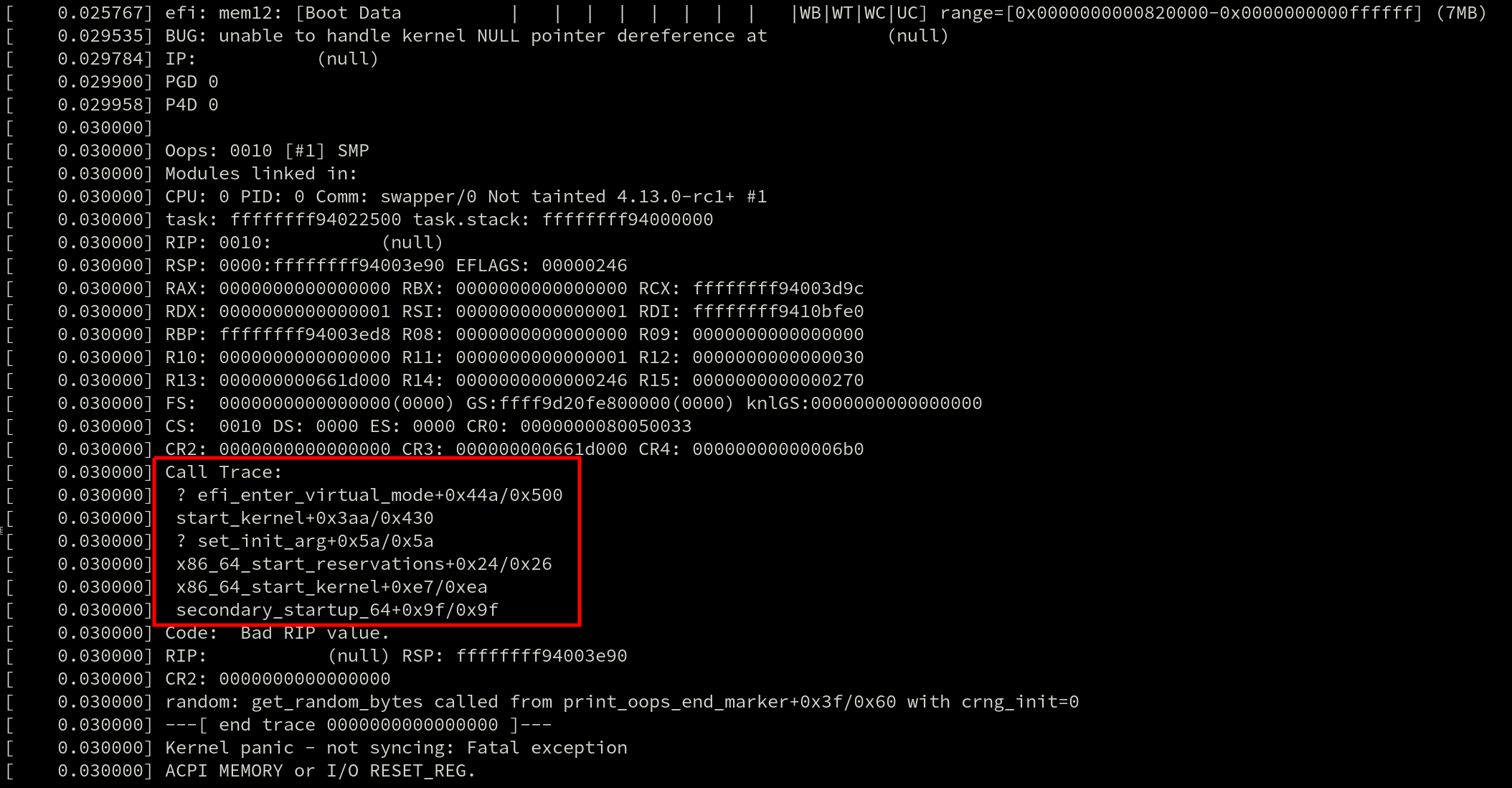
They’re also used by profilers such as perf and ftrace. Even live patching requires generating a callgraph because tasks can only be moved to the new (patched) version of a function if they’re not currently inside of the old one. And that requires searching for the function in the task’s callgraph.
Stack unwinders also exist outside of the kernel and callgraphs can be generated by debuggers like gdb for debugging live applications and to post-process coredumps.
With so many uses, there are plenty of developers that have an interest in ensuring stack unwinders work well. The two most prominent attributes of an unwinder are how quickly it can generate a callgraph, and how accurate that callgraph is.
As of Linux v4.12, there are multiple x86 unwinders: the guess and frame pointer unwinders. The guess unwinder is extremely simple and makes a guess at the callgraph by looking for instruction addresses on the stack. Its accuracy leaves a lot to be desired.
A far more robust stack unwinder is the frame pointer unwinder.
The Frame Pointer and DWARF Unwinders
The frame pointer unwinder is the current default for x86 in the mainline kernel. It requires support from the compiler which uses the rules described in the x86-64 ABI to save the address of the previous stack frame in the %rbp register at the start of every function (the prologue). When the kernel is compiled with this option the %rbp register is only used for that one purpose, and not for general use.
Stack frames are chained together by copying the value of %rbp to the current stack frame before the register is overwritten. Because the stack frames have a fixed layout – and because the function return addresses are at a known offset inside the stack frames – unwinding the stack then simply requires some arithmetic and pointer dereferencing; this is the reason that the frame pointer unwinder is so fast.
One of the downsides of the frame pointer unwinder is that using it introduces a runtime overhead for every function in the kernel. Regardless of whether a crash occurs there or not, every function prologue is modified to save the address of the stack frame in %rbp and restore the previous %rbp value in the epilogue before returning. In the cover letter for the ORC series, Poimboeuf reported that the kernel text size increases by 3.2% when GCC’s frame pointer option is enabled.
For some workloads, this overhead can be significant. Mel Gorman reported that enabling the GCC’s frame pointer option has been observed to add between 5% and 10% overhead when running benchmarks like netperf, [page allocator microbenchmark (run via SystemTap), pgbench and sqlite due to “a small amount of overhead added everywhere”. The overhead is caused by an increase in CPU cycles due to the additional instructions in every function prologue and epilogue, which bloats the kernel text size, and ultimately causes more instruction-cache misses.
The frame pointer unwinder can also have trouble unwinding a stack across the kernel-user boundary – it can be a major problem when using perf to profile an application. If the kernel was compiled with the frame pointers enabled, the application and every library it uses also needs to have been compiled with frame pointers enabled. Most Linux distributions do not compile their software with frame pointers enabled, and users have to result to building their software stacks by hand with custom compiler options if they want full callgraphs.
Finally, frame pointer unwinding is not reliable across exceptions and interrupts. Interrupts can occur at any point, including before the %rbp register has been written to. When that happens, the frame pointer unwinder is unable to calculate the callgraph. This results in inaccurate stacktraces in an Oops message, and impacts the ability to live patch which requires reliable stacktraces.
One unwinder that is reliable across interrupts is the DWARF unwinder. The DWARF unwinder generates a callgraph by parsing the DWARF Call Frame Information (CFI) tables that are emitted by the compiler.
DWARF was invented for debugging applications and callgraph generation is only a small part of that. DWARF is a very sophisticated debugging format. It can describe the state of a machine’s registers at any instruction with the use of a complex state machine.
Because the DWARF debuginfo lives in data tables the data used by the unwinder is out-of-band and can be distributed as a separate file. This is exactly what many Linux distributions do with their kernels. This completely eliminates the runtime overhead except for those users that want to debug a crash or profile a task; this is in stark contrast to the frame pointer unwinder.
The catch? There is no DWARF unwinder in the mainline Linux kernel for x86. Separate tools like gdb must be used to post-process crash dumps and generate callgraphs for kernels built with DWARF debuginfo, making it impossible to use DWARF for Oops messages, live patching, perf and ftrace.
Many years ago, there was a DWARF unwinder in the kernel but it was removed after developers discovered bugs that caused the oops code to crash – crashing inside the crash handler does not fulfill the promise of a more reliable unwinder. A recent series from Jiri Slaby that added the DWARF unwinder currently carried in SUSE’s kernel brought up a lot of the historical issues.
Some of those were caused by missing or incorrect DWARF information generated by GCC. Linus replied to Slaby’s patch and retold some of the problems with GCC’s DWARF debuginfo: “nobody actually really depended on it, and the people who had tested it seldom did the kinds of things we do in the kernel (eg inline asms etc).”
While the compiler can automatically generate the DWARF debguinfo for C code, anything written in assembly (there are over 50,000 lines in the x86 source) must be hand-annotated. Even after the original DWARF unwinder was removed, annotations remained in the x86 assembly code for years. But eventually their maintenance burden became too much and they were deleted by Ingo Molnar in during the v4.2 merge window.
Linus was clear that no DWARF unwinder would be allowed in the kernel: “Because from the last time we had fancy unwindoers [sic], and all the problems it caused for oops handling with absolutely zero_ upsides ever, I do not ever again want to see fancy unwinders with complex state machine handling used by the oopsing code.”
Enter the ORC Unwinder
It was in the middle of this discussion that Poimboeuf discussed the possibility of a new unwinder and debug format. The proposed solution is the ORC unwinder.
It creates a brand new custom debuginfo format using objtool and the existing stack validation work. The ORC format is smaller, and therefore, much simpler than DWARF which means no complex state machine is required in the unwinder.
Plus, with the format entirely controlled by the kernel community, it should provide both the reliability guarantees (no bugs in debuginfo causing crashes) and low-maintenance overhead (since it doesn’t require hand-annotating assembly code) that are missing with DWARF. Interrupts and exceptions are handled reliably with the ORC unwinder.
Like DWARF, but unlike frame pointers, the data is out-of-band and doesn’t increase the kernel text size, though Poimboeuf says enabling the ORC unwinder requires adding 2-4MB of ORC debuginfo which will increase the size of the data sections in the kernel image.
As Poimboeuf explains in his cover letter when comparing ORC and frame pointers: “In contrast, the ORC unwinder has no effect on text size or runtime performance, because the debuginfo is out of band. So if you disable frame pointers and enable the ORC unwinder, you get a nice performance improvement across the board, and still have reliable stack traces.”
The simplicity of the ORC unwinder also makes it faster. Jiri Slaby demonstrated that undwarf is 20x faster than DWARF unwinder. Performance tweaks have been added since and Poimboeuf speculates that the speed up may now be closer to 40x.
The Name
Until version v3 of the patch series the unwinder went by the name “undwarf”. After Poimboeuf said he wasn’t tied to the name, Ingo Molnar suggested some alternatives that were riffs on the ELF, DWARF tune. Poimboeuf took the Middle Earth theme and ran with it, finally settling on ORC aftering reading the Middle-earth peoples article on Wikipedia: “Orcs, fearsome creatures of medieval folklore, are the Dwarves’ natural enemies. Similarly, the ORC unwinder was created in opposition to the complexity and slowness of DWARF.” The backronym of ORC is “Oops Rewind Capability”.
How it works
All stack unwinders that use out-of-band data need some mechanism for generating that data. ORC uses objtool to build unwind tables which are built into the kernel image at link time, when a new kernel is built. The in-kernel ORC unwinder processes the unwind tables whenever a callgraph needs to be generated.
The stack validation tool is used to analyze all of the instructions in an object file and build unwind tables to describe the state of the stack for at each instruction address. This data is written to two parallel arrays, .orc_unwind and .orc_unwind_ip. Using two sections allows for a faster lookup of ORC data for a given instruction address because the searchable part of the data (.orc_unwind_ip) is more compact.
The tables consist of struct orc_entry elements, which describe how to locate the previous function’s stack and frame pointers. Each element corresponds to one or more code locations.
The existing x86 unwinder infrastructure that supports the frame pointer and guess unwinders already provides most of the code required for the ORC unwinder. As a rough measure of unwinder complexity, the number of lines of C required to implement each of the unwinders (frame pointer: 391, ORC: 582, DWARF: 1802) puts the ORC unwinder closer to frame pointer than DWARF.
Future Work
The ORC unwinder certainly shows promise. But it is still missing a few important features that will prevent it from becoming the default unwinder in the kernel.
For one, it doesn’t have stack reliability checks, which means it cannot be used with live patching. Live patching performs runtime checks and decides when it’s safe to patch a function by checking for the presence of a function in a task’s callgraph. But the improved reliability across interrupts and exceptions that ORC provides will likely make reliabilty checks a high priority item.
Support for dynamically generated code such as from ftrace and BPF is missing too.
And since ORC is an in-kernel unwinder, there is no support in the perf tool for generating callgraphs using ORC in userspace. Poimboeuf suggested that adding it should be possible: “If you want perf to be able to use ORC instead of DWARF for user space binaries, that’s not currently possible, though I don’t see any technical blockers for doing so. Perf would need to be taught to read ORC data.”
Based on the majority of comments so the ORC unwinder series so far, it seems likely that it will be merged for the v4.14 timeframe. Whether or not it will be enabled by default still remains to be seen – many developers, including Linus, vividly remember the last time a new unwinder was used in the Oops code. The hope is that orcs will prove more reliable than dwarves.

Testing with os/exec and TestMain
If you look at the
tests for
the Go standard library’s os/exec package, you’ll find a neat trick
for how it tests execution:
func helperCommandContext(t *testing.T, ctx context.Context, s ...string) (cmd *exec.Cmd) {
    testenv.MustHaveExec(t)

    cs := []string{"-test.run=TestHelperProcess", "--"}
    cs = append(cs, s...)
    if ctx != nil {
        cmd = exec.CommandContext(ctx, os.Args[0], cs...)
    } else {
        cmd = exec.Command(os.Args[0], cs...)
    }
    cmd.Env = []string{"GO_WANT_HELPER_PROCESS=1"}
    return cmd
}

// TestHelperProcess isn't a real test.
//
// Some details elided for this blog post.
func TestHelperProcess(*testing.T) {
    if os.Getenv("GO_WANT_HELPER_PROCESS") != "1" {
        return
    }
    defer os.Exit(0)

    args := os.Args
    for len(args) > 0 {
        if args[0] == "--" {
            args = args[1:]
            break
        }
        args = args[1:]
    }
    if len(args) == 0 {
        fmt.Fprintf(os.Stderr, "No command\n")
        os.Exit(2)
    }

    cmd, args := args[0], args[1:]
    switch cmd {
    case "echo":
        iargs := []interface{}{}
        for _, s := range args {
            iargs = append(iargs, s)
        }
        fmt.Println(iargs...)

    //// etc...
    }
}
When you run go test, under the covers the toolchain compiles your
test code into a temporary binary and runs it. (As an aside, passing
-x to the go tool is a great way to learn what the toolchain is
actually doing.)
This helper function in exec_test.go sets a GO_WANT_HELPER_PROCESS
environment variable and calls itself with a parameter directing it
to run a specific test, named TestHelperProcess.
Nate Finch wrote an excellent blog post in 2015 on this pattern in greater detail, and Mitchell Hashimoto’s 2017 GopherCon talk also makes mention of this trick.
I think this can be improved upon somewhat with the
TestMain mechanism
that was added in Go 1.4, however.
Here it is in action:
package myexec

import (
    "fmt"
    "os"
    "os/exec"
    "strings"
    "testing"
)

func TestMain(m *testing.M) {
    switch os.Getenv("GO_TEST_MODE") {
    case "":
        // Normal test mode
        os.Exit(m.Run())

    case "echo":
        iargs := []interface{}{}
        for _, s := range os.Args[1:] {
            iargs = append(iargs, s)
        }
        fmt.Println(iargs...)
    }
}

func TestEcho(t *testing.T) {
    cmd := exec.Command(os.Args[0], "hello", "world")
    cmd.Env = []string{"GO_TEST_MODE=echo"}
    output, err := cmd.Output()
    if err != nil {
        t.Errorf("echo: %v", err)
    }
    if g, e := string(output), "hello world\n"; g != e {
        t.Errorf("echo: want %q, got %q", e, g)
    }
}
We still set an environment variable and self-execute, but by moving
the dispatching to TestMain we avoid the somewhat-hacky special test
which only ran when a certain environment variable is set, and which
needed to do extra command-line argument handling.
Update: Chris Hines wrote about
this and other useful things
you can do with TestMain in a post from 2015 that I did not know
about!