
 Member
 crowbyte
Details on website migration and plans for the future
With my last post I promised to give some more detailed information on the migration of the crowbyte website and blog as well as my plans for the future of crowbyte.org and I live up with my promise in this post.
Migration details
After over half a year of absence I had the time to rethink the direction into which the blog and website headed lately.
I used Nikola as a page generator for my blog and websites. This was a decision which I made after a lot of consideration and testing of av...
Linux did not win, yet

Responsive HTML with CSS and Javscript
In this article you can learn how to make a minimalist web page readable on different format readers like larger desktop screens and handhelds. The ingredients are HTML, with CSS and few JavaScript. The goals for my home page are:
- most of the layout resides in CSS in a stateless way
minimal JavaScript- on small displays – single column layout
- on wide format displays – division of text in columns
- count of columns adapts to browser window width or screen size
- combine with markdown
CSS:
h1,h2,h3 {
  font-weight: bold;
  font-style: normal;
}

@media (min-width: 1000px) {
  .tiles {
    display: flex;
    justify-content: space-between;
    flex-wrap: wrap;
    align-items: flex-start;
    width: 100%;
  }
  .tile {
    flex: 0 1 49%;
  }
  .tile2 {
    flex: 1 280px
  }
  h1,h2,h3 {
    font-weight: normal;
  }
}
@media (min-width: 1200px) {
  @supports ( display: flex ) {
    .tile {
      flex: 0 1 24%;
    }
  }
}
The content in class=”tile” is shown as one column up to 4 columns. tile2 has a fixed with and picks its column count by itself. All flex boxes behave like one normal column. With @media (min-width: 1000px) { a bigger screen is assumed. Very likely there is a overlapping width for bigger handhelds, tablets and smaller laptops. But the layout works reasonable and performs well on shrinking the web browser on a desktop or viewing fullscreen and is well readable. Expressing all tile stuff in flex: syntax helps keeping compatibility with non flex supporting layout engines like in e.g. dillo.
For reading on High-DPI monitors on small it is essential to set font size properly. Update: Google and Mozilla recommend a meta “viewport” tag to signal browsers, that they are prepared to handle scaling properly. No JavaScript is needed for that.
<meta name="viewport" content="width=device-width, initial-scale=1.0">
[Outdated: I found no way to do that in CSS so far. JavaScript:]
function make_responsive () {
  if( typeof screen != "undefined" ) {
    var fontSize = "1rem";
    if( screen.width < 400 ) {
      fontSize = "2rem";
    }
    else if( screen.width < 720 ) {
      fontSize = "1.5rem";
    }
    else if( screen.width < 1320 ) {
      fontSize = "1rem";
    }
    if( typeof document.children === "object" ) {
      var obj = document.children[0]; // html node
      obj.style["font-size"] = fontSize;
    } else if( typeof document.body != "undefined" ) {
      document.body.style.fontSize = fontSize;
    }
  }
}
document.addEventListener( "DOMContentLoaded", make_responsive, false );
window.addEventListener( "orientationchange", make_responsive, false );
[The above JavaScript checks carefully if various browser attributes and scales the font size to compensate for small screens and make it readable.]
The above method works in all tested browsers (FireFox, Chrome, Konqueror, IE) beside dillo and on all platforms (Linux/KDE, Android, WP8.1). The meta tag method works as well better for printing.
Below some markdown to illustrate the approach.
HTML:
<div class="tiles">
<div class="tile"> My first text goes here. </div>
<div class="tile"> Second text goes here. </div>
<div class="tile"> Third text goes here. </div>
<div class="tile"> Fourth text goes here. </div>
</div>
In my previous articles you can read about using CSS3 for Translation and Web Open Font Format (WOFF) for Web Documents.
CSS3 for Translation
Years ago I used a CMS to bring content to a web page. But with evolving CSS, markdown syntax and comfortable git hosting, publication of smaller sites can be handled without a CMS. My home page is translated. Thus I liked to express page translations in a stateless language. The ingredients are simple. My requirements are:
- stateless CSS, no javascript
- integrable with markdown syntax (html tags are ok’ish)
- default language shall remain visible, when no translation was found
- hopefully searchable by robots (Those need to understand CSS.)
CSS:
/* hide translations initially */
.hide {
  display: none
}
/* show a browser detected translation */
:lang(de) { display: block; }
li:lang(de) { display: list-item; }
a:lang(de) { display: inline; }
em:lang(de) { display: inline; }
span:lang(de) { display: inline; }

/* hide default language, if a translation was found */
:lang(de) ~ [lang=en] {
 display: none;
}
The CSS uses the display property of the element, which was returned by the :lang() selector. However the selectors for different display: types are somewhat long. Which is not so short as I liked.
Markdown:
<span lang="de" class="hide"> Hallo _Welt_. </span>
<span lang="en"> Hello _World_. </span>
Even so the plain markdown text looks not as straight forward as before. But it is acceptable IMO.
Hiding the default language uses the sibling elements combinator E ~ F and selects a element containing the lang=”en” attribute. Matching elements are hidden (display: none;). This is here the default language string “Hello _World_.” with the lang=”en” attribute. This approach works fine in FireFox(49), Chrome Browser(54), Konqueror(4.18 khtml&WebKit) and WP8.1 with Internet Explorer. Dillo(3.0.5) does not show the translation, only the english text, which is correct as fallback for a non :lang() supporting engine.
On my search I found approaches for content swapping with CSS: :lang()::before { content: xxx; } . But those where not well accessible. Comments and ideas welcome.
foxtrotgps: not suitable for spacecraft navigation

Conversations with self while "Learning Reactjs"
> Go with react. That is what all the cool kids are using. Also, something to do with: Angular 2 continues to put “JS” into HTML. React puts “HTML” into JS. sounds geeky and logical.
Okay. Let me start with this react. Where do I even begin ? Seems very complex.
> Alright. There is this create-react-app which is introduced by Facebook to make it easy to begin, so that you do not have to break your head about gulp, grunt, node, etc. and their magical version incompatibilities
I started with this create-react-app and went a little further. I can create various components and render them, but how do I get various views/components to interact, to form a workflow (say such as sharing a session string or so) ?
> This is where state management comes in. You need to maintain state in a nice way centrally. You need to use the Flux architecture, introduced by Facebook.
Cool. So I just use the flux library from Facebook and things will all fall in place ?
> Actually flux is a standard, but everyone uses Redux which is an implementation of this standard. Oh, btw there are lot of other implementations such as alt. The creator of the redux seem to be an active guy and helps in the community often, writes long stackoverflow posts, etc. How can someone who write long posts be wrong ?
Hm. Okay. Let me start with this redux. What should I understand ?
> It is simple. If you understand: Global store, Reducers, Actions, Dispatch, Containers, you have understood redux. Just follow these egghead tutorials.
Okay. I tried following these. They are really beginner unfriendly. Actually this series on youtube is better, though a bit out-dated and non-standard. I have now done a simple redux toy app.
> Try a complex app, with multiple pages and talk to that API that you implemented.
Good idea. I will start with it. Oh, wait. My component has a lot of buttons, text boxes, etc. I need a way to get something rudimentary, like: getting the value from the username and password input boxes, when a "Login" button is clicked. Do I need to make a mess of global states and private-component-specific states ? That is like so contrary to what we learnt so far.
> Think again. Is there any alternative for this ?
May be I can have Actions, ActionCreators and State variables for each field in each component, centrally maintained in the global store ? That will be a looooot of boilerplate.
> Ahem. May be you should start using redux-form library. It will minimize your workload and optimizes the boilerplate.
Is it well maintained ? It has plenty of github stars but what if the bus factor is high and the primary author loses interest when he gets a dayjob somewhere else ? Also, it is already in version 6. Isn't react itself announced just three years ago ? Why is there so 6 major versions of this library already ? Will this change again if I depend on it ?
> Hrm. How long has it been since you began the exercise ?
It has been about a month or so, learning only during the latenights (after the dayjob and getting kid to sleep etc.) and occasionally weekends. Already I am tired. May be this javascript-fatigue is real.
> Now that you have learnt React and Redux, and experienced first-hand how much it takes time to identify the quintessential combination of libraries, you should not attempt to build anything in your free time, you should be careful in choosing these technologies, for a proper dayjob.
If all these javascript fatigue posts are to be believed, the alternatives are equally bad if not worse. Angular 2 broke APIs in RC stage, does not offer guarantee to not break APIs even after release it seems. Anyways, I started this project to learn about react and I can say, I know my way around react. It is a different question if I want to choose UI programming as a full time profession at all. The current flux (not to be confused with the architecture) of things makes it extremely painful. I think people choose mobile first development, not because of product requirements but because of javascript fatigue.
PS: A lot of things where I had to take a detour and wasted a lot of time is trimmed from the post, as they are anyway not directly related to ReactJS
Скоро выйдут Fedora 25 и openSUSE 42.2
Релиз Fedora 25 запланирован на 15 ноября, а openSUSE 42.2 — на день позже. На самом деле, оба этих дистрибутива я тестирую уже около месяца, установив ещё бета-версии. У меня есть некоторые наблюдения, которыми я хочу поделиться.
Fedora

Это очень достойный и довольно стабильный дистрибутив, который прекрасно подойдёт для домашнего использования, если вы возьмёте не официальную версию, а сборку от проекта Russian Fedora — в ней уже добавлены дополнительные репозитории, кодеки и прочие штуки, которые в обычной Федоре нужно проделывать вручную. Даже если вы не собираетесь использовать Федору как основную систему, её всегда полезно иметь где-нибудь под рукой (в виртуальной машине или на отдельном жёстком диске/разделе), потому что Федора — это всегда самая новая версия рабочего стола Gnome, передовая и самая стабильная работа новой графической системы Wayland, надёжная и стабильная поддержка UEFI и Secureboot в инсталляторе, огромный выбор стороннего ПО через систему Fedora Copr и многое другое.
Вместе с тем, пользоваться Fedora 25 Beta как основной системой затруднительно, потому что многие проекты в Copr пока не делают сборок для версии 25, многие инструменты, вроде Fedy, тоже пока поддерживают только версии Fedora вплоть до 24-й. Короче говоря, надо просто немного подождать.
В середине октября моя Russian Fedora 25 Beta вдруг перестала обновляться и вообще видеть сервера обновлений. Я догадался заглянуть на страницу состояния инфраструктуры Федоры и увидел там много красного цвета. Инфраструктура всего проекта «лежала» примерно 2 часа по вине урагана «Матфей», который вызвал наводнения и обрыв электропередач в местечке Raleigh, где и расположен дата-центр Fedora Project. Казалось бы, Fedora умеет искать местные зеркала своих репозиториев во всех частях мира, однако сам список зеркал всё равно сначала подтягивается из США. Так что при использовании стандартных настроек пакетного менеджера DNF, работоспособность Russian Fedora всё равно критично зависит от американских серверов.
openSUSE

Предыдущий релиз 42.1 мне откровенно не понравился — он был очень «сырым» и стал более-менее хорошим только через пару-тройку месяцев, когда большинство проблем разработчики наконец решили. Я использую openSUSE ещё со времён версии 10.2 и могу сказать, что за прошедшее время было много как хороших, так и неудачных релизов — в этом смысле проект openSUSE остаётся непредсказуемым. Правы были те пользователи, которые не стали обновляться до Leap 42.1 и остались на отличных версиях 13.1 и 13.2. Но похоже, что грядущий выпуск 42.2 получится исключительно удачным. За месяц активного использования я остался очень доволен качеством и производительностью системы. Пожалуй, стоит перечислить достоинства и некоторые выявленные недостатки в openSUSE 42.2.
Достоинства:
- Традиционно лучший инсталлятор из виденных мною. Логичный, удобный, стабильный — оно и не мудрено, ведь готовили его изначально для платной версии SUSE SLE:
- Приятный в использовании и очень производительный рабочий стол Plasma5;
- Огромный набор дополнительного ПО в системе openSUSE Build Service (OBS). Здесь много энтузиастов из сообщества openSUSE поддерживают свои сборки пакетов, и тут есть практически всё;
- Пакетный менеджер Zypper, который, на мой взгляд, гораздо мощнее любого apt или urpm*. На моей практике мне удавалось легко и изящно откатывать систему к предыдущему состоянию после обновления из «левых» репозиториев, используя Zypper. Сломать пакетную систему в openSUSE практически нереально — даже загубленную систему всегда можно вернуть в строй, вычистив её от ненужных наслоений;
- Интересные возможности бэкапа и версионирования системы благодаря файловой системе Btrfs. В последний раз я тестировал Btrfs ещё с openSUSE 13.1, и тогда меня неприятно удивила низкая производительность этой ФС на десктопе. С тех пор я всегда форматировал корневой раздел для openSUSE в ext4, но недавно я решил поставить 42.2 RC на отдельный жёсткий диск и оставил в инсталляторе настройки по умолчанию — они-то и предлагают всегда Btrfs. В итоге, установленная система показалась мне очень быстрой, и теперь мне больше не хочется менять Btrfs на ext4. Кстати, недавние тесты показывают, что Btrfs не так уж и отстаёт от конкуренток;
- Самый удобный способ установки обновлений, что я когда-либо видел. В системном лотке Plasma5 сидит значок обновлений, который подаёт сигнал о новых версиях пакетов. Достаточно всего двух щелчков мыши — и обновления тут же скачиваются и устанавливаются!
Недостатки:
По мелочи всегда набираются ошибки, которые хоть и не сильно влияют на общее впечатления о системе, но раздражают. Так, при выходе (log out) из Plasma5 эта самая Плазма сначала замирает на пару секунд, потом с ошибкой перезапускается, и лишь после этого сеанс завершается. Есть надежда, что это исправят в ближайших выпусках Plasma 5.8.х, так что нужно просто подождать обновлений. В остальном, некоторые программы всё равно приходится собирать вручную (KEncFS, KNemo), но их немного. Русификация Plasma5 в целом на «четвёрку» — чуть похуже чем в Rosa Fresh, но мелкие огрехи не сильно портят жизнь.
Самое главное — openSUSE 42.2 ещё до своего выхода оказался очень стабильным и пригодным для использования дистрибутивом, который я могу рекомендовать всем, кто интересуется Linux.
How To Install VirtualBox Latest Version on openSUSE Leap
This tutorial will show you about how to install VirtualBox on openSUSE Leap or another version and another .rpm distro. Because i’m using openSUSE Leap as my operating system.
VirtualBox is one of powerfull virtualization software. For developer you can use VirtualBox to create or manage your project without disrupt your main device, those are isolated. I’m using virtualbox for trying an another linux distro without destroy my Laptop.
VirtualBox can be combine with Vagrant. Wait for the next tutorial! 
Check this out:
Requirements
- openSUSE Leap
- Internet Connection
- VirtualBox, you can download it here.
Installation
- Install dependencies for VirtualBox, it requires gcc, kernel-devel, dkms and make.
zypper in gcc make kernel-devel dkms
- Download and install public key for signed,
wget -c https://www.virtualbox.org/download/oracle_vbox.asc
rpm --import oracle_vbox.asc
- Navigate to your download folder of VirtualBox, and run this command:
zypper in VirtualBox-xxxx.rpm
- As root, open YaST | go to Security and Users | User and group management. Select your username from the list, then click Edit. Go to the tab named Details, then tick the group
vboxusersin order to add your username to that group.

- Okay, VirtualBox is ready to use. If you using KDE you can find in by search or go to Application Menu | System | Oracle VM Virtualbox.
Hope this helpful 
The post How To Install VirtualBox Latest Version on openSUSE Leap appeared first on dhenandi.com.
Ruby Meetup Prague @SUSE

Among others, our YaST team has got a great chance to have three presentations there:
- Ladislav Slezak - Ruby Debugger in SUSE Installer
- Josef Reidinger - Continuous Deployment of a Big Project (GitHub, Rake, Build Service, Jenkins, ...)
- Martin Vidner - Static Code Analysis - The Failure with Ruby-lint
How To Install VMware Workstation 12 on openSUSE Leap 42.1
Now, i will show you how i did install VMware Workstation on my openSUSE Leap 42.1. Maybe this tutorial can be reference by another Linux Distro.
I want to tell you a little about my workplace, my workplace related with this tutorial because i got VMware Workstation License in my workplace haha :-D. My Workplace is a VMware Partner, and they are got a NFS (Not For Sale) License. So i use it.
Okay, Check this out!
Requirement
- Linux openSUSE Leap 42.1
- VMware Workstation 12, you can download at here. (with .bundle format)
- VMware Workstation 12 License
Installation
- Install dependencies for VMware Workstation, VMware Workstation need gcc and kernel-devel
zypper in gcc kernel-devel
- Go to your download folder and give execute permission
chmod +x VMware-Workstation-xxxxxxx.bundle
./VMware-Workstation-xxxxxxx.bundle
- Follow the wizard, and voilaaa. VMware Workstation Ready for use
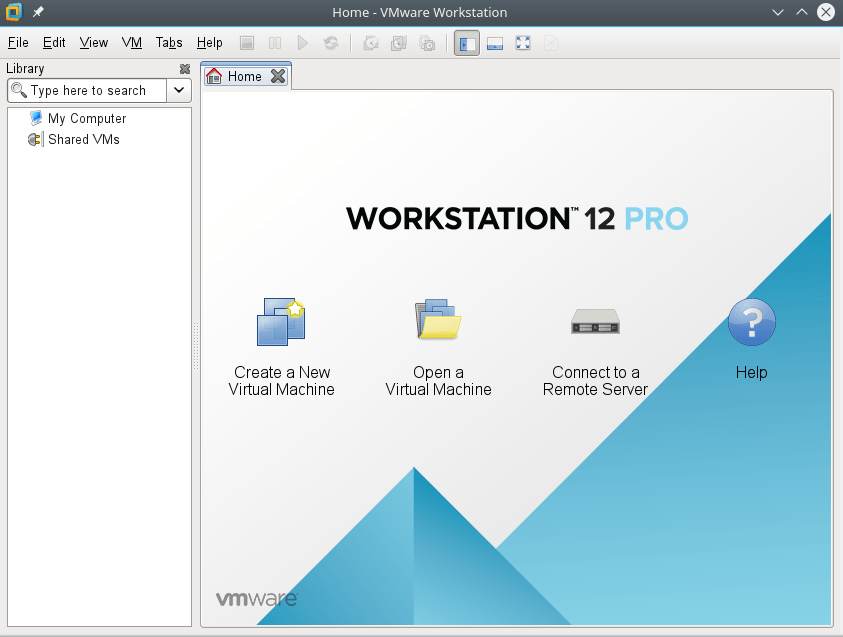
The post How To Install VMware Workstation 12 on openSUSE Leap 42.1 appeared first on dhenandi.com.