
 Member
 tigerfoot
AMD/ATI Catalyst fglrx rpms, end of an era!
Long time not talking about fglrx rpm, mostly because they’ve got no update since last December 2015.
Short Summary
In a word as hundred, fglrx is now a dead horse!

We had the hope of getting it working for Leap 42.2 in October, but except freezing kernel and xorg, you will not get what you would expect: a stable xorg session
Say goodbye fglrx!, repeat after me, goodbye fglrx.
If you are locked down and forced for any reasons to use fglrx with your gpu, and are still using 42.1, then don’t upgrade to 42.2, without a plan B
It has no more support from AMD upstream, and that’s it!, if someone want to break its computer, it’s still possible to pick the last files and try it by yourself, but the repository will never contain it for 42.2 (see below how-to)
That’s said, I’m not still sure, to keep for a long time the repository, I’ve been managing since 6 years now.
A bit of history
In 2010, when we were working hard to get 11.1 out, the news that no supported ATI (at that time) will be available for end-users, as we have for nvidia gpu
I didn’t check back the irc log, but we were a few, that would like to have this still available, by pure commodity. Especially that I’ve just exchanged a non working gpu by my new hd5750.
I remember the first chaotic steps, how to build that, and create repeating builds, what about the license? Did we have the right to offer a pre-build rpm etc. I spent some time fixing all of this stuff.
And start the build on real hardware. Hey afterward kvm was really in infancy stage.
Release after release amd/ati and openSUSE, the driver was build, on hardware for each supported distribution. When beginning of 2013 Sebastian Siebert, who got some direct contacts with AMD, release
his own script, we collaborate to have the possibility to build on virtual machines, which allow me to simplify the build process, as having on kvm for each openSUSE release supported.
Afterward, AMD start to split fglrx with the fglrx for HD5xx and above, and fglrx-legacy. So 2 drivers to maintain, but as always with proprietary software, the legacy version became rapidly obsolete,
and non usable. Not that bad, in the meantime the AMD effort on the free and open source radeon driver, quickly overcome the performance of legacy.
Still from 2013, to 2016 I’ve been able to propose ready to use rpm for several version of openSUSE’s distributions. I think the repository serve quite well end users, and I never got big flames.
I can’t avoid to mention the openSUSE powered server and sponsored by Ioda-Net Sàrl that has serve this objective so well during that time frame.
Future of the repository
Now that fglrx is becoming obsolete, I think seriously about why the repository online should stay online.
At openSUSE project level, we still have 13.1, 13.2, 42.1 and 42.2 that are mostly active. 13.1 is already almost out of the game of evergreen,
13.2 will follow soon, and I don’t know yet the exact plan for 42.1, but it will certainly go out of maintenance in less than a year.
If you feel or have the need of the repository, please express that in the comments below.
Wait there’s amd-gpu-pro, no?
Yeap there’s a closed driver, called amd-gpu-pro, available, for newer cards. But there’s two things that bring me out of the game, first I don’t have those newer gpu,
and don’t have the need to replace my hd5750 for the moment. The second and certainly the most important, those drivers are only available for Ubuntu or at least in .deb format.
I will certainly not help proprietary crap, if I don’t have a solid base to work with, and a bit of help from their side. I wish good luck to those who want to try those drivers,
I’ve got a look inside, and got a blame face.
For crazy, and those who don’t love their computer
So you want to loose your time? you can! I’ve kept in raw-src directory all the script used to build the driver.
They differ a bit compared to Sebastian Siebert last version in the sense of making Leap 422 as a possible target.
If you dig a bit around, you should be able to build them, but you’re alone on that way, you’ve been warned!
I’m not against a republished version, if someone find a way to make them working, just drop me a message.
That’s all for this journey, Have Fun! 

Ein Jobangebot für Linux-Enthusiasten
Da es für meine geneigte Leserschaft (auch die in den Planeten von OSBN und Debianforum.de) vielleicht interessant ist oder jemand jemanden kennt: Mein Arbeitgeber sucht derzeit Mitarbeiter für Kundenbetreuung, Support & Service im Bereich Linux.
Zur Verstärkung unseres Teams in Königsbrunn suchen wir Sie.
Wir freuen uns auf Sie als:
Mitarbeiter (m|w) Kundenbetreuung, Support & Service
Ihre Aufgaben in unserem Haus umfassen:
- Durchführen von Hardwaretestes
- Technische Beratung und Unterstützung von Kaufinteressenten telefonisch als auch in schriftlicher Form, vorwiegend per E-Mail
- Technische Hilfestellung bei Fragen zu Betriebssystemen der Linuxfamilie, insbesondere Ubuntu
- Prüfung von Kundengeräte auf Hard- oder Softwarefehler sowie deren Beseitigung
Mehr Infos gibt es im Firmenblog. Für Rückfragen stehe ich natürlich auch gerne zur Verfügung.

openSUSE project presentation at school, Nov 24th, 2016

On November 16th there was the release of openSUSE Leap 42.2. On November 24th, I had the opportunity to present openSUSE Project at school.
I was asked to make an introduction to FLOSS in general and more specific about openSUSE Project. The school was for middle aged people, for persons who quited school to work and conftibute financially to their families. There were 3 classes that they taught something computer related. It was a great opportunity for them to learn what FLOSS is and what makes openSUSE great Linux distro.
I busted the myth that "Linux is hard because you have to be a hacker, it's terminal operated" I showed them how to install openSUSE Leap step by step (pictures) and also how to use GNOME (pictures). I mentioned our tools to make a very stable distro and finally I showed them that it's not only a distro but there are people (the communtity) that take care of the software.

There were plenty of questions about linux software alternatives, how to install, if they can replace Ubuntu/Windows with openSUSE and what is perfect suit for specific systems. Each student took a DVD with stikers and a card with Greek community information. Professors will organize an install fest for their lab and/or laptops of their students.
I would like to thank Douglas DeMaio for managing to send me DVDs and stickers and Alexandros Mouhtsis that managed with his professors to organize this presentation. Finally, I would like to thank Dimitrios Katsikas for taking pictures.


There's same post at lizards.

umoci: a New Tool for OCI Images
Very recently, I've been working on implementing the required tooling for creating and modifying Open Container Initiative images without needing any external components. The tool I've written is called umoci and is probably one of the more exciting things I've worked on in the past couple of months. In particular, the applications of umoci when it comes to SUSE tooling like the Open Build Service or KIWI is what really makes it exciting.
Testing the untestable
Admit it: how many times you have seen “software from this branch is completely untested, use it at your own risk” when you checked the latest code from any FOSS project? I bet you have, many times. For any reasonably modern project, this is not entirely true: Continuous Integration and automated testing are a huge help in ensuring that the code builds and at least does what it is supposed to do. KDE is no exception to this, thanks to build.kde.org and a growing number of unit tests.
Is it enough?
This however does not count functional testing, i.e. checking whether the software actually does what it should. You wouldn’t want KMail to send kitten pictures as a reply to a meeting invitation from your boss, for example, or you might want to test that your office suite starts and is able to actually save documents without crashing. This is something you can’t test with traditional unit testing frameworks.
Why does this matter to KDE? Nowadays, the dream of always summer in trunk as proposed 8 years ago is getting closer, and there are several ways to run KDE software directly from git. However, except for the above strategy, there is no additional testing done.
Or, should I rather say, there wasn’t.
Our savior, openQA
Those who use openSUSE Tumbleweed know that even if it is technically a “rolling release” distribution, it is extensively tested. That is made possible by openQA, which runs a full series of automated functional tests, from installation to actual use of the desktops shipped by the distribution. The recently released openSUSE Leap has also benefited from this testing during the development phase.
“But, Luca,” you would say, “we already know about all this stuff.”
Indeed, this is not news. But the big news is that, thanks mainly to the efforts of Fabian Vogt and Oliver Kurz, now openQA is testing also KDE software from git! This works by feeding the Argon (Leap based) and Krypton (Tumbleweed based) live media, which are roughly built daily, to openQA, and running a series of specific tests.
You can see here an example for Argon and an example for Krypton (note: some links may become dead as tests are cleaned up, and will be adjusted accordingly). openQA tests both the distro-level stuff (the console test) and KDE specific operations (the X11 test). In the latter case, it tests the ability to launch a terminal, running a number of programs (Kate, Kontact, and a few others) and does some very basic tests with Plasma as well.
Is it enough to test the full experience of KDE software? No, but this is a good solid foundation for more automated testing to spot functional regressions: during the openSUSE Leap 42.2 development cycle, openQA found several upstream issues in Plasma which were then communicated to the developers and promptly fixed.
Is this enough for everything?
Of course not. Automated testing only gets so much, so this is not an excuse for being lazy and not filing those reports. Also, since the tests run in a VM, they won’t be able to catch some issues that only occur on real hardware (multiscreen, compositing). But is surely a good start to ensure that at least obvious regressions are found before the code is actually shipped to distributions and then to end users.
What needs to be done? More tests, of course. In particular, Plasma regression tests (handling applets, etc.) would be likely needed. But as they say, every journey starts with the first step.

3 alternative reasons why you should test Nextcloud 11 Beta
But I actually have some more reasons to test. You see, Nextcloud is one of the tools we need to keep our democracy working. As Frank notes on his home page:
"Privacy is the foundation of democracy"And he is completely right. So, here are three different reasons why you should test (and help improve) Nextcloud:
1. The USA is making a massive swing towards even more spying
Obama has done nothing to curb the growth of the NSA and the scope of its operations. Secret laws spiked under his watch. Many of the folks about to be put in power by President-elect Trump favor more spying, including on US citizens, expansion of the NSA, a crackdown on whistleblowers and more. Trump's pick for CIA director calls for Snowden's execution. For what I can only guess must be giving proof of illegal government spying to dangerous terrorists like the Washington Post and the Guardian, who proceeded to win a Pulitzer prize by disclosing this information irresponsibly to the US public.In general, as somebody who changes his stance on hugely important and complicated issues like torture in under an hour, it is impossible to predict what Trump will do with the most powerful spying agency in the world under his control, but his appreciation for dictatorial figures like Kim Jong Il and Putin gives plenty cause for concern.
2. Britain isn't doing much better
I wrote about the Snoopers' charter just some days ago - this piece of legislation goes further than any earlier piece of spying law. It allows not only passive spying but also actively hacking devices from citizens.3. Nor is Europe
The UK is not alone. Since Snowden, Europe has complained a bit about the NSA but seems to simply follow suit, rather than doing anything about it. Germany is even introducing a bill that will allow spying on foreign journalists.Help out!
So, how can you help? Well, test Nextcloud 11 Beta, obviously. Help others to use it, get them involved. But it goes beyond Nextcloud - promote the use of and help improve tools like Tor, Signal and others, or democracy is screwed.Edit: updated the blog
Watching org.libelektra with Qt
libelektra is a configuration library and tools set. It provides very many capabilities. Here I’d like to show how to observe data model changes from key/value manipulations outside of the actual application inside a user desktop. libelektra broadcasts changes as D-Bus messages. The Oyranos projects will use this method to sync the settings views of GUI’s, like qcmsevents, Synnefo and KDE’s KolorManager with libOyranos and it’s CLI tools in the next release.
Here a small example for connecting the org.libelektra interface over the QDBusConnection class with a class callback function:
Declare a callback function in your Qt class header:
public slots:
 void configChanged( QString msg );
Add the QtDBus API in your sources:
#include <QtDBus/QtDBus>
Wire the org.libelektra intereface to your callback in e.g. your Qt classes constructor:
if( QDBusConnection::sessionBus().connect( QString(), "/org/libelektra/configuration", "org.libelektra", QString(),
 this, SLOT( configChanged( QString ) )) )
 fprintf(stderr, "=================== Done connect\n" );
In your callback arrive the org.libelektra signals:
void Synnefo::configChanged( QString msg )
{
 fprintf( stdout, "config changed: %s\n", msg.toLocal8Bit().data() );
};
As the number of messages are not always known, it is useful to take the first message as a ping and update with a small timeout. Here a more practical code elaboration example:
// init a gate keeper in the class constructor:
acceptDBusUpdate = true;

void Synnefo::configChanged( QString msg )
{
  // allow the first message to ping
  if(acceptDBusUpdate == false) return;
  // block more messages
  acceptDBusUpdate = false;

  // update the view slightly later and avoid trouble
  QTimer::singleShot(250, this, SLOT( update() ));
};

void Synnefo::update()
{
  // clear the Oyranos settings cache (Oyranos CMS specific)
  oyGetPersistentStrings( NULL );

  // the data model reading from libelektra and GUI update
  // code ...

  // open the door for more messages to come
  acceptDBusUpdate = true;
}
The above code works for both Qt4 and Qt5.
Brittain’s Snoopers charter threatens your privacy
 |
| pic from the ZDNet article |
An attack on privacy
There is a global siege on privacy. Governments all over the world have introduced legislation (sometimes secret) which forces email, internet or data storage providers to track what you do and make that data available to their governments. This, of course, also means third parties who gain access to the storage systems can see and abuse it. And because so many of us have put so much of our data at just a few providers, we're at great risk as events like last week's shutdown of hundreds of Google accounts did show.While Google, Dropbox and others lure customers in with 'free' data storage and great online services, governments benefit from centralized data storages as it makes it easy for them to hack in or demand data from these companies.
Why this surveillance?
While governments usually claim they need access to this data to find terrorists or child pornography, experts point out that it will not be helpful at all. As multiple experts (even internally) put it, growing the haystack makes it harder to find the needle. Intelligence agencies are swamped with data and nearly every terrorist attack in western states over the last decade took place despite the agencies having all information they would have needed to prevent it. The Paris attackers, for example, coordinated their attack using plain SMS messages. The Guardian thus rightly points out that:"Paris is being used to justify agendas that had nothing to do with the attack"which has become a familiar refrain after nearly every terrorist attack.
Indeed, we all know the argument But you have nothing to hide, do you? and indeed, we probably don't. But some people do, so they'll try to avoid being seen. That being illegal won't change their behavior...
And as Phill Zimmermann, the inventor of the PGP encryption pointed out:
"When privacy is outlawed, only outlaws will have privacy"
So not terrorists. Then what?
Experts agree that the vast majority of these surveillance and anti-privacy laws have little or no effect on real criminals. The crime syndicates, corrupt politicians and large corporations evading taxes and anti-trust/health/environmental laws, they DO have something to hide, and thus they would use encryption or avoid surveilled communication methods even if it were outlawed.However, ordinary citizens, including grass-roots local activists, charitable organizations, journalists and others, who DO have nothing to hide, would be surveilled closely. And with that information, the real criminals mentioned earlier - crime syndicates, corporations or corrupt politicians - would have weapons in hand to keep these citizens from bothering them. Whistle blowers can be found out and killed (like in Mexico), journalists can be harassed and charged for trivial transgressions (like was recently done at the US pipeline protest) and charities can be extorted.
What can we do?
Luckily, there are initiatives like the Stanford Law Schools' Crypto Policy Project which aim to train, for example, journalists in the use of encryption. Tools and initiatives like Signal, PGP email encryption, Let's Encrypt and Nextcloud provide the ability for users to protect themselves and their loved ones from surveillance. More importantly, these at the same time making it harder and more costly to conduct mass surveillance.There is nothing wrong with governments targeting criminals with surveillance but just vacuuming up all data of all citizens that might, some day, be used is a massive risk for our democracy. We all have a responsibility to decentralize and use tools to protect our privacy so those who need it (press, activists and others) have a place to hide.
openSUSE Leap 42.2 est sortie !
openSUSE Leap 42.2 est sortie le 16 novembre dernier. C’est la deuxième version qui porte le nom de Leap. Cette dénomination rappelle le changement opéré l’an dernier dans la façon de construire la distribution : le cœur du système – noyau, système d’init, … – est celui de SLE, la distribution commerciale de SUSE.
L’aspect communautaire reste fort cependant, des centaines de logiciels étant ajoutés par dessus cette base, par des caméléons de tous bords. En ce sens, Leap 42.2 est un exemple : 1400 nouveaux paquets ont été incorporés et surtout le nouveau bureau KDE Plasma 5.8 LTS a été intégré, entièrement par la communauté.

Note : cette dépêche a été réalisée par AR7 sur le site de linuxfr.org, sous licence CC by-sa, elle s’inspire librement de l’annonce de sortie officielle.
En bref
Si l’on devait résumer cette nouvelle version en quatre points-clés, on pourrait dire qu’openSUSE Leap 42.2 est…
Encore un peu plus orientée entreprise
C’est vrai.
openSUSE Leap est basée sur SLE (SUSE Linux Enterprise), la distribution commerciale de SUSE. La version 42.2 de Leap partage encore plus de code source avec SLE, en l’occurrence avec sa version 12 SP 2.
Des technologies comme NVDIMM, OmniPATH et DPDK avec Open vSwitch sont maintenant prises en charge. Xen ne requiert plus son propre noyau et est supporté par le noyau par défaut.
En même temps que la base de code de SLE, openSUSE Leap 42.2 reçoit les paquets, la maintenance et les correctifs de la communauté openSUSE et des ingénieurs de SUSE. La série 42 de Leap est officiellement prise en charge pour au moins 36 mois à compter de la version 42.1, c’est-à-dire jusqu’en novembre 2018. Cela inclut des mises à jour de maintenance et de sécurité.
Prête pour les serveurs

openSUSE Leap 42.2 est la première version de Leap à offrir un profil « Serveur » durant l’installation. Lancer une plate-forme web ou mail est plus facile, tout comme gérer des projets plus complexes utilisant la virtualisation ou des technologies à base de conteneurs.
Il est aussi bon de rappeler que Leap et toutes les autres distributions openSUSE proposent un installateur complet en mode texte, donnant les mêmes fonctionnalités que l’installateur graphique sans pour autant utiliser X. Cet installateur est aussi capable de faire des installations à distance en utilisant VNC ou SSH, permettant ainsi de mettre en place openSUSE Leap sur un serveur sans accès physique.
Folle de Konqi !

Konqi, le petit dragon vert de KDE est de retour et en pleine forme ! Plasma 5.8 donne une nouvelle dimension à openSUSE Leap. Cette version du bureau KDE, estampillée LTS, devrait plaire aux utilisateurs soucieux de stabilité. Combiné avec Qt 5.6 et KDE Frameworks 5.26, Plasma 5.8 apporte aux utilisateurs de Leap 42.2 stabilité et fiabilité.
Amatrice de noyau LTS

Le noyau Linux 4.4 LTS pour openSUSE Leap 42.2 améliore les performances et les fonctionnalités du systèmes de fichiers Btrfs, avec notamment un nouveau « filtre d’équilibrage » ( balance filter). La para-virtualisation est activée dans le noyau par défaut. Ce noyau améliore la cryptographie ainsi que le support du standard TPM (Trusted Platform Module) version 2.0 et la virtualisation imbriquée via KVM.
En détails
Pour les utilisateurs
KDE

openSUSE Leap 42.2 est donc la première distribution à offrir le bureau Plasma LTS du projet KDE. L’environnement par défaut est en effet Plasma 5.8, riche en fonctionnalités et offrant de bonnes performances. Les utilisateurs de KDE qui étaient passés à autre chose devraient réévaluer cette version qui apporte des améliorations majeures en terme de stabilité et de fonctionnalités.
KRunner n’ouvre plus seulement des applications ; il peut aussi lancer certaines actions quand l’application démarre : ce sont les Jump List Actions.
La prise en charge du glisser-déposer a été ajouté pour apporter des résultats de recherche à n’importe quelle application.
Les utilisateurs de smartphones sous Android peuvent obtenir l’intégration de leur appareil avec l’application KDE Connect (disponible sur Google Play). Elle permet aux utilisateurs de recevoir des SMS sur leur poste de travail ou transférer des fichiers vers leur téléphone. Pour que ça marche, il ne faut pas oublier d’autoriser le service KDE Connect dans le module pare-feu de YaST.
Enfin, les administrateurs système apprécieront le support de Kiosk. permettant de fixer et déployer des profils de bureau.
GNOME

GNOME 3.20 offre aux utilisateurs de nouveaux contrôles de vie privée, notamment la possibilité d’autoriser la géolocalisation par application, un accès aux contrôles multimédia directement depuis la zone notification/date/calendrier et une nouvelle fenêtre listant les différents raccourcis clavier et gestes disponibles. Cette dernière peut être ouverte dans la plupart des applications GNOME, depuis le menu ou en utilisant le raccourci Ctrl+? ou Ctrl+F1. GNOME permet également accéder à Google Drive directement depuis l’application Fichiers.
Grâce à près de 870 contributeurs, plus de 28000 changements ont eu lieu depuis la version précédente. Tous les détails dans les notes de version de GNOME 3.20.
Autres bureaux

openSUSE Leap 42.2 offre à ses utilisateurs la possibilité de choisir d’autres bureaux. Vous pouvez essayer par exemple Xfce, Enlightenment, MATE, Cinnamon et LXQt. Seuls Xfce et Enlightenment sont disponibles sur l’image DVD d’installation ; il sont cependant tous disponibles en ajoutant les dépôts en ligne ou en utilisant l’image d’installation par le réseau.
LXQt 0.11.0, dont l’expérience utilisateur a été grandement améliorée grâce à la correction de nombreux bogues, introduit pavucontrol-Qt, le port Qt de pavucontrol, le mixer PulseAudio basé sur GTK.
Pour les administrateurs système
Virtualisation

openSUSE est une plateforme relativement complète pour faire de la virtualisation. On retrouve notamment QEMU 2.6.1, VirtualBox 5.0, GNOME Boxes 3.20, Xen et KVM ainsi que des solutions à base de conteneurs comme Docker et LXC. Une partie de la configuration peut se faire avec YaST, permettant de déployer des solutions plus rapidement et plus facilement.
YaST

Les sprints de l’équipe YaST menés jusqu’à la sortie de Leap 42.2 ont apporté pas mal de bonnes choses et ont rendu YaST (un peu) plus intuitif. La communauté YaST a remodelé l’interface utilisateur pour améliorer l’utilisabilité et continue d’ajouter de nouveaux outils et modules, après qu’ils ont fait leurs preuves dans Tumbleweed.
yast2-alternatives est un nouveau module, créé lors du GSoC 2016, pour gérer le système d’alternatives d’openSUSE (issu de Debian). Un autre module, yast2-vpn, permet de configurer des passerelles et des clients VPN. yast2-auth-client, qui permet de configurer un système d’authentification centralisé, a été presque complètement réécrit. La gestion du chargeur d’amorçage a été améliorée pour élargir le support du Trusted Boot et la configuration de la protection du mot de passe a été refaite au propre. yast2-firewall supporte maintenant firewalld, en plus du vénérable SuSEFirewall2.
En cas d’incident lors de l’installation, il est maintenant possible de lancer un débogueur. Les utilisateurs ayant une connaissance Ruby peuvent l’utiliser pour tracer ce qui s’est passé et trouver une solution voire un contournement.
L’impact sur la mémoire vive a été considérablement réduit, et la configuration du clavier et des polices de caractère de la console a été adaptée pour une meilleure compatibilité avec systemd.
Gestion des systèmes
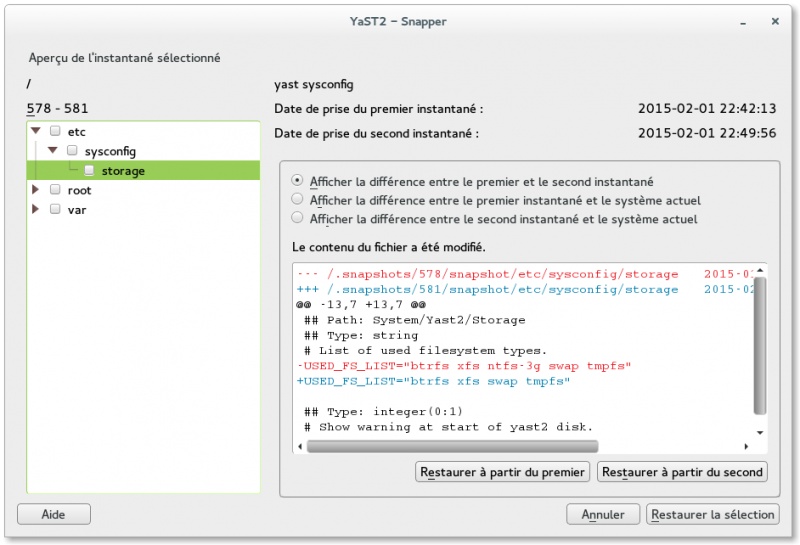
Snapper peut maintenant utiliser les quotas Btrfs pour gérer le nettoyage des instantanés. Fini les partitions racines saturées à cause d’un trop grand nombre de snapshots !
openSUSE Leap dispose de Samba 4.4.2, qui fonctionne mieux avec les domaines Windows 2003.
systemd 228 apporte un changement notable au niveau des fichiers temporaires : les attributs v, q et Q créeront désormais de simples répertoires même sous Btrfs (pas de sous-volume), si le répertoire racine est un simple répertoire. Cela devrait simplifier les choses avec certains environnements chroot qui ne connaissent pas le concept de sous-volume Btrfs.
La version d’AppStream améliore l’interaction avec les dépôts de logiciels.
La version de MariaDB ne bouge pas par rapport à la 42.1 et la petite mise à jour de MySQL vers la version 5.1.35 résout plusieurs soucis touchant le basculement vers un système de secours (failover).
Rappelons qu’openSUSE Leap utilise des Delta RPM pour les mises à jour de maintenance, réduisant l’impact sur la bande-passante.
Pour les développeurs
EDI et outillage

Avec le bureau KDE vient KDevelop 5.0.1.
Une version mûre du Qt 5 GUI Toolkit, la 5.6, est incluse dans Leap 42.2. On recense plus de 800 améliorations depuis la version présente dans openSUSE Leap 42.1. Qt 5.6 est une version LTS et apporte des corrections de sécurité dans le framework Qt ainsi que dans des bibliothèques tierces.
GTK 3.20, partagé avec SLE 12 SP2, fournit un toolkit solide et stable pour construire des applications. GNOME Builder est disponible en tant qu’EDI et permet non seulement de coder des applications GTK en C, C++ et Vala mais aussi de réaliser des projets dans de nombreux autres langages.
Pour tous vos besoin en compilation, Leap 42.2 contient GCC 4.8.5, 5.3.1 et 6.1.1. LLVM/Clang 3.8.0 est également disponible. CMake 3.5 est aussi de la partie, en fournissant un environnement de construction puissant et multi-plateforme pour les développeurs de projets Open-Source.
Enfin, niveau cryptographie, la version d’OpenSSL que l’on retrouve dans Leap 42.2 est la 1.0.2h, qui modifie le comportement d’ALPN et empêche ASN.1 BIO de faire des allocations mémoire excessives. OpenSSH est à la version 7.2p2 et assainit les informations d’identification pour X11.
Langages et bibliothèques
Parmi les langages de programmation présents dans openSUSE Leap 42.2, on retrouve notamment Python 2.7, Ruby 2.1 et Perl 5.18.
Cette version de Leap fournit également de nouvelles versions majeures pour libvirt (2.0) et libzypp (16.2).
Leap dispose d’une glibc 2.22 bien établie ainsi que de libsigc++ 2.8.
En plus
Images d’installation

Si vous voulez installer openSUSE Leap 42.2, rendez-vous sur software.opensuse.org/422. À noter que l’architecture i586 n’est plus disponible depuis Leap 42.1.
Des ports sont disponibles pour les architectures ARM et PowerPC.
Enfin, il est tout à fait possible de mettre à niveau une installation de Leap 42.1 vers Leap 42.2 en utilisant la commande zypper dup. N’oubliez pas alors de lire les notes de version par rapport aux paquets supprimés ou renommés depuis la version 42.1.
Pour les contributeurs

Leap 42.2 est la première version d’openSUSE (en dehors de Tumbleweed) à utiliser Weblate pour gérer la traduction du système dans plus de 50 langues. Cette application web permet à tous, du traducteur professionnel au contributeur occasionnel, de prendre part au processus et rend possible la fusion des traductions d’openSUSE avec celles de SLE.

Un autre outil qui est de plus en plus utilisé par openSUSE est openQA, un logiciel pour tester des systèmes d’exploitation en faisant de la comparaison de captures d’écran. Il est également utilisé par Fedora.

Enfin, l’outil le plus connu et le plus utilisé est l’Open Build Service, un système permettant de construire des paquets RPM, deb et autres de façon automatisée. À noter que le projet openSUSE est impliqué, tout comme bien d’autres distributions, à rendre reproductibles la compilation et l’empaquetage des logiciels qu’elle distribue.
Tumbleweed

Si Leap se porte bien, Tumbleweed, la distribution en rolling release du projet openSUSE, est en pleine forme. L’important travail d’intégration en amont de chaque nouveau snapshot permet d’éviter beaucoup de régressions. Et, sur le long-terme, c’est aussi openSUSE Leap qui bénéficie de ces efforts… juste quelques mois plus tard !
Note : cette dépêche a été réalisée par AR7 sur le site de linuxfr.org, sous licence CC by-sa, elle s’inspire librement de l’annonce de sortie officielle.
Details zu Migration und Zukunftsplänen
In meinem letzten Post versprach ich mehr Details über die Migration der crowbyte.org webseite und des Blogs, sowie mehr zu meinen Plänen für die Zukunft, zu verraten und halte mit diesem Post nun mein Versprechen.
Migrationsdetails
Nach über einem halben Jahr der Abwesenheit, hatte ich die Zeit und Gelegenheit die Richtung der Webseite und des Blogs noch einmal grundlegend zu überdenken.
Bisher nutzte ich Nikola als Seitengenerator für den Blog und die Webseiten. Dies war eine wohl übe...