
 Member
 anaumov
openSUSE :: adding static routes in NM
Новичков в openSUSE вводит в заблуждение настройка сети из-за того, что для её управления существует несколько независимых технологий. В openSUSE Tumbleweed сегодня используется NetworkManager и wicked. Первый используется по умолчанию. Если же вам, к примеру, понадобится добавить статический маршрут и вы спросите об этом гугл, скорее всего в первую очередь вы найтдете классический способ сделать это. Помние, этот способ не сработает, если вы используете NM, и наоборот. Также не стоит забывать, что настройки сети в разных дистрибутивах могут отличаться.
Добавить маршрут можно с помощью команды route. В данном примере для доступа в сеть 172.19.0.0/16 я использую рутер 172.20.1.161. Тут стоит помнить лишь о том, что эти настройки пропадут после перезагрузки.
# route add -net 172.19.0.0 netmask 255.255.0.0 gw 172.20.1.161
Чтобы настройки не пропали, нужно прописать их в конфиге NM. Для каждого соединения существуют свои настройки. Загляните в каталог /etc/NetworkManager/system-connections. Там находится список файлов, каждый из которых относиться к тому или иному соединению. Чтобы добавить route правило, о котором я говорил выше, просто добавьте такую строчку в секцию [ipv4]:
route0=172.19.0.0/16;172.20.1.161
Если вы используете KDE Workspace, вы можете добавить эти настройки в KDE NM-апплете. Для этого просто правый клик на иконке, выбираем “Configure Network Connections…”

Появляется список соедининий. Выбираем нужное нам, нажимаем “Edit”. В появившемся окне переходим во вкладку IPv4 и там нажимаем “Routes…”, где можно добавить новые или удалить старые маршруты.

Polyglot – Learn, Share, Collaborate – Hackfest 2016!!
Polyglot project aims to provide the summary of various choices available for each of the components while developing a web application. It details their strengths so that one can easily choose the right component to build a great solution.

I had gone through several blogs, stack-overflow/quora answers to choose a proper database, programming language, web-framework etc. to build a solution in the past. Most of them were out-dated and I had to keep track of the date for each of the posts.
So for this HACKFEST 2016, wondered how would it be if we could share the learning through a wiki and collaboratively maintain an up-to-date content. I had a hunch that this might be a problem that many would have faced and would be good to solve.
It starts with Questions/Concerns one should keep in mind before starting a project. It goes deep enough, providing a Syntax Cheat Sheet so that one can use it to directly shift the mind from one language to another by going through a single page. It also lists various WebFrameWorks and several Programming Language choices. Am a big fan of Rails and GoLang. The idea is a work in progress..
The wiki is available on github!! It would be nice to collaborate and make it better 
Uninstall a patch using zypper
Maintenance and security updates for the stable openSUSE Leap releases are automatically tested using OpenQA, and also receive community testing prior to release. In addition, many updates to openSUSE Leap are inherited from SUSE’s enterprise products, where they already receive thorough review, and automated as well as manual testing.
Should anything go wrong, here is how to “uninstall” an online update using zypper.
zypper in --oldpackage ` \

zypper info -t patch --conflicts openSUSE-2016-XXX | \

grep " < " | while read NAME C VERSION; do \

    rpm --quiet -q --queryformat "%{name}\n" $NAME && echo "${NAME}<${VERSION}"; \

done`
Replace openSUSE-2016-XXX with the update in question. All involved packages are installed in a prior version. This, of course, is an alternative to using Btrfs snapshots. Note that the update will be offered again.
If you want to help review proposed online updates, just check the “untested updates” repo in YaST or add one of the -test repositories to receive updates early.
"Ghost" keystrokes with libvirt/KVM, SPICE and Windows guests
dd if=/dev/zero of=wxp.img bs=1M seek=10240 count=0
fdisk -c=dos wxp.img # resize partition, activate(!)
losetup -Pf wxp.img
ntfsresize /dev/loop0p1
losetup -d /dev/loop0
Windows (as expected) wanted to run a file system check on next boot. And on the following boot. And... every time.
Long story short: apparently the SPICE drivers, which this VM is using, are creating "ghost" devices and events during boot, which are interpreted as key presses by Windows. The solution was pretty simple: shut down the VM, switch the configuration from "SPICE server" to "VNC server", boot, wait for the CHKDSK to finish, shut down, switch back to "SPICE server".

Building Docker images with plain Salt
So Hackweek 14 is over. It started during the openSUSE Conference 2016 on Friday June 24 and continued all over the following week.
I had worked on integrating snapshots with Salt with Pablo just some weeks before that and I was waiting for the openSUSE Conference to get the chance to show Thomas what we had done in order to get feedback and figure out next steps.
A few days before the Conference Redhat did a press release that caught my attention: a framework to build container images with Ansible. Yes, that makes a lot of sense. My head started immediately to think all day long about the challenges to build something like that: Installing the configuration management tool without leaving it there, etc. I got curious and started poking at the README.
On one hand, it was not what I was expecting (well, at least, for a Press Release or Tech Preview). It still “generated” Dockerfiles, relied on Ansible to be installed in some way, wich was “templated” into Dockerfiles, and it was of course a new tool.
On the other hand, it was pure inspiration: I remembered why I like Salt so much. I knew that with Salt I wouldn’t need to build a “new tool”. I’d only need to write a module and connect some pieces, and that makes my feature distributed, accessible, deployable, etc. I’d not need to interact with Docker directly, but only with the Salt execution module for it. The best part: I had a Hackweek project!.
I used the chance that Thomas was at the openSUSE Conference to ask him some details about salt-thin and explain him rough ideas.
The feature went more or less like expected:
- A Docker image is basically another image, modified.
- The problem can be reduced to run a Salt state run inside of the container, modulo problems.
- The image does not have Salt.
- After the State run, we can’t leave Salt there.
- The container does not have connectivity with the Salt master.
- Pillars may be templated against grains which come from the container.

After tackling the problems one by one, you can factor some stuff out:
- If
dockerng.build_slsneeds to apply state on a new container and commit it, why not allow to call state on a running container?.dockerng.slswas born. - If we are going to call
state.slsandgrains.itemson the container, why not allow to call any module in a container?.dockerng.callwas born.
On Friday I was able to give the following Lightning Talk:
The result is:
- You can build images using your own
salt://tree modules only needing Python on the base image. And yes, you can consume pillar data. - You can execute modules on containers. Which will be interesting to see how it can be used for auditing (eg. HubbleStack).
I prepared a pull request, which had the best reception I ever got on a pull request:

There are some details to polish and I hope it can be merged soon.
Jeopardy!
About two weeks ago, some visitors of the openSUSE Conference enjoyed playing openSUSE Jeopardy.
You might guess that there are some free implementations of the Jeopardy game out there. This is true, but everything I found didn't match my requirements (with varying reasons for each implementation I found). Therefore I decided to improve Ryan McDevitt's JavaScript Jeopardy and added quite some features I wanted to have available for running the openSUSE Jeopardy.
Some technical details:
- the board is implemented using HTML and jQuery, so all you need is a browser (ideally in fullscreen mode)
- the answers and questions are read from JSON files (you can also mark answers as "daily doubles" there)
- everything (except selecting a tile) is done with keyboard shortcuts
- besides the obvious basic features, there are some just for fun additions like the demo runner
I'm happy to announce that I just released my Jeopardy implementation on github under the MIT licence. (Yes, I usually prefer GPL, but since both jQuery and Ryan's original implementation are MIT-licensed, I decided to keep it that way.)
If you want to run a Jeopardy show (with whatever topics) yourself, I hope you find my implementation useful!
I'd also like to thank Hakon from the Linux User Group Landau for soldering a Jeopardy controller using the controller of an old USB keyboard. If you want to do something like that yourself: Dismantle an old keyboard. You'll find a small controller board which is attached to two foils that reach out to the keys. The buzzing is done using the 1..9 keys, so find out which contacts are used for those keys and solder cables on them. Oh, and make sure the cables are long enough to reach out to your players ;-)

How my GSoC project is going
After writing a lot about the openSUSE Conference 2016, it is time to write about how my GSoC project is going.
What I have done
As I explained in my first post, my project main objective is to improve the schedule. So, in this first part I focused on the public schedule, which includes the schedule itself and the all events section.
Schedule
Before explaining what I did, I’ll show you how the schedule used to be:
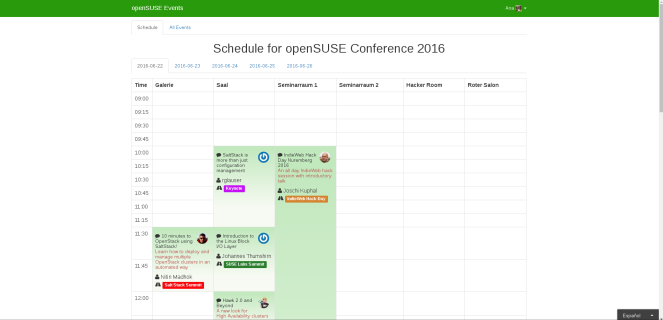
Well, maybe you think that it was not that bad, but look what happened in a mobile phone:


And this is how it looks now in the mobile phone:


And for tablets and big screens:
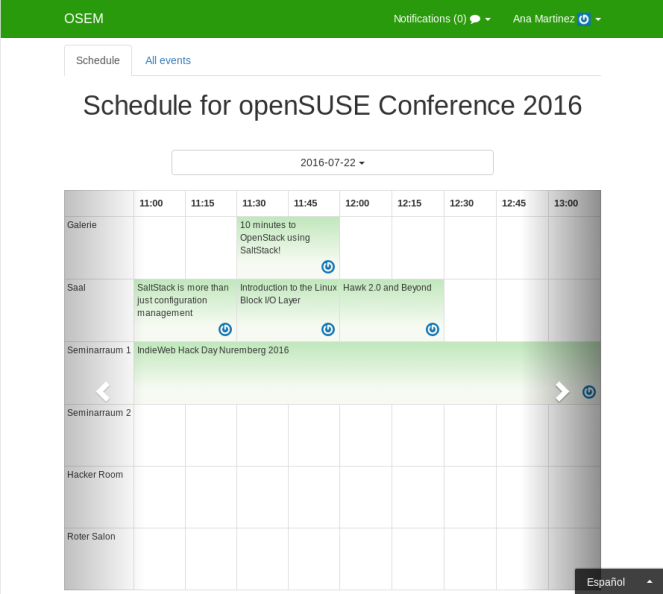
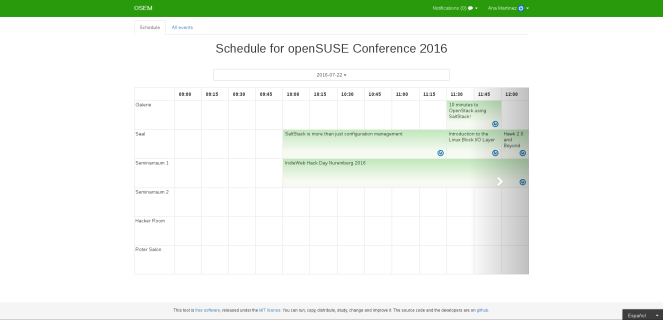
I think that the changes are really apparent. We decided to turn the schedule, having the times at the top, to use the space more efficiently. We looked for a mobile friendly solution for the schedule. At the beginning I wanted to use horizontal scroll, but my mentor made me realise that it is not very common and consequently most people wouldn’t understand it. So at the end I used a bootstrap carousel in which the interval of time that appear in every item of it is smaller when smaller is the device screen. I think that this is probably the only responsible option for a schedule, apart from using horizontal scroll, and it works pretty well. I also changed the tabs by a selector that fits all screen sizes and that is also better when the conference is too long.
The schedule height is at least 600px, as more devices are higher or equal to 600px, so that way we use most of the space. It was also important that every row and column had the same size. Regarding rows, it was very disconcerting that the carousel changed its size when clicking next. To keep all the rows with the same height I had to short the text. At the beginning I tried to do it truncating the title after a fixed number of characters, but I didn’t like that I wasted a lot of space, sometimes the title was too short or there was a lot of free space. At the end I used css to limit the title to a number of columns that depends on the the available height. In the case of columns, the fact that every time cell had a different size was what I hated the most of the old schedule. It was confusing, short events with a long title had more space than longer ones with a shorter title. Now the size of an event gives to a cue of how long it is, and I think that this is one of the main purposes of an schedule. The picture of the speaker is also dynamically adapted to the free space that there is left after adapting the number of lines and the cells height.
All events section
I also changed the all events section of the public schedule, although the pull request is still open: https://github.com/openSUSE/osem/pull/1032 But I think that we will be able to merge it next week. It used to be just an unordered list with all confirmed events:
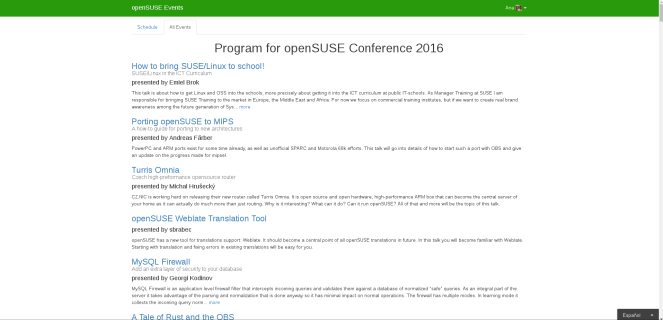
Now, the events are ordered by date and time and it is also included at the end a section of confirmed events which are not yet scheduled . The event boxes also include other useful information such as the start and end time, the room, the track and the speaker picture. I think it looks really nice:
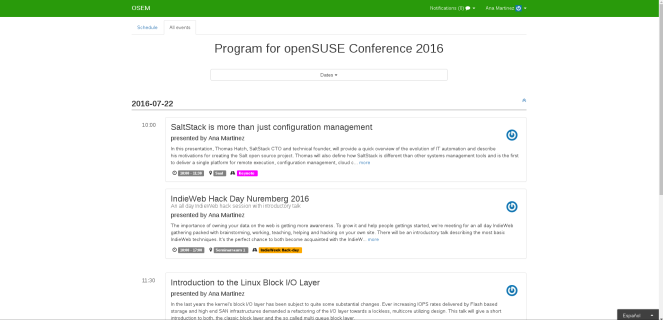
As you can see, I also added a selector with the dates at the top in which dates with no events are in grey to indicate it, so that way we provide an overview of the dates of the conference and reaching a concrete date is much faster. I’ve also added a button to go up in every date to make it easier to go up when there are many events.
Open the schedule in the current date
Another important feature, which I am pretty sure that people attending a conference will thank, is that the schedule is open in the current day and time. I think that this is very important taking into account that we are using a carousel and that in the mobile phone, which is the device that more likely people use when attending a conference to check the schedule, only one hour is rendered per carousel item. That means that otherwise we would have to click next repeatedly to reach the current time, specially when the day is almost finishing. Also, the all events section is open in the current day. Here it is not that important to go to the current time, as you just have to do scroll to find it and I implemented it and the code is quite complex.
Taking background colour into account
The track label used the track color for the background. It was always used white text for the name of the track and for some colors that made the name difficult or impossible to read. Now, the text is black or white depending on what of them provides a better readability. You can see the difference in the following images, where the text is the hexadecimal color of the background.


Style
I have hamlfy all views related to the schedule that were not already written in haml.
I also moved the all events view to a different controller method as that view was getting too complicated due to being together with the schedule.
What I have learned so far and things I liked
I have decided to put together the things I liked with the things I’ve learnt because what I like the most is that I am learning a lot of things. One of the best things of working at openSUSE is that I have the chance to work with a lot of intelligent people that come up with amazing ideas. That’s why I like the correction that my mentors and other people working on OSEM make me, it is the best way to learn. I also like that my mentors always help me when I have doubts, sending me links to useful information so that I can find a solution. Another thing I really appreciate is that I can always give my opinion and that everybody opinion is taken into account to decide the final design or implementation. And because of that I also loved all the things I’ve done, and to be honest now that I am putting all the screenshots together for the post I like them even more 
Regarding the things I’ve learned, the part where I feel I have improved more is on the use of git. When I started working on OSEM I spent more time fighting with git than working on the project, and I feel quite comfortable using it now. It was also the first time I used Rubocop and at the beginning I didn’t understand why it didn’t like any code I wrote. But I’ve got used to it, I’ve also installed a Rubocop plugin for atom and now I like that it corrects my style mistakes. Tests were also new for me. I’ve already added or fixed few test but I think there are still things I have to learn and I think I’ll have the chance to do so in the last part of GSoC. I hadn’t used haml before neither and although learning it was easy I didn’t like as I much as I like it now at the beginning. Installing an atom plugin that colors haml made the difference, it is much easy to read it if it is colored.
And of course I’ve also learnt many things regarding Ruby on Rails too. The first one I remember is that I found out that count, length and size methods don’t do the same thing. Regarding Bootstrap, I’ve learnt a lot of things too, such as what panels are.
Challenges I experienced
When working on the schedule I found a little bit frustrating that we spent a lot of time trying to decide what the best design was, so I felt I was going much slowlier than I had expected and I sometimes worked on things that at the end we decided that we didn’t like. Although seeing how wonderful the schedule looks like I am pretty sure that it was worthwhile.
Sometimes I feel a little bit disappointed when I have to throw away something in which I’ve spent a lot of time, but that remembers to what my drawing teacher told me when I was leaning painting:
If you really want to learn painting your objective can not be to decor your house with your paintings. You can not fall in love with your drawings, they are just exercises so you have to throw them away and when you learn then you will be able to decor your house.
So, that is the same, when I throw something away I keep what I learnt and at the end the final result is much better But it is still hard throwing things haha.
What’s next?
Currently I am working on allowing to have multiples schedules in the backend before deciding which of them to use. For that I’ve already introduce new models and associations. The following schema illustrate it (it is not a schema I did for the blog, I like to look at it when working on that, it helps me not to get lost with the relations):
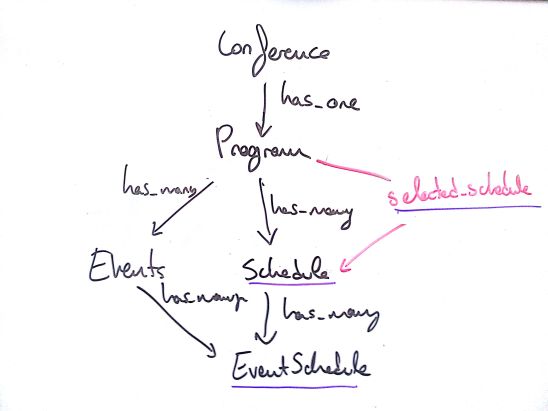
There are still many things to do before finishing it. Probably the most challenging will be merging it, as there are few pull request quite big that interfere a little bit. I’ll try to separate features in different branches if it is possible with the objective of having less files to look at the same time when merging.
The next thing I am going to start with is the admin interface for the schedule backend: integrate it and make it more usable. I am going to show you how it looks like now, so you will be anxious to see my post with the changes haha.
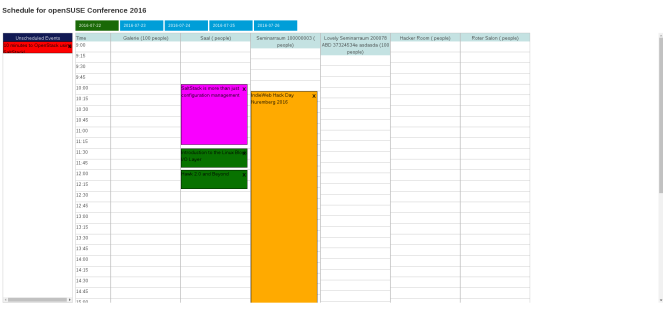
To finish the post I would like to thank my mentors the time they spend reviewing my work, giving me support and solving my doubts.
Hack Week
From June 27 to July 1 there was a Hack Week at the SUSE headquarters in Nuremberg, although I could only stayed the two first days. I hacked on OSEM together with Stella, Henne, Chris and Moises and I really enjoyed it. And SUSE office is really cool, there were chameleons and penguins everywhere, even in plants and mugs! 


And to be consistent with my other posts I’ll also show you what I ate at the Hack Week. That is the breakfast we had the second day, it was really strange for me having sausages for breakfast and even more if they are white and green haha.

And sadly that’s all about my travel to Germany as then Geeko and I came back home.  It was a really wonderful experience.

Last part of the conference
Fourth day of the conference
On Saturday I went to the openSUSE Wiki Workshop. We were talking about the problems that the Wiki has and how to solve them. After that, I was going to contribute to the Wiki, but it was broken.
Then, I had pizza for lunch, there were a lot of pizzas:


I didn’t attend any other conference that day, but I stayed at the conference place working on OSEM.
In the evening we went to the Octopus party organised by the Galician centre of Nuremberg, where I ate Paella. It was strange eating Paella in Germany, although it was better than some Paellas I have eaten in Spain. And again, I was surprised by the amount of Spaniards that are living in Nuremberg. Although it has been really sunny all day, just when we finished eating it started raining cats and dogs.


And at night we went to dance. I was really impressed by Matheus, he dances incredibly well.
Last day of the conference
On Sunday I went to the openSUSE: much more than Linux distributions talk, by Ancor González Sosa. He talked about the open source projects living under the openSUSE umbrella such as OSEM, Portus, Jangouts, Machinery or zypper-docker. He also mentioned openSUSE 101, openSUSE mentoring program, and the openSUSE GSoC projects as they are related with those project under the openSUSE umbrella. Then, it was the openSUSE Targeting the Education Sector talk, by Douglas DeMaio. I really liked the following sentence that Douglas said:
You can’t imagine how hard it is to sell something which is for free


Lastly, it was the openSUSE Project Meeting, where people could share their ideas or propose changes. Regarding the conference, most people liked the place where the conference took place but they would prefer the conference to be shorter (3 days instead of 5) and to have free water as there were some free drinks but no water. Also, there were complains about the marketing support for openSUSE less known projects. I agree, I want an OSEM‘s opossum sticker!

As on Sunday the conference ended before to allow people to return home there were not more talks that day. We had lunch and I talked with the people that stayed longer. And I also got a Geeko biscuit cutter printed with a 3D printer, I’ll put picture in the blog when I make Geeko biscuits! Here you have a pictures of the biscuits cutter finished and also a video of how it was printed:

In the evening we went give a walk around Nuremberg:


And of course we took the little Geeko that we were given at the conference with us:

We went to a street where there were columns with the humans rights on them. Every columns has a right in German and in other language. It was funny because the Spanish one was a circle in the floor instead of a column haha.


At night we had something delicious for dinner: Currywurst. It was the only dish in Germany that I ate completely haha.

And after that I got my two first books in German, one is a tale, so I hope to be able to read it soon, and the other one is a recipes book. I’ll probably use the recipes one earlier


Lastly, I took the last picture with Matheus as he was leaving on Monday morning and that was the last time I saw him

And that was all about the openSUSE conference 2016. I was really happy to meet my mentors and to put faces to nicknames as I met a lot people who I usually see in Github. I learnt many things, met a lot of people and had really fun. I hope to be able to go to next openSUSE conference and to met everyone there again!
I stayed two more days for the Hackweek and I’ll write about that in the next post.
GitLab Continuous Integration Runner Installation on SLES 12
At work we are using GitLab Comunity Edition hosted on our servers. GitLab includes Git repository management, code reviews, issue tracking, wikis, plus GitLab CI, a continuous integration and deployment tool similar to Jenkins or TeamCity.
Being responsible with architecting and implementing the infrastructure for our web application, I spent the last days implementing the continuous integration/deployment pipeline. Here is just a short tutorial about how to install GitLab Runner, an application which processes builds. It can be deployed separately and works with GitLab CI through an API. In order to run tests, you need at least one GitLab instance and one GitLab Runner. The installation is done on SUSE Linux Enterprise Server 12 but should work on openSUSE, as well.
Even if on their website, SUSE is not mentioned, the binary, writen in GO, is working perfectly fine.
- download the binary and save it in /usr/local/bin/
# wget -O /usr/local/bin/gitlab-ci-multi-runner https://gitlab-ci-multi-runner-downloads.s3.amazonaws.com/latest/binaries/gitlab-ci-multi-runner-linux-amd64
- let's make it executable
# chmod +x /usr/local/bin/gitlab-ci-multi-runner
- check to see if is working
# gitlab-ci-multi-runner --version
Version:      1.3.2
Git revision: 0323456
Git branch:   stable-1-3
GO version:   go1.6.2
Built:        Tue, 28 Jun 2016 14:03:09 +0000
OS/Arch:      linux/amd64
- create a GitLab CI user which will be responsible for our automatic builds and automatic deployments
# useradd -m deploy
# passwd deploy
New password: ...
- now we have to register the Runner. But before to do that we need a specific token and a "coordinator" URL which is generated by GitLab. In order to get them go to: Your GitLab Project -> Settings -> Runners, see the screenshot below.

# gitlab-ci-multi-runner register
Running in system-mode.

Please enter the gitlab-ci coordinator URL (e.g. https://gitlab.com/ci):
https://your-server-where-gitlab-is-installed/ci
Please enter the gitlab-ci token for this runner:
[your-unique-token]
Please enter the gitlab-ci description for this runner:
[our-little-gitlab-runner]:
Please enter the gitlab-ci tags for this runner (comma separated):
Registering runner... succeeded                     runner=fD_qnhkt
Please enter the executor: docker+machine, docker-ssh+machine, docker, docker-ssh, parallels, shell, ssh, virtualbox:
shell
Runner registered successfully. Feel free to start it, but if it's running already the config should be automatically reloaded!
- run the runner as a service
# gitlab-ci-multi-runner install --user=deploy --working-directory=/home/deploy/gitlab-runner
- start the service
# gitlab-ci-multi-runner start
- check if the runner is running
# ps aux | grep gitlab
root     25687  1.5  0.1  64192 14584 ?        Ssl  20:10   0:00 /usr/local/bin/gitlab-ci-multi-runner run --working-directory /home/deploy/gitlab-runner --config /etc/gitlab-runner/config.toml --service gitlab-runner --syslog --user deploy
- check if build started (after a few seconds)
# ls -ltr /home/deploy/gitlab-runner/builds/
total 4
drwxr-xr-x 3 deploy users 4096 Jul  6 20:10 baf1e27f
I didn't mentioned until now but you also need a .gitlab-ci.yml in your repository. Check the available documentation.