
Linux audio library smackdown part4: LibAO
Last time I’ve took look at Simple Direct Layer and how to get audio out of it. If SDL still feels little bit too hard to cope with I think I have solutions for you: libAO. Besides being no brainier with API libAO provides huge list of supported operating systems.
There is so much audio systems supported that you won’t be dissapointed but as much as I like everyone use Roaraudio. I don’t see it’s happening really soon (sorry roar you had your time in fame) but supporting Roaraudio doesn’t mean that libAO is obsolete. It’s far from being obsolete. Libao supports OSS, ALSA and Pulseaudio out of the box and only problem is license is GPL 2.0+ so it’s no-go for proprietary development.
History
LibAO is developed under Xiph umbrella. Xiph is the organization who brought you Ogg/Vorbis, FLAC, Theora and currently they are hammering together next generation video codec Daala. Opus-audio codec standard is also Xiph project. LibAO rised from Xiph’s need multi-platform audio output library for Vorbis-audio codec. In this point if you don’t have any glue what I just said in last sentences I think you should take your spoon and start shovelling about Open Source audio codecs.
Becaus of the history libAO only has output mode and doesn’t use any callbacks. It doesn’t have fancy Float32 mode (as much as I understood) but that doesn’t say it’s bad thing. It works as expected you just feed bytes and after while you hear them from your speakers.
What about API
Supported outputs: Alsa, Oss, Jack, Mac OS X, Windows
License: GNU General Public license 2.0+
As said libAO API is difficult to describe since there almost ain’t NAN of it. You initialize, ask output device, put in your mode settings and start feeding data. Pulseaudio simple is almost easy as this but it’s still more difficult if you compare it to libAO. LibAO doesn’t support recording so only output and there must be a way to use another device than default but it’s not very easy to find or I was too lazy to dig it out.
So who wants to use libAO? People in hurry and don’t mind GPL-license, someone with very very tiny need of just getting audio out and people how hate bloat.
Summary: So if you hate bloat and again license doesn’t make you unhappy please use this library. Still libAO has kind of same problem that ALSA has. It’s mature, usable and ready for hardcore torturing but is it sexy? No! Is fresh? No, No! Is something that will change it API every week or hour?
After this I have to choose what to bring next. I have FFmpeg, Gstreamer and VLC in row. If you have opinion about next framework let me know.

 Member
 Ilmehtar
Why openSUSE?
As this is hosted on my personal blog, this should probably go without saying, but given the topics covered in this post I wish to state for absolute clarity that the content of this post does not necessarily reflect the official opinion of the openSUSE Project or my employer, SUSE Linux GmbH. This is my personal opinion and should be treated as such
One thing I get asked, time and time again, is "Why openSUSE?". The context isn't always the same "Why should I use it?", "Why should I contribute to openSUSE?", "Why do you use it?", "Why not use [some other distribution]?" but the question always boils down to "What's special about the openSUSE Project?"
It's a good question, and in the past, I think it's one which both the openSUSE Project as a whole and me as an individual contributor have struggled to satisfactorily answer. But I don't believe that difficulty in answering is due to a lack of good reasons, but an abundance of them, mixed in with a general tendency within our community to be very modest.
This post is my effort to address that, and highlight a few reasons why you, the reader, should contribute to the openSUSE Project and use the software we're developing
Reason 1: We're not (just) a Linux Distribution
Normally, the first thing people think of when they hear openSUSE is our 'Regular Release Distribution', such as openSUSE 13.2 which we released last year (Download it HERE)
The openSUSE Project however produces a whole bunch more.
For starters, we have not one, but technically TWO other Linux Distributions which we release and maintain
openSUSE Tumbleweed - our amazing rolling release which manages to give it's users stable, usable, Linux operating system, with constantly updating software.
Perfect not only for Developers, but anyone who wants the latest and greatest software, leading Linux experts like Greg Kroah-Hartman have stated rolling releases like Tumbleweed represent the 'future' of Linux distributions. I agree, and I think openSUSE's is the best (for reasons that will be made clear later in this post).
In my case it's replaced all but one of my Linux installations, which previously included non-openSUSE distributions. The last (my openSUSE 13.1 server) is likely to end up running Tumbleweed as soon as I have a weekend to move it over. I started small with Tumbleweed, having it on just one machine, but after a year, I just don't see the need for the 'old fashioned' releases any more in any of my use cases.
If you want to see it for yourself, Download it HERE
openSUSE Evergreen - this is a great community driven project to extend the lifecycle of select versions of our Regular Release beyond its usual "2 Releases + 2 Months" lifespan.
While technically not a 'true' separate Distribution in the purest sense of the word, it takes a herculean effort from our community to keep on patching the distribution as it gets older and older, but it allows us to offer a 'Long Duration Support' for a significant period after the regular lifespan.
The current openSUSE Evergreen release is openSUSE 13.1, which will be supported until at least November 2016 and can be Downloaded HERE
So, we're not just *a* Linux distribution but several, but wait, there's more!
The openSUSE Project hosts a whole pile of other software Projects, always Open Source, which we both use ourselves and encourage others to use and contribute to. These include:
Open Build Service - our build tool, building all of our packages as well as ones for SUSE Linux Enterprise, Arch, Debian, Fedora, Scientific Linux, RHEL, CentOS, Ubuntu, and more.
openQA - automated testing for *any* operating system, that can read the screen and control the test host the same way a user does.
YaST - The best/only comprehensive Linux system configuration & installation tool.
KIWI - Create Linux images for deployment on real hardware, virtualisation, and now even container systems like Docker. Kiwi is the engine that powers SUSE Studio
Snapper - Create, manage, and revert system snapshots. Roll-back without hassle when your system gets messed up (p.s. It's probably your fault it messed up, so Snapper can show you what changed between snapshots too)
OSEM - Open Source Event Management. Lots of Open Source projects have their own conferences and other events. We have our own tool for managing proposals, organising schedules, taking registrations, etc.
Trollolo - Command line tool for Trello with a brilliant name ;)
And many more, many of which can be found on our GitHub project page
Reason 2: We build and use the best tools
You might have noticed a common theme among many of the software projects listed above. We're a Project that cares a lot about using the right tool for the job.
In many cases that means using many of the same tools that other projects use, IRC, Git & GitHub, Forums, Mailing Lists, etc. We're not the kind of project that wants to invent new types of wheels just because we didn't invent the first one, but when the tools that are out there don't do the job well enough, we roll up our sleeves and try to produce the *best* tool for that job.
Obviously, we do this motivated by the need to scratch our own itches, but we also work very hard to produce tools which can, and should, be adopted by a much wider audience than just 'users and contributors to the openSUSE Distributions'.
This is probably best highlighted by talking about two of our best tools, the Open Build Service, and openQA.
Open Build Service - As already mentioned, our build tool builds all of the openSUSE Distributions packages, ISOs, Images, etc.
It also generates and hosts repositories for these packages.
It has always been built as a 'cross-distribution' tool, currently able to build packages for SUSE Linux Enterprise, Arch, Debian, Fedora, Scientific Linux, RHEL, CentOS, Ubuntu and more.
With both a web-based UI (you can see and use our installation HERE) and the osc command-line tool (Documentation HERE) the barrier to entry is pretty low. Even someone with no packaging experience can easily see the contents of any package in OBS, understand how it's put together, branch it (aka fork it to use the github equivalent term) into their own Project and get hacking away.
We also allow our openSUSE instance of OBS to be used by *anyone* without charge, so they can build and host their packages on our infrastructure for free (though at the very least, we'd like it very much if they made sure their openSUSE packages work really nice in return ;) )
OBS is already used by other companies and projects like VideoLAN, Dell, HipChat and ownCloud, but if you're in the business of making software for Linux, you really need to ask yourself the question "Why don't I use OBS to build my packages?"
openQA - Another jewel in our crown and somewhere I've been spending a lot of my time lately. openQA is a testing tool that lets you build tests for any operating system or application. Unlike practically every other testing tool I've looked at, openQA actually tests software the same way *users* do. It looks at the screen, and makes sure the user will see what you expect them to see. Then press the same keyboard and mouse buttons that a user would to work through the application. You can see it in action HERE
openSUSE use openQA extensively to build Tumbleweed. Proposed code for Tumbleweed is tested by openQA before it is accepted, and tested again AFTER it's accepted (to make sure it integrates well with everything else that has been recently merged).
This is how we're able to offer Tumbleweed as a 'stable' Rolling Release, because thanks to openQA we *know* the Distribution works *before* we put any updates in the hands of any users. If something does break, openQA stops the release, and users don't notice any problems, besides perhaps a slight delay in receiving new updates. On the (exceptionally rare) chance that something slips by openQA, that becomes a new test case, so we never make the same mistake twice.
openQA is also being used by SUSE for the testing of SUSE Linux Enterprise, and the Fedora Project have recently started using it. We'd love to see more distributions using it, and while playing around we've already managed to get openQA testing different operating systems like Android and even Windows :)
Reason 3: Engineering matters
Why all this focus on tools? Well for our community, engineering matters. Beyond the tools that we use to make this happen, we spend a lot of time, braincells, and discussions, getting under the hood and trying to find the best way to build our software.
This has led to openSUSE leading the way with lots of innovations in areas like package management. zypper and libsolv mean that, unlike other RPM-based Linux distributions 'dependency-hell' is a thing of the past for us, and we manage to stand toe to toe with Debian and Ubuntu, look at their package managers and go 'yeah, we can do that, and more'
We're also not interested in being another Open Source project taking everything from dozens of upstream projects and either stamping our logo on it and calling it our own, or changing a whole bunch of stuff and not giving stuff back.
We work hard with our upstream projects, be that the Kernel, GNOME, KDE, whatever, to give our feedback, get our patches merged, not just for their benefit, but our own - the more they accept, the less work we'll have to do maintain long winded openSUSE specific patch sets in the Future.
Reason 4: Community, Community, Community
The openSUSE Community is great, so great they deserve a blog post of this length on their own. But for the purposes of this post I want to summarise a few things.
First, a little bit about SUSE. We're sponsored by SUSE, and they make up an important part of the community, employing a good number of openSUSE contributors, and regularly contributing to the openSUSE Project in terms of code, staff, money.
In many respects their the 'Patron' of the openSUSE Project, having our back when we need it, but not overarching overlords controlling the project. The openSUSE Project is independent, free to set it's own direction.
SUSE sees themselves as peers in the community, taking part in the same way as everyone else, encouraging its engineers to be involved in discussions, and help set the direction of the openSUSE Project via code submissions, just like everyone else.
Open Source works best when there is freedom to innovate, that's the business openSUSE is in, and SUSE is a company that understands at it's Core - as their current recruitment campaign says "Open Source is in their Genes" (P.S. They're Hiring)
So if SUSE aren't 'in charge', who is? Well, the community is. Those who do, decide, and we want more people to help join us doing stuff! We're the kind of project that is very open to new contributors, and we try hard to maintain a very low barrier to entry.
We're not the sort of project with lots of hoops you need to jump through before you're allowed to do anything.
If you see something that needs fixing, talk to the people also working on it, fix it for/with them, and submit your contributions. This is true for code, the website, wiki, marketing stuff, anything, anywhere. We're not a project where you need permission before you can get involved.
We try and keep our processes lean but the ones we do have are on our Wiki, and in terms of getting together with existing contributors, they can most easily be found in our IRC Channels and on our Mailing Lists
If you're a user and need help actually using openSUSE but aren't ready to get involved with contributing to the project yet, then we have a great community of contributors helping support people via IRC and our Forums
But doesn't everyone doing everything everywhere lead to chaos? No, not really. The Open Source model works, with the few processes we have in place providing enough structure and safety that problems get caught and dealt with as part of a natural flow and learning process.
But, it's not utopia, from time to time of course stuff pops up, and that's why the openSUSE project has the Board.
Our job is to help keep this Project on the right track, keep people talking to each other, resolving conflicts, keeping everyone on the same page, and being the 'decision makers of last resort' if there is no one else able/suitable to make a decision that affects the Project.
This basically boils down to being the 'Universal Escalation Point' - If you have a problem, if no one else can help, and if you can find them (and that should be easy), maybe you should contact board@opensuse.org (LINK - ahh, nostalgia)
The structure of the Board is also a nice reflection of how the rest of our community is structured - of the 5 elected Board seats, no more than 2 can be occupied by people employed/controlled by the same organisation. This means no company (not even SUSE) can have a majority of the seats on the Board, ensuring it's healthy and balanced just like the rest of our community.
And finally, the openSUSE community is just a great bunch of people. I've been contributing to this project since it started, and it's dragged me in and is as much fun as ever. We have great, smart, funny, dedicated people, and it's a pleasure working with them both as part of my day job and hobby.
A big part of that is our regular openSUSE Conferences. 2011 was my first, and the wonderful combination of meeting people, great talks, and (lots of) openSUSE Beer, enabled me to jump from being a 'casual contributor' on the fringes to someone who really felt part of this great community.
We have another openSUSE Conference coming up in May, in Den Haag/Netherlands. There's still time to Submit talks (we'd love to see more from other Projects) or Register. If this post has got you interested in openSUSE, come along, it's a great opportunity to meet us :)
And remember our motto and default /etc/motd.. Have a Lot of Fun!
Qactus is out in the wild
Qactus, a Qt-based OBS notifier, is out in the wild. Version 0.4.0 is the first release.
I started it a long time ago together with Sivan Greenberg as a personal project for learning Qt. And now it’s back into life 
It features
– Build status viewer
– Row editor with autocompleter for project, package, repository and arch
– Submit requests viewer
– Bugs
This application is possible thanks to Marcus ‘darix’ Rueckert. He has helped me getting further knowledge of the OBS API.
I think this version is usable. So, why don’t you give it a try?
The source code is hosted on GitHub.


AMD FGLRX new rebuild 14.501.1003-2 supporting Kernel 3.19 for openSUSE 13.1 13.2 and Tumbleweed
There’s a new build published today for the AMD FGLRX drivers.
It include the new patch made by Sebastian Siebert supporting Kernel 3.19x series you could have on 13.1, 13.2 and Tumbleweed openSUSE distribution.
The server just got the new rpms, so you should be able to update with zypper ref -f && zypper up
Have fun.
Three configuration domains
In this article I would like to describe how pass variables(configuration) to application and core of libgreattao. Writing about core I have in mind the main libgreattao librarary – without backends. Core configuration can be separated into shell configuration and window classes configuration.
Each sub chapter I begun with describing how invoke application, giving t o it application’s configuration, shell’s configuration and window classes configuration.
Configuration can went from files or command line. Additionally, application’s configuration can went from arguments(command line) after three additional decorators and additionally from configuration window. Configuration window is automatically generatedby libgreattao. In future I would like to add configuration coming from network. I would like to add to libgreattao web serwer and wrote client. Of course, network source will be less important, so there’s no additional risk to application.
Application domain
Configuration from file
./our_program --tao-app-config-from-file /path/to/first/file,/path/to/second/file
Libgreattao will read configuration from files in giving order. Files read in future will override file read in past. There’s the same rules than in user’s file for specified application for selecting user’s application directory(~/.tao/apps), so options are assembled with spaces, name, equal signs and value. Name and value must be divided by equal sign not preceded with backslash character. Using of escape characters are allowed, like ‘\ ‘, ‘\n’, ‘\=’. Using sentences are allowed too.
Configuration from command line – line
./our_program --tao-app-config-from-line first_variable=first_value,second_variable=second_val
In this case application’s parameters are separated by commas. Each parameter are assembled by variable(variable’s name) and value.
Configuration from command line – tao-switch
./our_program --tao-app-config-tao-switch-first-option first_value --tao-app-config-tao-switch-second-option second_value
In this case you should use for all option –tao-app-config-tao-switch- and name of option. You should put value as next argument.
Long option – equivalent to getopts syntax
./our_program --first-option first_value --second-option second_value
It’s equivalent to long option getopts syntax. We here put two dash and next name of option.You should put option’s value as next argument. Difference between this and previous method is in handling way. In this case option with value are not removed from arguments list(char **argv, char *argv[]). As you can guess, in previous case, we remove option decorator and value from arguments list. It’s indented, because this syntax is also used by getopts and application can support custom options, so we cannot remove it on libgreattao_initialize.
Character-switch – (not) equivalent to getopts syntax
./our_program -a first_value -b second_value
In this case it looks like previous way. Decorator and value are not removed from list. As getopts short arguments, you can puts dash and letter as decorator. In difference to getopts you cannot put this characters together and after each decorator you must put value.
Reading order
In first position libgreattao tries to read files. As I explain above, files are read in order as given, so values in files read in future will override, what was read in past. In second step command line are read. In last step window with options are generated. For each command-line parameter application can select decorators for each option, so libgreattao can search for tao-switches, long switches, short switches. Tao command line switch(there, where you put options separated by commas) are always enabled to command-line source. Order for command line switches are described below:
- tao-switches option
- Long decorators
- Characters(short) decorators
- Tao line
For each option used decorators are determined by used flags for option. Values read in future overlapped values read in past.
Arguments querying
#include <libgreattao/tao.h>

#include <libgreattao/config.h>
#include <stdlib.h>
#include <string.h>
const struct tao_app_config_option options[4] =
{
{"a", "a", "a", TAO_TYPE_STRING, 'a', TAO_CONFIG_OPTION_ARG_TAO_DECORATOR | TAO_CONFIG_OPTION_ARG_LONG_DECORATOR | TAO_CONFIG_OPTION_ARG_CHARACTER_DECORATOR},
{"b", "b", "b", TAO_TYPE_INT, 'b', TAO_CONFIG_OPTION_ARG_TAO_DECORATOR | TAO_CONFIG_OPTION_ARG_LONG_DECORATOR | TAO_CONFIG_OPTION_ARG_CHARACTER_DECORATOR},
{"c", "c", "c", TAO_TYPE_UINT, 'c', TAO_CONFIG_OPTION_ARG_TAO_DECORATOR | TAO_CONFIG_OPTION_ARG_LONG_DECORATOR | TAO_CONFIG_OPTION_ARG_CHARACTER_DECORATOR},
{"file", "file", "file", TAO_TYPE_FILE_PATH, 0, 0}
};
struct tao_app_config_result results[4];
void close_window(void *mesh, void *mesh2)
{
tao_close();
}
int main(int argc, char **argv)
{
char *buffer;
void *message_window;
int length;
int number;
tao_initialize("tao options demonstration", "", &argc, argv);
tao_get_app_configuration(options, results, 4, TAO_APP_CONFIG_FROM_LINE | TAO_APP_CONFIG_FROM_FILE) ;
buffer = (char *) malloc(sizeof("Error getting string\n") - 1
+ sizeof("Error getting integer\n") - 1
+ sizeof("Error getting unsigned\n") - 1
+ sizeof("Error getting file path"));
buffer[0] = '';
if (results[0].error) {
strcat(buffer, "Error getting string\n");
}
if (results[1].error) {
strcat(buffer, "Error getting integer\n");
}
if (results[2].error) {
strcat(buffer, "Error getting unsigned\n");
}
if (results[3].error) {
strcat(buffer, "Error getting file path");
}
if (buffer[0] != '') {
message_window = tao_new_window("/desktop/dialogs/message_dialog");
tao_add_handler(message_window, "/message", NULL, 0);
tao_add_handler(message_window, "/:abort", close_window, 0);
tao_set_hint(message_window, "/message", HINT_NAME, buffer);
tao_handle_events();
tao_release_window(message_window);
}
length = sizeof("\"\" \"\"\n");
length += 2; /* Two numbers */
if (!results[0].error) {
length += strlen(results[0].result);
}
else {
length += sizeof("(null)") - 1;
}
if (!results[1].error) {
number = (int) results[1].result;
while (number /= 10) {
++length;
};
}
if (!results[2].error) {
number = (int) results[2].result;
while (number /= 10) {
++length;
}
}
if (!results[3].error) {
length += strlen(results[3].result);
}
else {
length += sizeof("(null)") - 1;
}
if (length > (sizeof("Error getting string\n") - 1
+ sizeof("Error getting integer\n") - 1
+ sizeof("Error getting unsigned\n") - 1
+ sizeof("Error getting file path"))) {
free(buffer);
buffer = (char *)malloc(sizeof(*buffer) * (length+1));
}
snprintf(buffer, length+1, "\"%s\" %d %d \"%s\"\n",results[0].result,results[1].result,results[2].result,results[3].result);
if (buffer[0] != '') {
message_window = tao_new_window("/desktop/dialogs/message_dialog");
tao_add_handler(message_window, "/message", NULL, 0);
tao_add_handler(message_window, "/:abort", close_window, 0);
tao_set_hint(message_window, "/message", HINT_NAME, buffer);
tao_handle_events();
tao_release_window(message_window);
}
free(buffer);
}
This is simple program, which obtain options and next displaying, which options are not passed and next displaying all option’s values. Most important is tao_get_app_configuration. It have pointer for option description as first argument. This structures are not modified by function. As next argument, there’s pointer for structure of results, which will be modified by this function. Program must result structures by 0 before calling this function. As next argument we have count of parameters and results structures. The numbers of parameter structures and result structures must match. As next argument we have flags. We can use these flags:
- TAO_APP_CONFIG_FROM_FILE
- TAO_APP_CONFIG_FROM_LINE
- TAO_APP_CONFIG_INTERACTIVE
- TAO_APP_CONFIG_INTERACTIVE_FORCE
First flag makes reading from files. Configuration came from files are read in libgrattao_initialize method – not in tao_get_app_config. Next flag makes reading form command line. Last two flags makes libgrattao display configuration window. The difference is flag with suffix _FORCE causes displaying all options – filled options too. Additional difference is flag without this suffix don’t display configuration window in case, when all options are filled.
In this paragraph I will describe option description structure. First field of this structure is name of option. It is used to add suffix of switches in command line and it’s also used to searching in command line. Second field is name displayed to user in configuration window. Third field is description displayed to user in configuration window. Fourth filed is option type. In example I uses all allowed types, like string, natural number, integer and file’s path. File path are handled in the same way as string, but for file path(in config window) there’s displayed additional button, which allows to select file. Next filed is character, which are used to short-switches(character decorators). Last argument are flags, which allows to select decorators allowed for current option.
Explained program don’t uses configuration window. To change this you should add flag to last argument of tao_get_app_configuration. It makes this function not returning, while passed data are incorrect. Configuration window guards to all option are correct and filled. Only in case, when user close configuration window, this function assign error to all options.
Shell configuration
./our_program --tao-shell-config-from-file /path/for/configuration/file/1,/path/for/configuration/file/2
It’s similar to application configuration. Files are parsed in giving order and have similar syntax as application configuration files.
Second case:
./our_program --tao-shell-config-from-line first_option=first_value,second_option=second_value
It’s similar to application configuration too
Of course, options given in command line are more important from that reading from files.
I will now show, how uses this data.
=fromconfig variable_name configuration_option_name
This command writes to variable with name given as first argument configuration option with name given as second argument.
Windows classes configuration
./our_program --tao-design-config-from-file /path/for/configuration/file/1,/path/for/configuration/file/2
It’s similar to application configuration. Files are parsed in giving order and have similar syntax as application configuration files.
Second case:
./our_program --tao-design-config-from-line first_option=first_value,second_option=second_value
This is similar as configuration of application.
Now, I will show how use this:
<root>
<fromconfig name="instance_id" configuration="instance_id" />
<label>
<attr-connect name="label" variable="instance_id" />
</label>
<label dir-for="label" path="/message" />
<label dir-for="description" path="/message" />
<hbox>
<template path="/actions/*">
<button label="ok" dir-for="event,label">
<attr-connect name="label" function="last-dir" />
</button>
</template>
</hbox>
</root>
We are using here fromconfig element. Name means variable name, which will be created/overwritten. Configuration is configuration option’s name of window classes. In next step we assign variable’s value to label element.
That’s all!

openSUSE Tumbleweed; 3.19 kernel; VMware Workstation 11.0.x
VMware community message
Credit for the patch
patch available at 1
Execute the following steps to patch your VMware Workstation 11.0.x
# curl -L "https://docs.google.com/a/seader.us/uc?authuser=0&id=0BxMaO3Y-qL_1Z2NMSkxRdndzNlk&export=download" -o /tmp/vmnet-3.19.patchExtract the vmnet module from sources:
# cd /usr/lib/vmware/modules/source
# tar -xf vmnet.tar
# patch -p0 -i /tmp/vmnet-3.19.patch
# tar -cf vmnet.tar vmnet-only
# rm -r *-only
# vmware-modconfig --console --install-allEnjoy!
openSUSE miniSummit @Scale13x – summary
Hi Geekos, here a small summary of our Thursday February 19th openSUSE miniSummit event here at SCale 13x.
Located in Century AB room, a 80 seats room. The average attendance rate was varying between 50% and 85%.
Qualifying the attendance 50% or more were not related to SUSE / openSUSE, which was a good experience of question and feedback.
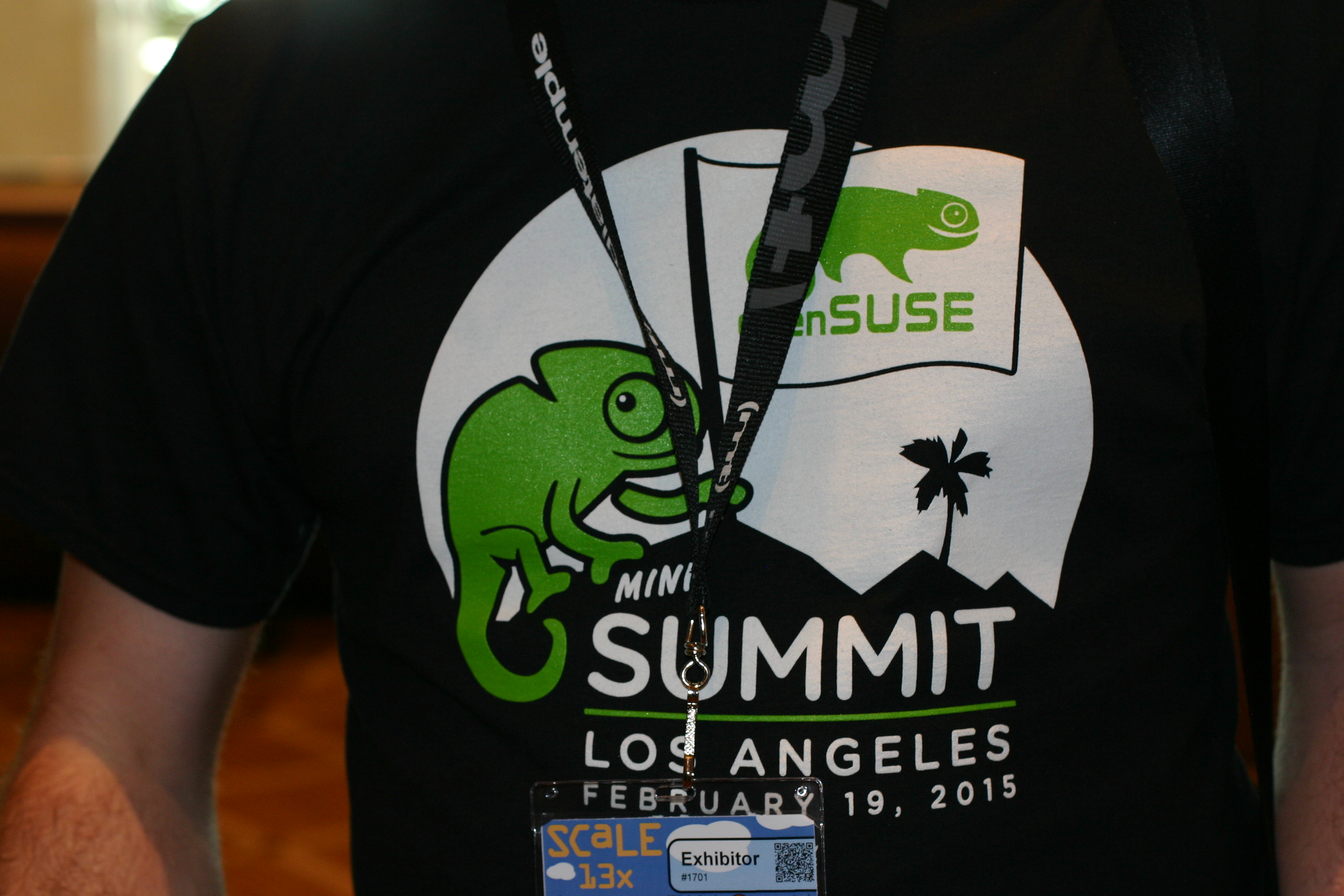
The day started by a talk about openSUSE / SUSE Xen and openstack by Peter Linnel and Russel Pavlicek.
One hour later Manu Gupta has presented all the bolts and nuts about GSOC at openSUSE.
We then go for lunch, and corridor exchanges.
I’ve opened the afternoon with my talk “them + me = we” about breaking mythic frontier
Then just after a small break, Mark Fasheh member of filesystem SUSE Labs group has talk about the project Duperemove: dedupe on btrfs (have a look on github the source are there, and package available on obs)
The day continue with a Town Hall talk co-animated by myself and Peter running an open discussion with attendees. With interesting remarks and feedback from openSUSE users, and also complete foreigners. For example, the way systemd was introduced in openSUSE distribution was appreciated (having choice during 2 versions). It was an unstressfull, open and positive exchange.
To follow, Bryan Lunduke and Peter animated a talk about “the 10 things you would love about SUSE and openSUSE if you only you knew…”
I did really enjoy the way they numbered the slides …
Freschy, punchy, funky, the kinda talk I would like to see again at OSC15.
To finalize the day, Markus Feilner for Linux Magazine (de) talked about openQA.
I found interesting the perfect mix we’ve done between openSUSE and SUSE during this day, confirming the excellent partnership we have.
Let the sponsors of this day be warmly thanked to make it happened.
Links :
SCale picture album day 1 : by Françoise on G+
openSUSE miniSummit day album :
Bruno’s Album on G+
Follow the news on G+ channel
Stay tuned for more news during this week-end.
Intel Power Management on openSUSE Tumbleweed
In the past I've posted several articles on various tweaks to improve Power Management on Intel Sandy/Ivybridge hardware, based on my experiments with my Lenovo X220
With more recent releases of openSUSE, I've been experimenting with my old tweaks, and found that they NO LONGER help with power management - In fact, they seem to increase it
So, my advice at the moment - if you want a Linux OS that has good Power Management on a Lenovo X220 or similar laptop.. install openSUSE Tumbleweed, and don't change the default settings :)
HTH
OpenStack Summit Vancouver 2015 Presentation Votes (ends Feb. 23rd)
I have submitted a handful of sessions which I hope will be voted for. Below are some short summary's and links to their voting pages.
- Accelerate OpenStack deployment with OpenStack Admin Appliance ( Speaker: Cameron Seader )
In an effort to make OpenStack available to the non-tech user and appear much less of a heavy lifting project, I have created the SUSE OpenStack Cloud Admin Appliance. However, no matter if your an OpenStack Noob, Professional, Expert or Developer...
https://www.openstack.org/vote-vancouver/Presentation/accelerate-openstack-deployment-with-openstack-admin-appliance
- Deploying SUSE OpenStack Cloud with the Xen Project Hypervisor ( Speakers: Cameron Seader, Russell Pavlicek, Stefano Stabellini )
Its all about choice these days when it comes to selecting your OpenStack hypervisor. But what makes for a good choice of hypervisor? And why should you consider the Xen Project Hypervisor when there are other possible selections? ...
https://www.openstack.org/vote-vancouver/Presentation/deploying-suse-openstack-cloud-with-the-xen-project-hypervisor
- Hands-On With Heat: Service Orchestration in the Cloud submitted by Rick Ashford ( Speakers: Rick Ashford, Cameron Seader )
OpenStack Heat provides a framework for predefining a structured service, and allows you instantiate that service in an automated manner. This hands-on lab will walk the participants through the process of creating a Heat template file for a multi-tiered...
https://www.openstack.org/vote-vancouver/Presentation/hands-on-with-heat-service-orchestration-in-the-cloud
- Planning an Enterprise OpenStack Deployment submitted by Rick Ashford ( Speakers: Rick Ashford, Cameron Seader )
Deploying OpenStack can be a difficult, time-consuming, and complex task. Doing it successfully is even harder. Planning and coordination between groups are the key differences between successful and failed implementations. Come discuss the questions you will need to ask yourself to be able to architect...
https://www.openstack.org/vote-vancouver/Presentation/planning-an-enterprise-openstack-deployment
FOSDEM and early Tamil driver work.
FOSDEM 2015
It was another great FOSDEM this year. Even with their 5-10.000 attendants, the formula of being absolutely free, with limited sponsorship, and while only making small changes each year is an absolute winner. There is just no conference which comes even close to FOSDEM.For those on ICE14 on Friday, the highspeed train from Frankfurt to Brussels south at 14:00, who were so nice to participate in my ad-hoc visitor count: 66. I counted 66 people, but i might have skipped a few as people were sometimes too engrossed in their laptops to hear me over their headphones. On a ~400 seat train, that's a pretty high number, and i never see the same level of geekiness on the Frankfurt to Brussels trains as on the Friday before FOSDEM. If it didn't sound like an organizational nightmare, it might have been a good idea to talk to DB and get a whole carriage reserved especially for FOSDEM goers.
With the Graphics DevRoom we returned to the K building this year, and i absolutely love the cozy 80 people classrooms we have there. With good airflow, freely movable tables, and an easy way to put in my powersockets, i have an easy time as a devroom organizer. While some speakers probably prefer bigger rooms to have a higher number of attendants, there is nothing like the more direct interaction of the rooms in the K buildings. With us sitting on the top floor, we also only had people who were very actively interested in the topics of the graphics devroom.
Despite the fact that FOSDEM has no equal, and anyone who does anything with open source software in the European Union should attend, i always have a very difficult time recruiting a full set of speakers for the graphics DevRoom. Perhaps the biggest reason for this is the fact that it is a free conference, and it lacks the elitarian status of a paid-for conference. Everyone can attend your talk, even people who do not work on the kernel or on graphics drivers, and the potential speaker might feel as if he needs to waste his time on people who are below his own perceived station. Another reason may be that it is harder to convince the beancounters to sponsor a visit to a free conference. In that case, if you live in the European Union and when you are paid to do open source software, you should be able to afford going to the must-visit FOSDEM by yourself.
As for next year, i am not sure whether there will be a graphics devroom again. Speaker count really was too low and perhaps it is time for another hiatus. Perhaps it is once again time to show people that talking in a devroom at FOSDEM truly is a privilege, and not to be taken for granted.
Tamil "Driver" talk.
My talk this year, or rather, my incoherent mumble finished off with a demo, was about showing my work on the ARM Mali Midgard GPUs. For those who had to endure it, my apologies for my ill-preparedness; i poured all my efforts into the demo (which was finished on Wednesday), and spent too much time doing devroom stuff (which ate Thursday) and of course in drinking up, ahem, the event that is FOSDEM (which ate the rest of the weekend). I will try to make up for it now in this blog post.Current Tamil Status.
As some might remember, in September and October 2013, i did some preliminary work on the Mali T-series. I spent about 3 to 3.5 weeks building the infrastructure to capture the command stream and replay it. At the same time I also dug deep into the Mali binary driver to expose the binary shader compiler. These two feats gave me all the prerequisites for doing the job of reverse engineering the command stream of the Mali Midgard.During the Christmas holidays of 2014 and in January 2015, i spent my time building a command stream parser. This is a huge improvement over my work on lima, where i only ended doing so later on in the process (while bringing up Q3A). As i built up the capabilities of this parser, i threw ever more complex GLES2 programs at it. A week before FOSDEM, my parser was correctly handling multiple draws and frames, uniforms, attributes, varyings and textures. Instead of having raw blobs of memory, i had C structs and tables, allowing me to easily see the differences between streams.
I then took the parsed result of my most complex test and slowly turned that into actual C code, using the shader binary produced by the binary compiler, and adding a trivial sequential memory allocator. I then added rotation into the mix, and this is the demo as seen on FOSDEM (and now uploaded to youtube).
All the big things are known.
For textures. I only have simple texture support at this time, no mipmapping nor cubemapping yet, and only RGB565 and RGBA32 are supported at this time. I also still have not figured out how to disable swizzling, instead i re-use the texture swizzling code from lima, the only place where I was able to re-use code in tamil. This missing knowledge is just some busywork, and a bit of coding away.As for programs, while both the Mali Utgard (M-series) and Midgard (T-series) binary compilers output in a format called MBS (Mali Binary Shader), the contents of each file is significantly different. I had no option but to rewrite the MBS parser for tamil.
Instead of rewriting the vertex shaders binaries like ARMs binary driver does, i reorder the entries in the attribute descriptor table to match the order as described by the shader compiler output. This avoids adding a whole lot of logic to handle this correctly, even though MBS now describes which bits to alter in the binary. I still lay uniforms, attributes and varyings out by hand though, i similarly have only limited knowledge of typing at this point. This mostly is a bit of busywork of writing up the actual logic, and trying out a few different things.
I know only very few things about most of the GL state. Again, mostly busywork with a bit of testing and coding up the results. And while many values left and right are still magic, nothing big is hiding any more.
Unlike lima, i am refraining from building up more infrastructure (than necessary to show the demo) outside of Mesa. The next step really is writing up a mesa driver. Since my lima driver for mesa was already pretty advanced, i should be able to re-use a lot of the knowledge gained there, and perhaps some code.
The demo
The demo was shown on a Samsung ARM Chromebook, with a kernel and linux installation from september 2013 (when i brought up cs capture and exposed the shader compiler). The exynos KMS driver on this 3.4.0 kernel is terrible. It only accepts a few fixed resolutions (as if I never existed and modesetting wasn't a thing), and then panics when you even look at it. Try to leave X while using HDMI: panic. Try to use a KMS plane to display the resulting render: panic.In the end, i used fbdev and memcpy the rendered frame over to the console. On this kernel, i cannot even disable the console, so some of the visible flashing is the console either being overwritten by or overwriting the copied render.
The youtube video shows a capture of the Chromebooks built in LCD, at 1280x720 on a 1366x768 display. At FOSDEM, i was lucky that the projector accepted the 1280x720 mode the exynos hdmi driver produced. My dumb HDMI->VGA converter (which makes the image darker) was willing to pass this through directly. I have a more intelligent HDMI->VGA adapter which also does scaling and which keeps colours nice, but that one just refused the output of the exynos driver. The video that was captured in our devroom probably does not show the demo correctly, as that should've been at 1024x768.
The demo shows 3 cubes rotating in front of the milky way. It is 4 different draws, using 3 different textures, and 3 different programs. These cubes currently rotate at 47fps, with the memcpy. During the talk, the chromebook slowed down progressively down to 26fps and even 21fps at one point, but i have not seen that behaviour before or since. I do know of an issue that makes the demo fail at frame 79530, which is 100% reproducible. I still need to track this down, it probably is an issue with my job handling code.
linux-exynos.org
With Lima and Tamil i am in a very unique position. Unlike on adreno, tegra or Videocore, i have to deal with many different SoCs. Apart from the difference in kernel GPU drivers, i also have to deal with differences in display drivers and run into a whole new world of hurts every time i move over to a new target device. The information for doing a proper linux installation on an android or chrome device is usually dispersed, not up to date, and not too good, and i get to do a lot of the legwork for myself every time, knowing full well that a lot of others have done so already but couldn't be bothered to document things (hence my role in the linux-sunxi community).The ARM chromebook and its broken kms driver is much of the same. Last FOSDEM i complained how badly supported and documented the Samsung ARM chromebook is, despite its popularity, and appealed for more linux-sunxi style, SoC specific communities, especially since I, as a graphics driver developer, cannot go and spend as much time in each and every of the SoC projects as i have done with sunxi.
During the questions round of this talk, one guy in the audience asked what needed to be done to fix the SoC pain. At first i completely missed the question, upon which he went and rephrased his question. My answer was: provide the infrastructure, make some honest noise and people will come. Usually, when some asks such a question, nothing ever comes from it. But Merlijn "Wizzup" Wajer and his buddy S.J.R. "Swabbles" van Schaik really came through.
Today there is the linux-exynos.org wiki, the linux-exynos mailinglist, and the #linux-exynos irc channel. While the community is not as large as linux-sunxi, it is steadily growing. So if you own exynos based hardware, or if your company is basing a product on the exynos chipset, head to linux-exynos.org and help these guys out. Linux-exynos deserves your support.