
 Member
 vinzv
vinzvQuicktipp: Firefox und die Adressleiste: Wie man Wort für Wort markiert
Was mich auf meiner aktuellen OpenSUSE-Installation genervt hat, war das Verhalten beim Markieren von Text in der Firefox Adressleiste. Ich bin es gewohnt mit Strg+Shift und den Cursortasten Teile der eingegebene Adresse Wort für Wort auswählen zu können.
Scheinbar hat man das beim Paketieren für OpenSUSE jedoch nicht gemacht, sondern lässt immer die komplette Zeile markieren.
Kurz und gut, du kannst das Problem recht einfach in den Anwendungseinstellungen beheben:
1. about:config aufrufen und – falls nötig – den Warnhinweis bestätigen
2. Nach layout.word_select.stop_at_punctuation und den Wert durch Doppelklick auf “true” setzen.
2b. Wenn du Leerzeichen mit dem nächstgelegenen Wort zusammen markieren möchtest, noch layout.word_select.eat_space_to_next_word ebenfalls auf “true” umstellen.
Fertig!
KDE Plasma 5 und OpenSUSE Tumbleweed
KDE Plasma 5.2 ist seit kurzem veröffentlicht und in den Repositories von OpenSUSEs rolling release Zweig “Tumbleweed” bereits verfügbar. Der einfachste Weg um beides installiert zu bekommen ist wie folgt:
1. NetInstall ISO holen und Live-Stick (oder CD) erstellen.
- Für 64bit:
$ wget -c http://download.opensuse.org/tumbleweed/iso/openSUSE-Tumbleweed-NET-x86_64-Current.iso - Für 32bit:
$ wget -c http://download.opensuse.org/tumbleweed/iso/openSUSE-Tumbleweed-NET-i686-Current.iso
2. Vom Installationsmedium starten und ein minimales grafisches System installieren. Hierzu bei der Desktopauswahl zuerst “Weitere” (oder “Other”) und dann “Minimal X Window” auswählen. Als entscheidenden Punkt noch “KDE Plasma 5” aktivieren.
3. Nachdem die Installation durch ist (dauert etwas, selbst über einen 100Mbit-Leitung musste ich ca. 45 Minuten warten) startest du das System zum ersten Mal – und boom! – landest in einem hässlichen twm Loginfenster. Und wenn du dich einloggst, bekommst du twm als Windowmanager gestartet.
Um das zu beheben änderst du Folgendes:
$ sudo vim /etc/sysconfig/displaymanager
Hier die Variable DISPLAYMANAGER auf kdm oder sddm (falls installiert) setzen.
$ sudo vim /etc/sysconfig/windowmanager
Hier änderst du den Wert für DEFAULT_WM auf “plasma5”.
Jetzt einfach neu booten oder den Displaymanager neu starten:
$ sudo service display-manager restart
Das war’s!

How do you upgrade your distro? A tale of two workarounds
Every classic Linuxer would know why it's very handy to dedicate a separate partition for the /home folder of your tree: you could in theory share it between multiple OSs that you installed in your box (which you choose to run when you start your computer).
Now, I'm guessing that many people reading and nodding to the above, will also know that sharing /home/ is one thing, sharing $HOME (/home/yourUserName) is a completely different beast.
For example: you have a stable distro installed in your box; you decide to install a new version of that distro along the old one, in the same box. You run the new distro with a new account tied to the old /home/yourUserName folder: KABOOM!!! Weird things start happening. Among these:
- The newer versions of your desktop or desktop programs don't run properly with the settings saved in your .dotDirectories (they are to blame because they didn't probably have a settings-conversion feature).
- The newer versions of your desktop or desktop programs have a buggy settings-conversion feature; because your program does not run properly, or as well as it would have run if it had been ran for the first time with no settings saved at all.
- The newer versions of your non-buggy desktop or desktop programs convert your settings to a new format. Then when you go back and run your old distro again, your old-versioned programs stop working because they see settings in a new format which they don't understand. (This is impossible to fix, or very hard.) It's very important that this scenario works, because the migration to the new version of your distro may not be immediate, it may take you some days to figure everything out, and until that happens, you want to still be able to run the stable version of your desktop and desktop programs
- Etc.
To workaround these problems, I have a strategy: I use a different /home/ sub-directory for each distro installed in my system. For example, for distro X version A.B I use /home/knocteXAB/, for distro Y version C.D I use /home/knocteYCD/. The advantage about this is that you can migrate your settings manually and at your own pace. But then, you may be asking, how to really take advantage of sharing the /home folder when using this technique?
Easy: I keep non-settings data (mainly the non-dotfiles) in a different /home/ folder with no associated account in any of the distros. For example: /home/knocte/ (no version suffix). Then, from each of the suffixed /home/ subfolders, I setup symlinks to this other folder, setting the appropriate permissions. For instance:
- /home/knocteXAB/Music -> /home/knocte/Music
- /home/knocteXAB/Documents -> /home/knocte/Documents
- /home/knocteYCD/Music -> /home/knocte/Music
- /home/knocteYCD/Documents -> /home/knocte/Documents
- Etc.
- Debugger not stopping on breakpoints.
- Builds breaking with obscure error messages.
- Debugger opening file in the IDE which was already open, duplicating two tabs for the same file.
- Etc.
So I had to use a workaround for my workaround: clone all my projects in $HOME instead of /home/knocte/Documents/Code/OpenSource/ (yah, I'm this organized ;) ).
I've been trying to fix these problems for a while, without much time on my hands.
But the last weeks a magical thing happened: I decided to finally sit down and try to fix the last two remaining, and my patches were all accepted and merged last week! (at least all the ones fixing symlink-related problems), woo!!!
So the lessons to learn here are:
- Even the slickest workarounds have problems. Try to fix or report settings-conversion bugs!!
- Don't ever quit trying to fix a problem. Some day you'll have the solution and you will realize it was simpler than you thought.
- realpath is your friend.
- MonoDevelop (master branch) is now less buggy and as amazing as (or more than) ever (</PUBLIC_SERVICE_ANNOUNCEMENT>).

ownCloud Client 1.8.0 Released
Today, we’re happy to release the best ownCloud Desktop Client ever to our community and users! It is ownCloud Client 1.8.0 and it will push syncing with ownCloud to a new level of performance, stability and convenience.
[caption id=“attachment_586” align=“alignleft” width=“300”] The Share Dialog[/caption]This release brings a new integration into the operating system file manager. With 1.8.0, there is a new context menu that opens a dialog to allow the user to create a public link on a synced file. This link can be forwarded to other users who get access to the file via ownCloud.
Also the clients behavior when syncing files that are opened by other applications on Windows has greatly been improved. The problems with file locking some users saw for example with MS office apps were fixed.
Another area of improvements is again performance. With latest ownCloud servers, the client uses even more parallized requests, now for all kind of operations. Depending on the synced data structure, this can make a huge difference.
All the other changes, improvements and bug-fixes are too hard to count. Finally, this release received around 700 git commits compared to the previous release.
All this is only possible with the powerful and awesome community of ownClouders. We received a lot of very good contributions through the GitHub tracker, which helped us to nail down a lot of issues and improved the client tremendously.
But this time we’d like to specifically point out the code contributions of Alfie “Azelphur” Day and Roeland Jago Douma who contributed significant code bits to the sharing dialog on the client and also some server code.
A great thanks goes out to all of you who helped with this release. It was a great experience again and it is big fun working with you!
We hope you enjoy 1.8.0! Get it from https://owncloud.org/install/#desktop
FITRIM/discard with qemu/kvm for thin provisioning
<disk type='block' device='disk'>After:
<driver name='qemu' type='raw'/>
<source dev='/dev/main/factory'/>
<target dev='vda' bus='virtio'/>
<address type='pci' domain='0x0000' bus='0x00' slot='0x07' function='0x0'/
</disk>
<disk type='block' device='disk'>
<driver name='qemu' type='raw'/>
<source dev='/dev/main/factory'/>
<target dev='sda' bus='scsi'/>
<address type='drive' controller='0' bus='0' target='0' unit='0'/>
</disk>
<controller type='scsi' index='0' model='virtio-scsi'/>
<driver name='qemu' type='raw' discard='unmap'/>Restart the VM, and...
factory-vm:~ # fstrim -v /
/: 8,7 GiB (9374568448 bytes) trimmed
factory-vm:~ #
susi:/local/libvirt-images # ls -lh factory.raw
-rw-r----- 1 qemu qemu 20G Mar 15 14:05 factory.raw
susi:/local/libvirt-images # du -sh factory.raw
12G factory.raw
factory-vm:~ # du -sh /home/seife/linux-2.6/
3.9G /home/seife/linux-2.6/
factory-vm:~ # rm -rf /home/seife/linux-2.6/
factory-vm:~ # fstrim -v /
/: 12.7 GiB (13579157504 bytes) trimmed
susi:/local/libvirt-images # ls -lh factory.raw
-rw-r----- 1 qemu qemu 20G Mar 15 14:08 factory.raw
susi:/local/libvirt-images # du -sh factory.raw
6.4G factory.raw
CLT2015 – Chemnitzer Linux-Tage – Veranstaltung zu Linux und Open-Source-Software
Am 21./22. März 2015 findet in Chemnitz (ehemals Karl-Marx-Stadt) die Veranstaltung Chemnitzer Linux-Tage (CLT2015) statt. In diesem Jahr ist sie die größte Veranstaltung zu Open-Source-Software und Linux-Distribution.
openSUSE ist natürlich mit einem eigenen Stand vertreten. Zum ersten Mal werde ich ebenfalls vor Ort bei der CLT dabei sein und bringe mein Notebook mit installiertem openSUSE 13.2, AMD Catalyst und einige Steam-Spiele zur Präsentation mit. Als 6-köpfiges Team werden wir mit an sicherheitsgrenzender Wahrscheinlichkeit eine ganze Menge Fragen beantworten wie auch Feedbacks zu openSUSE erhalten. Am Stand haben wir mehrere Geräte mit openSUSE stehen. Dort kann jeder Besucher in openSUSE reinschnuppern. Ich freue mich, wenn ich den einen oder anderen openSUSE-User persönlich antreffe. 
Es werden interessante Vorträge aus folgenden Kategorien gehalten:
- Business-Forum
- Cluster/Virtualisierung
- Datenbank
- Desktop
- Einsteigerforum
- Gesellschaft
- Identitiy Management
- Kernel
- LaTeX
- Linux
- Monitoring
- Nerd
- Programmieren
- Publishing
- Security
- Storage
- systemd
- Web
- Wirtschaft
Link zum Vortragsprogramm:
https://chemnitzer.linux-tage.de/2015/de/programm/plan
Folgende Projekte sind vertreten:
- CAcert.org – kostenlose Zertifikate für jedermann
- Chaostreff Chemnitz e.V.
- CMS Garden e.V. – Open Source CMS
- Code for Chemnitz
- Das NetBSD-Projekt
- Debian-Projekt
- debianforum.de – eine Debian-Online-Community
- Django – Das einfache und schnelle Python-Web-Framework
- Eagle Mode
- eisfair – The easy Internet server
- FabLab Chemnitz – offenes HighTechlabor
- Fedora Project
- FFmpeg
- fli4l – flexible Internet router for Linux
- Fortis Saxonia – Automobilprojekte der Zukunft
- Free Software Foundation Europe
- Freifunk Chemnitz e.V.
- Geany
- Gemeinsam E-Bücher herstellen
- Gentoo Linux
- Hostsharing eG – community driven web hosting
- illumos
- InnoContEx
- invis Server
- Jugend Hackt/awearness
- KMUX – ein ganzes Unternehmen in einer Box
- Kubuntu
- Leipzig Python User Group
- Linuxdistribution siduction
- m23 software distribution
- Mageia.Org
- MEGWARE GmbH und Rechenkraft.net e.V.: HPC & Citizen Science
- OpenLDAP – Verzeichnisdienste für kritische Infrastrukturen
- OpenRheinRuhr e.V.
- OpenStreetMap – die freie Mitmach-Weltkarte
- openSUSE Community
- ownCloud
- Privacy Corner von Aktion Freiheit statt Angst
- Privatsphäre einfach sicherstellen: Die eigene Cloud
- Professioneller Textsatz mit LaTeX
- Python Software Verband e.V.
- ReactOS Project
- Sicherheit in Kommunalen Netzwerken mit pfSense
- Skolelinux.DE – Debian für die Bildung
- Smart-SARAH
- Storage und Monitoring: openATTIC und openITCOCKPIT
- TU Chemnitz Fakultät für Informatik goes Linux
- Ubuntu Community
- Xfce
- YaCy
Unter anderem sind auch folgende Firmen dabei:
- 1C:Enterprise – Entwicklungsumgebung für Business Software
- Amazon Development Center Germany GmbH
- c.a.p.e. IT GmbH
- Dynamik im Web-Application Management
- FromDual GmbH – MySQL Support und Galera Cluster
- Heinlein Support GmbH
- Hetzner Online AG
- Industrieelektronik auf Open-Source und Linux-Basis
- Linux Professional Institute (LPI)
- moneyplex Homebanking
- Pengutronix – Embedded-Linux-Entwicklung
- privacyIDEA
- Python Academy
- VARIA – Mini Embedded Boards (ARM,APU) und Wireless Lösungen
Eintrittspreise:
| Business-Ticket (inkl. Spende): | 80,- € |
| Business-Ticket Sonntag (inkl. Spende): | 60,- € |
| Normal: | 8,- € |
| Ermäßigt: | 4,- € |
Link zum Übersichtsplan inkl. Anfahrtsplan:
https://chemnitzer.linux-tage.de/2015/media/plaene/plan-clt-chemnitz.pdf
Weitere Informationen zur Veranstaltung:
https://chemnitzer.linux-tage.de/2015/de/
ownCloud ETags and FileIDs
Often questions come up about the meaning of FileIDs and ETags. Both values are metadata that the ownCloud Server stores for each of the files and directories in the server database. These values are fundamentally important for the integrity of data in the overall system. Here are some thoughts about what they are why these are so important.This is mainly from a clients point of view, but there are other use cases as well.
ETags
ETags are strings that describe exactly one specific version of a file (example: 71a89a94b0846d53c17905a940b1581e).
 Whenever the file changes, the ownCloud server will make sure that the ETag of the specific file changes as well. It is not important in which way the ETag changes, it also does not have to be strictly unique, it’s just important that it changes reliably if the file changes for whatever reason. However, ETags should not change if the file was not changed, otherwise the client will download that file again.
In addition to that, The ETags of the parent directories of the file have to change as well, up to the root directory. That way client systems can detect changes that happen somewhere in the file tree. This is in contrast to normal computer file systems where only the modification time of the direct parent of a file is changing.
File IDs
FileIDs are also strings that are created once at the creation time of the file (example: 00003867ocobzus5kn6s).
 But contrary to the ETags, the file IDs should never ever change over the files lifetime. Not on an edit of the file, and also not if the file is renamed or moved. One of the important usages of the FileID is to detect renames and moves of a file on the server.
The FileID is used as an unique key to identify a file. FileIDs need to be unique within one ownCloud, and in inter-owncloud connections, they must be compared together with the ownCloud server instance id.
Also, the FileIDs must never be recycled or reused.
Checksums?
Often ETags and FileIDs are confused with checksums such as MD5 or SHA1 sums over the file content.
Neither ETags nor FileIDs are, even if there are similarities: Especially the ETag can be seen as a checksum over the file content. However, file checksums are way more costly to compute than just a value that only needs to change somehow.
What happens if…?
Let’s make a thought experiment and consider what it would mean especially for sync clients if either fileID or ETag gets lost from the servers database.
If ETags are lost, clients loose the ability to decide if files have changed since the last time that was checked by the clients. So what happens is that the client will download the files again, byte-wise compare them to the local file and use the server file if the files differ. A conflict file will be created. Because the ETag was lost, the server will create new ETags on download. This could be improved by the server creating more predictable ETags based on the storage backends capabilities.
If the ETags are changed without reason, for example because a backup was played back on the server, the clients will consider the ones with changed ETags as changed and redownload them. Conflict handling will happen as described if there was a local change as well.
For the user, this means a lot of unnecessary downloads as well as potential conflicts. However, there will not be data loss.
If FileIDs got lost or changed, the problem is that renames or moves on server side can no longer be detected. That would result in a new download of files in the good case. If a fileID however changes to something that was used before, that can result in a rename that overwrites an unrelated file. That is because clients might still have the FileID associated with another file.
Hopefully this little post explains the importance of the additional metadata that we maintain in ownCloud.

Simple Browser Project
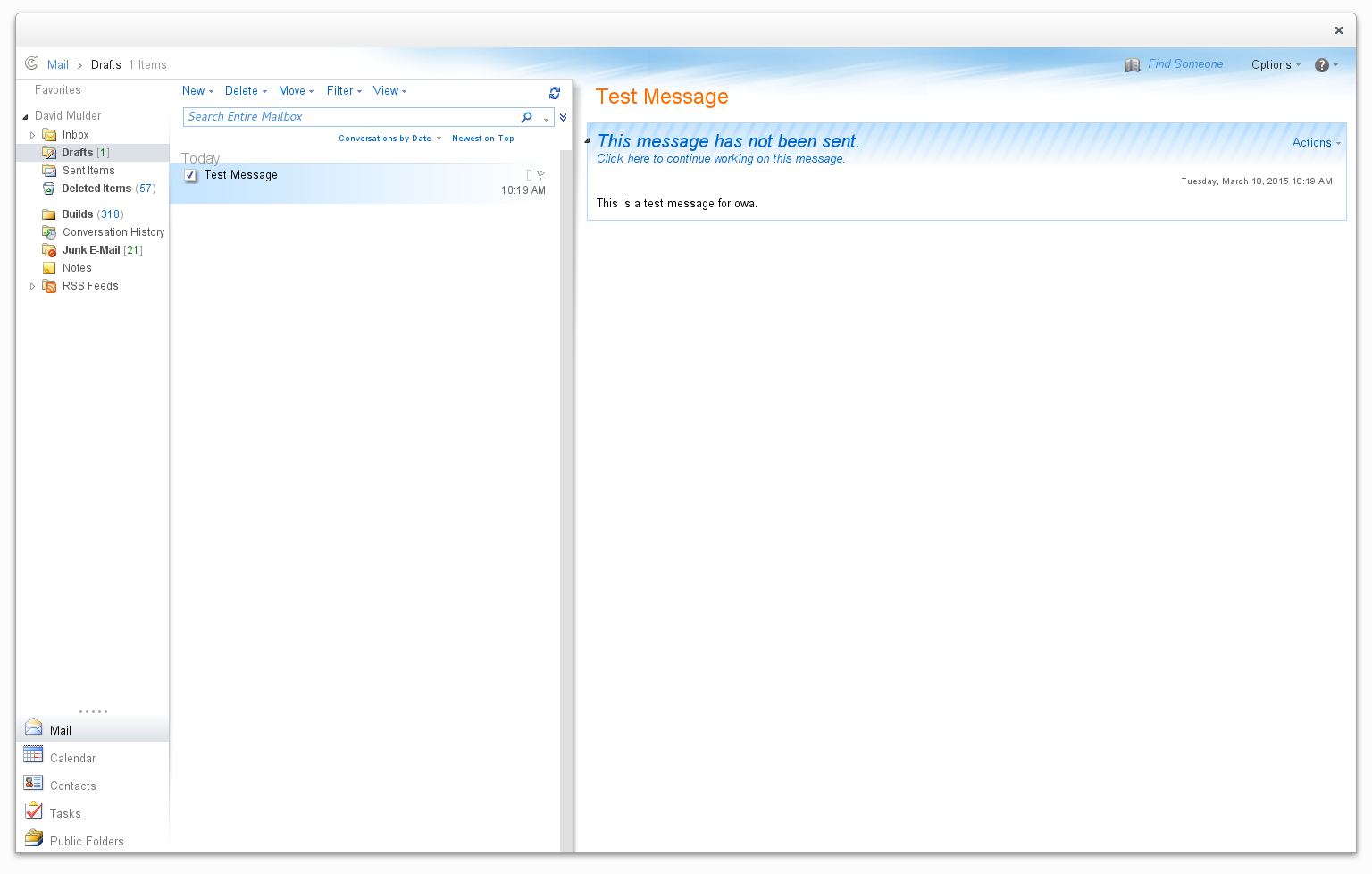
I’ve been looking for a good way to access my corporate email on my linux (opensuse) laptop. Evolution is pretty good, but the evolution-ews plugin is REALLY buggy. The connection was dropping every few minutes for me. The user interface also feels too cluttered for what I’m trying to do. So, I decided to try a different approach.
I wrote a simple python based webkit browser to modify the look and feel of owa to make it more like a desktop app.
You can access the source code here:
http://github.com/DavidMulder/simple_browse
Or you can install the opensuse package here:
http://software.opensuse.org/package/simple_browse?search_term=simple_browse
I also plan to use it to play Netflix on my mythtv box. It seems like I should be able to modify the css styling to make the summaries bigger on the page, etc.
Portable Float Map with 16-bit Half
Recently we saw some lively discussions about support of Half within the Tiff image format on the OpenEXR mailing list. That made me aware of the according oyHALF code paths inside Oyranos. In order to test easily, Oyranos uses the KISS format PPM. That comes with a three ascii lines header and then the uncompressed pixel data. I wanted to create some RGB images containing 16-bit floating point half channels, but that PFM format variant is not yet defined. So here comes a RFC.
A portable float map (PFM) starts with the first line identifier “Pf” or “PF” and contains 32-bit IEEE floating point data. The 16-bit IEEE/Nvidia/OpenEXR floating point data variant starts with a first line “Ph” or “PH” magic similar to PFM. “Ph” stands for grayscale with one sample. The “PH” identifier is used for RGB with three samples.
That’s it. Oyranos supports the format in git and maybe in the next 0.9.6 release.

Online Programming Competitions are Overrated
I believe that the assessment for a senior/architect level programmer, should be done by finding how co-operative [s]he is with others to create interesting products and their history than by assessing how competitive [s]he is in a contest.
Algorithms
On my lone programming competition experience (on hackerrank), the focus of the challenges were on Algorithms (discrete math, combinatorics etc.).Usage of standard, simple algorithms, instead of fancy, non-standard algorithms is a better idea in real life, where the products have to last for a long time, oblivious to changing programmers. Fancy algorithms are usually untested, harder to understand for a maintenance programmer.
Often, it is efficient to use the APIs provided by the standard library or ubiquitously popular libraries (say jquery). Unless you are working on specific areas (say compilers, memory management etc.) an in-depth of knowledge of a wide-range of algorithms may not be very beneficial (imo) in day-to-day work, elaborated in the next section.
Runtime Costs
There are various factors that decide the runtime performance, such as: Disk accesses, Caches, Scalable designs, Pluggable architectures, Points of Failures, etc.Algorithms optimize mostly one aspect, CPU cycles. There are other aspects (say choice of Data structures, databases, frameworks, memory maps, indexes, How much to cache etc.) which have a bigger impact on the overall performance. CPU cycles are comparatively cheap and we can afford to waste them, instead of doing bad I/O or a non-scalable design.
Most of the times, if you choose proper datastructures and get your API design correct, we can plug the most efficient algorithm, without affecting the other parts of the system, iff your algorithm proves to be really a bottleneck. A good example is the Evolution of filesystems, schedulers in the Linux Kernel. Remember that Intelligent Design school of software development is a myth.
In my decade of experience, I have seen more performance problems due to poor choice of datastructures or unnecessary I/O, than due to poor selection of algorithms. Remember, Ken Thompson said: When in doubt, Use Brute Force. It is not important to get the right algorithm on the first try. Getting the skeleton right is more important. The individual algorithms can be changed, after profiling.
At the same time, this should not be misconstrued as an argument to use bubblesort.
The 10,000 hour rule
Hardware
AHA Algorithms
Conclusion:
Having said all these, these online programming contests are a nice way to improve one's skills and to think faster. I will be participating in a few more to make myself fitter. There may be other programming challenges which are better and test all aspects of an engineer. I should write about my view after an year or so.