
 Member
 tittiatcoke
brBoard Elections: openSUSE Release Strategy
As also indicated on my Board Election Platform page (http://en.opensuse.org/openSUSE:Board_election_2012_platform_rwooninck), one of the topics that I would like to change is the strategy plan/release goals for the upcoming openSUSE releases.
The issue as seen by me.

4.10 Beta 2 packages available for openSUSE
The KDE community has just released Beta 2 of the upcoming 4.10 release of the Development Platform, Workspaces, and Applications. Of course, distributions are providing binary packages for the adventurous… and how could the green distro be left out?
In fact, it is not. Beta 2 packages were uploaded and built in the KDE:Distro:Factory repository. Updated packages have also been submitted to the development version of openSUSE (Factory) as the ultimate goal is having 4.10 in openSUSE 12.3.
Before attempting to install them, be aware that:
-
This release is mostly aimed at contributors and testers to ensure that the final version is as polished as possible
-
You should expect bugs of all forms and kinds
-
It is not officially supported by openSUSE
If you understand all of the above, add KDE:Distro:Factory from YaST or zypper (see the link above; in case of zypper, use zypper ar -f <linktorepo> <reponame>), then trigger an upgrade using your method of choice (in the case of zypper, zypper dup --from <reponame>; don’t forget the --from!).
In case you find something that is not working and you are not sure, try posting your impressions in this special area at the KDE Community Forums, and afterwards file a bug on bugs.kde.org (as detailed as possible). Feel free to report packaging errors (not bugs in the software) on the opensuse-kde mailing list or on IRC (#opensuse-kde on Freenode).
Happy testing!

New Plasma Theme
I have been working on a plasma theme for some weeks now and I think I am at a point where the plasma theme idea is understood and I would like to get some feedback. Obviously this theme is still considered in early stages, but I think it works well enough for testing.
I hope you like it.
If you would like to help me with it, find me at #opensuse-artwork
Thank you
https://www.dropbox.com/s/zd661zz69x389f7/Pure.zip


Let the openSUSE Board campaign begin.
This afternoon the official start of the Campaign week for the openSUSE board was given. In total there are 8 candidates with all good credentials.

JDLL and Mini-DebConf Paris 2012
During the last two week-ends, I went to two different events. That's part of my end-of-year sprint where I travel too much: SUSEcon and openSUSE Summit in September, OpenStack Summit and openSUSE Conference in October (oops, didn't find time to write about these events), two weeks vacation in Thailand in October/November (yes, we enjoyed the time there!), one week of team meeting in Prague right now, and two other trips to Paris during those few months... Crazy planning!
I attended these events with my advocate hat to deliver GNOME-related talks (and also to chat with people a bit about openSUSE, and of course to meet good friends of mine ;-)). I feel there's a big need on GNOME's side to communicate more and clarify our direction and opinions, and on top of that, there's a lot of mis-informed statements around that people blindly trust and that need to be debunked. My talks were simply part of my local contribution towards that goal. And apparently, that's something that seems to be most welcome!

The Journées du Logiciel Libre (or JDLL) is an event that occurs every year in Lyon. Lyon being close to home, it's an event I can attend quite easily and this is not something I can complain about ;-) We did have some great people at the event this year, including a french-turned-british-turned-french-again guy.
When I got asked to give a talk about GNOME this year, I wasn't sure I would have anything really interesting to tell, so I suggested an interactive session around the recent hot topics in GNOME (you know, GNOME OS, systemd, fallback mode, etc.). In the end, even though I had many slides ready, we simply discussed the questions that were raised by the audience, and I believe that this session proved to be very useful for the attendees. So a good experience, and a format I'll likely use again.
I also had the opportunity to play a bit with Firefox OS. I've been following the project for quite some time but never took time to really try it, so I was really glad to be able to take a long look at it. There's still some work to do, and, hrm, well, that was visible ;-) I managed to crash things without even trying to be nasty. I hope it will take off, though: there's a need for an alternative closer to our ideals.

The Debian France team organized a Mini-DebConf in Paris, and I was invited for a slot. I chose to talk about GNOME vs downstreams
, and discuss the love/hate relationship we have, and how the future direction can be good/bad for different downstreams. The idea was simply to get out some information out about what GNOME is doing, and to clarify where the project is heading, as this has some pretty big impact on our downstream friends. Obviously not everything is perfect in GNOME but I feel that the project is, overall, doing okay as an upstream. (I'm kind of sad to discover an ABI breakage in glib after I told to Stefano and Lucas that we were not breaking ABI in our platform; oh well).
This Mini-DebConf was a pleasant surprise, as there were quite a number of attendees, and the whole event went quite smoothly (well, at least for the day I was there). It was also interesting to hear about the different opinions with regards to the Debian release cycle (got some pretty good food for thoughts), and I enjoyed Sylvestre's talk about making Debian compiler agnostic. The event had many other great talks — definitely an event I'd recommend attending, even to non-Debian people.
As we work on the next release of openSUSE.
our community to participate with ideas to guide our design team in
choosing artwork for openSUSE 12.3.
Right now, there are some ideas coming through. As designers, it is
important to find ideas, words, or concepts that can help guide our
thoughts into choosing artwork for 12.3. Please provide us with a max
of 3 design "thoughts," for example
1. Simplicity
2. Clarity
3. Light
Choose any 3 of these that can help describe our thought process.
If in doubt of what's appropriate to suggest, and not deviate too much
from our current styling guidelines, refer to
http://en.opensuse.org/
Thank you
Andy (anditosan)
PS: In case you have not seen yet, please swing by our flickr page.
Our contributors have been hard at work taking pictures and making
images that can do for a good wallpaper.

qjson 0.8.1 released
Just a quick information, QJson 0.8.1 has been released. This release ensure API and ABI compatibility with version 0.7.1.
The previous 0.8.0 release broke ABI compatibility without changing the SOVERSION.
Toward QJson 1.0.0
I’m not entirely happy with some parts of QJson’s API. I addressed these issues inside of the 1_0_0 branch.
I would appreciate to hear your opinion before merging this branch into master and releasing QJson 1.0.0.
jappix needs php-mbstring and will fail on SLES11
jappix is a fine piece of xmpp (jabber) based community building software.
Sadly, its installer needs php-mbstring (for SLES 11 SP2, this is php5-mbstring or php53-mbstring depending on your php choice). Sadly, it hides any error messages before requiring this crucial library. You will never know until you investigate closely.
Or as some person on the web paraphrased in German: was meinst du mit testsuite?
Software should not behave that way. Test suites and installers like jappix’ setup.php should know how to handle missing dependencies and show them to users.
Debian is not affected. By luck or purpose, debian ships mbstring with the basic php package.
LibreOffice CorelDraw import filter: improvements by user input
It has been a long time without communicating with the distinguished readership of my blog. There was a hard decision to be made between producing code and producing literature. The code won until now. But now I have found a time to lift my head up from the coding, so the literature is back.
Many of you might be wondering what happened since my post about the text support in CorelDraw files from last June. Things are going pretty well. Since the CorelDraw import filter was released with LibreOffice 3.6, the users started to use the feature and report bugs. We were working on fixing them and improving the libcdr's quality.
Quick overview of reverse-engineering process
From my discussions with our users and developers on-line and during some of the conferences that I attended, I realize that there is a slight misunderstanding in the large public about how the reverse-engineering works. So, here are some thoughts that may help understand it a bit more:
At the beginning of the process, there is a file-format. We don't know anything about its internal structure. There is no documentation whatsoever about it. One tries to generate a file in this file-format and examine it in hexadecimal viewer. Next, one tries to operate some little change in the document and examine what changed in the file itself. Eventually after many iterations, one might find regularities and some structure that helps to divide the file into several sections or blocks of more manageable size. It is essential in this phase that one can encode this information into some kind of introspection tool, since a plain hexadecimal viewer is not a very productive tool in the long run. We use for introspection of documents Valek Filippov's oletoy, a python tool that stores our knowledge about the structure of different file-formats.
Once there is enough information about how to parse the document structure, the next target becomes to get some visible results. In order to save time and get visible results in a short time, all libraries such as libcdr or libvisio, use the libwpg's interface. Reusing this interface means a considerable saving of time, since there are already working generators of ODG and SVG from the callbacks of this interface. Having visible results soon in the development/reverse-engineering cycle also allows visually asses the import results and correct them if necessary. Eventually, one can realize the absence of necessary information and try to go back to reverse-engineering to find it.
The support of reverse-engineered file-formats is a constant work-in-progress. A subtle dance between implementation and information digging. In this process, the user feedback is an essential element. The theories about the meaning of some information inside file hold only until a file comes to falsify them. Even a complex file generated by a developer is easily beaten by real life documents. And each file that shows a "weird" bug is advancing the understanding of the file-format. Let us look at this example:
After the release of LibreOffice 3.6.1, we got a not so good assessment of the quality of the CorelDraw import filter in the heise.de' c't review. Those of you that understand German can delight in the nuanced evaluation:
Ein neuer Import-Filter in Draw öffnet jetzt auch CorelDraw-Dateien, was uns im Test allerdings nur mit sehr einfachen Zeichnungen fehlerfrei gelang. In dieser Form ist er schlicht unbrauchbar.
Which can be mildly translated into English (given the understatements so common in en-GB):
A new import filter in Draw opens now also CorelDraw files, which we managed to do without errors only with very simple drawings. In this form, it is rather unusable.
Since we are really concerned about the quality of our software, we are thankful for any bug report whether it is brought to us in a friendly or other manner. This specific bug report helped us to understand how are stored in newer CorelDraw files chains of matrix transforms. And since a picture speaks louder then thousand words, compare the document c't was refering to opened in LibreOffice 3.6.2 and then in LibreOffice 3.6.3, after we fixed the position bits.
| File opened in Libreoffice 3.6.2 |   | The same file opened in LibreOffice 3.6.3 |
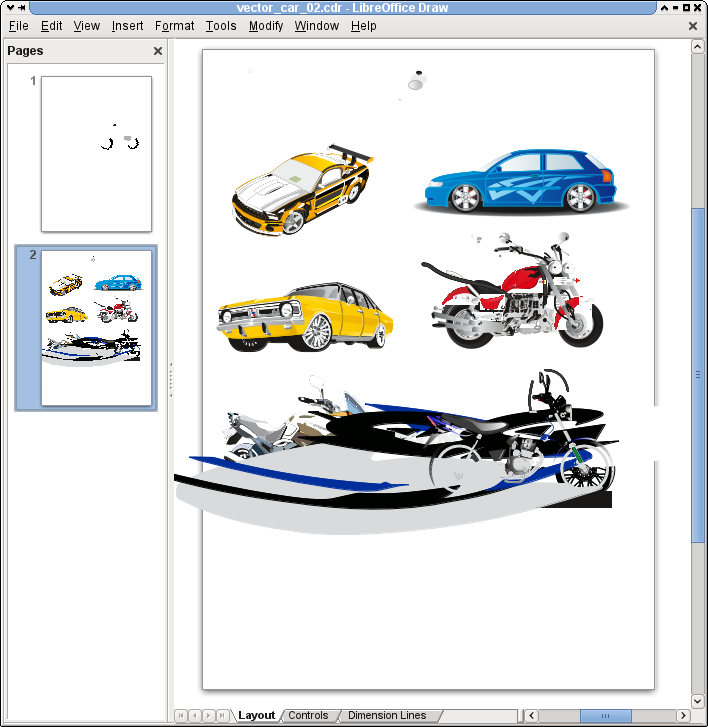 |
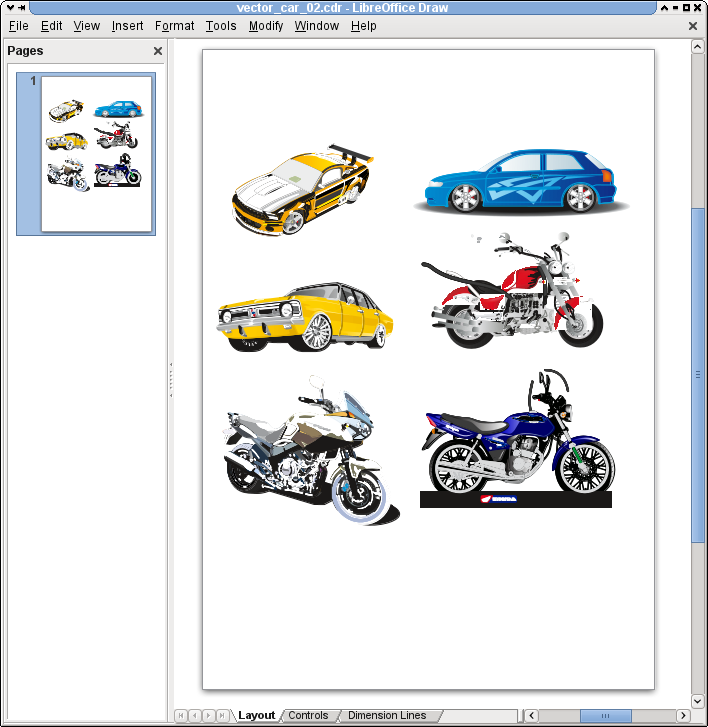 |
So feel encouraged to submit bugs against the CorelDraw import filter, or — even better — send us patches for your favorite itch.
New theme for KDE openSUSE 12.3 is now in!
Following up my [earlier post]({{ site.url }}/2012/10/whats-cooking-for-kde-in-opensuse-12-3-theming), the new openSUSE 12.3 theme has finally landed into the official openSUSE repositories and will be part of the upcoming 12.3. A lot of work has gone into the new theme since I last posted about it, so this post will show how things look at the moment.
A few caveats:
-
The theme targets the 4.10 release of the KDE Workspaces, so it may be not be perfect under 4.9;
-
The default wallpaper has not been chosen yet.
Without further ado, let’s get down to seeing what’s improved.
[caption id=“attachment_1030” align=“aligncenter” width=“584”][]({{ site.url }}/images/2012/11/snapshot12.png) Desktop view[/caption]
[caption id=“attachment_1032” align=“aligncenter” width=“584”][]({{ site.url }}/images/2012/11/snapshot13.png) Desktop with System Settings and Dolphin[/caption]
[caption id=“attachment_1026” align=“aligncenter” width=“584”][]({{ site.url }}/images/2012/11/produkt1.png) Notifications and system tray[/caption]
[caption id=“attachment_1031” align=“aligncenter” width=“300”][]({{ site.url }}/images/2012/11/produkt3.png) Dolphin with the new theme[/caption]
[caption id=“attachment_1027” align=“aligncenter” width=“584”][]({{ site.url }}/images/2012/11/produkt2.png) Add widgets controller[/caption]
Of course feedback is always appreciated: there’s still time until openSUSE 12.3 ships, so be sure to let us know what can be changed so we can make this a truly awesome visual experience for openSUSE KDE users.