
 toscalix
openSUSE Team at SUSE: we have an opening
To achieve this task, we want a senior developer to join us.
openSUSE Team at SUSE is a multidisciplinary group of professionals that works in many different areas in constant evolution so learning is part of our natural process. We have a clear R & D focus. We will work in projects covering several different technologies, so we are looking for somebody that is open minded, not afraid to work with a wide range of tools.
The position involves mentoring. It won't be just about designing solutions, solving problems and delivering, but also about engaging new developers and motivate them. Our team have high exposure to the openSUSE community and internally at SUSE. We also work with other communities and companies. Therefor communication skills (with other engineers) is a relevant skill for this position.
openSUSE Team has members in other parts of the world so having experience working remotely will be a plus. The team is based in Nuremberg. So the new member will be located there and will travel to events a few times per year.
SUSE is now operating as an independent business unit of The Attachmate Group, it is growing and profitable. At openSUSE Team we are defining our action plan for the near future and we want this person to get involved in this process. So I think it is a great moment for joining us.
If you are a senior developer, care about Free Software, are a team player willing to help openSUSE and want to work in the open in projects with a great potential impact, getting a lot of exposure, consider applying to our opening.

Robustness principle, blah
Did you hear somebody whining that min and max might be commonly used macros in various code-bases? No, me neither. They deserve to suffer anyway.
Mandriva Conectiva contrata profissional de kernel
a MANDRIVA CONECTIVA contrata profissional de desenvolvimento Linux.
Local de trabalho: Curitiba/Paraná.
Jornada: de segunda a sexta-feira, das 09h às 18h. Início: imediato.
Benefícios: plano de saúde e odontológico, vale transporte, vale refeição e seguro de vida em grupo.
Profissional de desenvolvimento Linux – kernel.
Requisitos: experiência em desenvolvimento e manutenção do kernel de Linux. Áreas de conhecimento importantes, porém não essenciais, incluem: programação Shell Script, Python, C e/ou C++, administração de sistemas, integração de distribuições (OEM), programação ou manutenção de device drivers e experiência com plataformas embarcadas.
Interessados enviar currículo com pretensão salarial para curriculo_tech@mandriva.com.br
Fonte: http://www.mandrivabrasil.org/site/forum/index.php?topic=13627.0
Avise se algum erro for encontrado nesse artigo.
O conteúdo desse artigo pode ser modificado ou atualizado, por isso, visite essa página constantemente e mantenha-se atualizado.
 Member
Optimizing a boot time, aka 2 second boot (part 2)
Changes for upcoming openSUSE
As a result of my previous 2 second post I have submitted few changes to openSUSE to be included in a next release.
-
purge-kernels.servicepatch has been accepted by our brave mkinitrd package maintainer -
requested a split of mkinitrd setup script from
splashypackage, so users can freely remove the initrd integration without breaking resume et al - I opened feature 313851 to make NM the default network tool at least for laptops, because this expects a little more changes than add a package to laptop pattern
Run NetworkManager on demand
That is very uncommon user-case for *nix machines, but makes a perfect sense for consumer devices. My Amazon Kindle or today’s smartphone or tables works in the same way – device starts without a network connection and there’s a button or magic tap enabling it. On my laptop I already have such button – it is the Fn+F2 with a antenna symbol printed. This is the rfkill button turns my wlan card on and off.
So what I want is once I turn wifi on, NetworkManager should start and work. With systemd and it’s udev integration this is so simple, that I was not able to find a good howto for it. So here we are with a small howto for udev/systemd newbiew like me.
We need to know a sysfs name of wlan0 – simple find /sys/ -name 'wlan0' will say us all we need. Then udevadm info will tell you more
udevadm info --path=/sys/class/net/wlan0 --attribute-walk | less
...
  looking at device '/devices/pci0000:00/0000:00:1c.2/0000:01:00.0/net/wlan0':
    KERNEL=="wlan0"
    SUBSYSTEM=="net"
    DRIVER==""
That is all you need to know how to write a rule will match for all wlan cards.
# cat /etc/udev/rules.d/95-start-nm-on-wlan.rules
SUBSYSTEM=="net", NAME=="wlan?", TAG+="systemd", ACTION=="add", ENV{SYSTEMD_WANTS}="NetworkManager.service"
To explain it – SUBSYSTEM and NAME are taken from previous output and means that following rule matches for all devices in net subsystem named wlan-something. We should append tag systemd, because systemd sees tagged devices only. The ACTION=="add" says the rule will be evaluated only in case device will be added and the last part says to systemd which service should be started.
In case you will want to stop NM, the
SUBSYSTEM=="net", NAME=="wlan?", TAG+="systemd", ACTION=="remove", ENV{SYSTEMD_WANTS}="NetworkManager-stop.service"
# cat /etc/systemd/system/NetworkManager-stop.service
[Unit]
Description=Stops NetworkManager
Conflicts=NetworkManager.service

[Service]
ExecStart=/bin/true
WLAN cards
For onboard wlan cards following thing won’t work as they appear in a tree from early phase. Unfortunately I’ve found only one way how kernel exports the fact cable is plugged in and that’s changed /sys/class/net/eth0/carrier. But inotify does not work with a quantum-like fs like sysfs is. The trouble is values appears in time of read, but inotify react on writes, which never appear.
How much the removal of getting IP address from boot saved the time?
# systemd-analyze
Startup finished in 2719ms (kernel) + 4333ms (userspace) = 7052ms
which is about half of second.
Too much mounts in a parallel
The one thing surprised me was a long time until trivial mounts like debugfs were finished. The reason is that systemd (at least 44, recent version use generator+ .mount units) behaves differently to .mount units and things in /etc/fstab. In the first case, it executes the /bin/mount. Which means a lot of ld, stats, mmap, and the big delay of the system start.
So move things to fstab, or disable the systemd mount unit (I did that for sys-kernel-debug.mount and sys-kernel-security.mount). I already masked the remount-rootfs.mount, which calls /bin/mount -o remount /< only. That seems to me like a barrier for other mount units – iow this will be done as a last one. But who cares with a fast boot we have?
Way more changes
Then the systemd-modules-load.service delay a boot as it block sysinit.service, when basic boot ends. I read strace carefully, but it only load microcode_ctl module, but that took few seconds to be done. Thus I gently masked it.
The next change is backport from Factory package – this reduce the delay caused by all those tty devices to appear. Fortunately this will be part of next openSUSE as it is an upstream patch.
And as a last thing I wrote a simple xdm.service, instead of a big xdm init script. It will definitely need more love, but for me just works 
cat /etc/systemd/system/xdm.service
[Unit]
Description=X Display Manager
After=dbus.socket

[Service]
Type=simple
ExecStart=/usr/bin/xdm -nodaemon
Restart=always

[Install]
WantedBy=graphical.target
Voilà!
#systemd-analyze
Startup finished in 2698ms (kernel) + 1513ms (userspace) = 4212ms
Using dracut
Because our brave systemd maintainer, Fréderic Crozat, chooses dracut as his hackweek project, I was curious if dracut can make some gain for me. I installed dracut and rebuilt and installed hardlink from his branches and try to investigate it. I would say the biggest advantage over mkinitrd is that dracut is configurable from command line. This is in a contrast with mkinitrd, where you have mostly no way how to exclude something – at least I did not find anything.
As Fréderic also pointed me, there is a --hostonly switch, which include only things needed for boot of current machine only. For instance dracut module kernel-modules will pull only things needed to mount rootfs (and if usrmount is included, then it will add things for /usr as well). Then I have excluded at least everything I can to have a working initramfs via -o, --nofsck and --strip. And that is the resulting time
# systemd-analyze
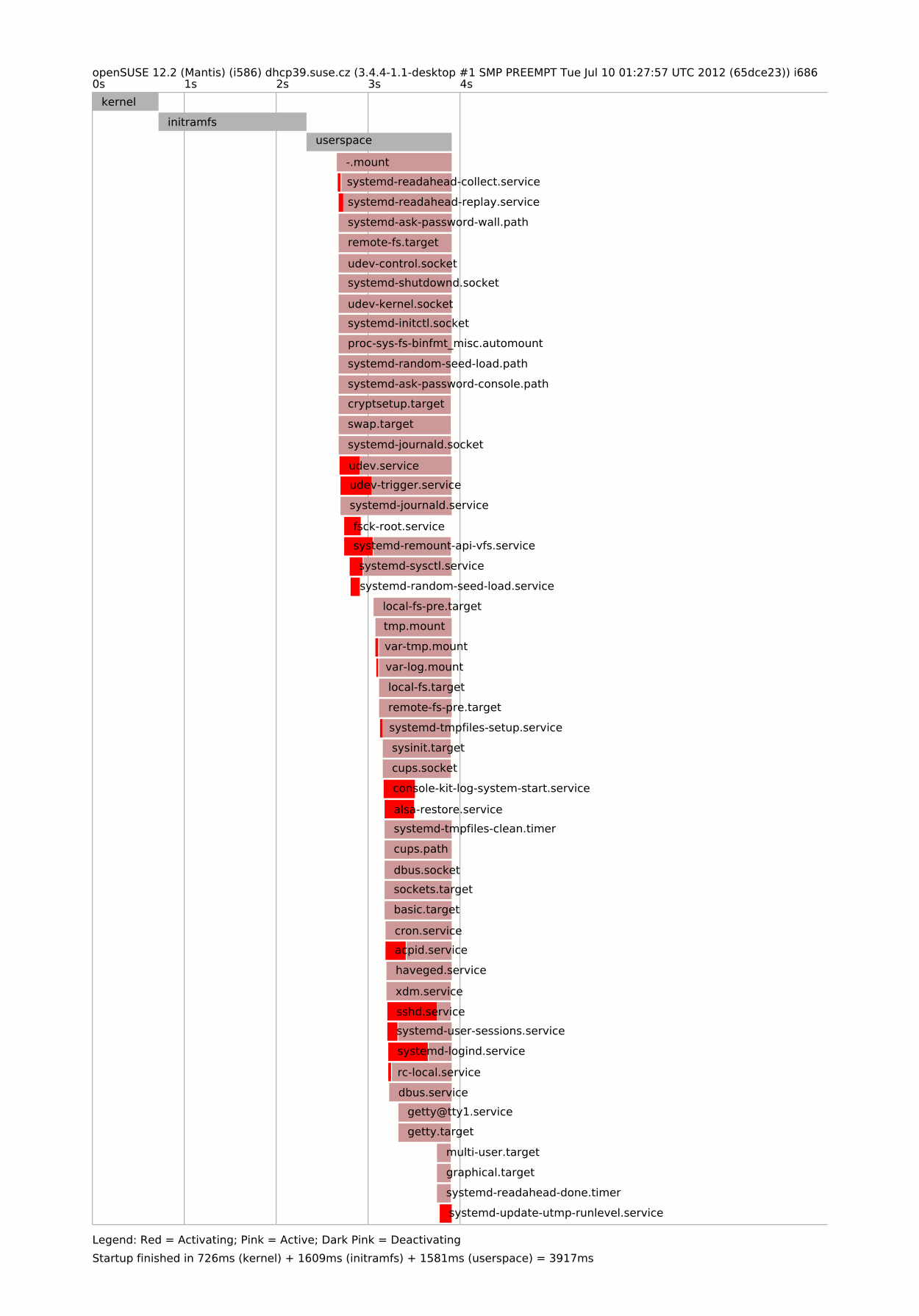
Startup finished in 726ms (kernel) + 1609ms (initramfs) + 1581ms (userspace) = 3917ms
Disabling way more things
As we are now versed in a looking at diagrams, there are still few ms we can save, even those changes are not sane ;-). The first one follows the NetworkManager.service – now sshd.service delays the boot a lot, because it systemd-update-utmp-level.service waits on it’s finish. So let’s start it on demand
# cat /etc/udev/rules.d/95-start-nm-on-wlan.rules
SUBSYSTEM=="net", NAME=="wlan?", TAG+="systemd", ACTION=="add", ENV{SYSTEMD_WANTS}="NetworkManager.service sshd.service"
and disable it. Then mask all few remaining things – systemd-login.service, systemd-remount-api-vfs.service, systemd-user-session.service and rc-local.service. But only in case you are pretty sure what you are doing, because you might loose an important functionality, especially if you use a DE expected such things.
And that is the last time I will post
# systemd-analyze
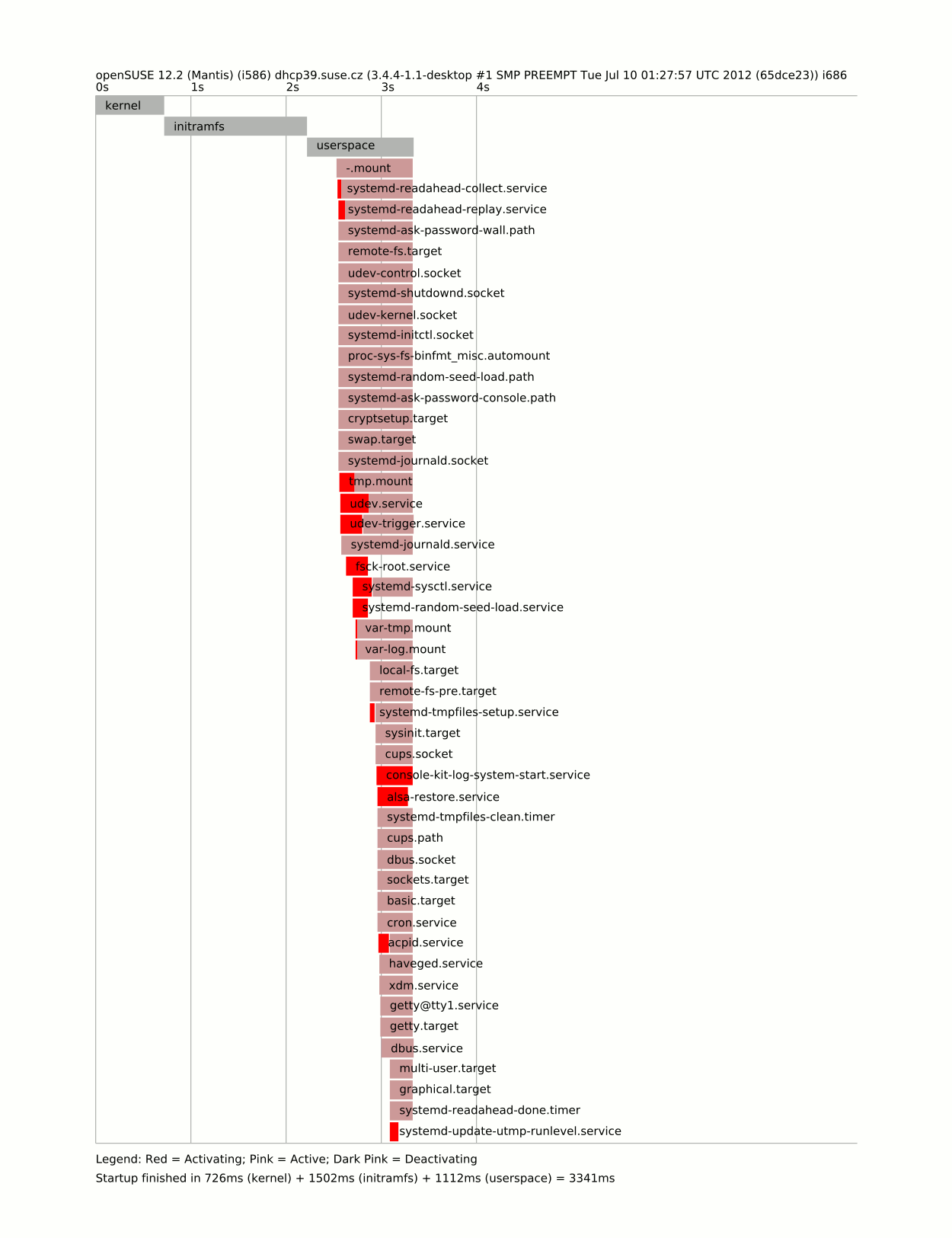
Startup finished in 726ms (kernel) + 1502ms (initramfs) + 1112ms (userspace) = 3341ms
With a kernel with SATA+ext support builtin, I would reach the two second goal – 1839ms. Of course on a system, which functionality was extremely cut down, but my goal was to boot as fast as possible. In reality, hunting of ms does not makes your feeling better a lot (until you will type systemd-analyze, of course)
This is the diagram of the really fast boot
[gsoc] osc2 client – summary of week 10
Hi,
here’s a small summary of the 10th (coding) week. Last week I worked
mostly on the new fetcher code which I finally pushed into the git
repo. Apart from this I did some refactoring here and there.
The todo for this and the next week is to start with the new osc
user interface (that is the client code). As I already wrote in the
proposal the new osc client will be based on python’s argparse module
and the Jinja2 template engine.
Marcus

My hackweek8 project: dracut

I've worked on dracut (a mkinitrd replacement), to see if it works nicely on openSUSE (with the hope to replace the three different initrd we have in openSUSE, main one created by mkinitrd, the one used by YaST installer and a third one in kiwi).
Fortunately, I was not alone working on dracut for openSUSE. Thomas Renniger had started packaging dracut for openSUSE and I was able to reuse his work and improve it. Moreover, Mike Gorse uses his hackweek to also improve dracut (adding support for CIFS for instance).
- Day 1:
- cleaned up dracut package (done by trenn), to meet openSUSE standard, remove any Fedora specific stuff in it and update it to latest dracut package, available
at https://build.opensuse.org/package/show?package=dracut&project=home%3Afcrozat%3Abranches%3ABase%3ASystemin openSUSE:Factory.
- update hardlink package (available atm in Java:base, will move it to Base:System), needed for dracut at runtime. Available
at https://build.opensuse.org/package/show?package=hardlink&project=home%3Afcrozat%3Abranches%3AJava%3Abasein openSUSE:Factory too.
- modified my own grub2 configuration to add a additional dracut menu entry (hard coded atm)
- succesfully booted a 12.2 VM with dracut image !
- Day 2:
- discussed with upstream if they would accept "compatibility" patches to team dracut about openSUSE / SLE own initrd command line and got no as an answer, because they don't want to maintain compability cruft on their own side.
- worked on a separate module which is able to convert at boot time SUSE initrd commands into dracut one (when they are available). Works fine for "shell=1" "linuxrc=trace" and "sysrq". Upstream proposed to review the module for mistake when we are done with it
- asked upstream if they were interested in "sysrq" feature for dracut. No response yet
- worked on separate journal (reiserfs / XFS). Need to create VM to test it and ask upstream if they want to integrate it
- Day 3:
- got trenn cflags patch merged upstream
- continue digging into dracut internals
- journaldev is working on boot command line (tested with XFS)
- need improvement to configure initrd with system fstab value, when available and try to use a more generic term (root.journaldev)
- Day 4:
- subscribed to initramfs mailing list
- got my first patch merged upstream (journaldev support)
- added cmdline support for mduuid and isci (TargetAddress / TargetPort / TargetName), untested (don't have the right setup)
- ran test suite, found some issues: some in dracut upstream (fixed immediatly by upstream), some in our package (fixed mdadm and device-mapper to not call blkid binary but use udev builtin-blkid, will be faster and we save some fork ;)
- Day 5:
- sr mdadm and device-mapper fixes
- tried to get all test suite to pass
- some fixes were made to dracut, with more test passing
- still getting issue with network based test (NFS, iSCSI, etc..). Partially working (DHCP server is working now in test suite), partially not (impossible to mount stuff in server test image, getting "EUID=1000" for root, even when booting the image with init=/bin/sh .. No clue to fix that and upstream never got this issue either, if you have an idea, I'm all ears..)
In short, this hackweek worked well for me, even if I didn't finished all I wanted to do. I'll make sure everything is pushed in Factory soon, so we could try (maybe) to switch openSUSE 12.3 to dracut.

Configurar EPSON Stylus CX7300 en Archlinux
"Create PDFs in One Click"

A very cliché slogan, right? But wait, notice anything odd? Click, on a tablet?

Η εμπειρία από το 2o openSUSE Collaboration Summercamp 2012 !
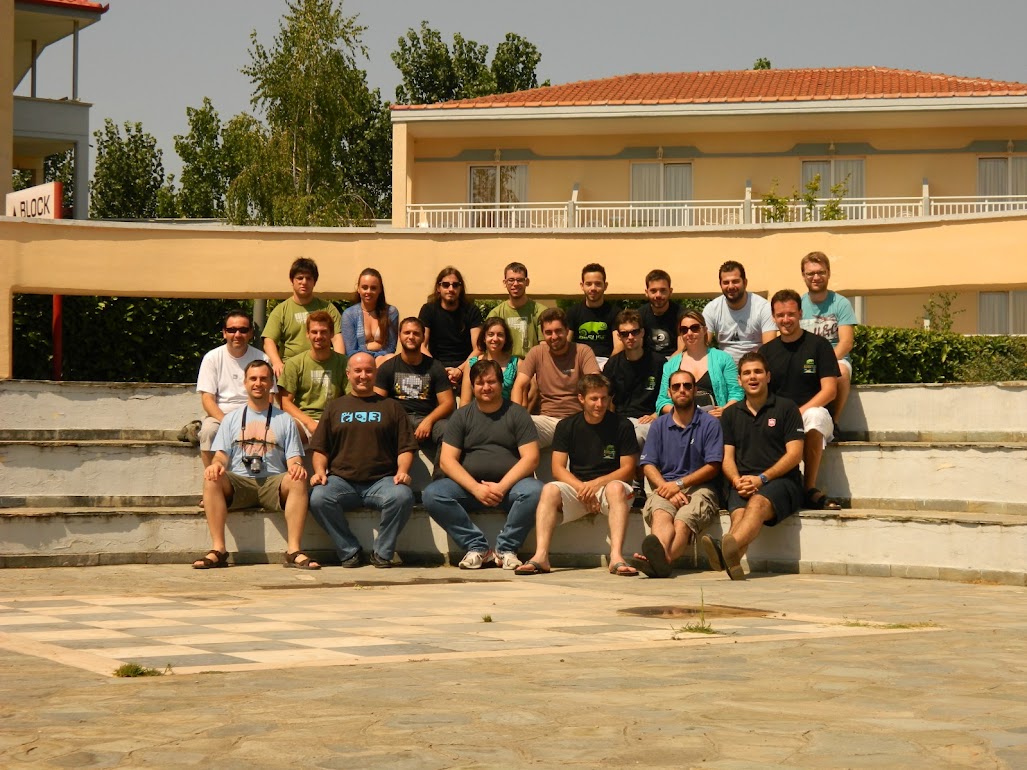
Group photo
Στις 20-22 Ιουλίου πραγματοποιήθηκε με επιτυχία το 2o openSUSE Collaboration Summercamp στην Κατερίνη. Εφόσσον είχα χάσει την πρώτη διοργάνωση και είχα ακούσει πολύ καλά λόγια έκανα το ταξίδι από την Τρίπολη στην Κατερίνη για να παρακολουθήσω το φετινό. Φέτος υπήρχε περισσότερη συμμετοχή από διαφορετικές ελληνικές κοινότητες, ενδιαφέρουσες παρουσιάσεις σε νέες τεχνολογίες και παρουσιάσεις γύρω από τις κοινότητες.
Παρουσιάσεις που μου κίνησαν το ενδιαφέρον ήταν το Puppet από τον Θοδωρή Χατζημίχο,

Puppet
το openSUSE ARM από τον Michal Hrušecký,

openSUSE Arm
η χρήση του LVM από τον Ευστάθιο Αγραπίδη,
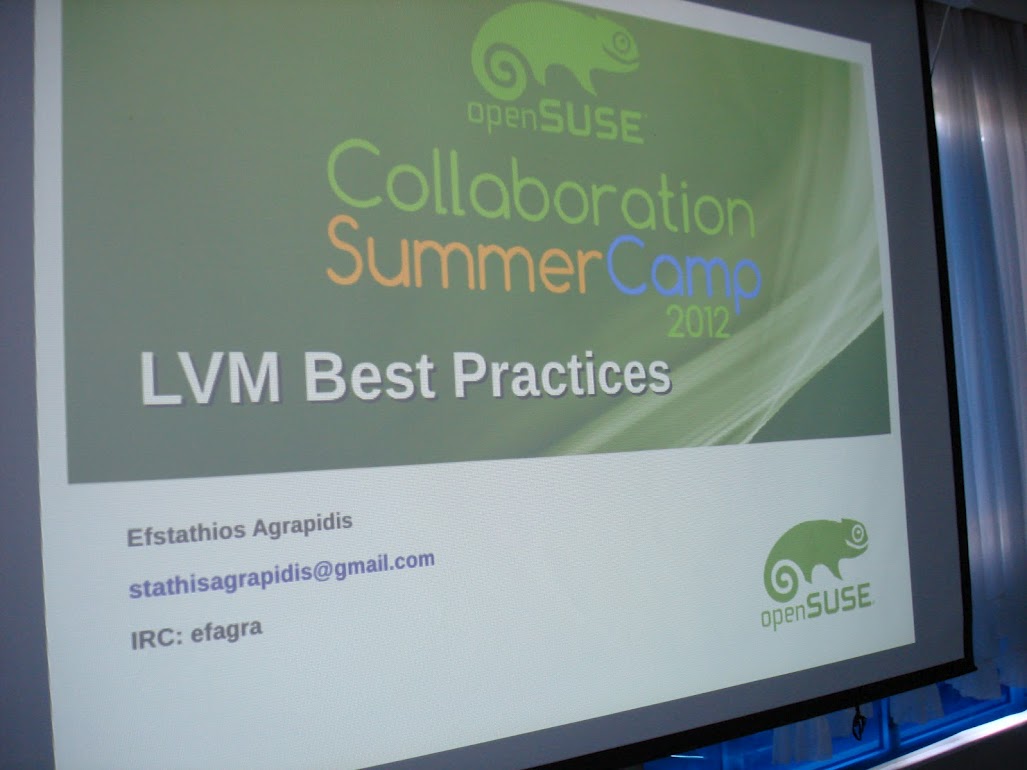
LVM Best Practices
τα Mozilla web applications από τον Χρήστο Μπαχαράκη,

mozilla web application
η σωστή χρήση του LibreOffice για την παραγωγή κειμένων από τον Σίμο Ξενιτέλη.

LibreOffice
Η παρουσίαση για την σωστή συμπεριφόρα στα booths από τον Στάθη Ιωσηφίδη,
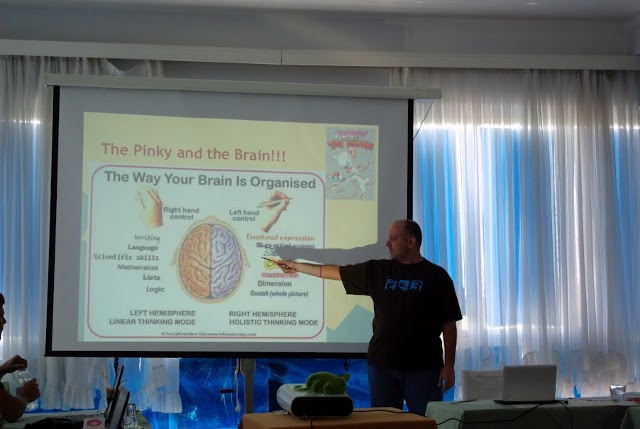
boothing
και τέλος η παρουσίαση για την Πράγα και το openSUSE Conference από τον Michal Hrušecký που μου έφερε πολλές αναμνήσεις από το περισνό openSUSE Conference στη Νυρεμβέρη.
Επίσης υπήρχε και ένα Raspberry Pi που είχε φέρει ο Στάθης Ιωσηφίδης μέσα σε ένα πολύ όμορφο κουτάκι openSUSE!
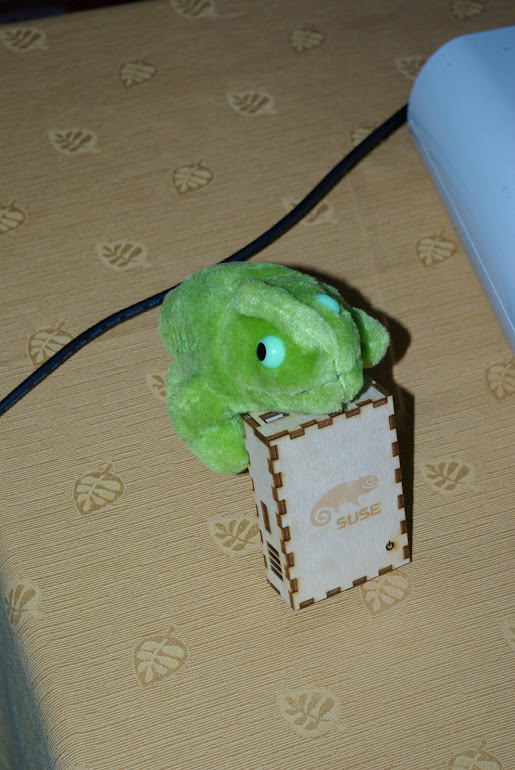
Raspberry Pi

Raspberry Pi
Την τελευταία μέρα μοιράστηκε στους συμμετέχοντες μία τσάντα με τα παρακάτω:

2o openSUSE Collaboration SummerCamp
Και ένα t-shirt με το logo της διοργάνωσης και ένα lanyard

2o openSUSE Collaboration SummerCamp
Έμεινα πολύ ευχαριστημένος από το κλίμα και τη διοργάνωση του 2ου openSUSE Collaboration Summercamp.
Ανυπομονώ για το επόμενο!
ΔΕΙΤΕ 3 ΣΕΤ ΦΩΤΟΓΡΑΦΙΩΝ:
2. Σετ Κουδάρα

Optimizing a boot time, aka 2 second boot
During the hackweek, I have decided to take a look onto a boot process to realize, how fast can be boot of the system. This metric is considered as a not important, especially in a geek community. But I am sure that this is an important part of user experience. Following text is mean to share my investigations with you – but you should be aware what you are doing, since I have been focused on reducing the boot time as much as possible.
A bit of theory
Basically you have three possibilities how to make your boot fast.
- Start things in a parallel.
- Start things on demand.
- Start less things.
… root of all evil …
“Premature optimization is the root of all evil.”
And I will modestly extend Donald Knuth’s sentence, that the blind optimization as well. So if we have to optimize something, we have to know what to do. Fortunately systemd comes with an excellent tool called systemd-analyze, which show us our boot in several ways.
The simple run of command prints the time we spent in a boot and in which phase.
# systemd-analyze
Startup finished in 8480ms (kernel) + 30873ms (userspace) = 39353ms
That was the default (minimal X system) 12.2 installation on my EEE 701 netbook, which is probably not suitable to work as nowadays cellsmarphone, because is pathetically slow. On the other hand is it a perfect playground, so let’s continue with an investigating.
The overall time is nice, but won’t help to know what’s going on. There are two more subcommands, blame and plot shows us more information about the boot. The first shows the services sorted by the start time. The ones boots so long are those we should kicked off as a first ones.
Let see what slow the boot down a most
$ systemd-analyze blame | head
 11385ms network.service
  5664ms SuSEfirewall2_init.service
  5575ms systemd-vconsole-setup.service
  3032ms ntp.service
  2840ms remount-rootfs.service
  2230ms postfix.service
  2021ms network-remotefs.service
  1925ms cpufreq.service
  1661ms SuSEfirewall2_setup.service
  1506ms xdm.service
And take look at the output of systemd-analyze plot command
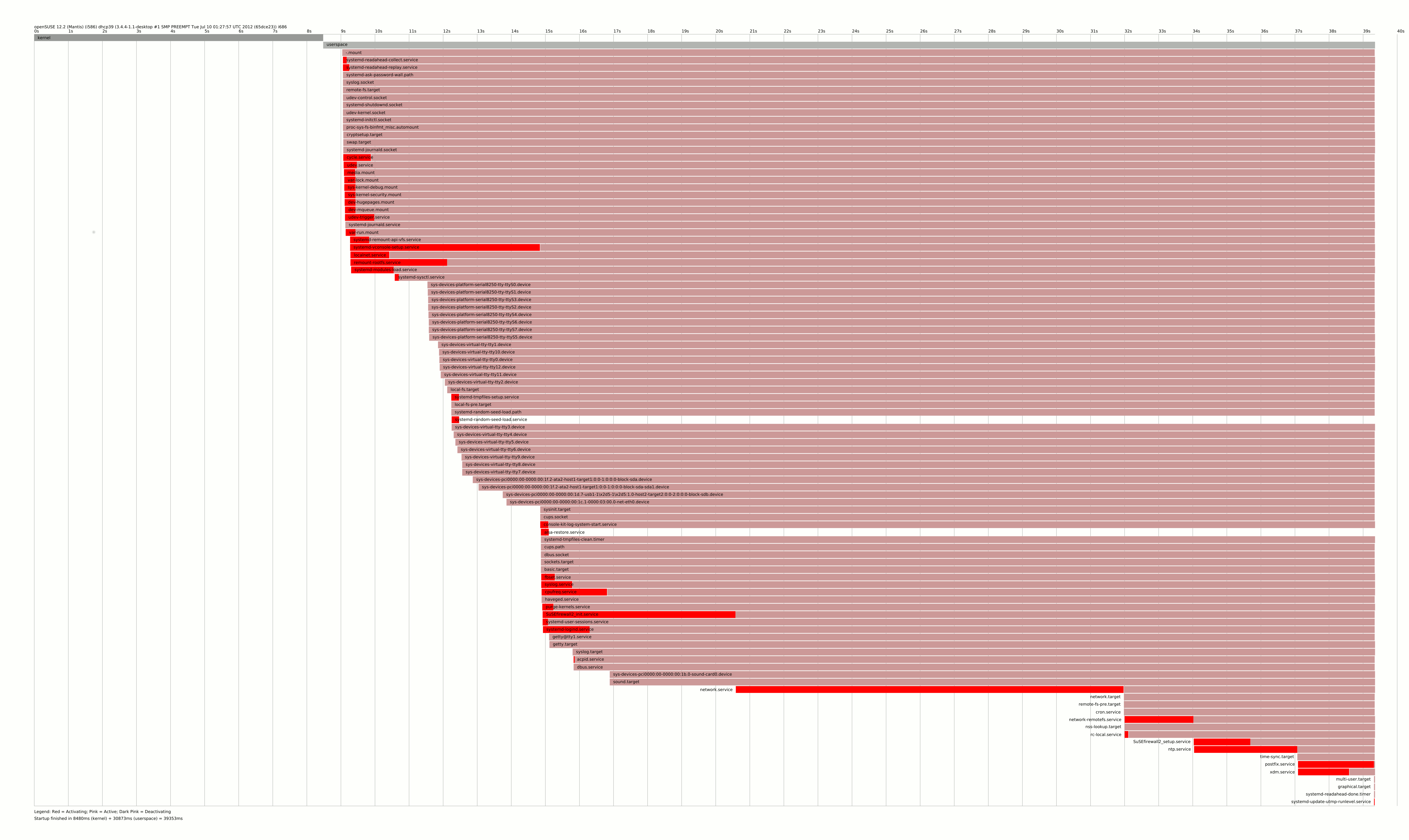
You can see, that there is a long chain of SuSEfirewall2_init -> network -> network-remotefs -> SuSEfirewall2_setup tooks several dozen seconds to be finished. And nothing is wrong with that, but that is the server solution, not what I want to have on my tiny laptop.
Making a laptop boot twice more faster
So having the complex dependencies of several services in mind, I decided to mask some of them. Masking in systemd world means the service cannot be started using systemd, so it becomes invisible for it. I masked those
-
network.service– will be replaced by NetworkManager, which is more suitable for laptops usage -
SuSEfirewall2_initandSuSEfirewall2_setup– even if it’s a security feature, a risc for laptop, which is mostly offline and running onlysshdis pretty small. -
ntp.service,network-remotefs.service– those does not makes a sense on my laptop -
postfix.service– I do not want to send emails via/usr/bin/sendmail -
cpufreq.service– it is even not supported by my CPU (grep rc.cpufreq /var/log/messages)
Do not forget to install NetworkManager and the applet and change the /etc/sysconfig/network/config and reboot.
Now we have
$ systemd-analyze
Startup finished in 8528ms (kernel) + 11123ms (userspace) = 19652ms
Using an strace with systemd
Now we have a list of worse services
$ systemd-analyze blame | head -n 10
  5476ms xdm.service
  4172ms systemd-vconsole-setup.service
  3950ms systemd-modules-load.service
  2781ms remount-rootfs.service
  1848ms NetworkManager.service
  1439ms media.mount
  1426ms systemd-remount-api-vfs.service
  1419ms dev-hugepages.mount
  1411ms dev-mqueue.mount
  1371ms sys-kernel-debug.mount
and a proper boot chart
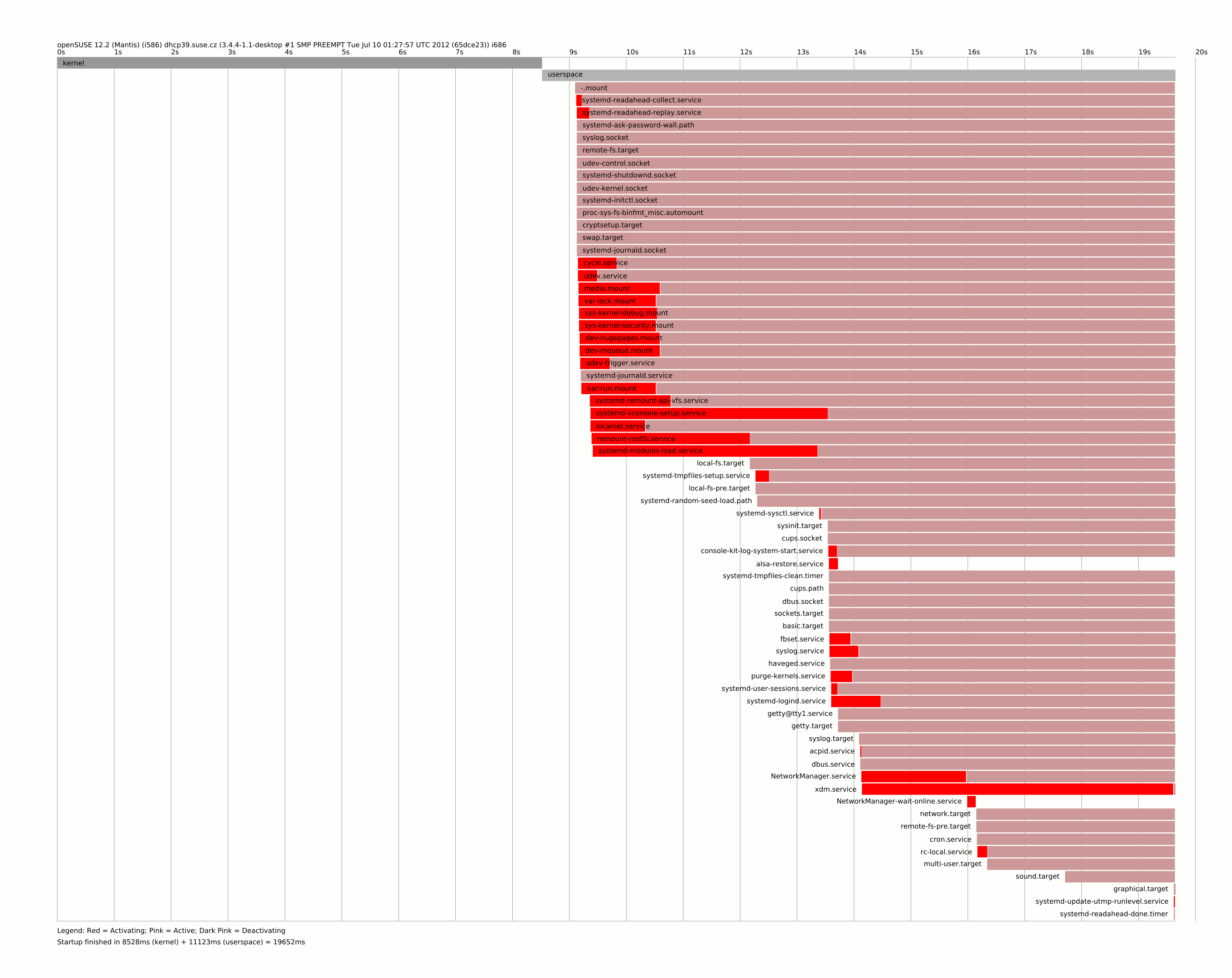
It shows us an another botleneck, which is the systemd-vconsole-setup.service, because it delay the sysinit.target, which is very early boot stage. In case like this, we can only use strace to know, what is taking too long. And debugging is pretty straightforward in systemd world. All we have to do is copy service file to /etc/systemd/system and change the ExecStart
ExecStart=/usr/bin/strace -f -tt -o /run/%N.strace /lib/systemd/systemd-vconsole-setup
and reboot. Then you will find the output in /run/systemd-vconsole-setup.strace with a timestamps. Looking there it’s obvious calling hwinfo --bios is extremely expensive in this stage. You can speedup the unit by setting the KBD_NUMLOCK to yes or no in /etc/sysconfig/keyboard, or you can try to mask it completely I did.
The next service needs to closer look was system-modules-load – then strace says that it spent 2(!) in init_module() for module microcode. I disabled it as well, even for CPUs needs it can’t be recommended.
Native systemd units
There is one tiny init script called purge-kernels, which starts for 300ms according blame. And in this particular case systemd alternative will be way more effective
$ cat /etc/systemd/system/purge-kernels.service
[Unit]
Description=Purge old kernels
After=local_fs.target
ConditionPathExists=/boot/do_pure_kernels

[Service]
Type=oneshot
ExecStart=/sbin/purge-kernels
because systemd only do one stat on the file and do not run it at all, so this service disappears from the blame at all.
The kernel time
There is one interesting thing about kernel time – 8 seconds spent there seems to be a lot to me. Simple ls on /boot gave me a pointer
$ ls -lh /boot/vmlinuz-* /boot/initrd-*
-rw-r--r-- 1 root root  14M Jul 24 11:03 /boot/initrd-3.4.4-1.1-desktop
-rw-r--r-- 1 root root 4.7M Jul 10 15:48 /boot/vmlinuz-3.4.4-1.1-desktop
The initrd is huge, around three times bigger than kernel? So let’s try to find what caused that. Every package can add it’s own setup script into /lib/mkinitrd/scripts/ thus let ask rpm whose did that
$ rpm -qf /lib/mkinitrd/scripts/setup-* | sort -u
cifs-utils-5.5-2.2.2.i586
cryptsetup-1.4.2-3.2.1.i586
device-mapper-1.02.63-26.1.1.i586
dmraid-1.0.0.rc16-18.2.1.i586
kpartx-0.4.9-3.1.1.i586
lvm2-2.02.84-26.1.1.i586
mdadm-3.2.5-3.3.2.i586
mkinitrd-2.7.0-62.2.1.i586
multipath-tools-0.4.9-3.1.1.i586
plymouth-scripts-0.8.5.1-1.3.1.noarch
splashy-0.3.13-35.1.1.i586
So I went through a list and try to uninstall things I do not need
-
cifs-utils– if you do not have any windows disc to mount, you can remove, but no impact on initrd size -
cryptsetup– this is a popular service for laptops, but I do not have any luks device, so let skip that. It removes a half of Yast as well, so I saved 18M of space, but a little in initrd. -
device-mapper,dmraid,kpartxandlvm2– cannot be easily removed as too much low-level stuff depends on it -
mdadm– no linux md devides, skip that -
mkinitrd– removal can reduce initrd to zero, but we would need own kernel -
plymouth-scripts– who would need the “fancy” boot when booting so fast? – reducing initrd to 8.9M -
splashy– the same – and reducing initrd to 6.6M
multipath-tools – no multipath device, let skip that
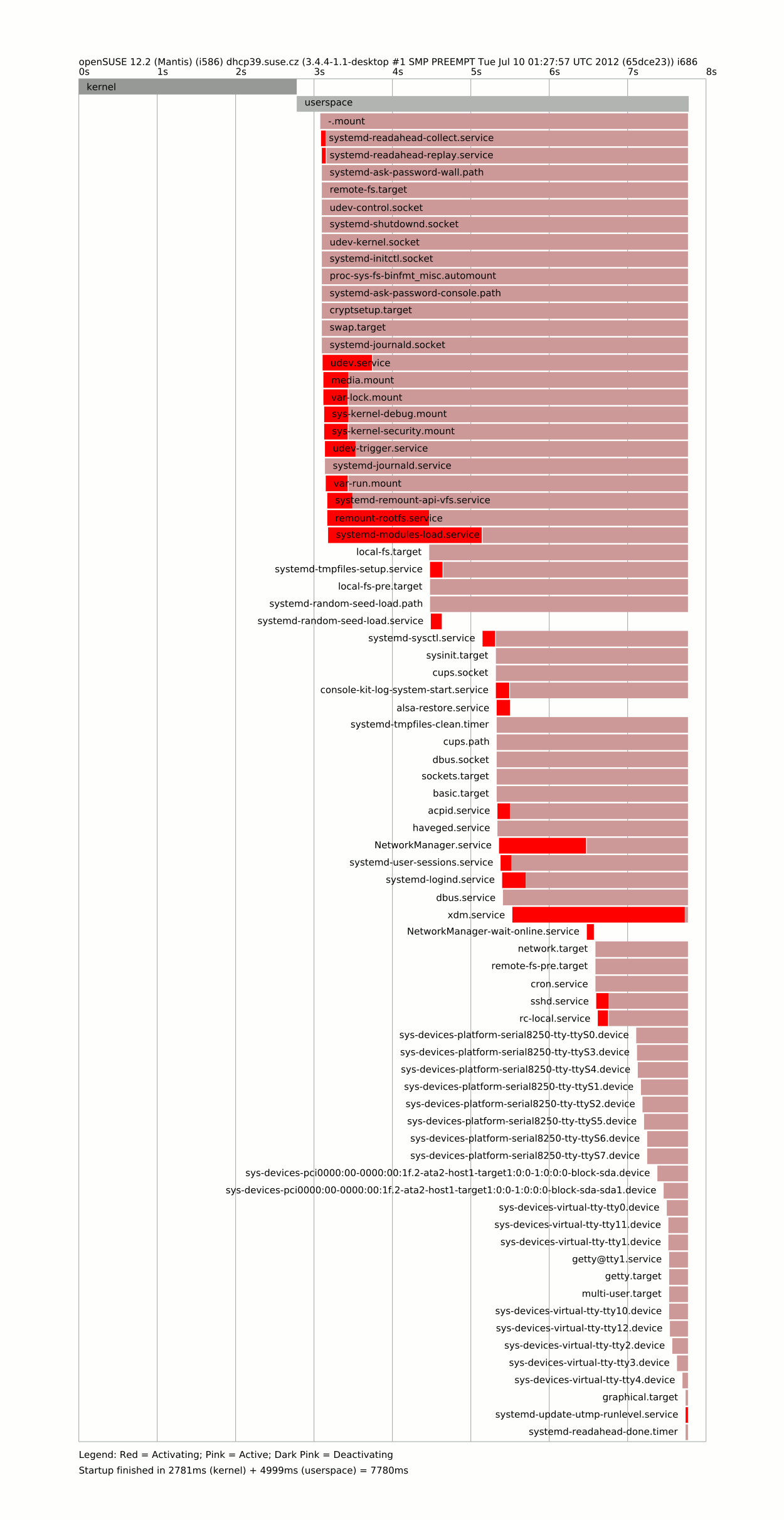
So the things intended to provide fancy boot actually bloats the system. Let’s measure the impact of those changes
$ systemd-analyze
2781ms (kernel) + 4999ms (userspace) = 7780ms
And that’s all folks …?
There are a lot of factors slowing our boot – reducing it to 8 seconds is not that bad. One have to go carefully through blame and plot output to see what delays his computer in start. I would say making NetworkManager default one at least when installing laptop pattern would be nice and simple change as well as continue on “systemdifization” of openSUSE.
There are few other tricks, which get us closer to the target time, but I’ll post them next day.