

Welcome
My name is Priyanka. I like to code, and adore PHP, Ruby-on-Rails, C and C++. In the past couple of weeks, stemmed by the urge to learn, I have been grasping a lot of new things.
Apart from having worked on PHP and RoR for college activities, I ventured into the territory of NoSQL databases. I like MongoDB in this respect. One of my pet-projects is 'Ask' which is a scalable Q&A application. It is under GNU GPL, and you can have a peep at http://www.github.com/priyanka-m/ask . I am in the initial stages, but you are most welcome to clone it and send a pull request my way.
Looking forward to an awesome summer.
Happy Hacking.
 SatManUK
26 Sales, Gnome 3, Lets Party!!
Well what can I say? 4 sales in on calendar week, and 2 sales to kick start April and this ain't no fool!!
Friday was an amazing day for Bolton Linux, 2 sales back to back took our sales to 4 for the week for the first time, all be it 2 on Wednesday and Two on Friday, it shows there is a market, and that it is growing.
To celebrate the launch of Gnome 3.0 (three point zero) Free Software UK are throwing a party in Manchester Next Sunday 10th April from 2pm till 5pm Bolton Linux will be giving a presentation on Gnome, Novel and openSUSE.
We would welcome everybody to join us.
This does mean that however, we will not be attending Sheffield market this month. Instead we will arrange for PC Centre North West to carry some stock on our behalf.
But I am sure you will all agree a party is better than hard slog at a market :)

Zwei Hinweise zum IPv6-Routing mit openSUSE
Den Artikel Doppelmoppel – IPv6-Zugang fürs LAN nachrüsten
in der aktuellen c't möchte ich nutzen um auf zwei Punkte hinzuweisen welche in den meisten Dokumentationen zum Thema leider fehlen, ohne die es unter openSUSE aber nicht funktioniert.
- Das mit dem LAN verbundene Netzwerkinterface benötigt eine gültige IPv6-Adresse aus dem LAN-Subnetz. Diese muss von Hand vergeben werden, da die Zuweisung per radvd am lokalen Interface nicht funktioniert.
Diese Adresse kann man via
ifconfig add <in radvd eingetragenes prefix>:<mac addresse>/64vergeben. Ist die Link-lokale Addresse z.B. fe80::442b:39ff:f231:95cd/64 und das Prefix 2a01:498:4c8::/64 so wäre die Addresse 2a01:498:4c8:0:4a5b:39ff:feed:95cd/64.Hat das lokale Interface keine gültige IPv6 im LAN-Subnetz werden die aus dem LAN kommenden Pakete vom Router verworfen.
- Nutzt man die SuSEfirewall2 muss man diese so konfigurieren, dass sie Verbindungen vom LAN ins IPv6 zulässt. Per Default blockt die SuSEfirewall2 nämlich alle durchzuleitenden IPv6-Pakete.
Hierzu editiert man die Datei
/etc/sysconfig/SuSEfirewall2und ändert den WertFW_FORWARDauf"<lokales IPv6-Netz>,2000::/3". 2000::/3 bezeichnet alle gültigen IPv6-Adressen. Im obigen Beispiel wäre der Eintrag dannFW_FORWARD="2a01:498:4c8::/64,2000::/3". Wichtig bei diesem Eintrag ist die Reihenfolge, denn Verbindungen sind immer vom ersten zum zweiten möglich. Wer die Einträge vertauscht erlaubt also dem ganzen Internet Zugriff aufs LAN, kommt aber nicht raus.
Zum Abschluss möchte ich noch auf ein allgemeines Problem bei IPv6 hinweisen. Ein Teil der eigenen IPv6-Adresse wird aus der MAC-Adresse des eigenen Rechners abgeleitet. Dadurch ist man natürlich dauerhaft im Netz identifizierbar. Um das dadurch entstehende Datenschutzproblem zu entschärfen gibt es die IPv6 Privacy Extension, deren Aktivierung ich jedem ans Herz legen möchte. Wie das geht beschreibt ein ausführlicher Artikel bei Heise-Netze für alle Betriebssysteme. Ob die Aktivierung der Privacy Extensions erfolgreich war kann man z.B. durch den Aufruf von sixxs.net prüfen, welches oben rechts die aufrufende IPv6-Adresse anzeigt.
Introducing snapper: A tool for managing btrfs snapshots
Today we want to present the current development of snapper, a tool for managing btrfs snapshots.
For years we had the request to provide rollbacks for YaST and zypper but things never got far due to various technical problems. With the rise of btrfs snapshots we finally saw the possibility for a usable solution. The basic idea is to create a snapshot before and after running YaST or zypper, compare the two snapshots and finally provide a tool to revert the differences between the two snapshots. That was the birth of snapper. Soon the idea was extended to create hourly snapshots as a backup system against general user mistakes.
The tool is now in a state where you can play with it. On the other hand there is still room and time for modifications and new features.
Overview
We provide a command line tool and a YaST UI module. Here is a brief tour:
First we manually create a snapshot:
# snapper create --description "initial"
Running YaST automatically creates two snapshots:
# yast2 users
Now we can list our snapshots:
# snapper list
Type   | # | Pre # | Date                     | Cleanup  | Description
-------+---+-------+--------------------------+----------+-------------
single | 0 |       |                          |          | current
single | 1 |       | Wed Mar 30 14:52:17 2011 |          | initial
pre    | 2 |       | Wed Mar 30 14:57:10 2011 | number   | yast users
post   | 3 | 2     | Wed Mar 30 14:57:35 2011 | number   |
single | 4 |       | Wed Mar 30 15:00:01 2011 | timeline | timeline
Snapshot #0 always refers to the current system. Snapshot #2 and #3 were created by YaST. Snapshot #4 was created by an hourly cronjob.
Getting the list of modified files between to snapshots is easy:
# snapper diff 2 3
c... /etc/group
c... /etc/group.YaST2save
c... /etc/passwd
c... /etc/passwd.YaST2save
c... /etc/shadow
c... /etc/shadow.YaST2save
c... /etc/sysconfig/displaymanager
c... /var/tmp/kdecache-linux/icon-cache.kcache
c... /var/tmp/kdecache-linux/plasma_theme_openSUSEdefault.kcache
You can also compare a single file between two snapshots:
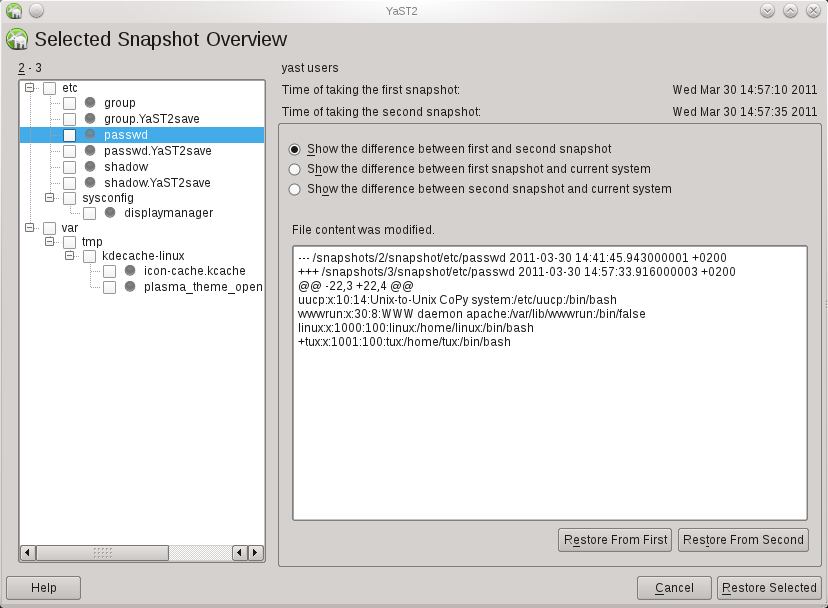
# snapper diff --file /etc/passwd 2 3
--- /snapshots/2/snapshot/etc/passwd    2011-03-30 14:41:45.943000001 +0200
+++ /snapshots/3/snapshot/etc/passwd    2011-03-30 14:57:33.916000003 +0200
@@ -22,3 +22,4 @@
 uucp:x:10:14:Unix-to-Unix CoPy system:/etc/uucp:/bin/bash
 wwwrun:x:30:8:WWW daemon apache:/var/lib/wwwrun:/bin/false
 linux:x:1000:100:linux:/home/linux:/bin/bash
+tux:x:1001:100:tux:/home/tux:/bin/bash
The main feature of course is to revert the changes between two snapshots:
# snapper rollback 2 3
Finally yast2-snapper provides a YaST UI for snapper.
Testing
Playing with snapper should only be done on test machines. Both btrfs and snapper are not finished and included known bugs. Here is a step-by-step manual for installing and configuring snapper for openSUSE 11.4.
Feedback
We would like to get feedback, esp. about general problems and further ideas. There are also tasks everybody can work on, e.g. the snapper wiki page or a man-page for snapper.
For the time being there is no dedicated mailing-list so just use opensuse-factory@opensuse.org.

 Member
Canterbury Rolling Application Platform
Following the announcement of the Canterbury distribution, there has been a lot of work about this in the background too. In order to provide developers with the easiest framework to package with, we are pleased to announce the availability of the Canterbury Rolling Application Platform.
No more tedious packaging, upstream won't have to deal with the idiosyncrasies of distributions any more. Just write your source code, use our framework, and it will automagically be turned into a craplet, which is the new name for artifacts in our distributed platform. It will just fly!
Unlike all efforts of packaging and distribution, our approach is truly revolutionary and provides instant and effortless scalability for the cloud through virtualization of provisioning for horizontal and vertical growth of your business.
At the center of this revolutionary platform lies our secret sauce, Publish Organic in the Open, which will enable you to quickly push out your stuff into the wide world of users of the new Canterbury Rolling Application Platform.
aprfoo@feci.es$ make_poo --dist=loo LibreOpenOffice
Preparing upstream organic ... [DONE]
Building craplet loo.crap ... [DONE]
Flushing buffers ... [DONE]
Pushing to canterbury.org ... [DONE]
Finishing up.
Congratulations, your CRAP is flying at the loo !
We are expecting big vendor support behind this effort, with HP, Oracle, IBM and probably also Microsoft, as it would only be a natural fit for their .NET platform.
It is obviously written in Python (significant whitespace fits in naturally with our philosophy) and will be available in git repositories soon.

GNOME3 live image 0.3.1 released

I just did a quick update to GNOME 3 live image, to fix some issues people discovered in previous images :
- radeon / r600g openGL drivers have been switched to use gallium : they should be more stable with GNOME-Shell
- GNOME Control Center system information correctly detects graphics card on your system
- Empathy accounts panel is back in GNOME Control Center
Enjoy !
Amazon
Amazon has now sold two copies although i can't figure why the price changes each time!
GNOME3 Live Image version 0.3.0 released

Release team decided to do another call for tarballs to fix some bugs across the entire GNOME3 platform, so 2.91.93 was released yesterday.
And today, you can download GNOME Live Image 0.3.0, which contains all the fixes from 2.91.93 tarballs.
Url to download it hasn't changed : http://gnome3.org/tryit.html
Enjoy !

Introducing dister, a Heroku like solution for SUSE Studio
SUSE Studio is an awesome tool, with a couple of clicks you can create an openSUSE/SUSE based system and deploy to your hard drive, an usb flash, a live dvd, a VMware/VirtualBox/Xen server and even Amazon EC2 cloud.
Suppose you want to create a tailored SUSE Studio appliance to run a Ruby on Rails app, this is a list of things you have to take care of:
- install all the gems required by the app (this can be a long list).
- install and configure the database used by the app.
- install and configure a webserver.
- ensure all the required services are started at boot time. You can save some time by cloning this appliance shared on SUSE Gallery, but this is still going to be boring.
Dister to the rescue!
Dister is a command line tool similar to the one used by Heroku (one of the coolest ways to run your Rails app into the cloud). Within a few steps you will be able to create a SUSE Studio appliance running your rails application, download it and deploy wherever you want.
Dister is named after SUSE Studio robot. It has been created by Dominik Mayer and me during the latest hackweek.
How it works
We are going to create a SUSE Studio appliance running a rails application called “SUSE history”. The app uses bundler to handle its dependencies. This is its Gemfile file:
source 'http://rubygems.org'
gem 'rails', '3.0.5'
gem 'pg'
gem "flutie", "~> 1.1"
As you can see the app uses rails3, the flutie gem and PostgreSQL as database.
Appliance creation
Move into the suse_history directory and execute the following command:
dister create suse_history
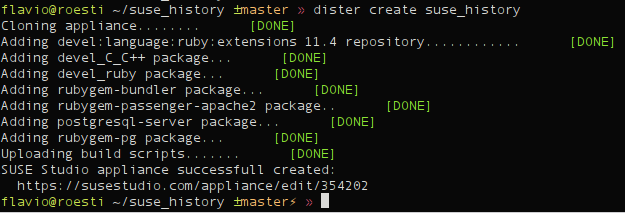
As you can see dister has already done a couple of things for you:
- created an appliance using latest version of openSUSE supported by SUSE Studio (you can use a different base system of course)
- added the devel:language:ruby:extensions repository to the appliance: this repo contains tons of ruby packages (like _modpassenger)
- installed a couple of things:
- _devel_CC++ pattern: this will allow you to build native gems.
- _develruby pattern: provides ruby, rubygems and a couple of development packages needed to build native gems.
- rubygem-bundler: bundler is required by dister in order to handle the dependencies of your rails application.
- rubygem-passenger-apache2: dister uses passenger and apache2 to deploy your rails application.
- postgresql-server: dister noticed suse_history uses PostgreSQL as database, hence it automatically installs it.
- rubygem-pg: dister noticed suse_history uses PostgreSQL as database, hence it automatically installs the ruby’s library forPostgreSQL.
- uploaded a custom build script which ensures:
- mod_passenger module is loaded by Apache
- both Apache and PostgreSQL are always started at boot time.
- all dependencies are installed: this is done only during the first boot using bundler.
- the database user required by your rails app is created. This is done only during the first boot using some SQL code.
- the database used by the appliance is properly initialized (aka rails db:create db:migrate). This is done only during the first boot.
Upload your code
It’s time to upload suse_history code. This is done using the following command:
dister push
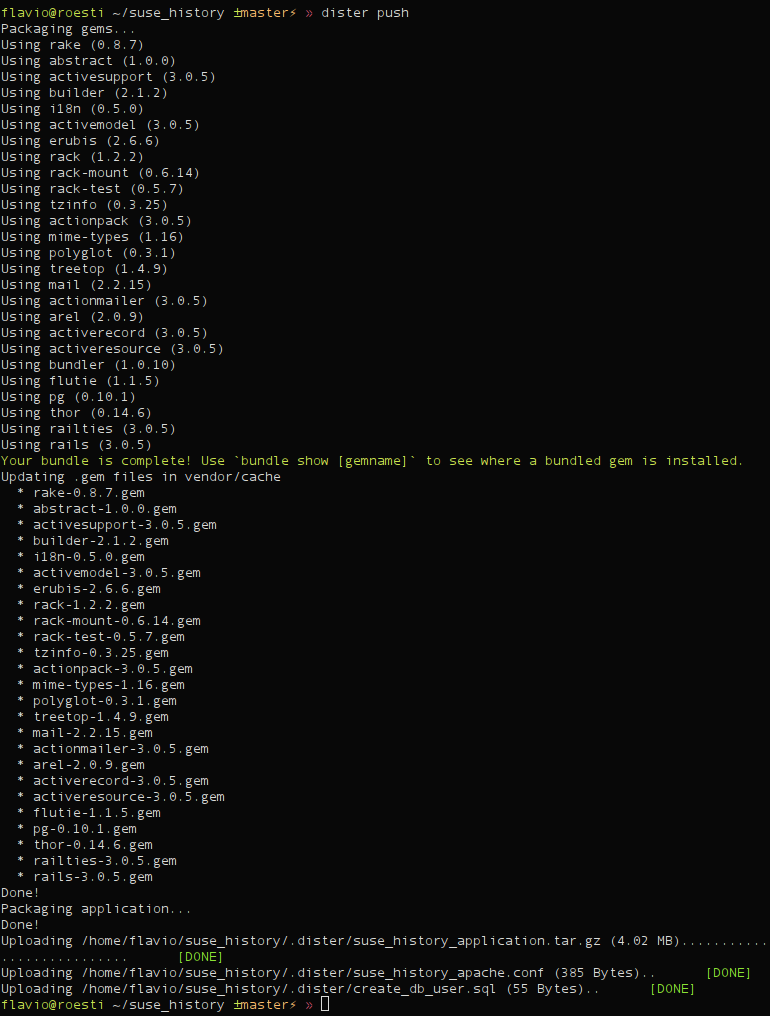
As you can see dister packaged the application source code and all its dependencies into a single archive. Then uploaded the archive to SUSE Studio as an overlay file. Dister uploaded also the configuration files required by Apache and by PostgreSQL setup.
Build your appliance
It’s build time!
dister build

The appliance has automatically being built using the raw disk. You can use different formats of course.
Testdrive
Testdrive is one of the coolest features of SUSE Studio. Unfortunately dister doesn’t support it yet. Just visit your appliance page and start testdrive from your browser. Just enable testdrive networking and connect to your appliance:
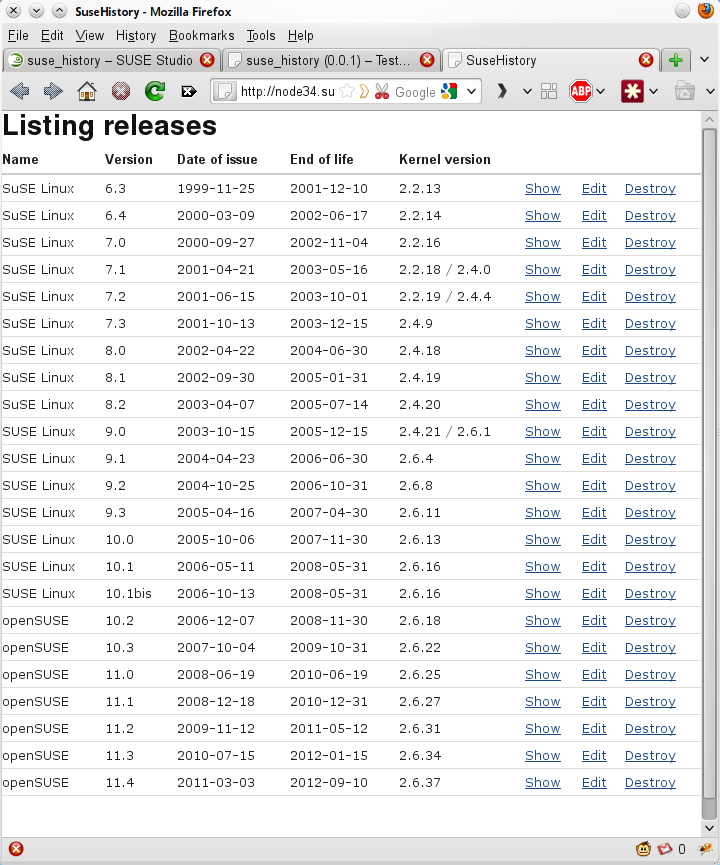
Download
Your appliance is working flawlessly. Download it and deploy it wherever you want.
dister download
Current status
As you can see dister handles pretty fine a simple Rails application, but there’s still room for improvements.
Here’s a small list of the things on my TODO list:
- The dependency management should install gems using rpm packages. This would make the installation of native gems easier, right now the user has to manually add all the development libraries required by the gem. Moreover it would reduce the size of the overlay files uploaded to SUSE Studio.
- SUSE Studio Testdrive should be supported.
- It should be possible to deploy the SUSE Studio directly to EC2.
- Fix bugs!
Bugs and enhancements are going to be tracked here.
Contribute
Dister code can be found here on github, fork it and start contributing.
If you are a student you can work on dister during the next Google Summer of code, apply now!

openSUSE Release versioning – Poll on last three options
The poll on SurveyMonkey on how to version the openSUSE distribution release is now closed, you can see the results here. The winner is the “old school” (like currently but only counting the right number until 3), followed by “Fedora style” (just integers) and “Ubuntu style” (2 digits year “.” 2 digits month).
The openSUSE members only poll is now live on connect.opensuse.org until April 04, 2011. Please select your favorite option!