
ALP prototype 'Les Droites' is to be expected later this week.
All of the ALP Workgroups are working towards delivering promised September ALP prototype with the codename “Les Droites”. SUSE will continue using a mountain naming theme for all upcoming prototypes, which will be delivered on a three months basis from now.
Adaptable Linux Platform (ALP) is planned, developed, and tested in open so users can simply get images from OBS and see test results in openQA
As far as “Les Droites” goes, users can look forward to a SLE Micro like HostOS with self-healing abilities contributing to our OS-as-a-Service/ZeroTouch story. The Big Idea is that the user focuses on the application rather than the underlying host, which manages, heals, and self-optimizes itself. Both Salt (pre-installed) and Ansible will be available to simplify further management.
Users can look forward to Full Disk Encryption (FDE) with TPM support by default on x86_64. Another part of the deliverables are numerous containerized system components including yast2, podman, k3s, cockpit, Display Manager (GDM), and KVM. All of which users can experiment with, which are simply referred to as Workloads.
A seamless system integration will arrive later and may vary based on the type of workload. An example could be /usr/bin wrapper deployed via rpm, etc. An example of running a ncurses variant of a YaST workload on ALP or in fact any podman-enabled Linux system.
$ podman container runlabel run \
registry.opensuse.org/suse/alp/workloads/tumbleweed_containerfiles/suse/alp/workloads/yast-mgmt-ncurses:latest
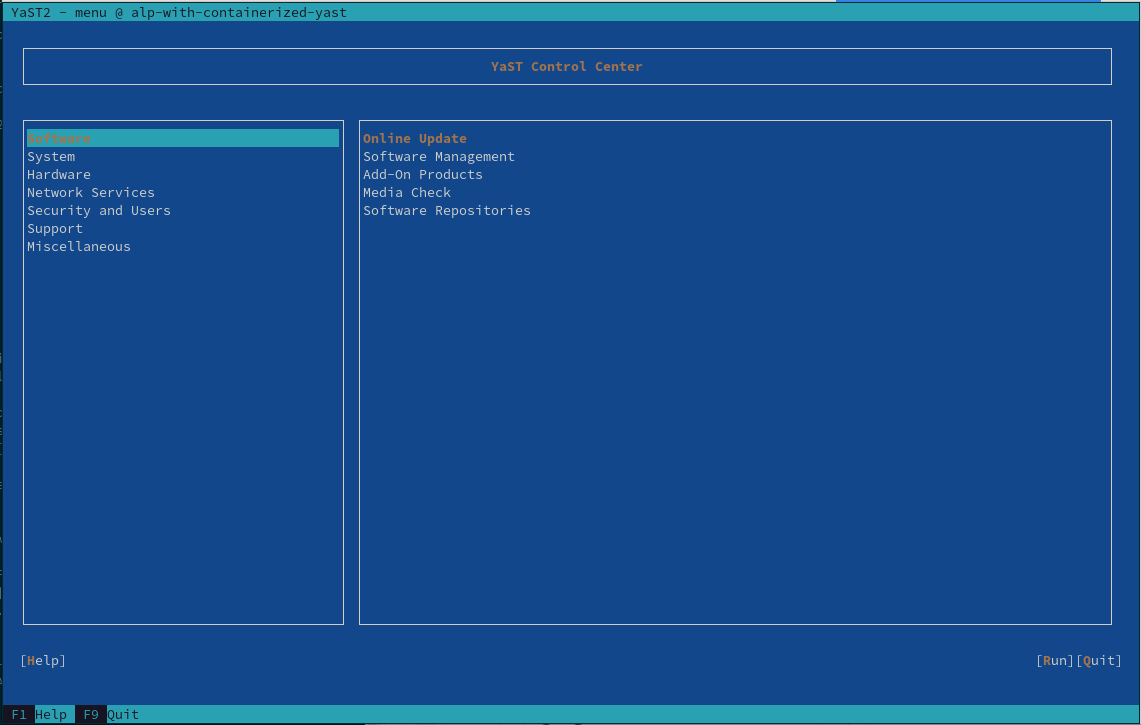
We strongly recommend that users read the following articles for more information about ALP workloads yast-report-2022-7, yast-report-2022-8, and Cockpit_at_ALP wiki.
ALP minimal arch baselevel will be x86_64-2
There is big news brewing! SUSE has reconsidered setting the minimum architecture baseline for ALP from the originally announced x86_64-v3 to x86_64-v2.
SUSE is currently looking into providing support for x86_64-v3 and perhaps even v4 through hwcaps functionality, just as it is currently being handled on other non-intel architectures.
Dimstar already announced that openSUSE Factory will lead the way and set the minimum architecture level for Intel to x86_64-v2 in upcoming weeks.
Those who have older hardware than x86_64-v2 can still install the 32bit Intel variant of openSUSE Tumbleweed. We have you covered!
Original discussion with proposal to change minimal architecture baselevel in Factory can be found here 20220728.

The New Watchlist Came to Stay

 Member
 Futureboy
Stacked Dual Screen on a Laptop

openSUSE Tumbleweed – Review of the week 2022/38
Dear Tumbleweed users and hackers,
During this week, openSUSE Tumbleweed was once again able to showcase the power there is in using OBS (open build service), openQA, and a dedicated team to make things happen. After six months of development, GNOME 43.0 has been released upstream on Sep 21. The openSUSE GNOME Team has been closely following progress and kept packages updated in the devel branch throughout the alpha/beta/RC phases. All the relevant package updates had been ready shortly after upstream released the tarballs and GNOME 43.0 could be shipped as part of Snapshot 20220921. This one snapshot only serves as an example of what happens in the various development areas. And this was just ONE of the snapshots published during this week. One, in a group of a total of 7, that is.
The 7 snapshots (0915…0921) released during this week brought you these changes:
- Plymouth: minor packaging change, allowing buildcompare to do its job better
- meson 0.63.2
- FFmpeg 5.1.1 (note: default FFmpeg is still version 4, but a lot of progress has happened in the last weeks towards changing this)
- grep 3.8: egrep and fgrep are deprecated. Scripts relying on this spit out warnings and should be changed to using grep -E, resp grep -F
- gawk 5.2.0
- Python 3.10.7 (CVE-2020-10735)
- Virtualbox 6.1.38
- GNOME 43.0
In the staging projects, we currently test submissions like:
- Linux kernel 5.19.10
- Mesa 22.2.0
- KDE Plasma 5.26 (5.25.90 staged, Staging:K)
- LLVM 15: breaks all versions of PostgreSQL
- fmt 9.0: Breaks ceph and zxing-cpp
- gpgme 1.18: breaks LibreOffice
- libxslt 1.1.36: breaks daps
- util-linux 2.38.1: this also brings a massive package layout change, which will probably take some time to settle. It’s part of the distro bootstrap and we have to be careful not to blow it out of proportion

YaST Development Report - Chapter 9 of 2022
The YaST Team keeps working on the already known three fronts: improving the installation experience in the traditional (open)SUSE systems, polishing and extending the containerized version of YaST and smoothing Cockpit as the main 1:1 system management tool for the upcoming ALP (Adaptable Linux Platform).
So let’s see the news on each one of those areas.
New Possibilities with Containerized YaST
Quite some things were improved regarding the containerized version of YaST and we made sure to
reflect all that in the corresponding reference
documentation.
Although that document is maintained in the scope of ALP, the content applies almost literally
to any recent (open)SUSE distribution. Of course, that includes openSUSE Tumbleweed and, as a
consequence, we dropped from that distribution
the package yast-in-container since it’s not longer needed to enjoy the benefits of the
containerized variant of YaST.
But you may be wondering what those recent improvements are. First of all, now the respective YaST
modules for configuring both Kdump and the boot loader can handle transactional systems like ALP or
MicroOS. On the other hand, the graphical Qt container was fixed to allow remote execution via SSH
X11 forwarding. Again, that is useful in the context of ALP but not only there. That simple fix
actually opens the door to full graphical administration of systems in which there is no graphical
environment installed. Only the xauth package is needed, as explained in the mentioned
documentation.
Last but not least, we added two new YaST containers based on the existing graphical and text-mode ones but adding the LibYUI REST API on top. Those containers will be used by openQA and potentially by other automated testing tools.
Better Cockpit Compatibility with ALP
All the improvements mentioned above contribute to make YaST more useful in the context of ALP. But Cockpit remains (and will remain in the foreseeable future) as the default tool for graphical and convenient direct administration of individual ALP systems. As such, we keep working to make sure the experience is as smooth as possible.
We integrated some changes to make cockpit-kdump work better in (open)SUSE systems and improved
the cockpit-storaged package to ensure LVM compatibility. We are also working on a better
integration of Cockpit with the ALP firewall, but that is still in progress because it’s a complex
topic with several facets and implications.
But the biggest news regarding Cockpit and ALP is the availability of the Cockpit Web Server
(cockpit-ws) as a containerized
workload, which makes it possible to
enjoy Cockpit on the standard ALP image without installing any additional package.
Of course we also improved the "Cockpit at ALP" documentation to reflect all the recent changes and additions.
Improvements in the YaST Installer
As much as we look into the future with ALP, we keep taking care of our traditional distributions like Leap, Tumbleweed or SUSE Linux Enterprise. As part of that continuous effort, we tweaked and improved the installer in a couple of areas.
First of all we adjusted the font scaling in HiDPI scenarios. In general the installer adapts properly to all screens, but sometimes the fonts turned out to be too large or too small. Now it should work much better. The road to the fix was full of bumps which made it a quite interesting journey. You can check the technical details (and some screenshots) in this pull request.
We also keep improving the feature about security policies we presented in one of our previous posts. Check the following pull request to get an status update and to see a recent screenshot.
Back to Work
ALP is getting to an state in which it can be considered usable for initial testing. We plan to keep helping to make that happen without forgetting our sacred duties of maintaining and evolving our beloved YaST. All that demands us to stop blogging and go back to more mundane tasks. But we do it with the promise of being back in some weeks.
See you soon!
Came Full Circle
As mentioned in the previous post I've been creating these short pixel art animations for twitter and mastodon to promote the lovely apps that sprung up under the umbrella of the GNOME Circle project.
I was surprised the video gets actually quite long. It's true that a little something every day really adds up. The music was composed on the Dirtywave M8 and the composite and sequence assembled in Blender.
Please take the time to enjoy this fullscreen for that good'ol CRT feel. If you're a maintainer or contributer to any of the apps featured, thank you!
Came Full Circle
As mentioned in the previous post I’ve been creating these short pixel art animations for twitter and mastodon to promote the lovely apps that sprung up under the umbrella of the GNOME Circle project.
I was surprised the video gets actually quite long. It’s true that a little something every day really adds up. The music was composed on the Dirtywave M8 and the composite and sequence assembled in Blender.
Please take the time to enjoy this fullscreen for that good’ol CRT feel. If you’re a maintainer or contributer to any of the apps featured, thank you!
Virtualbox, grep, gawk update in Tumbleweed
The rhythm of openSUSE Tumbleweed snapshots being released this week continues at a steady pace.
The rolling release appears to be producing consistent snapshots since the 20220903 release.
Two packages were released in snapshot 20220919. An update of libksba 1.6.1, which works with X.509 certificates, fixed rpmlint warnings and now ensures an Online Certificate Status Protocol server does not to return the sent nonce. The other package to update was xfce4-pulseaudio-plugin 0.4.5, which fixed the accidental toggling of the mute switch and compilation with GNU Compiler Collection 10.
An update of virtualbox 6.1.38 arrived in snapshot 20220918. This version upgrade fixed a couple Common Vulnerabilities and Exposures. Both CVE-2022-21571 and CVE-2022-21554 could allow virtual machine access and result in an unauthorized ability to cause a hang or repeatable crash. An update of the virtualbox-kmp package introduced initial support for Linux Kernel 6.0. The package also fixes the permission problem with /dev/vboxuser. Other packages to update in the snapshot were ibus-m17n 1.4.17, python-charset-normalizer 2.1.1 and python-idna 3.4, which updated to the recently announced Unicode 15.0.0.
Several packages were updated in snapshot 20220917. Static code analysis tool cppcheck 2.9 propagated condition values from outer function calls, and it enabled the evaluation of more math functions in valueflow. An update of dracut changed the default persistent policy and fixed “directories not owned by a package” caused by bash-completion directories not owned by the package. An update of yast2 4.5.14 removed some patterns from the code and yast2-network 4.5.7 had a change activating s390 devices before importing and reading the network configuration; otherwise the related Linux devices will not be present and could be ignored. Some other packages that updated in the snapshot were microos-tools 2.17 and python310 3.10.7, which solved a flaw in the language labeled as CVE-2020-10735.
An update of grep 3.8 arrived in snapshot 20220916; the package now warns that egrep and fgrep are both becoming obsolete in favor of grep -E and grep -F. An update of pipewire 0.3.58 fixes some regressions and potential crashes when starting system streams. The package while using the filter chain now warns when a non-existing control property is used in the config file. File-type identification package file 5.43 added zstd decompression support and support for ndjson.org. An update of gawk 5.2.0 now supports Terence Kelly’s persistent malloc allowing the utility interpreter to preserve its variables, arrays and user-defined functions between runs. Some other packages to update in the snapshot were fuse3 3.12.0, hdparm 9.65, ncurses and more.
Starting off the updates this week was snapshot 20220915. The snapshot updated ffmpeg-5 5.1.1, which addressed CVE-2022-2566. The package also fixed the use of an uninitialized value. The rsync 3.2.6 made some improvements in the file-list validation code and added a safety check for the file transferring package. A few other packages were updated in the snapshot.
Read more about the packages arriving in Tumbleweed in the mailing list review.