
Mesa, Git, Gear, More Update in Tumbleweed
This was another full week of openSUSE Tumbleweed snapshots.
The rolling release continues fastforwarding daily with new versions of software.
The most recent snapshot is 20220824 and it updated the Linux Bluetooth protocol bluez 5.65; the package fixed a few Advanced Audio Distribution Profile issues and added experimental support for ISO sockets. The 4.16.2 version of hypervisor xen dropped several patches contained in the new tarball including a CLFLUSH work around for AMD x86. The new xen update fixes a few Common Vulnerabilities and Exposures. There were a few updates related to Vulkan like an update of shaderc 2022.2, which added support for 16b-bit-types in High-Level Shader Language. There were also updates to vulkan-loader and vulkan-tools 1.3.224.0. The OpenGL and OpenGL for Embedded Systems shader glslang 11.11.0 added OpSource support and avoids a double-free in functions clone for vulkan in relaxed mode.
Mesa and its drivers package updated to version 22.1.7 in snapshot 20220823. The 3d graphics library’s new version had fixes and cleanups all over the tree; most of the fixes were for the Zink driver that emits Vulkan Application Programming Interface calls. Several YaST packages updated in the snapshot. There were some adjustments made with yast2-storage-ng 4.5.8 to adapt to new types of mounts by libstorage-ng, and yast2-network 4.5.5 added a class to generate the configuration needed for Fibre Channel over Ethernet. Other packages to update in the snapshot were transactional-update 4.0.1, autoyast2 4.5.3 and many other libraries.
Snapshot 20220822 updated a half dozen packages. An update of aws-cli 1.25.55 fixed a regression that made setting configuration values for a new profile problematic. The package also received several API changes from a jump of a few minor versions. The xfce4-panel 4.16.5 fixed a critical warning when starting on a disconnected device and updated .gitignore. Xfce’s desktop manager xfdesktop 4.16.1 removed an unused function call and allocates memory after error processing. Other packages to update were lttng-ust 2.13.3, python-matplotlib 3.5.3 and python-pbr 5.10.0
Mesa had its first update of the week to version 22.1.5 in snapshot 20220821. Mesa dropped a warning for unhandled hwconfig keys. The SDL2 2.24.0 update added a number of functions relating to input devices such as keyboards and joysticks. It also added support for the NVIDIA Shield Controller. The other two packages to update were libevdev 1.13.0 and libtirpc 1.3.3, which fixed a Denial of Service vulnerability.
Snapshot 20220820 provided an update of ImageMagick 7.1.0.46 and its changelog says it moved building the dependencies to a separate file and eliminated a compiler warning. The update of bind 9.18.6 fixed some crashes that occurred when a configured forwarder sent a broken response, and a fix was made with the dnssec-policy. Linux Kernel 5.19.2 updated in the snapshot and most of the code was related to Advanced Linux Sound Architecture additions and fixes for KVM. The systemd 251.4 update dropped conflicted headers and a patch was added to resolve conflicts with glibc 2.36. A few Python Package Index updates were also made available with the snapshot.
Of the three snapshots to begin the week, which were 20220819, 20220818 and 20220817, a few packages of the many stood out. Among the packages to update were KDE Gear 22.08.0, which allows you to sort files also by file extension with Dolphin. KWrite added another interesting new feature that now supports tabs and screen splitting so you can open several documents at the same time. GTK4 4.7.2 added audio support to the ffmpeg backend and fixed handling of touchpad hold events. Text editor vim 9.0.0224 redraw flags that are not named specifically and it fixed the splitting of a line that may duplicate virtual text. Multiple bug fixes that were developer visible were fixed in the git 2.37.2 update. The version control handler improved git p4 non-ASCII support. Other packages to update were a 12.1.1 gcc12 git version, ncurses 6.3.20220813, rsync 3.2.5 and timezone 2022c, which updates that fact that Iran will no longer observes Daylight Saving Time after 2022.
ALP Aims to Balance Past, Present with Future
The openSUSE Project has been discussing technical aspects for the Adaptable Linux Platform (ALP) on the development mailing list.
An email titled x86_64 architecture level requirements, x86-64-v2 for openSUSE Factory kicked off a discussion acknowledging challenges possessed by instructional sets for different subsets of the x86-64 architecture. Four defined levels of the x86-64 architecture are categorized as x86-64-v1, x86-64-v2, x86-64-v3 and x86-64-v4. The newer micro-architectures after 86-64-v2 allow for greater performance advantages and are present in many of the newer hardware on the market.
All these architectures exist within the code stream of openSUSE Factory, which are targeted for specific builds and distributions. For example, openSUSE Tumbleweed is a customized build blueprint of all the code functioning together that leads to a well tested release of a snapshot for the rolling release distribution. Another would be the super stable openSUSE Leap release, which is based on years of building toward a mature target that was designed to bring uniformity among Leap and SUSE Linux Enterprise.
Transitioning to the next long-term cycle of development, SUSE’s Adaptable Linux Platform and openSUSE’s ALP are presented with an architectural divergence as enterprise builds for future hardware and community builds for past, present and future uses.
SUSE’s aim with its Adaptable Linux Platform is to build a new immutable-base operating system for enhanced application-layer features and container orchestration on newer hardware. The prototype that is expected soon will have x86-64-v3 as a baseline.
A proposal within the email thread suggests moving Factory from x86-64-v1 to x86-64-v2, which appears to be the consensus among 80 plus comments. Whatever is decided, the transitioning for ALP to move to x86-64-vX will be based on the decision by the community made for Factory. However, this is not all regarding x86-64-vX. openSUSE’s ALP builds confront building for users of newer and older machines. While SUSE’s ALP target is specific to v3, the community will not be letting users down and aims to support hardware on the community side. The same immutable-base operating system is expected to be amplified both on arm and RISC-V for new hardware as the architectures expand. The community version will use the same architectural availability that’s available in the Factory code stream. Rebuilds of SUSE’s ALP may be necessary for openSUSE’s architectural needs. However, once the prototype is released, the release team plans to run tests and gather comparative data to understand the performance differences of v2 and v3. There is a desire to support a migration path.

 Member
 CzP
CzP7 sudo myths debunked
Whether attending conferences or reading blogs, I often hear several misconceptions about sudo. Most of these misconceptions focus on security, flexibility, and central management. In this article, I will debunk some of these myths.
Many misconceptions likely arise because users know only the basic functionality of sudo. The sudoers file, by default, has only two rules: The root user, and members of the administrative wheel group, can do practically anything using sudo. There are barely any limits, and optional features are not enabled at all. Even this setup is better than sharing the root password, as you can usually follow who did what on your systems using the logs. However, learning some of the lesser-known old and new features gives you much more control and visibility on your systems.
In my latest opensource.com article, I debunk seven of the sudo myths: https://opensource.com/article/22/8/debunk-sudo-myths

YaST Development Report - Chapter 7 of 2022
Lately in this blog we have been covering mostly developments in the area of ALP (Adaptable Linux Platform), although we never stopped improving how YaST works on our currently maintained systems. In this report we will start by taking a look to an installer feature we plan to release soon for openSUSE Tumbleweed and also as a maintenance update for the current versions of Leap and SUSE Linux Enterprise. Of course, that will not stop us from offering you a sneak peek about the mid-term future. The whole menu includes:
- Presenting the new mechanism to validate security policies during installation
- An announcement of the official YaST container images
- Some reports about the current state on ALP of both Cockpit and YaST
- An update on the development of Iguana and D-Installer
Security Policies in the Installer
We all know there is a series of good practices that must be observed when installing and administering any computer system in order to minimize the security hazards. In some cases, those good practices are formalized into a so-called security policy that defines the guidelines that must be observed in order for a given system to be accepted in a secure environment. In that regard, the DISA (Defense Information Systems Agency) and SUSE have authored a STIG (Secure Technical Implementation Guide) that describes how to harden a SUSE Linux Enterprise system.
The STIG is a long list of rules, each containing description, detection of problems and how to remediate problems on a per rule basis. There are even some tools to automate the detection and remediation of many of the problems in an already installed systems. But some aspects are very hard to correct if they are not properly set during the installation process of the operating system, like the need of encrypting all the relevant filesystems or honoring certain restrictions in how the devices are formatted and the mount points are defined.
So we are actively working on adding the concept of security policies to both the interactive installation and AutoYaST. It is still a work in progress and we will offer a more detailed review of the feature when it’s ready to hit the repositories.

Official YaST Container Images
On other news, you know we have been working on making possible to execute YaST as a container. So far, it was necessary to execute a script in order to use the containerized version of YaST. It was even available as a package on openSUSE Tumbleweed. But now, with the recent advances on ALP and its concept of so-called workloads, we found a better way to distribute the YaST containers.
We have now three “official” containers for YaST. available at the repository SUSE:ALP:Workloads. Although the repository, as the name suggests, is supposed to provide containerized workloads to be executed on top of ALP, we have decided it will be the official source for containerized YaST no matter if you execute it on top of ALP, the latest SLE, the latest Leap or openSUSE Tumbleweed. It should work the same in all cases.
So from now on, you can execute a containerized YaST anywhere by doing:
podman container runlabel run
registry.opensuse.org/suse/alp/workloads/tumbleweed_containerfiles/suse/alp/workloads/yast-mgmt-ncurses:latest
Replace “ncurses” by “qt” or “web” to enjoy the alternative versions.
The route is a bit redundant and maybe it will change in the future, but that’s out of the control of the YaST Team. In any case, we will always use the official repository for ALP workloads.
For more details, see the full
announcement
at the archive of the yast-devel mailing list.
Additionally, we are also proud of remarking that those container images include the YaST Kdump and YaST Bootloader modules. We recently adapted them to work containerized, which we consider an important milestone because it implies libstorage-ng is now able to perform a system analysis of the running host system from a container.
YaST on ALP
As you know, the main motivation to containerize YaST was making it available to ALP users. But ALP is a new concept in Linux distributions with an innovative approach to some areas of system management. So we didn’t expect YaST, containerized or not, to just work smooth out-of-the-box on top of ALP. Thus, we are doing a continuous evaluation of the situation in the early previews of ALP to detect the areas of YaST (or even ALP itself) that need fixing and to decide where to put the focus on every given moment.
The good news is that most things seems to work in the non-transactional variant of ALP. We only detected small problems that we are now tracking and will fix step by step as time permits.
But on transactional ALP systems, which likely will be the default version in most scenarios, we
have a very visible problem with software installation. YaST does not use static RPM dependencies
to enforce beforehand the installation of the tools it relies on. Instead, YaST installs any needed
software on demand during its execution. That’s a problem in a transactional system, as defined by
ALP or openSUSE MicroOS. On the bright side, we checked that
working-around the software installation problem, most of the other functionality works just fine
also in a transactional ALP system with the only exception of the previously mentioned YaST Kdump
and YaST Bootloader. Although those two modules work fine containerized in any non-transactional
system, we still need to find a way for them in situations in which /boot is not directly
writeable.
In short, things look relatively promising for YaST on ALP, but we still need to do a lot of adjustments here and there. We will keep you informed of the progress.
What About Cockpit?
As already mentioned, ALP is an innovative system and that not only affects YaST. Cockpit, the default platform for 1:1 system administration on ALP, also struggles with some of the particularities of the first prototypes of ALP, especially in its transactional flavor.
Thus, we are also investing quite some time testing all the Cockpit functionality on ALP and documenting which parts need tweaking… or even rethinking the Cockpit or the ALP approaches to some topics. As with the YaST case, we are already working on some aspects and we will keep you informed as long as we solve every existing problem.
Moving Forward with Iguana and D-Installer
Talking about ALP, you know we are using it as an opportunity to rethink how the (open)SUSE systems may be installed in the future on real hardware with complex requirements in terms of storage technologies, network setup, etc. In that regard, we keep developing D-Installer and Iguana.
In the case of the former, most recent news are about the internal architecture. You may remember from previous reports that we are trying to make D-Installer as modular as possible with separate processes to handle software management, creation of users, internationalization, etc. To make that mechanism more powerful, we defined now a D-Bus API so the different processes can interact with the user from a centralized user interface. See more details in the corresponding pull request.
In the case of Iguana we are focusing of expanding its scope (eg. making it useful in the
context of
Saltboot)
and documentation. The Iguana Orchestrator
(iguana-workflow) now comes with some examples for
possible uses like running D-Installer as a set of two separate containers, one for the back-end and
another for the web interface. If you want to run you own experiments, installing the
iguana package from OBS will
install a kernel and iguana-initrd, which then can be used for PXE boot or for direct kernel boot
in virtual machines.
More to come
As you can see, we are actively working on many areas. So we hope to have all kind of news for you in the next report. Meanwhile, we hope you got enough to keep you interested. Keep having a lot of fun!
Enabling HEIF support in Nextcloud
It is actually relatively simple
- install the php imagick extension with libheif support
- enable the preview providers
For openSUSE Tumbleweed the php8-imagick package is already built with libheif support. Though the library in the distribution lacks H.256 support.
We can easily remedy that situation by using the libheif1 package from packman instead.
# cat /etc/zypp/repos.d/isv-packman.repo
[isv-packman]
enabled=1
autorefresh=1
baseurl=https://ftp.halifax.rwth-aachen.de/packman/suse/openSUSE_Tumbleweed/
type=rpm-md
gpgcheck=1
Then we can install the new libheif1 with
zypper in --from isv-packman libheif1
Afterwards you have to restart Apache or php-fpm depending on what you use.
openSUSE Tumbleweed – Review of the week 2022/33
Dear Tumbleweed users and hackers,
Nothing is stopping Tumbleweed – it’s still full steam ahead with 7 snapshots released in one week, which means daily snapshots without interruptions—trying to get a new streak record? let’s see! So far we’re at 14 days of release without a gap. So far, the highest streak was 18 if I’m not mistaken (2021/1116-1203). In any case, these are just nice stats, but the quality of the snapshots has always been more important to us than the number of snapshots. And I’m convinced the Tumbleweed users to see this the same way.
The last 7 snapshots (0811.0817) delivered these changes:
- Linux kernel 5.19.1
- GNOME 42.4 (completed, incl. gnome-shell and gnome-desktop)
- KDE Frameworks 5.97.0
- hdf5 1.12.2
- PostgreSQL 14.5
- Mozilla Firefox 103.0.2
- binutils 2.39
- git 2.37.2
- libwacom 2.4.0: support new devices, like Lenovo 14s Yoga, Samsung Galaxy Book Pro 360, and more
- wxWidgets 3.2.0
The Staging projects are well used, and the forge is hot, pressing things like:
- Linux kernel 5.19.2
- KDE Gear 22.08.0
- Boost 1.80.0
- systemd 251.4
- glibc 2.36: meta bug tracking failures: https://bugzilla.opensuse.org/show_bug.cgi?id=1202207
- Shadow 4.12
- fmt 9.0
The War of the Worlds
“Jeff Wayne’s Musical Version of The War of the Worlds” has been a turning point in my life in many ways. It was one of the first non-classical albums I listened to. It was the starting point in my ability to understand spoken English.
The first steps from classical
My parents only listen to classical music. Even Bartók is too modern for them. In my household growing up, I was only exposed to classical music. Yes, I heard some pop-music on the streets, but I was told that it’s just noise, not music. I must admit that even to this date I mostly agree with this statement :-)
However, today I do not listen only to classical music. I still recall the first album that I liked and was not fully classical. It was Hooked on Classics played by the Royal Philharmonic Orchestra. Tons of familiar classical melodies played in the style of pop music of that time. I listened to these albums countless times.
Once the damage was done, I started to listen other non-classical works. From the early years I recall the names of Richard Clayderman and Kitaro. Clearly not classical music any more, even some electronic instruments, but still very different from mainstream pop music.
Understanding spoken English
In high school one of my classmates lent me an album: Jeff Wayne’s Musical Version of The War of the Worlds. First I listened to it as I loved the music and the story on which album was built. Then I realized that it can help me to understand spoken English.

The War of the Worlds album cover
It was right after 1989, when Hungary changed to a democracy. The Russian troops were still in the country, but I was in the first high school year where learning Russian was not mandatory any more. My primary foreign language in high school was German, the secondary was English. There was a glut of Russian language teachers and barely enough teachers for other languages. We had one or two English lessons a week, and very minimal chance to listen to real English pronunciation. At that time there was no YouTube, etc. We had a satellite TV receiver, but I could not follow spoken English there at all, as in school I never heard anything close to real English…
When I first listened to The War of the Worlds, I could barely understand anything, even when I was reading the text from the album cover. After a while I realized that repeated listening and reading the book, things “clicked” and I started to understand the language better. Then I started listening to the album not just for the music but to check if my understanding of spoken English improves. After a while I could follow the narrator and the singers even without having the album cover at hand.
The good thing is that understanding spoken English did not stop at this album. It was as very important milestone. From that time on, I could pick up more English from the television. Of course high school level English provided just a very basic level of understanding, which I would later build on to greatly improve my English skills. That’s another story, not related to music…
Listen to the album on TIDAL: https://listen.tidal.com/album/2917051
Read my blog about Discogs to learn about my music collection: https://peter.czanik.hu/posts/discogs/
Frameworks, PostgreSQL, Vim Update in Tumbleweed
The month of August is hot for openSUSE Tumbleweed as snapshots appear to be rolling out daily.
The trend this week is like Tumbleweed on cruise control just rolling out snapshot after snapshot.
Among the updated packages in snapshot 20220816, postgresql14 14.5 made a splash with fixing a Common Vulnerability and Exposure; with CVE-2022-2625, the extensions use of CREATE OR REPLACE or CREATE IF NOT EXISTS are not being adhered to according to the documented rules and attacker can run arbitrary code as the victim role, which may be a superuser. PostgreSQL is blocking this attack in the core server, so there is no need to modify individual extension scripts. Moving on to a more lighter subject, the snapshot provided an update of filesystem utility xfsprogs 5.19.0. The newer version update provides more autoconf modernization and fixes a memory leak. It’s counterpart, xfsdump 3.1.10, fixed bind mount handling that was corrupting dumps and removed Data Management Application Programming Interface support. Xfce users can now have window capture in HiDPI mode thanks to an update of xfce4-screenshooter 1.9.11.
KDE Frameworks 5.97.0 glided into snapshot 20220815 and gave Plasma Desktop users several fixes. Frameworks updated blur and other window effects when the dialog changes size and the password storage KWallet Framework introduced a Secret Service API. User Interface framework Kirigami added workaround for the Qt horizontal scroll-view bug. KIO had an update to better prevent duplicate bookmarks for the same Hypertext REFerence. Text editor vim saw its second update of the week; its 9.0.0203 version had some fixes for invalid memory access and a fix for extra space of virtual text when ‘linebreak’ is set. The diagnostic, debugging and instructional userspace package strace updated to version 5.19. The update had changes in behavior and implemented some decoding socket option and netlink attributes. The last package to update in the snapshot was hdf5 1.12.2; this general purpose library and file format for storing scientific data dropped one patch, disabled another and enabled the rpm and deb CPack generators on Linux.
Snapshot 20220814 updated the distribution to Linux Kernel 5.19.1. Nearly a third of all the updates for the kernel were related to bluetooth and most of those were for the RTL8852C wireless module. An update of gnome-shell 42.4 improved the overview animation performance and had a fix for remembering the set up of bluetooth devices. GNOME’s layout and text rendering package pango updated to 1.50.9 and fixed a thread-safety problem. There was a minor update to the boot splash package plymouth; the update can be used to check the secure boot configuration and put a red warning image on the screen if the secure boot is disabled, according to the changelog. NetworkManager 1.38.4 and mutter 42.4 were also updated in the snapshot.
GNU’s collection of binary tools binutils 2.39 was the lone package to update in snapshot 20220813. The ELF linker now supports a --package-metadata option that allows embedding a JSON payload in accordance to the Package Metadata specification. The linker can also now generate a warning message if the stack is made executable.
Snapshot 20220812 had relatively few packages updated. The one major version update was made to the parse and domain-name decomposer rubygem-public_suffix 5.0.0. The new major version updated definitions and requires a minimum Ruby 2.6 version. The use of importlib-metadata for runtime package version lookups was made in the python-pbr 5.9.0 update, which is used to manage setuptools packaging. Another package to update in the snapshot was ncurses, which trimed out some unwanted linker options seen in Fedora 36.
The 20220811 snapshot started off the week with updates to Mozilla Firefox 103.0.2. The browser update fixed menu shortcuts for users of the JAWS screen reader and fixed an occasional non-overridable certificate error. The 42.4 version of gnome-desktop made Italian and Serbian translation changes and fixed detail text when it contained markup. An update of icewm 2.9.8 made a change that a restart will start icewm if no Window Manager is active and the package also updated the grouping menu when removing a task. Vim had its first update of the week in this snapshot and iproute2 5.19 added a set command and a group link with it ipstats. Intel had a CVE fixed in the ucode-intel 20220809 update; the company thanked those involved for helping find and solve CVE-2022-21233, which affected some processors.

Adventure game graphics with DALL-E 2
Update, February 3rd 2025: It's been a couple of years, and by now, this article is extremely outdated. In fact, it was rendered obsolete roughly two weeks after its publication, when Stable Diffusion was released to the public. The technical bits aren't that interesting anymore, but I think the legal and ethics parts, such as they are, have held up.
I recently got access to OpenAI's DALL-E 2 instance. It's a lot of fun, but beyond its obvious application as a cornucopia of funny cat avatars, I think it's now fit to use in certain kinds of creative work.
There are already plenty of good articles out there on the model's strengths and weaknesses, so I won't go over that here other than to note that it's not a threat to high-end art. It's got an idea of what things look like and how they can visually fit together, but it's very vague on how they work (e.g. anatomy, architecture, the finer points of Victorian-era dinner etiquette, art critics), and object inpainting aside, it doesn't rise to the level of realism where I'd worry too much about the fake news potential either.
However, with human guidance and a carefully chosen domain, it can still do some very impressive things. I've suspected that adventure game graphics in the point-and-click vein could be one of those domains, and since I'm helping someone dear to me realize such a game, I had the excuse I needed to explore it a little and write this case study.
Inspiration
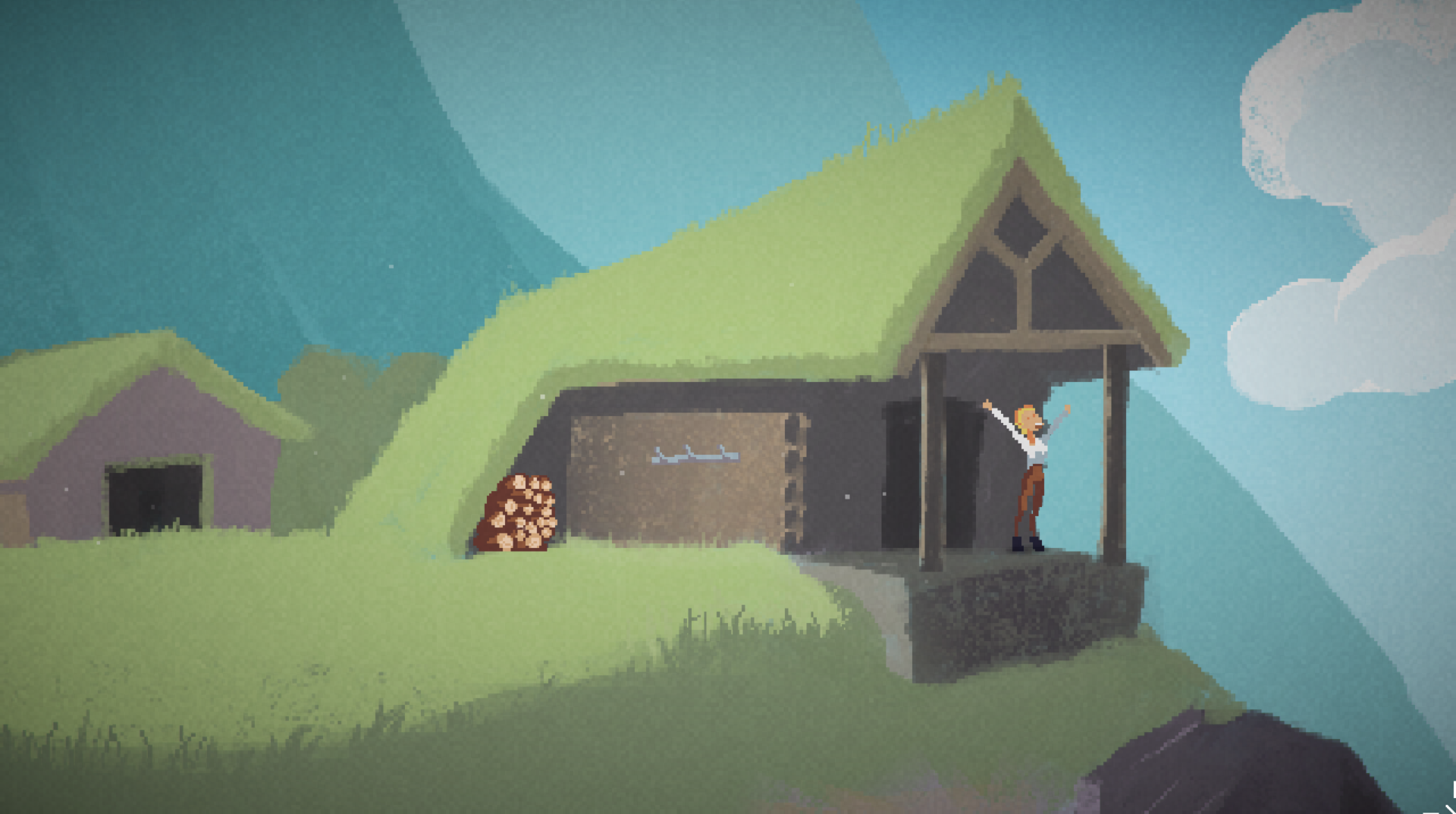
Point-and-click adventures make up a fairly broad genre with many different art styles. I've focused my attention on a sub-genre that hews close to the style of early 1990s Sierra and LucasArts adventure games. These would typically run at a screen resolution of 320×200 and appear pixelized, especially so on a modern display:
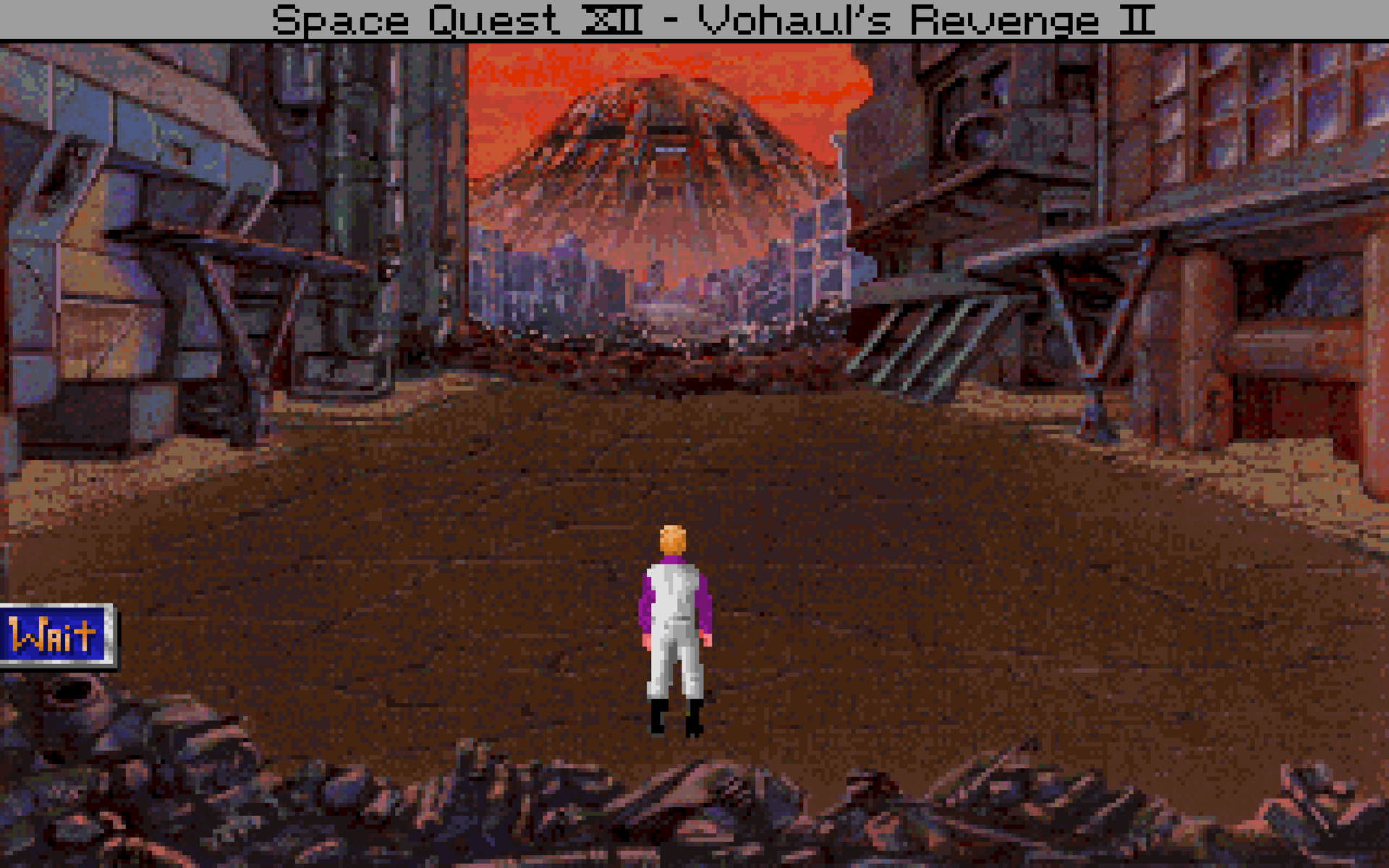
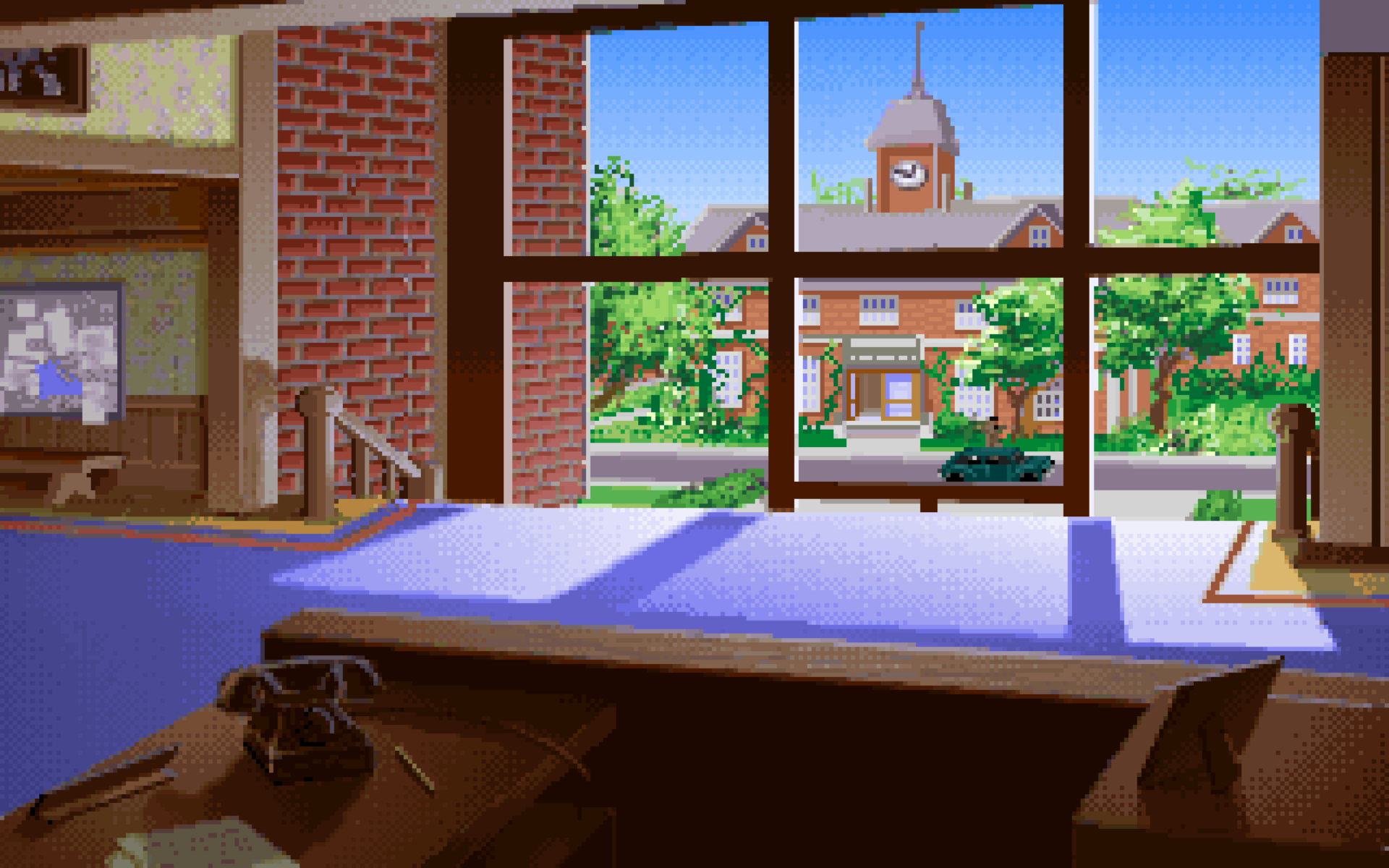
Contemporary game developers sometimes work at low resolutions, producing a similar effect:
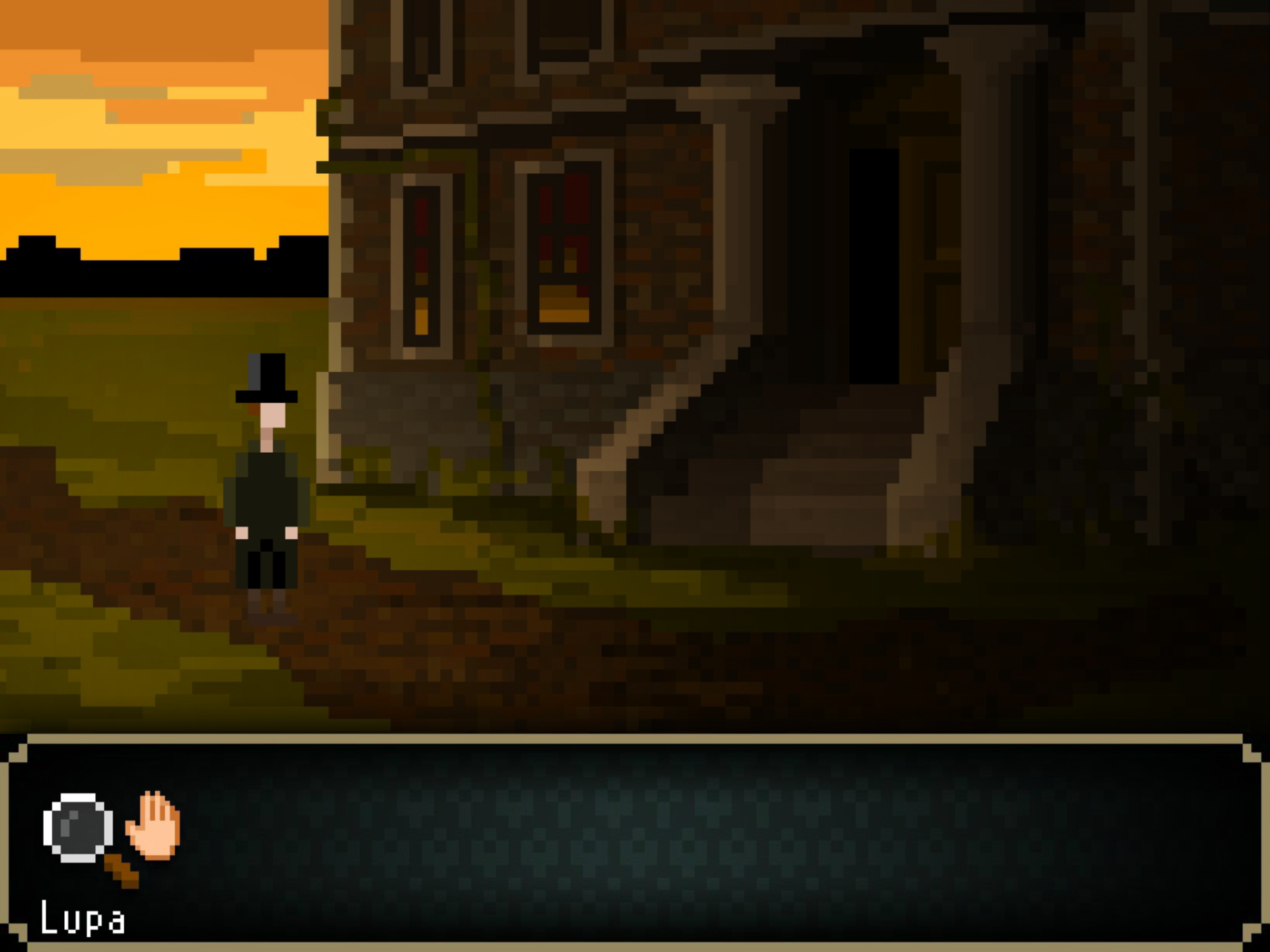
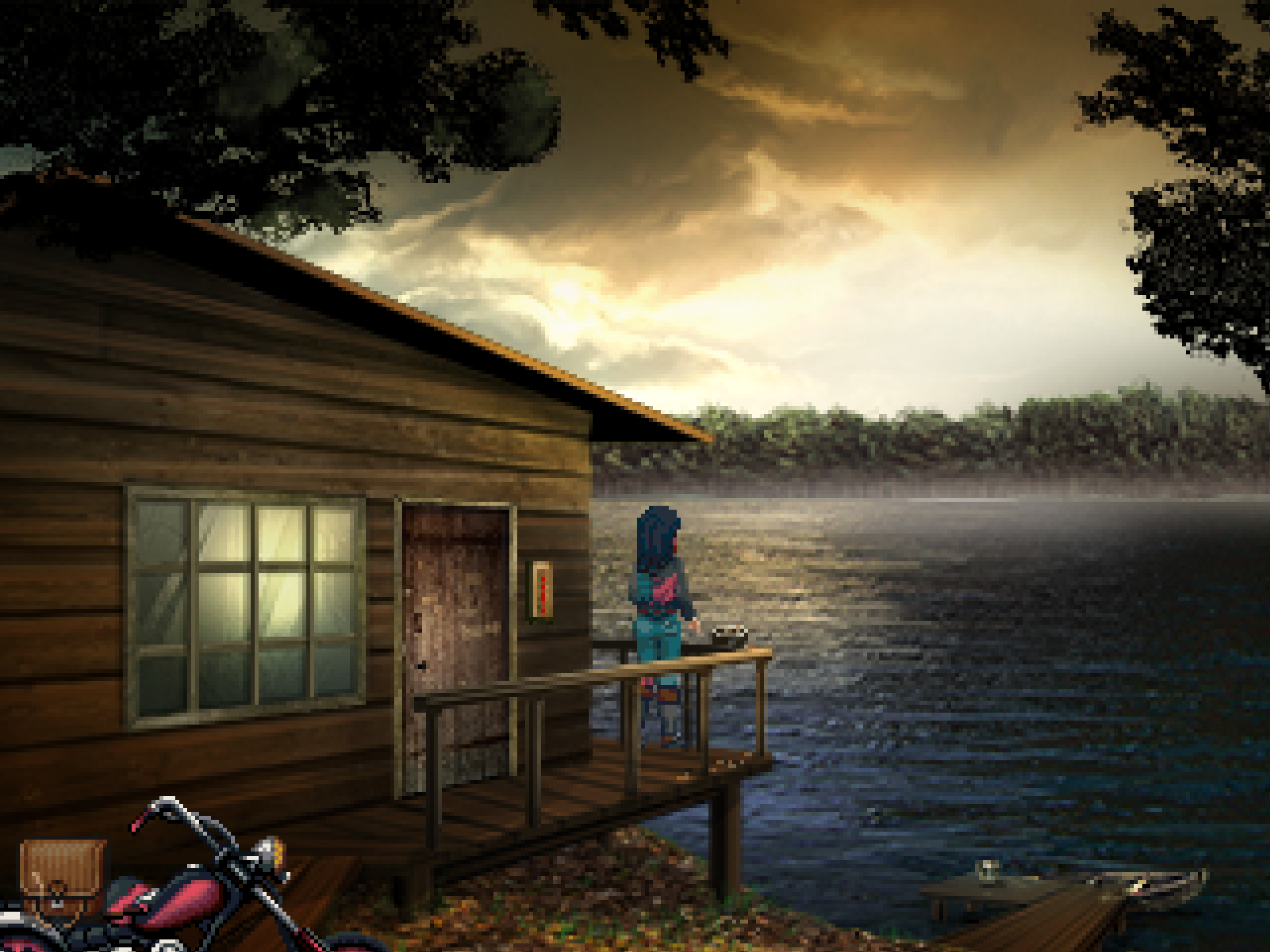
At first glance this seems restrictive (just ask H.R. Giger), but from a certain point of view, it's actually quite forgiving and confers lots of artistic license:
- The perspective doesn't need to be realistic or even consistent, and is often tweaked for practical reasons, such as eliminating visual clutter, providing more space for the action or aligning better with the pixel grid.
- Speaking of pixels, pixelization helps work around the fact that DALL-E can produce odd smudges and sometimes struggles with details. It also helps with manual retouching, since there aren't very fine details or textures to be precisely propagated.
- Does your art look weird? Uncanny valley anxiety? Take a free tour courtesy of the entire genre. Feel your troubles float away as it throws an arm around you. And another arm. And another.
Ahem. What I'm trying to say is, this is a wonderful, fun genre with many degrees of freedom. We'll need them!
How to into the pixels
While you can tell DALL-E to generate pixel art directly, it's not even remotely up to the task; it just doesn't know how a pixel grid works. The result will tend to have some typical pixel art properties (flattened perspective, right angles, restricted palette with colors that "pop") wrapped in a mess of smudged rectangles of all sizes:
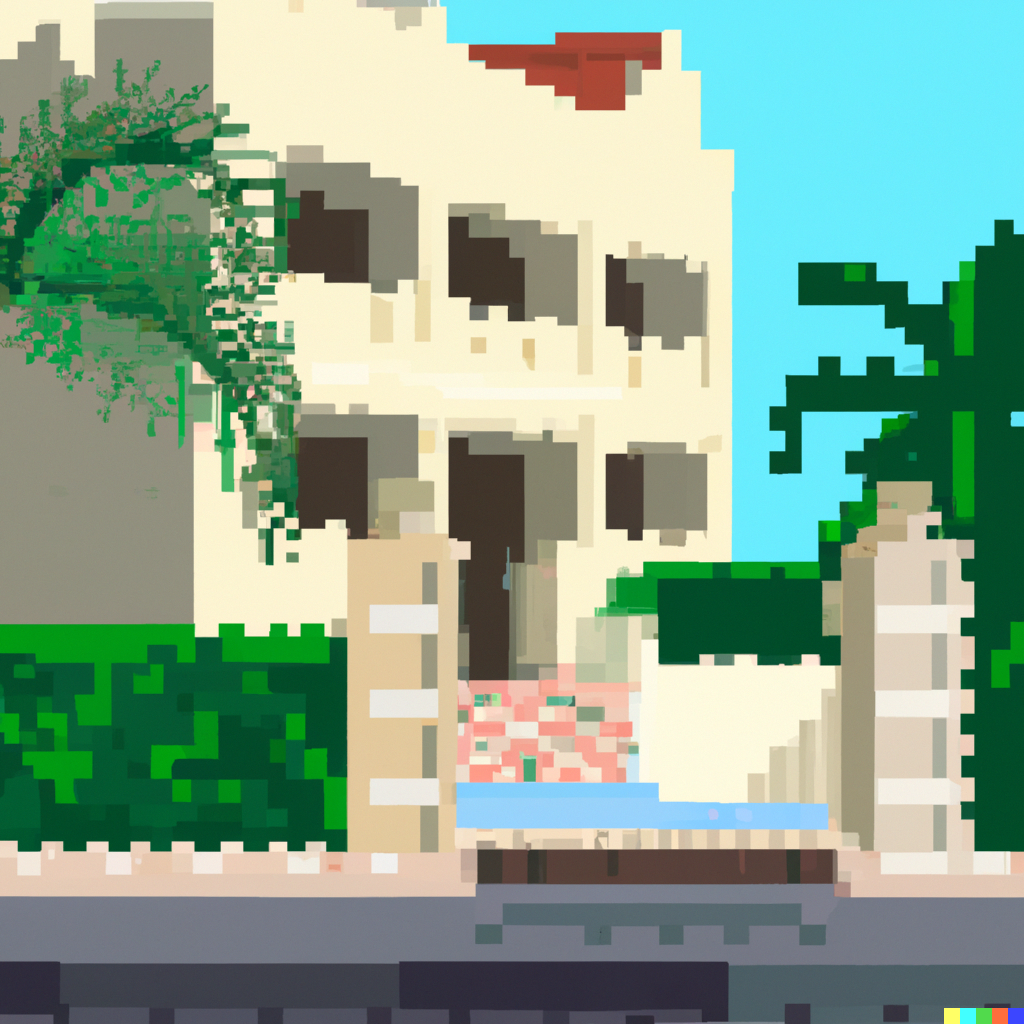
It's impressive in a "holy guacamole, it kind of understood what I meant" way, but even if you clean up the grid you don't stand a chance of getting a consistent style, and you have no control over the grid size.
Fortunately, pixelization can be easily split off from the creative task and turned over to a specialist tool. I used magick in my scripts:
$ magick -adaptive-resize 25% -scale 400% in.png out.pngIt's worth trying different resampling filters. ImageMagick's -adaptive-resize operator produces nice and crisp output, but when downsampling by this much there may be even better options.
You could also experiment with color reduction and dithering. The images I generated for this article have been postprocessed like this…
$ magick -adaptive-resize 25% -ordered-dither checks,32,32,32 \
    -scale 800% in.png out.png
…which pixelizes to a 1:4 ratio, restricts the output to a color cube with 32 levels per channel (i.e. 15-bit color) and applies subtle — but not too subtle — checker-pattern dithering. It also upscales to twice the original size for easy viewing in a web browser.
Style prompts and selection
After some trial and error, I settled on a range of prompts involving techniques, styles and authors of fine art: oil on canvas, high renaissance, modernism, precisionism. This gave me a good chance of output in a handful of repeatable styles with sufficient but not overwhelming detail:
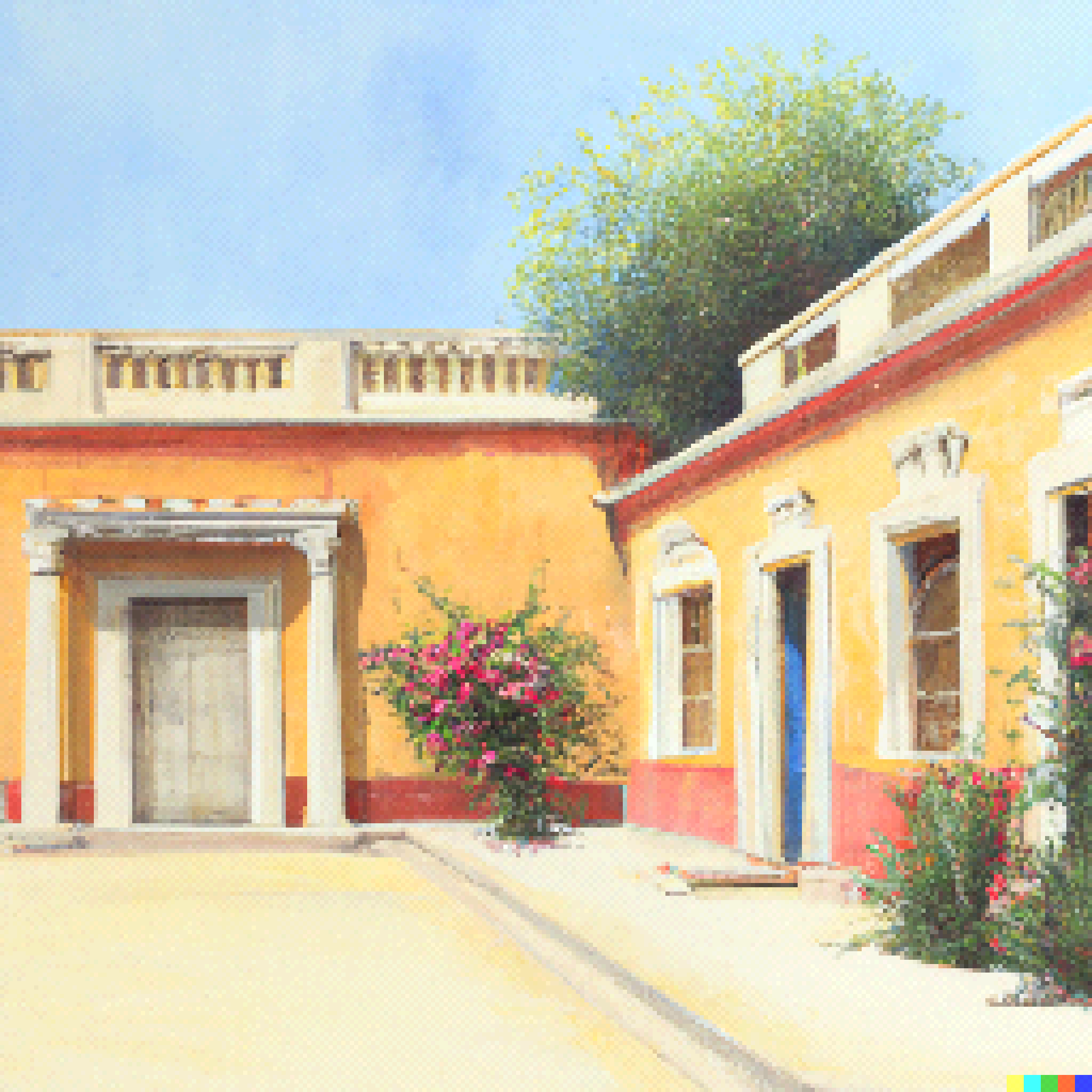
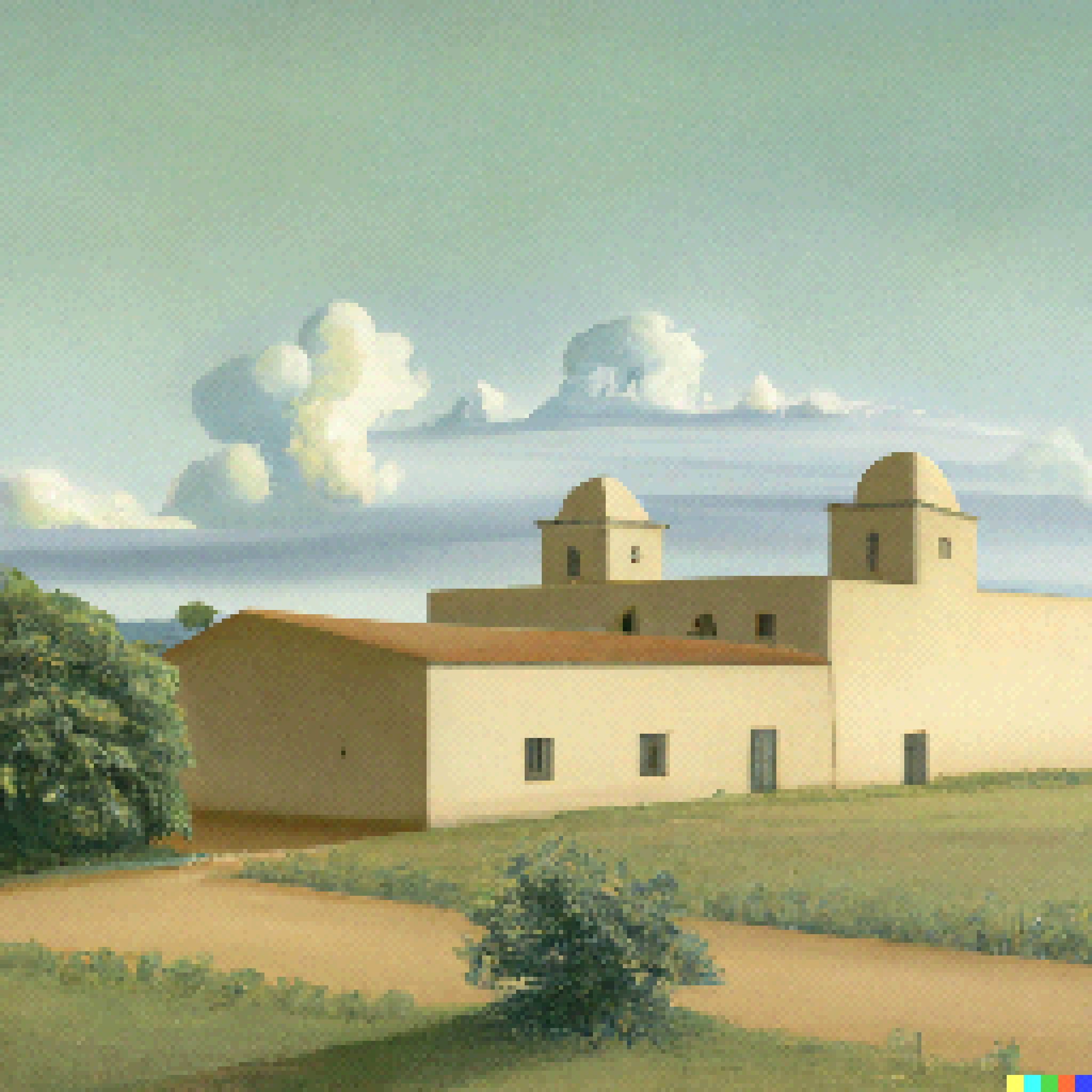
Beyond important details ("sunny day"), vague modifiers like "atmospheric", "dramatic" and "high quality" can have huge effects on lighting, camera angles and embellishment. They're also very unreliable, and I have the feeling they can crowd out more important parts of the prompt from the model's tiny mind and cause them to be overlooked. It's better to use compact, specific prompts until you're close, and then, well, watch it fall apart as you add a single modifier.
Which brings us to the second human-intensive part of this task: selection. Since the OpenAI UI produces four variants for each prompt, this is mandatory. It's also very necessary, as most of the output falls far short of the mark. With the right prompt, you might get a distribution where roughly 1/20 images is good (with minor defects) and 5/20 are potentially salvageable. The remainder will be obviously unusable for various reasons (major defects, stylistic and framing issues, photobombed by anthropomorphic utility pole).
I think it's the same way with the impressive DALL-E mashups being shared. By the time you're seeing them, they've been curated at least twice; once at the source, and one or more times by the chain of media that brought them to you. You won't see the hundreds of images that came out funny but not ha-ha funny.
Since each image takes only a second to generate and a few seconds to evaluate, this wild inconsistency isn't disqualifying. It just means DALL-E isn't magical or even very intelligent.
Setting the stage
An adventure game location is a bit like a theatre stage; it's a good idea to have an ample area close to the camera for the player to walk around in. It's also a good idea to avoid scenes where the player can get far away from the camera, as you'd be forced to choose between a comical perspective mismatch and a really tiny player character that'd be hard to follow and control. Obviously a real game won't want to follow these rules strictly, but it's important to be able to implement them when needed.
Fortunately it can be done, and it's not too hard:

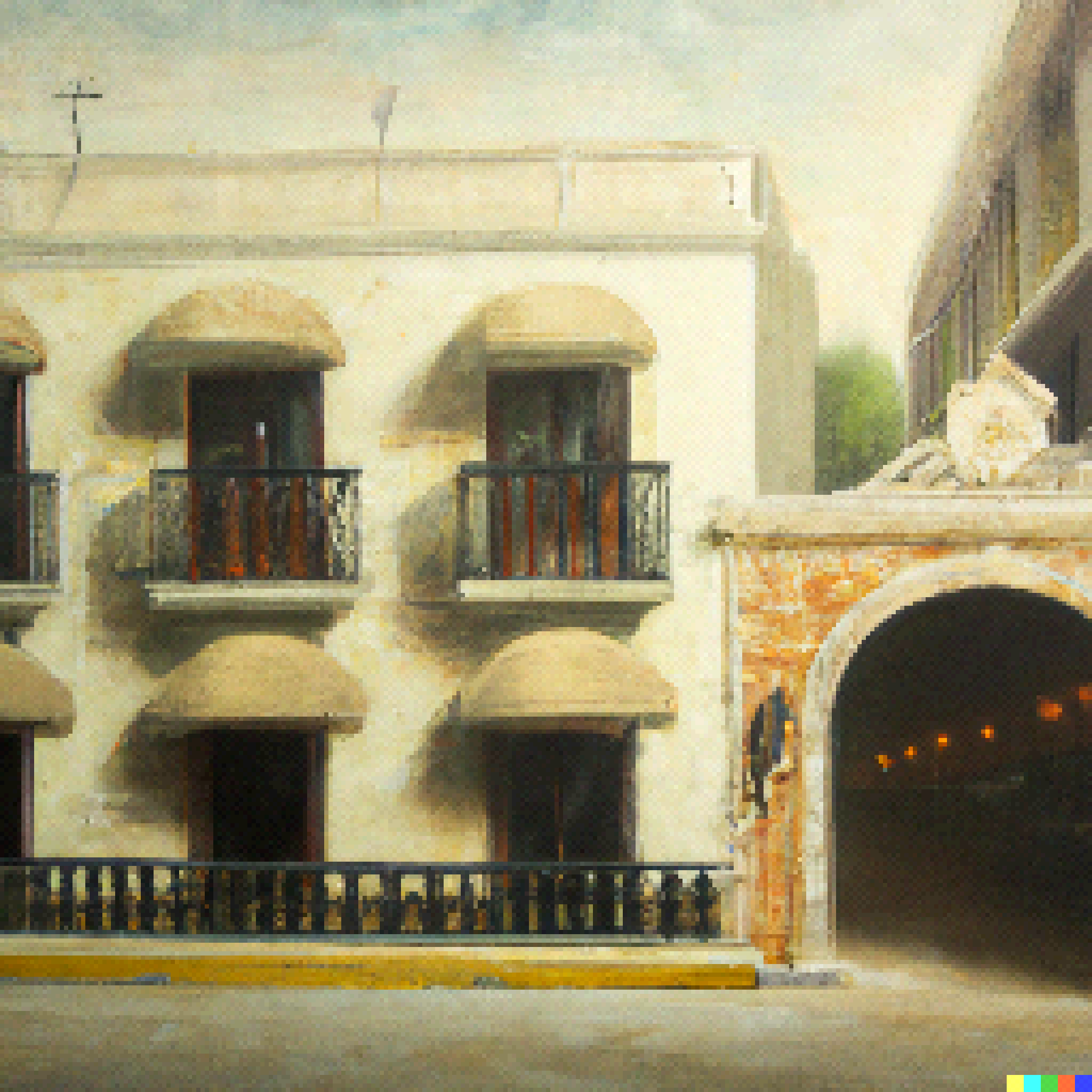
To control the perspective and make it more flat, adding "facade" seemed to be effective. Ditto "diorama" and "miniature", although they tended to produce a more clinical look. Specifying a typical ground-level detail to focus on, e.g. "entrance", was also helpful. I'm not sure "2d" and "2.5d" actually made any difference. Bringing it all together:
- Specify the era, time of day and lighting conditions (e.g. "on a sunny day in the 2000s").
- Be specific about the overall location ("town", "city", or a named geographical location), the focus ("facade", "hotel entrance") and the immediate surroundings ("houses", "streets", "plains").
- You can explicitly ask for open space, e.g. "…and street in front" or "plaza surrounded by…".
- Sometimes it's necessary to ask for the space to be empty, otherwise DALL-E can paint in objects and people that you'd rather add as overlays later on.
- You can also specify camera placement, e.g. "seen from second-floor balcony", but you risk ground-level details becoming too small.
- Some combinations will have the model drawing blanks, resulting in ignoring much of your prompt or horking up non sequitur macro shots of blades of grass and the like. Be prepared to rephrase or compromise. Think about what might be well represented in the training set.
- Do not under any circumstance mention "video game", unless you want blue neon lights on everything.
Retouching and editing
This is easy to do using the in-browser UI. Just erase part of the image, optionally edit the prompt and off you go. Very useful for those times you've got something great, except there's a pine growing out of a church tower or an impromptu invasion of sea swine. Adding objects works too. Here's a villain's preferred mode of transportation, quite believable (if out of place) on the first try:
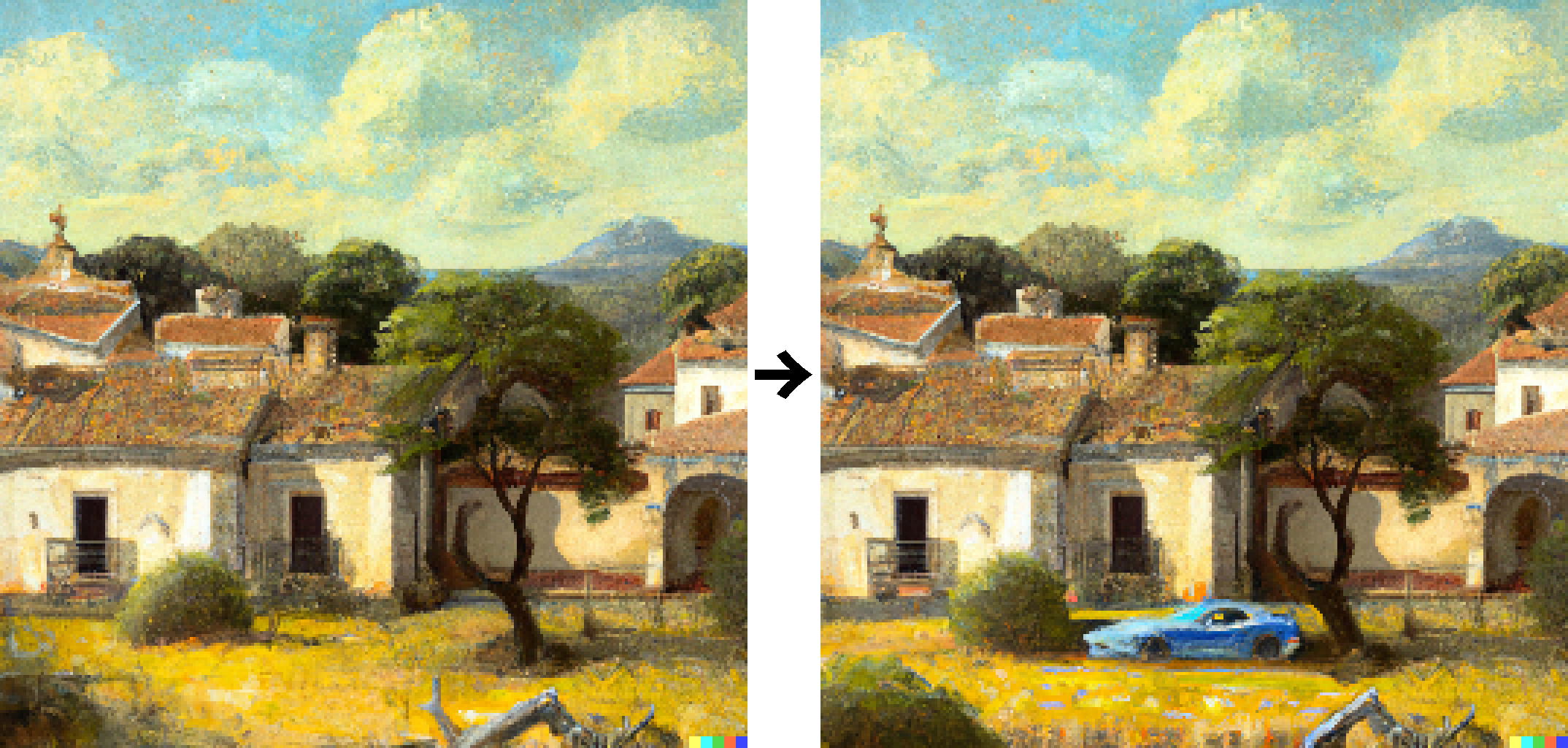
You can also upload PNG images with an alpha channel, although I had to click somewhere with the eraser before it would accept that there were indeed transparent areas. I suspect you could use this to seed your images with spots of color in order to get a more consistent palette.
Extending the images
DALL-E generates 1024×1024-pixel postage stamps. To fill a modern display you want something closer to a 19:10 ratio. Transparency edits come in handy here. The idea is to split the original image into left-right halves and use those to seed two new images with transparency to fill in:
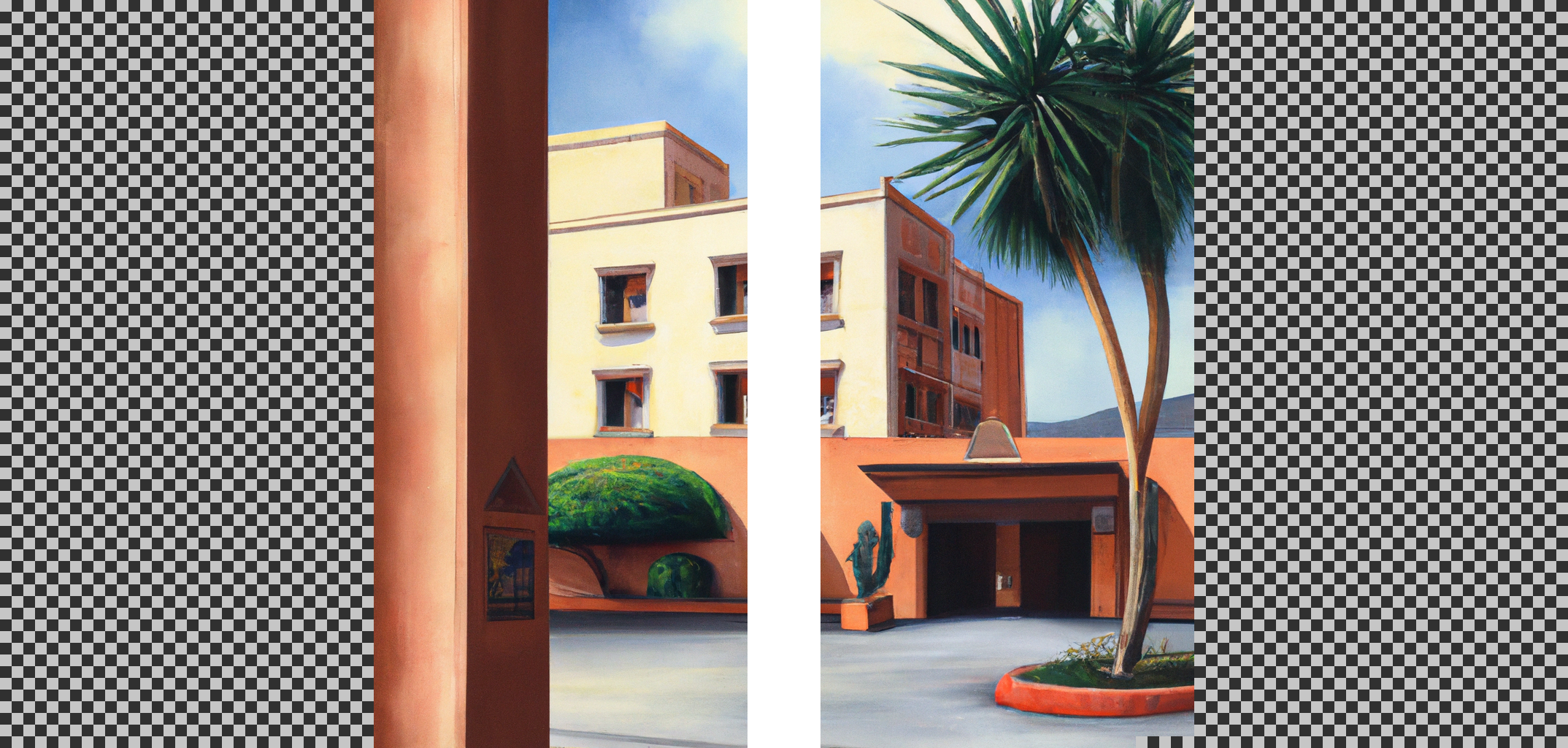
This is easily scriptable. Note that you have to erase the DALL-E signature from the right half to prevent it bleeding into the result. Something like this can work:
$ magick in.png -background none -extent 512x0 -splice 512x0 left.png
$ magick in.png \( +clone -fill white -colorize 100 -size 80x16 xc:black \
    -gravity southeast -composite \) -alpha off -compose copy_opacity \
    -composite -compose copy -background none -gravity east -extent 512x0 \
    -splice 512x0 right.png
Upload left.png and right.png, reenter the prompt and generate a couple of variants for each. Since there's lots of context, the results turn out pretty good for the most part. Then stitch the halves together like this:
$ magick +append left.png right.png out.pngWith a little more scripting, you can generate all possible permutations and apply your big brain judgement to them, e.g:
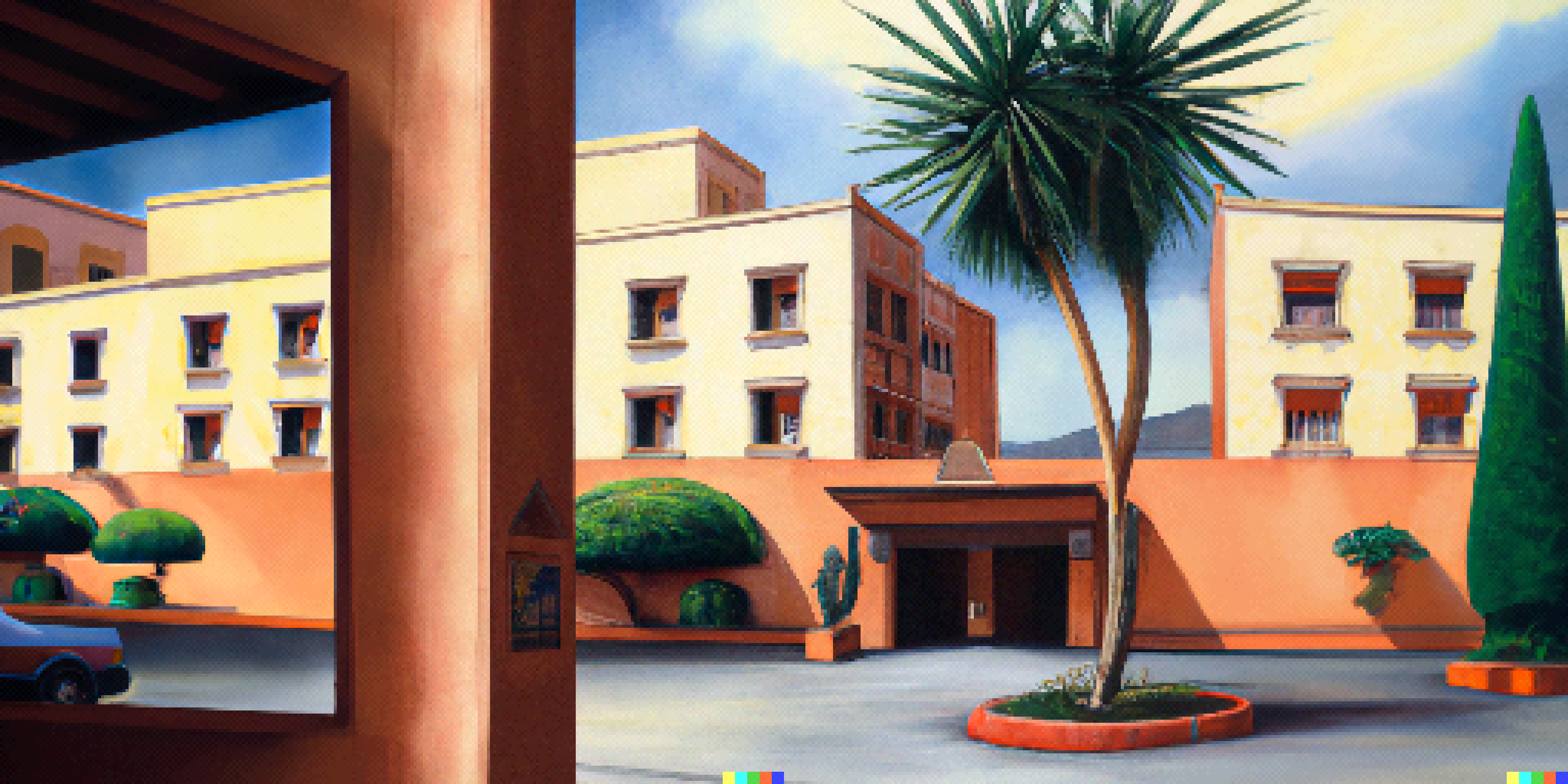
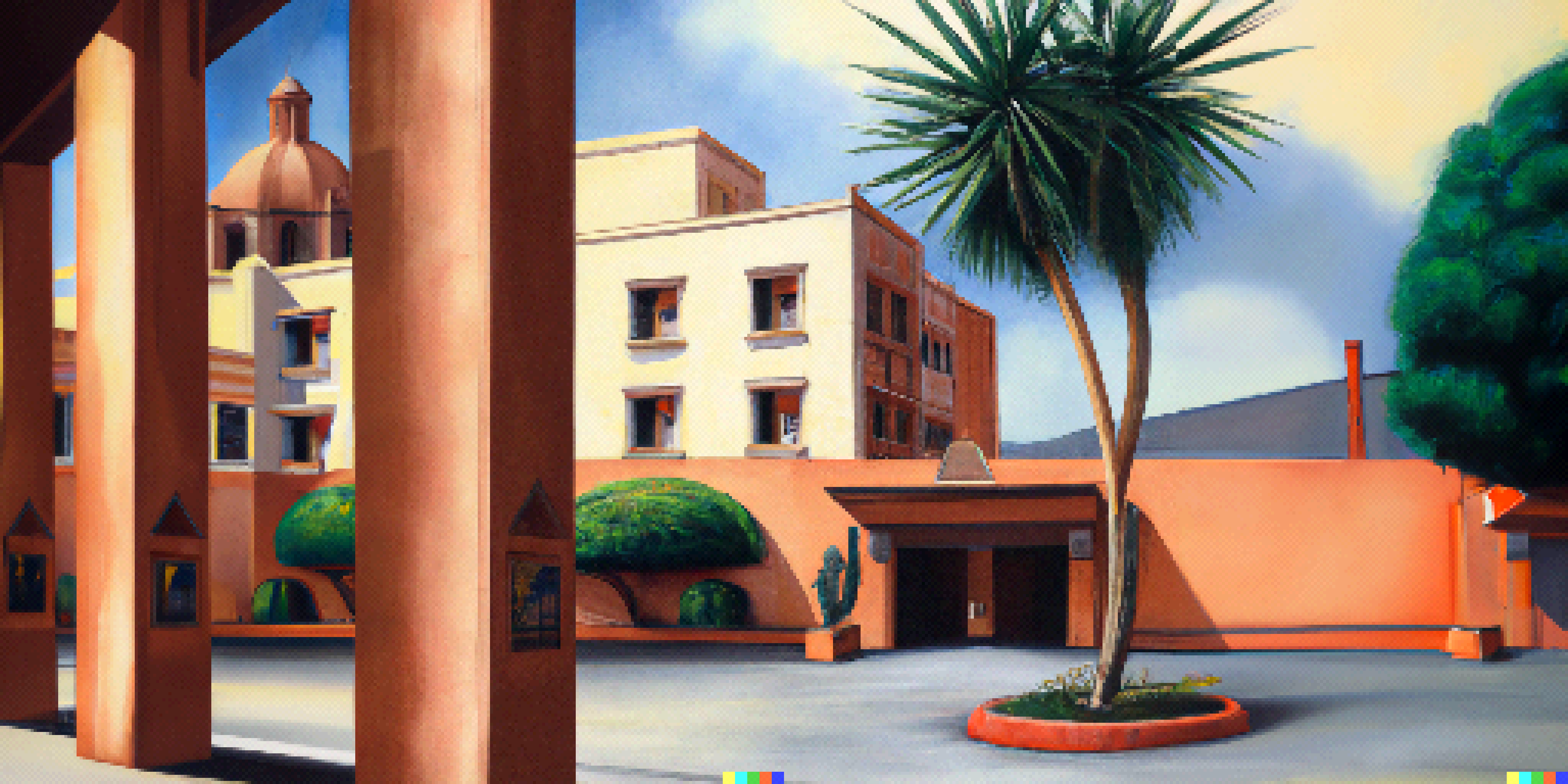
…and so on. You can also tweak the side prompts. Put in a pool or whatever:
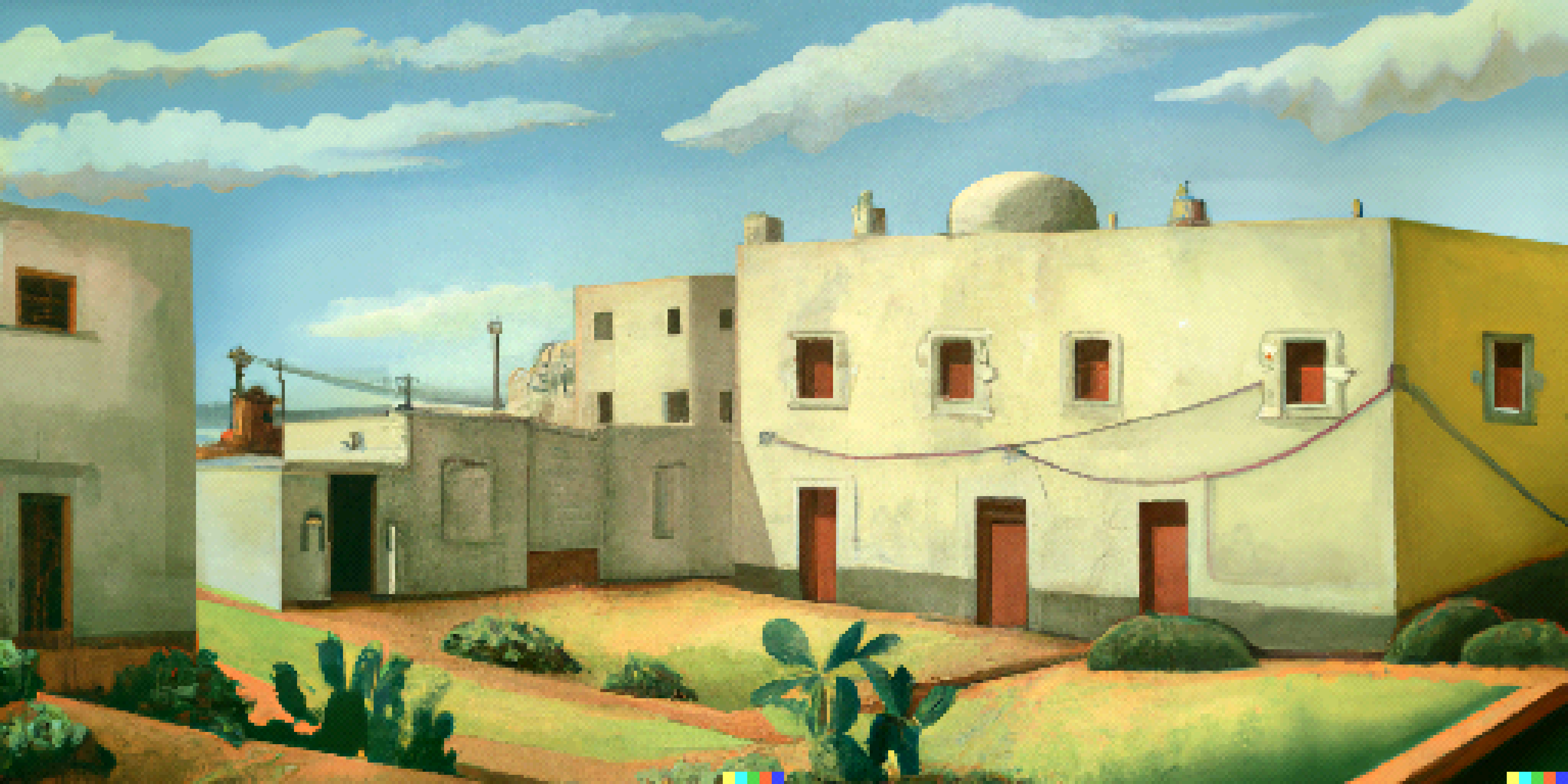
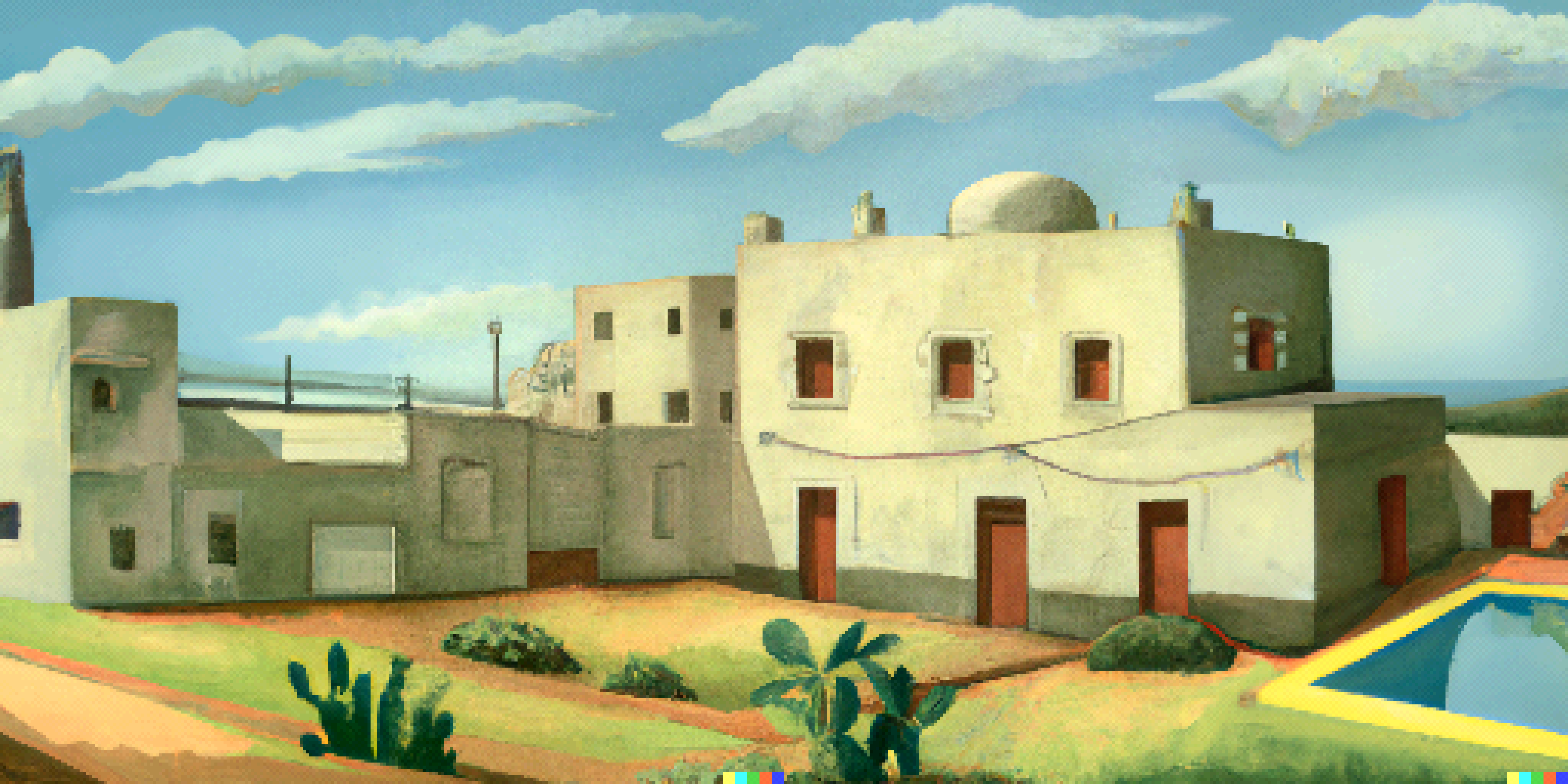
I wouldn't be surprised if this kind of image extension made it into the standard toolbox at some point.
Other things it can do, and some that it can't
I had some success with interiors too. "Cutaway" was a handy cue to knock out walls and avoid claustrophobic camera placement, and it handled decorations and furniture fairly well (e.g. "opulent living room with a table and two chairs"). It could also generate icons for inventory items after a fashion ("mail envelope on black background"). I didn't delve very deeply into that, though.
You've probably noticed that the generated images all contain defects. Some can be fixed by erasing them and having DALL-E fill in the blanks, but others are too numerous, stubborn or minute for that to be practical. This means you'll have to go over each image manually before pixelization (for rough edits) and after (for the final touch). You'll also need to adjust colors and levels for consistency.
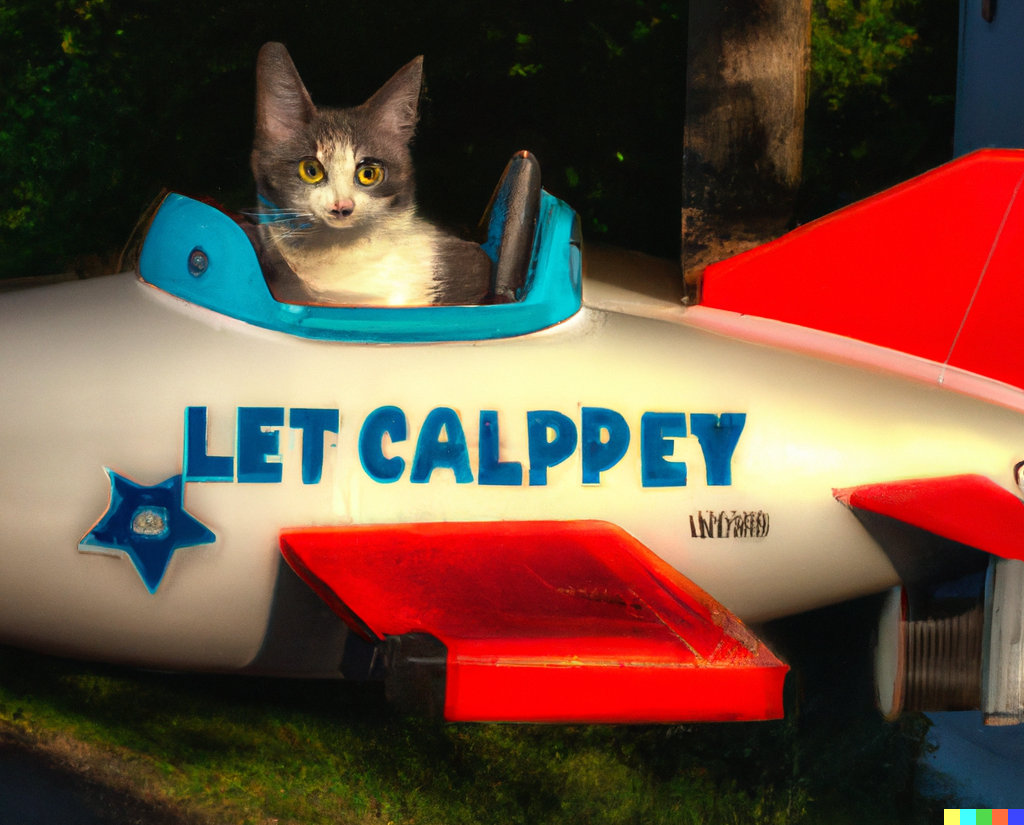
DALL-E can't write. In fact it will rarely be able to arrange more than three letters in a correct sequence, so if you want words and signage, you'll have to draw it yourself. Maps and other items that convey specific information by virtue of their geometry can probably also be ruled out, although you may get lucky using a mostly transparent cue sketch.
You won't get much help with animations, especially complex multi-frame ones like walk cycles.
If you want to convert an existing daylight scene into a night scene, that's probably best done manually or with the help of a style transfer model.
I realize I've barely scratched the surface here, and there's bound to be a lot more that I haven't thought of.
The economics of AI jackpot
OpenAI controls usage through a credit system. Currently, one credit can be used to generate four images from a single prompt, or three edits/variants from a single image and prompt. I got some free welcome credits (50 or so), and they're promising another 15 each month. When you spend a credit, it takes 4-5 seconds to get results, which means about a second per image. You can buy 115 credits for $15 + tax, which in my case works out to a total of $18.75. That's $0.163 per credit, or at most $0.0543 per image (batch of three).
Let's say you use this to generate locations for a point-and-click game. How many will you need? Well, one very successful such game, The Blackwell Epiphany (made entirely by the fine humans at Wadjet Eye Games), has about 70 locations. If you're considering AI-generated images for your game, you're probably not trying to compete with one of the industry's most accomplished developers, so let's lower that to 50.
50 locations is still a lot, and as I mentioned before, only 1/20 images come out adequate. For each location, you can probably get by with 10 adequate candidates to choose from. That means you'll generate 200 images per location, or 10,000 images total. Let's double that to account for some additional curation, edits, horizontal extensions, late changes to the script and plain old mistakes. Then, 20,000 * $0.0543 = $1,087. Since most of the images will be generated in batches of four, not three, it's fair to round that down to an even $1,000. It's probably not your biggest expense, anyway.
How about time investment? I mean, evaluating that many images seems kind of crazy, but let's do the math and see. If an image takes about 1s to generate and you spend about 5s deciding whether to keep it (recalling that 95% is quickly recognizable as dross and you'll be looking at batches of four), that's 20,000 * 6s = 120,000s or about 33 hours. Even if you can only stand to do it for two hours a day, you should be done in three to four weeks.
Throughout this you should be able to generate 10 candidates and 10 edits for each location. Further manual editing will likely take much longer than three weeks, but that's not something I'm experienced with, so I've really no idea. It also presupposes that you're starting out with a detailed list of locations.
Legal considerations
In addition to their API policies, OpenAI have public content policy and terms of use documents that appear to be specific to DALL-E. I'm not trained in law, but the gist of the content policy appears to be "don't be mean, sneaky or disgusting", which is easy for us to abide by with only landscapes and architecture. Some of the restrictions seem unfortunate from the perspective of entertainment fiction: Could I generate a bloodied handkerchief, a car wreck or something even worse? Probably not. Anything containing a gun? Certainly not. However, they're also understandable given the stakes (see below).
The most concerning thing, and likely a showstopper for some creative enterprises, is point 6 of the terms of use: Ownership of Generations. My interpretation of this is that generated images are the property of OpenAI, but that they promise not to assert the copyright if you observe their other policies (which may, presumably, change). If you're making a long-lived creative work, especially something like a game that may include adult topics alongside the generations, this seems like a risky proposition. I wouldn't embark on it without seeking clarification or some kind of written release.
Ow, my ethics!
So, yeah, ethics. An obvious line of questioning concerns misuse, but OpenAI is erring on the side of caution (or realistically, trying to keep the lid on just a little longer), and anyway, our use case isn't nefarious.
What's more relevant to us is the closed training dataset and how it might contain tons of formerly "open" but copyrighted material, or simply pictures whose author didn't want them used this way. We're talking half a billion images, and the relevant research and blog posts either allude to web scraping or mention it outright. A search for reassurance didn't turn up much, but I did discover an interesting open issue. So, could this be disrespectful or even abusive?
A common defense claims that the model learns from the training set the same way a human student would, implying human rules (presumably with human exceptions) should apply to its output. This can seem like a reasonable argument in passing, but besides being plain wrong, it's too facile since DALL-E is not human-like. It can't own the output (or, as the case would be, sign its ownership over to OpenAI) any more than a relational database could.
A better argument is that the training process munges the input so thoroughly that there's no way to reconstruct an original image. You don't have to understand the process deeply to see that this makes sense: there's terabytes of training data and only gigabytes of model. Then the implication becomes that this is transformative remixing and potentially fair/ethical use.
Thinking about this kind of hurts my head, particularly as it's also playing out in my own field. I haven't definitely concluded, but in general I think it's important to focus on the net good that technology and sharing can bring and how the benefits (and obligations) can be distributed equitably.
So is this going to upend everything?
Well, not everything. But some things, for sure. Neural networks have evolved very quickly over the past couple of years, and it looks like there's plenty of low-hanging fruit left. Current research leaves the impression that DALL-E 2 is already old news. There are also open efforts that seem to be completely caught up, at least for those with some elbow grease and compute time to spare.
A dear friend of mine joked that we've been privileged to live in a truly global era with minimal blank spots on the map and a constant flow of reasonably accurate information, the implication being that the not too distant past had mostly blank spots and the not too distant future will be saturated with extremely plausible-looking gibberish. We had a laugh about that, but you have to wonder.
A clarification regarding pixelization
August 18th: This article sort of made the rounds, and there has been lots of interesting feedback. Contrary to conventional wisdom, my experience when this happens is that other netizens are mostly very thoughtful and nice. So too this time.
There's one recurring criticism I should address, though, because I think it stems from my own carelessness and/or attempts at brevity: This is not pixel art!
Well, sure. It's not what we understand to be pixel art in 2022. Pixel art is when you hand-pixel the things, and maybe this could be too if it had gotten seriously retouched during/after pixelization — but in its current state it isn't. Since I'm aware of the distinction, I tried to word the article carefully ("adventure game graphics", "pixelization", "pixel graphics" in lieu of "lowres" or whatever) and only brought up pixel art in relation to the DALL-E query because, y'know, one can dream.
I sort of danced around it, though, and never explicitly said so. Here's the missing section:
An important reason I started out with a comparison to early 90s games (and not, say, any of the great 80s games) is that around that time, it became practical to make adventure game art using physical media (e.g. matte painting) and then digitizing it, which is somewhat similar to what I'm attempting here — except there's no need to digitize DALL-E's paintings (already digital). Instead, I added postprocessing as a callback to the traditional digitization process. Here's an excerpt from a nice Sierra retrospective by Shawn Mills. Go read the whole thing, it's great:
"We started painting with traditional media and then had our programming team develop some amazing codecs to scan the artwork in. That also allowed us to key scenes for other people and send them overseas to places like Korea and have them paint them. So we could really up the production because we [alone] never would have been able to raise the quality of production that we wanted."
Bill Davis, first Creative Director at Sierra On-Line
So Sierra got more for less, and they did this by sending prompts to dedicated overseas painters (vs. learning to paint faster/better or hiring more in-house). Sound familiar?
There's still the sort of "ugh" reaction one might have to talking about efficiency and art in the same sentence, and I do feel that. It's more fun to learn a new skill, or to work closely with others.
What's not fun, though, is to watch a nice, practical article that's already way too long start to overflow with the author's opinions and speculation. That's what the comments are for.
