
 Member
 CzP
CzPWorking with JSON logs from sudo in syslog-ng
This weekend I am going to give a talk about sudo in the security track of FOSDEM. I will talk a few words about logging at each major point I mention, but I cannot go into too much detail there. So, consider this blog both as a teaser and an extension to my FOSDEM talk. You will learn how to work with JSON formatted logs in syslog-ng and also about new sudo features along the way. You will also learn about JSON logging in sudo, chroot support, logging sub-commands, and how to work with these logs in syslog-ng.
Read the rest of my blog at https://www.syslog-ng.com/community/b/blog/posts/working-with-json-logs-from-sudo-in-syslog-ng

syslog-ng logo
syslog-ng relaunch
Balázs Scheidler, founder of the syslog-ng project, started a new blog where he details why and how he started to work on syslog-ng even more actively. He also asks for your feedback!
“syslog-ng has been around for decades: I started coding the first version of syslog-ng in September 1998, circa 24 years ago. The adoption of syslog-ng skyrocketed soon after that: people installed it in place of the traditional syslogd across the globe. It was packaged for Debian, Gentoo, SUSE and even commercial UNIXes. It became a default logging daemon in some of these Linux distributions. Commercial products started embedding it as a system component. Over the years however I feel that syslog-ng has become a trusted piece of infrastructure, few people really care about. I set out to change that.”
Read the rest of the blog at https://syslog-ng-future.blog/syslog-ng-relaunch/
syslog-ng logo
Supporting Sustainability
Many software teams struggle with ever growing cost of change, and technical debt that risks overwhelming them.
It’s always interesting to talk with folks and understand, how the system and incentives created this state.
Often I hear from software engineers that management doesn’t give them permission for (or doesn’t prioritise) work such as tidying, refactoring, testing, observability.
Blaming management in this way may be accurate in many situations (they are indeed probably accountable for the system that created this outcome). However, the problem with blame is that it tends to short-circuit further thinking. How could the system be improved with the influence and control you do have, perhaps with minimal authority.
But what about from the management side? I often hear from engineering and product managers that they’re unaware, or learn too late, that folks were accumulating debt. It becomes visible when teams are no longer able to achieve goals.
Management has a bad reputation in the tech community. I’ve been very fortunate to work almost exclusively with managers who genuinely care deeply about the people and teams they support; who want what’s best for them in the long term.
And yet, it’s still common, with the best of intentions, to create systems that result in unsustainable software development, and lots of technical debt.
How does this happen?
The risks are not very visible. If managers were given the option of twice as much this month, in exchange for nothing for the next 6 months, they probably wouldn’t take it (perverse incentives like annual bonuses notwithstanding). Would that it were so simple.
The decks are stacked against sustainability. It requires active effort from managers to combat the natural incentives.
Here’s three practical ways you can help as a manager.
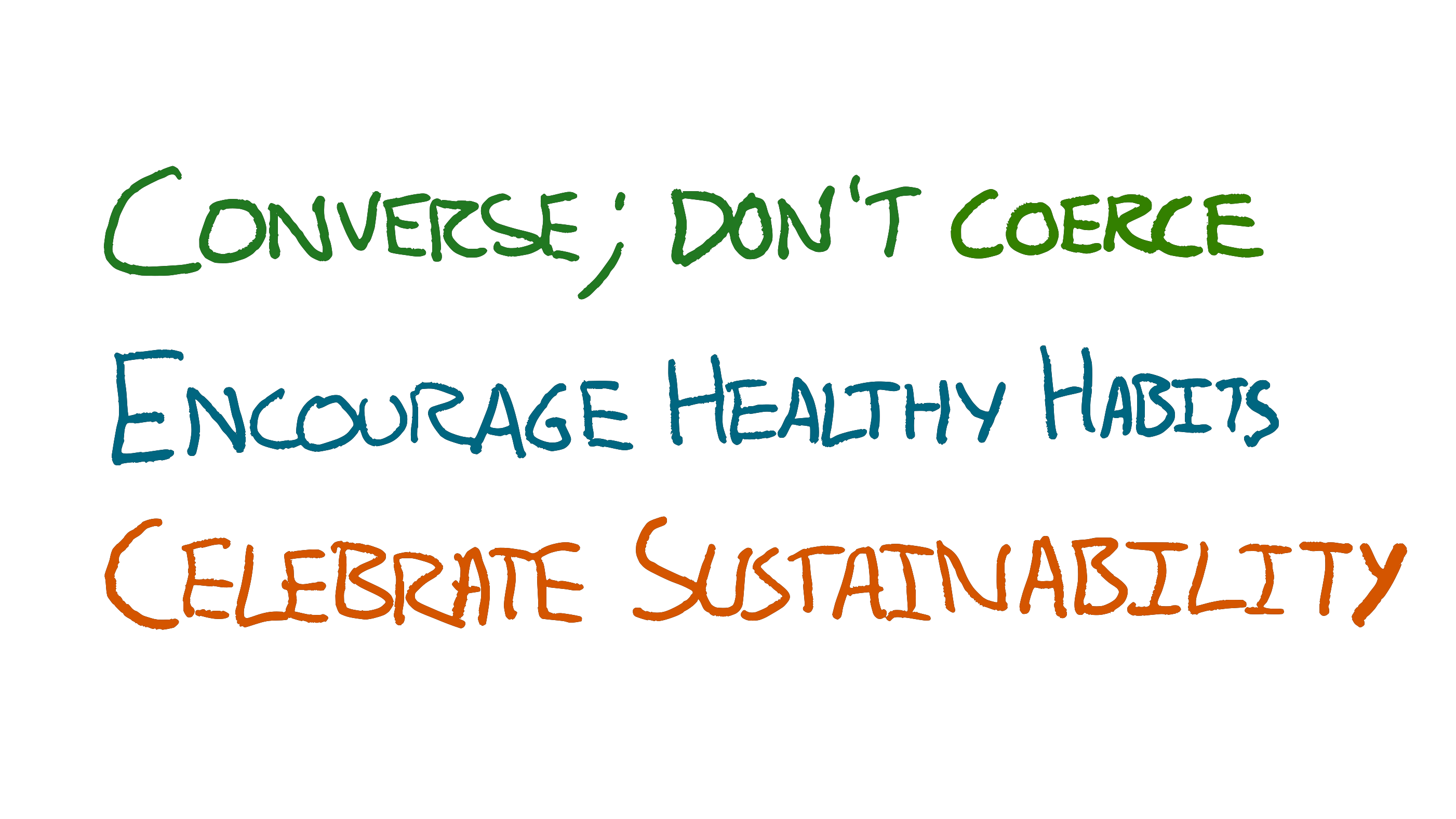
Converse; don’t Coerce
Get Curious
People will always want more than you’re able to achieve. Meaning we’re often starting from a position of saying no to lots of things that are very valuable; it’s faster to identify opportunities than it is to win them.
Most people don’t want to give bad news. Most people don’t want to hear bad news.
This sets us up for miscommunication.
<Manager> we need to do X this week
<Maker> Ok [unsaid: I’m going to risk a production outage by skipping testing]
If sufficient trust exists then it’s possible the risk will be vocalised, but the manager has not invited this feedback. Nor have they provided enough information for the maker to form their own opinion on the merits of the risk.
It’s an instruction. There’s no curiosity as to what the impact or tradeoffs are, which shuts off thinking.
It encourages risks. Some might infer an unsaid “…whatever it takes”. This could lead to taking risks such as skipping normal safety, or working long hours
It’s informationless. It’s a blanket “we need”. It doesn’t say what the value or tolerable costs are. The recipient has no information to make good judgements themselves with.
Things get a little better with even the slightest bit of curiosity.
<Manager> can we do X this week?
<Maker> I think so [unsaid: cutting corners]
* next week *
<Manager> can we do Y this week?
<Maker> I think so [unsaid: that means they’ve decided not to clean up the debt from X]
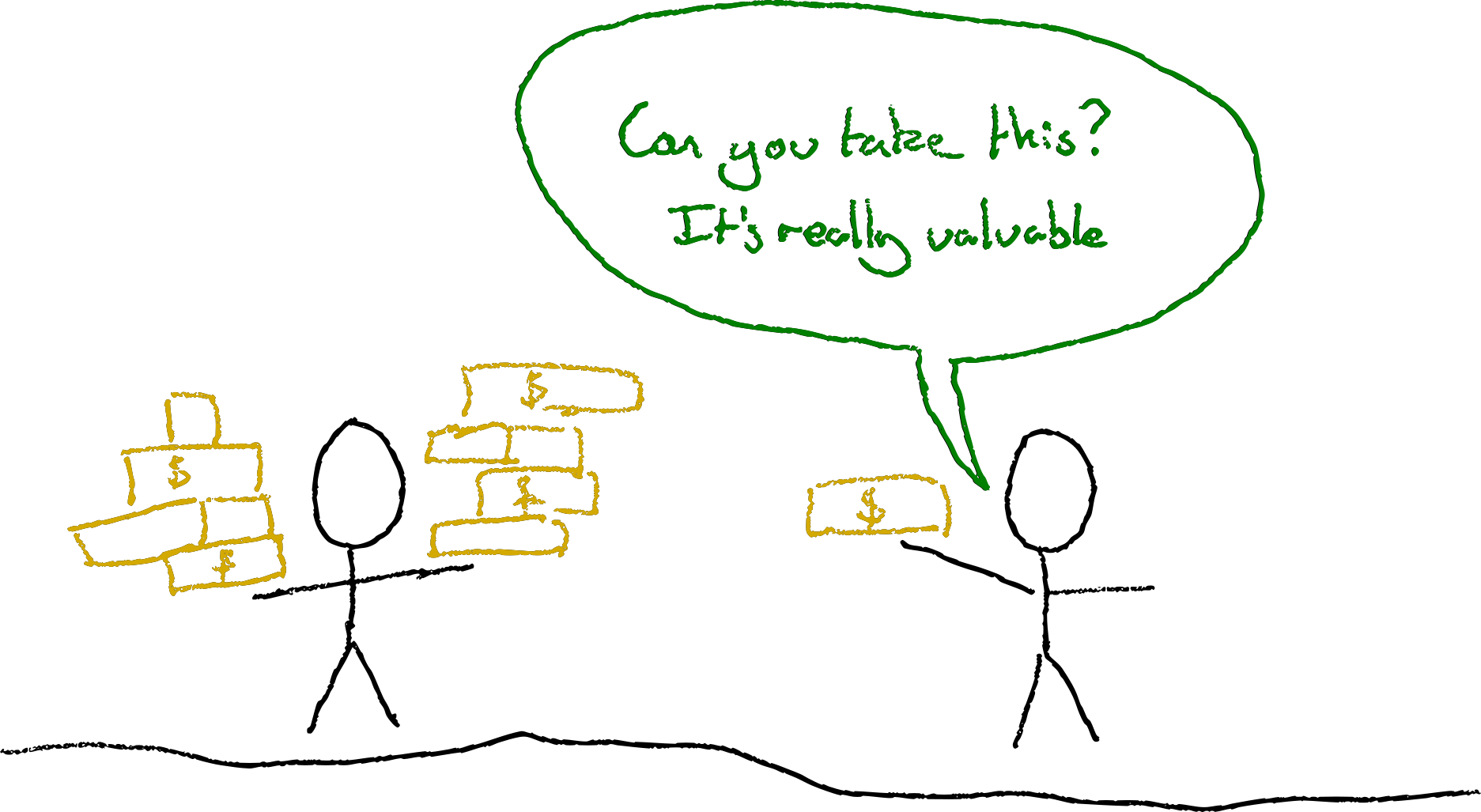
At least the manager is now making it clear that there’s some degree of choice, although the power dynamic might make the choice seem illusionary.
It’s a closed question. The manager’s likely to get yes or no answers. They’re not showing curiosity about the consequences of the team making X or Y happen.
The manager is still asking the team to do things. Having to ask a team to do something is often a sign of a bug in the organisation. An organisational smell.
What’s stopping the team self-organising to the most important work? What information were the team missing to help them spot that X&Y were more important? What skills or perspectives are they missing to be able to make the best choices?
Use Open Questions
Things improve further if we ask open questions:
<Manager> what would we drop if we tried to do X this week?
<Maker> well we were planning on implementing the actions from last week’s post mortem, if we postponed those we might be able to do X.
or
<Manager> on a scale of 1-5, how risky would it be to release X this week?
<Maker> Hmm, probably a 4, we’d not have any time to test or do a canary deployment so we’d lose our usual safety nets
Here the manager has asked open questions, and solicited information that might help make better decisions. Even if the manager then asks the maker to do the same thing, the risks have at least been taken more intentionally.
Prefer information over instructions
What if we didn’t ask the team to do X at all?
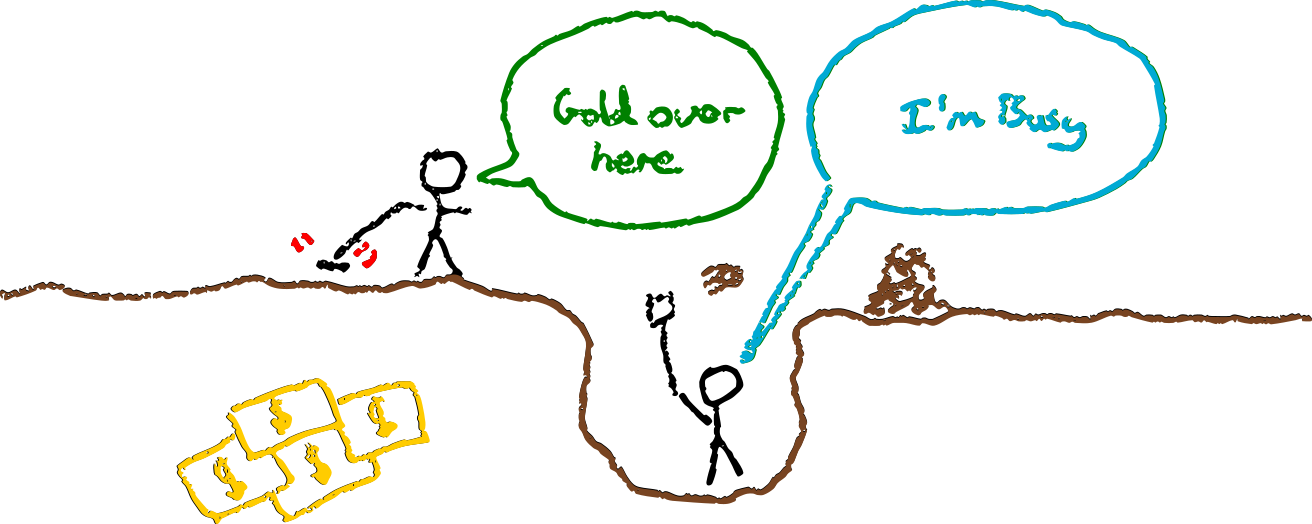
<Manager> I’ve learned that we could close a $n deal if we can ship X this week.
<Maker> Hey that’s more than the total cost savings from what we were working on, let’s do X instead.
or
<Manager> I’ve learned that we could close a $n deal if we can ship X this week.
<Maker> Hmm, but if we rush we risk breaking the service. Last time this cost us $10*n
However, this is somewhat optimistic. Even with all the information, people often have recency bias and eagerness to please. The power dynamic between manager and maker often exacerbates this.
Incentives conspire to eliminate slack time that would be used to keep development sustainable.
Combining Curiosity and Information
<Manager> I’ve learned that we could close a $n deal if we can ship X this week.
<Maker> Hmm, that sounds like a lot, I can get it done
<Manager> How risky is it on a scale of 1-5?
<Maker> Probably a 1, we’ve still got time to test it carefully.
<Manager> What things are we dropping that we’d otherwise be doing?
<Maker> Oh we were going to refactor Y as changes in that area are slow
<Manager> Oh I thought Y was done months ago
<Maker> We shipped it months ago but have since noticed the design trips us up and we never have time to fix it with all these urgent opportunities.
<Manager> How much time has it cost us?
<Maker> More than it takes to ship X just this month
Here the manager and maker have built a much richer understanding of the situation and tradeoffs. They are much better placed to make a decision than if the maker had simply been asked to ship X.
Encourage Healthy Habits
Team habits can help people escape the trap of needing permission from unsupportive or oblivious management. You will probably be unsupportive or oblivious at some point. Unintentionally coercing people is so easy.
You can counter this by encouraging your team to adopt habits that will resist your efforts to coerce them into doing the wrong thing.
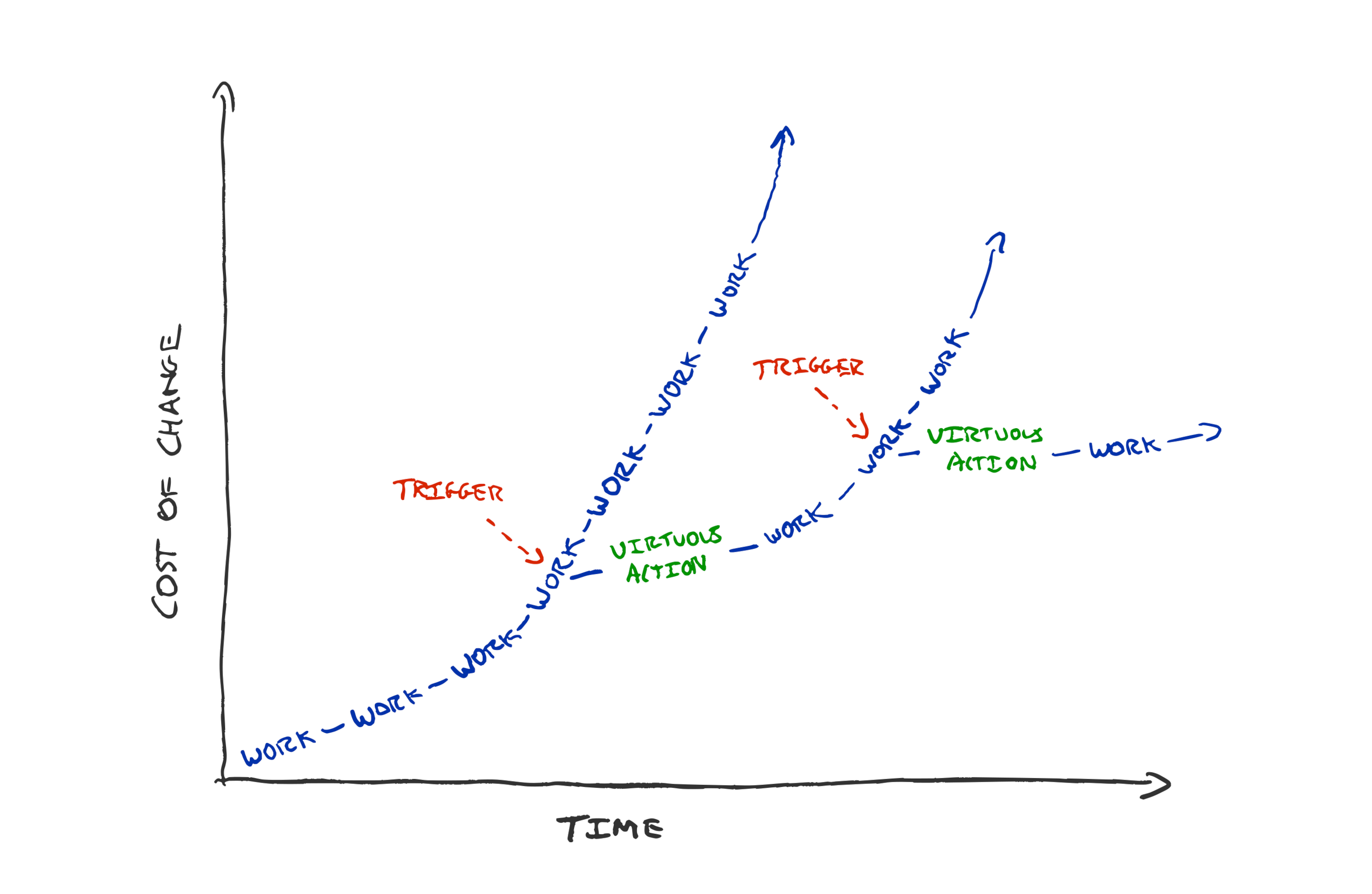
If your team practices TDD then you’d have to break a strong habit to encourage people to release a feature without tests.
If your team habitually drops everything to bring the build time down every time it creeps above 5 minutes, then they’re more likely to do the same even if you’ve asked them to deliver a feature.
If your team habitually prioritises work based on cost of delay, then they’ll likely ask you questions to find out the value before jumping on it. Even if you have omitted the information in your request.
Habits are hard to break. This can be a good thing. The right habits can add resistance to the forces that conspire to create creeping loss of sustainability.
Celebrate Sustainability
If you publicly appreciate internal improvements you will signal for more.
If your only questions about the work are inquiries about when it will be finished, you’ll incentivise unsustainable working.
If your promo process only recognises features and customer impact, you’ll discourage sustainability.
Do you celebrate with the team as much when they halve their deploy time, as when the ship that flagship feature?
Do you thank folks for taking extra days to refactor and clean up the code?
Do you ask “how much more could we simplify it?” or “when will we be done?”
Do you ask “what if tried doing less?” or “how can we do more?”
The post Supporting Sustainability appeared first on Benji's Blog.
Pondering Agile Principles
I’ve worked in and with teams who would identify as agile for many years. I’ve written about how I think the most interesting part of the agile manifesto is the “uncovering better ways” mindset.
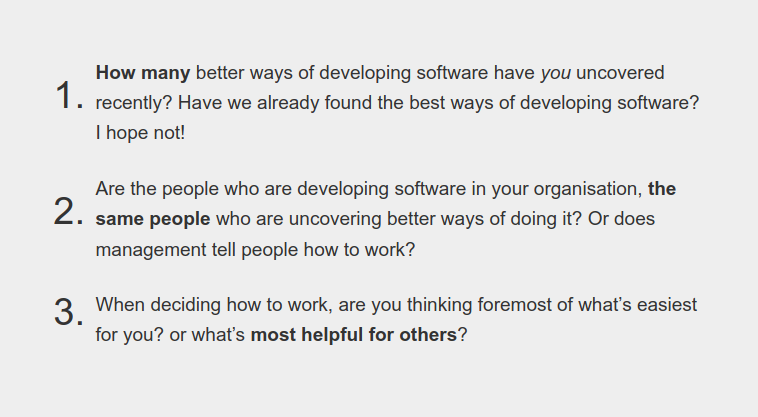
With this in mind, I’ve been pondering how the principles in the agile manifesto have aged. Where do (and don’t) I share the same principles.
Given the “better ways” of developing software we’ve uncovered, can we “turn up the dials” on the principles as well as the ways of working?
Principles tend to stand the test of time better than specifics. The agile manifesto still reads as an aspirational document today, but I think there’s room for improvement.
Here’s my take on things I’d tweak in each principle; hopefully staying true to the values.
Bettering Ourselves

Building working software is a powerful tool to achieve our ends. However, I wouldn’t consider it the highest priority of a team. If we can achieve our goals without software (which can be a liability) that’s even better.
Moreover, if the software we’re asked to build is harmful for humanity, or counter to our organisational/personal values; avoiding that comes before satisfying the customer. The negative impact software can have on society is increasingly evident as more of our society is controlled by software.
“Bettering ourselves” (optimise for learning) is at the heart of agile to me. To borrow from Captain Picard, I’d state our highest priority as:
Our highest priority is to better ourselves, our organisation, and the rest of humanity. Continuous delivery of software is our tool to achieve this.
Learning we’re Wrong

We’re not passively waiting for requirements. We can take more ownership over our goals and understand customer needs ourselves. We’ve shifted from requirements to forming our own hypotheses of what customers need.
It’s not that requirements change, it’s our understanding that improves. We learn how we were wrong and adapt our goals in response.
We don’t need to build for a customer-proxy (stakeholder who wants the software). We’re can build products for people; they are our customers. By meeting customer needs, we build a competitive advantage for ourselves.
We welcome learning that we’re wrong, even late in development. Changing our software in response to what we learn helps us meet customer needs and gives us a competitive advantage.
Continuous Delivery
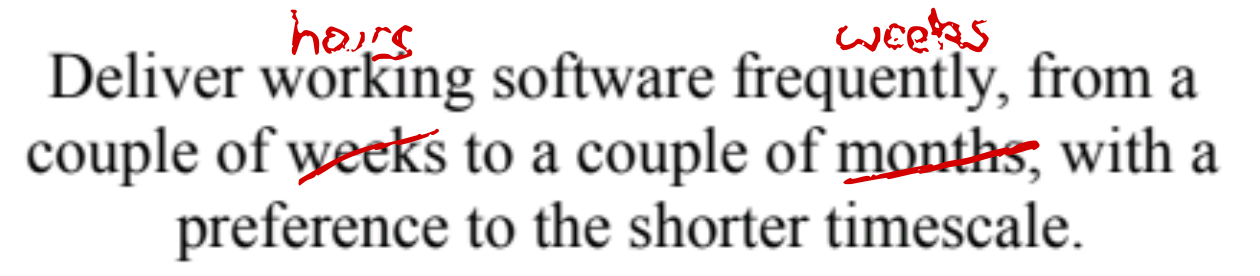
The only thing worth changing in the continuous delivery principle, is that our tooling and platforms are so much better now than 20 years ago. We can deliver considerably faster and smaller.
A team can feasibly ship multiple times a day—given a good continuous delivery pipeline, reliable & fast tests, production safety net from canary deploys, and production observability. We’re no longer having to burn CDs with software builds.
Deliver increments to working software frequently, from a couple of hours to a couple of weeks, with a preference to the shorter timescale.
All the Brilliant People
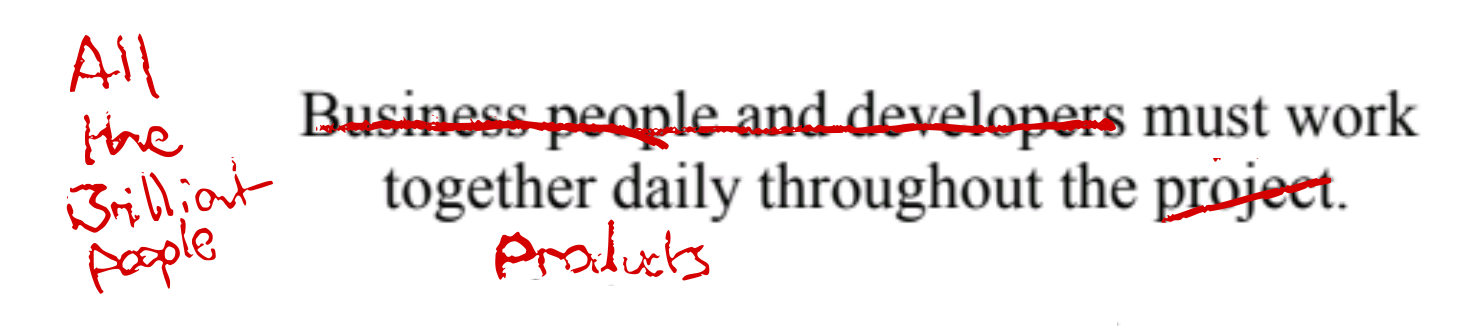
I’d replace project with product; due to the temporary-team fixed time/budget/requirements connotations of project.
I think longer lived product teams are more effective. I appreciate this won’t be for folks working in a project/consultancy context but I avoid those ;)
I’d also expand to “all the brilliant people” as per Woody Zuill’s description of mob programming. Get everyone needed to achieve the goals together into the team, collaborating together every day. Minimising dependencies and handoffs.
All the brilliant people work together daily on the product. Developers, businesspeople, customers, designers, testers, ux, data scientists …
Product Teams over Individuals on Projects
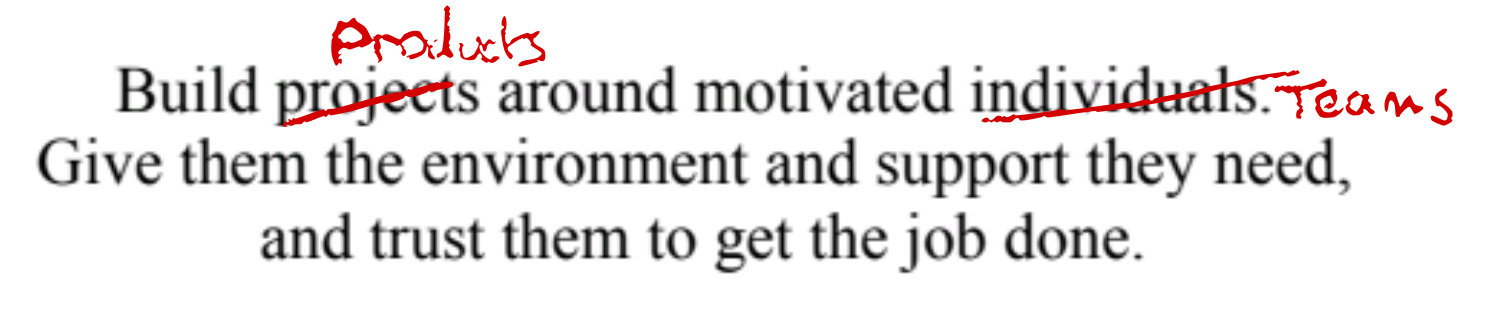
As per above, I prefer sustained investment in stable product teams over the project model.
Teams of motivated individuals build products. Give them the environment and support they need, and trust them to get the job done.
Communication Quality over Efficiency

This is the only principle I feel like I’m watering down rather than turning up.
I think face to face conversation is still the highest bandwidth communication method. However, face to face communication is not always feasible for practical & inclusion reasons. Reasons such as geographic location, neurodiversity, family commitments, carbon footprints, and global pandemics!
If face to face communication is infeasible then it’s not the most effective method of communication; even if it would be the highest bandwidth method.
I think the general principle is it’s better to trade off efficiency for quality of communication. Be willing to sacrifice time for better communication. You’ll save time in the long run. Prefer the highest bandwidth communication you can enable, even if it feels inefficient.
Prioritise communication quality over time efficiency. Learn the most effective method of conveying information to and within your team, for your context and each other’s individual needs.
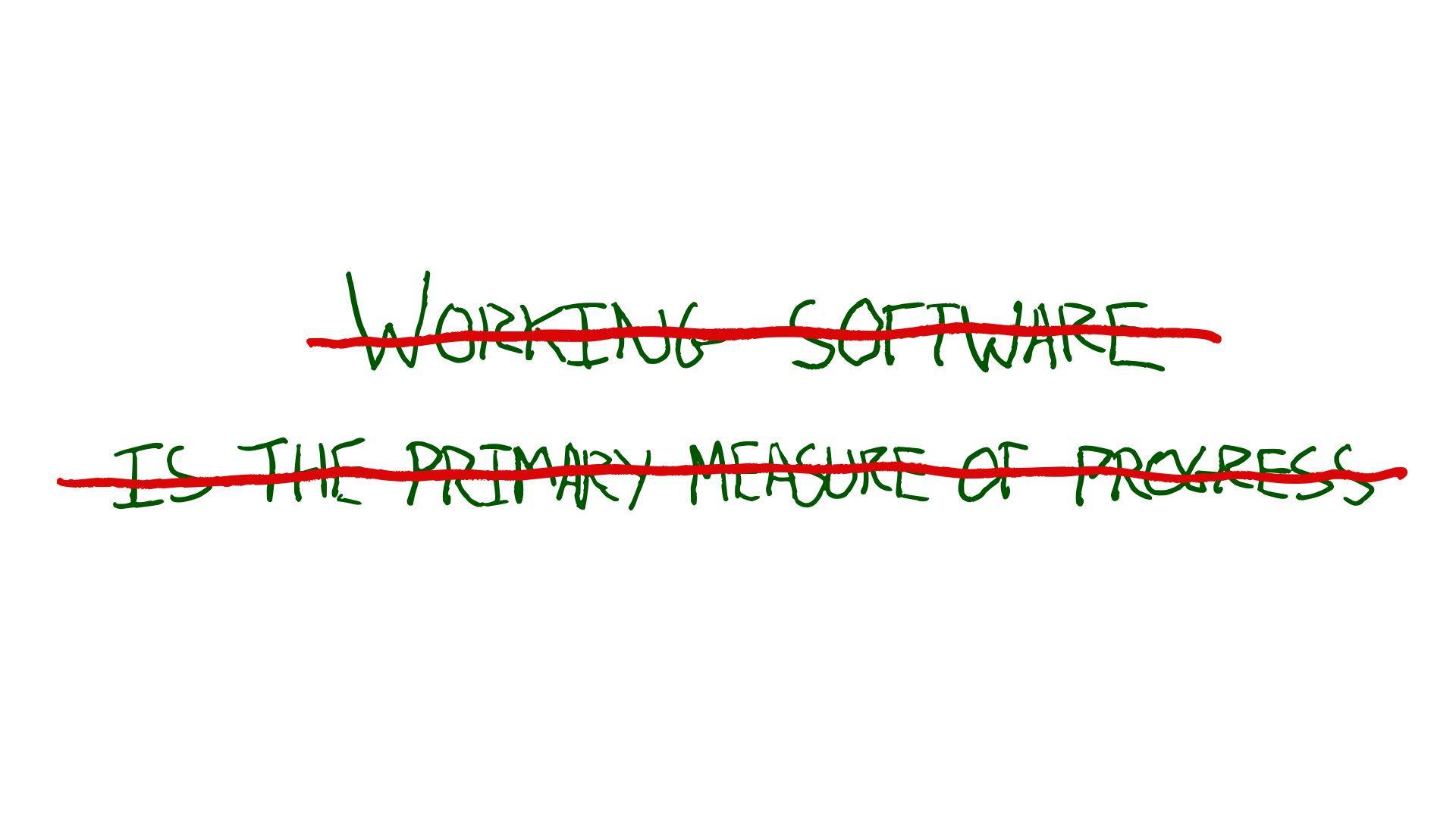
Results are the primary measure of progress

I don’t see working software as the primary measure of progress. We can ship oodles of working software every day and benefit nobody.
How are people’s lives enriched by our toil? How are our organisational goals furthered by our software? How is society better?
Have we achieved what we set out to? What have we learned from our experiments?
The less software needed the better!
The results of working software in production is the primary measure of progress. Get software into production early, starting with a walking skeleton.
Sustainability

I’d make the call for sustainbility more imperative. We don’t rely on static processes to keep development sustainable. It requires active effort and adaptation to combat the natural incentives in play.
We don’t go fast now at the expense of tomorrow. We strive to keep the cost of change curve low.

Prioritise sustainable development over speed. The sponsors, developers, and users should be able to maintain a constant pace indefinitely.
Technical Excellence

I find myself avoiding the words agile and agility since “agile” has become so semantically diffused it can create confusion.
Continuous attention to technical excellence and good design keeps cost of change low and lets us learn and adapt swiftly.
Simplicity

The principle of simplicity is timeless.
Diverse Teams

I’d add diversity to the description of teams that produce the best results. Self-organising teams with a monoculture are not going to produce the best ideas; there’ll be shared blind spots.
I think it can also be useful to expound on some of the things teams need to self-organise effectively.
The best architectures, requirements, and designs emerge from diverse teams that can self organise. Having the skills needed, clarity on their goals, with a high level of psychological safety.
Double-loop Learning

I’d just add adjusting goals, in addition to tuning team behaviours. The most effective teams benefit from double loop learning. Learning-through-doing that our goals are wrong, or our assumptions when choosing our goals were wrong.
At regular intervals, the team reflects on how to become more effective, then tunes and adjusts its behaviour accordingly, reviewing their goals based on what they have learned.
Your Team’s Principles
How do your principles differ? I’ve only thought about things I’d tweak from the manifesto principles above, not what I’d add. What would you add?
The post Pondering Agile Principles appeared first on Benji's Blog.


mdbook-pdf: A mdBook backend for generating PDF files




Introduction
mdBook allows you to create book from markdown files. It’s pretty much alike Gitbook but implemented in Rust. However, unlike Gitbook that supports using calibre for generating PDF, for a long time, mdBook doesn’t support generating PDF files natively, and supporting that is also not in their roadmap. Existing plugins (backends) such as mdbook-latex that utilize Tectonic as well as pandoc solutions will generate a PDF page that doesn’t unify with the existing mdBook generated HTML version. Considering these facts, I created a mdBook backend named mdbook-pdf for generating PDF based on headless chrome and Chrome DevTools Protocol Page.printToPDF.
mdbook-pdf depends on Google Chrome / Microsoft Edge / Chromium. The generated page are pretty much alike the one you manually print to PDF in your browser by opening print.html or executing google-chrome-stable --headless --print-to-pdf=output.pdf file:///path/to/print.html, but with customization of PDF paper orientation, scale of the webpage rendering, paper width and height, page margins, generated PDF page ranges, whether to display header and footer as well as customize their formats, and more, as well as automation. It supports all the platform where Google Chrome / Microsoft Edge / Chromium would work. You can check samples of the generated PDF files in the Artifacts here (The Rust book collections generated in x86_64 Windows, macOS as well as Linux).
Installation & Usage
Since it’s a plugin (backend) for mdBook, first of all you should ensure that mdbook is available.
If your machine’s architecture is x86_64, or you are using Linux for ARM64, check the successful build GitHub Actions workflows, click into the latest one, and then you can get a binary from the Artifacts (including Windows, Linux, macOS).
Otherwise, make sure the rust compiling environment is available, execute cargo install mdbook-pdf to compile and install.
If you want to compile the latest version, make sure the Rust build environment is available (cargo build). Then run git clone https://github.com/HollowMan6/mdbook-pdf.git, in the cloned folder, run cargo build --release , get the executable in target/release/, and put it in PATH.
For running, have Google Chrome / Chromium / Microsoft Edge available (installed at the default location, in PATH or binary location configured) as currently, automatically downloading Chromium binary isn’t available (will update once upstream fixes such support).
- On Windows 10 and above, the program can generate PDF normally without installing any additional software, because Microsoft Edge is the browser provided with Windows system. Of course, considering the support for the older versions of Windows without Edge, you can install Google Chrome on your computer.
- In MacOS, you need to install Google Chrome / Microsoft Edge or Chromium.
- In Linux, you can choose to install any of the Google Chrome / Chromium / Microsoft Edge browsers. It is recommended to install Chromium. The name of this software package in your Linux distribution is commonly
chromiumorchromium-browser(Note: for Ubuntu later than 18.04, you have to installchromium-browserthroughsnap).
Make sure the following exists in your book.toml:
[output.html]

[output.pdf]
And also [output.html.print] is not disabled (it should be enabled by default, so don’t worry if the following lines doesn’t occur in you book.toml).
[output.html.print]
enable = true
A simplest book.toml is as follows:
[book]
title = "An Example"

[output.html]

[output.pdf]
Finally you can build your book and get the PDF file with mdbook build command, your PDF file will be available at book/pdf/output.pdf.

Configuration
Check book.toml and comments for details for the available configurations of [output.pdf].
Credits
This project relies on headless_chrome. Because the new version has not been released, and the default timeout is not friendly to PDF generation, I use my Fork version to publish mdbook-pdf-headless_chrome for expanding the relevant timeout to 300 seconds as a submodule of this project, thus enabling the project to be published on Crates.io as well.
Some Notes and Thoughts
mdBook supports adding alternative backend. When the mdbook build command is invoked, if the book.toml in the book folder has an [output.pdf] item in addition to the default [output.html] for generating the html web page, mdbook-pdf will be called, and the relevant book information and parameter configuration in JSON are passed to the standard input of the program. Relevant mdBook documentation can be found here.

A headless browser means that all the operations will be in the background without a graphical interface.
Before decided to use Chrome DevTools Protocol Page.printToPDF, I also tried wkhtmltopdf which is based on QT4 Webkit. Hovewer, wkhtmltopdf doesn’t seem to support CSS Printing @media Rule, which will make some extra components visible and printed in the PDF.
I’ve also tried directly making HTTP calls to the WebDriver in python based on W3C WebDriver Protocol Print Page, as well as using selenium for calling Chrome DevTools Protocol Page.printToPDF in Python. All those methods are not robust for large pages with the errors as follows for just the same reason for the original upstream headless_chrome: the default timeout is 10 seconds, which is not friendly to large page PDF generation.
timeout: Timed out receiving message from renderer: 10.000
selenium.common.exceptions.WebDriverException: Message: unknown error: session deleted because of page crash
from unknown error: cannot determine loading status
from tab crashed
At present, I have tested that Firefox does not support using headless_chrome for PDF generation, and the Safari browser even does not support the W3C WebDriver Protocol Print Page, let alone Chrome DevTools Protocol.
I’ve noticed that for some book, by using this backend, when click on some links that link inside the book, a html page that points to the original generated HTML storing path of the book will be opened, just as the issue mentioned here. I guess for those “internal” links inside the book, work should be done in the mdbook side for print.html referring here so that all the links linked “internally” would jump inside the generated print.html, as all the contents should already be on the print.html, there shouldn’t be any hyperlinks that jump to other html files in the book. By resolving in this way, the generated PDF would also jump internally instead of opening a browser that won’t connect to anything. I have already created a PR for this, hope it will get merged soon.
In addition, as I found that special characters such as : are very likely to appear in the title of the book, which will cause the generation of the related PDF file to fail, so the file name does not use the form of <book name>.pdf but output.pdf
Hope you enjoy it.

YouTube Shorts | Blathering
openSUSE Tumbleweed – Review of the week 2022/04
Dear Tumbleweed users and hackers,
The week has passed without any major hiccups, which also shows in the number of Tumbleweed snapshots released during this week. Not the highest count ever achieved, but we are at a solid 6 snapshots (0121.0126), with the next one already in QA.
The major changes in those 6 snapshots were:
- systemd 249.9
- Lots of YaST changes (mostly under the hood, some UI changes in the installer)
- Mozilla Firefox 96.0.2
- Samba 4.15.3 & 4.15.4, including a rather large reorganisation of the library packages (i.e. multiple libs combinaed into samba-client-libs
- Virtualbox 6.1.32
- Bash 5.1.16
- Linux kernel 5.16.2
- Switch the default Network interface manager from wicked to NetworkManager: so far this was only done for graphical installations, but newly NetworkManager is also the default on server/console-only installs. With nmtui it is rather comfortable to configure it. Upgraders do not (yet) get migrated to NetworkManager, but stay on their working wicked config. Of course wicked is still available in the repos
Thins being worked on to reach you in the future include:
- Linux kernel 5.16.3
- Polkit with fix for pwnkit (Snapshot 0127(: the fix is also already in the Tumbleweed update channel. Make sure to get this update soon
- Ruby 3.1, incl switch of default Ruby version to 3.1
- Removal of Ruby 2.7 and Ruby 3.0 (together with the switch to Ruby 3.1)
- KDE Plasma 5.24 (currently beta is staged and being tested)
- Python 3.6 interpreter will be removed (We have roughly 100 python36-FOO packages left)
- Python 3.10 as the distro default interpreter (a bit down the line)
- GCC 12 introduction has started to be as ready as possible for when the upstream release happens.

Bash, systemd, libvirt Update in Tumbleweed
There were openSUSE Tumbleweed snapshots every day this week.
Some other noteworthy news within Tumbleweed is that Wicked is being phased out. New installations of Tumbleweed are all using NetworkManager by default. This is not only for desktops, but also for server installs. However, upgraders are not planned as of yet to be migrated away from Wicked.
The latest Tumbleweed snapshot is 20220126. Samba updated twice this week; this snapshot brought in the 4.15.4 version, which provided a bit of cleanup and configuration changes. The 5.16.2 Linux Kernel quickly went from staging to snapshot. The updated kernel had multiple Advanced Linux Sound Architecture fixes for newer Lenovo laptops and KVM fixes for s390 and x86 architectures. The text editor vim had several fixes along with some additional changes for the experimental vim9 fork in its 8.2.4186 version. xlockmore, which is a screen saver and X Window System package, updated an xscreensaver port and fixed some modules in its 5.68 version. The 3.74 version for mozilla-nss replaced four Google Trust Services LLC root certificates, added a few iTrusChina root certificates and added support for SHA-2 hashes in CertIDs in Online Certificate Status Protocol responses.
Snapshot 20220125 brought some exciting system updates. A few patches were added in the bash 5.1.16 update; one of those fixed a corrupted input. Another fixed a tilde expansion following an unquoted colon on the right-hand side of an assignment statement in posix mode. Fedora’s enterprise-class package 389-ds 2.0.13 added a user interface feature and a fixed compiler warning. The cross-platform development library for accessing audio, keyboard, mouse, joystick, and graphics hardware SDL2 2.0.20 improved the accuracy of horizontal and vertical line drawing when using OpenGL. The major version update of pentobi 20.0, which is a computer opponent for the board game Blokus, made a workaround for bugs in Qt 6.2 that sometimes cause the wrong positions of unplayed pieces. Quite a few openSUSE packages were updated in the snapshot. The update of yast2-security 4.4.8 fixed a declarative AppArmor option; an update of libstorage-ng 4.4.76 added support for RAID metadata versions 1.1 and 1.2; yast2-bootloader 4.4.14, yast2-installation 4.4.35, yast2-storage-ng 4.4.33, autoyast2 4.4.27 and yast2 4.4.39 were just a few of the many YaST packages updated.
Snapshot 20220124 updated two packages. Text web browser lynx 2.9.0.10 had some translations and provided several fixes for problems found using asan2 with fuzzer-generated data. The z3 4.8.14 update fixed some constraints and provided some additional user functionality for the theorem prover.
The 20220123 snapshot brought in virtualbox 6.1.32, which fixed a Common Vulnerabilities and Exposures. CVE-2022-21394 would have allowed for unauthorized access to critical data; the package changed the guest RAM management when using Hyper-V to be more compatible with Hypervisor-Protected Code Integrity. The virtual machine package also fixed access to some USB devices and device classes that were not correctly handled. Mozilla Firefox 96.0.2 fixed an issue that caused the tab height to display inconsistently on Linux when audio was played. Bind 9.16.25 had some changes to prevent callbacks from being executed before the current read callback finishes. The highly portable DNS protcol implementation fixed seven more bugs in the update. Samba 4.15.3 fixed CVE-2020-25717 and, with windows active directory, could have allowed for the mapping of domain users to local users in an undesired way. Samba also added python-rpm-macros to the build requirements. Another package to update in the snapshot was webkit2gtk3 2.34.4, which fixed several crashes and rendering issues; the package release also fixes numerous security issues, including a severe issue that allowed websites to read the names of IndexedDB databases created by other websites. Other packages to update in the snapshot were codec2 1.0.3, iso-codes 4.9.0, kdump 1.0 and more.
The handling of add-on signature settings were changed with the autoyast2 4.4.26 update in snapshot 20220122. Three major versions updates came in the snapshot; these were systemd-rpm-macros 15 and userspace tooling package nvme-cli 2.0, which fixed some dependencies and version strings. The major version update of python-ipython 8.0.1 fixed CVE-2022-21699 and backported some fixes from Python 3.10.
Tumbleweeds 20220121 snapshot gave rolling release users systemd 249.9. The updated version moved the network configuration systemd-network-generator in the udev package; this generator can generate .link files and is mainly used in initrd where udev is mandatory. The new systemd also dropped a few patches and fixed undisclosed CVE-2021-3997. The 8.0 major version of libvirt was updated in the snapshot. One of the new features is the qemu synchronous write mode for disk copying operations. Other packages to update in the snapshot were ncurses 6.3.20220115, flatpak 1.12.4, autofs 5.1.8, gnutls 3.7.3 and more.
The snapshot released last Thursday, snapshot 20220120, updated the Linux Kernel to version 5.16.1. That update provided several Bluetooth fixes to include one for the MacBook Air 8,1 and 8,2. An update of the userspace setup tool cryptsetup 2.4.3 fixed CVE-2021-4122 that allowed for possible attacks against data confidentiality through LUKS2 online reencryption extension crash recovery, according to the changelog. The sqlite 3.37.2 fixed a bug introduced in version 3.35.0 that could cause database corruption and fix a long-standing problem involving a reset option. The update of yast2-bootloader 4.4.13 added support for password protection and added support for PowerPC secure boot.
Arm specific Tumbleweed snapshots released this week were arm 20220125 and arm 20220123.
Deploy a Kubernetes Cluster based on Calico and openSUSE Kubic
Introduction
openSUSE Kubic is a certified Kubernetes Distribution based on openSUSE MicroOS. Calico is an open-source project that can be used by Kubernetes to deploy a pod network to the cluster. In this blog, I will show you how to deploy a Kubernetes Cluster based on Calico and openSUSE Kubic by a Virtual Machine. We are going to deploy a cluster that has a master and a worker.
I was intended to use Oracle VM VirtualBox. However, it turned out that on my machine, when I tried to run kubeadm at openSUSE Kubic in VirtualBox, it always stuck at watchdog: BUG: soft lockup - CPU#? stuck for xxs! with CPU usage around 100%. As a result, I switched to VMware Workstation Pro and the issue got solved. Guess it’s caused by some bugs of VirtualBox.
Steps
Create the Virtual Machine and Install openSUSE Kubic
Here I won’t explain how to do these things but share some important things to note, just refer to their documents if you don’t know or have any questions.
- Here is my configuration for the Virtual Machine. Recommend that your host machine has a memory that is larger than 8GB so that more than 3GB of memory can be assigned to the Virtual Machine for it to run smoothly. In order for the Virtual Machines to be connected to each other, and also connect to the Internet, you can set the Network Adapter to be
Bridged (Automatic).

- For openSUSE Kubic Installation, remember to choose
kubeadm Nodewhen it comes to System Role, as it will deploy a Weave pod network cluster instead of Calico if you choose to use Kubic.

- I suggest that you can install the openSUSE Kubic in one Virtual Machine, later after successful installation, clone that Virtual Machine, assign one as master and another worker. Remember to do a full clone.

Configuring the Master
When you boot into the master Virtual Machine, you can see your IP address in the notification part. In my case, it’s 192.168.1.14. Take note of that.

For the convenience of copy and paste commands, we can use SSH to log into the system. To configure that, first, log into the system with root account. Second, execute vi /etc/ssh/sshd_config.d/10-enable-root-password.conf, type i to insert, write the following into the file:
PasswordAuthentication yes
PermitRootLogin yes
This will enable SSH root password login, although it’s not recommended if you are in production. When editing is finished, press [ESC] then type :wq to save and exit.
Kubeadm Init
Run kubeadm config images pull to pull the container images required for Kubernetes.

You can also specify the --image-repository if, in your location, registry.opensuse.org downloading speed is too slow. In my case (in China) I’ll use Aliyun to speed up: kubeadm config images pull --image-repository registry.aliyuncs.com/google_containers

Then run kubeadm init --apiserver-advertise-address=<Your Master IP Address> --pod-network-cidr=192.168.0.0/16, replace <Your Master IP Address> with the IP address you just noted. If you specified the --image-repository in the last step, also append that to this command.


Wait for it to finish, remember to take notes of the worker nodes joining command.
Execute export KUBECONFIG=/etc/kubernetes/admin.conf in your shell for the kubectl to work.
Deploy Calico
Get the latest copy of the calico configuration yaml file by curl -O https://docs.projectcalico.org/manifests/calico.yaml.
Change the path to install the FlexVolume driver by sed -i 's#/usr/libexec/kubernetes/kubelet-plugins/volume/exec#/var/lib/kubelet/volume-plugin#g' calico.yaml as in Transactional (Atomic) systems /usr/libexec/kubernetes is read-only.
Finally, apply the yaml file by kubectl apply -f calico.yaml.

Wait for all the pods to be available.
watch kubectl get pods --all-namespaces

You can check the Events of the pod to get the error messages if you are waiting too much time on a specific pod: kubectl describe pods -n kube-system <Pod Name>.
Configuring the Worker
Start the worker Virtual Machine, login as root, change the host name as it can’t be the same with the master: hostnamectl set-hostname 'worker'.
Finally, execute the worker nodes joining command just noted, ignoring the hostname could not be reached warnings since we didn’t and don’t need to configure the DNS.

Then wait for the worker to be available, Done!

Release Manager Gives Community Update On Desktop Environment
The openSUSE community received cheerful news today after Leap release manager Luboš Kocman updated the community on the desktop environment expected for the next minor release.
Leap 15.4, which is in the alpha phase of the software release cycle, is planned to have updated desktop environments.
Kocman’s email “KDE Plasma 5.24 LTS will be in Leap 15.4” informed contributors on the Project’s Factory mailing list that all the “dependencies are already submitted” to SUSE Linux Enterprise. Leap is built with the same source code and exact same binary packages as SLE.
“We’ve received the green light,” Kocman wrote.
The feature is being tracked as issue #7.
Currently, the Long-Term-Support release of Plasma 5.24 is in it’s beta release cycle and will likely arrive in openSUSE Tumbleweed soon.
Based on GNOME’s upstream schedule and the roadmap for Leap, GNOME 41.x is expected to be in the release. The versions for LXQt, LXDE, Cinnamon, Mate, XFCE, sway have yet to be finalized, according to issue #9, which is tracking the Desktop Environments’ latest version for the forthcoming version Leap.