
Releasing version 21
We know, we know. We skipped a blog post for version 20 and you may be wondering what happened. The truth is that we were heads-down working on several significant improvements and decided to focus on shipping rather than writing. But don't worry - this release announcement covers the most relevant changes introduced in both versions 20 and 21.
In exchange for the delay we offer you an extensive list of impressive enhancements, covering several aspects of the installation experience and including some long-awaited features. Let's go through the most visible novelties.
Shedding some light on the desktops
And few things are more visible in a GNU/Linux system than its desktop environment. During installation, most openSUSE distributions provide a wide range of desktops to select from. But openSUSE does not endorse any of those environments as the default option. As a consequence, the user needs to make a conscious decision during installation.
That was not obvious enough in previous versions of Agama. As a result, it was too easy to end up installing a system with no graphical interface at all. The resulting text-based system could be daunting for many users, especially newbies to openSUSE or GNU/Linux in general.
Now the situation is more clearly presented in the main summary screen of the installer and in the software selection section.
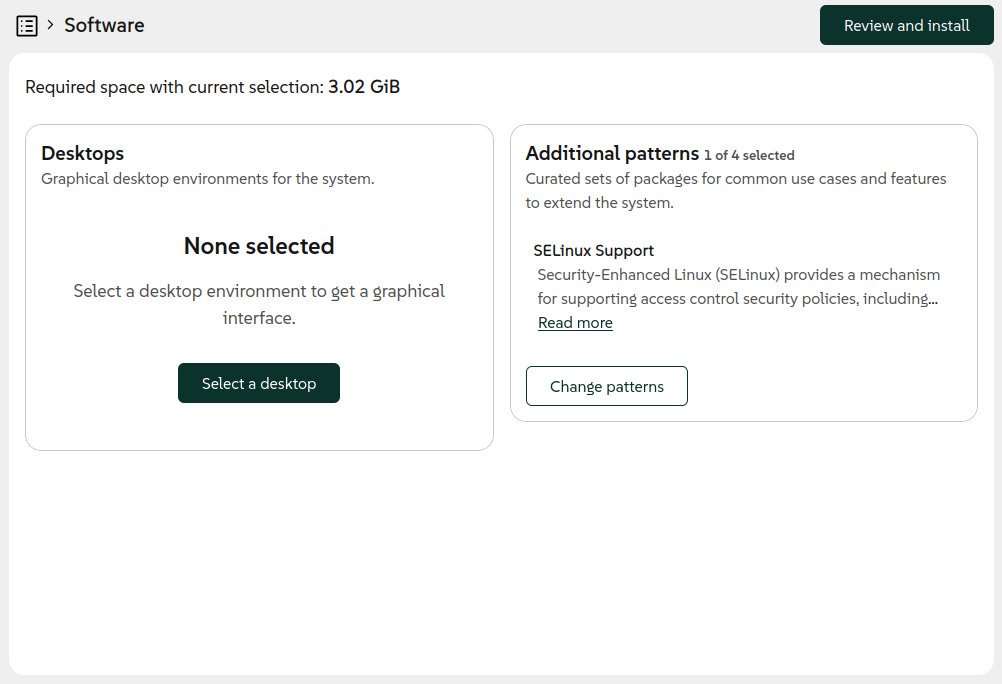
We took the opportunity to rethink several aspects of the form used to select patterns. Now it works in a way that is more consistent with the rest of the Agama interface and it presents the information in a more useful way.
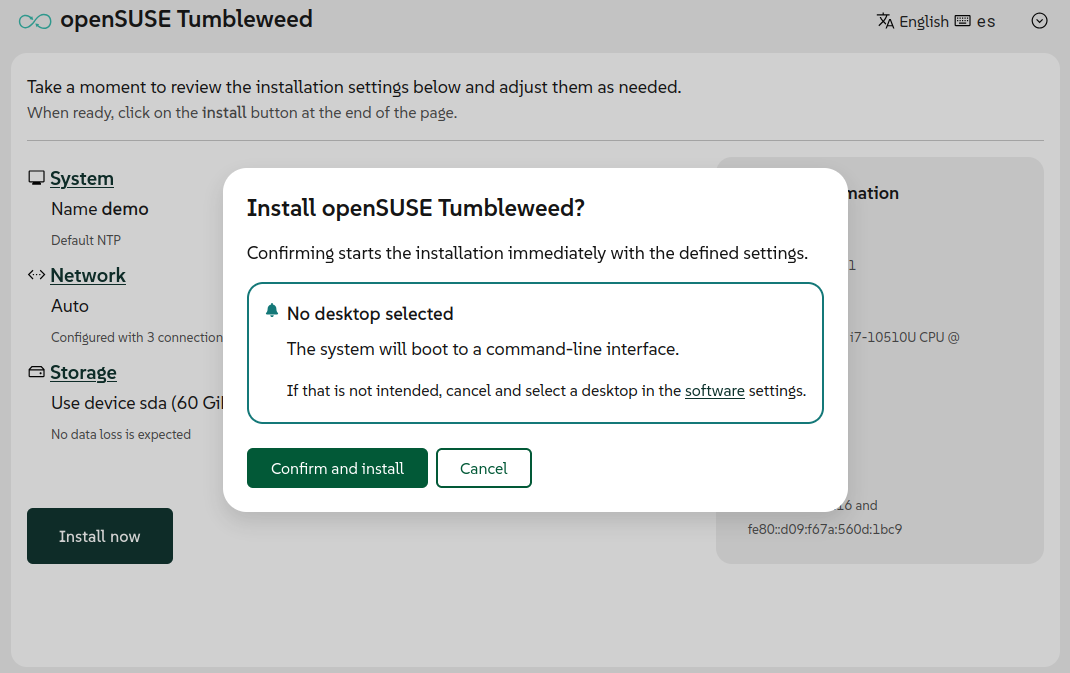
In addition to all that, a reminder about the potentially missing desktop was added in the confirmation dialog for some distributions like openSUSE Tumbleweed, Slowroll or Leap 16.1.
Better network management in the web UI
Usability improvements go beyond the software management. The user interface for configuring the network also received some serious attention in these releases. The most visible result is a completely redesigned form to create and modify network connections.
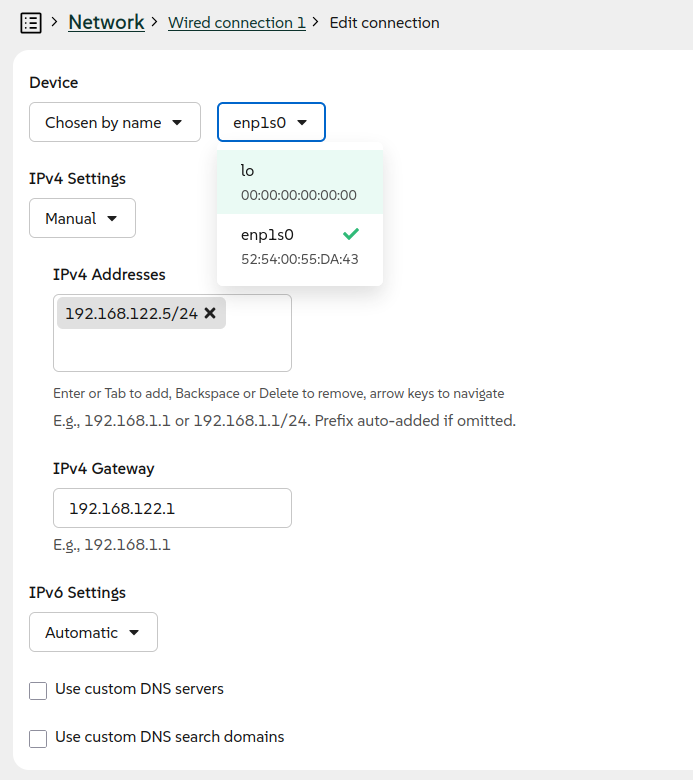
With the new form, we are now in the position to enrich the web interface with the ability to configure more types of connections, in addition to Ethernet and Wi-Fi. In previous releases, it was necessary to use the JSON-based Agama configuration format in order to setup a network bonding, a bridge or a VLAN connection. With Agama 21 it is now possible to configure a bonding or bridge connection directly from the user interface. As usual, Agama offers reasonable default settings for each kind of connection but it also allows to setup several advanced aspects manually.
Support for VLAN connections is on its way and will be included in the upcoming version of the Agama web interface. Hopefully these new features will fulfill the wishes of those users who have been requesting a more powerful user interface to configure the network.
Install on an existing LVM setup
But if there is a feature that has been long awaited by some users, that is the ability to reuse existing LVM volume groups and logical volumes. If you had an existing LVM setup on your system, previous versions of Agama couldn't take advantage of it. Now it is possible thanks to a new feature that, as usual, is built at two levels.
On the one hand, the JSON configuration format was expanded to support all kind of operations with existing volume groups and logical volumes. That includes expanding the volume groups with new physical volumes and also mounting, formatting and resizing all kind of logical volumes. It is even possible to create new thin volumes in a reused thin pool.
On the other hand, the web user interface now allows to select an existing volume group as destination for the installation and also as additional device to create or reuse more logical volumes.
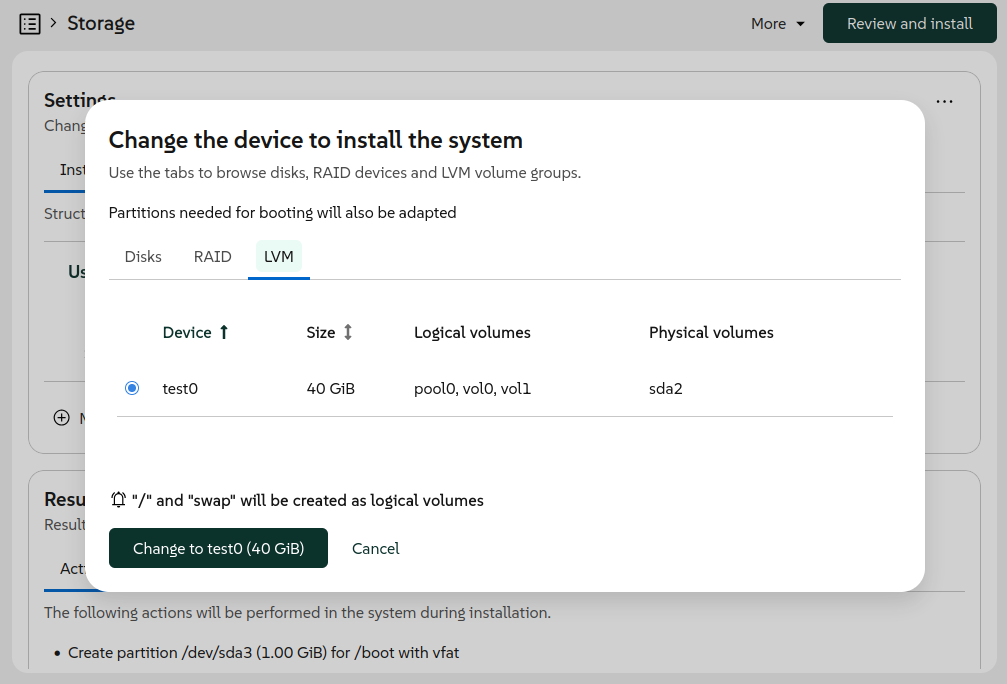
The user interface also makes it possible to define what to do with the current logical volumes in the same way that it can be done for the current partitions of a disk.
Support for Systemd-boot
So far, Agama has always installed Grub2 as boot loader for all distributions. At least, that was the idea, although Systemd-boot slipped through the cracks in some openSUSE Tumbleweed installations due to changes introduced in the internals shared between YaST and Agama.
But in EFI environments, it seems there is a trend among many Linux distributions to adopt the UAPI Boot Loader Specification. And we do not want Agama to fall behind.
Although Grub2 is still used unconditionally in many scenarios, now every distribution ("product" in Agama's jargon) can define which boot loader to install in some supported EFI systems. Products can choose between Grub2, Systemd-boot or openSUSE's Grub2-BLS. In the latter two cases, Agama will adhere to the mentioned UAPI Boot Loader Specification.
Based on the chosen boot loader, Agama automatically adapts the partitioning and uses the corresponding methodology and tools to configure the TPM to automatically unlock encrypted devices, if the user decided to do so.
For products that still rely on Grub2, like the beta versions of openSUSE Leap 16.1 and SUSE
Enterprise Linux Server 16.1, the user can force the usage of Systemd-boot where possible by
starting the installation with the boot argument inst.systemd_boot_preview=1.
NTP configuration
As most of our readers surely know, the Network Time Protocol (NTP) is typically used to set the date and time of computers through the network connection. That normally works out of the box if the network offers access to the Internet or if the address of a local NTP server is provided as part of the automatic network configuration (eg. using DHCP). But sometimes some manual configuration is needed.
Agama now allows to explicitly set the list of NTP sources (pools, servers and peers) using the JSON
format. It also supports automatic conversion from the corresponding ntp-client section of an
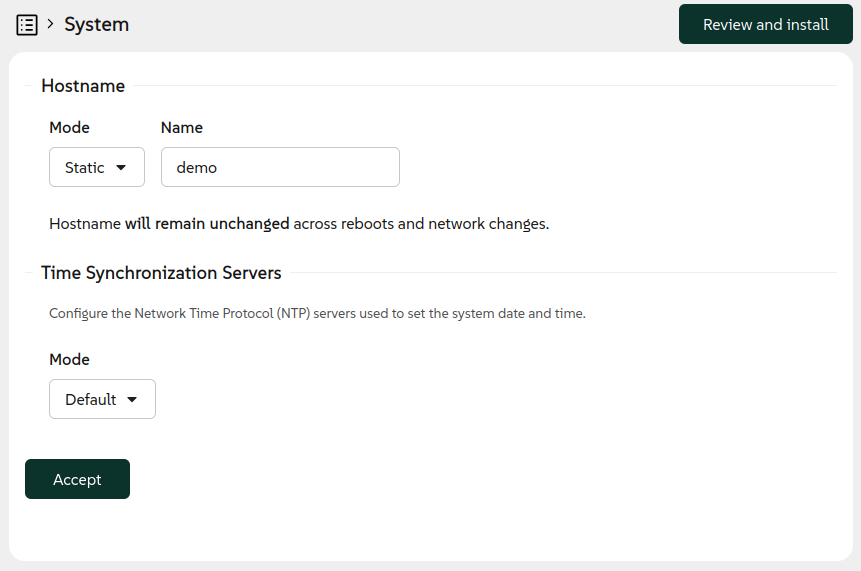
AutoYaST profile. Last but not least, the web interface now offers a new "System" section
accommodating the configuration of both the hostname and the NTP sources.
But there is an important aspect to consider. In order to establish secure network connections, the
date and time must be aligned with the date and time of the other system and all the involved
certificates. For network-based installations, in which secure connections may be needed already in
order to fetch the installation media, that implies the NTP configuration must happen at a very
early stage of the booting process. For that, the installation media now supports the special
boot argument rd.ntp that
allows to setup the NTP sources.
Agama will take care to persist to the installed system any setting configured through Agama itself
or by using the rd.ntp boot option.
Restrict network access to the installer
Speaking of installations and network, you already know that by default Agama allows to control the installation process over the network from another computer or mobile device. But that is a feature that could come with security implications in some scenarios.
Now it is possible to disable the remote access with the inst.remote=0 boot option. When used, the
installer can be accessed only locally from the machine being installed.
Usability improvements in the command-line tools
Apart from all the mentioned new installer features, the command-line interface also received several enhancements to make it more useful for tracking the current state of the installation process. Whether you are automating installations or just prefer working from the terminal, the improved CLI tools provide better visibility into what Agama is doing at any given moment. These improvements make it easier to monitor installations, debug issues and integrate Agama into your existing automation workflows.
More to come
As you can see, we have not been idle lately. After these two feature-packed releases we are planning to shift our focus a bit more toward stabilization and polish. That doesn't mean development is slowing down, though! We still plan to release Agama 22 in about a month, and it will include some cool new features alongside the stability improvements.
As always, we appreciate your feedback and contributions. You can reach the YaST team at the
YaST Development mailing list,
our #yast channel at Libera.chat or the
Agama project at GitHub.
Have a lot of fun!
 Member
 CzP
CzPLearning syslog-ng
How can you learn syslog-ng? There are many possibilities, depending on your time and budget. Possibilities range from tutorial series through reading the documentation to instructor-led training. Find out which one is for you!
Read more at https://www.syslog-ng.com/community/b/blog/posts/learning-syslog-ng

syslog-ng logo

Spaghetti Carbonara & American pancakes with Blueberries


55,041,902 Lines of Code
I did some exploration on KDE's code base. It's amazing what you can find when you have almost 30 years of public history in git.
In doing so I ran some statistics on KDE's core software. That core is relatively well-defined, even over the years. It's the libraries (Frameworks), the desktop (Plasma), and the standard applications shipped together on a regular release schedule (Gear). Of course there are other fine applications in Extragear and elsewhere, but I didn't look at them for now.
In 2009 I did an analysis of KDE's sources and found 4,273,291 lines of code. So I was curious to see where we are today. The numbers are not 100% comparable, because the shape of KDE's core software has changed a bit, but when you look at what is in git (omitting graphics, translations, and other non-code files) you find 8,173,148 lines of code.

Yes, when you look at the history, there is more. There is churn, code gets added, code gets modified, code gets deleted. It evolves. So behind every line of code which is shipped today, there are about 7 lines of code which have been written, changed, deleted. This is what you find in git.

So 55 million lines of code have been written to arrive at 8 million lines of code today. They represent progress, learning, and adaptation to a changing world. You see life there.
The most amazing part for me is actually not the code itself, but that there are thousands of people behind this code who have worked together for decades to continuously improve KDE's software. That's the real story.
P.S. Take the numbers with a grain of salt. They are based on a couple of assumptions and influenced by quirks of tools and history. This is not science, it's the report of a hobby code historian.

Linux Saloon 201 | Tambourine Music Player
Tumbleweed – Review of the week 2026/20
Dear Tumbleweed users and hackers,
This week was quite uneventful: another holiday on Thursday in my region (Ascension Day), which also explains the lack of a snapshot being published that day. Actually, while I was reviewing the openQA results, the next snapshot had already landed and discarded the old one. I really need to better keep up with our automatisms (better yet, tests should not fail, then I would not have to look at any test result to confirm/debug). Anyway, we managed to publish 5 Snapshots (0507, 0509, 0510, 0511, and 0512) this week.
The most relevant changes were:
- fwupd 2.1.1
- lcms 2.19.1
- Linux kernel 7.0.5
- Mesa 26.1.0
- Mozilla Firefox 150.0.2
- gawk 5.4.0
- GCC 16.1.1
- KDE Gear 24.04.1
- KDE Frameworks 6.26.0
- ffmpeg 8.1.1
- PHP 8.5.6
The next snapshot (0514) is already in QA and, unless something comes up, should be released later today. Together with the staging projects, we can foresee these changes reaching the user base anytime soon:
- AppArmor 5.0.0 (NOTE: SELinux is the default on new installations; upgraded installations, or users intentionally doing so, might still run AppArmor. cURL is newly confined and is only permitting read/write to $HOME and tmp-dir locations. Some scripts might trip on that. We had some openQA tests tripping on this as well (solved by staging the files in question via /tmp)
- KDE Plasma 6.6.5
- fwupd 2.1.3
- GStreamer 1.28.3
- Ruby 4.0.4
- Linux kernel 7.0.7
- gpg 2.5.20
- Pipewire 1.6.5

Planet News Roundup
This is a roundup of articles from the openSUSE community listed on planet.opensuse.org.
The community blog feed aggregator lists the featured highlights below from May 8 to 14.
Blogs this week cover the Plasma 6.7 beta launch, sovereign Tech funds major investment in KDE, a leadership change on the openSUSE Board, two helpful Firefox tips, a Tumbleweed review, a new Plasmoid for displaying song lyrics, a KDE Frameworks update, and an openSUSE Leap 15.6 reaches end-of-life.
Here is a summary and links for each post:
openSUSE Leap 15.6 Reaches End of Life – Time to Upgrade
Victorhck reports that openSUSE Leap 15.6 reached its official end of life on April 30, which means it will no longer receive security patches or official support. Users are advised to migrate to openSUSE Leap 16.0 to keep their systems up to date and secure.
Plasma 6.7 Beta Released
The KDE Blog announces the launch of the Plasma 6.7 beta and invites testers to try the new release and report any bugs at bugs.kde.org ahead of the final release. Key new features include a quick light/dark mode toggle in the Brightness and Color widget and a modern new print queue application with active job badges in the Printers widget.
The syslog-ng Insider 2026-05: OTEL; Central Log Collection; Old Mac
Peter Czanik’s Blog presents the 140th issue of the syslog-ng Insider monthly newsletter and covers three topics: how Databricks customers can stream logs to a data lakehouse using syslog-ng with OAuth2 authentication and the OpenTelemetry protocol; a reminder that central log collection is valuable far beyond mere compliance, benefiting operations, security, and development teams alike; and a guide to compiling the latest syslog-ng release on older Intel-based Macs where Homebrew no longer provides full support.
Sovereign Tech Fund Invests Over €1 Million in KDE
Victorhck covers the announcement that the Sovereign Tech Fund will invest €1,285,200 in the KDE community across 2026 and 2027. The funding is aimed at strengthening the structural reliability and security of KDE’s core infrastructure, including Plasma and the frameworks supporting KDE’s communication services. The author translates the official KDE announcement into Spanish and shares his thoughts on the significance of the investment for the free software ecosystem.
Plasma Lyrics Widget – View Song Lyrics in Plasma 6 (28)
The KDE Blog presents Plasma Lyrics, a new widget for KDE Plasma 6 that displays the lyrics of the currently playing songs directly on the desktop. This is the 28th entry in the blog’s ongoing series showcasing Plasmoids for Plasma 6, which is aimed at users who want richer desktop integration with their music player.
Fifth Update of Plasma 6.6
The KDE Blog announces the fifth bugfix update to KDE Plasma 6.6, which was released on May 12. The update brings improved animation fluidity on high-refresh-rate displays along with the usual bug fixes and stability improvements.
How to Change the Annoying Firefox “Not Found” Sound
Victorhck shares a practical tip for Firefox users annoyed by the jarring sound the browser plays when a text search via Ctrl+F finds no match on the page. The post walks through how to replace that default sound with a system sound of the user’s own choosing.
IA MED: Public Health, Privacy and Brazilian Technological Sovereignty
Alessandro’s Blog introduces IA MED, which is a an AI solution developed by MultiCortex to bring advanced language models to the public health sector with a focus on precision, privacy, and data sovereignty. The system is already operational in the city of Bebedouro, São Paulo. The post argues that vertically specialized, locally hosted AI running on cost-effective hardware represents a viable and responsible alternative to generic cloud-based AI for public health systems across Brazil.
SOTAQUE: When AI Learns to Speak like a Brazilian
Alessandro’s Blog introduces SOTAQUE (Speech-Oriented Training Audio for Quality Understanding and Expression), which is a community-driven initiative to build an open dataset of Brazilian Portuguese voices that captures the country’s regional diversity of accents. The project, which is published under the CDLA-Permissive-2.0 license, aims to collect up to 10,000 hours of audio so that AI speech tools better represent all Brazilians rather than defaulting to a narrow Southeastern urban standard. Anyone over 18 in Brazil can contribute by recording just a few minutes of their own voice at sotaque.ia.br.
Firefox Not Displaying Japanese (or Chinese or Korean) Characters in Plasma
Victorhck explains how to fix the issue of Firefox displaying small empty squares instead of Japanese kanji characters when browsing the web on KDE Plasma. The solution involves installing the appropriate font packages to give the browser the rendering support it needs.
Framework Becomes a KDE Patron
The KDE Blog announces that Framework, the company behind the modular Framework Laptop, has become an official patron of KDE e.V., and joins existing supporters such as The Qt Company, SUSE, Google, Canonical, Slimbook, and Rocky Linux. Framework founder Nirav Patel noted that KDE is extremely popular within the Framework community, while KDE e.V. President Aleix Pol highlighted that Framework’s commitment to repairability strongly aligns with KDE’s own values of sustainability and open hardware.
malcontent: Disk Space Exhaustion via Globally Accessible D-Bus API (CVE-2026-44931)
The SUSE Security Team Blog discloses CVE-2026-44931, a local denial-of-service vulnerability in malcontent, the GNOME parental control system, introduced in version 0.14.0 as part of the GNOME 50 update packaged for openSUSE. The flaw allows any unprivileged local user to slowly exhaust disk space in /var/lib/malcontent-timerd by repeatedly calling the RecordUsage D-Bus method with arbitrary app identifiers, with no upstream fix currently available. The SUSE team reported the issue privately in February 2026 and, after receiving no follow-up from upstream despite repeated contact, proceeded with public disclosure to avoid further delay.
26th Update of KDE Frameworks 6 and the KArchive Library
The KDE Blog covers the 26th update to KDE Frameworks 6, highlighting improvements to the KArchive library among other fixes across the KDE software stack. The post follows the blog’s regular cadence of documenting each KDE Frameworks release for Spanish-speaking KDE users.
Linux Saloon 200 | Open Mic Night
CubicleNate’s Blog celebrates the 200th episode of the Linux Saloon podcast with an Open Mic Night format, where participants shared tech topics that were top of mind. Highlights included a hands-on look at the new Framework Laptop 13 Pro and its hardware improvements, a discussion about Brave’s new Origin browser on Linux, and a nostalgic trip back to the old internet covering GeoCities, webrings, and Homestar Runner.
openSUSE Board Leadership Change
Victorhck reports on the change at the top of the openSUSE Board. The post translates and expands on the official announcement of Gerald Pfeifer stepping down as chair on May 7 after nearly seven years in the role. He is succeeded by Jeff Mahoney, who was elected to the board in 2024.
ICC Profiles in HDR ❤️ – This Week in Plasma
The KDE Blog summarizes “This Week in Plasma” with headlines featuring new support for ICC color profiles in HDR mode. This addition is a significant step forward for color-accurate workflows on Linux, particularly for photographers and designers using HDR-capable displays.
USS/FMS Carrier
Jakub Steiner’s Blog dives into FMS Carrier, a tiny 2-operator FM synthesizer and sequencer for the Nintendo Game Boy Advance created by Ess Mattisson, the original designer of the Elektron Digitone. Jakub shares his enthusiasm for the sequencing workflow, which mirrors the building-block composition approach he loves on his Dirtywave M8 tracker.
Tumbleweed – Review of the Weeks 2026/18 & 19
Victorhck and Dominique Leuenberger cover nine Tumbleweed snapshots published across weeks 18 and 19. Major package arrivals include GNOME 50.1, Linux kernel 7.0.1 through 7.0.3, glibc 2.43, systemd 260.1, Boost 1.91.0, and Mozilla Firefox 150.0.
LliureX Turns 21 – Happy Birthday!
The KDE Blog celebrates the 21st anniversary of LliureX, a GNU/Linux distribution based on Ubuntu and KDE Plasma developed by the Valencian Community’s regional education authority in Spain. The project has been delivering a free software desktop tailored to educational environments in the Valencian Community for over two decades.
View more blogs or learn to publish your own on planet.opensuse.org.

Quick Filtering by Label
The syslog-ng Insider 2026-05: OTEL; central log collection; old Mac
Dear syslog-ng users,
This is the 140th issue of syslog-ng Insider, a monthly newsletter that brings you syslog-ng-related news.
Streaming syslog-ng data to your lakehouse using OTEL
Version 4.11.0 of syslog-ng contains contributions from Databricks related to OAuth2 authentication. Recently, they published a blog about how this enables their customers to send logs to their data lake using syslog-ng and the OpenTelemetry protocol.
Central log collection - more than just compliance
I often hear, even at security conferences that “no central log collection here” or “we have something due to compliance”. Central logging is more than just compliance. It makes logs easier to use, available and secure, thus making your life easier in operations, security, development, but also in marketing, sales, and so on.
https://www.syslog-ng.com/community/b/blog/posts/central-log-collection—more-than-just-compliance
Compiling syslog-ng on an old Mac
I have an aging, but fully functional MacBook. I bought it for syslog-ng testing, but I also use for watching movies. Homebrew no more fully supports old, Intel-based Macs. This blog helps to compile the latest syslog-ng release on these old, but otherwise functional machines.
https://www.syslog-ng.com/community/b/blog/posts/compiling-syslog-ng-on-an-old-mac
syslog-ng logo
Your feedback and news, or tips about the next issue are welcome. To read this newsletter online, visit: https://syslog-ng.com/blog/
malcontent: Disk Space Exhaustion via Globally Accessible D-Bus API (CVE-2026-44931)
Table of Contents
- Introduction
- Review Summary
- Disk Space Exhaustion Issue
- Upstream Report
- CVE Assignment
- Timeline
- References
Introduction
malcontent is a parental control system for the GNOME desktop environment which allows to restrict access to adult Internet content and to keep track of and restrict the amount of screen time for children. As part of the GNOME 50 version update malcontent 0.14.0 was packaged for openSUSE, triggering a review of changes in the package’s D-Bus methods and Polkit actions.
During this review we identified a local disk space exhaustion attack vector via one of the newly added D-Bus methods. There is currently no upstream bugfix available for the issue. The full details about the issue and communication with upstream will be provided in the following sections.
Review Summary
The complexity of malcontent increased a lot compared to the last time we looked into it. There now exist three different malcontent D-Bus daemons utilizing three different service user accounts and some additional daemons not providing D-Bus interfaces on top of that.
Some parts of the user tracking in malcontent suffer from race conditions. We believe this is acceptable, given that parental controls don’t need to be strong security boundaries; it is sufficient if the target audience (children) is not able to bypass the parental controls.
Disk Space Exhaustion Issue
The newly introduced RecordUsage D-Bus method in
malcontent-timerd is problematic beyond the possibility to bypass parental
controls. It allows arbitrary users in the system to slowly fill up disk space
in /var/lib/malcontent-timerd. The following shell construct is a simple
reproducer of the issue:
for I in `seq 100000`; do
    gdbus call -y -d org.freedesktop.MalcontentTimer1 \
        -o /org/freedesktop/MalcontentTimer1 \
        -m org.freedesktop.MalcontentTimer1.Child.RecordUsage \
        "[(0, 1000, \"app\", \"org.gnome.MyApp$I\")]"
done
The daemon will create an entry for every supposed GNOME app identifier passed
to it in /var/lib/malcontent-timerd/store/<caller-username>.gvdb. This will
slowly use up the disk space in /var and therefore is a local
Denial-of-Service attack vector.
To fix the problem, the method call could be restricted to callers in local active sessions. Furthermore an upper limit of usage entries could be placed on every user account to prevent excess disk usage.
Upstream Report
We reported this issue privately via the upstream’s GitLab bug tracker on 2026-02-18 offering coordinated disclosure. We only received an initial reply a couple of weeks later in which upstream confirmed the issue but also mentioned that there is a lack of developer resources for malcontent. At this time we expressed our opinion that a non-disclosure period would not be strictly necessary since the impact of the issue is not high. We never received further replies from upstream, so we decided to go public with this report to avoid wasting more time without a bugfix being developed.
CVE Assignment
Due to the lack of replies we could not discuss with upstream whether a CVE assignment is appropriate for this issue. Given that upstream at least basically confirmed the issue and there is no bugfix available we assigned CVE-2026-44931 to track the defect and to make others aware.
Timeline
| 2026-02-18 | We created a private issue in the upstream GitLab, offering coordinated disclosure. |
| 2026-03-11 | Lacking a reaction we pinged the issue asking if anybody were reading it. |
| 2026-03-11 | An upstream developer responded confirming the issue and pointing out that little developer time is available for malcontent. |
| 2026-03-23 | We asked how upstream wants to continue regarding coordinated disclosure. We explained that in our view a non-disclosure period is not strictly necessary for the issue and pointed out that the maximum non-disclosure period we can offer is 90 days until 2026-05-19. |
| 2026-04-09 | Still without an answer we urged upstream once more to come to a decision and a path forward regarding the publication of the issue. |
| 2026-04-21 | We informed upstream that we would publish the report on our end if no reaction is received by 2026-04-30. |
| 2026-05-05 | We published our Bugzilla bug describing the issue. |
| 2026-05-08 | We assigned CVE-2026-44931 for the issue and communicated this in the upstream issue. |
| 2026-05-11 | Publication of this report. |