
Hello openSUSE world!
This blog was created by openSUSE Science Project to publish some news for openSUSE community. This project provides software for engineering and natural science.
More info:
And done…. new images available
Hi,
It took a bit but I am happy to report that all openSUSE 13.1 images in Amazon EC2, Google Compute Engine and Microsoft Azure public cloud environments have been refreshed. After the latest round of the GNU-TLS and OpenSSL fixes the security was, as usual, extremely efficient in providing fixed packages and these have been available in all cloud images via zypper up since last Friday. As of today the base images available in the public cloud frameworks contain the fixes by default.
In Amazon the new images are as follows:
- ap-northeast-1: ami-79296078
- ap-southeast-1: ami-84a7fbd6
- ap-southeast-2: ami-41cbae7b
- eu-west-1: ami-b56aa4c2
- sa-east-1: ami-bffb54a2
- us-east-1: ami-5e708d36
- us-west-1: ami-16f2f553
- us-west-2: ami-b7097487
In Google compute engine the image name is: opensuse-13-1-v20140609
The old image (opensuse131-v20140417) has been deprecated. To access the image you will need to add –image=opensuse-cloud/global/images/opensuse-13-1-v20140609 as the openSUSE images are not yet fully integrated into the GCE framework. Still working on that part with Google. This image also has upgrades to the google-cloud-sdk package and enable the bq (big-query) command. The gcloud command is still a bit rough around the edges, but the gcutil command should work as expected. Eventually gcutil is going to be deprecated by Google thus there is work to be done to fix the integration issues with the gcloud command. If anyone has time to work on that please send submit request to the google-cloud-sdk package in the Cloud:Tools project in OBS. Unfortunately Google still hasn’t posted the source anywhere for open collaboration  . They’ll get there eventually. I will try and push any changes upstream.
In Azure just search for openSUSE in the Gallery, it’s more of a point an click thing 
And that’s a wrap. Not certain we will be able to improve on the speed of such fire drill updates, but we’ll try to keep refreshing images as quickly as time allows when critical vulnerabilities in the core libraries get exposed.
Have a lot of fun….

 Member
 duncanmv
SUSE Manager 2.1
Back in March, Christian Stankowic analysed Spacewalk 2.1 and its new user interface look and feel. He asked himself how SUSE Manager would look like:
I really appreciate this update! The new interface looks more clean and well-designed than the elderly look. I’m really interested to see what the implementation in SUSE Manager will look like and whether Red Hat Satellite will also get a new design.
Well, now you can see it yourself, as SUSE Manager 2.1 is out!


New features include, among others:
A slick setup wizard to guide administrators through the basic steps needed to configure a fully operational SUSE Manager: Proxy, Novell Mirror Credentials, SUSE Products.

- Action chaining that lets administrators bundle and execute related management actions in one step
- Unattended bare-metal provisioning that allows customers to power on and off and reboot bare-metal systems via the IPMI (Intelligent Platform Management Interface) protocol.
- OpenScap (the open source implementation of SCAP – Security Content Automation Protocol), a standardized approach to maintaining enterprise system security.
CVE Auditing. This feature goes beyond telling you pending patches but instead assisting you to assign the right content to your systems: what vulnerabilities affect you where you haven’t yet assigned the right channels. For example, you may have an affected system in production. CVE Auditing may tell you that you can fix the security issue by assigning the stage channel to a system.

- Locks packages on the server which are then enforced on the client side (eg. if you login via ssh to the client).
And of course, most of the work is already merged upstream.
SaX3 Localized
Recently, Saurabh Sood suggested me to blog more often, and this an attempt yet again to write more often. Off course, what I may write may or may not be appealing to others, but then its my area 
Anyway, the past few weeks, I have written a bit of code, a bit actually means a teeny weeny bit, but hey, the good news is SaX3 is completely localized / internationalized now and this will be shown in the next openSUSE release.
Offcourse, if you are a translator, you can help me out by translating the files at https://github.com/openSUSE/sax3/tree/master/src/translation and by sending an email with translated files, I will include it in the upcoming repos, I will also try to get it to the openSUSE translation repository, so that lives become easier for all of us.
Other than that, we have a new contributor at openSUSE and who is already writing great articles for the news team, thanks a lot Nenad
There are plenty of things down the line and I hope I will update the same in the coming weeks, till then cya people..

gtranslator and translation memory problem
Hello openSUSE translators everywhere,
You love gtranslator and want to use it to localize openSUSE to your native language, but hey! there is a slight problem when you try to create a local translation memory to ease your task. It crashes!
Well, I don’t know if it really happens in Gnome, but in XFCE, when it is the only desktop environment in a default openSUSE installation (of which I am a very happy user), it definitely happens.
So, there is nothing wrong with the program itself. It is more of a packaging issue and a missing runtime dependency. A fix should be on the run (let’s see if I did it correctly on the OBS).
However, until the fix is accepted you can just sudo zypper install libgda-5_0-sqlite and it should crash no more. This fix should work in openSUSE 12.3. Please, drop me a note if it doesn’t work for you.
Have fun translating,
efagra
How to write unit tests dealing with files
You need test files as input for tests. You need space to write files, which is cleaned up after the test. You often have series of tests which use similar but not quite identical sets of files. Doing all this in unit tests is inconvenient, as you usually can't just do it in the test code, but have to interface with some actual file system.
One approach is to stub all the interfaces dealing with the file system and fake them with test code, which mirrors the desired environment without ever hitting a real file system. FakeFS is one low-level way of doing this. You can also often do something similar on a higher level stubbing functions of your own code, when interaction with the file system is well encapsulated.
But this approach often is too limited. When you are using external libraries or calling external tools, you don't have access to the code interacting with the file system, so you can't stub it. You also limit your test coverage, as the actual interaction with the file system usually is an essential part. Finally it can be quite some work to isolate, separate, and fake the code, which interacts with files.
So we do want to have a better solution, right?
My solution is GivenFilesystem. It is a set of helpers for use in RSpec-based tests. It also provides a basic class, if you prefer more direct access or want to integrate it with some other test framework.
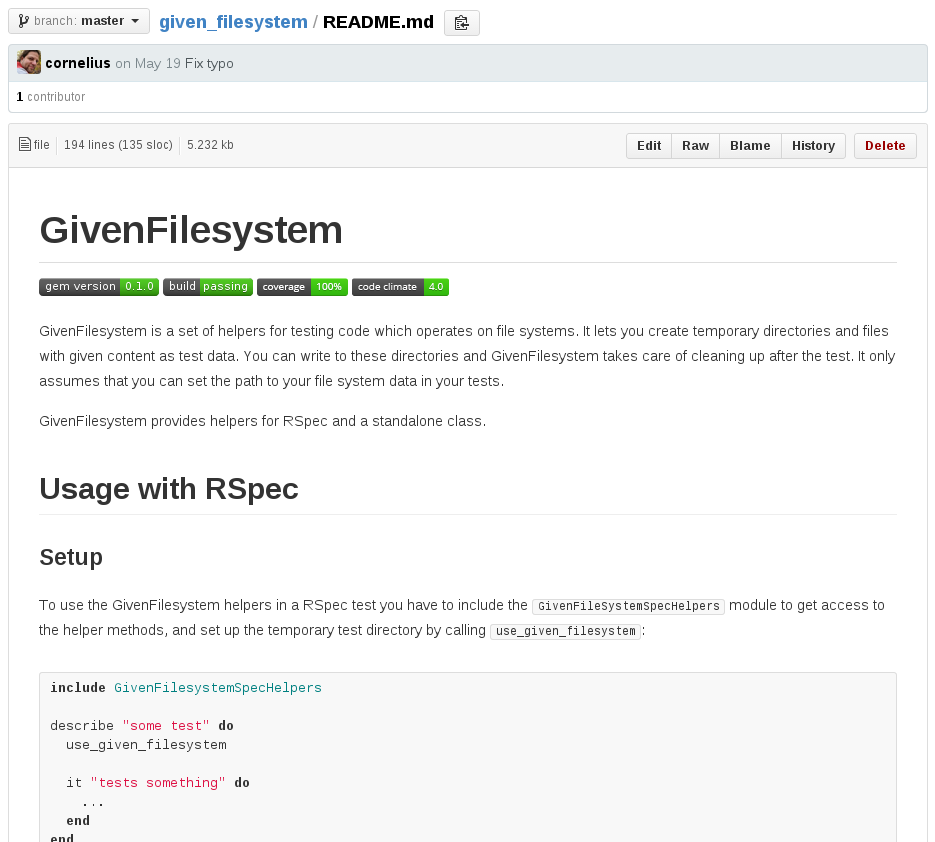
GivenFilesystem provides a simple and convenient way to create test files and directories. These can be structures as complex as needed. They are built up from test data you store as part of your tests. But you only need to store the data once, and create different scenarios using this data in your unit test code. GivenFilesystem also provides an easy way to create temporary locations in the file system for writing files. These are automatically cleaned up after the tests.
Here is an example of some code creating test files (see the details in the docs):
path = given_directory "mydir" doThe only assumption is that you have a way to specify the path your code uses to read and write files. There is no magic behind the scenes, which replaces internal code accessing the file system, but your code has to be structured in a way that you can tell it where files are. Usually this is something you want to have anyway, and which gives nicely structured code.
given_directory "one" do
given_file "myfile"
given_file "myotherfile"
end
given_directory "two" do
given_file "myfile2", :from => "myfile"
end
end
So if you come to the point, where you need to set up files for unit tests, or worry about cleaning up files written by your tests, consider giving GivenFilesystem a try. It has made my life a little bit more simple and convenient, maybe it can do the same for you.
I put some effort into polishing GivenFilesystem. It comes with tests, has full test coverage, and clean code. This turned out quite nicely, also thanks to the magic of code review.
Get the gem, read the docs, get started.
Feedback and other contributions are always welcome. Or if you just want to talk about it, simply drop me an email.

Kraft Release 0.55
Herewith I announce the availability of the new Kraft release 0.55.
It was finished today and fixes two issues that came up after the release of the previous version: A compile fix for compiling Kraft against the latest version of ctemplate, which did not work out of the box with Kraft 0.54. The other fix is a fail in generating PDF documents which is a pretty severe problem for Kraft. Both is now working well with the new version 0.55 which can be downloaded here.
Thanks a lot to the Kraft community for testing!
If you find other problems, want to give feedback or seek help, please see here how to proceed. Thanks!
Fosscomm 2014 at Lamia
Fosscomm is the annual conference of the Greek Free Software communities. This year the event took place on May 3 & 4 at the Technological Educational Institute(TEI) of Lamia. This time we organized the road trip with Pavlos Ratis (dastergon) from Thessaloniki.
##openSUSE-el
Most of the greek community was recuperating from the long and tedious journey to Dubrovnik, Croatia for the Annual openSUSE conference where some had a series of presentations while the rest helped as volunteers there. That left me practically alone at Fosscomm to have a talk and man a booth which we co-hosted with dastergon as a multi-community booth (openSUSE/Gentoo).
The booth had a wide assortment of stickers, flyers, CDs and DVDs for both
openSUSE and Gentoo.
My talk, entitled “Enlightening Lizards: Getting the Enlightenment experience &
Being part of the effort”, was about the effort we put for packaging the
environment and associated libraries and the current status in recent openSUSE
versions.
I started the talk with a brief historical overview about the Enlightenment project,
then moved on to an introduction of the Enlightenment Foundation Libraries (EFL)
and the Enlightenment window manager to conclude with a briefing of the team members
and plans for the future.
Finally, I talked about how we coordinate the work in distribution level and how
to work with upstream so that we can provide a full and enjoyable environment for
openSUSE users.

##Gentoo-el
The Gentoo community had 2 presentations one by dastergon, entitled “Btrfs: A
next generation filesystem”, in 35’ Pavlos managed to get us up to date with
the current developments regarding btrfs, the ecosystem that has developed around
it, its users the architecture and workings of the filesystem.

The second presentation was one that is more upstream in character and also one I personally
consider far more important. This one Pavlos co-presented with Panayiotis Christopoulos (pchrist)
they talked about package maintainership and the distinction between distribution and upstream level
packaging. In quite an effective and coherent manner they switched places each talking about a specific
environment and its tooling and packaging tactics.
Finally after having switched quite a few distros before they both ended up as Gentoo users
(later Gentoo developers) they gave a handful of tips about packaging and working with upstreams gathered
from their experience with said distros and packaging schemes.

##The rest
I spent the rest of the conference at our booth helping people, answering questions and generally socializing and talking with old friends.
Congratulations to the people from the TEI of Lamia for the organization! :)
Here is their photostream on flickr
- Update: Fixed Gentoo-el photos.
librevenge 0.0.0 is out: Document Liberation Project's framework is available to be used
It is not without emotion that the Document Liberation Project announces today the first release of the new framework library, librevenge-0.0.0. This release means that the API of librevenge is now set into a stone (at least until the 0.1.x series) and thus the library can be used by willing filter-writers.
You might be familiar with some aspects of the librevenge framework from this blog or from this FOSDEM 2014 presentation. David Tardon started a nice serie of articles explaining how to use the framework. So, there are no valid excuses remaining not to use it and not to contribute to the world domination that is the ultimate destiny of the Document Liberation Project.
Standing on the shoulders of giants
But the first release of a new framework would be empty without mentioning those on shoulder of whom we stand. First we would love to thank Will Lachance and Mark Maurer for having started more then 10 years ago the development of libwpd. It is this library and its wise interface design that allowed us to move incrementally to the current framework. Thank you guys, you know that without you we would be nowhere!
Besides your servant, David Tardon, and Valek Filipov, we would love to single out a discrete person, who speaks little but codes a lot. It is Laurent Alonso, without whom we would never be able to recover a huge amount of old MacIntosh documents. We thank equally to all our past and present Google Summer of Code students, without whom the road would be much more thorny.
LibreOffice and The Document Foundation
It would be a very big mistake if we did not thank the project from which we all originate, the LibreOffice project. The community gravitating around LibreOffice creates is caring, encouraging and creates the right environment to foster innovation.
Last but not least, our thanks go to The Document Foundation that did not hesitate to take us under its umbrella and provide all the necessary institutional support.
How to contribute
Now a new phase starts and you can be part of it! There are many ways to contribute. You drop by at the #documentliberation-dev channel at irc.freenode.net. There will always be someone to help you to join this exciting journey.
For more information about our activities, follow @DocLiberation on twitter, Join our Google plus community or like us on Facebook.

Banshee GSoC-2014 projects under Gnome umbrella
This time, Google has given plenty of slots to the GNOME project, so we could accept many participants, including 3 brilliant students to work on the Banshee project. In case they haven't blogged about it, or didn't give much detail, I'll elaborate a bit about what they will be aiming to do these months:
- Nicholas Little will be working on creating a new extension for Bluetooth synchronization, and if time permits, refactoring our MTP support. In regards to the latter, if you have an Android phone you might have experienced some bugs getting it to work with Banshee lately (our MassStorage synchronization support is great, but the latest versions of Android have been deprecating this mode in favour of MTP, which we never supported very well); we have been working hard on fixing them, but Nicholas is going to try to give it that extra push at the end of the summer, which I'm confident he will do very well (he was the developer who brought Symbian support for the masses -or rather, for his Nokia N95 ;) -, on Banshee 2.9.0). And you may be wondering, why do we need Bluetooth sync? Well, we understand that it's much slower than USB or Wifi, but:
- USB can work for the first sync, but whenever you update your library, I never remember to connect my phone again with my cable, or I'm too lazy to do it. Now imagine that whenever your phone is near your computer (and of course if you have Banshee running), they could negotiate together to update the sync without the need of moving a finger!
- Wifi could work also for the use case I just explained, but getting Wifi to work, compared to Bluetooth, would involve creating an app for the phone that could talk with Banshee. And we all know what are the problems associated with that: we would need to be cross-platform for at least the 3 main mobile platforms out there (well, iOS wouldn't even work neither with this nor with Bluetooth, because there are no public APIs to integrate with the music database of the OS, sigh iTunes...), and that means a lot of maintenance burden (even if we choose a same-language native platform like Xamarin), and a user experience that is not so seamless (as it would require the user to install an app first).
- Marcin Kolny, which has convinced us that he will do a great job given his great patches and the fact that he's already very involved in opensource (maintainer of C++ bindings to GStreamer if I recall correctly), will be working on integration with AcoustID. To summarize it very bluntly, AcoustID is the open-source alternative to Shazam, so thanks to this, if you have many tracks in your library which didn't get ripped properly with tags, or you got from some friend which is not very metadata-driven ;) then you will be able to fix this situation! We will be likely reusing the MetadataFixer extension that we already have in Banshee, to not reinvent the UI wheel.
- Dmitriy Petukhov, a very motivated Russian student, will be helping us get two extensions in shape, which were developed in the last GSoC (more details about this in my previous blog post), but were not ready for mainstream yet. The FanArt.TV extension, which retrieves artist logos and shows them next to your album icons, needs some caching (we could even violate FanArt.TV service's ToS if we don't do this) and UI polish (our ListView widget doesn't play well with differently-sized images, so we need to modify this custom GTK widget to allow rendering rows with different heights). The SongKick extension works great, but also needs caching, and it especially needs GeoLocation to maybe even work autonomously (imagine, you don't even know what SongKick is, and because you installed the banshee-community-extensions package of your distro, you suddenly get told that one of your favorite bands is soon playing a gig near your city!).
I'm very happy about starting the mentoring of these projects this year. And I'm specially jealous about my students... I became mentor of GSoC myself without being GSoC student first! (Maybe I should switch roles in the future?)
Wish them good luck! It was actually just yesterday when GSoC really started! (gotta love mondays)
UPDATE: Fixed embarrassing typo: I meant AcoustID, not OpenID!