
 Member
 visnov
Do You Want Multiple Kernels on Your System?
Today, I’d like to mention another rather hidden feature of openSUSE 11.1. The package management is finally able to keep multiple versions of packages, if they support installation of parallel versions. A typical example of this is of course kernel. A lot of people want to keep the old, functional, kernel around when installing a kernel update and now there is a way to do it.
Open /etc/zypp/zypp.conf in your favorite editor and change this value:
multiversion = kernel-default,kernel-default-extra,kernel-default-base,kernel-source
The list contains names of packages to be installed via ‘rpm -i’ instead of ‘rpm -U’. Just adopt it to your the kernel flavor you are using.
Of course, there is a catch – there are no means to limit the number of package versions to be installed this way. The reasoning is that there is no automatic way to guess which versions to remove (in case of kernel, everyone has its own definition of working kernel) So you have to uninstall additional kernels you don’t need anymore manually.
Enjoy!
YaST WEB
Aim
First of all we want to provide an general web based interface with the
functionality which is already provided by the YaST command line interface.
This API is based on the REST (Representational state transfer) architecture. This is a
simple interface which transmits domain-specific data over HTTP.
Please have a look to
http://en.wikipedia.org/wiki/Representational_State_Transfer
for more information about REST.
The second aim is to provide a YaST Web UI which can be used by every
web browser.
The current state of the project is an existing YaST-Webservice on the
host side which provides the REST based interface.
On the client side we have the concerning YaST-Webclient which can be
used be any web browser.
YaST-Webservice and YaST-Webclient are running as a webserver
(currently lighttpd) on different or even the same computer.
So the aim is to configure a host via the internet in a simple and
safety way.
How does it work ?
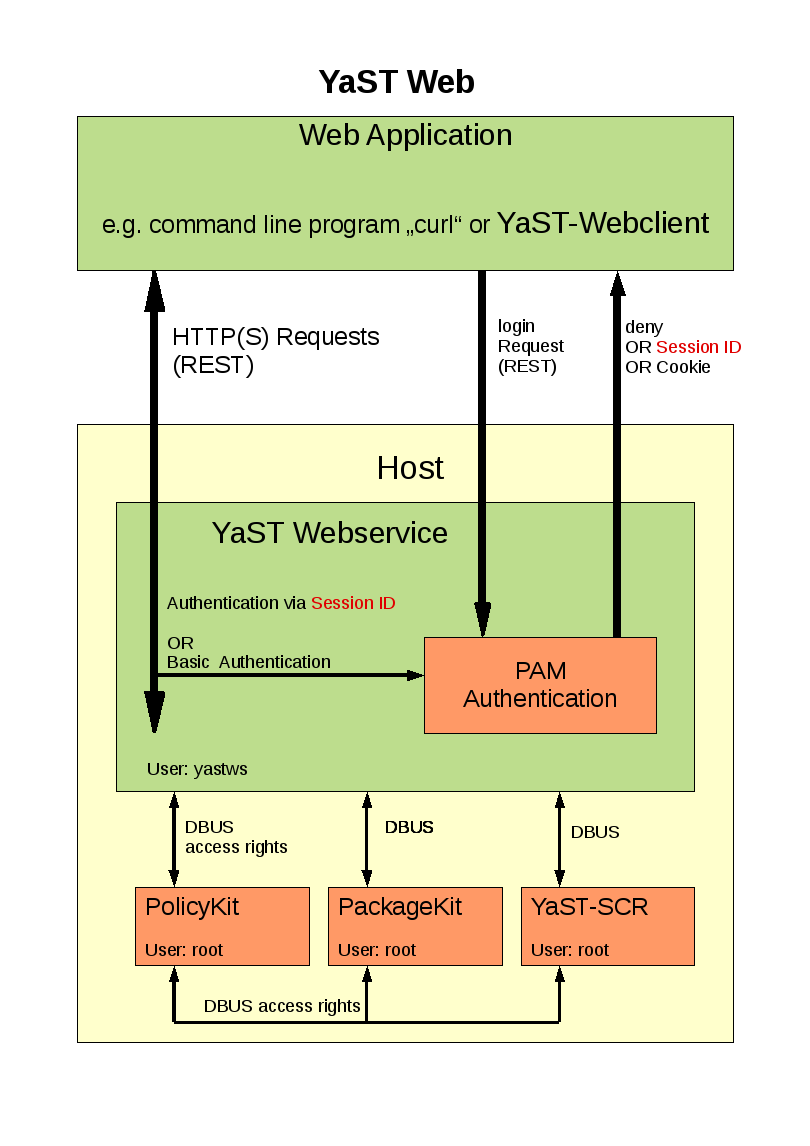
The YaST Webclient communicate via HTTP(s) with the YaST Webservice. The
user has to authenticate ( username, password ) to the host via PAM
(Pluggable Authentication Modules) which is available on every linux system.
The YaST Webclient sends requests ( e.g. create a user, install patch) to
the YaST Webservice. This service checks if the user has the right to
execute this request via PolicyKit. For each kind of request there is
PolicyKit rule defined. These rights has to be granted to the concerning user.
After permission check the request will be send via DBUS to the SCR agent of
YaST. The return value will be given back to YaST-Webclient in XML or JSON
format.
Patches will be handled by PackageKit. These requests will also be sent from
the YaST Webservice to PackageKit via DBUS.
How to get it ?
Have a look the openSUSE buildservice project
YaST Webservice (home:schubi2)
There are all needed packages for version openSuSE 11.1 and above.
As some additional packages (e.g. lighttpd) are needed which are not on openSuSE 11.1 you should add a
repositories ( e.g. factory ) in order to provide these packages.
The simplest way for installation would be to use zypper:
zypper in yast2-core-2*.rpm
zypper in ruby-dbus-*.rpm
zypper in yast2-webservice-*.rpm
zypper in yast2-webclient-*.rpm
How to use the YaST-Webservice
After you have installed these packages you can start the YaST-Webservice-Server with
rcyastws start
The server is running as “localhost:8080” with which you can connect with a web browser:
http://localhost:8080
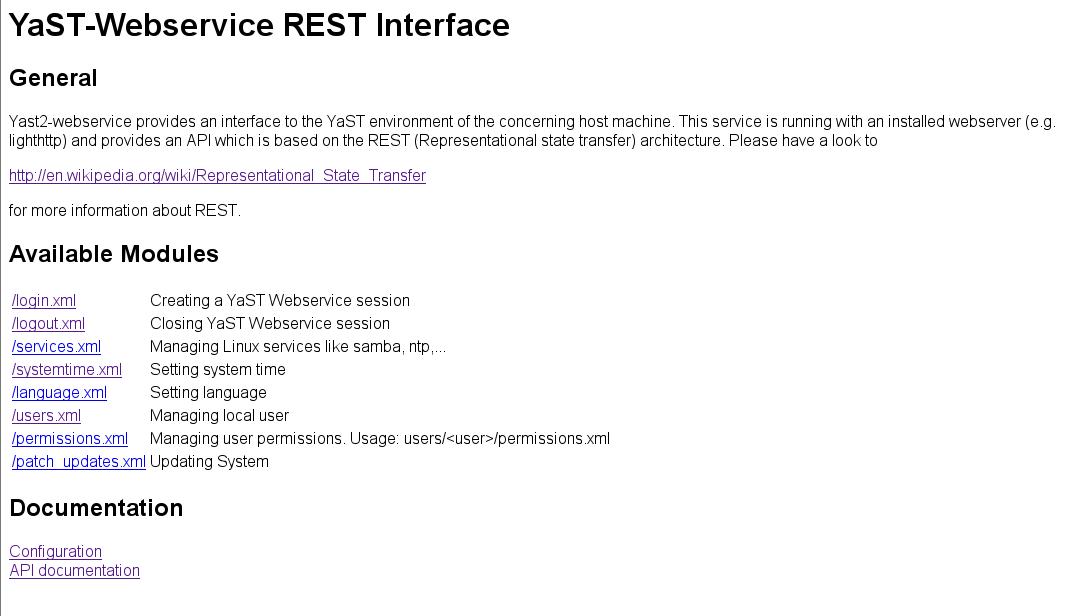
This “pure” web page shows the available modules which can be used via the REST interface.
This REST API is described under
http://localhost:8080/doc_interface.html
Additional configuration stuff like
– setup Hostname and Port
– setup HTTPS connection
– granting permissions for an single user
– AVAHI support
can be found here:
http://localhost:8080/doc_config.html
How to use the YaST-Webclient
After you have started the YaST-Webservice-Server you also can start the YaST-Webclient:
rcyastwc start
Now you can use any browser and connect with http://<name of your computer> to your
computer.
The default rights of the YaST Webservice are set to root only. So you can login with the root password
of that machine.
Following features are implemented:
– setting languages
– setting system time
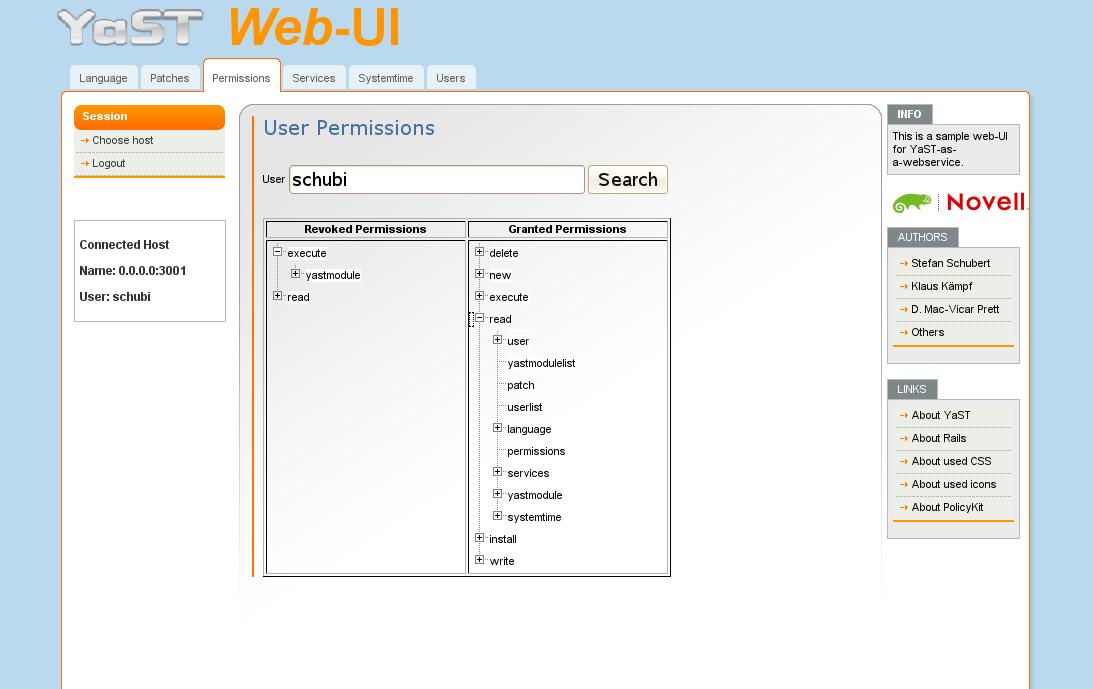
– setting user permissions
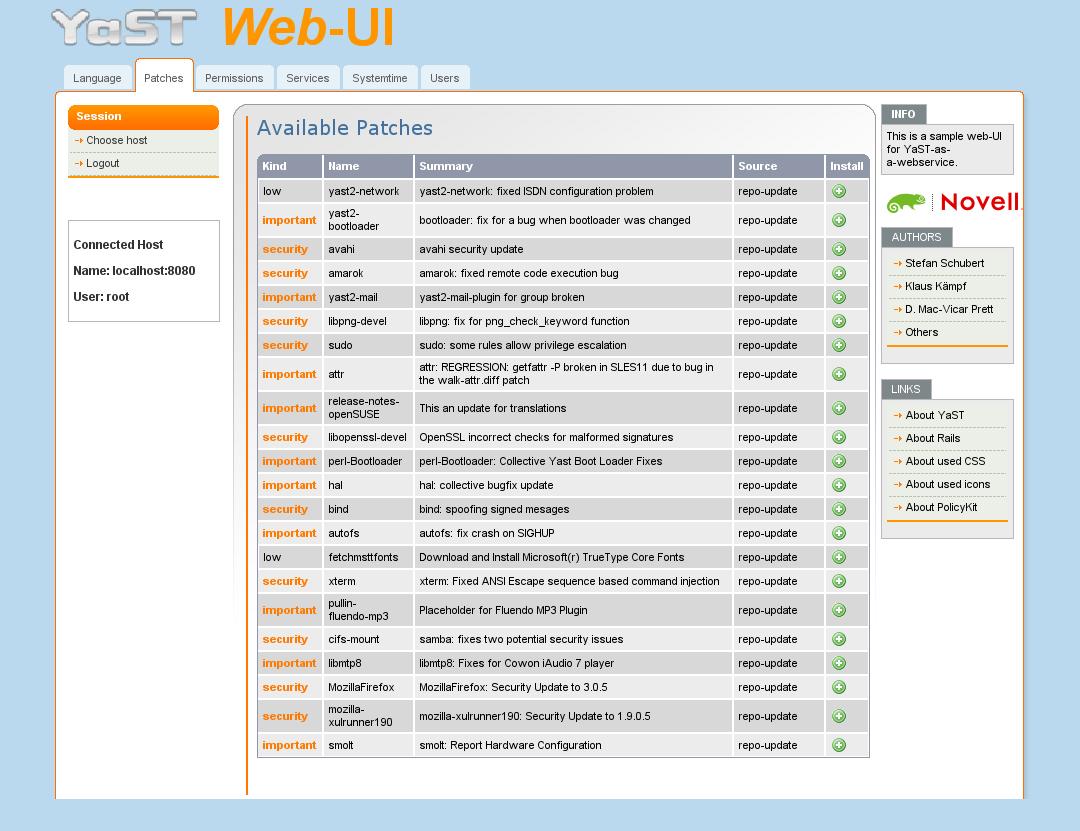
– installing patches
– managing local users
– export user SSH-keys
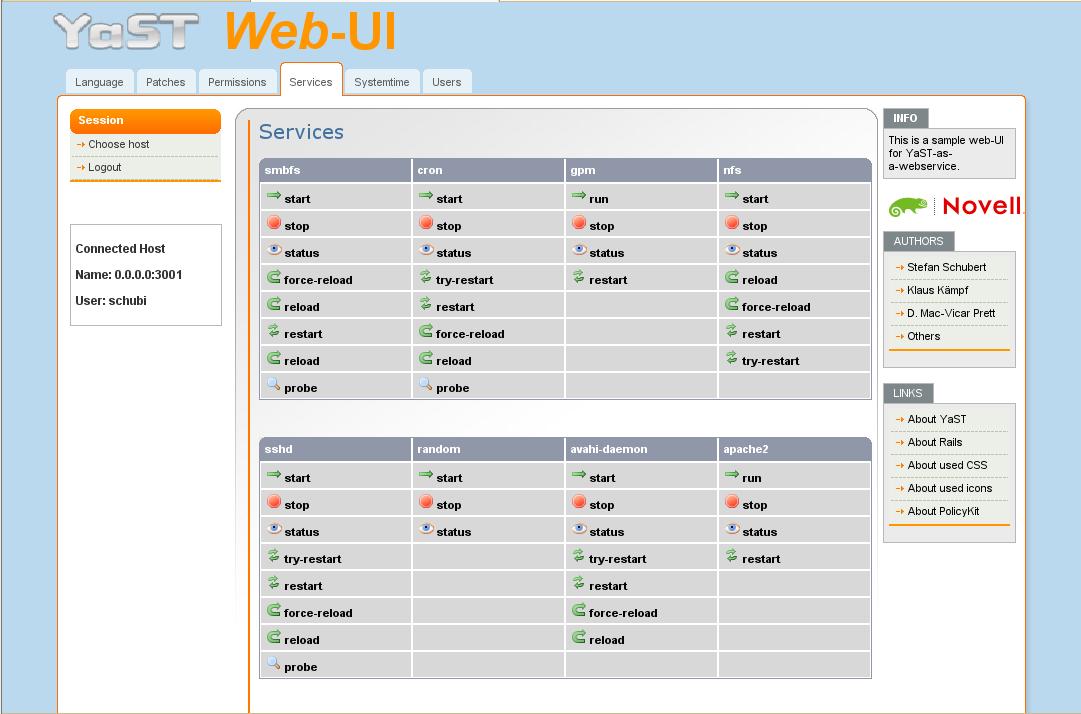
– starting,stopping,status,… of services
– configuration of ntp server
Have a look to the following screen shot it order to give an overview how it looks like:
Known Bugs
-The first call of an menue entry will be slow cause an additional process will be started.
The second one should be much more faster 
-Permissions will sometime not be shown correctly (just click “search” again) Bug 470645
openSUSE Packaging day
Just join us at #opensuse-gnome @ irc.freenode.net and learn how to get involved with the GNOME team.
KDE 4.2.0 & KDE Four Live 1.2.0
KDE Project:
KDE 4.2 has been released and gives "The Answer".
With the usual openSUSE KDE4 packages available comes also a new release of KDE Four Live, the most comprehensive KDE4 Live-CD, with following changes:
- x86_64 version available for the first time
- kdelibs3 is not contained anymore, NetworkManager-kde4 is responsible for managing network connections
- qt3 is not contained anymore, as result YaST Control Center doesn't show icons and offer search currently
- the freed space is used for new stuff not contained before: kepas, krename, krusader, yakuake, ...
- kdebluetooth4 version working with bluez4
Have a lot of fun...
Writing wrapper packages for server applications or a generic YaST module?
As we get more and more PHP-, Perl- and other applications like openSIS, Koha, Moodle, … in the Education repository, the question turns up, how to package those applications “the right way”.
A normal user, who wants to use one of these apps, might just choose to install the package and has the problem how to proceed afterwards. openSUSE sadly has no “post config” scripts like Debian based distributions – even the SuSEconfig scripts are deprecated. So all a packager can currently do is:
- write a README.SuSE (which is already the case for many packages) and place it in /usr/share/doc/packages/<packagename>/README.SuSE explaning how to proceed
- sugget what the user always wants to do and do it via %post-script after the installation of the RPM
- combine 1&2 and point the user to a script in the README.SuSE

- write a YaST module which can be started during installation or afterwards
- any other option I missed (please inform me!)
For the Education project, I’m currently thinking about two ways to make the life of the admins easier.
First: think about “wrapper packages” around the normal packages. I’ll take moodle as example. The normal moodle package installs the php-scripts, an apache configuration and some other config stuff – but will not setup the complete moodle instance. So the user has to install the mysql database himself. An additional wrapper package can do this for him. This package comes with a SQL-Dump of the current moodle version (therefore requires the exact moodle version), and uses a stored mysql-root password to create a new database and insert the database-dump. If needed (for example: the user enables the “user LDAP-Auth wherever possible” checkbox in a (to be written) yast-edu module), additional tasks can be triggered by the wrapper package.
We can also think about calling a “generic” YaST module after installation of such a “needs postconfiguring” package. If we define a place (say: /var/adm/YaST/postinstall/) where packages can place a file containing some important questions to configure the application, and someone writes a YaST module which can be started, this would perhaps be “very cool”. If the user has entered his values, the YaST module can start one or more scripts (coming with the package) and feeds it with the entered values. The biggest questions for this solution:
- When should this YaST module be started? IMO it could be enough to let the user start it manually and select the package he wants to configure. => No adaptions of the current workflows is needed. But perhaps there are other options (like calling it via “SuSEconfig”)?
- Who can write such a module?
- Who defines the config syntax?
Think about a file like this:
<package name=”moodle”>
<questionpack type=”string” action=”/usr/share/moodle/scripts/install_database”>
<question arg=”1″ type=”string”>What’s the database password?</question>
<question arg=”2″ type=”string”>What should be the name of the new database (suggest: moodle)?</question>
<question arg=”3″ type=”string”>What’s the username of the new database user?</question>
<question arg=”4″ type=”string”>What’s the password of the new database user?</question>
</questionpack><questionpack action=”/use/share/moodle/scripts/configure_auth_backend” type=”selectbox”>
<question arg=”1″>What auth-backend should be used?</question>
<answer value=”1″>ldap</answer>
<answer value=”2″>mail</answer>
<answer value=”3″>passwd</answer>
</questionpack>
</package>
I think, there’s room for many enhancements in this area – what do you think ?
Should/Could we produce something like a “Windows-Installer” for openSUSE? Or is it enough to provide special “wrapper packages”? Or is “what was hard to write, should be hard to install” still a valid answer?
Build maemo-apps with openSUSE BuildService ? – It works !
 The openSUSE Build Service is an open and complete distribution development platform. It’s the infrastructure for a development of the openSUSE distributions. But this powerful tool can do much more! The upcoming version 1.5 will also have cross-build support and thus be able to build e.g. ARM packages on x86 hardware .
 Maemo is the platform for mobile devices like the N810 and has been developed by Nokia in collaboration with many open source projects such as the Linux kernel, GNOME and many more.
Today I succeeded in building a package of csync (the new file-sync tool) for maemo/diablo inside a local instance of the openSUSE Build Service using the cross-build and download-on-demand support. To make this happen, I imported the diablo/sdk repository from repository.maemo.org as download-on-demand target.

Then I had to write the project configuration (osc prjconf) and add some missing pieces.

In the end, I was able to build iniparser, samba and cmake as dependencies of csync. Last step was csync itself. The packages are available here …
Use: deb http://www.csync.org/maemo/diablo/n810 ./ as source for apt.
More information about the cross-build support can be found on this page and here on lizards.opensuse.org [1], [2] .
There will be a talk about cross-build and download-on-demand at FOSDEM 2009.
OBS rocks !
Tabbed Browsing for Packages – Follow-up
In last Friday’s blog entry about tabbed browsing for packages, I had asked for comments and opinions. There were quite a number of them, all of them very constructive. Thanks to all who participated!
The overall feedback was positive, welcoming the change. To us, this means that we will indeed merge that code branch (yes, it’s largely working already, it’s not just a mock-up) to the main development line, and you will see that new user interface appear in the next versions of the yast2-qt-pkg package on FACTORY.
There were a number of concerns and side issues that I’d like to summarize here:
- We should not use tabs here because what goes on is not parallel. Well, this is an issue that could be debated for a long time. It’s not parallel in the same sense as multiple sessions in separate KDE konsole tabs. But it’s at least as parallel as different settings in settings dialogs in a zillion of applications: More or less unrelated stuff that would clutter the screen too much if displayed all at ounce, but that makes sense to be grouped together. In tabs. We do respect others seeing this differently, but weighing the pros and cons carefully we found that this rather abstract concern does not outweigh the benefit of migrating to tabs.
- Missing keyboard shortcuts. Right: Each tab and each menu entry should have one. I added them to the code this afternoon.
- Duplicate View menu, one in the main menu bar and on that new View button. That was an oversight; the label on that button was New in the first version, but that didn’t look too obvious to us, so we changed it to View, not realizing that we already had a View menu in the main menu bar. That menu in the main menu bar contained view options, so it is now renamed to Options and moved to the right. It’s not truly a traditional View menu anyway. It contains menu entries like Show -devel Packages and Show -debuginfo Packages.
- Consuming screen space for the tabs. Right, this is a tradeoff.
- Less surprise to first time users. That combo box was unusual, and some of you replied that they had to point first time openSUSE users to that combo box so they could switch views.
- Don’t change for the sake of changing. No, we are not doing that. You’d be amazed how many times we had to defend our design. There were a number of attempts to radically dumb it down for the sake of newbies, but the voice of reason had always won. The world does not consist of newbies only. We also have to cater for expert or intermediate users. We came up with the simple Patterns dialog during installation for them, moving the full-fledged package selector one more mouse click away (with the Details button) for the experts. Each time we improve the usability of the package selector, there is one less arguments for dumbing it down. We believe that using tabs is a step towards that direction.
- Nobody commented on the position of that View button. The majority of internal people here (including our usability experts) said they preferred it on the left side where it isn’t easily overlooked (unlike on the right side).
- The current settings (which tabs are open) should be saved upon exit and restored when the user enters the dialog the next time. I hadn’t explicitly mentioned this, but this was always our intention. It’s not in the code yet, but this is the next thing on the “to do” list.
There were also some side issues that were not entirely on topic, yet worthwhile to mention:
- Don’t quit the package management workflow after package installation is finished. There was a long discussion about that in Bugzilla why that “Install more packages?” pop-up was introduced in the first place (because of slow start-up times of the package management stack) and why we removed it when that was no longer the case. For those of you who want that question pop-up back, look here how.
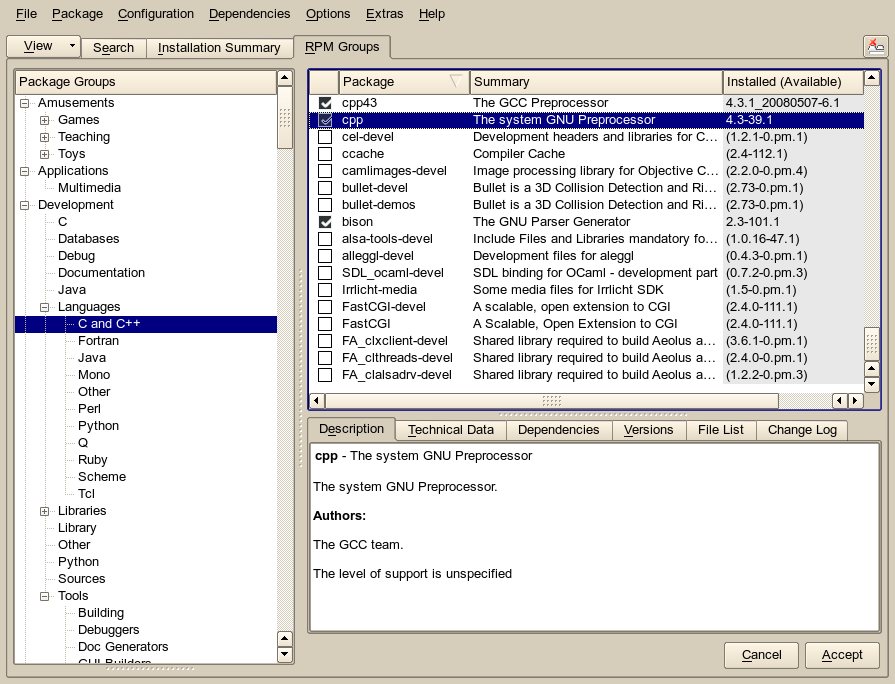
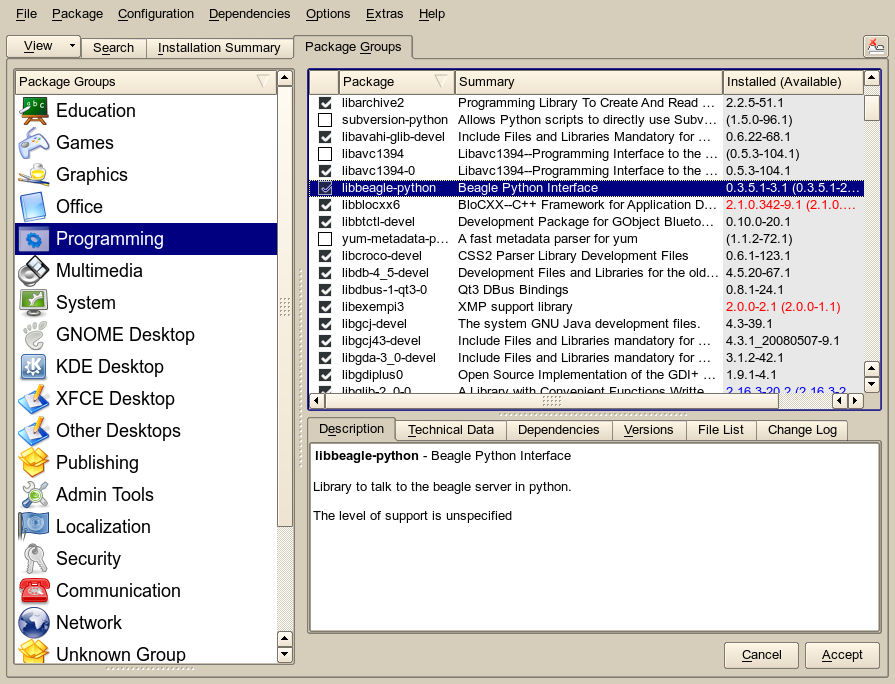
- Some users complained that the new flat list in the Package Groups filter view is confusing – too many packages are listed in each category. They want the old tree back. Well, here it is – it’s the RPM Groups filter view I had briefly mentioned:
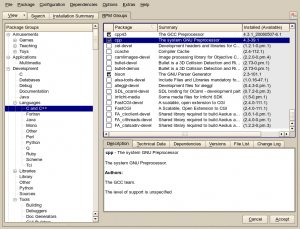
The other view (the flat PackageKit groups list) is still there, of course:
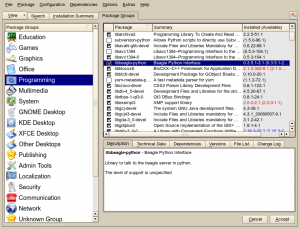

Tomboy 0.13.3, Tomboy 0.12.2, Tasque 0.1.8, and Giver!
- Tomboy 0.12.2, an update to the stable series, fixes a nasty bug that could cause notes to be mistakenly deleted during synchronization. Versions of Tomboy affected by this bug are: 0.12.0, 0.12.1, 0.13.0, 0.13.1. If you are using any of these versions, and you like to use sync (or set note contents via the dbus interface), please upgrade now! Note that this was fixed in the unstable series in Tomboy 0.13.2.
- Yesterday I finally made new Windows/Mac builds. You can get binaries for Tomboy 0.13.3 at our download page.
- Last month we released Tasque 0.1.8. It fixes problems communicating with RememberTheMilk.com and a kabillion other bugs. Windows and Mac binaries are available at the download page.
- Ankit Jain has started reviving Giver development. For one thing, he has Windows builds available for download (an obviously useful feature for a file sharing tool).
- I've discovered the best theme for openSUSE: Shiki Colors with the Shiki-Wise color scheme and the GNOME-Colors icon set.
 Shiki-Colors Theme (click for larger version)
So what else is going on? Tomboy 0.13.3 features some fixes that cut down my memory usage by 25% (with ~200 notes). It should also speed up start-up time if you have a big note collection. One user with 621 notes reported a change from 11 seconds to 4 seconds when he upgraded! The fixes were almost all related to extra work done on a per-note basis, so the memory and performance wins are most significant on these large note collections.
That being said, there is a lot more work to do on memory and performance. Ruben Vermeersch blogged about adapting Federico's timeline tracing tools to chart Tomboy start-up performance. This is going to be extremely helpful in figuring out where we're slowing things down. And as for memory usage, I have only fixed the low-hanging fruit; there are more wins to be had! If this is an area of computer science that you find fun, all help is welcome. :-)
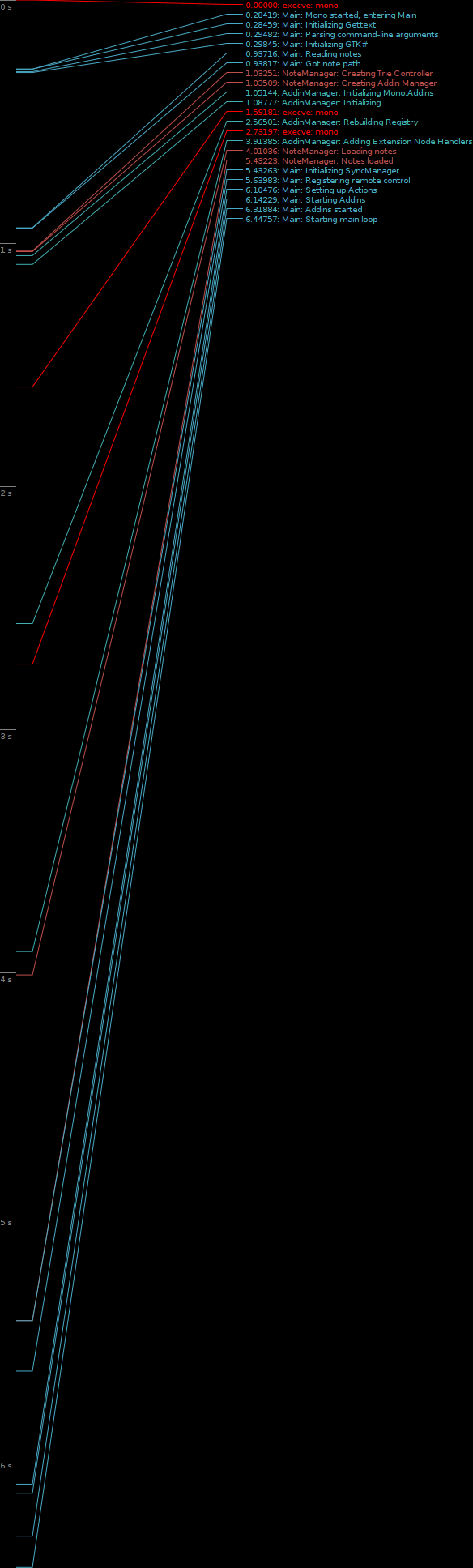 Tomboy Startup (click for full-size graph)
My day job of working on the Mono Accessibility team has kept me pretty busy, and it's been hard lately to find time to work on Tomboy and Tasque. Sure, my team understands when I take a few hours every couple of weeks to prepare a Tomboy release, but that doesn't provide enough time for big feature work or difficult bug fixes. For example, we knew about the problems with Tasque and RememberTheMilk.com for a month before we were able to fix it and get a release out. Fortunately, Novell has its cool "ITO" (Innovation Time On) program. I accumulate 4 hours of ITO every week; that's basically the equivalent of 10% time! As I used up all of my regular time off with hospital visits last year, I scheduled four days of ITO during the week of Christmas. I was able to use that time to review a ton of outstanding patches for Tasque, fix the bugs in the RTM and SQLite backends, and make it easy to build on Windows and Mac OS X. This is also when I did all of the memory fixes for Tomboy. So a big thanks to Novell for supporting me in this work.
Lastly, I'm really excited about Ankit Jain's work on Giver. I never worked on Giver, unless you count the moral support I lent during that first Hackweek. :-) But I am amazed at how many people are asking for updates, Windows and Mac versions, etc. As somebody who works from home, Giver isn't that useful to me, but apparently it is very popular and more people are learning about it every day. With Ankit's help, this project may not be so dead after all. You can help him out by testing his Windows builds, trying latest SVN, filing issues, and hanging out in #giver on GIMPNet.
Tabbed Browsing for Packages
There are many approaches to managing software packages. Some users like to use command line tools like zypper. Others prefer a GUI tool like the YaST2 package selector. And even within such a GUI tool, there are many ways to deal with the packages you’d like to install, update or remove: Install a bunch of packages that make up a functionality like “KDE desktop” or “web development”, find one specific package with a known name, or just look through packages that are available. That’s why there are different filter views for those different approaches.
How do you select any of those filter views? In previous versions of the (Qt) package selector, we used to have a combo box to do that:
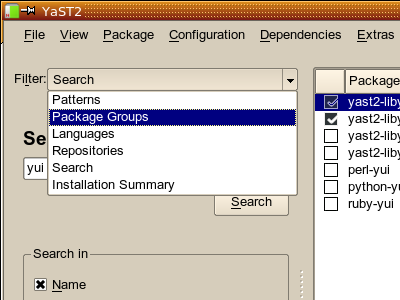
That’s somewhat unusual, and there have always been critics who claimed that we should use tabs instead. Our standard reply was always that this would not really be helpful because there are so many of them; you’d run out of screen space quickly, and with the number of filter views we have, this would look overwhelming and confusing:

Ugh… not good. Not even at this screen resolution. Now think about 800×480 netbooks and more verbose languages like German, French or Hungarian. No way to make this fit on the screen. And left/right scroll buttons are the last thing you want for tabs.
So, what else could we do?
Reduce the number of filter views? Well, we’ve been down that road for a while. But new ones come along all the time, and it always hurts some users when we throw out their favourite one. The “RPM groups” (the one with a tree) was such a case; it had to make way for the newer PackageKit groups. A number of users complained.
And we have more filter views in store. There are many more cool things we could do. But this should not add to confusion, so right now, we avoid to add more views.
But how is everybody else doing it? Let’s have a few looks at that.
What is it we are doing here? We are browsing for and through packages. So, let’s compare it with other kinds of browsers. Let’s look at Konqueror:
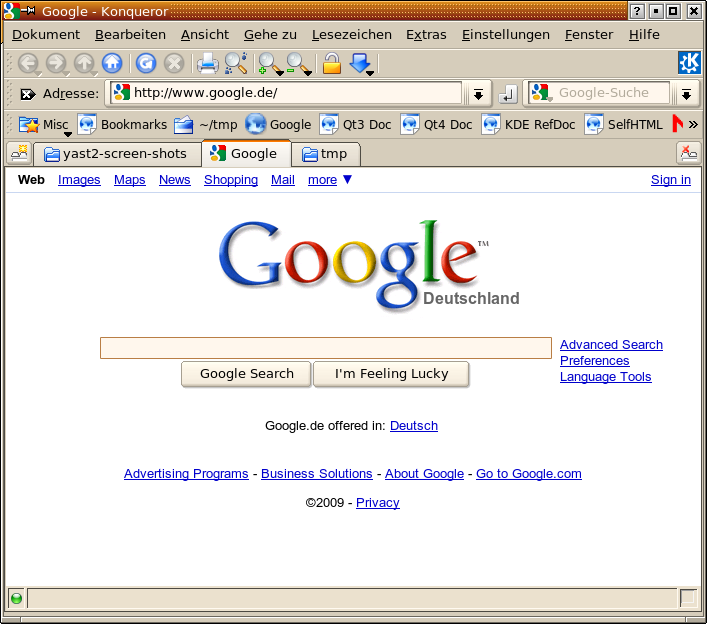
In Konqueror, you can use tabs. Once you got used to it, that’s a powerful and efficient way to avoid cluttering your screen with multiple browser windows. They are all neatly tucked away in that row of tabs.
Another application that uses a similar approach is Konsole, the KDE terminal emulator:

While in Konqueror you use the middle mouse button to open a link or a bookmark in a new tab, there is a limited number of options in Konsole. You select a session type from a pop-up menu on a special button on the bottom left corner:
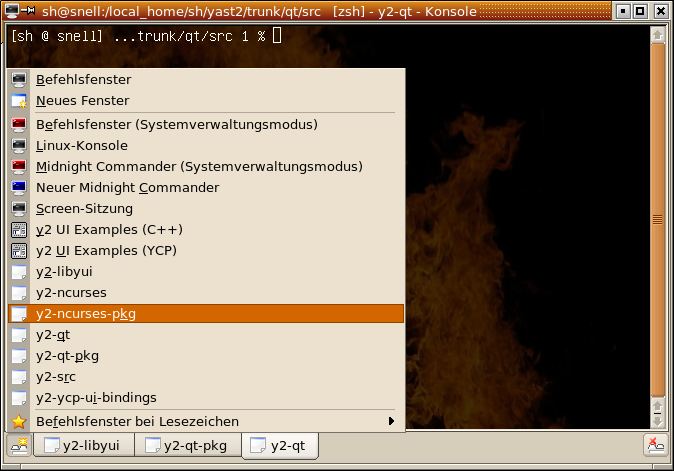
So, let’s try someting similar with the YaST2 Qt package selector. Let’s try to use tabs, but not in an overwhelming number. Let’s open only a few of them right away. The user can open more if he likes.
First try:
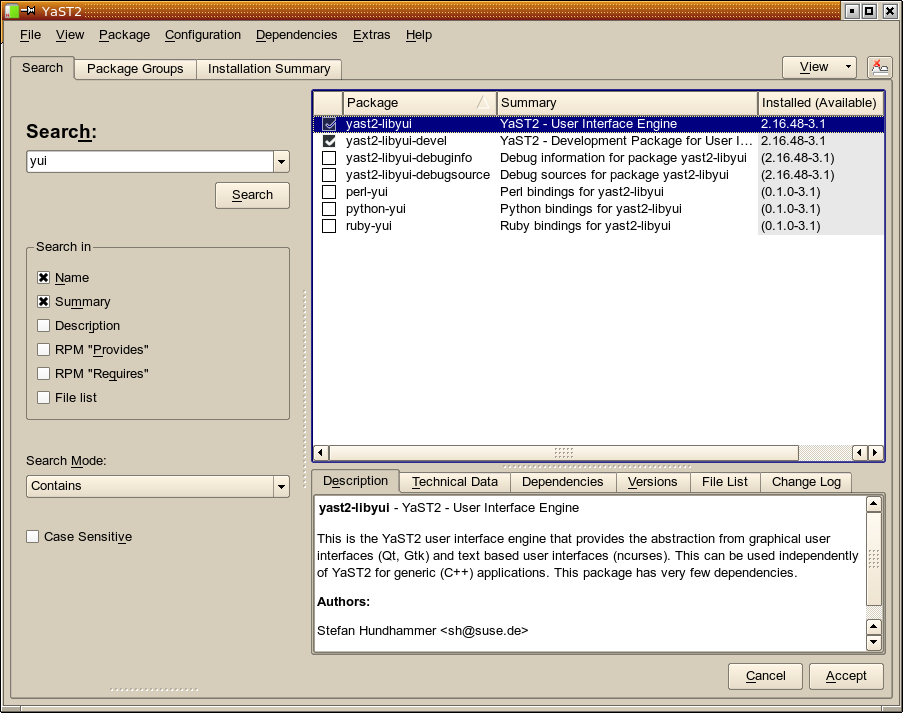
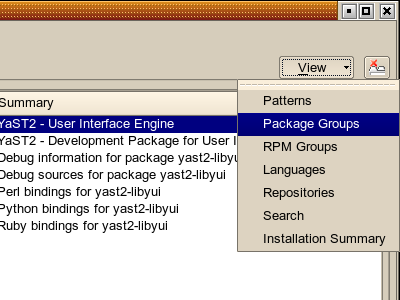
Hm – or maybe put that “View” button in the top left corner?
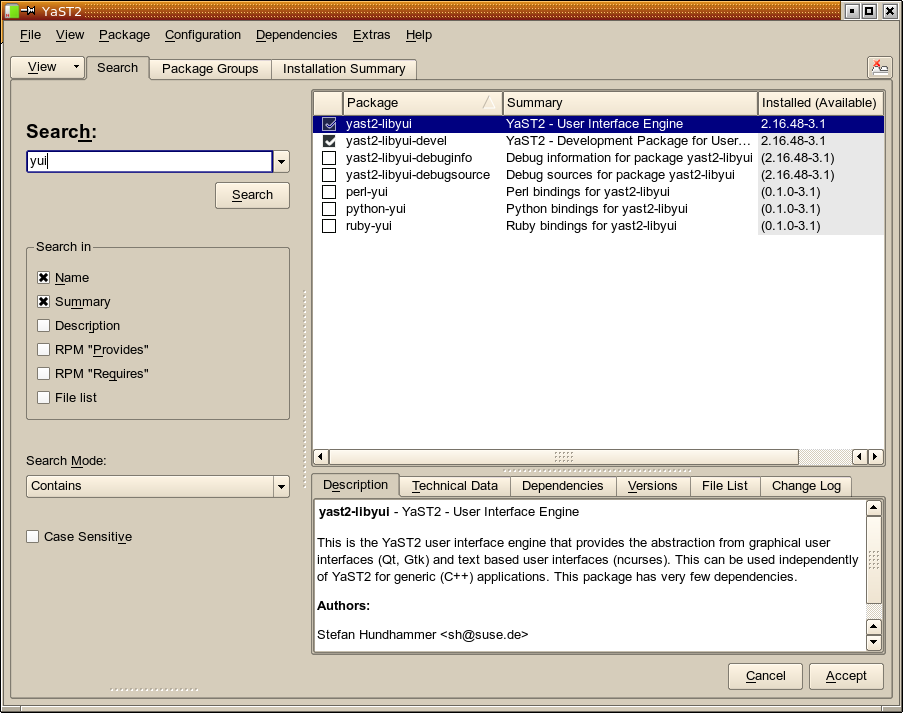

Of course, the user can close any of the open tabs (except the last one) again – just like in Konqueror or in Konsole:
If we really do that, that means that the door is now no longer closed for new filter views. Some that could be added immediately are:
- Show all available (not installed) packages (yes, available via “Installation Summary”, but not that obvious to novice users)
- Show all installed packages (also available via “Installation Summary”)
- Keywords / tag cloud (“KDE application” (linked against KDE libs), “GNOME application”, “mail client”, “Java application”)
We don’t want to overdo it, of course.
So… what do you out there think? Do you like it? Should we use tabs there? If yes, where to put that “View” menu? Left? Right? Elsewhere? Use a toolbar button with just an icon (like in Konsole) instead? Add it to the main menu, too?
Comments? (on topic please, there are other tools and forums for support or bug reports)
Smolt Popup
kupdateapplet shows a popup that asks the user to send his/her hardware profile to the smolt project.

I think kupdateapplet isn’t the appropriate application for showing this notification because smolt has nothing in common with update installation.
I’ve written a tiny python-qt script that shows the smolt popup.
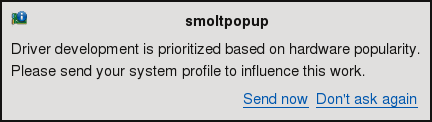
You can find a package called smolt-qt in my build service home. Feel free to test and comment!