
Tumbleweed Monthly Update - April 2025
The rolling release Tumbleweed continues enhancements in April and brings more usefulness to gamers, developers and others with the delivery of several snapshots.
Among the key highlights this month, Tumbleweed users benefit from a major security boost with OpenSSH 10.0p2, featuring faster, quantum-resistant key exchange and improved session performance. Developers will notice smoother workflows with GDB 16.3’s smarter multithreaded debugging and better tracing tools, while gamers and multimedia users will see enhanced GPU performance and stability thanks to Mesa 25.0.4 and critical fixes in FFmpeg 7.1.1. Audio reliability has improved across more devices with SBC 2.1 and new kernel-firmware-sound 20250408 updates. Meanwhile, major updates to KDE Gear 25.04.0, GTK4 4.18.3, and system packages like iproute2 6.14 and rsyslog 8.2502 bring refinements that enhance daily desktop, server, and development environments. Numerous security vulnerabilities have also been patched across Mozilla Firefox 137.0, PHP 8.4.5, OpenVPN 2.6.14, and Python 3.13.3..
As always, be sure to roll back using snapper if any issues arise.
Happy updating and tumble on!
For more details on the change logs for the month, visit the openSUSE Factory mailing list.
New Features and Enhancements
OpenSSH 10.0p2: This major version brings major security, stability, and performance updates important for all openSUSE Tumbleweed users. It removes support for the outdated DSA algorithm, making SSH connections more secure by default, and introduces faster, quantum-resistant key exchange with mlkem768x25519-sha256. For desktop and server users, SSH sessions are now faster and more efficient thanks to cipher improvements favoring AES-GCM. Developers will benefit from new flexible configuration options, like session-type matching and environment variable expansion. The update also strengthens security by fixing issues with forwarding settings and restructuring the SSH daemon to reduce its attack surface after login. Day-to-day remote access, file transfers, and automation workflows will be more secure, slightly faster, and better prepared for future cryptographic standards.
GDB 16.3: The new major version update improves debugging precision, performance, and integration for developers on openSUSE Tumbleweed. Smarter thread-specific breakpoints reduce overhead when debugging large, multi-threaded applications. Support for watchpoints with tagged pointers, like Intel’s LAM (Linear Address Masking), means better handling of modern CPU features. New tracing options using Intel Processor Trace make it easier to analyze programs at the instruction level. ARM users benefit from improved support for Memory Tagging Extension (MTE) debugging. This release also expands Python scripting APIs and improves Debug Adapter Protocol (DAP) integration, helping GDB fit more seamlessly into modern development tools and workflows. Overall, a solid update for anyone working with complex applications or the latest hardware.
SBC 2.1 Another major update brings important under-the-hood improvements for audio handling. SBC (Subband Codec) is widely used for Bluetooth audio, and this update fixes critical issues when running on non-x86 hardware (like ARM-based devices) and ensures better stability when SSE CPU optimizations are disabled. While casual users won’t notice immediate differences, this makes Bluetooth audio more reliable across more systems, especially useful for newer laptops, desktops, and ARM boards. Developers also benefit from cleaner builds and better cross-platform support.
kernel-firmware-sound 20250408: This update adds new Sound Open Firmware (SOF) support for two MediaTek chips: the MT8195 and MT8188. This means improved audio hardware compatibility and support on newer MediaTek-based devices using these chipsets.
xz 5.8.1: The command line tool and utilities package brings performance improvements and a key security fix. The multithreaded .xz decoder now correctly handles invalid input that led to crashes. A performance bug was also fixed to ensure all threads are used during decompression in certain scenarios. For systems using SSE2, such as x86 with musl libc, decompression can be noticeably faster, up to 15 percent in some cases. This update also improves encoder speed on 64-bit PowerPC and RISC-V processors, and adds low-level Application Programming Interface access for BCJ filters on RISC-V, ARM64, and x86_64
. On Linux, xz now uses fsync() to safely sync output files before deleting the input file, with a new --no-sync option if you want to skip that behavior.
rsyslog 8.2502: This maintenance release improves stability, better error handling, and support for newer platforms. The update fixes a multithreading issue in the forwarding module (omfwd), improves TLS support by handling OpenSSL and gnutls handshakes more gracefully, and adds a socketBacklog setting to tune TCP listener behavior. Improvements to Kafka logging and SNMP support are included as well. The package now also supports building under the latest C23 standard, which brings the project up to date with modern compiler toolchains.
tigervnc 1.15.0: This package adds several usability improvements for both viewers and servers. You can now use the back and forward mouse buttons in the native viewer and makes remote desktop navigation smoother. Clipboard redirection has been added to x0vncserver, letting you copy and paste between your local system and the remote desktop. The native viewer now remembers your username and password on reconnect, saving time during repeated sessions. Both the native and Java viewers can display a standard arrow cursor when the server cursor is hidden, making it easier to see where your pointer is. Finally, vncpasswd can now check password strength using pwquality, enhancing security.
ffmpeg 7.1.1: Audio decoding is now more robust, with protections against overflows in WAV file parsing and better handling of invalid DVD video packets. Timecode calculation has been improved to avoid FPS-related overflows. The MJPEG decoder now disallows unsupported progressive Bayer images, and audio packets in fragmented MP4 (mov) files are no longer incorrectly marked as keyframes. OpenVINO support has been disabled to simplify dependencies for openSUSE Factory.
harfbuzz 11.0.1 and 11.1.0: This first minor version of version 11 restores compatibility by reverting a recent change to trak tracking behavior, now applied during shaping instead of directly. It improves shaping performance, refines glyph rendering (like rounding extents and emboldening at the font layer), and adds experimental access to raw CFF/CFF2 CharStrings. The CLI tools now return meaningful error codes and come with optional manpages. The 11.1.0 version improves font subsetting by including bidirectional (bidi) mirroring variants by default, which helps ensure better rendering of right-to-left scripts. A new flag allows disabling this if needed. The release also includes general bug fixes, build improvements, and enhancements to the test suite.
cups 2.4.12: This release now honors system-wide cryptographic policies with GnuTLS and adds an option (NoSystem) to opt out. Users will see clearer alerts when secure IPP printing (IPPS) encounters certificate issues, and the scheduler now logs detailed debug history if a backend fails. Bug fixes address potential job loss during install failures, improved PPD option parsing, and better IPP keyword validation.
Key Package Updates
kernel-source 6.14.4 and 6.14.3: The 6.14.4 version was a small maintenance update for the Linux Kernel that fixes several memory leaks, improves Wi-Fi and Bluetooth stability, and resolves issues with SCSI, RAID and sound drivers. Networking reliability is enhanced, especially for IPv6 and Open vSwitch users. This release also brings a few targeted fixes for Intel IGC networking, block device handling, and hardware-specific improvements for devices like Rockchip CAN and AMD graphics. The 6.14.3 update provided Bluetooth reliability improvements for some Qualcomm devices, while fixes in graphics drivers like Intel and VirtIO solve flickering and memory leaks. Networking sees more robust handling in drivers like ethtool and TLS, which benefits server admins and gaming setups relying on low-latency connections. Developers and advanced users benefit from better tracing tools and memory management fixes, reducing the chance of subtle bugs during debugging.
systemd 257.5: This maintenance updates documentation and test behavior. It fixes the location references for pstore.conf and coredump.conf templates, which is important for admins managing system crashes or dumps. It also adjusts network tests by using a copy instead of a symlink for default network configuration.
libxmlb 0.3.22: This release improves file integrity checks and XML export reliability. This release adds safeguards to detect file truncation and malformed string tables, preventing potential crashes or data corruption when working with .xmlb binary XML files. For developers, exporting XML with the COLLAPSE_EMPTY feature is now supported and more robust, especially when dealing with empty elements or silos. These improvements help ensure tools using libxmlb (like GNOME Software) handle XML metadata more reliably.
GTK4 4.18.3: This update improves text editing by fixing margins, double-click selections, and dead key handling. The update resolves a regression where input methods showed incorrect positions when line numbers were enabled. It also improves menu behavior on mobile by preventing text overflow and ensures window resizing always works. Accessibility stability is improved by fixing errors related to accessibility relations. The column view and listbox widgets now handle measurements and selections more reliably. The GTK Inspector now remembers some user interface states between sessions. Several internal fixes reduce warnings and improve memory management when running on Wayland. The release also includes documentation updates and refreshed translations.
Mesa 25.0.4: This bugfix update improves performance and stability across several GPUs and games. AMD users with GFX8/Polaris cards will see better performance in titles like Elden Ring, and GPU hangs in The Last of Us Part I on RDNA3 (gfx1201) have been resolved. Vulkan 1.4 support continues, bringing smoother rendering and compatibility improvements for modern games. Fixes also address visual glitches in Satisfactory, rendering errors on Intel Battlemage (BMG), and memory leaks in Vulkan swapchain handling.
KDE Gear 25.04.0: This release brings refined accessibility, right-to-left language support, safer file operations, digital signing with Okular, and better performance in creative tools like KWave and Kdenlive. It also includes enhancements for social media apps like Mastodon client Tokodon, with support for scheduled posts and content filters, and introduces useful new features in travel, productivity, and system tools.
curl 8.13.0: This version now supports TLS 1.3 early data with OpenSSL/quictls, adds ECH support with DoH in rustls, and introduces --upload-flags for IMAP uploads. You can also load URLs from a file and access new write-out variables like tls_earlydata. Numerous bug fixes improve HTTP/2 handling, OpenSSL compatibility, and SSH file transfers.
fwupd 2.0.8: This super-thin layer library n the DBus interface adds support for updating the UEFI Signature Database and KEK via two new plugins and now reports the updated UEFI db as part of the device’s HSI attributes. The update improves compatibility with UEFI systems and fixes bugs related to EFI paths, Redfish detection on non-Supermicro systems, and JSON mode behavior. It also ensures safer firmware updates on UEFI-capable architectures and enhances support for certain device protocols.
iproute2 6.14: This version adds new functionality for advanced networking setups, including support for IPv6 flow labels in ip route and ip rule, monitoring for multicast addresses via ip monitor maddress, and improved readability in ss by showing Multipath Transmission Control Protocol subflow sequence counters in decimal format.
** selinux-policy 20250410**: This update provides a fix to allow logging into Podman containers from a terminal (TTY), which resolved issues some users faced with interactive sessions. It also introduces a test for RPM builds in the CI pipeline. A workaround has been included to address persistent issues with semodule removal, pending a more permanent fix (PED-12491).
python313 3.13.3: This update bundled libraries like libexpat for improved security, fixes multiple bugs affecting subprocess handling, sockets, and gzip files, and corrects crashes and resource leaks in rare cases. Important security improvements include safer email header handling and better tempfile behavior.
Bug Fixes and Security Updates
Several key security vulnerabilities were addressed this month. Common Vulnerabilities and Exposures this month are:
Security Updates
Mozilla Firefox 137.0:
- CVE-2025-3028: Use-after-free triggered by XSLTProcessor.
- CVE-2025-3029: URL bar spoofing via non-BMP Unicode characters.
- CVE-2025-3030: Memory safety bugs (various components).
- CVE-2025-3031: JIT optimization bug with different stack slot sizes.
- CVE-2025-3032: Leaking file descriptors from the fork server.
-
CVE-2025-3033: Opening local
.urlfiles could lead to another file being opened. - CVE-2025-3034: More memory safety bugs.
- CVE-2025-3035: Tab title disclosure via AI chatbot.
php 8.4.5:
-
CVE-2024-11235: Use-after-free in
php_request_shutdown. - CVE-2025-1217: Stream wrapper does not handle folded headers properly.
-
CVE-2025-1219:
libxml2content-type misbehavior during redirects. - CVE-2025-1734: HTTP wrapper allows headers without colons.
- CVE-2025-1736: HTTP wrapper may omit basic auth headers.
- CVE-2025-1861: Redirect location truncated to 1024 bytes.
openvpn 2.6.14:
- CVE-2024-28882: Authenticated client could force server to keep session alive.
- CVE-2024-5594: DoS via control channel with malformed data.
-
CVE-2025-2704:
--tls-crypt-v2misuse leading to assertion failures.
ffmpeg 7.1.1:
- CVE-2025-1816: Missing constraints for audio element parameter count.
- CVE-2025-22919: Fixed reachable assertion in FFmpeg that could cause DoS via crafted AAC files.
-
CVE-2025-0518: Fixed unchecked return value and out-of-bounds read in FFmpeg’s
af_pan.c, preventing data leaks.
poppler 25.04.0:
-
CVE-2025-32364: Fixed a floating-point exception in Poppler’s
PSStack::rollfunction triggered by malformed input. -
CVE-2025-32365: Fixed out-of-bounds read in Poppler’s
JBIG2Bitmap::combinefunction due to misplacedisOkcheck.
c-ares 1.34.5:
-
CVE-2025-31498: Fixed a use-after-free in c-ares
read_answers()caused by premature connection closure handling.
-
CVE-2025-2173: Buffer overflow in
DumpScreen2RGBfunction.
mozjs128 128.8.1:
- CVE-2025-2857: Sandbox escape via IPC handle mismanagement on Windows.
- CVE-2024-43097: Out-of-bounds write in SkRegion due to integer overflow.
- CVE-2025-1930: Use-after-free in AudioIPC allowing sandbox escape on Windows.
- CVE-2025-1931: Use-after-free in WebTransport connection handling.
- CVE-2025-1932: Out-of-bounds access in xslt/txNodeSorter due to inconsistent comparator.
- CVE-2025-1933: WASM i32 return values may pick up bits from leftover memory on 64-bit CPUs.
- CVE-2025-1934: Fixed a RegExp bailout flaw in Firefox that allowed unexpected JavaScript execution and GC triggering.
- CVE-2025-1935: Fixed an issue where websites could trick users into setting them as default URL protocol handlers.
- CVE-2025-1936: jar: URL handling flaw could allow code hiding in web extensions.
xz 5.8.1:
- CVE-2025-31115: Heap use-after-free and null pointer dereference in multithreaded .xz decoder.
python-h11 0.16.0:
-
CVE-2025-43859: Fixed lenient line terminator parsing in
h11, preventing potential HTTP request smuggling.
-
CVE-2025-2588: Null pointer dereference in Augeas
re_case_expand, potentially leading to crashes.
java-21-openjdk 21.0.7.0
- CVE-2025-21587: Fixed a JSSE flaw in Java SE allowing remote data access/modification via crafted protocol input.
- CVE-2025-30691: Fixed a Java SE compiler flaw that allowed limited remote access to application data.
- CVE-2025-30698: Fixed a flaw in Java SE 2D allowing remote attackers to access or modify limited data or cause partial DoS.
libraw 0.21.4:
-
CVE-2025-43964: Fixed missing minimum checks for
w0andw1in LibRaw’s tag 0x412 processing. -
CVE-2025-43962: Fixed out-of-bounds read in LibRaw’s
phase_one_correctdue to improper handling of tag 0x412 values. -
CVE-2025-43961: Fixed out-of-bounds read in LibRaw’s Fujifilm tag parser in
metadata/tiff.cpp. -
CVE-2025-43963: Fixed out-of-bounds access in LibRaw’s
phase_one_correctdue to unchecked image split values.
-
CVE-2025-0938: Fixed improper parsing in Python’s
urllib.parsethat accepted invalid square-bracketed domains.
- CVE-2025-2784: Fixed potential HTTP/2 request queue issue leading to unexpected behavior or resource exhaustion.
- CVE-2025-32050: Addressed a flaw where incorrect HTTP/2 stream reset handling could cause crashes.
- CVE-2025-32052: Fixed improper HTTP trailer processing that could cause request handling errors.
- CVE-2025-32053: Resolved an issue with trailer field names incorrectly accepting invalid characters.
-
CVE-2025-32415: Fixed a heap buffer overflow in
xmlSchemaIDCFillNodeTablesduring XML Schema validation. - CVE-2025-32414: Limited Python bindings’ XML reading to prevent buffer overreads when parsing data.
Users are advised to update to the latest versions to mitigate these vulnerabilities.
Conclusion
April 2025 continued to show why Tumbleweed is a benchmark for modern Linux distributions. This month brought major security advancements with OpenSSH 10, deeper hardware compatibility through new kernel firmware and Mesa updates. It also brings smarter developer tools with GDB 16.3 and KDE Gear 25.04. April’s snapshots delivered faster, quantum-resistant SSH sessions, improved Bluetooth audio reliability, and boosted game performance, making Tumbleweed even more capable across desktops, servers, and ARM-based systems.
Slowroll Arrivals
Please note that these updates also apply to Slowroll and arrive between an average of 5 to 10 days after being released in Tumbleweed snapshot. This monthly approach has been consistent for many months, ensuring stability and timely enhancements for users. Updated packages for Slowroll are regularly published in emails on openSUSE Factory mailing list ](https://lists.opensuse.org/archives/list/factory@lists.opensuse.org/).
Contributing to openSUSE Tumbleweed
Stay updated with the latest snapshots by subscribing to the openSUSE Factory mailing list. For those Tumbleweed users who want to contribute or want to engage with detailed technological discussions, subscribe to the openSUSE Factory mailing list . The openSUSE team encourages users to continue participating through bug reports, feature suggestions and discussions.
Your contributions and feedback make openSUSE Tumbleweed better with every update. Whether reporting bugs, suggesting features, or participating in community discussions, your involvement is highly valued.
openSUSE Leap 16 Enters Beta
Leap Micro 6.2 Adopts the Leap Release Cycle
Members of the openSUSE Release Team are excited to announce that the Leap 16 Beta is now available for testing!
Like its predecessor Leap 15.6, the Leap 16.0 version continues the tradition of a stable, classic Linux distribution; it’s built from SUSE Linux Enterprise 16 and its new base, SUSE Linux Framework One (formerly ALP).
You can download both online and offline Agama installer images from get.opensuse.org. Leap remains the project’s traditional, full-featured Linux distribution.
Meanwhile, people looking for a modern, immutable system with point releases, take a look at our Leap Micro instead; It’s designed for containerized and virtualized workloads.
Roadmap Highlights
The Leap Micro 6.2 schedule and lifecycle align with Leap 16.0’s roadmap. This makes Leap Micro effectively a specialized image of Leap 16.X going forward.
- Leap Micro 6.2 Beta release within a few days
- Both Leap 16.0 and Leap Micro 6.2 releases are planned for October 2025
What’s New in the Beta?
Leap 16.0 with its fresh fork brings a renewed foundation and cleaner system.
- Expected to be Wayland-only (some Xorg remnants remain for now)
- SysV init support has been dropped
- The new Agama installer is now the default
- The traditional YaST stack is retired in favor of:
- Cockpit for system management
- Myrlyn as a drop-in replacement for the YaST Software GUI (Note: YaST is still available in Tumbleweed but will no longer be developed. YaST has been removed from Leap 16 and Myrlyn takes on this role of software installation like YaST. If someone is interested in the maintanece of YaST for further development and bugfixes, the sources are available on github.)
- Leap 16.0 will no longer run on machines that do not support x86_64-v2.
Versions of Interest
- Kernel: 6.12 (from SLES 16.0)
- GNOME: 48.0 (targeting 48.1 for GA)
- KDE Plasma: 6.3.4 (aiming for 6.4.0 in the final release)
- AppArmor: 4.1
- GIMP: 3.0
- RPM: 4.20 coming soon
- Cockpit 334.1 (aiming for latest version available at time of RC)
- GNU Health 5.0 once it’s available in June
Revamped Repositories
Leap 16.0 now uses RIS-based repository management through the openSUSE-repos package and is a system already familiar to users of Leap Micro 6.0.
Leap 16.0 distribution repositories are now split per architecture, which makes metadata smaller and refreshes faster. Aside from that Leap 16.0 Beta contains experimental support for parallel package downloads in Zypper, speeding up installs and updates`. We expect the feature to become stable and therefore enabled by default before the release.
All of these changes should hopefuly result into a much better experience with software management on Leap overall.
You can find the full list of Leap 16.0 repositories here.
Migration Options
We recommend fresh installs to fully test the new Agama installer. If you would like to upgrade from Leap 15.6 manually with zypper dup, you’ll need to update distribution repositories. We are newly using split repodata per architecture and we no longer have a separate update repositories. Users are adviced to disable all 3rd party repositories, as these are usually the root cause of most upgrade issues.
More details at https://en.opensuse.org/SDB:System_upgrade
sudo zypper dup --releasever 16.0
Alternatively, test our experimental migration tool which utilizes openSUSE-repos and will do the repository change for you:
sudo zypper in opensuse-migration-tool
sudo opensuse-migration-tool
You can find it on GitHub: opensuse-migration-tool
Screenshot:

SELinux, AppArmor and Gaming
Leap 16.0 follows SUSE Linux Enterprise in using SELinux by default. Unlike SLE, openSUSE also provides AppArmor, thanks to active community contributions.
You can switch from SELinux to AppArmor if preferred. Steam users may want to follow this workaround until gaming-targeted SELinux policies land in 16.0 Beta.
New Release Notes System
Our documentation team has introduced a modular release notes system using SUSE/release-notes. This allows for better sharing of SLE changes and should lead to more complete and useful documention.
Submitting Bug Reports
Your feedback is critical at this stage. People participating in alpha and beta testing help to identify and resolve issues before the general release of distributions. Whether bugs are in software packages, printing, networking or other areas, reporting these problems now ensures a smoother experience for everyone. Please report any issues on bugzilla.opensuse.org.
Thank you for testing and being part of the openSUSE community. Let’s shape Leap 16.0 together!

 rriemann
Interview about EU OS: ‘Most public servants have never used something else than Windows’
The interview has been conducted by Jose Pomeyrol and published originally in Spanish on MuyLinux. Find the English version here below.
 The other day I noticed something curious: after updating one of the
apps I use regularly, it now shows a bold message when starting up —
“Made with ❤️ Europe.” It’s similar to the tagline on the credits page
of EU OS, a new Linux distribution being discussed in various
tech-focused forums these last days. What do these two projects have in
common? Among other things, they are both developed in Europe — or at
least, their final form is.
The other day I noticed something curious: after updating one of the
apps I use regularly, it now shows a bold message when starting up —
“Made with ❤️ Europe.” It’s similar to the tagline on the credits page
of EU OS, a new Linux distribution being discussed in various
tech-focused forums these last days. What do these two projects have in
common? Among other things, they are both developed in Europe — or at
least, their final form is.
Europe, and the European Union in particular, is preparing to face challenges unprecedented in recent history: tensions with Russia and calls for rearmament among Eurozone members; Trump’s return to the White House and a new wave of protectionist policies; and China’s technological rise, especially in AI. Europe must respond on multiple fronts — and the complexity of these issues doesn’t make things any easier.
To explore all this, we exchanged via email with Robert Riemann, master in physics and PhD in computer science, Head of Digital Transformation in the Technology and Privacy Unit of one body of the EU, and project lead of EU OS, a Linux distribution with institutional ambitions… proudly “Made with ❤️ in Brussels.”
I recently read a headline suggesting that EU OS is “the EU’s official Linux distribution” — which isn’t quite accurate. According to the project’s website, it’s a proof of concept for implementing a Linux operating system […] in a typical public sector organisation. The existence of such a project raises several questions: what motivated you to propose something like this? Has the current geopolitical situation influenced your thinking?
Indeed, some writers only see "EU OS" and believe it must be from the Commission. Let me clarify that this is currently a community project that as of now has no support from the EU institutions and is not used by them. So when I get aware of misleading articles, I write them an email and ask to be clear about this. I hope of course that EU OS will be adopted officially in the future.
In my day job, I work for the European Data Protection Supervisor and I often hear that there are no alternatives to Windows. Given the geopolitical situation, I think alternatives are very valuable. Even if you do not use them, they give you more leverage and decrease your exit costs as an organisation. I am already a Linux user for over 15 years. I think the Linux user experience improved drastically during this period. If the administrations in the EU (meaning both on member state and EU level) have not enough phantasy to imagine how using Linux would be, someone needs to build a pilot, so they can try it out themselves. I’ve been building previously pilots in my professional capacity to convince decision makers and had some success. This is how the project EU OS was born. As this project is larger and resources are scarce at work, I work on it in my free time. I think it is too important to not even try due to lack of resources. If you are a Linux admin, please subscribe to our issues tracker and join our Matrix channel. EU OS needs as much help as it can get.
Although EU OS is described not as just another distribution but rather a common base upon which tailored solutions for different countries or use cases could be built, in the end it is still a distribution. Specifically, it’s based on Fedora and KDE Plasma. Why this combination? And more importantly, why not a European-origin distribution such as Debian or SUSE?
I received this question often and answered in great detail on the project website. If organisations want to actually assume control, they need to in-source the development and maintenance of the operating system. Already today, public sector organisations struggle to recruit IT talent. So the two options to deploy Linux at scale in the public sector would be to outsource to an Enterprise Linux company or to collaborate for the development and maintenance with the community and with other public sector organisations. The latter already works quite well for Docker/Podman containers. When I learnt first about how the bootable container (bootc) technology permits to build containers with Kernels included, so that those containers are bootable on desktop machines, I thought that this matches the collaboration style of the public sector quite well: sharing Containerfiles and building customisations locally to stay in control and maintain autonomy all while reusing existing container IT infrastructure.
bootc builds on top of rpm-ostree, which is stable for some time and also used by e.g. flatpak applications. The ecosystem is quite vivid, but all its adopters belong to the fedora family: fedora, CentOS stream, universal blue, AlmaLinux and few smaller more. SUSE does not support bootc. SUSE’s Kalpa is only in alpha and their technology is less suited. I acknowledge that Debian is popular, but Fedora has apparently thanks to Redhat Linux more consistent tooling for enterprise users. This is important for enterprise users.
However, as far as I understood SUSE also offers professional services for fedora-like distributions. Their build service supports also fedora. So EU OS could still leverage some tools and know-how from SUSE. Maybe SUSE manages in the future to support bootc as well. Then it would be easy to switch to opensuse base images in EU OS.
KDE is mostly a personal choice. Schlewig-Holstein apparently also selected KDE for their desktop. This gave me some confidence. For the piloting of EU OS, the choice of the desktop environment is not so important as long as with one bootc command, one can easily switch between KDE and Gnome based images. Of course I hope, that we can agree on one desktop environment later on and do not have to support both.
Redhat Linux, RockyLinux, and AlmaLinux compete currently for similar use cases. This keeps the exist costs down from any of those and offers a competitive market. That’s important. Redhat and SUSE have both business in the US and the EU. These are global companies. Many FOSS projects rely on contributions from all over the world and I think this is international collaboration is very inspiring. It would be unfair to judge and select FOSS projects by the origin of their core team or office address only.
Looking deeper into the choice of base system, I noticed you’re not just referring to Fedora, but specifically to Fedora Kinoite, the immutable KDE edition. And when someone suggested Kalpa (openSUSE), you dismissed it citing a couple of technical reasons. Beyond the detail: wouldn’t it be reasonable for a project with EU OS’s aspirations to aim higher? I mean: if something’s missing, we make it happen — but we build it in-house.
I totally agree. Unfortunately, it is not happening already and I don’t believe I can make it happen now for two reasons:
- EU OS does not have enough volunteers who contribute in code. With many, EU OS could be more ambitious.
- The public sector is not convinced and resources are scarce. To justify more resources for something like EU OS, EU OS first needs to build some traction. Most public servants have never used something else than Windows. I assume it is no different for most IT decision makers.
I invite the readers to ask themselves what they have done so far: Have you talked to your local, national or EU parliamentarians? To political parties? How many have signed the recent European Parliament petition? Only 2500 people in the entire European Union. It was maybe not the best text, but nobody submitted since then a better one. It seems to me the Linux community hasn’t learnt yet how to organise campaigns. Commenting on tech blogs and Mastodon resonates in our own echo chamber, but does not reach the average politician, IT decision maker or user in the public sector.
On the project’s motivation page, you explicitly mention campaigns like Public Money? Public Code! launched years ago by the Free Software Foundation Europe. You also reference similar initiatives to EU OS. In Spain, there have been some interesting success stories. For example, in the region of Valencia, public primary school students have been using LliureX, an Ubuntu-based system adapted to their needs, for years. And there are more examples. But whenever these initiatives are discussed, the same criticisms usually arise — especially regarding supposed resource waste, arguing that existing solutions could be reused. What’s your view on this criticism? And what do you think are the real chances of implementing an operating system at a European level, even as a shared base that different institutions and public bodies could adapt to their own needs — which is exactly what EU OS aims to offer?
The added value of EU OS is not to use Linux is some public sector organisations. As you point out rightly, Linux is already used in Europe and also Spain specifically, so this has been proven to work.
However, all those projects are very much isolated from each other. EU OS offers an added value as it proposes to use bootable container technology (bootc). bootc has security advantages and eases the collaboration, so that organisations can mutualise the efforts of a migration from Windows and the operations afterwards. Given the scarcity of budget and IT experts in the public sector, this collaboration could be decisive to start a migration in the first place.
Initially, EU OS could be setup in 3 or 4 specific organisations that require (for some users) more control than Windows 11 may be able to offer.
To achieve further than more control also cost savings, scaling effects must be achieved through replacing licensed Windows computers with EU OS (or other Linux distributions) on a large scale. To pay a team of 10 IT experts (est. 160k€/a) one would need to replace Windows 11 (est. 100€/a)1 on 16k workplaces. From the 80k people working for or in an EU administration, this would mean 20%. From the 2.9 Mio people working in the Spanish public sector,2 this would mean 0.6%. Higher adoption would then lead to savings. These are of course just some basic estimates that do not factor in IT support yet.
You currently work for the EU as Head of Digital Transformation in the Technology and Privacy Unit. Can you explain what your job actually entails? And beyond that: to what extent can your position help push forward a project like EU OS within EU institutions? What would the path look like for it to be considered officially, receive funding, and ultimately grow under the EU’s wing?
Until the Commission is recruiting me to speak publicly about EU OS, I shall keep separate my work and this personal project. Only that much: Obviously, my work experience helps me to understand how I need to position EU OS to make it appealing. It doesn’t mean though I cannot be mistaken.
The path is entirely unclear. At best citizens would ask their members of the European Parliament to discuss this in the European Parliament and their governments to discuss this in the Council of the European Union. Meanwhile, I look for partners to support the piloting.
At MuyLinux we’ve followed several EU open source initiatives in recent years — from bounty programmes to evaluations of open source applications and services like Signal, or more recently, Nextcloud and Collabora Online. Since you work for the EU: how well is open source software actually adopted in EU institutions? Not just on the server side, but also for end users. What’s the overall picture? And what about your own case — or your department’s?
I can point your to a press release: https://www.edps.europa.eu/edps-inspection-software_en
For more information from public organisations, you need to ask them, not me.
I recently interviewed Gerald Pfeifer, CTO of SUSE, about the new geopolitical context and its implications for Europe. He’s confident that Open Source will be key to Europe’s digital future — and I agree. But we don’t fully see eye to eye on one issue: the balance between digital sovereignty and economic competitiveness. If the EU is known for one thing, it’s regulation — sometimes fragmented across member states, even if unification efforts are underway. The aim is to protect citizens, but it often slows innovation. What’s your take on this?
I think the Draghi report written for the European Commission offers some answers answer. I do not think this balancing act is so important for the ambitions of EU OS.
Following up on that: I can understand the benefits of having a community -on a european community sense- OS for Europe. But we’re missing big tech players: we don’t have a Google, a Microsoft, a Meta or an Amazon in Europe. How independent are we, really? Or how independent can we hope to be, when 90% of Europeans rely on Gmail and WhatsApp to communicate, use Microsoft Office for work, and shop on Amazon?
Important is that with EU OS, the EU would be more independent than before. EU OS could be considered as a building block of another, broader initiative to increase the strategic IT sovereignty in the European Union: https://euro-stack.eu is a proposal backed by some members of the European Parliament and the industry. The proposal considers the entire digital supply chain. People should translate their worries or hopes into actions. Everyone can join a political party or non-partisan initiative and promote change. People who can subscribe to the ideas of the euro stack initiative should promote it.
Beyond global tensions, various EU member states have for years tried to spy on their own citizens, or at least to push for more control over communications systems, encryption, and so on — all in the name of national security. Are we perhaps a bit too self-righteous in Europe when comparing ourselves to foreign powers? How much trust can we really place in our own governments?
EU OS focuses on corporate computers only that the government distributes to their own staff. Already today, people have a lot of choice of alternative operating systems. In this context, I like to mention the initiative https://endof10.org that promotes the migration from Windows 10 to Linux for non-corporate private computers.
Then, it is not my role to judge the trustworthiness of governments. The EU grants a lot of rights to citizens to protect their privacy from both the private and public sector – most famously the GDPR. Use these rights!
And finally, just out of curiosity: you're not just a technocrat. From your social media, it’s clear you have a genuine interest in free and open technologies. Tell us a bit more about that. On a personal level... what do you run on your PC? What free software projects are you most passionate about, and why?
I guess I use the same tools on my private computer that most physicists or scientists working with data would use on their Linux computer. The only difference is that I joint after my PhD the public service. So I have to use a Windows computer as well during week days – let’s see for how long still! ;)
Since my first semester in 2007 (maybe even a bit early), I used opensuse (back then they called it differently) on my own computer and Debian in the university. 2024, I switched to opensuse Kalpa and then to Fedora Kinoite.
I am a member of the Chaos Computer Club, of KDE, of Matrix and lend a hand to keep OpenStreetMap updated. They all help to shape the IT infrastructure for our democratic societies. However, I do not hold formal roles on these projects.
Disclaimer: The views expressed in this interview are personal and do not represent directly or indirectly the views of the European Data Protection Supervisor.
-
Microsoft offers various bundles and reductions to governments that are mostly confidential. So this is only a very rough estimate based on a 3^rd^ party website: https://m365.de/en/ ↩︎
-
Based on data from https://thecorner.eu/news-spain/spain-economy/historic-record-of-public-employment-2-9-million-with-22840-more-in-1q23/105699/ ↩︎

 Member
Tumbleweed – Review of the weeks 2025/16 & 17
Dear Tumbleweed users and hackers,
As many know, last weekend was Easter-Weekend, which means many of us in Europe get a long weekend with extra days off. This is why I did not get around to writing last week’s Review. But with such a long weekend in between, it’s also not very surprising that things moved a bit slower. Let me catch up now and inform you about the changes of the last two weeks. We released 8 snapshots (0410, 0411, 0414, 0417, 0418, 0420, 0422, 0423).
The most relevant/interesting things that changed in the mentioned 8 snapshots were:
- Inkscape 1.4.1
- Systemd 257.5
- coreutils 9.7
- fwupd 2.0.8
- Mozilla Firefox 137.0.2
- Alsa 1.2.14
- Apparmor 4.1.0
- GNOME 48.1
- Linux kernel 6.14.2 & 6.14.3
- KDE Frameworks 6.13.0
- LibreOffice 25.2.2.2
- Perl 5.40.2
- Python setuptools 78.1.0: main breaking change: dist-info directories are now all lower-case
- Ruby 3.4.3
- KDE Gear 25.04.0
- cURL 8.13.0
- VirtualBox 7.1.8
- Mesa 25.0.4
- Grep 3.12
- pcre2 10.45; pcre (1) has been removed from the distribution
- PHP 8.4.6
- LibXML 2.13.8
Maintainers have submitted the following changes, which are currently being tested in the staging areas:
- Linux kernel 6.14.4
- util-linux 2.41
- openSSL 3.5.0
- openSSH 10.0p2
- Python 3.13.3
- GCC 15 as distro compiler, see https://build.opensuse.org/staging_workflows/openSUSE:Factory/staging_projects/openSUSE:Factory:Staging:Gcc7
- CMake 4.0 (not yet submitted, but please help fix issues, See https://lists.opensuse.org/archives/list/factory@lists.opensuse.org/thread/FHM4V3PGI3GX65LG6ZIAGJ6QQD5O57WN/
A call for testing the upcoming syslog-ng releases
While no dates are set to stone yet, we expect a couple of syslog-ng releases in the near future. As version 4.8.1 is used in major Linux distributions and has a couple of known bugs, we will release 4.8.2 to address those. However, we are also working on 4.9.0, which will bring many changes.
Read more at https://www.syslog-ng.com/community/b/blog/posts/a-call-for-testing-the-upcoming-syslog-ng-releases

syslog-ng logo

New Kernel Module Enhances Battery Management for Framework Laptop
openSUSE.Asia Summit 2025 Call for Speakers
We are pleased to announce that the Call for Speakers for the openSUSE.Asia Summit 2025 is now open. The event will take place from August 29 to 31, 2025 in Faridabad, India. This summit is an excellent opportunity to share your expertise, ideas, and experiences with the openSUSE community.
We are looking for speakers who are passionate about openSUSE and open-source technologies. The openSUSE Asia committee encourages proposals from diverse backgrounds to present in-depth technical talks, tutorials, and case studies. We invite submissions from individuals with a wide range of expertise in open-source topics.
In 2025, we aim to include more cross-distro talks, focusing on collaboration with other distribution communities such as AlmaLinux, Debian, and Ubuntu.
Topics
We welcome talks in a wide range of categories that reflect both technical depth and community relevance. Topics may include, but are not limited to:
Technical Topics
- openSUSE in Action: Leap, Tumbleweed, MicroOS, openQA, YaST, and local deployment stories
- Building with Open Build Service (OBS): Packaging, collaboration, and automation
- Localized Desktop Environments & Tools: GNOME, KDE, XFCE with Indian language support
- FOSS for Creative & Educational Use: LibreOffice, GIMP, Inkscape in schools, colleges, and startups
- Cloud & DevOps Technologies: Kubernetes, Rancher, Docker – real-world implementations in India
- Cybersecurity & Digital Safety: Securing the open-source stack and managing vulnerabilities
- IoT & Embedded Systems in India: Applications in smart cities, agriculture, and local innovations
- openSUSE in Government & Institutions: Adoption stories and digital infrastructure
Community and Practice Topics
- FLOSS Ecosystem Overviews & Trends
- Tips, Experience Stories (Success or Failure), and Best Practices
- FOSS in Indian Education and Curriculum Integration
Types of Sessions
We are inviting proposals for the following types of sessions:
- Long Talks (30 min. + Q&A)
- Short Talks (15 min. + Q&A)
We will also have Lightning Talks (5 min.) announced later.
Schedule
- Proposal Deadline: June 20, 2025
- Notification to Speakers: June 30, 2025
How to Submit Your Proposal
- Submit your proposal at: events.opensuse.org
- If you do not have a SUSE community account, sign up from the top menu of the system before submitting your proposal.
- You must follow the openSUSE Conference Code of Conduct.
- Your proposal must be written in English, between 130 to 250 words.
- It should have a suitable title that clearly reflects the topic of your talk.
- Before submission, please check for spelling and grammar using tools such as:
- Refer to our guide for writing a strong proposal.
- If you need help, reach out to committee members in your country or region:
Asia Summit Committee List

Gravad lax en ribeye


Fix Missing Monitor Brightness Controls in KDE Plasma
Mastodon: How to configure custom signup questions
The Mastodon instance eupolicy.social is geared towards people who identify themselves as part of the EU Bubble. Purposfully, there is no definition provided and indeed the instance is a bit flexible on what EU Bubble would mean.
To help the instance keep this focus (and avoid spam), the admins have opted for approval-based registration of signups. New users can during their signup process provide some text about themselves. To make this more relevant, eupolicy.social decided to customise the text that instructs the users to describe their relation with the instance.
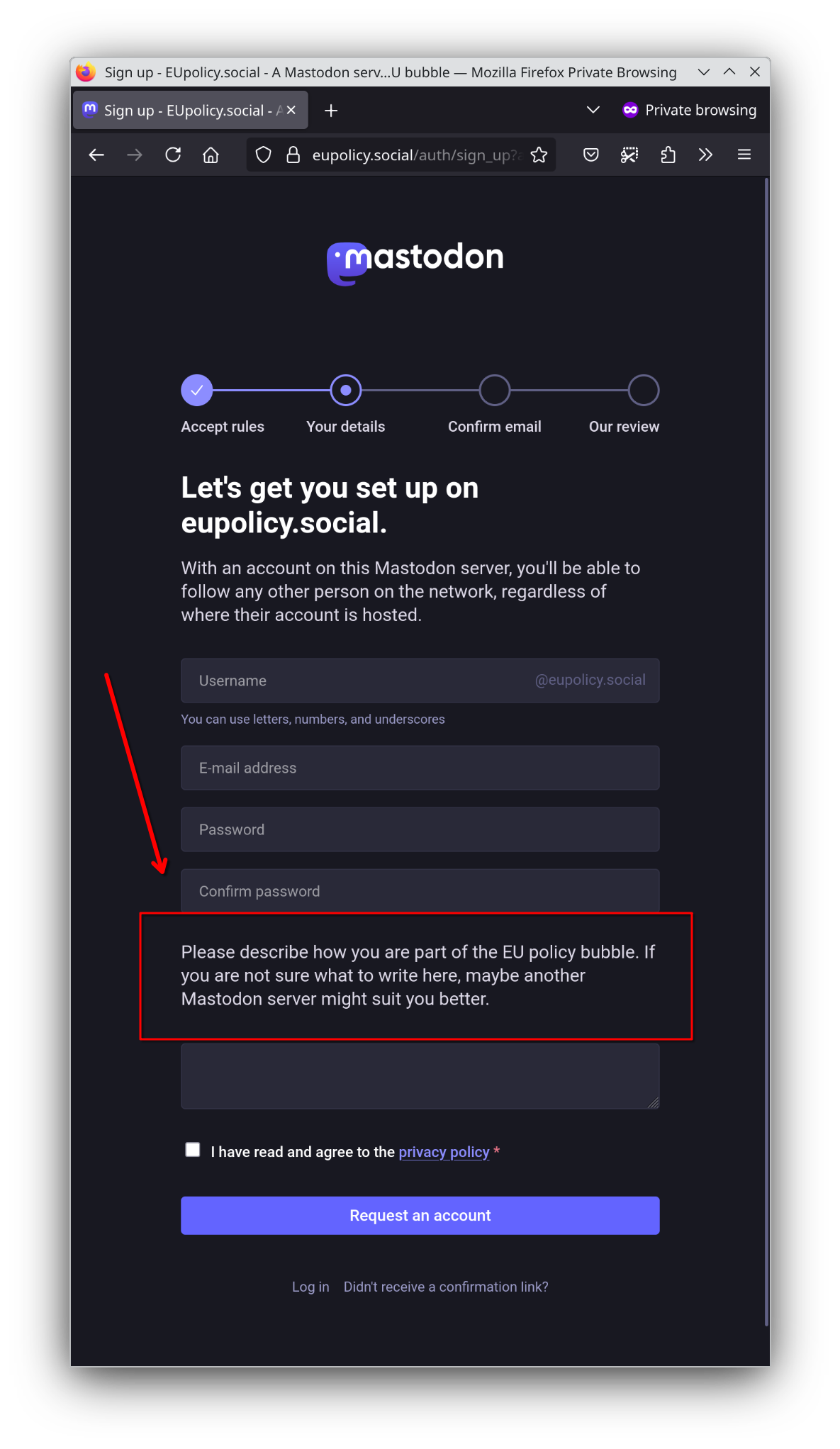
Previously, the instance admins changed all language files in a source code copy of the locales folder. This was tidysome and can easily break with an update, especially when using a docker/podman-based setup that contains already all language files.
How to overwrite individual language/translation strings
The underlying Ruby on Rails loads all string (by alphabetic order) from yml files in a folder that is by default /config/locales. Files loaded later can overwrite strings from files loaded earlier. To overwrite a string, you have to find the identifier first, e.g. in the English language file.
# file: "/config/locales/en.yml"
en:
  […]
  auth:
    […]
    sign_in:
      preamble_html: Login with your <strong>%{domain}</strong> credentials. If your account is hosted on a different server, you will not be able to log in here.
      title: Login to %{domain}
    sign_up:
      manual_review: Sign-ups on %{domain} go through manual review by our moderators. To help us process your registration, write a bit about yourself and why you want an account on %{domain}.
    […]
To change the string auth.sign_up.manual_review in all languages, I have created a new language file called zz-custom-signup-message.yml here below. The prefix zz puts the file at the very end given the alphabetic ordering.
If Mastodon admins use a local git clone of the Mastodon source code, this file can stay in the folder and won’t cause conflicts when language files receive updates via git.
If Mastodon admins use the Container image with Docker or Podman, they can mount this file into the setup with podman run -v ./zz-custom-signup-message.yml:/config/locales/zz-custom-signup-message.yml:z,ro […]. With Container compose file, this would look like:
# file: "docker-compose.yml"
services:
  web:
    container_name: "mastodon-web"
    image: ghcr.io/mastodon/mastodon:$MASTODON_VERSION
    restart: always
    […]
    volumes:
      - ./container-volumes/mastodon/public/system:/mastodon/public/system
      - ./zz-custom-signup-message.yml:/opt/mastodon/config/locales/zz-custom-signup-message.yml:z,ro
  […]
# file: "/config/locales/zz-custom-signup-message.yml"
---
en:
  auth:
    sign_up:
      manual_review: |
        Please describe how you are part of the EU policy bubble. If you are not sure what to write here, maybe another Mastodon server might suit you better.

de:
  auth:
    sign_up:
      manual_review: |
        Auf welche Weise sind Sie mit der EU-Politik-Bubble verbunden? Wenn Sie nicht sicher sind, was in dieses Feld soll, möchten Sie sich vielleicht einen anderen Mastodon-Server aussuchen.

fr:
  auth:
    sign_up:
      manual_review: |
        Comment faites-vous parti de la bulle politique européenne? Si vous n'êtes pas sûr quoi répondre, peut-être un autre serveur Mastodon sera plus approprié pour vous.

es:
  auth:
    sign_up:
      manual_review: |
        Por favor, describa cómo forma parte de la burbuja política de la UE. Si no está seguro de qué escribir aquí, quizá otro servidor de Mastodon le venga mejor.

bg:
  auth:
    sign_up:
      manual_review: |
        Моля, опишете по какъв начин сте част от политическия балон на ЕС. Ако не сте сигурни какво да напишете тук, може би друг сървър на Мастодон ще ви подхожда повече.

cz:
  auth:
    sign_up:
      manual_review: |
        Popište, jak jste součástí politické bubliny EU. Pokud si nejste jisti, co sem napsat, možná by vám lépe vyhovoval jiný server Mastodon.

dk:
  auth:
    sign_up:
      manual_review: |
        Beskriv venligst, hvordan du er en del af EU's politiske boble. Hvis du ikke er sikker på, hvad du skal skrive her, passer en anden Mastodon-server måske bedre til dig.

nl:
  auth:
    sign_up:
      manual_review: |
        Beschrijf alsjeblieft hoe je deel uitmaakt van de EU-beleidsbel. Als je niet zeker weet wat je hier moet schrijven, misschien past een andere Mastodon server beter bij je.

et:
  auth:
    sign_up:
      manual_review: |
        Palun kirjeldage, kuidas te olete osa ELi poliitikamullist. Kui te ei ole kindel, mida siia kirjutada, siis võib-olla sobib teile paremini mõni teine Mastodoni server.

fi:
  auth:
    sign_up:
      manual_review: |
        Kuvailkaa, miten olette osa EU:n poliittista kuplaa. Jos et ole varma, mitä kirjoittaa tänne, ehkä toinen Mastodon-palvelin voisi sopia sinulle paremmin.

gr:
  auth:
    sign_up:
      manual_review: |
        Περιγράψτε τον τρόπο με τον οποίο συμμετέχετε στην πολιτική φούσκα της ΕΕ. Αν δεν είστε σίγουροι για το τι να γράψετε εδώ, ίσως ένας άλλος διακομιστής Mastodon να σας ταιριάζει καλύτερα.

hu:
  auth:
    sign_up:
      manual_review: |
        Kérjük, írd le, hogy milyen szerepet töltesz be az uniós szakpolitikákban. Ha nem tudod, mit írj ide, talán egy másik Mastodon-szerver jobban megfelelne neked.

it:
  auth:
    sign_up:
      manual_review: |
        Descrivi come fai parte della bolla politica dell'UE. Se non sei sicuro di cosa scrivere qui, forse un altro server Mastodon potrebbe essere più adatto a te.

pl:
  auth:
    sign_up:
      manual_review: |
        Wyjaśnij, na czym polega twój związek ze środowiskiem politycznym Unii Europejskiej. Jeśli nie wiesz, co tu napisać, być może inna instancja Mastodona będzie dla Ciebie bardziej odpowiednia.

lv:
  auth:
    sign_up:
      manual_review: |
        Lūdzu, aprakstiet, kā jūs esat daļa no ES politikas burbuļa. Ja neesat pārliecināts, ko šeit rakstīt, varbūt cits Mastodon serveris varētu būt jums piemērotāks.

lt:
  auth:
    sign_up:
      manual_review: |
        Apibūdinkite, kaip dalyvaujate ES politikos burbule. Jei nežinote, ką čia rašyti, galbūt jums labiau tiktų kitas Mastodono serveris.

pt:
  auth:
    sign_up:
      manual_review: |
        Descreva de que forma faz parte da bolha política da UE. Se não tem a certeza do que escrever aqui, talvez outro servidor Mastodon seja mais adequado para si.

ro:
  auth:
    sign_up:
      manual_review: |
        Vă rugăm să descrieți modul în care faceți parte din comunitatea politicilor europene. Dacă nu sunteți sigur ce să scrieți aici, poate că un alt server Mastodon vi s-ar potrivi mai bine.

sk:
  auth:
    sign_up:
      manual_review: |
        Opíšte, ako ste súčasťou politickej bubliny EÚ. Ak si nie ste istí, čo sem napísať, možno by vám viac vyhovoval iný server Mastodon.

sl:
  auth:
    sign_up:
      manual_review: |
        Opišite, kako ste del političnega mehurčka EU. Če niste prepričani, kaj bi napisali tukaj, vam bo morda bolj ustrezal drug Mastodonov strežnik.

se:
  auth:
    sign_up:
      manual_review: |
        Beskriv hur du är en del av EU-bubblan. Om du inte är säker på vad du ska skriva här, kanske en annan Mastodon-server passar dig bättre.

uk:
  auth:
    sign_up:
      manual_review: |
        Будь ласка, опишіть, яким чином ви є частиною мильної бульбашки політики ЄС. Якщо ви не знаєте, що тут писати, можливо, вам більше підійде інший сервер Mastodon.

no:
  auth:
    sign_up:
      manual_review: |
        Beskriv hvordan du er en del av EUs politiske boble. Hvis du ikke er sikker på hva du skal skrive her, passer kanskje en annen Mastodon-server bedre.
References:
- internationalisation in Rails https://guides.rubyonrails.org/i18n.html
- how merging and as such overwriting works in Rails language files https://stackoverflow.com/a/1840077/1407622