
 Member
 CzP
CzPsyslog-ng 4.8.2 is now available
Finally, a new syslog-ng release! As you can see from its version number, this is a bug fix release. It took a bit longer than expected, as we wanted to release it in sync with syslog-ng PE, the commercial variant of syslog-ng. 4.8.2 serves not just as the foundation of the new syslog-ng PE release, but also provides fixes to 4.8.1, which is included in major Linux distributions. This update ensures that all our recent bug fixes reach the majority of our users.
Read more at https://www.syslog-ng.com/community/b/blog/posts/syslog-ng-4-8-2-is-now-available

syslog-ng logo
Removal of Deepin Desktop from openSUSE due to Packaging Policy Violation
Table of Contents
- 1) Introduction
- 2) Bypass of the openSUSE Packaging Policy via a “License Agreement” Dialog
-
3) Review History of Deepin Components
- 2017-12-04: deepin-api: Initial Review of D-Bus Service and Polkit Actions
- 2019-03-25: deepin-clone: Polkit Action com.deepin.pkexec.deepin-clone
- 2019-05-05: deepin-file-manager: D-Bus Service and Polkit Actions
- 2019-05-23: deepin-anything: D-Bus Service
- 2021-02-01: dtkcommon: FileDrag D-Bus Service
- 2021-02-06: deepin-system-monitor: Polkit Policy
- 2023-05-13: deepin-app-services: dde-dconfig-daemon D-Bus Service
- 2023-05-13: deepin-api: Follow-up Review of D-Bus and Polkit
- 2024-08-29: deepin-api-proxy: D-Bus Service
- 2024-09-02: deepin-system-monitor: added D-Bus service and new Polkit actions
- 4) Conclusions about the Future of Deepin in openSUSE
- 5) How to Continue Using Deepin on openSUSE
- 6) References
- Change History
1) Introduction
The Deepin desktop environment (DDE) is part of the Deepin Linux distribution. It focuses on usability, a polished graphical presentation and support for the Chinese language. It is also available on a number of other Linux distributions, openSUSE among them.
Recently we noticed a policy violation in the packaging of the Deepin desktop environment in openSUSE. To get around security review requirements, our Deepin community packager implemented a workaround which bypasses the regular RPM packaging mechanisms to install restricted assets.
As a result of this violation, and in the light of the difficult history we have with Deepin code reviews, we will be removing the Deepin Desktop packages from openSUSE distributions for the time being.
In this blog post we will look at the exact nature of the policy violation, the review history of Deepin components in openSUSE and the conclusions we draw from all of this. Finally, we will give an outlook on how this situation could be resolved, and how users of openSUSE can continue to opt-in to use Deepin in the future.
2) Bypass of the openSUSE Packaging Policy via a “License Agreement” Dialog
The SUSE security team enforces a number of packaging
restrictions for openSUSE distributions. Among
others, the installation of D-Bus system service configuration files and Polkit
policies requires a review by us. When we are satisfied with a package’s
security, then we whitelist the respective components. From there on, the
package can be submitted to the openSUSE:Factory project in the Open Build
Service, which is the base for the openSUSE
Tumbleweed rolling release distribution.
For a large software suite like Deepin, which contains a significant number of D-Bus services, this can be a difficult initial hurdle to overcome. We have been in contact with the openSUSE Deepin packager ever since 2017, and have whitelisted various Deepin D-Bus components in the meantime. A number of remaining Deepin review bugs have seen little progress in recent years, however, because the issues we pointed out have not been addressed properly.
Perhaps tired of waiting, the packager decided to try a different avenue to
get the remaining Deepin components into openSUSE skirting the review
requirements. In January 2025, during routine reviews, we stumbled upon
the deepin-feature-enable package,
which was introduced on
2021-04-27 without consulting
us or even informing us. This innocently named package implements a “license
agreement dialog” which basically explains that the SUSE security team has
doubts about the security of Deepin, but to properly use Deepin, certain
components need to be installed anyway. Thus, if the user does not care about
security then “the license” should be accepted. If the user accepts, the
missing D-Bus configuration files and Polkit policies are automatically
extracted into system directories from tarballs found in the
deepin-daemon-dbus and deepin-daemon-polkit packages. The license text
also contains a hint suggesting to manually install the
deepin-file-manager-dbus and deepin-file-manager-polkit packages and run a
script to sideload further configuration files that are needed for the Deepin
file manager D-Bus component to work.
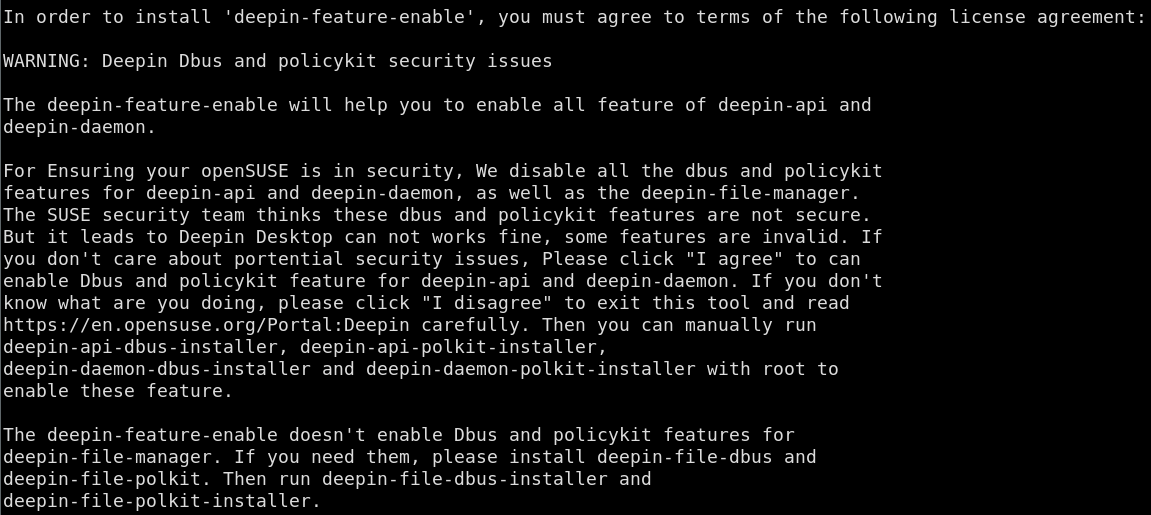
For end users, this effectively means that typing “y” once during the installation of the Deepin pattern is enough to opt in to activating components with questionable security which have not been accepted by the SUSE security team.
Given the number of reviews that happened over many years, with some decline
in frequency and activity, we had wrongly assumed that by now the bulk of
Deepin D-Bus components had managed to enter openSUSE:Factory after being
whitelisted by us (apart from some optional utility packages). Instead we had
to find out that core components, which are found in the deepin-daemon
package, had never been submitted for our review, but had been smuggled into
openSUSE.
A review bug has been running for Deepin file manager since 2019 without the package reaching a satisfying state. Offering users the ability to run a script to activate the problematic components is less critical than automatically doing so via a crafted “license dialog”, but is still an unclean and questionable approach.
3) Review History of Deepin Components
This section gives an overview of the long history of review requests for Deepin components in openSUSE. This should give an insight into the effort that already went into checking Deepin’s security, and the difficulties that we often encountered in attempting to arrive at a good solution.
2017-12-04: deepin-api: Initial Review of D-Bus Service and Polkit Actions
This was the first review request we received for
Deepin. It reached us during a time of restructuring in our team, which caused
a delay of about half a year before we found time to work on it. deepin-api
contained a D-Bus service which ran as root, offering a miscellaneous
collection of D-Bus methods on the D-Bus system bus e.g. for playing audio
files.
We found various issues in the D-Bus
method implementations. Most prominently, any user in the system was allowed to
run various commands like rfkill with arbitrary parameters as root. Polkit
authentication was only implemented in some of the D-Bus methods, while others
merely had a TODO: marker to add authentication. Furthermore, the Polkit
authentication that was implemented for some methods was subject to a race
condition allowing authentication bypass.
The Deepin packager involved upstream and we started a discussion in the review bug about how to address the issues. A first attempt to fix them produced incomplete results. We asked for a formal security contact at the Deepin project to offer coordinated disclosure, since we found problems in other Deepin components as well in the meantime. We did not receive an answer to this, though.
After this initial activity there was no more progress for six months, which is why we closed the bug due to inactivity in December 2019. In April 2021 the Deepin packager reopened this bug assigning it to an upstream developer. In July 2021 we were finally pointed to the proper fixes for the issues, and we granted a whitelisting for this specific Deepin component in August 2021.
2019-03-25: deepin-clone: Polkit Action com.deepin.pkexec.deepin-clone
deepin-clone is a backup utility for the Deepin desktop. In March 2019 we
received a review request for a Polkit action
contained in the package. We found a large number of issues in the
implementation of this Polkit action, such as problematic predictable /tmp
file uses, a world-readable log file in a fixed path in /tmp and the
possibility to prevent the unmounting of temporarily mounted block devices.
We reported these issues to the packager in April 2019. In July 2019 we were pointed to a couple of fixes, but we found that some issues had still not been addressed and the code in general still looked unclean. The more severe issues had been fixed at least, thus we requested CVEs for them and published a report on the oss-security mailing list.
We never heard back about the remaining concerns we had, thus the whitelisting for this component was never granted.
2019-05-05: deepin-file-manager: D-Bus Service and Polkit Actions
In May 2019 we received review requests for the D-Bus
part and the Polkit
part of the deepin-file-manager
package. This application is a file manager similar to Dolphin in KDE or
Nautilus in GNOME. The D-Bus service implemented in the package offers methods
to perform actions like mounting Samba network shares or managing the UNIX
group membership for user accounts in the system. This is one of the packages
for which the Deepin packager eventually implemented a whitelisting bypass, as
explained in section 2).
After reviewing the main D-Bus service, we could not help ourselves but call
it a security nightmare. The
service methods were not only unauthenticated and thus accessible to
all users in the system, but the D-Bus configuration file also allowed anybody
to own the D-Bus service path on the system bus, which could lead to
impersonation of the daemon. Among other issues, the D-Bus service allowed
anybody in the system to create arbitrary new UNIX groups, add arbitrary users
to arbitrary groups, set arbitrary users’ Samba passwords or overwrite almost
any file on the system by invoking mkfs on them as root, leading to
data loss and denial-of-service. The daemon did contain some Polkit
authentication code, but it was all found in unused code paths; to top it all
off, this code used the deprecated UnixProcess Polkit subject in an unsafe
way, which would make it vulnerable to race conditions allowing authentication
bypass, if it had been used.
Other Polkit policies found in the package were at least being used. One
Polkit action allowed locally logged-in users to run
/usr/bin/usb-device-formatter as root without authentication. The program
allowed to determine the existence of arbitrary files in the system, and to
unmount or format non-busy file systems. A Deepin developer joined the
discussion in the bug and again we tried to bring to upstream’s
attention the overarching security
situation in Deepin, but to no avail.
A couple of bugfixes appeared for the Polkit issues but once more they were incomplete. By December 2019 we did not receive any further responses, thus we closed the bug without whitelisting the Polkit policies. In March 2021 the Deepin packager reopened the bug but only pointed us to supposed fixes later in October 2022. We moved the discussion for the Polkit parts into the other bug for the D-Bus service component at this time.
For the D-Bus service issues we did not receive any response at all, and thus also closed the bug in December 2019 without whitelisting the service. Meanwhile we published our findings on the oss-security mailing list in August 2019. In April 2021 the Deepin packager reopened the bug, stating that upstream would be working on the issues. In August 2021 an upstream developer was assigned to the bug, who pointed to a partial bugfix but at the same time stated that Deepin developers had “different opinions” about the reported security issues, without providing further details, however.
In October 2022 the Deepin packager pointed us to more fixes and a new release packaged for openSUSE. The D-Bus interface received major changes at this point. Polkit authentication was added to some D-Bus calls now, but it again used the deprecated UnixProcess subject in an unsafe manner, which would allow to bypass authentication by winning a race condition. Newly added D-Bus methods also introduced new issues, such as lacking path validation when unmounting Samba shares. Some other methods again were left completely unauthenticated.
In November 2023 the Deepin packager informed us about another new release that was supposed to contain more bugfixes. This time some of the problematic D-Bus methods disappeared completely, but some of the original issues as well as confusing and broken Polkit authentication attempts remained.
In April 2024 the Deepin packager informed us again about a new release
containing bugfixes. Some more D-Bus methods simply disappeared, some now
actually used proper Polkit authentication based on the D-Bus system bus name.
The D-Bus service configuration still allowed any user in the system to
impersonate the service, however. Also, once more, a bunch of newly added
D-Bus methods introduced new problems. One of them, for example, allowed any
user in the system to start the Samba system daemons nmbd and smbd. A lot
of path verification issues also lingered in the new APIs.
We did not get further responses for these reviews, and the components are still not whitelisted for openSUSE. Due to the frequent alteration of the D-Bus methods in the Deepin file manager daemon, which led to partial bugfixes and new issues appearing, we also refrained from assigning further CVEs for the issues. Formally, each incomplete bugfix would need a dedicated CVE, which would have led to a confusingly long list of CVEs revolving around the same topic: that the Deepin file manager daemon has major security issues, some of them likely still unfixed.
2019-05-23: deepin-anything: D-Bus Service
In May 2019 we received a review request for the
deepin-anything package. This component acts as the back end for a desktop
search engine. Given the number of unsolved Deepin related reviews we already
faced at this time, we refused to work on this additional review until the
others would have been resolved.
Still, just from taking a quick look at the package we noticed yet another issue: the D-Bus service configuration allowed any user in the system to register the deepin-anything service on the system bus.
In September 2024 the Deepin packager approached us again pointing to changes in the upstream D-Bus configuration. We did not get around to looking more closely into it again, as we treated Deepin with lower priority at that time.
2021-02-01: dtkcommon: FileDrag D-Bus Service
Another review request arrived in February 2021. This time it was about a “com.deepin.dtk.FileDrag” D-Bus interface, but the actual implementation of this D-Bus service remained a mystery to be found. In the end, upstream moved this interface to the D-Bus session bus in July 2021 and no whitelisting on our end was necessary after all.
Interestingly the Deepin packager stated in the bug that upstream finds itself unable to respond to security bug reports, which is rather worrying for such a big project with such an amount of security issues uncovered.
2021-02-06: deepin-system-monitor: Polkit Policy
This request also arrived in February 2021.
It is one of the few Deepin reviews that was completed quite quickly and
without any major worries. The Polkit policy only allowed execution of
programs like kill, renice and systemctl via the pkexec utility. This
was only allowed with admin authentication. We whitelisted the policy in May
2021.
2023-05-13: deepin-app-services: dde-dconfig-daemon D-Bus Service
Here we see a gap of about two years since the last Deepin review request.
This might be due to the fact that the offending deepin-feature-enable
package had meanwhile been introduced in May 2021 to circumvent the
whitelisting requirements. It seems the packager was still willing to involve
us in newly added Deepin packages that contained D-Bus components, however.
Sadly the review of deepin-app-services was
another chaotic case, one that is actually still unfinished. Even understanding
the purpose of this D-Bus service was difficult, because there wasn’t really
any design documentation or purpose description of the component. From looking
at the D-Bus service implementation, we judged that it is a kind of system
wide configuration store for Deepin. Contrary to most other Deepin D-Bus
services, this one is not running as root but as a dedicated unprivileged
service user.
We quickly found one class of issues in this D-Bus service, namely the
crafting of relative path names by adding ../ components to various
D-Bus input parameters that are used for looking up configuration files. It
seemed the D-Bus service should only allow the lookup JSON configuration files
from trusted paths in /usr. By constructing relative paths, however, the
D-Bus service could be tricked into loading untrusted JSON configuration from
arbitrary locations. We were not completely sure about the impact of this,
given the abstract nature of the configuration store, but it seemed to have
security relevance, since upstream reacted to our report of the issue.
It took three passes and a year of time, however, for upstream to fix all
combinations of input parameters that would allow construction of arbitrary
paths. Upstream did not verify and solve these on their own. Instead they only
fixed the concrete issues we reported and, when we returned to the review, we
found yet more ways to escape the /usr path restriction.
In December 2024 we were close to whitelisting this D-Bus service. With this much time passed, however, we thought it would be better to have a fresh look at the current situation in the D-Bus interface. This led to a series of new concerns, partly again in the area of path lookup, but also due to the fact that arbitrary users could read and store configuration for arbitrary other users. There was a lack of Polkit authentication and user separation in the interface.
2023-05-13: deepin-api: Follow-up Review of D-Bus and Polkit
In parallel to the deepin-app-services review described in the previous
section, we also received a follow-up review
request for deepin-api. The trigger for this
review was that upstream renamed their D-Bus interface and Polkit action names
from com.deepin.* to org.deepin.*.
Luckily, this time the implementation of the D-Bus service did not change much compared to the last time and we could not identify any new security issues. For this reason we quickly accepted the changes and finished the review.
2024-08-29: deepin-api-proxy: D-Bus Service
After a longer time of standstill regarding Deepin reviews, a request for the
addition of deepin-api-proxy arrived. This package
greeted us with over two dozen D-Bus configuration files. Again, upstream’s
description of what the component is supposed to do was very terse. From
looking at the implementation we deduced that the proxy component seems to be
related to the renaming of interfaces described in the previous section.
We found a design flaw in the proxy’s design which allowed a local root exploit. You can find the details in a dedicated blog post we published about this not too long ago.
It is noteworthy that the communication with upstream proved very difficult
during the coordinated disclosure process we started for this
finding. We did not get timely responses, which nearly led us to a one-sided
publication of the report, until upstream finally expressed their wish to
follow coordinated disclosure at the very last moment. The actual publication
of the upstream fix was not communicated to us and neither was the bugfix
shared or discussed with us. This resulted in a follow-up security issue,
since upstream once again relied on the unsafe use of the deprecated Polkit
UnixProcess subject for authentication.
The review of this component was also what led us to the discovery of the
deepin-feature-enable whitelisting bypass, since we installed the full
Deepin desktop environment for the first time in a long time, which triggered
the “license agreement” dialog described above. After finding out about this,
we decided that it was time to reassess the overall topic of Deepin in openSUSE
based on our long-standing experiences.
2024-09-02: deepin-system-monitor: added D-Bus service and new Polkit actions
The deepin-system-monitor received additions in the form of a new D-Bus
service and additional Polkit
actions. We accepted the
D-Bus service although it contained some quirks. We did not find time
to fully complete the review of the Polkit actions until now, however. A
second look that we had at the D-Bus service showed that it was once more
using the deprecated UnixProcess subject for Polkit authentication in an
unsafe way. This is something that we had previously overlooked.
4) Conclusions about the Future of Deepin in openSUSE
The experience with Deepin software and its upstream during the code reviews that we performed has not been the best. More than once, security issues we reported have been replaced by new security issues. Other times, upstream did not invest the effort to fully analyze the issues we reported and fixed them insufficiently. Generally the communication with upstream proved difficult, maybe also due to the language barrier. While upstream stated at times that they don’t have enough resources to deal with security reports, which is worrying enough, the design and implementation of Deepin D-Bus components often changed radically in unrelated ways. This makes the security assessment of Deepin components a moving target. Building trust towards Deepin components has thus been extremely difficult over the years.
The history of Deepin code reviews clearly shows that upstream is lacking security culture, and the same classes of security issues keep appearing. Although we only looked at a small fraction of the code Deepin consists of, we found security issues nearly every time we looked at one of its components. Based on these experiences, we expect further security issues to linger in the rest of the Deepin code that does not stick out, as the D-Bus services do (as they run with raised privileges). Given the experiences we have gathered with Deepin D-Bus services, we consider it likely that they break user isolation. These components are certainly not fit for multi-user systems; even on single user systems they will be weakening defense-in-depth significantly.
The discovery of the bypass of the security whitelistings via the
deepin-feature-enable package marks a turning point in our assessment of
Deepin. We don’t believe that the openSUSE Deepin packager acted with bad
intent when he implemented the “license agreement” dialog to bypass our
whitelisting restrictions. The dialog itself makes the security concerns we
have transparent, so this does not happen in a sneaky way, at least not
towards users. It was not discussed with us, however, and it violates openSUSE
packaging policies. Beyond the security aspect, this also affects general
packaging quality assurance: the D-Bus configuration files and Polkit policies
installed by the deepin-feature-enable package are unknown to the package
manager and won’t be cleaned up upon package removal, for example. Such
bypasses are not deemed acceptable by us.
The combination of these factors led us to the decision to remove the Deepin
desktop completely from openSUSE Tumbleweed and from the future Leap 16.0
release. In openSUSE Leap 15.6 we will remove the offending
deepin-feature-enable package only. It is a difficult decision given that
the Deepin desktop has a considerable number of users. We firmly believe the
Deepin packaging and security assessment in openSUSE needs a reboot, however,
ideally involving new people that can help get the Deepin packages into shape,
establish a relationship with Deepin upstream and keep an eye on bugfixes,
thus avoiding fruitless follow-up reviews that just waste our time. In such a
new setup we would be willing to have a look at all the sensitive Deepin
components again one by one.
This is a process that will take time, of course, and there are limits to what we as a security team can do. Given the size of the Deepin project we would also like to see other Linux distributions and the (security) community join us in trying to establish a better security culture with Deepin upstream.
After publication of this report we received an email response from Deepin upstream and they also published a blog post on the topic which contains similar content. They outline an action plan on how to improve the security stance of Deepin and also intend to solve any unfixed issues we reported by the end of May 2025.
5) How to Continue Using Deepin on openSUSE
Given the security record of Deepin and the concerns expressed in the previous section, we don’t recommend to use the Deepin desktop at this time. If you still would like to install (or continue using) the Deepin desktop on openSUSE Tumbleweed despite the existing security concerns, then you can add the Deepin devel project repositories to your system as follows:
# add the devel project repository for Deepin to zypper
# for other distributions you need to adjust the URL here to point to the proper repository for your case
root# zypper ar https://download.opensuse.org/repositories/X11:/Deepin:/Factory/openSUSE_Tumbleweed deepin-factory
# refresh zypper repositories
root# zypper ref
New repository or package signing key received:

  Repository:       deepin-factory
  Key Fingerprint:  EED7 FE07 D0FC DEF0 E5B4 D4A9 C0DA 4428 1599 EA1E
  Key Name:         X11:Deepin:Factory OBS Project <X11:Deepin:Factory@build.opensuse.org>
  Key Algorithm:    RSA 2048
  Key Created:      Sat Apr 29 01:27:01 2023
  Key Expires:      Mon Jul  7 01:27:01 2025
  Rpm Name:         gpg-pubkey-1599ea1e-644c5645


    Note: Signing data enables the recipient to verify that no modifications occurred after the data
    were signed. Accepting data with no, wrong or unknown signature can lead to a corrupted system
    and in extreme cases even to a system compromise.

    Note: A GPG pubkey is clearly identified by its fingerprint. Do not rely on the key\'s name. If
    you are not sure whether the presented key is authentic, ask the repository provider or check
    their web site. Many providers maintain a web page showing the fingerprints of the GPG keys they
    are using.

Do you want to reject the key, trust temporarily, or trust always? [r/t/a/?] (r):
The current GPG key fingerprint for this project is EED7 FE07 D0FC DEF0 E5B4
D4A9 C0DA 4428 1599 EA1E. You can verify it yourself by downloading the
public key
, importing it via gpg --import and checking the output of gpg
--fingerprint for the newly imported key.
Note that by doing this you will trust any packages originating from this devel project, which are neither vetted by the SUSE security team nor by the openSUSE package submission review teams.
For openSUSE Leap you need to adjust the repository URL to point to the proper Leap repository for your system.
6) References
- Deepin desktop website
- openSUSE packaging security guidelines
- deepin-feature-enable package (implements whitelisting bypass)
Dedicated Security Reports
- blog post about deepin-api-proxy security issues
- oss-security report about various Deepin issues
- oss-security report about deepin-clone issues
Review Bugs
- initial deepin-api review bug (bsc#1070943)
- follow-up deepin-api review bug (bsc#1211376)
- deepin-clone review bug (bsc#1130388)
- deepin-file-manager Polkit policy review bug (bsc#1134131)
- deepin-file-manager D-Bus review bug (bsc#1134132)
- deepin-anything review bug (bsc#1136026)
- dtkcommon FileDrag D-Bus review bug (bsc#1181642)
- deepin-system-monitor review bug (bsc#1181886)
- deepin-app-services review bug (bsc#1211374)
- deepin-api-proxy review bug (bsc#1229918)
- deepin-system-monitor D-Bus additions review bug (bsc#1229918)
- deepin-system-monitor Polkit additions review bug (bsc#1233054)
Change History
| 2025-05-08 | Minor clarifications in Section 3) 2019-05-05: deepin-file-manager and Section 3) 2023-05-13: deepin-app-services. Fixed a typo in Section 5). |
| 2025-05-14 | Added a note to the end of section 4) about upstream’s response to this report. |

Get openSUSE Gear at oSC25
Heading to the openSUSE Conference 2025 in Nuremberg? Great news! The project will have a shop available at the conference venue where attendees can purchase openSUSE merchandise! Items available at the shop will include popular products from Freewear.org’s openSUSE section.
Between 100 to 125 items, mainly t-shirts, will be available as a preview of brand-new designs that emphasize Leap, Tumbleweed, Slowroll, Aeon and Kalpa and MicroOS. These new items aren’t yet listed on Freewear.org’s website, but there are plans to update the online shop with all of them after the conference.
If you’re particularly interested in specific items, sizes, or styles, we encourage you to email your request in advance to ddemaio@opensuse.org and ishwon@openSUSE.org with the subject line “oSC25 Shop Selection”. Please do this before June 4 since shipments will happen around this time. This helps us better prepare and ensure we have the most requested items available during the event.
Event Details
- Conference Dates: June 26 – 28, 2025
- Location: Z-Bau, Nuremberg, Germany
- What to Expect: Talks, workshops, and community networking
The openSUSE Conference is a free, community-driven event that brings together contributors, developers and enthusiasts from across the globe to collaborate on open-source software development.
Pre-Party
Kick things off early! Join us for the pre-party on June 25 at Kater Murr.
Come by anytime after 6 p.m. and connect with fellow attendees ahead of the main event.
📍 Kater Murr on OpenStreetMap
📍 Google Maps Location
Stay tuned, get involved, and don’t forget to gear up at oSC25!
Upgrade to Freedom Campaign Shifts to End of 10
Microsoft will end support for Windows 10 on Oct. 14 and this will likely trigger a surge in unnecessary electronic waste (e-waste) on International E-Waste Day, which is a day designed to raise awareness about the global issue of e-waste and promote responsible recycling and disposal practices.
The openSUSE Project’s Upgrade to Freedom campaign urges people to extend the life of their device rather than becoming e-waste. Since millions of Windows 10 users may believe their devices will become useless and contribute to the waste of fully functional devices, installing a Linux operating systems like openSUSE or another Linux distribution is more reasonable.
A new initiative called End of 10 has launched that shares the purposes and origin of openSUSE’s Upgrade to Freedom efforts. As the #endof10 initiative also intends to help people extend the life of devices that would otherwise become e-waste, rather than dilute the messaging and narrative, members of openSUSE marketing have decided to transition the Upgrade to Freedom campaign to joining the End of 10 initiative.
The project will update all its previous Upgrade to Freedom content to reflect these changes.
Many articles in the media report that Microsoft demands new hardware or extended support payments for continued use of Windows. Many users own computers that still run well but fail to meet Windows 11 upgrade requirements.
Most computers built after 2010 can run Linux operating systems like openSUSE, Fedora, or Debian with excellent performance. The campaign encourages users to upgrade their software, not their hardware.
Volunteers developed endof10.org as a resource hub. Users can find local repair groups, download installation tools and offer support to others. The site connects people who want to switch away from Windows with those ready to help.
The End of 10 organizers have launched the first phase with outreach to FOSS communities, Repair Cafes, and media outlets. Over the next several months, they will promote install fests and coordinate local outreach events. They will continue promoting the campaign throughout 2025 as the Windows 10 deadline approaches.
Organizers encourage teachers, developers, and students to join the effort.
We encourage everyone to learn more about the campaign at endof10.org.
Additional Information
What does the “End Of 10” campaign have planned? At the moment, activities include traditional media outreach, social media campaigns, and in-person install events ramping up to 14 October. As an example, we are planning a “Lists of 10” campaign with the hashtag #EndOf10, with topics like:
- “10 reasons to switch to Linux”
- “10 Free & Open Source apps to try on your new Linux computer”
- “10 Free & Open Source apps you may already use but didn’t know it”
Important: End Of 10 wants the larger FOSS universe to be at the center of everything the campaign does. The goal of the campaign is to speak as a big FOSS family and therefore there is no tolerance for negative messaging about other FOSS communities.
We hope you and other FOSS members will join us in the End Of 10 campaign, so we can promote Free & Open Source Software as a solution for Windows 10 users who wish to keep their devices safely in use, together.
This is part of a series on End of 10 where we advocate for Free & Open Source Software as a solution for Windows 10 users who wish to keep their devices rather than contributing to e-waste of functioning devices.
Qactus v3.0.0 is out!
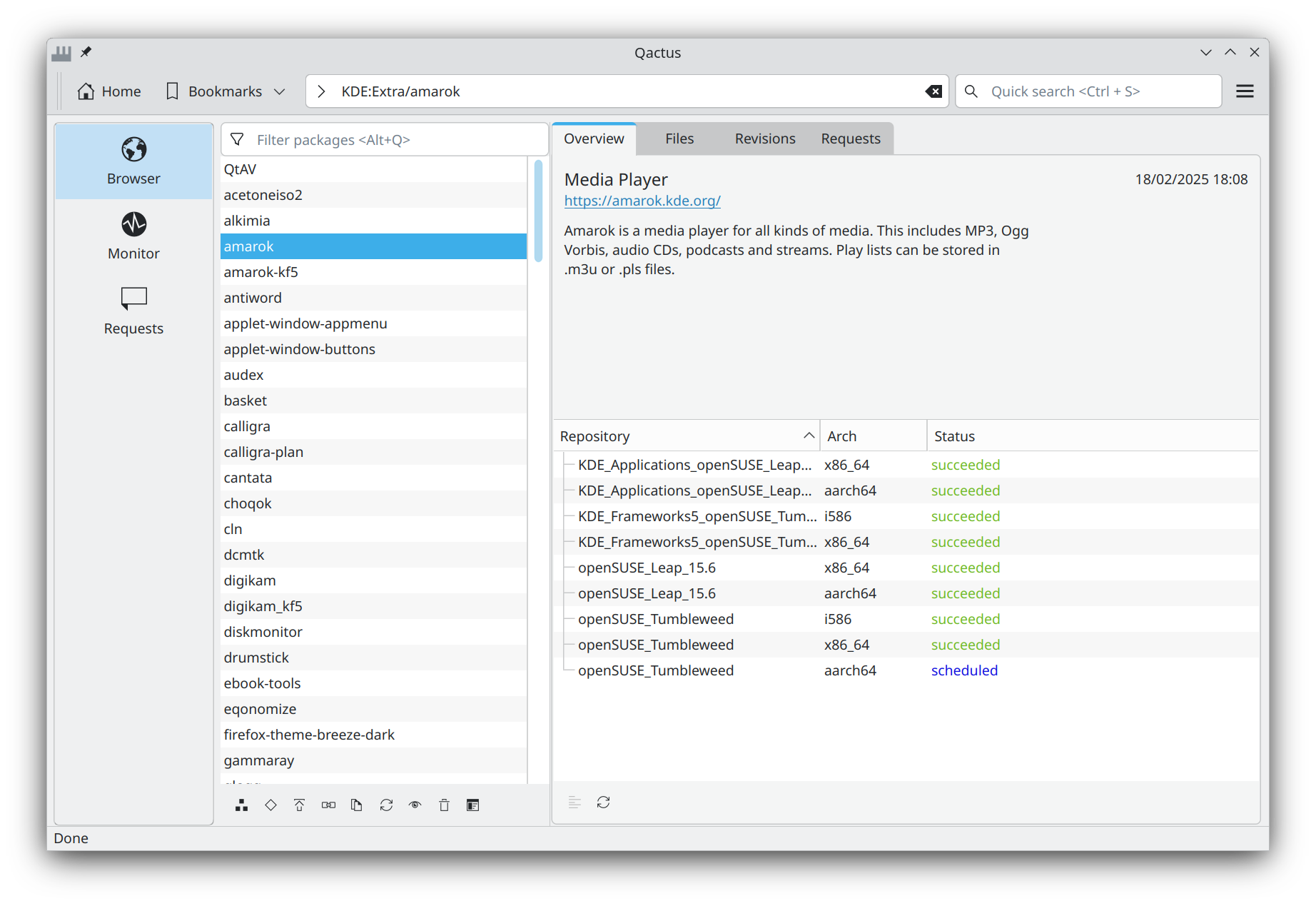
Qactus 3.0.0 comes with many changes, such as:
- UI redesign, package-centred with a modern style (Plasma-ish)
- Code ported to Qt6
- Improved memory usage
- New features:
- Location bar
- Search bar
- Project/package overview
- Getting revisions
- Getting requests per project/package
- New logo
- Multiple fixes (and some bugs?

- Switch to Apache License 2.0

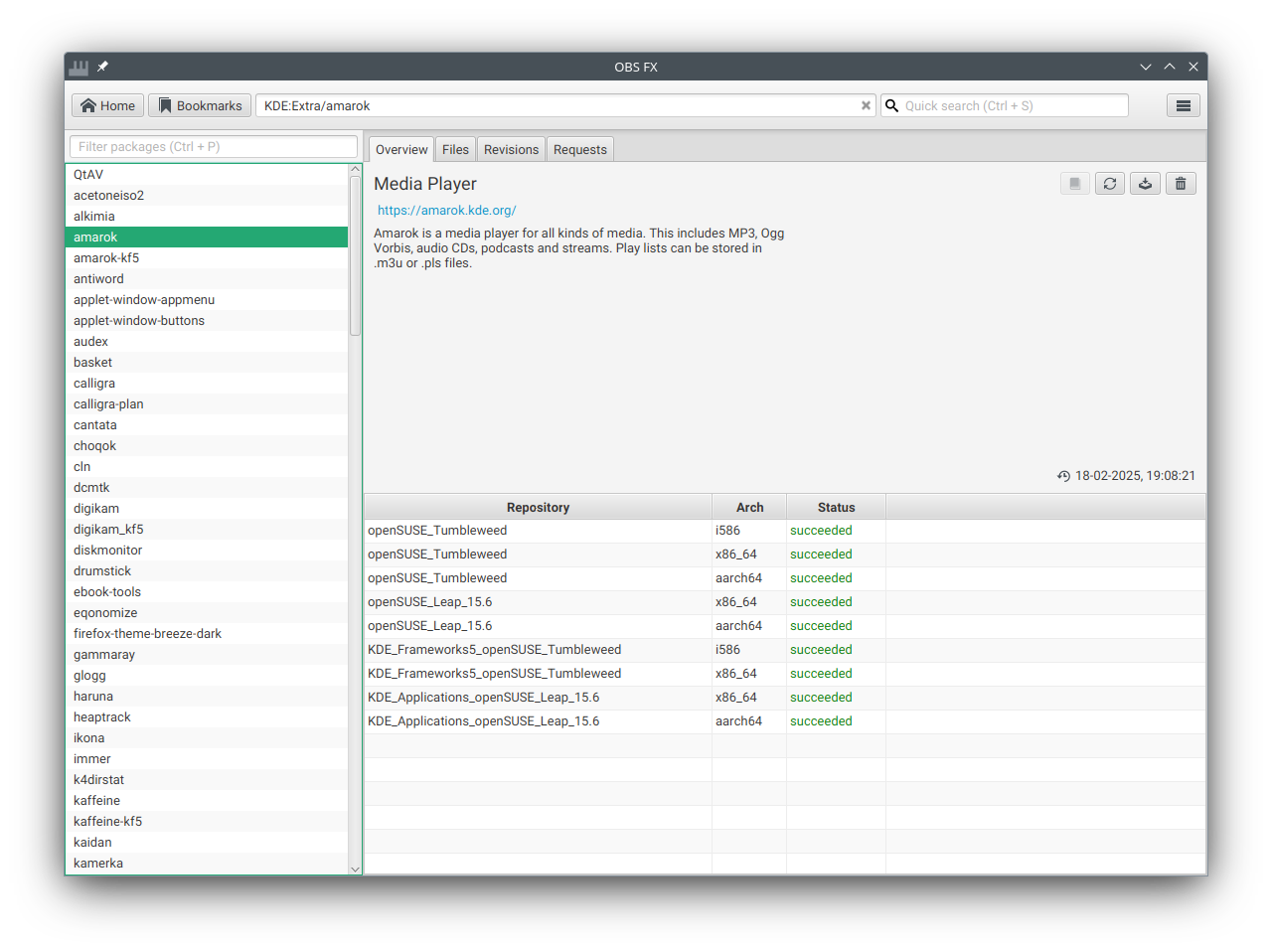
I have also updated jOBS, a Java-based Open Build Service library and developed a basic GUI for it,
OBS FX; it is a JavaFX-based OBS client with a green touch 

Framework 2nd Gen Event | Blathering

Labeling outside of OBS with an API
Fix LibreOffice Scaling Issues on Linux
Zypper’s New Parallel Downloads: Speed Up Your openSUSE Tumbleweed Updates
Tumbleweed – Review of the week 2025/18
Dear Tumbleweed users and hackers,
This week felt rather quiet – but that’s what we get for having a Thursday holiday (May Day, Labour Day). People tend to take Friday off, too, which in turn makes the entire work week very short (but gives the enthusiast more time to hack on things to balance it out). Despite all this, we have published 6 snapshots during this week (0424…0428, 0501)
There are surely some interesting changes for everybody in there:
- Java 21 openJDK 21.0.7.0
- Postfix 3.10.2
- openSSH 10.0p2: support for the weak DSA signature algorithm removed
- Python 3.13.3
- Linux kernel 6.14.4
- fuse 3.17.2
- Mesa 25.0.5
- GCC 15.1.1
- openSSL 3.5.0
In the staging projects, we are busy testing these submissions by maintainers:
- Meson 1.8.0
- Boost 1.88.0
- GStreamer 1.26.1
- Mozilla Firefox 138.0
- Mozilla NSS 3.110
- util-linux 2.41: findmnt causes segfaults
- GCC 15 as distro compiler, see https://build.opensuse.org/staging_workflows/openSUSE:Factory/staging_projects/openSUSE:Factory:Staging:Gcc7
- CMake 4.0 (not yet submitted, but please help fix issues, See https://lists.opensuse.org/archives/list/factory@lists.opensuse.org/thread/FHM4V3PGI3GX65LG6ZIAGJ6QQD5O57WN/