
 Member
Using QJson under Windows
Recently lots of people asked me how to build QJson under Windows. Most of them reported build/link errors, so I decided to try personally.
The good news is that QJson can be successfully built under Window, I can show you proof ;)
{% img /images/qjson/qjson_windows_1.png %} {% img /images/qjson/qjson_windows_2.png %}
I have written the build instructions on QJson website: just take a look here.
One last note: if you have problems with QJson please subscribe to the developer mailing list and post a message.

.NET/Mono Code Camp in Tarragona: Call for Papers
| We have started planning the sessions for the .NET/Mono Code Camp in Tarragona (Spain). The sessions are being organized in two tracks: a Mono track and an MSDN track. I plan to give at least a couple of talks: one about the upcoming release of MonoDevelop, and one about application extensibility based on Mono.Addins. If you are interested in giving a talk, it is now time let us know. You'll find here a form you can use to submit your proposal. We will select the proposals we find more interesting, and we plan to pay the travel expenses for all speakers. Update: sessions are going to be held in spanish. Update 2: we don't have a big budget, so we may not be able to pay full expenses to people coming from outside Spain. Update 3: the deadline for the call for papers is September 11th. I like how the Code Camp is shaping up so far. It will be a chance to meet with spanish Mono hackers and users, but it will also be a good chance to talk about Mono and Linux to an audience which typically is very Microsoft-centric. |
 |
ATI fglrx driver
It is Radeon Xpress 200 graphic adapter that is making trouble.
The open source radeon driver is OK for almost anything, specially after removing strange sized "Virtual 3840x1200" when frame rates jumped to values comparable to proprietary fglrx, but the "Almost" is a keyword here.
Despite glxgears giving nice number of the frames per second, Google Earth was like molasses, and fan would start turning in high speed almost from start, YouTube videos refused to take full screen, with Flash actually going on strike.
So, to cover those cases I attempted to install fglrx again.
First attempt was to compile driver, but that didn't work well. The ati installer didn't do the job well.
Using /usr/share/ati/fglrx-uninstall.sh I removed remnants of "Hard Way" installation and used procedure described in http://en.opensuse.org/ATI_Radeon_Xpress
When all was done, Google Earth was running as it should, YouTube didn't complain to run in full screen mode.

 foursixnine
GtkBuilder on IronPython
 Someone asked me if I could add the missing parts of GtkBuilder in Gtk#Beans so he could use it with IronPython on mono.
Hey, it looks there's no missing parts ! It all works fine since day one. Here's the the trick:
Now your IronPython skills are ready to rock Gnome3!
import clr
clr.AddReference('glib-sharp')
clr.AddReference('gtk-sharp')
clr.AddReference('gtk-sharp-beans')
import Gtk
import GLib
import GtkBeans
import System.IO

def PyBuilderAutoconnect(builder, target):
def _connect(builder, object, signal_name, handler_name, connect_object, flags):
    name = ''.join([frag.title() for frag in signal_name.split('_')])
    event = getattr(object, name)
    event += getattr(target, handler_name)

for object in builder.Objects:
    setattr(target, object.Name, object)
builder.ConnectSignalsFull (_connect)

class Application:
def __init__(self):
    builder = GtkBeans.Builder (System.IO.FileStream ('ui.ui', System.IO.FileMode.Open))
    #use this ctor if you don't like FileStream
    #builder = GtkBeans.Builder ()
    #builder.AddFromFile ('./ui.ui')

    PyBuilderAutoconnect (builder, self)
    self.window1.ShowAll ()

def onbuttonclicked(self, o, args):
    Gtk.Application.Quit()

Gtk.Application.Init ()
app = Application ()
Gtk.Application.Run ()
Firewall Zone Switcher Updated
I have updated the Firewall Zone Switcher.
It now starts with a main window by default instead of
directly going to the system tray. There’s a settings dialog that
allows to enable the system tray icon and optionally also enables
starting the applet on log-in. Furthermore the daemon now uses
PolicyKit for access control and the applet supports i18n.
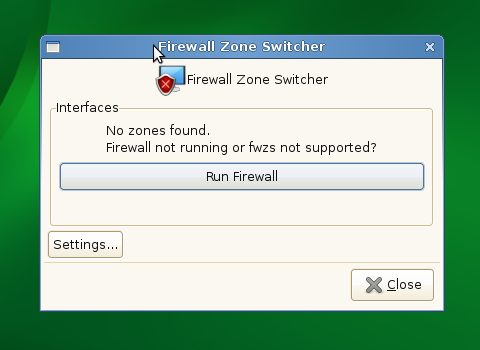
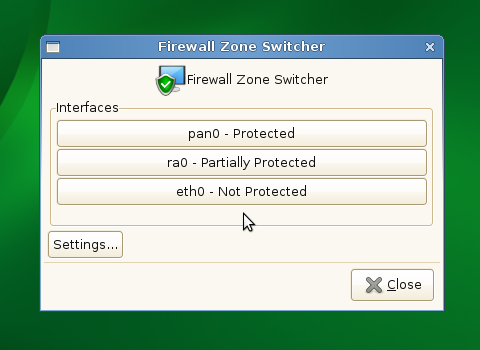
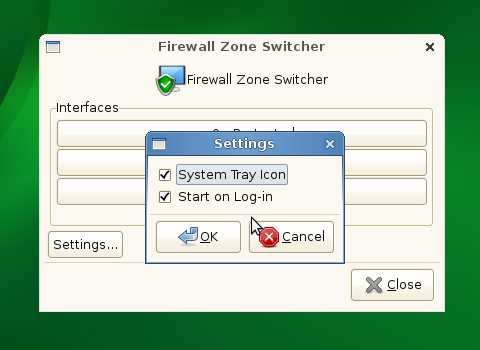
Packages for openSUSE 11.1 are available from the openSUSE build service. You also need to update SuSEfirewall2 from that repo. Source code repo is available at gitorious.
Awesometastic

The HTML/js UI is pretty slick even !
The code is not merged yet, but I packaged the extension and it's now installable from within F-Spot (> 0.6.0.0) from the "Extension Manager" dialog.
More details can be found on Anton's blog.
[Update 2009/09/15. The code is now merged]
Clicks with touchpad trick (11.2 M6)
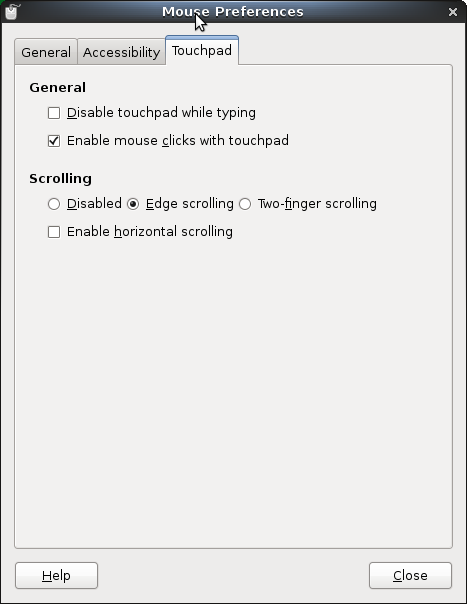
If you are running the openSUSE 11.2 Milestone 6 (Gnome 2.27.5, Kernel 2.6.31-rc6-3-default) and find out that clicks of touchpad do not work, then this might help you a bit.
First of all, go to the Control Center, and look up for the Mouse item. Then click on Touchpad (obviously not using your computer’s touchpad, heh) and mark the option Enable mouse clicks with touchpad. That’d work fine 
I must thank my friend Pedro Villavicencio of Ubuntu for letting me know about this solution.
Yahoo Mail and free IMAP
If you are using yahoo mail, like me, then you missed for a long time IMAP access for your inbox. They provide just POP3 access and I don't want that. I would like to have/access the messages also via web interface and also to have them on my computer for offline access. So, the solution is Zimbra Desktop and you can use it on Windows, Linux or Mac.
"Zimbra software is open source, meaning we make both the software code and the application itself available to anyone at no charge. Also, Zimbra Desktop is a full version; there are no missing features or catches"
For a complete list of features see this link: http://www.zimbra.com/products/desktop_features.html
If you have any issue with it you can find the answer on their wiki.
Here is just a screenshot:

It's gonna be legendary
 F-Spot 0.6.1.0 is out!
This one is coming quite soon after 0.6, and contains only fixes, cleanups and translation updates.
It aims to be a packager friendly release, as it drops some bundled code, some dependencies, a few megs of code, and more than a megabyte of installed size !
So, if you were using or packaging 0.6.0.0, jump in now, enjoy the .1.
[Update: I pushed 0.6.1.1 to avoid a reported build issue]