
 Member
 baltolkien
Tercera actualización de KDE Gear 25.12
La Comunidad KDE es una comunidad responsable y no solo se preocupa en lanzar novedades sino que también en mejorarlas. Me complace presentar, un poco tarde, la tercera actualización de KDE Gear 25.12 que apareció hace casi dos meses. Más estabilidad, mejores traducciones y pequeñas mejoras para las aplicaciones de nuestro entornos de trabajo.
Tercera actualización de KDE Gear 25.12
A pesar de lo que puedan pensar muchas personas, las aplicaciones no son perfectas. Entre las líneas de código se pueden colar errores de tipografía o que el usuario realice alguna opción que en un principio no estaba prevista por los desarrollador, por poner solo un par de ejemplos de imperfecciones.
Este no es un problema del Software Libre ya que el Software actual funciona de esta manera ya que no se piensa en él como un producto final que se encierra en una caja y se olvida. En la actualidad se sabe que el Software está vivo y sería estúpido ir guardando las mejoras sin dejarlas a disposición del gran público.
Con esto se gana en rapidez y evolución pero puede aumentar el número de errores (por norma general) leves, los cuales son subsanables con pequeñas actualizaciones.
La Comunidad KDE lo tiene claro: grandes lanzamientos cada cuatro meses y actualizaciones mensuales para subsanar errores.

Por ello me congratula compartir con vosotros la primera actualización de KDE Gear 25.12 que nos ofrece un buen número de errores resueltos entre aplicaciones, librerías y widgets, algo que mejora el rendimiento del sistema.
Aquí podéis encontrar la lista completa de cambios de KDE Gear 25.12.3, pero por poner unos cuantos ejemplos de los errores que sea han resuelto tenemos:
- kdeconnect: Se ha corregido el error por el que al hacer clic en la fila del complemento no se cambiaba el estado del complemento (Commit, corrige el error n.º 514923).
- neochat: No se desplaza la línea de tiempo al reaccionar a los mensajes (Commit, corrige el error n.º 515306).
- umbrello: Se ha corregido el error por el que se bloqueaba al eliminar una escena completa (Commit, corrige el error n.º 516457).
Más información: KDE Gear 25.12.3
La entrada Tercera actualización de KDE Gear 25.12 se publicó primero en KDE Blog.

Enxergar pessoas através das paredes com Wi-Fi – π RuView: WiFi DensePose
O projeto RuView (tambem chamado de WiFi DensePose) é daqueles projetos que parecem ficção científica e bruxaria: ele estima pose humana, presença e até sinais vitais usando apenas ondas de rádio do Wi-Fi, sem capturar um único pixel de vídeo, ou seja somente Wifi.
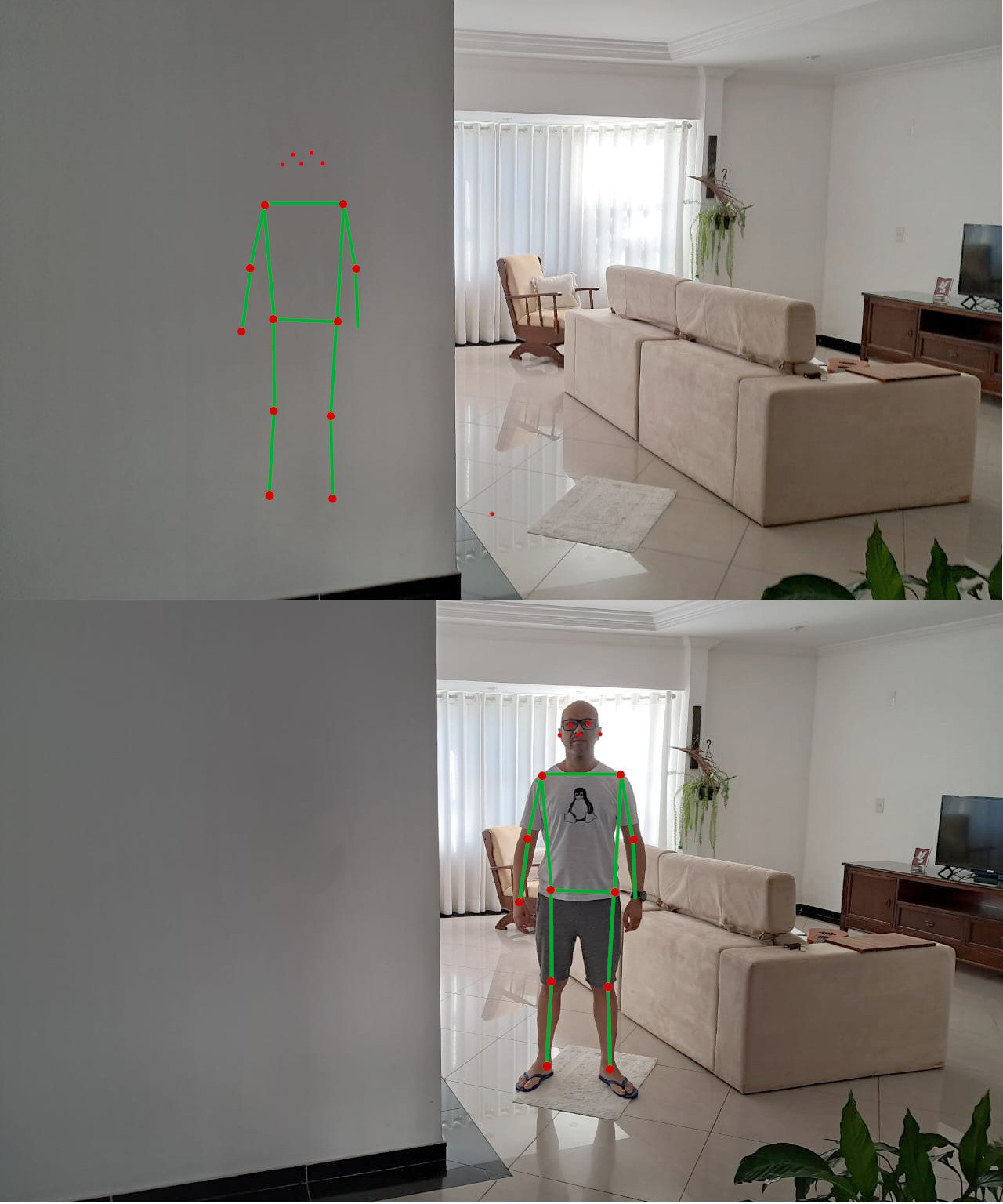
O que é o RuView, em uma frase?
O RuView é um sistema open source que analisa perturbações no CSI (Channel State Information) do Wi-Fi para reconstruir, em tempo real, pose humana (skeleton/DensePose), presença e métricas de respiração/batimentos com foco forte em privacidade, porque não usa câmeras.
Por que “CSI” importa (e por que seu notebook comum não faz tudo)
Aqui está o pulo do gato:
- RSSI (o que Wi-Fi comum costuma expor) é basicamente “um número por AP” (força do sinal). Serve para presença/movimento de forma bem mais grossa.
- CSI expõe informações ricas por subportadora (amplitude/fase), permitindo extrair padrões finos do ambiente e do movimento.
O próprio projeto deixa claro: pose/vitais/through-wall dependem de CSI; em laptops comuns você tende a ficar no máximo em presença/movimento via RSSI.
O que ele consegue detectar hoje
O “cardápio” técnico do projeto:
- Pose estimation: CSI (amplitude/fase por subportadora) → DensePose UV maps / skeleton
- Respiração: bandpass ~0,1–0,5 Hz → pico por FFT (faixa típica 6–30 BPM)
- Batimentos: bandpass ~0,8–2,0 Hz → pico por FFT (faixa típica 40–120 bpm)
- Presença: variação de RSSI + energia de banda de movimento com latência muito baixa
-
Through-wall sensing: usando geometria de zona de Fresnel + multipath (o README menciona “até ~5m” em certos cenários)
E tem um detalhe importante de responsabilidade: a estimativa de sinais vitais no firmware alpha é heurística e “não é para uso médico” melhor com pessoa parada e ambiente controlado.
O projeto esta disponível nos seguintes hardware:
- ESP32-S3 (recomendado) para capturar CSI e montar uma malha (mesh) de sensores; o README cita cenários com ESP32-S3 “~$8” como add-on por zona.
- NICs de pesquisa (ex.: Intel 5300 / Atheros AR9580) com drivers/patches para CSI no Linux.
- Sem hardware: dá para brincar o pipeline com execução determinística/“proof replay”. Além disso, o projeto mostra uma linha interessante para edge AI: um modelo/embedding de “fingerprint” do ambiente com ~55 KB total, cabendo na memória do ESP32, com backbone + head + MicroLoRA por ambiente.
Arquitetura: do rádio ao 3D
- O RuView não é só “um script”; ele é um sistema completo:
- Captura e streaming (ESP32-S3): captura CSI em frequência definida e pode enviar bruto por UDP para um servidor.
- Processamento e API (Rust): o “sensing server” expõe REST API e WebSocket para frames/vitais/pose e integra com UI.
- Visualização (Observatory/Three.js): um modo “Observatory” para ver cenários (multi-person, fall detect, intrusion, etc.) e animações em 3D.
O projeto também enfatiza performance com um rewrite em Rust, citando pipeline completo em ordem de dezenas de microssegundos por frame e um comparativo de speedup vs Python.
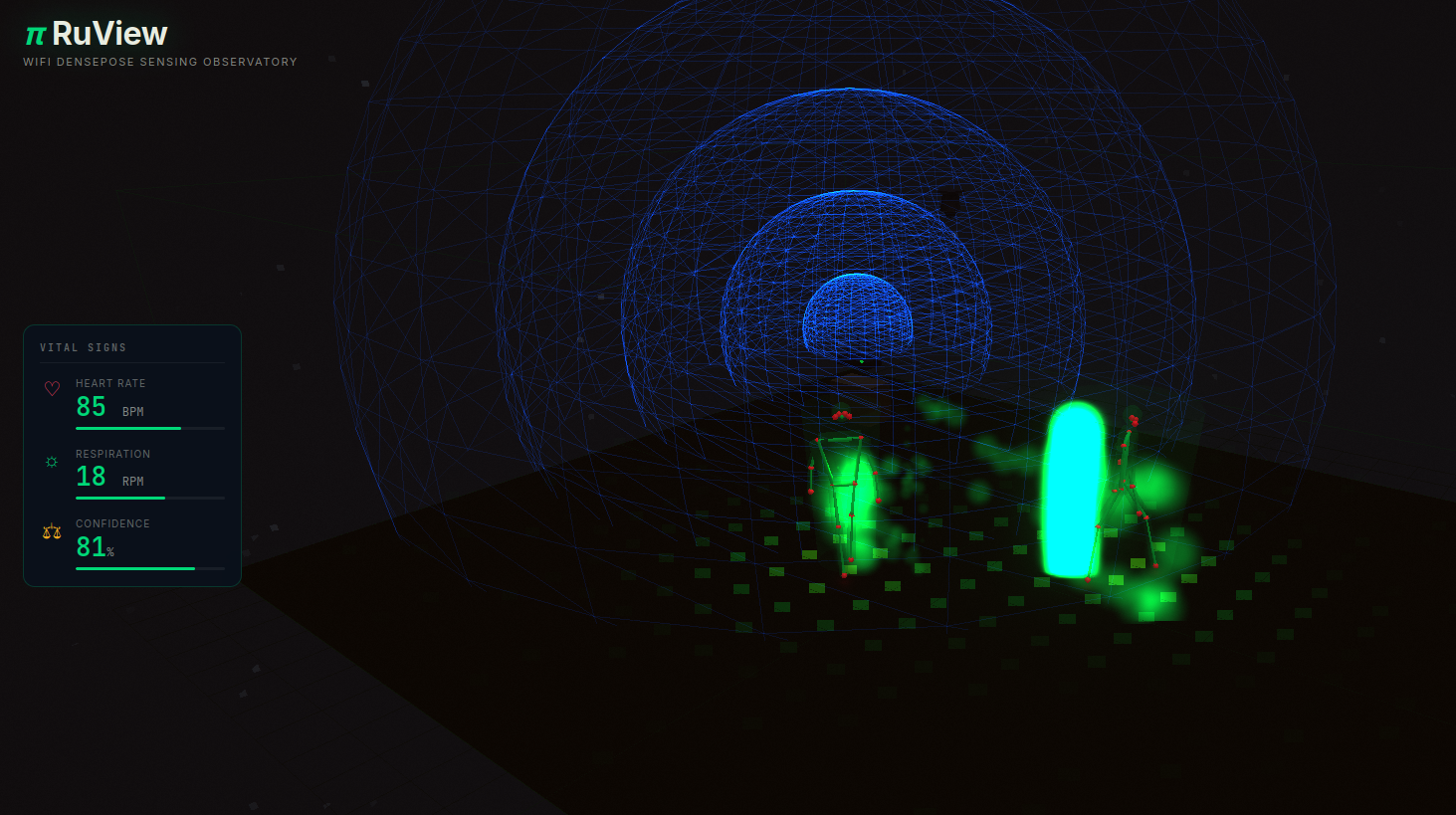
Primeiros passos em 30 segundos (sem instalar ferramentas compiladas localmente)
O caminho mais simples é via Docker:
docker pull ruvnet/wifi-densepose:latest
docker run -p 3000:3000 -p 3001:3001 -p 5005:5005/udp ruvnet/wifi-densepose:latest
# depois abra http://localhost:3000
Abaixo as URL da API:
curl http://localhost:3000/health
curl http://localhost:3000/api/v1/vital-signs
curl http://localhost:3000/api/v1/pose/current
Verificação “científica”: pipeline determinístico (sem Wi-Fi real)
Um pedaço que eu achei muito bem pensado: o projeto oferece um modo “verify” para confirmar que o pipeline de sinal é real e reproduzível sem hardware, sem GPU, sem Docker. Para isto basta usar o comando ./verify
Ele roda checagem de ambiente, replay de um sinal de referência por toda a cadeia (filtragem, janelamento, FFT/Doppler etc.) e compara um hash SHA-256 do resultado.
Edge Intelligence no ESP32: do “raw streaming” ao “standalone”
O RuView também descreve “tiers” de processamento no próprio ESP32-S3:
- Tier 0: só streaming bruto (raw CSI)
- Tier 1: limpeza + estatística + seleção de subportadoras + compressão
- Tier 2: Tier 1 + presença + vitais + motion scoring + fall detection
- (No README do github, também aparece um tier com módulos WASM, para extensões customizadas)
A ideia é reduzir banda e permitir detecção local sem PC/servidor, dependendo do tier configurado.
Casos de uso que fazem sentido (e por que isso chama tanta atenção)
Quando você junta “funciona no escuro”, “não precisa line-of-sight” e “sem câmera”, começa a aparecer uma lista enorme de aplicações. Por exemplo, como monitoramento de idosos (quedas/sono), segurança perimetral, ambientes industriais e robótica, entre outros. A parte legal aqui é que não é só “conceito”: o projeto também discute limitações físicas (subportadoras, multipath, atenuação por metal) e escalabilidade por múltiplos APs/nós.
Privacidade: “sem câmera” não significa “sem dado sensível”
Mesmo sendo privacy-first (sem imagem/vídeo), o próprio user guide lembra que posição, movimento e sinais vitais ainda são dados pessoais e podem cair em regulações dependendo do contexto.
RESUMO: RuView é um daqueles projetos que redefinem o que a gente entende por “sensor”: em vez de adicionar mais uma câmera ao mundo, ele tenta extrair informação do que já está no ar ondas de rádio. E mesmo que você não vá colocar isso em produção amanhã, só o fato de ter:
- pipeline verificável (hash),
- stack completa (edge → API → UI),
- e documentação extensa,
já torna o repositório um prato cheio para quem pesquisa IA aplicada, sistemas embarcados e computação “ambiental”.
Créditos: ruvnet
Fonte: https://github.com/ruvnet/RuView
Episodio 70 de KDE Express: Plasma 6.6.1 y las Naciones Unidas
Con este creo que ya me pongo al día con los últimos episodios del podcast más regular e informativo de la Comunidad KDE. Me congratula presentaros el episodio 70 de KDE Express, titulado «Plasma 6.6.1 y las Naciones Unidas» donde David Marzal nos pone al día de las novedades de la Comunidad.
Episodio 70 de KDE Express: Plasma 6.6.1 y las Naciones Unidas
Comenté hace ya bastante tiempo que había nacido KDE Express, un audio con noticias y la actualidad de la Comunidad KDE y del Software Libre con un formato breve (menos de 30 minutos) que complementan los que ya generaba la Comunidad de KDE España, aunque ahora estamos tomándonos un tiempo de respiro por diversos motivos, con sus ya veteranos Vídeo-Podcast que todavía podéis encontrar en Archive.org, Youtube, Ivoox, Spotify y Apple Podcast.
De esta forma, a lo largo de estos 66 episodios, promovidos principalmente por David Marzal, nos han contado un poco de todo: noticias, proyectos, eventos, etc., convirtiéndose (al menos para mi) uno de los podcast favoritos que me suelo encontrar en mi reproductor audio.
En palabras de David:

- Temas tratados en el episodio 70: Plasma 6.6, Spectacle, Accesibilidad, KDE Connect, MuyLinux, KDE Linux, Firefox, Thunderbird, Gadgetbridge, Naciones Unidas.
- Plasma 6.6
- Spectacle puede leer el texto de la captura (necesita tener instalado tesseract)
- Puesta en producción de nuestro teclado virtual para pantallas táctiles
- Inauguramos la pantalla de configuración inicial. Permite configurar contraseñas, zonas horarios, ajustes de teclado, redes …
- Ahora se puede salvar tu configuración como tema global personalizado para volver a el cuando quieras. Que ademas puedes usar como tema de día o de noche.
- Configuración de WiFis mediante QR si tenéis cámara.
- Accesibilidad:
- Nuevo filtro «escala de grises» para personas con problemas de visión de colores. Ya hay 4 para elegir.
- Modo de seguimiento del puntero en el Zoom y magnificador.
- Ademas de las «teclas lentas» en Wayland y «reducir el movimiento».
- El OCR de Spectacle puede ser útil para el texto alternativo.
- Esta versión de Plasma sale en memoria de Björn Balazs, fallecido en Septiembre. DEP.
- Plasma 6.6.1
- Como configurar el panel de Plasma como un Dock (según MuyLinux)
- Proponen modernizar KDE Connect tanto en diseño como en funcionalidad.
- Kapsule una manera de de añadir capas a KDE Linux, Una manera sencilla y robusta de trabajar persistentemente en nuestra distro inmutable de cabecera.
- La opción gráfica para instalar Plasma en FreeBSD ya se puede probar
- Firefox 148 nos trae el botón anti-IA o la opción de desactivarla granularmente (por dejar las traducciones)
- Y 148 mejora la accesibilidad en varias vistas de arbol, suma «Favoritos» como destino de los botones «Mover a» y «Archivo», las carpetas leídas ahora no aparecen en Carpetas sin leer y muchos arreglos.
- Gadgetbridge 0.89 trae dos grandes novedades Health Connect e Internet access
- KDE se une a la promoción de los principios del Código Abierto de las Naciones Unidas.
Por cierto, también podéis encontrarlos en Telegram: https://t.me/KDEexpress
La entrada Episodio 70 de KDE Express: Plasma 6.6.1 y las Naciones Unidas se publicó primero en KDE Blog.

New Version Tracking through API and Automatic Labeling
Episodio 69 de KDE Express: Trinity Reloaded con Plasma a tope
Ya me acerco a los últimos episodios del podcast más regular e informativo de la Comunidad KDE. Me congratula presentaros el episodio 69 de KDE Express, titulado «Trinity Reloaded con Plasma a tope» donde David Marzal nos pone al día de las novedades de la Comunidad.
Episodio 69 de KDE Express: Trinity Reloaded con Plasma a tope
Comenté hace ya bastante tiempo que había nacido KDE Express, un audio con noticias y la actualidad de la Comunidad KDE y del Software Libre con un formato breve (menos de 30 minutos) que complementan los que ya generaba la Comunidad de KDE España, aunque ahora estamos tomándonos un tiempo de respiro por diversos motivos, con sus ya veteranos Vídeo-Podcast que todavía podéis encontrar en Archive.org, Youtube, Ivoox, Spotify y Apple Podcast.
De esta forma, a lo largo de estos 66 episodios, promovidos principalmente por David Marzal, nos han contado un poco de todo: noticias, proyectos, eventos, etc., convirtiéndose (al menos para mi) uno de los podcast favoritos que me suelo encontrar en mi reproductor audio.
En palabras de David:
- Recopilatorio habitual de noticias y novedades recientes en nuestra comunidad KDE.
- búsquedas parciales en Krunner.
- Discover invitará a buscar por internet una aplicación si no la encuentra.
- Arreglado un bug que afectaba a las Valve Index VR.
- Para MuyLinux, Plasma es el escritorio + popular de 2025
- CatchyOS ya utiliza Plasma Login Manager
- Plasma añadido al soporte de instalador de Guix
- KDE Linux marcha de Alpha a Beta
- Actualizaciones con Deltas activadas, solo se descarga lo que cambia. O lo que es lo mismo de 7GB a 1 o 2.
- Experiencia de usuario mejorada en la configuración inicial
- ampliado el soporte de HW como escaner, tabletas, WiFis USB..
- Un proceso de arranque más limpio
- Soporte al compresor RAR añadido a Ark
- Más aplicaciones por defecto: Calculadora, escaner de QT, copia de seguridad y otras de linea de comando para administradores de sistema.
- Cambiado Kate por Kwrite para edición de escritura
- Configurado la zona o dominio regularorio WiFi automáticamente en
- Trinity Reloaded -> SonicDE. O lo que es lo mismo ya hay un fork de KDE Plasma para seguir en modo legacy X11
- GParted vs KDE Partition Manager: comparación de dos de los mejores gestores de particiones para Linux
- Kaidan 0.15 viene con :
- Llamadas de audio o vídeo en modo beta
- Un campo de búsqueda integrado
- Notificaciones de respuestas en grupos
- Los campos de entada de texto mantienen el foco para escritura con el teclado
- Mensajes destacados (Highlighting) en más casos, como si se están modificando o si estás buscando emojies para reaccionar.
- Uso de un fichero plano si no hay gestor de claves instalado.
- Ha vuelto la bola a la tienda de KDE Plasma. Sinceramente nunca la he usado, pero parece que tenia sus fans.
- Gcompris lanza una versión con grandes novedades entre la que destaca el modo escuela
- Usar Plasmoides como aplicaciones
- KDE Connect arregla unos problemas de logs excesivos por el Bluetooth y en Android 1.35.2
- Plugin para usar el dispositivo como una tableta de dibujo con sensor de presión
- Opción para siempre mostrar el teclado en el modo «Entrada remota»
- Separado TV input y Entrada remota
- Comparativa y recorrido histórico de Kate / Kwrite por parte de LinuxAdictos
- Un articulo con más info de oo7 el nuevo servicio de secretos integrado en Plasma
- LineageOS 31 con Material Expressive
- Cartagena está preciosa en Marzo, ¡apuntarse al Crespillos y Podcast!
Por cierto, también podéis encontrarlos en Telegram: https://t.me/KDEexpress
La entrada Episodio 69 de KDE Express: Trinity Reloaded con Plasma a tope se publicó primero en KDE Blog.

Data Has Weight But Only on SSDs | Blathering
New toy: Installing Fedora Linux on the HP Z2 Mini
The data sheet of my new AI-focused mini workstation from HP does not mention Fedora, but I could install it just fine. I expected this though, because when I asked around about Linux support and hardware AI acceleration for AMD Ryzen 39X chips, all responses came from Fedora users… :-)
Installing Fedora on the HP Z2 Mini was a smooth experience, even though I hadn’t used the graphical installer for ages. I installed the Fedora server variant during Covid, and I’m upgrading it ever since. Still, using the graphical installer was easy, so Fedora was up and running in no time.
Rebooting Fedora is not always fun, though. This box has two SSDs in it. In most cases, booting is OK, but sometimes the numbering of SSDs seems to be reversed. When this happens, booting gets stuck in an infinite loop, but a simple reboot solves the problem.
I guess I’m getting older, but I appreciate that GNOME looks exactly the same as on any other Linux distro, except Ubuntu. Everything in GNOME works from muscle memory, just as in most applications. Of course, under the hood, Linux distros are different: they have different package managers, repositories, backgrounds and application defaults. However, for a simple user, there is no need to learn the desktop from scratch, just because their friend installed another Linux distro for them…
Also, while I’m not a gamer, when I saw during installation that Steam was available, I gave it a try as well. It worked flawlessly. I do not follow the current Windows situation, but when I installed Need for Speed a few years ago, I had to go through many steps and install the game twice due to a failed attempt to make it work. Today, installing and starting NFS was a simple next-next-finish experience, so I could start the latest reincarnation of my favorite childhood game without any problems.
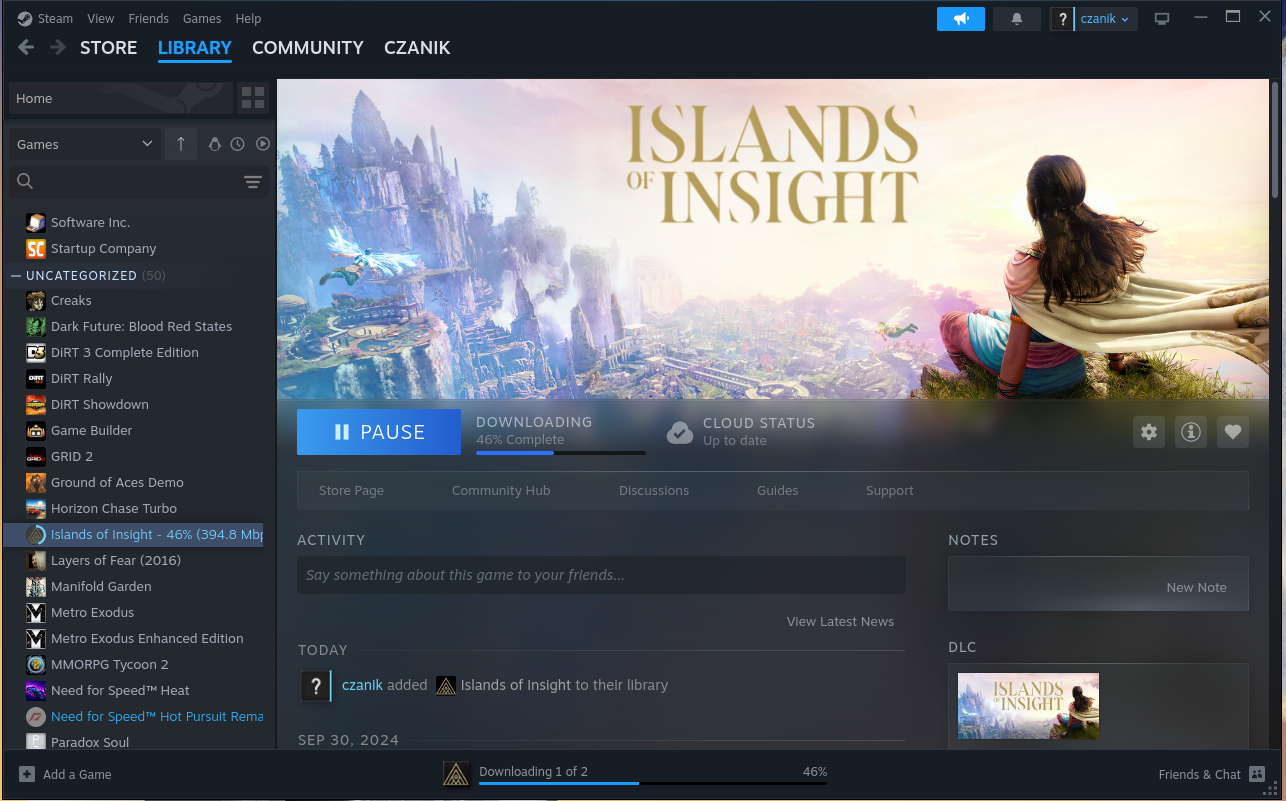
Steam on Fedora :-)
Need for Speed
I did a few steps to configure accelerated AI on the machine. I installed a few extra packages from Copr and they found something, after I worked around a couple minor problems:
root@fedora:~# /usr/xrt/bin/xrt-smi examine
System Configuration
  OS Name              : Linux
  Release              : 6.18.13-200.fc43.x86_64
  Machine              : x86_64
  CPU Cores            : 32
  Memory               : 96311 MB
  Distribution         : Fedora Linux 43 (Workstation Edition)
  GLIBC                : 2.42
  Model                : HP Z2 Mini G1a Workstation Desktop PC
  BIOS Vendor          : HP
  BIOS Version         : X53 Ver. 01.05.02

XRT
  Version              : 2.19.0
  Branch               :
  Hash                 :
  Hash Date            : 2025-04-25 00:00:00
  virtio-pci           : unknown, unknown
  amdxdna              : unknown, unknown
  NPU Firmware Version : 1.0.0.166

Device(s) Present
|BDF             |Name          |
|----------------|--------------|
|[0000:c6:00.1]  |RyzenAI-npu5  |
More in-depth AI testing will follow later, once I also installed FreeBSD on the box.
This blog is part of a longer series about my adventures with my new HP Z2 Mini and AI. You can reach me to discuss this blog on one of the contacts listed in the upper right corner. You can read the rest of the blogs under the toy tag.

Sound-reactive Sideboard

A project that I had planned for quite some time came to fruition last year, now I finally found time to document the result. My livingroom sideboard looked messy and kind of boring while not blending in anymore with the updated style of my living room. I wanted to turn it into a striking centerpiece of the room.
The plan was to install a sound-reactive lighting system. I wanted the light effects to be detailed and not disturbed by ambient sound in the living room, i.e. it sound not react to people’s voices, just the music playing.
My living room sideboard is an off-the-shelf product from IKEA that I bought many years ago. It didn’t have doors installed, but I was delighted that I could still buy matching doors with windows in them.
To realize the light effects, I’ve installed frosted plexi glass inside the windows.
Getting technical…
To control the LEDs, I’m using an ESP32-based LED controller with a line-in module and an ADC (analog-digital converter). After some experimenting, I’ve found this board to work well. I’ve connected 6 WS2812B LED strips to 3 pins and installed them with an aluminium profile into the doors. The frosted windows and profiles diffuse the light nicely so you can’t make out individual LEDs really.
On the software side, I’m using a sound-reactive port of the WLED project. WLED is Free and Open Source software, of course. Though its user interface can be a little unwieldy, it’s also very powerful and integrates nicely with homeassistant, so it can be controlled automatically.

The ESP32, being a rather powerful dual-core microcontroller, can process the incoming audio signal on one core (using fast-fourier transformation) and compute complex LED effects on the other core. Rendering up to 200 frames per second to 2 times 210 LEDs is no problem while power consumption of just the controller stays well under 1W. Pretty impressive! Depending on the LED effects (number of LEDs lit up at a given time and their colors), the whole thing hardly ever reaches 10W of power consumption.

Another functional goal of this project was to solve cooling issues of my amplifier once and for all. The amp would run really hot and shut off after playing at higher volume for some time. I installed a bunch of 12cm fans which suck air through the amplifier and blow it out on the backside. Both amp and and fans are connected to smartplugs. I turned to my homeassistant and set up an automation which turns the fans on whenever the amp’s power consumption reaches a certain level. This works really nicely, since the fans never spin at lower volumes (when you could hear them through the music) and keep everything cool and running stable at higher volume when it’s necessary — without human interaction.

Walnut finish
The outer shell of the sideboard is made of walnut wooden panels with an oil and varnish finish, thanks to my friend Joris. The oil gives it a darker look and accentuates the grain, matching the speaker system. The matte varnish finish (Skylt, highly recommended for its durability and natural look) allows me to sleep well even if people put their drinks on it.

I love it when a plan comes together!
I’m really happy with the result. While I had thought it out for a long time already, it’s always a lot more impressive when you see the final result in action.
The WLED firmware allows me to create interesting light effects. I can run the 3 doors as one, but also easily split them up into segments so each door panel renders its own effect. WLED has ca. 200 different LED effects, many of them react to sound. Each effect can be combined with one of 50 color palettes, some of the palettes are sound-reactive in their own right leading to a very dynamic display.
One cool feature is that the processed sound data can be broadcast across the network (over UDP) and received by other WLED controllers, so I can have multiple LED displays in the house, each rendering their own effect to the music, creating a more immersive experience.
Syslog-ng 4.11.0 packaging status
Committed users compile syslog-ng for themselves from source. However, most of us wait until a software is available as an easy-to-install package for our operating system of choice. In this blog post, you will see an overview on the available packages for syslog-ng 4.11.0.
Read more at https://www.syslog-ng.com/community/b/blog/posts/syslog-ng-4-11-0-packaging-status

syslog-ng logo
Segunda actualización de Plasma 6.6
Me alegra compartir con todos vosotros la segunda actualización de Plasma 6.6, iniciando así una serie de revisión de software que le dotará de más estabilidad, mejores traducción y resolución de errores. Estas actualizaciones son 100% recomendables y casi obligatorias para cualquier usuario ya que lo único que hacen es mejorar la versión sin comprometer sus funcionalidades.
Segunda actualización de Plasma 6.6
No existe Software creado por la humanidad que no contenga errores. Es un hecho incontestable y cuya única solución son las actualizaciones. Es por ello que en el ciclo de desarrollo del software creado por la Comunidad KDE se incluye siempre las fechas de las mismas siguiendo una especie de serie de Fibonacci.
Así que me congratula en presentar que hoy martes 3 de marzo de 2026, dos semanas después de liberar el código de Plasma 6.6 la Comunidad KDE presenta la segunda actualización de errores.

Más información: KDE
Las novedades generales de Plasma 6.6
Aprovecho para realizar un listado de las novedades generales de Plasma 6.6:
- Nuevo Teclado Virtual: Se estrena «Plasma Keyboard», un teclado en pantalla completamente renovado y mejorado para dispositivos táctiles.
- OCR en Spectacle: La herramienta de capturas de pantalla ahora puede reconocer y extraer texto de las imágenes capturadas.
- Plasma Setup: Un nuevo asistente de configuración inicial que permite crear cuentas de usuario y configurar la red de forma independiente al proceso de instalación del sistema.
- Temas Globales Propios: Ahora puedes convertir tu configuración actual en un «Tema Global» personalizado, que además es compatible con el cambio automático entre modo día y noche.
- Intensidad de color: Posibilidad de ajustar la intensidad del color de los cuadros de las ventanas.
-
Selector de emojis: Nuevo selector de tonos de piel para los emojis (
Meta+.). - Conexión por QR: Si tienes una cámara, puedes conectarte a redes Wi-Fi escaneando códigos QR.
- Control de volumen rápido: Puedes ajustar el volumen de una aplicación específica pasando el puntero sobre su icono en el gestor de tareas y usando la rueda del ratón.
- Lista de ventanas: Nueva opción para abrir la lista al pasar el ratón (Open on hover) y filtrado de ventanas por actividad o escritorio.
-
Propiedades rápidas: Manteniendo
Alty haciendo doble clic en un archivo del escritorio se abren sus propiedades. - Filtros para Daltonismo: Se añade un filtro de escala de grises, sumando un total de 4 filtros para diferentes tipos de deficiencia visual.
- Modo de seguimiento en Lupa: Nuevo modo que mantiene el puntero siempre centrado en la pantalla mientras se usa el zoom.
- Mejoras en Wayland: Soporte para «Teclas lentas» (Slow Keys) y ajuste estándar de «Movimiento reducido».
- Escritorios Virtuales: Posibilidad de tener escritorios virtuales solo en la pantalla principal.
- Gestión de Energía: Brillo de pantalla automático para dispositivos con sensores de luz ambiental.
- Gaming: Soporte opcional para usar mandos de juegos como dispositivos de entrada comunes (ratón/teclado).
- Monitor del Sistema: Ahora permite elegir la prioridad de los procesos.
- Animaciones: Mayor fluidez en pantallas con altas tasas de refresco.
La entrada Segunda actualización de Plasma 6.6 se publicó primero en KDE Blog.