
 Member
 baltolkien
Segunda actualización de Plasma 6 – Copy
Me alegra compartir con todos vosotros la segunda actualización de Plasma 6, iniciando así una serie de revisión de software que le dotará de más estabilidad, mejores traducción y resolución de errores. Estas actualizaciones son 100% recomendables y casi obligatorias para cualquier usuario ya que lo único que hacen es mejorar la versión sin comprometer sus funcionalidades.
Segunda actualización de Plasma 6
No existe Software creado por la humanidad que no contenga errores. Es un hecho incontestable y cuya única solución son las actualizaciones. Es por ello que en el ciclo de desarrollo del software creado por la Comunidad KDE se incluye siempre las fechas de las mismas siguiendo una especie de serie de Fibonacci.
La Comunidad KDE ha publicado se se ha lanzado la primera actualización de Plasma 6, una versión que ha supuesto una salto muy importante en cuanto a tecnología y que, francamente, ha salido bastante bien ya, por ejemplo, KDE Neon se actualizó pasadas unas horas del lanzamiento, con problemas menores y completamente funcional (de hecho, estoy trabajando desde el jueves 29 con él en todos mis equipos).
Creo es un buen momento para reflexionar: yo tardé casi un año en dar el salto a KDE 4 a Plasma 5, ya que es cuando pensé acertadamente que ya se ofrecía algo bastante estable para el trabajo diario. Para dar el salto de KDE 3 a KDE 4 fueron varios años, así que estamos ante un hito que marca un pico de calidad en el mundo del Software Libre.
Para dar el salto de Plasma 5 a Plasma 6 han bastado 5 horas. ¡Y lo mejor está por llegar! Y es que en realidad, los desarrolladores de KDE simplemente se han centrado en portar Plasma 5 a Plasma 6 y todas las novedades de la nueva tecnología está todavía en desarrollo y se irá implementando poco a poco.
Así que me congratula en presentar que ayer martes 12 de marzo de 2024, una semana después de liberar el código la Comunidad KDE presenta la segunda actualización de errores entre los que destacan:
- Corregido el envío de la ventana a todos los escritorios.
- Corregido el error en los paneles que se establecen en flotante por las actualizaciones.
- Modo de carpeta: error con URL inválida en archivo de escritorio.
Más información: KDE
Las novedades básicas del Plasma 6
Han sido días tan frenéticos que no he podido hacer todavía la entrada detallando las novedades de Plasma 6 o de KDE Gears, pero he aquí una pincelada de las mismas .
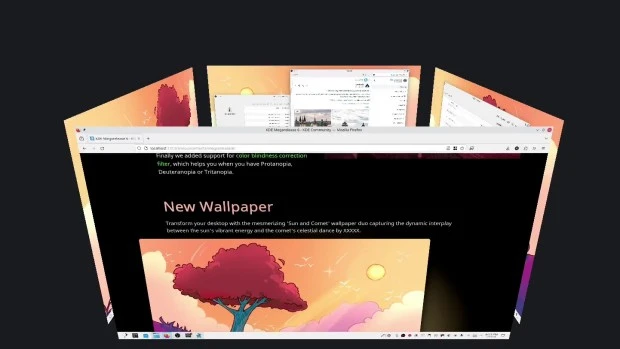
- Nuevo efecto de vista general: se han combinado los efectos de Vista general y Cuadrícula de escritorios en uno, con grandes mejoras en los gestos del panel táctil.
- Color mejorado: Plasma en Wayland ya tiene compatibilidad parcial con alto rango dinámico (HDR).
- Nuevo fondo de escritorio: Árbol escarlata, creado por axo1otl.
- Panel flotante: en Plasma 6, el panel flota de forma predeterminada. Se puede cambiar, por supuesto.
- ¡Nuevos valores predeterminados!
- Brisa refrescada: se ha rediseñado el tema Brisa para que presente un aspecto más moderno, con menos marcos y con un espaciado más consistente.
- Preferencias reorganizadas: se ha mejorado la aplicación de Preferencias para que resulte más amigable y tenga menos páginas anidadas.
- ¡El cubo ha vuelto!
- Mejoras en la búsqueda de Plasma: ahora personalizar el orden de los resultados de la búsqueda y es mucho más rápida.
- Mejoras en Plasma Mobile.
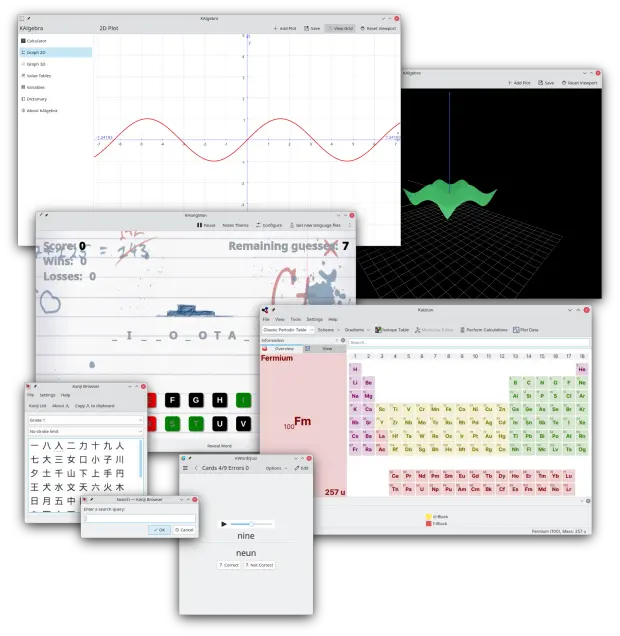
- Cambios en todas las aplicaciones de KDE Gear: Kontact, Kleopatras. Itineray, KDE Edu, KDEnlive, Dolphin, Spectacle, etc.
Y esto es una brevísima pincelada… Creo que ahora tengo temas de para el blog de sobra hasta 2025.
La entrada Segunda actualización de Plasma 6 – Copy se publicó primero en KDE Blog.

Gmail Accounts with Kmail
Cómo grabar el audio de un streaming en un archivo en Linux
Veamos cómo guardar el audio de un servicio de streaming que estemos escuchando en un archivo de audio en nuestra distribución GNU/Linux

Imaginemos que estamos escuchando una radio online, un servicio de música en streaming, un vídeo, etc en nuestro equipo con GNU/Linux y queremos guardar ese audio en un archivo para volver a escucharlo cuando queramos, compartirlo con otra persona, etc… Veamos cómo hacerlo.
Este artículo tiene su origen en una pregunta de un usuario que planteaba en un artículo del blog.
El artículo en cuestión era sobre cómo escuchar somafm mediante mocp un reproductor para la terminal, pero también se puede utilizar si escuchamos somafm mediante un script de bash.
El usuario quería saber cómo poder guardar en un archivo de audio esa música en streaming que se reproduce en nuestro equipo, para después poder escucharla en otro momento en el que no tiene conexión a internet.
Buscando por la red encontré un método que he probado y me funciona perfectamente. Para ello vamos a utilizar Pipewire, mediante una herramienta para la línea de comandos de GNU/Linux llamada pw-cli.
Lo primero vamos a identificar los sistemas desde los que podemos escoger para grabar el audio que se está reproduciendo.
pw-cli list-objects | grep node.name
En mi caso me da el siguiente resultado:
                node.name = "Dummy-Driver"
                node.name = "Freewheel-Driver"
                node.name = "alsa_output.pci-0000_00_1f.3.analog-stereo.2"
                node.name = "Midi-Bridge"
                node.name = "bluez_midi.server"
                node.name = "Firefox"
                node.name = "mpv"
Puedo grabar el audio desde la salida alsa, o Firefox (si quiero guardar el audio de un vídeo que estoy reproduciendo) o desde mpv (que está reproduciendo somafm con el script de bash.
Para guardar el audio, debo ejecutar este comando:
pw-record --target mpv audio.mp3
En target puedo poner cualquiera de las fuentes que quiera del comando anterior, yo he escogido mpv. Y después el nombre del archivo donde lo guardará el audio, en mi caso lo he llamado audio.mp3.
Y así lo dejamos lo que queramos. Para acabar de grabar, simplemente cancelamos la tarea con Ctrl+c
Y ya tendremos el archivo listo para reproducirlo en donde queramos cuando queramos. ¿Te ha parecido interesante?

Juegos libres de calidad y en desarrollo Marzo 2024
Repito entradilla. Esta entrada tiene como objetivo promocionar los juegos libres, pero no quiere ser una página que quede obsoleta o sea un cementerio de proyectos muertos, así que la voy a realizar poco a poco y con conocimiento de causa. Por ello, y conciendo mis limitaciones y mi estilo de trabajo, la voy a ir actualizando de forma mensual y su contenido se irá ampliando poco a poco a. De esta forma, bienvenidos a la entrada de juegos libres de calidad y en desarrollo de marzo 2024 en la que recopilo los juegos libres presentados en forma de entrada «tocha» en el blog ampliándola con Hedgewars y con noticias breves algunos de los juegos presentados.
Juegos libres de calidad y en desarrollo Marzo 2024
Como decía en la entradilla, esta primera entrada de la serie Juegos Libre de Calidad y en Desarrollo, prentende ser una entrada viva y creciente, que tenga una parte fija pero dinámica en la que muestre no solo juegos libres sino también su estado de desarrollo, sus novedades principales y, si es posible, alguna noticia relevante de alguno de ellos: lanzamientos especiales, vídeos, premios, cambios notables, etc.
Para empezar utilizaré una tabla para mostrar la información y los juegos iniciales que aparecen son aquellos que he analizado a fondo en el blog dado que son los que tengo más claro su desarrollo, y cada més añadiré el siguiente que tengo en mente analizar.
| Género | Nombre | Presentado en el blog | Última actualización | Comentario | Otros juegos alternativos Libres o no. |
| Conducción | Speed-dreams | Si | Agosto 2021 Versión 2.2.3 |
Muy activos últimamente en redes | Need For Speed |
| Conducción | SuperTux Kart | Si | Septiembre 2023 1.4 |
Última entrada de la serie Juegos Linux del blog | SuperMario Kart |
| Estrategia por turnos | The Battle of Wesnoth | Si | 3 de enero de 2024 Versión Estable 1.16.11 |
Tiene dos ramas de desarrollo: la 1.16 (estable) y 1.17 (beta). Más información: Forum Wesnoth |
?¿?League of Legends??¿ |
| Estrategia por turnos | Hedgewars | Si | Versión 1.0 el 9 de octubre de 2019 | Publicado | Worms Warmux (proyecto libre sin desarrollo) |
| FPS | Xonotic | Si |
20/06/2023 Versión 0.8.6 |
No necesita instalación | Quake, Doom, Nexuiz |
| MMORPG | Ryzom | Si | 3 de julio de 2021 Versión 3.4.0 |
Es posible que esta no sea la última versión ya que se parchea muy seguido. | World of Warcraft |
| Plataformas | Supertux | Si | 2021 Versón 0.6.3 |
Se estima que la 0.7.0 saldrá en agosto de 2024. | Super Mario |
Novedades de los juegos de la tabla
Esta sección la voy a dedicar a ofrecer una noticia de actualidad de los juegos de la tabla, de esta forma podremos ver si las comunidades siguen activas:
- The Battle of Wesnoth tiene una Guía de estrategia
- Ryzom: este juego MMORPG también tiene una sección en el foro para que la Comunidad de ideas para el juego. Tienes subsecciones para ver las aceptadas, las rechazadas, en estudio, etc.
- En el foro de SuperTuKarts se está discutiendo qué circuitos saldrán por defecto en la versión 2.0 del juego.
- Speedreams: ha sido actualizado el circuito Spa. Se trata de un trabajo de Leillo, de Jugando en Linux. Además, ha publicado un tweet recordando que la página web oficial es speed-dreams.net, algo que tenía yo mal en las entradas dedicadas a este juego.
La entrada Juegos libres de calidad y en desarrollo Marzo 2024 se publicó primero en KDE Blog.
Colorea tu panel a tu gusto con Panel Colorizer – Plasmoides de KDE (247)
Sigo con estas pequeñas aplicaciones que se conocen como applets, widgets o plasmoides… para Plasma 5 (que a partir de ahora lo tengo que especificar), y que dotan de funcionalidades de todo tipo a nuestro entorno de trabajo KDE. Hoy toca hablar de uno que colorea tu panel a tu gusto, se llama Panel Colorizer. Con este llegaremos a los 247 plasmoides presentado de esta serie.
Colorea tu panel a tu gusto con Panel Colorizer – Plasmoides de KDE (247)
Como he comentado en otras ocasiones, de plasmoides tenemos de todo tipo funcionales, de configuración, de comportamiento, de decoración o, como no podía ser de otra forma, de información sobre nuestro sistema como puede ser el uso de disco duro, o de memoria RAM, la temperatura o la carga de uso de nuestras CPUs.
Así que espero que le deis la bienvenida a un plasmoide creado por Luis Bocanegra que recibe el nombre de Panel Colorizer que básicamente es un potente y completo coloreador de paneles Plasma de KDE para una apariencia similar a la barra de estado de WM.
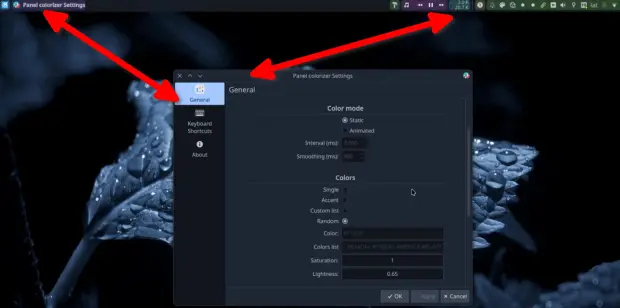
La idea es centralizar las opciones en un solo widget y a través de sus múltiples opciones poder cambiar con unos simples clicks el aspecto del panel que elijas. Para entenderlo mejor os aconsejo ver el vídeo inferior.
Y como siempre digo, si os gusta el plasmoide podéis «pagarlo» de muchas formas en la página de KDE Store, que estoy seguro que el desarrollador lo agradecer?: puntúale positivamente, hazle un comentario en la página o realiza una donación. Ayudar al desarrollo del Software Libre también se hace simplemente dando las gracias, ayuda mucho más de lo que os podéis imaginar, recordad la campaña I love Free Software Day de la Free Software Foundation donde se nos recordaba esta forma tan sencilla de colaborar con el gran proyecto del Software Libre y que en el blog dedicamos un artículo.
Más información: KDE Store
¿Qué son los plasmoides?
Para los no iniciados en el blog, quizás la palabra plasmoide le suene un poco rara pero no es mas que el nombre que reciben los widgets para el escritorio Plasma de KDE.
En otras palabras, los plasmoides no son más que pequeñas aplicaciones que puestas sobre el escritorio o sobre una de las barras de tareas del mismo aumentan las funcionalidades del mismo o simplemente lo decoran.
La entrada Colorea tu panel a tu gusto con Panel Colorizer – Plasmoides de KDE (247) se publicó primero en KDE Blog.
Hedgewars, juego de estrategia y habilidad por turnos – Juegos Linux (VII)
Sigo con la serie de grandes juegos libres que empecé con estrategia por turnos (The Battle for Wesnoth), seguí con uno de velocidad (Speed Dreams), continué con el MMORPG (Ryzom) para posteriormente segui con uno de plataformas (SuperTux) y con un FPS (Xonotic). El último de la serie fue otro juego de conducción diferente (SuperTuxKart) y hoy vuelvo a los inicios con otro juegos de estrategía que añade un componente de habilidad. Se trata de Hedegewars, un gran juego para GNU/Linux que te asegura horas y horas de diversión.
Hedgewars, juego de estrategia y habilidad por turnos – Juegos Linux (VII)
Hoy le toca al turno a uno de los juegos más divertidos para jugar en una sala con ordenadores conectados en red local: Hedgewars.
Se trata de un juego de estrategía y habilidad por turnos que nos pone al mando de un equipo compuesto por una serie de erizos con mucha mala baba y que tienen como objetivo eliminar al equipo de erizos rival.
Este juego está basado, o directamente es un clon, de Worms, un fabuloso juego de estrategia que, cuando teníamos tiempo para hacer fiestas locales en red en casa con mis amigos, nos hizo pasar tardes de diversión compaginándo sus batallas «relajadas» con los combates a muerte frenéticos del Unreal Tournament.
Su estilo cómico, desenfadado, con voces graciosas y unas físicas muy bien trabajadas lo convierten en uno de los juegos que cualquier Lan Party debería tener en mente cuando se anuncie.
En palabras de sus desarrolladores:
Hedgewars es un juego de estrategia por turnos, artillería, acción y comedia, que presenta las travesuras de erizos rosas con actitud mientras luchan desde las profundidades del infierno hasta las profundidades del espacio.
Como comandante, tu trabajo consiste en reunir a tu equipo de soldados erizo y llevar la guerra a tu enemigo.
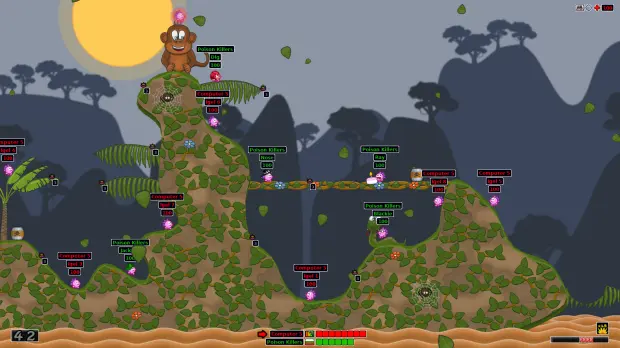
La mecánica en realidad es muy sencilla: cada jugador controla un equipo de hasta ocho erizos, durante el juego, los jugadores se turnan con uno de sus erizos. A continuación, utilizan las herramientas y armas disponibles para atacar y matar a los erizos del equipo contrario y ganar así la partida.Los erizos pueden desplazarse por el terreno de diversas formas, normalmente caminando y saltando, pero también utilizando determinadas herramientas, como la cuerda o el paracaídas, para llegar a zonas inaccesibles de otro modo. Cada turno tiene un límite de tiempo para que los jugadores no entorpezcan el juego pensando o moviéndose demasiado.
Hace unos cuantos años Hedgewars llegó a la versión 1.0, concretamente el 9 de octubre de 2019, lo cual ha significado una pausa en su desarrollo (lo cual no es positivo) pero que significa que el juego es 100% jugable (lo cual es muy positivo). Eso si, se han seguido creando temas para el juego y se ha actualizado los DLC para Windows, es decir, contenido opcional descargable.
Las características de Hedgewars
Como es habitual, aunque el juego está basado en el clásico de Worms, este juego libre va adquiriendo novedades en forma de nuevas armas, campos de batalla, modos de juegos o personalización de los parámetros de las partidas..
De esta forma, Hedgewars ofrece las siguients características, extraídas de la página oficial:
- Divertidos y estratégicos combates por turnos para hasta 8 jugadores
- Multijugador local y en red, con oponentes IA opcionales.
- Dos campañas para un jugador con un total de 24 misiones
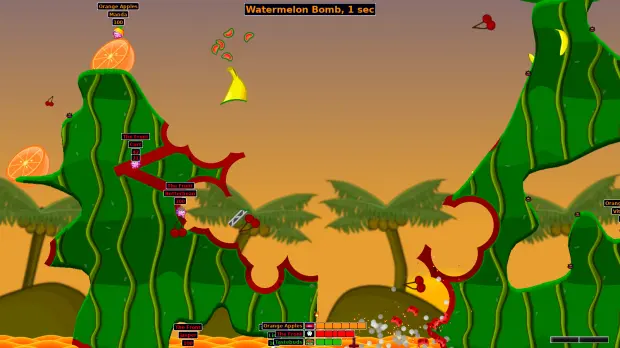
- ¡Utiliza unas 58 armas y utilidades devastadoras! Derrota a tus enemigos con armas sencillas como granadas o pasa al siguiente nivel y destroza paisajes enteros con armas como la bomba sandía o el golpe de piano.
- Mejora tus habilidades en un total de más de 25 misiones individuales para aprender el juego, prácticas de tiro, desafíos y simplemente por diversión
- Lucha en un número infinito de mapas generados aleatoriamente con 37 entornos, o elige entre 44 mapas de imágenes fijas, o incluso dibuja los tuyos propios en un editor.
- Juega a tu aire con 25 modificadores de juego diferentes, ajusta casi todos los aspectos de la partida.
- Guarda tus ajustes de juego favoritos en esquemas
- Personaliza tu equipo con más de 280 sombreros/trajes, 32 tumbas, 13 fuertes, cientos de banderas y 13 paquetes de voz únicos.
- Enormes batallas con hasta 64 erizos
- Juega a minijuegos para un jugador y multijugador
- Por si fuera poco, puedes descargarte montones de paquetes de contenido de la comunidad directamente a través del juego o incluso crear tus propias tumbas, mapas, sombreros y trajes personalizados, además de muchas otras ilustraciones. Consulta el HWKB para saber más
Estas opciones brindan una experiencia de juego variada y emocionante para jugadores de todos los niveles.

¿Cómo conseguir Hedgewars?
Como era de esperar Hedgewars para los sistemas operativos más famosos Linux, Windows y macOS, en mi opinión creo que una vía de desarrollo sería preparar versiones para plataformas móviles como Android o consolas como la Nintendo Switch. Sí que está disponible para móviles IOs.
Además, puedes encontrar Hedgewars en la plataforma Steam, lo que le da una gran visibilidad.
¿Puedo participar en su desarrollo?
Evidentemente la respuesta es que si. Cualquier proyecto libre necesita ayuda para su desarrollo bien sea programando, diseñando, organizando, etc. Además, siempre puede ayudar donando para los temas económicos como mantenimiento de servidores y, porqué no decirlo, para intentar que el juego tenga desarrolladores a tiempo completo.
En el caso de Hedegewars la información para colaboradores, artistas y desarrolladores se encuentra en la Base de conocimientos de Hedgewars.
No obstante, y por si queréis ir directamente al grano, a continuación os ofrezco los enlaces a la Base de conocimientos que nos explican sobre cómo crear sus propios contenidos. Ten en cuenta que para utilizar nuevos contenidos en línea, todos los jugadores participantes necesitarán los mismos archivos. Además, los envíos excelentes tendrán la oportunidad de ser incluidos por defecto en futuras versiones del juego.
- Crear nuevas banderas
- Creación de nuevas tumbas
- Creación de nuevos sombreros
- Creación de nuevos mapas
- Creación de nuevos fuertes
- Creación de nuevas misiones
- Creación de nuevos scripts
- Creación de nuevos paquetes de voz
- Creación de nuevos temas
Si tienes más preguntas o te encuentras con algún problema, no dudes en preguntar en los foros o visitar el canal de IRC; también (y esto es muy importante) no olvides que puedes informar de un error que te solucionará tu problema y el de otros jugadores, ya sea ahora o en un futuro.
La entrada Hedgewars, juego de estrategia y habilidad por turnos – Juegos Linux (VII) se publicó primero en KDE Blog.
Traductor de idiomas para tu escritorio, Deepl Widget – Plasmoides de KDE (246)
Sigo con estas pequeñas aplicaciones que se conocen como applets, widgets o plasmoides… para Plasma 5 (que a partir de ahora lo tengo que especificar, y que dotan de funcionalidades de todo tipo a nuestro entorno de trabajo KDE. Hoy toca hablar de un traductor de idiomas para tu escritorio llamado Deepl Widget, que no es más que poner a un simple click las opciones del sistema de traducción automática neuronal de DeepL SE.
Traductor de idiomas para tu escritorio, Deepl Widget – Plasmoides de KDE (246)
Como he comentado en otras ocasiones, de plasmoides tenemos de todo tipo funcionales, de configuración, de comportamiento, de decoración o, como no podía ser de otra forma, de información sobre nuestro sistema como puede ser el uso de disco duro, o de memoria RAM, la temperatura o la carga de uso de nuestras CPUs.
Así que espero que le deis la bienvenida a un plasmoide creado por samirgaire10 y llamado simplemente Deepl, el cual simplemente te ofrece un simple botoncito o un espacio en el escritorio, en el que pones el texto a traducir y de forma instantánea y con un alto grado de calidad obtienes el texto traducido.
Y es que Deepl se ha convertido en uno de los mejores traductores que podéis utilizar ya que emplea un sistema de traducción automática neuronal que le proporciona gran precisión.
Y como siempre digo, si os gusta el plasmoide podéis «pagarlo» de muchas formas en la página de KDE Store, que estoy seguro que el desarrollador lo agradecer?: puntúale positivamente, hazle un comentario en la página o realiza una donación. Ayudar al desarrollo del Software Libre también se hace simplemente dando las gracias, ayuda mucho más de lo que os podéis imaginar, recordad la campaña I love Free Software Day de la Free Software Foundation donde se nos recordaba esta forma tan sencilla de colaborar con el gran proyecto del Software Libre y que en el blog dedicamos un artículo.
Más información: KDE Store
¿Qué son los plasmoides?
Para los no iniciados en el blog, quizás la palabra plasmoide le suene un poco rara pero no es mas que el nombre que reciben los widgets para el escritorio Plasma de KDE.
En otras palabras, los plasmoides no son más que pequeñas aplicaciones que puestas sobre el escritorio o sobre una de las barras de tareas del mismo aumentan las funcionalidades del mismo o simplemente lo decoran.
La entrada Traductor de idiomas para tu escritorio, Deepl Widget – Plasmoides de KDE (246) se publicó primero en KDE Blog.

Novos códigos All Star Tower Defense

As seguir a lista dos últimos códigos do jogo All Tower Defense que podem ser trocados por joias gratuitas, que você usa para invocar novos personagens para ajudar na defesa contra seus inimigos.
- blamspot500kcodeunitrelease – (novo)
- videocode12135 – 100 joias e 2.400 Gemas (novo)
- EnumaElish2024 – 400 joias e 7.300 Gema (nível 60 ou superior) (novo)
#openSUSE Tumbleweed revisión de la semana 10 de 2024
Tumbleweed es una distribución de GNU/Linux «Rolling Release» o de actualización contínua. Aquí puedes estar al tanto de las últimas novedades.

openSUSE Tumbleweed es la versión «rolling release» o de actualización continua de la distribución de GNU/Linux openSUSE.
Hagamos un repaso a las novedades que han llegado hasta los repositorios esta semana.
Y recuerda que puedes estar al tanto de las nuevas publicaciones de snapshots en esta web:
El anuncio original lo puedes leer en el blog de Dominique Leuenberger, publicado bajo licencia CC-by-sa, en este este enlace:
De nuevo otra semana llena de actualizaciones importantes… aunque de momento no hay está disponible Plasma 6 desde los repositorios oficiales.
Se han publicado 6 nuevas snapshots (0301…0306), que entre otros traen estos cambios:
- ImageMagick 7.1.1.29
- Python 3.x
- Linux kernel 6.7.7
- kernel-firmware 20240229
- openblas 0.3.26
- Tcl 8.6.14
- RPM: parches para soportar mejor las compilaciones reproducibles. Factory habilitará esta función el lunes (11 de marzo)
- Shadow 4.14.6
- openjpeg 2.5.2
- GStreamer 1.24.0
- postfix 3.8.6
- wireplumber 0.4.90
Pero las mejoras y actualizaciones no acaban y aquí. Tumbleweed no deja de rodar… Estas son algunas de las actualizaciones que se están preparando.
- libvirt 10.1.0
- Mozilla Firefox 123.0.1
- Poppler 24.03.0
- KDE Frameworks and Plasma 6: Mucho progreso desde la semana pasada. A estas alturas hemos llegado a la fase de control de calidad. Las personas más optimistas apuestan por la próxima semana (¡aunque sin promesas!)
- KDE Gear 24.02.0
- Systemd 255.3
- python 3.9, abandono de esta versión: Se ha decidido posponer esto un poco debido a las consecuencias aún grandes de la inclusión de Python 3.12. Eliminar una versión de Python requerirá recompilar todos los paquetes de Python para que las nuevas compilaciones eliminen la versión de python3.9. Hay demasiados paquetes que no se pueden compilar en este momento.
- dbus-broker
- libxml 2.12.x
- GCC 14
Si quieres estar a la última con software actualizado y probado utiliza openSUSE Tumbleweed la opción rolling release de la distribución de GNU/Linux openSUSE.
Mantente actualizado y ya sabes: Have a lot of fun!!
Enlaces de interés
- ¿Por qué deberías utilizar openSUSE Tumbleweed?
- zypper dup en Tumbleweed hace todo el trabajo al actualizar
- ¿Cual es el mejor comando para actualizar Tumbleweed?
- ¿Qué es el test openQA?
- http://download.opensuse.org/tumbleweed/iso/
- https://es.opensuse.org/Portal:Tumbleweed

——————————–
openSUSE Tumbleweed – Review of the week 2024/10
Dear Tumbleweed users and hackers,
We have officially reached ‘spring’ (according to some calendars/regions). We cleaned up the staging projects: we accepted all the good things you submitted that passed staging. Neat, eh? That’s what we do all the time anyway, so it’s not that special. The progress on RPM 4.20 fixes in the spec files has been slowing down a bit, but we’re nearing the end. This morning, there were 235 spec files left in Factory that needed touching – and many submit requests are still pending.
In sum, we have released again 6 snapshots this week (0301…0306), containing these changes:
- ImageMagick 7.1.1.29
- Python 3.x fixes for CVE-2023-6597 (TmpDir cleaning)
- Linux kernel 6.7.7
- kernel-firmware 20240229
- openblas 0.3.26
- Tcl 8.6.14
- RPM: patches to better support reproducible builds. Factory will test-enable this feature on Monday (March 11)
- Shadow 4.14.6
- openjpeg 2.5.2
- GStreamer 1.24.0: We have heard of some users having issues with their local caches.If you experience issues, try “rm ~/.cache/gstreamer-1.0/registry.x86_64.bin”
- postfix 3.8.6
- wireplumber 0.4.90
Staging projects are mainly busy with the same things that take some more time to prepare. Luckily, this does not stop progress at all and we have sufficient capacity to test things in parallel. The current list here is:
- libvirt 10.1.0
- Mozilla Firefox 123.0.1
- Poppler 24.03.0
- KDE Frameworks and Plasma 6: Lots of progress since last week. By now we reached the QA phase. Optimistic souls bet on next week (no promises though!)
- KDE Gear 24.02.0 – Requires KDE Frameworks 6 and will land at the same time
- Systemd 255.3: issues with OBS/build and transactional-update were identified. Once addressed, this should move forward soon too.
- python 3.9 deprecation: we decided to postpone this a little bit due to the still large fallout from Python 3.12 addition. Removing a Python flavor will require us to rebuild all the Python packages for the new builds to drop the python39 flavor. Too many packages fail to build at this moment.
- dbus-broker: no progress this week
- libxml 2.12.x: slow/no progress
- GCC 14: phase 2: use gcc14 as the default compiler