
 Member
 Victorhck
#openSUSE Tumbleweed revisión de la semana 51 de 2025
Tumbleweed es una distribución de GNU/Linux «Rolling Release» o de actualización contínua. Aquí puedes estar al tanto de las últimas novedades.

openSUSE Tumbleweed es la versión «rolling release» o de actualización continua de la distribución de GNU/Linux openSUSE.
Hagamos un repaso a las novedades que han llegado hasta los repositorios esta semana.
Y recuerda que puedes estar al tanto de las nuevas publicaciones de snapshots en esta web:
El anuncio original lo puedes leer en el blog de Dominique Leuenberger, publicado bajo licencia CC-by-sa, en este este enlace:
El año 2025 está llegando a su fin, pero Tumbleweed sigue rodando. Al igual que la semana pasada se han publicado un total de 4 nuevas snapshots: 1212, 1215, 1216, y 1217.
Las actualizaciones más destacadas de esta semana:
- Bash 5.3.9
- KDE Gear 25.12.0
- Linux kernel 6.18.1
- Qemu 10.1.3
- KDE Frameworks 6.21.0
- LLVM 21.1.7
- Samba 4.23.4
- Cambio a Node.js 24
- Rust 1.92
Y para próximas snapshots, ya se están preparando las siguientes actualizaciones:
- Ruby 3.4.8
- PHP 8.4.15 y 8.4.16
- Mozilla Firefox 146.0.1
- Linux kernel 6.18.2
- Habilitar módulos de Python 3.14, además de eliminar Python 3.12.
- Ruby 4.0
- Eliminación de LUA 5.1
Si quieres estar a la última con software actualizado y probado utiliza openSUSE Tumbleweed la opción rolling release de la distribución de GNU/Linux openSUSE.
Mantente actualizado y ya sabes: Have a lot of fun!!
Enlaces de interés
- ¿Por qué deberías utilizar openSUSE Tumbleweed?
- zypper dup en Tumbleweed hace todo el trabajo al actualizar
- ¿Cual es el mejor comando para actualizar Tumbleweed?
- ¿Qué es el test openQA?
- http://download.opensuse.org/tumbleweed/iso/
- https://es.opensuse.org/Portal:Tumbleweed
——————————–
Episodio 61 de KDE Express: Plasma Mobile, noticias y felices fiestas
Me congratula presentaros el episodio 61 de KDE Express, titulado «Plasma Mobile, noticias y felices fiestas» donde David Marzal nos ofrece un aluvión de noticias que van desde Plasma 6.53 pasando por Kilipper sin dejar de lado las numerosas novedades de Plasma Mobile 6.5.
Episodio 61 de KDE Express: Plasma Mobile, noticias y felices fiestas
Comenté hace ya bastante tiempo que había nacido KDE Express, un audio con noticias y la actualidad de la Comunidad KDE y del Software Libre con un formato breve (menos de 30 minutos) que complementan los que ya generaba la Comunidad de KDE España, aunque ahora estamos tomándonos un tiempo de respiro por diversos motivos, con sus ya veteranos Vídeo-Podcast que todavía podéis encontrar en Archive.org, Youtube, Ivoox, Spotify y Apple Podcast.
De esta forma, a lo largo de estos 61 episodios, promovidos principalmente por David Marzal, nos han contado un poco de todo: noticias, proyectos, eventos, etc., convirtiéndose (al menos para mi) uno de los podcast favoritos que me suelo encontrar en mi reproductor audio.
En palabras de David:

Rozando ya las navidades, una época floja de podcasting, pero que no baja la intensidad de producción en KDE, os traemos una nueva selección de noticias de esta nuestra comunidad.
Plasma 6.5.3 llega tras dos semanas con muchas mejoras y arreglos como por ejemplo en configuraciones multimonitor con frecuencia de refresco variable.
Klipper se gana una review de Muy Linux
Plasma Mobile 6.5
- Integración con Waydroid desde la aplicación de configuración
- La pantalla de bloqueo ahora es más rápida y muestra mejor las notificaciones. Ahora puedes hacer un doble toque para bloquear.
- Mejora del «homescreen»/ pantalla de inicio/fondo, rendimiento, navegación con teclado…
- Separadas las configuraciones de navegación y del «Shell»
- Añadida la opción de configurar cuantos columnas de «quicksettings»/opciones rápidas tenemos disponibles.
- Ahora hay una nueva opción de estas rápidas para quien tenga multi-monitor
- Mejoras de diseño, como el tema de colores, animaciones …
- Y por último aunque fuera de la 6.5 ya está la versión inestable 0.1.0 del nuevo teclado virtual que se está desarrollando de 0.
KDE va a renovar desde cero el sistema de cuentas online que ahora mismo es bastante deficiente para mejorar su funcionalidad
Spectacle tendrá reconocimiento OCR en su próxima versión
LightDM KDE Greeter es un tema para una gestión de sesiones genérico, aunque en Plasma solemos usar sddm. Pues ha recibido una auditoria de seguridad por SUSE y han arreglado un problema en la versión 6.0.4 En ArchLinux por ejemplo no está en los repos oficiales, solo en AUR que ya está actualizado.
Cómo instalar Plasma en Linux Mint.
KDE y Penpot están colaborando para que KDE pueda adaptar sus flujos de trabajo a esta plataforma de diseño. Pablo Ruiz si nos escuchas, nos encantaría entrevistarte.
- Posibilidad de limitar los escritorios virtuales a la pantalla principal mientras que en la secundaría las ventanas permanecen las mismas.
- Ahorro de 100MB de memoria al manejar mejor como se cargan y descargan los fondos de escritorio.
- Nuevo herramienta de configuración de la luminancia HDR.
- Plasma concreta sus planes con X11 y dejará de darle soporte en 2027
Thundebird 145 trae DNS sobre HTTPS, soporte para Microsoft Exchange via servicios web y el fin de la versión de 32 bits. Entre otras tantas cosas.
Firefox 145 nos trae:
- Poder manejar comentarios/anotaciones en PDFs, mejoras en las protecciones de privacidad, previsualizar las pestañas que hay en un tab, panel de contraseñas en el latera
- Posibilidad de abrir webs de otras aplicaciones junto a tu pestaña actual en vez de la última.
- El fin del soporte de 32 bits. Por mis pruebas esos equipos ya era imposible realmente usar Firefox.
- Soporte para el contenedor Matroska (.mkv)
- Y la que más esperaba yo, el poder enlazar a un texto concreto de una web, directamente seleccionando el texto y con el menu contextual.
Blender 5.0 publicado, un gran salto de este excelente programa de modelado 3D, con mejor soporte para Vulkan, HDR y Wayland. Yo no lo uso para entender todas las novedades así que os dejo la noticia en las notas.
Para los valientes si queréis instalar ArchLinux su instalador de texto ya tiene opción para configurar la Wifi
VLC publica una nueva versión tras más de un año, la 3.0.22
Por cierto, también podéis encontrarlos en Telegram: https://t.me/KDEexpress
La entrada Episodio 61 de KDE Express: Plasma Mobile, noticias y felices fiestas se publicó primero en KDE Blog.
Novedades de Dolphin y KJournal en KDE Gear 25.12
El pasado jueves 11 de diciembre fue lanzado la nueva hornada de las aplicaciones de la Comunidad KDE , el cual vino cargado de nuevas funcionalidades. Seguimos con las novedades de Dolphin y KJournal en KDE Gear 25.12, grandes mejoras para la estas aplicaciones de sistema que hacen nuestra vida más fácil.
Novedades de Dolphin y KJournal en KDE Gear 25.12
Mi aplicación fetiche, Dolphin ofrece pocas novedades, a diferencia de la versión 25.08, para esta nueva versión pero es que ya está tan cargada de funcionalidades que empieza a ser difícil ofrecer nuevas funcionalidades, su desarrollo en estos momentos se produce más bajo el capó.
De esta forma en Dolphin en KDE 🎄 Gear 25.12 ofrece que las carpetas temporales borradas ya no terminan en la papelera personal y ahora se pueden ocultar archivos y carpetas usando el menú contextal.

Otra cosa es KJournald, una aplicación que nunca ha aparecido en el blog y que paso a presentar gracias a la gran explicación del anuncio oficial de KDE 🎄 Gear 25.12. Es posible que hayas oído hablar de systemd como el software subyacente que controla todos los servicios de tu sistema.
Y journald es la herramienta que puedes usar para revisar las numerosas entradas que systemd crea en sus registros. Si quieres saber por qué se inician durante el arranque tus archivos de red o por qué Bluetooth se corta repentinamente, tendrías que usar journald para averiguarlo.
Pero examinar miles de entradas en la línea de órdenes puede ser un trabajo duro, y es por eso, que la comunidad KDE proporciona KJournald, una aplicación gráfica que te permite filtrar, seleccionar y resaltar exactamente lo que estás buscando.

En esta nueva versión, KJournald añade compatibilidad con la carga de unidades del usuario en el explorador de KJournald.
Más información: KDE
KDE Gear, un Software gratuito para todo el mundo pero que necesita de tu apoyo

Recuerda, todo este software es gratuito y sin publicidad en todos los sentidos: no te cuesta ni un euro y no se cobra en en forma de datos personales. No obstante, si quieres ayudar a su desarrollo siempre puedes participar en su campaña de recaudación de fondos.
La entrada Novedades de Dolphin y KJournal en KDE Gear 25.12 se publicó primero en KDE Blog.
Geeko Magazine 2025冬号を発行します
openSUSE Advent Calendar の16日目です。
Geeko Magazine 2025冬号を発行します。最初の頒布はコミックマーケットC107です。スペースは南2ホールh-42bです。色々な技術同人誌が集まっていますので、ぜひお越しください。
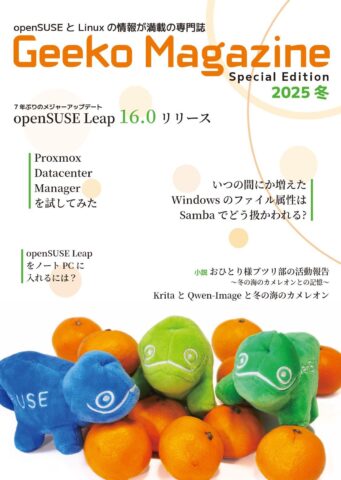
今回の記事は
- openSUSE Leap 16.0 リリース
- Proxmox Datacenter Managerを試してみた
- いつの間にか増えた Windows のファイル属性は Samba でどう扱われる?
- openSUSE Leap をノート PC に入れるには?
- 小説 おひとり様ブツリ部の活動報告〜冬の海のカメレオンとの記憶〜
- Krita と Qwen-Image と冬の海のカメレオン
Using OpenSearch data streams in syslog-ng
Recently, one of our power users contributed OpenSearch data streams support to syslog-ng, which reminded me to also do some minimal testing on the latest OpenSearch release with syslog-ng. TL;DR: both worked just fine.
Read more at https://www.syslog-ng.com/community/b/blog/posts/using-opensearch-data-streams-in-syslog-ng

syslog-ng logo
Curso de Vim: Capítulo 2 de vimtutor ya en español
Ya puedes consultar en español el capítulo 2 de vimtutor, la guía propia que incluye el editor Vim

Allá por 2022 me dediqué a la traducción y actualización del idioma español del editor Vim y entre esas tareas también la actualización de vimtutor que también estaba desactualizado.
En aquella ocasión fue Bram Moolenaar quien aceptó aquellas actualizaciones que se incorporaron al código oficial, por lo que me sentí muy satisfecho de haber colaborado con ese gran proyecto y cruzar unos cuantos correos con él que me ayudo con ciertos escollos técnicos.
En estos 3 años mucha cosas han cambiado dentro del proyecto, la principal la pérdida de su creador Bram Moolenaar, pero lo bueno es que el proyecto que inició sigue con buen pie ofreciendo un editor de texto eficaz y rápido a millones de usuarios en todo el mundo.
Y yo he seguido colaborando con el proyecto, en este caso traduciendo el capítulo 2 de esa guía propia que incluye Vim que es Vimutor.
Este artículo es una nueva entrega del curso “improVIMsado” que desde hace meses vengo publicando en mi blog sobre el editor Vim y que puedes seguir en estos enlaces:
- https://victorhckinthefreeworld.com/tag/vim/
- https://victorhck.gitlab.io/comandos_vim/articulos.html
Y para aprender Vim (de la manera más inteligente) aquí tienes esta útil guía:
Vimtutor es una guía que empieza por conceptos muy básicos para ir adentrándose en el modo de funcionamiento del editor Vim mientras practicamos. Es un buen punto de partida para llegar a comprender cómo utilizar Vim y sacarle todo el partido.
La guía original constaba de un capítulo dividido en diferentes lecciones y secciones. Y desde hace un tiempo ya había disponible un segundo capítulo en inglés para seguir adentrándonos en su uso y manejo.
Hice lo propio y realicé una traducción de ese segundo capítulo de vimtutor y envié el código al proyecto, que ya se aceptó y se añadió al código. Y como veo que mi editor Vim se ha actualizado en mi equipo he querido ver si ya estaba disponible. ¡Y allí estaba mi traducción!
Si tenéis Vim actualizado a la versión más recients publicada, vosotros también tendréis disponible ese capítulo 2 de vimtutor. ¿Y cómo comenzar a leer ese capítulo 2? Para entrar en el capítulo 2 de vimtutor, basta con ejecutar el siguiente comando:
vimtutor -c 2
Ye debería apareceros mi versión traducida al español si tenéis Vim actualizado. Ya he mandado unas correcciones, porque aunque se revise siempre se pasa algo por alto.
En fin, espero que os sea de ayuda ese tutor de Vim y aprendáis algo nuevo. Y ya sabéis que en mis artículos y en la extensa guía que traduje tenéis más recursos para dominar este gran editor de texto.

Novedades de Itinerary en KDE Gear 25.12
El pasado jueves 11 de diciembre fue lanzado la nueva hornada de las aplicaciones de la Comunidad KDE , el cual vino cargado de nuevas funcionalidades, las cuales empezamos a repasar con esta entrada con las novedades de Itinerary en KDE Gear 25.12, grandes mejoras para la aplicación para organizar tus viajes que no deja de mejorar versión tras versión.
Novedades de Itinerary en KDE Gear 25.12
Lamentablemente no viajo demasiado, así que no utilizo mucho esta aplicación pero parece que Itinerary cada vez tiene más adeptos.
Para los que no lo conozcan, Itinerary es una aplicación para planificar viajes que funciona en el equipo de sobremesa y en el teléfono. Puede almacenar información sobre alojamientos, generar códigos QR para las tarjetas de embarque, informar de retrasos y cancelaciones, encontrar rutas o medios de transporte alternativos, ayudar a encontrar el andén correcto en una estación o puerta de embarque desconocida, e incluso guardar copias de certificados y pases sanitarios.
Las novedadades principal de Itinerary en KDE Gear 25.12 son las siguientes.
Se ha añadido más de una docena de extractores adicionales (los complementos que permiten procesar información de tus billetes de forma automática) de compañías ferroviarias, eventos y otros.
De esta forma, la versión más reciente de Itinerary simplifica la planificación del viaje y puede determinar automáticamente tu ubicación como punto de partida.
Por otra parte, ahora mientras viajas, Itinerary no solo muestra tu ubicación en un mapa, sino que también te indicará la altura y, cuando llegues a tu destino, podrás usar el conversor de moneda incorporado para comprar recuerdos para tus amigos.

Más información: KDE
KDE Gear, un Software gratuito para todo el mundo pero que necesita de tu apoyo
Recuerda, todo este software es gratuito y sin publicidad en todos los sentidos: no te cuesta ni un euro y no se cobra en en forma de datos personales. No obstante, si quieres ayudar a su desarrollo siempre puedes participar en su campaña de recaudación de fondos.
La entrada Novedades de Itinerary en KDE Gear 25.12 se publicó primero en KDE Blog.
Ian Murdock y el Manifiesto Debian en Compilando Podcast
Hoy me complace compartir con vosotros un nuevo episodio de Compilando Podcast, que ha vuelto con fuerza en forma de episodios tipo píldora muy instructivos. En esta ocasión se trata del episodio 65 que lleva por título «Ian Murdock y el Manifiesto Debian» donde Paco nos explica la apasionante, triste y, sobre todo, importante historia que rodea a esta figura del Software Libre.
Ian Murdock y el Manifiesto Debian en Compilando Podcast

En palabras del gran Paco Estrada, extraídas de la nueva web de Compilando Podcast y que sirven de introducción del episodio 65:
En este episodio de Compilando Podcast recuperamos una figura esencial en la historia del software libre: Ian Murdock, creador de Debian y autor del célebre Manifiesto Debian, un documento que cambió para siempre la manera de construir, mantener y entender una distribución GNU/Linux.
A lo largo del programa repasamos:
- El contexto en el que Ian Murdock comenzó a experimentar con Linux y sus primeras frustraciones con SLS.
- Cómo nació Debian en 1993 y por qué su diseño fue una revolución para la época.
- El significado del nombre “Debian”, el origen del logo en espiral y la curiosa relación con Toy Story.
- La importancia de APT y del enfoque modular que sentó las bases de muchas distros actuales.
- El impacto del Manifiesto Debian en la ética y la gobernanza del software libre moderno.
- El trabajo posterior de Murdock en Sun Microsystems, la Linux Foundation y Docker.
- Sus últimos días, llenos de incertidumbre, y el legado que sigue vivo en millones de sistemas y servidores en todo el mundo.
Un episodio para entender no solo la historia de una distribución fundamental, sino también la visión de la persona que la hizo posible
Música: https://incompetech.filmmusic.io/ by Kevin McLeod y musopen.org
Licencia : Creative Commons (CC BY-NC-SA)
Más información: Compilando Podcast
¿Qué es Compilando Podcast?
Dentro del mundo de los audios de Software Libre, que los hay muchos y de calidad, destaca uno por la profesionalidad de la voz que lo lleva, el gran Paco Estrada, y por el mimo con el que está hecho. No es por nada que ganó el Open Awards’18 al mejor medio, un reconocimiento al trabajo realizado por la promoción .
A modo de resumen, Compilando Podcast es un proyecto personal de su locutor Paco Estrada que aúna sus pasiones y que además, nos ofrece una voz prodigiosa y una dicción perfecta.
La entrada Ian Murdock y el Manifiesto Debian en Compilando Podcast se publicó primero en KDE Blog.
Presenta tu charla al encuentro de #openSUSE en América Latina
Ya puedes presentar tu charla para la próxima cumbre openSUSE America Summit que tendrá lugar en Barranquilla, Colombia en abril de 2026

La organización de la próxima openSUSE Summit en América ya ha abierto el periodo de presentación de charlas para la que se celebrará en Colombia el próximo abril de 2026.
Aprovechando que este pequeño blog tiene lectores y lectoras por toda América Latina quiero hacerme eco de esta noticia y así darle más alcance.
Ya se ha abierto el plazo para entregar tus propuestas de charlas o talleres para el encuentro, que se llevará a cabo del 29 al 30 de abril de 2026 en la Universidad CUC, en Barranquilla, Colombia.
El evento está siendo organizado por Astian Inc., con el apoyo de la comunidad local LinuxBQ y de la Universidad CUC. La sede cuenta con un auditorio principal con capacidad para entre 300 y 350 personas, salas de talleres y un laboratorio de ciberseguridad diseñado para sesiones prácticas.
El periodo de presentación de propuestas estará abierto hasta el 1 de marzo de 2026. Se aceptan propuestas para charlas de 30 minutos, charlas breves de 15 minutos y talleres de una hora.
Si tienes la posibilidad de asistir no dudes en acercarte a esta cita para aquellas personas que disfrutan y quieren aprender sobre GNU/Linux en general y openSUSE en particular.
El proyecto openSUSE está formado por una comunidad global, que de Asia a América pasando por Europa organizan encuentros en los que participar y difundir conocimientos sobre GNU/Linux y software libre y lo más importante, encontrar a personas con intereses similares. ¿Te animas a participar o a asistir?
Enlaces de interés
Nueva etapa de KDE Blog
De forma fortuita y no planeada hoy se inicia oficialmente una nueva etapa de KDE Blog. La razón es que después de 17 años de funcionamiento del blog sobre los servidores de Ebooz, a partir del 10 de diciembre ahora funciona alojado en los de Neodigit, una empresa de Tecnocrática, tras una migración realizada en menos de un día.
Los inicios del blog
Para explicar el cambio y lo que puede ocurrir a partir de ahora debo contaros un poco el inicio del blog, lo cual he explicado muy pocas veces, al menos en los detalles técnicos.
Mis inicios en el mundo de la edición de blogs empezaron con una invitación a publicar en un blog existente llamado Gaceta Digital. El acuerdo era que yo publicaba regularmente en un blog que se alojaba en los servidores de Ebooz, una compañía malagueña. Yo creaba contenido y, si quería monetizar, tenía libertad para hacerlo, mientras ellos pagaban el dominio, el alojamiento, hacían el mantenimiento y ponía algunos enlaces o escribían artículos que quisieran. Lo hacían en muy pocas ocasiones.
A mi me venía bien, era un hobby que me servía para aprender y cogía tablas en la edición de blogs, y ellos ganaban visitas al tener un editor que no cobraba.
Pasado un tiempo, tras mis primeros pasos en el mundo GNU/Linux, y como pago a lo que ofrecía esta tecnología, tuve la idea de crear KDE Blog y, ya que estaba a gusto con ellos, decidí proponérselo a ellos. En un breve periodo de tiempo me contestaron que sí, y el 24 marzo de 2008 nació el blog.

Las condiciones fueron las mismas: ellos se ocupaban de las cosas técnicas y de los gastos, yo escribía. Además, en el caso de KDE Blog me hice la promesa de publicar diariamente, algo que he cumplido religiosamente. Eran buenos tiempos para los blogs y la blogosfera estaba activa, yo motivado y tiempo por delante.
Creo recordar que tiempo más tarde también me dediqué a escribir en un tercer blog llamado LinuxJuegos, pero mi paso por el mismo fue más efímero, pero sí, llevé tres blogs de forma simultánea.
Evidentemente el ritmo era insostenible. Además, las obligaciones familiares y las laborales cada vez apretaban más, al tiempo que me involucraba más en la Comunidad con eventos, charlas, podcast, etc. El desenlace era inevitable. Primero cayó LinuxJuegos y después la Gaceta Digital (¿o fue al reves? Sinceramente no lo recuerdo).
Así que finalmente me centré en KDE Blog, que seguía alojado en Ebooz de forma feliz y sin preocupaciones ya que ellos se ocupan de los temas técnicos, e incluso de alguna que otra mejora: poner los plugins que quería, nuevos diseños, etc.
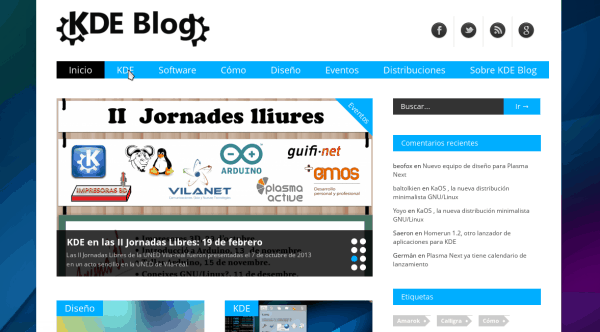
De esta forma, a lo largo de 17 años apenas he tenido problemas… aunque siempre tenía la espina de que dependía de ellos. Hablé en muchas ocasiones de qué pasaría si las cosas cambiaban y siempre me decían que estuviera tranquilo, que el blog era mío. Y así ha sido.
Nueva etapa de KDE Blog
De esta forma, este mes de noviembre, cuando el blog ha tenido algún problema que otro en cuanto a rendimiento, me puse a pensar que quizás, tras todos estos años y viendo que los blogs no son ya atractivos para las empresas, me estaba aprovechando de la inercia y que era el momento de cambiar.
Tenía que hacer el blog 100% mío, con todas las consecuencias y no depender de una empresa que podría desaparecer y que, pensado fríamente, no me debía nada aunque siempre se había portado de maravilla.
Así que tras hablar con ellos y reflexionar mucho decidí migrar mi blog a mi servidor alojado en Neodigit, una empresa de Tecnocrática, asumiendo yo los gastos y pensando cómo financiar este proyecto. De hecho, tengo un plan que requerirá de vuestra colaboración para que mis preocupaciones sean simplemente escribir y mantener técnicamente el blog.
En este punto debo decir que he hablado con gente de la Comunidad y que todo el mundo se ha ofrecido en ayudarme de una forma u otra, desde KDE España a KDE e.V., pasando por Slimbook, pero al final he decidido que, de momento, este es mi blog para lo bueno y para lo malo, que voy a pedir la colaboración económica voluntaria para su mantenimiento (que también os digo, no será condición necesaria para su existencia) y que este proyecto debe seguir adelante por muchos años de forma libre e independiente, es decir, aunque tenga fuertes lazos con la Comunidad este no es el blog oficial de KDE España o KDE e.V.
En definitiva, a partir de ahora llevaré íntegramente el blog, alojado en los servidores de Tecnocrática, los cuáles me han ayudado a realizar la migración y que es bueno recordar que son los que ofrecen de forma gratuita los servidores donde se aloja la web de KDE España.
No quiero finalizar esta entrada sin agradecer los servicios de Ebooz y, especialmente, a uno de sus CEOS, Daniel, que siempre me ha tratado de maravilla, siendo una de las personas que ha facilitado que el blog haya funcionado bien a lo largo de estos 17 años. Muchas gracias de corazón.
Espero que esta nueva andadura no presente mayores dificultades, y os aseguro que las publicaciones seguirán siendo diarias, que se han iniciado cambios estéticos en el blog y que pronto os pediré ayuda para que este proyecto no pare.
¡Nos leemos en este nuevo KDE Blog 4.0!
La entrada Nueva etapa de KDE Blog se publicó primero en KDE Blog.