
 Member
 Victorhck
Crear un nuevo módulo para Tide el prompt para Fish
Vamos a ver cómo crear un módulo para Tide, el prompt para Fish, que muestre el valor del «uptime» de nuestro equipo

Desde hace tiempo fish es la shell que utilizo en mi distribución de GNU/Linux. Una shell con un montón de características que hacen que realizar tareas en la terminal sea sencillo, me ahorra tiempo y pulsaciones de teclas.
Y casi al mismo tiempo que fish descubrí el prompt Tide, que es el que utilizo por la información que muestra y hacerlo de una forma bonita. Sobre ambas cosas puedes leer en sendos artículos:
- https://victorhckinthefreeworld.com/2020/02/12/fish-la-shell-para-linux-amigable-e-interactiva/
- https://victorhckinthefreeworld.com/2021/11/25/tide-como-prompt-para-la-shell-fish/
El prompt Tide incluye un buen número de módulos que añaden y muestran información en nuestro prompt. Tide es extensible, por lo que se pueden crear nuevos módulos personalizados.
En este caso os mostraré cómo he creado un módulo para el prompt Tide que me muestre el valor del «uptime» de mi equipo.
En primer lugar aclarar que esta es la manera en que lo he hecho yo, no quiero decir que sea la mejor, ya que no soy desarrollador, por tanto te explico solo lo que a mí me ha funcionado.
En primer lugar, vamos a necesitar un script en Bash que nos muestre el uptime en un formato que podamos mostrar de manera bonita.
Para eso, podéis descargar el script que hice yo y sobre el que escribí en este artículo:
Ya tenemos la base que utilizaremos más adelante. Ahora vamos a ver cómo crear el propio módulo para Tide.
Creando el nuevo módulo para Tide
Tide admite prompt en la parte izquierda de la pantalla, lo que es lo habitual y también en la parte derecha. En mi caso quiero que el nuevo prompt se muestre en la parte derecha después de la hora, como se muestra en la captura que abre el artículo.
Vamos a echar un vistazo a la wiki del proyecto Tide que ofrece (algo de) información sobre cómo hacer módulos personalizados.
En primer lugar vamos a crear una función que se llamará (en mi caso): _tide_item_uptime.fish y dentro escribiremos:
function _tide_item_uptime
    _tide_print_item uptime $tide_uptime_icon' ' (/home/victorhck/Scripts/aptaim)
end
Dentro de los paréntesis es donde debería ir el código para que la función haga lo que queremos, en mi caso lo que hago es una llamada al script «aptime» que he mencionado antes, proporcionándole la ruta donde se encuentra.
Guardamos el archivo en la ruta: /home/tu_usuario/.config/fish/functions/
Ahora con la función ya creada, vamos a incluirla en el prompt Tide para que se muestre. Para eso, en la documentación dice que se haría ejecutando estas dos líneas:
echo $tide_right_prompt_items
set --append tide_right_prompt_items uptime
Pero yo lo he hecho de otra manera. Editando el archivo: /home/tu_usuario/.config/fish/fish_variables
Y añadimos el nombre de la función, en mi caso se llama uptime, en el prompt derecho, añadiéndolo en esta línea, tal como está al final.
En tu caso quizás tienes otros módulos configurados, pero tendrías que añadirlo anteponiendo un x1e antes del nombre del módulo.
SETUVAR tide_right_prompt_items:status\x1ecmd_duration\x1econtext\x1ejobs\x1enode\x1evirtual_env\x1ephp\x1evi_mode\x1etime\x1euptime
También en ese archivo podremos configurar el color del texto, y del fondo y si queremos un icono, usando NerdFont. En mi caso puse estas configuraciones de colores:
SETUVAR tide_uptime_bg_color:1C1C1C
SETUVAR tide_uptime_color:5F8787
Y con esto ya estaría todo completo y ya se debería ver el nuevo módulo en el prompt de Tide. Aquí lo dejo documentado, para mi yo del futuro y para ti lector o lectora que recalas en el blog buscando cómo hacerlo.
Espero que te sea útil, si es así escríbelo en los comentarios y haz feliz a un gatito.


A quick textmode-themed update
Summer is coming and I've got a couple of posts cooking that may turn out mildly interesting, but — time constraints being what they are — in the meantime there's this.
Chafa
I (judiciously, as one might opine) pulled back from posting about every single feature release, but things have kept plodding along in quiet. ImageMagick is finally going away as per a buried remark from 2020, which means no more filling up /tmp, no more spawning Inkscape to read in SVGs, and so on. There's also lots of convenience and robustness and whatnot. Go read the release notes.

As for eye candy, I guess the new 16/8-color mode qualifies. It's the good old "eight colors, but bold attribute makes foreground bright" trick, which requires a bit of special handling since the quantization step must apply two different palettes.
With this working, the road to ANSI art scene Naraka nirvana is short: Select code points present in your favorite IBM code page, strip newlines (only if your output is 80 columns wide), and convert Chafa's Unicode output to the target code page. You'll get a file worthy of the .ANS extension and perhaps a utility like Ansilove (to those who care: There's some mildly NSFW art in their Examples section. Definitely don't look at it. You've been warned).
Taken together, it goes something like this:
$ chafa -f symbol -c 16/8 -s 80 -w 9 --font-ratio 1 --color-space din99d \
    --symbols space+solid+half+stipple+ascii they_wont.jpg | tr -d \\n | \
    iconv -c -f utf8 -t cp437 > they_wont.ans
$ ansilove -f 80x50 -r they_wont.ans -o top_notch_blog_fodder.png
It's a bit of a screenful, but should get better once I get around to implementing presets.
Finally, I added a new internal symbol range for Latin scripts. It's got about 350 new symbols to work with on top of the ASCII that was already there. Example anim below; might be a good idea to open this one in a separate tab, as browser scaling kind of ruins it.

--fg-only --symbols latin. Input from 30000fps.Thanks
Apart from the packagers, who are excellent but too numerous to list for fear of leaving anyone out, this time I'd like to thank Lionel Dricot aka Ploum for lots of good feedback. He develops a text mode offline-first browser for Gemini, Gopher, Spartan and the web called Offpunk, and you should check it out.
One more. When huntr.dev came onto my radar for the first time this spring, I admit to being a little bit skeptical. However, they've been a great help, and every interaction I've had with both staff and researchers has been professional, pleasant and highly effective. Big thumbs up. I've more thoughts on this, probably enough for a post of its own. Eventually.
A propos
I came across Aaron A. Reed's project 50 Years of Text Games a while back (via Emily Short's blog, I suspect), and have been following it with interest. He launched his kickstarter this week and is knocking it out of the park. The selection is a tad heavy on story/IF games (quoth the neckbeard, "grumble grumble, Empire, ZZT, grumble"), but it's really no complaint considering the effort that obviously went into this.

Seems low-risk too (the draft articles are already written and available to read), but I have a 75% miss rate on projects I've backed, so what do I know. Maybe next year it'll be 60%.

openSUSE Leap 15.4 lançado oficialmente!

Esta disponível para download o sistema operacional openSUSE Leap 15.4, que por sua vez proporciona novos recursos, componentes atualizados e muitas melhorias.
Idêntico ao SUSE Linux Enterprise 15 SP4 (Service Pack 4) lançado recentemente, o openSUSE Leap 15.4 conta com a série de kernel Linux 5.14 mantida pela SUSE.
Para o mercado um recurso de migração de SUSE Linux Enterprise Server comercial para o sistema operacional openSUSE Leap gratuito ficou bem mais fácil.
Os ambientes gráficos disponíveis são KDE Plasma 5.24 LTS , GNOME 41 e Xfce 4.16. Também é possível instalar MATE 1.26, Enlightenment 0.25.3, e Deepin Desktop Environment (DDE) 20.3.
Muitos pacotes de IA (Inteligência Artificial) estão disponíveis também no Leap 15.4, agora disponível no SITE OFICIAL em imagens ISO com Plasma KDE, Ambientes de desktop GNOME e Xfce pré instalado. Disponível nas plataformas desktops de 64 bits, servidores PowerPC (ppc64le), servidores UEFI ARM de 64 bits (AArch64) e servidores IBM System Z e LinuxONE (s390x).
Parabolic Calendar – Plasmoides de KDE (200)
La fiesta de plasmoides no para y hoy ¡llegamos al número 200! En esta ocasión con un widget que cumple dos funciones decorar nuestro escritorio y proporcionar información: Parabolic Calendar.
Parabolic Calendar – Plasmoides de KDE (200)
Tenemos muchos plasmoides estilo reloj para Plasma, pero pocos para calendarios. Aunque haciendo un rápida búsqueda por el blog me aparecen unos cuantos (Calendar WL, Event Calendar, Weekday Grid, etc) debo reconocer todavía hay variantes por explorar.
Y es por ello que me alegra presentaros Parabolic Calendar, una creación de Adhe, un simple plasmoide que nos muestra el día de la semana dentro de un calendario con un efecto visual my interesante. Además, en Parabolic Calendar podemos definir algunos interesantes parámetros como el número de días a mostrar, posición de la parábola izquierda o derecha, estilo del fondo del calendario, etc.
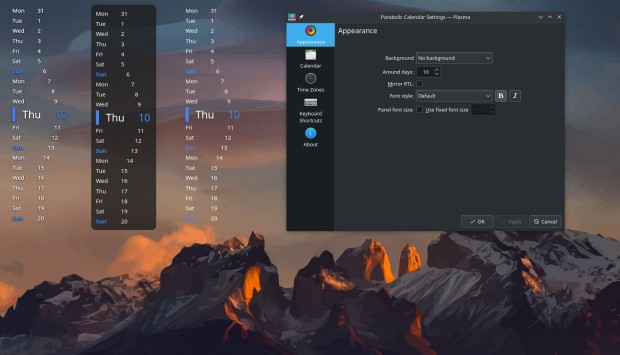
Y como siempre digo, si os gusta el plasmoide podéis “pagarlo” de muchas formas en la cambiante página de KDE Store, que estoy seguro que el desarrollador lo agradecerá: puntúale positivamente, hazle un comentario en la página o realiza una donación. Ayudar al desarrollo del Software Libre también se hace simplemente dando las gracias, ayuda mucho más de lo que os podéis imaginar, recordad la campaña I love Free Software Day 2017 de la Free Software Foundation donde se nos recordaba esta forma tan sencilla de colaborar con el gran proyecto del Software Libre y que en el blog dedicamos un artículo.
Más información: KDE Store
¿Qué son los plasmoides?
Para los no iniciados en el blog, quizás la palabra plasmoide le suene un poco rara pero no es mas que el nombre que reciben los widgets para el escritorio Plasma de KDE.
En otras palabras, los plasmoides no son más que pequeñas aplicaciones que puestas sobre el escritorio o sobre una de las barras de tareas del mismo aumentan las funcionalidades del mismo o simplemente lo decoran.
La entrada Parabolic Calendar – Plasmoides de KDE (200) se publicó primero en KDE Blog.
Publicada la versión final de #openSUSE Leap 15.4
Ya está disponible la versión final de la distribución de GNU/Linux openSUSE Leap 15.4 para actualizar o instalar en tu equipo, portátil, sobremesa o servidor

La comunidad de openSUSE, cumpliendo las fechas y plazos, vuelve a publicar una versión menor o «Service Pack» de openSUSE Leap 15, la que es openSUSE Leap 15.4.
Ya está disponible la imagen ISO final para descargar o actualizar tu versión 15.3 y seguir disfrutando
Después de un año de vida de openSUSE Leap 15.3 que se publicó a principios de junio del año 2021, la comunidad de openSUSE vuelve a publicar un nuevo «service pack» o versión menor de la versión 15 de openSUSE Leap.
La comunidad de openSUSE publica, entre otras opciones, dos distribuciones de GNU/Linux. Una rolling release llamada openSUSE Tumbleweed y otra de publicaciones periódicas llamada openSUSE Leap.
En openSUSE Leap, los paquetes más importantes se mantienen estables y sin cambios, únicamente actualizando los parches de seguridad y mejoras de errores graves, lo que hace un sistema estable, seguro y confiable.
Desde hace un par de versiones, la versión comunitaria openSUSE Leap y la versión empresarial SUSE Linux Enterprise Desktop, comparten binarios, así que prácticamente son la misma distribución, pero después en openSUSE tienes disponibles todos los paquetes de software comunitarios que empaqueta y pone a disposición de todo el mundo la comunidad de openSUSE.
Por tanto desde YaST, la herramienta de gestión del sistema de openSUSE y SUSE, se puede migrar desde openSUSE a SUSE de manera sencilla y seguir manteniendo los servicios que se ejecuten en nuestro sistema y disfrutar del soporte que ofrece la versión empresarial para servidores.
Junto con esta versión de openSUSE Leap 15.4 también se pone a disposición Micro OS 5.2, un sistema ligero e inmutable ideal para entornos IoT o crear entornos con contenedores específicos y relacionados con la industria automovilística, telecomunicaciones, robótica, etc…
openSUSE Leap 15.4 incluirá Plasma 5.24, la colección de parches KDE Qt5, GNOME 41 o Enlightenment 0.25. Y se mantendrá Xfce en su versión 4.16 o systemd 249 entre lo más destacable, pero hay mucho más!!
openSUSE Leap 15.3 tendrá soporte oficial hasta 6 meses después de la publicación de hoy de openSUSE Leap 15.4 por lo que se aconseja realizar la migración en estos 6 meses y no posponerlo más y poder seguir disfrutando de un sistema de GNU/Linux estable y seguro.
Más información y detalles en el anuncio oficial y si tienes dudas o quieres obtener más información, puedes hacerlo en los canales oficiales de la comunidad de openSUSE
- Canal de Telegram (en inglés)
- Lista de correo (en inglés)
- Discord (en inglés)
- Foros (en inglés y en español)


Leap 15.4 Offers New Features, Familiar Stability
CA / CS / ES / FR / JA / NL / PT-BR / SV / ZH-CN / ZH-TW
NUREMBERG, Germany – The next minor release of openSUSE Leap 15 is now available on get.opensuse.org for users, professionals, hobbyists and developers who want to update to the latest version.
Leap 15.4 is a feature release version and provides a significant amount of updates from previous Leap 15.x versions along with new offerings.
“Leap 15.4 continues to provide a familiar rock-hard release and delivers stable open-source software for desktops, servers, containers and virtualized workloads,” said Max Lin, a member of the release team. “Leap is a hard distribution to ignore for technology specialists; security fixes, new technologies and updated packages give professionals a well engineered community release that is identical to its enterprise twin. And it offers an enormous amount community software.”
As with the previous Leap version, users can migrate to SUSE Linux Enterprise and leave workloads running as normal. This release further enhances migration proficiency because the YaST team developed a simplified migration tool for migrations to SLE.
Containers and workloads transition seamlessly, and the container story for Leap has expanded with a new offering of Leap Micro.
New to Leap 15.4 is Leap Micro 5.2. Leap Micro is a modern lightweight operating system that is immutable and ideal for host-container and virtualized workloads. Leap Micro is well suited for decentralized, computing environments, edge uses and embedded/IoT deployments. Developers and professionals can build and scale systems for uses in aerospace, telecommunications, automotive, defense, healthcare, hospitality, manufacturing and robotics. Leap Micro provides automated administration and patching. One of the packages related to Leap Micro for developers is Podman. Podman gives developers options to run their applications with Podman in production and the upgraded 3.4.2 version brings new pods support for init containers, which are containers that run before the rest of the pod starts.
Large development teams gain added value with openSUSE Leap 15.4 and Leap Micro 5.2 since workloads can be lifted and shifted to SUSE Linux Enterprise Linux 15 SP4 or SLE Micro for extended maintenance and favourable version migration advantages.
This version of Leap simplifies multimedia codec installation. Progress has been made to bring Cisco’s openh264 video codecs to users via a repository present by default on the system, which will come in a maintenance update. The release not only gains multimedia improvements; it gains open-source driver support. Besides AMD’s and Intel’s continual open-source Linux graphics drivers commitment, users of modern NVIDIA GPUs will benefit from it signing firmware images for the latest-generation GeForce 30 series GPUs.
Another new package to Leap 15.4 is Dell’s sassist. The package helps with troubleshooting/debugging issues with Dell PowerEdge Server and runs on the Linux Operating System to work with Dell integrated Dell Remote Access Controller (iDRAC) enabling log and configuration collection.
Those using Leap for server deployments will find a few notable changes. These changes include the deprecation of Python 2, libvirt LXC containers, and OpenLDAP server. The 389 Directory Server is the primary LDAP server, which replaces the OpenLDAP server.
PHP 8.1.0 has been added and brings many improvements. These include Enumerations, readonly properties, fsync, and many others. There’s also a 3.5 percent speedup with PHP 8.1.0 for WordPress and the new PHP version provides a Just-In-Time backend for ARM64 along with other JIT improvements and fixes. A couple other notable changes for Leap is that Wayland now works with the latest NVIDIA proprietary driver and LUKS2 is supported in the YaST Partitioner, but it has to be explicitly enabled.
Leap has a vast selection for desktop users and has a tradition of offering Long-Term Support versions of several packages; this community release does not disappoint either. Leap’s new minor version will offer KDE Plasma 5.24 LTS, on top of Qt 5.15 LTS with the “KDE Qt 5 Patch collection” on top.
“To transition to great future technologies like Qt 6, we need to have the peace of mind that our current users are catered for,” said KDE e.V. President Aleix Pol in an annoucement about Qt 5 patch collection. “With this patch collection we gain the flexibility we need to stabilize the status quo. This way we can continue collaborating with Qt and deliver great solutions for our users.”
Several other deliberately selected packages are aimed at the release’s stability and development purposes, including Qt6.
There are some newer desktop environments like Plasma 5.24, GNOME 41, Enlightenment 0.25 and MATE 1.26. These desktops will offer newer features, though not all desktops in the release will gain new features. Leap 15.4 will keep Xfce 4.16, which was updated in the Leap 15.3 release. Deepin 20.3 is initial bringing in Leap 15.4.
Leap 15.4 comes with KDE Frameworks 5.90.0, which made changes to several packages including Baloo, Breeze Icons, KConfig, KIO, Kirigami, KWayland, Oxygen Icons and more. This Leap version also includes KDE Gear 21.12.2; the Gear applications includes improvements to the music player Elisa, search tags for the file manager Dolphin and provides faster editing with KDE’s advanced video-editing application Kdenlive.
Versatile application framework Qt 5.15.2 will be upgraded; it’s 5.12.7 version has been in the distribution unchanged since Leap 15.2. This release brings in features of three minor releases and comes with a fully supported Qt Quick 3D.
The core of the system has received numerous updates. This Leap release updates systemd to version 249, which has plenty of changes to enhance user experience. The new system components can now correctly identify Amazon EC2 environments, and various improvements were made for the DHCP server network management protocol. A new udev hardware database has been added for FireWire devices and another notable change in the version is whole-file-system A/B updates where new operating system versions are dropped into partitions whose label is then updated with a matching version identifier. Leap provides the most up to date compiler set. The LLVM Compiler 13.0 version has some major new features and Improvements to Clang’s diagnostics. There are about a handful of new compiler flags.
The DNF stack was updated to version 4.10.0 and adds new features. Added support for autodetecting and excluding packages from being installed due to weak dependencies gives the package manager new quality.
Leap isn’t just for the savvy system administrator or IT professional. Leap gives musicians software to enhance the sound, recording and streaming quality of their performance. Virtual Studio Technology with packages like PipeWire, Wireplumber and synthesizer LV2 take instruments and lyrics to a new level. Professional content creators and website designers can leverage 3D modelling tools like Blender, video editor Kdenlive and image-editing software like Krita to turn their vision into reality.
Users who want specific packages in the next version of Leap 15.5 are encouraged to reach out to the release team. If there are community efforts that can be put forth to maintain certain packages, some packages might be able to be upgraded in the next release. Leap 15.5 is not expected to be a feature release and should have many of the same version packages that are in Leap 15.4. The successor to Leap 15 is likely to come soon after the release of Leap 15.5.
Find more information about openSUSE Leap 15.4 Windows Subsystem for Linux here.
End of Life
openSUSE Leap 15.3 will have its End of Life (EOL) six months from today’s release. Users should update to openSUSE Leap 15.4 to continue to receive security and maintenance updates within six months of June 8, 2022.
Download Leap 15.4
To download the ISO image, visit https://get.opensuse.org/leap/
Questions
If you have a question about the release or think found a bug, we’d love to hear from you at:
https://lists.opensuse.org/opensuse-support/
https://discordapp.com/invite/openSUSE
https://www.facebook.com/groups/opensuseproject
Get involved
The openSUSE Project is a worldwide community that promotes the use of Linux everywhere. It creates two of the world’s best Linux distributions, the Tumbleweed rolling-release, and Leap, the hybrid enterprise-community distribution. openSUSE is continuously working together in an open, transparent and friendly manner as part of the worldwide Free and Open Source Software community. The project is controlled by its community and relies on the contributions of individuals, working as testers, writers, translators, usability experts, artists and ambassadors or developers. The project embraces a wide variety of technology, people with different levels of expertise, speaking different languages and having different cultural backgrounds. Learn more about it on opensuse.org
Más iconos coloridos estilo neon: Firemoon
Vuelve de uno de los clásicos del blog, los temas de iconos. Y es que el numero de ellos es casi infinito y cada vez que encuentro uno que me llama la atención me gusta presentarlo en el blog. Hoy toca hablar de Firemoon con el que tenemos más iconos coloridos estilo neon, que es la forma que tengo de llamar a aquellos iconos de líneas gruesas multicolores, ideales para temas oscuros y que han conquistado mi corazón este 2022.
Más iconos coloridos estilo neon: Firemoon
Me fascina la variedad que tenemos a nuestra disposición tanto de forma, estilo o colores. Tenemos iconos clásicos, minimalistas, lineales, 3D, que simulan otros sistemas operativos, imaginativos, etc.
Uno de los que más me están gustando últimamente son los que se asemejan al típico cartel luminoso de estilo neon, y ya he presentado algunos como Oie Icons, el Epsilon Icons, Punk Theme, Abyss, BeautyLine y Miya.
A esta extensa colección se le une Firemoon, un tema de Fedelta que también destaca de los otros por tener las líneas más gruesas y, que como siempre, son fabulosos para temas oscuros.

Y como siempre digo, si os gusta el pack de iconos podéis pagarlo de muchas formas en la página en continua evolución (mirad su nuevo aspecto) de KDE Store, que estoy seguro que el desarrollador lo agradecer: puntúale positivamente, hazle un comentario en la página o realiza una donación. Ayudar al desarrollo del Software Libre también se hace simplemente dando las gracias, ayuda mucho más de lo que os podéis imaginar, recordad la campaña I love Free Software Day 2017 de la Free Software Foundation donde se nos recordaba esta forma tan sencilla de colaborar con el gran proyecto del Software Libre y que en el blog dedicamos un artículo.
Más información: KDE Store
La entrada Más iconos coloridos estilo neon: Firemoon se publicó primero en KDE Blog.
The lie of 'Just a Little More'
Most people I talked to about buying expensive products are aware of “the law of diminishing returns”. When you buy a product, the more you pay for it the less extra quality you get for the extra spending. However, not many people recognize that the same can be said of most human activities. It is a lie that “just a little more effort” will lift you from above average to the top, as the law of diminishing returns hits even harder. You can have all the money in the world, but time - that is limited.
The law of diminishing returns
I am a HiFi maniac, so I am affected greatly by this law. I can choose to buy a pair of headphones for $20, $200, or for over $2000. There is probably a 2-3x quality increase in sound between the $20 and $200 headphones. The difference in quality is even less noticeable from $200 to $2000. I try to convince myself that my Sony WH 1000XM3 or my Sennheiser HD300Pro are good enough. They are more expensive and of better quality, than what most people use around me. I am happy with them, but unfortunately, I can hear the difference between them and the $1000+ category. Thankfully, I am not this picky when it comes to many of my other interests. :-)
Just a little more
Photography. Hiking. Listening to music. Biking. Playing the synth. Reading. Writing. Teaching. Traveling. Coding. This is just a partial list of what I love to do in my free time. And I love to do all of these. It effects my mood if any of these are missing for a longer time.
Taking photos is fun. I love flowers and nature. I love to show people how beautiful our World is. I do not like taking photos of people, but occasionally, I do that as well. People love the results. They try to convince me to take photos at events. They tell me, that my photos are fantastic, that I am talented, and with a bit more effort I could be a real artist. It took me the past forty years to get to this level and I would need to practice a lot more, spend my time reading books and going to a years long photography training. I love photography, but not in place of all my other activities.

flower
Coding is a fantastic brain exercise. I coded a lot during my university years. Simulations, measurement automation, data analytics. Even now, I write code occasionally. Many of my technical blogs have sample code in Python for sudo and syslog-ng. I even wrote some simple code to collect air humidity data on a Raspberry Pi. However, to be able to develop production-ready code, I would need to do more coding…
I started my personal blog, because I love writing. I am often told, that I should write more. Here, on my personal blog, to opensource.com, to the FreeBSD Journal, and elsewhere. But I do not feel pressured to write every day, or on a weekly basis.
Progress requires time.
Time
I learned writing at a major Hungarian magazine of the time. I spent there eight hours a week + travel + writing my home work. It was a lot of fun. I enjoyed almost every moment of it. My colleagues and readers could feel the improvement. However, it also meant that each week, I spent over 15 hours on improving my writing skills. I did this for a whole year. Most of this time was taken away from other activities. I learned the hard way that 24 hour days are not enough for everything.
When it comes to activities, “just a little more” means that you have to make a tough choice about how you manage your time. Of course, it can be a worthy sacrifice, like my year-long writing course. However, it is better to think twice before falling for the “just a little more” suggestion, no matter how tempting it sounds when someone praises you.
openSUSE’s Brazilian Community to Celebrate Leap Release
Members of the openSUSE Brazilian community are getting together for a release party on June 15 for openSUSE Leap 15.4.
The team is developing a full schedule and will be doing live lectures and will give away a few items.
The event will be on YouTube and people are asked to sign up for a ticket to receive the participation link.
The event will run from 1 to 6 p.m. Brazilian Standard Time (16:00 UTC - 22:00 UTC). Leap 15.4 will be released on June 8.


NVIDIA Open GPU kernel modules: openSUSE/SLE packages available
Important Notice
With my new blogpost Installation of NVIDIA drivers on openSUSE and SLE this article here became more or less obsolete. So it is highly recommended to read my new article there instead.
Introduction
On May 19, 2022 NVIDIA made a release of their Open GPU kernel modules for their newer GPU platforms (Turing and newer) with Risc-V system processor. Meanwhile we have packages available in our currently supported openSUSE/SLE distributions. If you want to use these you need to install nvidia-open-driver-G06-signed package.
Installation
Installation instructions since Leap 15.6/SLE15-SP6 and Tumbleweed:
# will install needed packages
zypper in nvidia-open-driver-G06-signed-kmp-default
Find supported Turing/Ampere/Hopper/Ada/Blackwell GPUs here. Check with inxi -aG. Use hwinfo --gfxcard on SLE.
Display Drivers
nvidia-video-G06, nvidia-gl-G06 and nvidia-compute-utils-G06 packages are
available via NVIDIA’s openSUSE/SLE repositories, which
then can be used together with NVIDIA’s Open GPU kernel modules above.
Installing Display Drivers on Leap 15.6/Tumbleweed/SLE15-SPx
# if you have not added this repository yet
# Leap 15.6
zypper addrepo https://download.nvidia.com/opensuse/leap/15.6/  nvidia
# Leap 16.0 (Beta)
zypper addrepo https://download.nvidia.com/opensuse/leap/16.0/  nvidia
# Tumbleweed
zypper addrepo https://download.nvidia.com/opensuse/tumbleweed/  nvidia
# SLE15-SP6
zypper addrepo https://download.nvidia.com/suse/sle15sp6/  nvidia
# SLE15-SP7
zypper addrepo https://download.nvidia.com/suse/sle15sp7/  nvidia
# SLE16 (Beta)
zypper addrepo https://download.nvidia.com/suse/sle16/  nvidia

# install all required packages
version=$(rpm -qa --queryformat '%{VERSION}\n' nvidia-open-driver-G06-signed-kmp-default | cut -d "_" -f1 | sort -u | tail -n 1)
zypper in nvidia-video-G06 == ${version} nvidia-compute-utils-G06 == ${version}
CUDA
With that - after installing nvidia-compute-utils-G06 (which requires nvidia-compute-G06, which contains libcuda) - you can experiment with CUDA. Install CUDA stack from NVIDIA’s webserver.
Installing CUDA on Leap 15.6/Tumbleweed/SLE15-SPx
# if you have not added this repository yet
# Leap 15.6/16.0(Beta)/Tumbleweed
zypper addrepo https://developer.download.nvidia.com/compute/cuda/repos/opensuse15/x86_64/  cuda
# SLE15-SPx/SLE16(Beta) (x86_64)
zypper addrepo https://developer.download.nvidia.com/compute/cuda/repos/sles15/x86_64/  cuda
# SLE15-SPx/SLE16(Beta) (aarch64)
zypper addrepo https://developer.download.nvidia.com/compute/cuda/repos/sles15/sbsa/  cuda

# will install needed CUDA packages
zypper in cuda-toolkit-12-8

# Unfortunately the following package is not available for aarch64,
# but there are CUDA samples available on GitHub, which can be
# compiled from source: https://github.com/nvidia/cuda-samples
zypper in cuda-demo-suite-12-8
Let’s have a first test for using libcuda (only available on x86_64).
/usr/local/cuda-12.8/extras/demo_suite/deviceQueryCUDA Minimal Installation
Users, who don’t need a graphical desktop, can omit the installation of the display driver packages above and perform a CUDA Minimal Installation instead.
version=$(rpm -qa --queryformat '%{VERSION}\n' nvidia-open-driver-G06-signed-kmp-default | cut -d "_" -f1 | sort -u | tail -n 1)
zypper in nvidia-compute-utils-G06 == ${version} cuda-libraries-12-8
Longterm Kernel on Tumbleweed
In case you’re using Tumbleweed’s longterm Kernel (kernel-longterm), please replace default with longterm in the commands above, i.e.
[...]
# Installation
zypper in nvidia-open-driver-G06-signed-kmp-longterm
[...]
# Display Drivers / CUDA Minimal Installation
version=$(rpm -qa --queryformat '%{VERSION}\n' nvidia-open-driver-G06-signed-kmp-longterm | cut -d "_" -f1 | sort -u | tail -n 1)
[...]
Feedback
If you have questions, comments and any kind of feedback regarding this topic, don’t hesitate to contact me via email. Thanks!