
kkc.el はどんなものなのか
Emacs で日本語テキストを入力する場合、通常は Windows 上のかな漢字変換システムを使っています(Teraterm からつなぎ込んで作業をすることが大半なので)。ATOK 、Google日本語入力、MS-IME(どうしても、という場合)のどれかを使うのですが、コンソールのみで漢字変換が出来ればもう少し楽になります。
色々調べたところ、Ctrl+\ でかな漢字変換モードになる事が分かりました。かな漢字変換モードになると、Emacs 内部でかな漢字変換が出来るようになります。しかし、かな漢字変換のための変換サーバやライブラリをインストールした覚えはありません。しかも、その手のソフトを全く入れていない、FreeBSD でもかな漢字変換モードが動いてしまうのですね。そこで、一体どうやっているのかを探ってみました。
Ctrl+\ でかな漢字変換モードになると、kkc-なんとか というコマンドが使えるようになります。ただ、一覧を出してみても、バージョン情報等はでてきませんでした。そこで、emacs のソースを展開し、kkc というキーワードで展開してみると、 kkc.el というのが見つかりました。中身をみると、この emacs lisp 自体でかな漢字変換作業をしているようです。コメント欄には AIST が作ったと書いてありました。AIST から GNU に寄贈され、GNU Emacs の一部になっていることのようです。ソースは
http://git.savannah.gnu.org/cgit/emacs.git/tree/lisp/international/kinsoku.el?h=emacs-28
にありました。
確かに、他のかな漢字変換システムを使わなくとも、Emacs だけでかな漢字変換作業が出来るのは便利なのですが、機能がちょっと低すぎます。最低限のことしか出来ません。また、カスタマイズも出来ません。どちらかというと、他のかな漢字変換システムが動いていないときの非常用、という感じがします。

 sakana
container 設定時區整理小記
container 設定時區整理小記
OS: openSUSE Leap 15.3
這篇文章的起因是因為在測試 zabbix 經由 telegram 推送通知時
發現通知時間的部份是使用 UTC time, 如果想要收到通知的時候上面的時間符合目前的時間
想法上解法有 2 個方向
使用自訂訊息的部份, 標示 Problem started 時間為 UTC
將 container 內的時區訂為自己所在地區的時區
今天這篇文章就是整理將 container 內的時區設定為目前時區的小記
先整理一下實體主機 openSUSE Leap 15.3 時區相關資訊
系統預設時區設定觀察
# cat /etc/sysconfig/clock
DEFAULT_TIMEZONE="US/Eastern"
本地時區設定觀察
# ls -l /etc/localtime
lrwxrwxrwx 1 root root 33 Nov 28 2021 /etc/localtime -> ../usr/share/zoneinfo/Asia/Taipei
現在的作業系統可以使用 timedatectl 來觀察相關設定
# timedatectl
Local time: Sun 2022-06-19 08:17:36 CST
Universal time: Sun 2022-06-19 00:17:36 UTC
RTC time: Sun 2022-06-19 00:17:36
Time zone: Asia/Taipei (CST, +0800)
System clock synchronized: yes
NTP service: active
RTC in local TZ: no
不同的作業系統可能會採取 /etc/localtime 或是 /etc/timezone 的方式, 可以參考網路上找到的文章 http://www.freekb.net/Article?id=965
當然在 openSUSE 內, 最方便的作法就是使用
# yast2 timezone 來設定 :)

接下來回到 container 的部份
參考網路上的文章
原則上可以使用 -e TZ=Asia/Taipei 方式來設定 container 內的時區
但是前題是要安裝相關套件, 整理如下
openSUSE
安裝 timezone 套件
有 tzselect 指令可以執行
CentOS
安裝 tzdata
Ubuntu
安裝 tzdata
實際驗證
> docker run -it opensuse/leap:15.3 /bin/bash
dfc4994abd1d:/ # date
Sun Jun 19 00:30:22 UTC 2022
> docker run -it -e TZ=Asia/Taipei opensuse/leap:15.3 /bin/bash
940407fada80:/ # date
Sun Jun 19 00:31:39 Asia 2022
這邊可以觀察到, 雖然傳遞 -e TZ=Asia/Taipei, 目前顯示的時間還不是 local time
預設沒有裝 timezone 套件, 然後容器內也沒有 /etc/localtime 檔案
嘗試自己來建立 container image 測試
以下是 Dockerfile 內容
FROM opensuse/leap:15.3
RUN zypper install -y timezone
建立 container image
> docker build -t sakana/testtimezone2 .
再次測試
> docker run -it sakana/testtimezone2 /bin/bash
23460ce0b35f:/ # date
Sun Jun 19 00:37:43 UTC 2022
傳入時區
> docker run -it -e TZ=Asia/Taipei sakana/testtimezone2 /bin/bash
7c48052f9d9e:/ # date
Sun Jun 19 08:38:42 CST 2022
這邊就可以發現時間顯示已經變成我們傳入的 Asia/Taipei
另外 centos:7 以及 ubuntu:latest 的 container image 我也測試過 ( 如果有安裝 tzdata 套件就可以設定時區 )
先記下來
~ enjoy it
Reference
 Member
Las novedades de Impress de LibreOffice 7.4
LibreOffice, junto con Firefox y VLC Player, son las aplicaciones libres que más éxito han tenido fuera de los sistemas GNU/Linux, lo cual es muy importante para dar a conocer las bondades y ventajas de este tipo de programas. Hace mucho tempor que no hablo de esta suite ofimática, es por ello que me complace compartir las novedades de Writer de LibreOffice 7.4.
Un poco de historia de LibreOffice
No es fácil competir con grandes empresas del mundo de la informática… y no se podría pretender presentar GNU/Linux sin una suite ofimática decente, lo cual es imprescindible para la mayoría de los usuarios, es por ello que una de las joyas de las aplicaciones libres es LibreOffice.

Este proyecto fue fruto de una escisión (fork en inglés) que se produjo en 2010 de OpenOffice.org auspiciada por The Document Foundation debido a discrepancias de un grupo de desarrolladores con Sun/Oracle Corporation que eran las empresas a las que pertenecía OpenOffice.
El resultado fue el nacimiento de LibreOffice, y un espectacular aumento en el desarrollo de la suite ofimática, que pronto empezó a aumentar su numeración gracias al trabajo constante de la Comunidad.
Poco a poco ganó estabilidad, funcionalidades, mejoras visuales, menor consumo de recursos y un largo etcétera, lo que han convertido a LibreOffice como una aplicación imprescindible entre muchos usuarios y una alternativa más que válida para todo el mundo.
Las novedades de Impress de LibreOffice 7.4
La versión 7.4 de LibreOffice (prevista para agosto), trae actualizaciones periódicas de los módulos principales, incluyendo Calc, Writer e Impress, con características y mejoras. Además, en esta versión se ha mejorado la compatibilidad con Microsoft Office con cambios en los filtros del núcleo y actualizaciones de la plataforma.
Hoy vamos a comentar la novedad máas destacada de Impress, el creador de presentaciones de LibreOffice que no tiene nada que envidiar a cualquier otro editor, ya sea libre o privativa.
Se trata de la nueva ·Pestaña Tema» presente en las propiedades de la diapositiva maestra. Esta nueva pestaña contiene varias opciones de colores de acento que controlan todos las diapositivas de tu presentación. Será una característica muy interesante en esta versión y a la que seguro que le podemos sacar un buen rendimiento.

Vía: Debug Point
La entrada Las novedades de Impress de LibreOffice 7.4 se publicó primero en KDE Blog.
Las novedades de Writer de LibreOffice 7.4
LibreOffice, junto con Firefox y VLC Player, son las aplicaciones libres que más éxito han tenido fuera de los sistemas GNU/Linux, lo cual es muy importante para dar a conocer las bondades y ventajas de este tipo de programas. Hace mucho tempor que no hablo de esta suite ofimática, es por ello que me complace compartir las novedades de Writer de LibreOffice 7.4.
Un poco de historia de LibreOffice
No es fácil competir con grandes empresas del mundo de la informática… y no se podría pretender presentar GNU/Linux sin una suite ofimática decente, lo cual es imprescindible para la mayoría de los usuarios, es por ello que una de las joyas de las aplicaciones libres es LibreOffice.
Este proyecto fue fruto de una escisión (fork en inglés) que se produjo en 2010 de OpenOffice.org auspiciada por The Document Foundation debido a discrepancias de un grupo de desarrolladores con Sun/Oracle Corporation que eran las empresas a las que pertenecía OpenOffice.
El resultado fue el nacimiento de LibreOffice, y un espectacular aumento en el desarrollo de la suite ofimática, que pronto empezó a aumentar su numeración gracias al trabajo constante de la Comunidad.
Poco a poco ganó estabilidad, funcionalidades, mejoras visuales, menor consumo de recursos y un largo etcétera, lo que han convertido a LibreOffice como una aplicación imprescindible entre muchos usuarios y una alternativa más que válida para todo el mundo.
Las novedades de Writer de LibreOffice 7.4
La versión 7.4 de LibreOffice (prevista para agosto), trae actualizaciones periódicas de los módulos principales, incluyendo Calc, Writer e Impress, con características y mejoras. Además, en esta versión se ha mejorado la compatibilidad con Microsoft Office con cambios en los filtros del núcleo y actualizaciones de la plataforma.
Hoy vamos a repasar las de Writer, la hoja de cálculo de LibreOffice que no tiene nada que envidiar a cualquier otro editor de texto, ya sea libre o privativa.
Sus novedades principales son:
- La configuración de la separación silábica recibe tres nuevas opciones. Ahora puede especificar el tamaño de la zona de separación, la longitud mínima de la palabra y la posibilidad de dejar de separar la última palabra.
- En el menú Herramientas > Actualizar > Actualizar ahora se actualiza la vista previa de todos los objetos OLE. Además, si está importando un archivo DOCX en LibreOffice 7.4, los bordes de los párrafos aportan más claridad. Además, la importación también mejora el texto enriquecido y el contenido de las casillas de verificación dentro del cuadro de texto para las importaciones DOCX.
- Writer 7.4 admite ahora la eliminación de saltos de los archivos de Word, lo que mejora la coherencia del diseño.
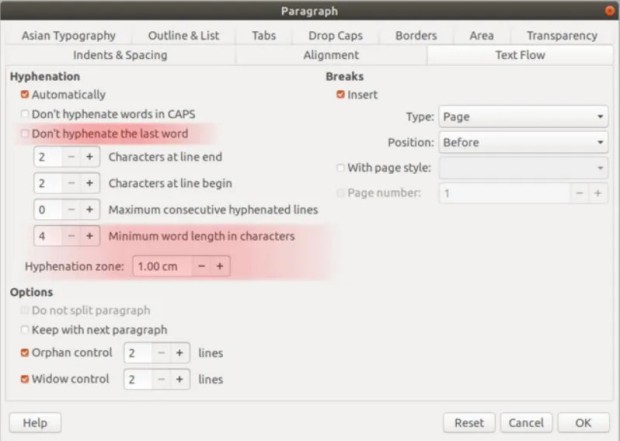
Vía: Debug Point
La entrada Las novedades de Writer de LibreOffice 7.4 se publicó primero en KDE Blog.
#openSUSE Tumbleweed revisión de la semana 24 de 2022
Tumbleweed es una distribución «Rolling Release» de actualización contínua. Aquí puedes estar al tanto de las últimas novedades.

openSUSE Tumbleweed es la versión «rolling release» o de actualización continua de la distribución de GNU/Linux openSUSE.
Hagamos un repaso a las novedades que han llegado hasta los repositorios esta semana.
El anuncio original lo puedes leer en el blog de Dominique Leuenberger, publicado bajo licencia CC-by-sa, en este este enlace:
Esta semana se han publicado 5 snapshots (0609, 0611, 0612, 0613 y 0614)
Los cambios a destacar que han llegado a los repositorios son:
- GNOME 42.2 – ya completo
- GTK 4.7.0
- openssl 1.1.1o
- KDE Gear 22.04.2
- KDE Plasma 5.25.0
- python 3.10 como el intérprete de Python predeterminado. pymodules todavía disponibles paraare python 3.8, 3.9, y 3.10
Y para próximas snapshots:
- Linux kernel 5.18.4
- Mozilla Firefox 101.0.1
- KDE Frameworks 5.95
- Inkscape 1.2
- systemd 251.2
- SELinux 3.4
- krb5 1.20.0
- Sphinx 5
Si quieres estar a la última con software actualizado y probado utiliza openSUSE Tumbleweed la opción rolling release de la distribución de GNU/Linux openSUSE.
Mantente actualizado y ya sabes: Have a lot of fun!!
Enlaces de interés

——————————–
openSUSE Tumbleweed – Review of the week 2022/24
Dear Tumbleweed users and hackers,
Week 24 contained again some public holidays for my place, but as in the past, this has never stopped Tumbleweed from rolling. After all, it’s all our contributor’s work making it go as smoothly as it is. And their great work has paid off once again, as we could finally, after months and months of preparation, testing, fixing, and redo, make the switch of the default python interpreter to version 3.10. This resulted in a rather large rebuild of the distro, as all python3- symbols needed to move to the correct python subpackage again. As a positive side effect, the recently introduced SOURCE_FORTIFY=3 is now enabled on all binaries. With the rebuild taking a bit longer, we have still managed to publish 5 snapshots this week (0609, 0611, 0612, 0613, and 0614)
The main changes delivered this week include:
- GNOME 42.2 – the missing pieces are now finally also there
- GTK 4.7.0
- openssl 1.1.1o
- KDE Gear 22.04.2
- KDE Plasma 5.25.0
- python 3.10 as the default python3 interpreter; pymodules are still built for python 3.8, 3.9, and 3.10
The python 3.10 switch also took a bit of a toll on the stagings, as they all needed to be rebased on top of that change and all competed for build powers. That in turn means they are all filled with the new, good stuff:
- Linux kernel 5.18.4
- Mozilla Firefox 101.0.1
- KDE Frameworks 5.95
- Inkscape 1.2
- systemd 251.2
- SELinux 3.4
- krb5 1.20.0: breaks samba
- Sphinx 5: breaks qemu

Community work group update post oSC22
The community workgroup (CWG) for the Adaptable Linux Platform (ALP) would like to update you on what has happened since the openSUSE Conference 2022. Make sure to check the panel discussion with the ALP steering committee and other talks from oSC22 as they become public.
First, there is a new official communication channel! We’re using the “openSUSE ALP” matrix channel, bridged with https://discord.gg/opensuse and ircs://libera.chat/#opensuse-alp. We’ve got you covered! This is the best way how to consume updates.
We have revisited the way we would like to communicate updates on ALP. The idea is to switch away from a digest report for all workgroups to something a bit easier to follow and more exciting to read.
We’ve invited SUSE’s newly appointed Engineering Director Marco Varlese to the weekly ALP CWG meeting, and we have great news to share!
We’ve received confirmation about the upcoming Roadmap. A delivery of the Proof of Concept is expected in September, and the public availability of an ALP Based product is projected for September 2023.
Next Tuesday, June 21, Marco will work with Robert Sirchia from the SUSE’s Community team on a suse.com article about the strategy and vision for the Adaptable Linux Platform. We’d like to then interview individual work groups and share some updates in a story-telling way and communicate better how they fit into the bigger picture shared by Marco. Dan Čermák will put together a sorted list of WGs by the impact on the openSUSE community. This will make sure that the interviews are as relevant as possible.
We’ve had Quality Engineering over this week. For next Tuesday, we’ve invited Jiří Šrain and Frederic Crozat from the ALP steering committee, with whom we’d like to discuss building of the community part of ALP, essentially the Package Hub for ALP. The remaining items on our radar are a test instance of Fedocal and centralized documentation.
The community platform is being referred to as openSUSE ALP during its development cycle with SUSE to be concise with planning the next community edition.
Extendido el plazo para presentar tu charla para Akademy 2022 de Barcelona
Este año, a diferencias de las ediciones anteriores, se va a celebrar de forma presencial, concretamente en Barcelona del 1 al 7 de octubre. Es por ello que es el momento de animaros a participar ya que ha sido extendido el plazo para presentar tu charla para Akademy 2022 de Barcelona. Así que no te duerma en los laureles y muestra al mundo tu implicación con el Software Libre.
Extendido el plazo para presentar tu charla para Akademy 2022 de Barcelona

A pesar de todas las restricciones para vernos que tenemos debido a la pandemia que ya dura un año, los eventos comunitarios no se han detenido.
El pasado 9 de febrero compartí con vosotros que este año Akademy 2022 se realizaría en Barcelona del 1 al 7 de octubre, en una edición que retorna con el formato del presencial que se perdió en el 2020
Siguiendo el esquema habitual, las charlas se realizarán el sábado 1 y el domingo 2, dejando el resto de días para el trabajo en pequeños grupos en sala más reservadas pero no privadas, es decir, que no están cerradas sino que todo el que quiera aportar algo está invitado.
Como se ha comentado en anteriores ocasiones, uno de los objetivos de Akademy es aprender y enseñar nuevos conocimientos y compartir entre nosotros la pasión de lo que se hace en KDE.
Para compartir ideas, experiencias o momentos, se reservan talleres específicos en la sede (o se aprovechan los corrillos en los pasillos, las cenas o los momentos de barra), pero para enseñar y compartir detalles técnicos se utilizan las charlas.
Si crees que tienes algo importante que presentar, por favor házselo saber a la organización. Y si crees que alguien debería presentar su ponencia, no dejes de animarlo para que lo haga. Todas las contribuciones son útiles y, si necesitas, inspiración:
- KDE en acción: casos de uso de la tecnología KDE en la vida real; ya sea en dispositivos móviles, implementaciones de escritorio, etc.
- Visión general de lo que está ocurriendo en las distintas áreas de la comunidad KDE.
- Colaboración entre KDE y otros proyectos de Software Libre.
- Publicación, empaquetado y distribución de software por parte de KDE.
- Aumentar nuestro alcance a través de esfuerzos como la accesibilidad, la promoción, la traducción y la localización.
- Mejora de nuestra gobernanza y procesos, construcción de la comunidad.
- Temas relacionados con los objetivos de KDE.
- Innovaciones y mejores prácticas en las bibliotecas y tecnologías utilizadas por el software de KDE, por ejemplo, C++/Qt/Python/KDE Frameworks/etc. o que puedan ser interesantes para su uso futuro, por ejemplo, Rust/C++20, etc.
Para más detalles, mira las líneas generales del Call for Papers.
Más información: KDE.News
Akademy 2022 será un evento híbrido, en Barcelona y online que se celebrará del sábado 1 al viernes 7 de octubre. La convocatoria de participación sigue abierta. Envía tus ideas de charlas y resúmenes, ya que el plazo se ha ampliado hasta el 19 de junio 23:59:59 CEST.
¿Qué es Akademy?
Para los que no lo sepan, Akademy es el evento de la Comunidad KDE que aúna en una gran conferencia todo tipo de simpatizantes de KDE como desarrolladores, diseñadores, usuarios, traductores, promotores, ideólogos, etc. Allí se reunirán a lo largo de una semana para compartir charlas, cenas, ponencias, talleres y, en definitiva, para trabajar juntos.
Es una gran semana que sirve para unir más fuerte los lazos que unen nuestra Comunidad, así como para crear nuevos que se mantendran gracias a las listas de correo, canales irc o Sprints.
Hay que recordar que en España tenemos gran tradición en la celebración de Akademy ya que en 2005 se celebró en Málaga , en 2011 en Gran Canaria, en 2013 en Bilbao, en 2015 en A Coruña y en 2017 en Almería, todos esos años junto con Akademy-es (como este año), y que fue un gran éxito tanto de asistentes, como de ponencias o de resultados. Así que no tienes excusa para asistir ya que por el «precio» de uno este año tienes dos grandísimos eventos a tu alcance.
La entrada Extendido el plazo para presentar tu charla para Akademy 2022 de Barcelona se publicó primero en KDE Blog.

BCI test tutorial
Base Container Images (BCI) are a SUSE offer for a variety of container images suitable for building custom applications atop of the SUSE Linux Enterprise (SLE). They are a suitable building platform for different container applications and are available for free without subscription. In this blog post I’m covering how we test BCI before they are released and how you can run individual tests on them.
An update from ALP Quality Engineering
Building our products in an open and transparent way allows us to rethink the way how we test.
Jose Lausuch from our ALP Quality Engineering was invited to the Community Workgroup weekly meeting to speak about current plans of Quality Engineering for ALP.
Jose mentioned that the QE Workgroup would like to start testing existing ALP images with the existing MicroOS test suite. The effort is coordinated in poo#112409.
Let’s start with what we already have and run it against ALP in openqa.opensuse.org (o3). We’d initially cover KVM and self-install images for x86_64 and aarch64. VMware and possibly others would come later.
Once we have a proof of concept, other QE experts will jump to cover specific testing areas (virtualization, containers, public cloud, yast) and contribute to ALP as well back to upstream, which is in this case MicroOS.
We hope that this new model will raise community interest in contributions to the Quality Engineering area, as this has been always a challenge.
Jose already submitted the initial ALP job group to o3 and started adding some code to the upstream test repository.