
 Member
 Victorhck
#openSUSE Tumbleweed revisión de la semana 13 de 2022
Tumbleweed es una distribución «Rolling Release» de actualización contínua. Aquí puedes estar al tanto de las últimas novedades.

openSUSE Tumbleweed es la versión «rolling release» o de actualización continua de la distribución de GNU/Linux openSUSE.
Hagamos un repaso a las novedades que han llegado hasta los repositorios esta semana.
El anuncio original lo puedes leer en el blog de Dominique Leuenberger, publicado bajo licencia CC-by-sa, en este este enlace:
El anuncio original de esta semana ha coincidido con el famoso April’s fool de la cultura anglosajona, similar el día de los inocentes, donde se gastan bromas.
Por eso el anuncio en inglés «insinuaba» que para evitar retrasos innecesarios en la publicación de nuevas «snapshots» se iba a dejar de utilizar openQA y se publicarían directamente las snapshots todos los días a las 5 pm. Porque los desarrolladores y empaquetadores no se equivocan nunca y confiamos ciegamente en ellos… Bueno, obviamente esto no es cierto
Lo que sí es cierto es que en esta semana se han publicado 4 snapshots (0324, 0328, 0329, y 0330).
Que entre otras han traído estas actualizaciones:
- GStreamer 1.20.1
- Snapper 0.10.0
- Mozilla Firefox 98.0.2
- systemd 250.4
- timezone 2022a
- ibus 1.5.26 – soluciona algunas incompatibilidades con GNOME 42
Y en próximas actualizaciones podremos disfrutar de:
- Linux kernel 5.17.1
- KDE Plasma 5.24.4
- Mesa 22.0.1
- gcc12: se está preparando la migración a esta nueva versión del compilador
- procps-ng 4.0
Si quieres estar a la última con software actualizado y probado utiliza openSUSE Tumbleweed la opción rolling release de la distribución de GNU/Linux openSUSE.
Mantente actualizado y ya sabes: Have a lot of fun!!
Enlaces de interés
-
-
- ¿Por qué deberías utilizar openSUSE Tumbleweed?
- zypper dup en Tumbleweed hace todo el trabajo al actualizar
- ¿Cual es el mejor comando para actualizar Tumbleweed?
- Comprueba la valoración de las «snapshots» de Tumbleweed
- ¿Qué es el test openQA?
- http://download.opensuse.org/tumbleweed/iso/
- https://es.opensuse.org/Portal:Tumbleweed
-

——————————–
openSUSE Tumbleweed – Review of the week 2022/13
Dear Tumbleweed users and hackers,
During this week, we only managed to get 4 snapshots (0324, 0328, 0329, and 0330) out of the door. Seems QA is slowing us down too much, so I decided to give up on it. To make Tumbleweed more plannable for upgraders, the new process will foresee a fixed time when a snapshot will go out – daily at 5 pm UTC. We will just ship out whatever we have built by that time. This is a minimal tradeoff between stability and plannability – after all, we all trust our developers and maintainers and we know that they test things before sending them your way. So no more need to slow down using QA!
Anyway, the 4 snapshots we delivered during this week contained these updates:
- GStreamer 1.20.1
- Snapper 0.10.0
- Mozilla Firefox 98.0.2
- systemd 250.4
- timezone 2022a
- ibus 1.5.26 – fixes some incompatibilities with GNOME 42
Of course, we continue planning what will come through in the next few days; currently, the plan includes:
- Linux kernel 5.17.1
- KDE Plasma 5.24.4
- Mesa 22.0.1
- gcc12: we won’t be switching to it as the default compiler yet, but we will start using the provided libstdc libraries from gcc12 (phazes migration, as done in the past)
- procps-ng 4.0
New syslog-ng parser: flip-parser()
The latest pull request to syslog-ng adds a really useful feature: the flip-parser(): https://github.com/syslog-ng/syslog-ng/pull/3971
It allows you to flip the message text, reverse it, or both. As I also reported a couple of minor problems related to UTF-8 character handling, this PR most likely will not be merged today. However, you can compile it yourself, or if you use openSUSE Tumbleweed, use my packages from the openSUSE Build Service.
You can read the rest of my blog at https://www.syslog-ng.com/community/b/blog/posts/new-syslog-ng-parser-flip-parser

syslog-ng logo
Cómo evitar los efectos 3D en aplicaciones en pantalla completa – Scripts de Kwin (III)
Sigo con la nueva sección en el blog dedicado a los Scripts de Kwin, esas pequeñas modificaciones a Kwin que le confieren nuevas funcionalidades. Y aunque he cambiado el título por razones de accesibilidad voy a hablar de Autocompser o cómo evitar los efectos 3D en aplicaciones en pantalla completa o lo que técnicamente se llama compositing.
Cómo evitar los efectos 3D en aplicaciones en pantalla completa – Scripts de Kwin (III)
Me encanta seguir encontrando nuevas funcionales no oficiales para KWin con los que seguir experimentando con nuestro escritorio, y más cuando éstas pueden ayudarme a ser más eficiente al utilizar mis ordenadores.
En el blog ya hemos hablado de algunas de ellas, como es el caso de KWin dynamic workspaces, de Mudeer, Windows Gaps o Always Open on Primary Screen scripts que mejoran el comportamiento de nuestro entorno de trabajo, pero últimamente están apareciendo tantos en la Store de KDE que no hay duda que merecen un hueco constante en el blog.
De esta forma, me complace presentaros Autocomposer una creación de es20490446e que evita los efectos 3D que en ocasiones relantizan el funcionamiento de las aplicaciones que se abren pantalla completa en nuestro escritorio.
Y es que una característica de Plasma es que se lleva bien con entornos 3D de escritorio, tal y como se lee en la página userbase de KDE, KWin es compatible con composición, que consiste en utilizar efectos 3D para manejar tus ventanas. Y esto que es bueno para el mayor tiempo funciona muy bien, algunas ocasiones puede no ser oportuno.

Y Y como siempre digo, si os gusta el script podéis “pagarlo” de muchas formas en la mutante página de KDE Store, que estoy seguro que el desarrollador lo agradecerá: puntúale positivamente, hazle un comentario en la página o realiza una donación. Ayudar al desarrollo del Software Libre también se hace simplemente dando las gracias, ayuda mucho más de lo que os podéis imaginar, recordad la campaña I love Free Software Day de la Free Software Foundation donde se nos recordaba esta forma tan sencilla de colaborar con el gran proyecto del Software Libre y que en el blog dedicamos un artículo.
La entrada Cómo evitar los efectos 3D en aplicaciones en pantalla completa – Scripts de Kwin (III) se publicó primero en KDE Blog.
Cursores minimalistas para tu PC, Nordzy
En estos días me apetece las entradas ligeras. De esta forma comparto con vosotros unos cursores minimalistas para tu PC sencillos y muy agradables a la vista. Se trata los cursores Nordzy, los cuales tiene un aspecto muy planos pero con toques de colores que se adaptan a cualquier estilo de escritorio.
Cursores minimalistas para tu PC, Nordzy
Nacidos de la mano y de la mente de alvatip nos llegan los cursores Nordzy un conjunto de cursores ideales tanto para temas claros y oscuros basados en los temas Vimix y cz-Viator.
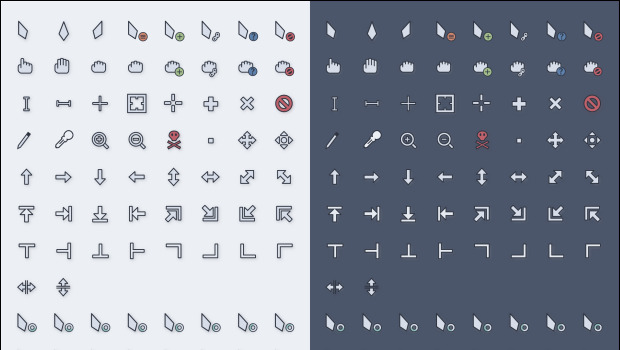
Como se puede ver en la imagen superior, los cursores Nordzy se adaptan perfectamente a cualquier estilo de escritorio gracias a su borde grueso y oscuro.
Y como siempre digo, si os gusta este conjunto de cursores Nordzy podéis «pagarlo» de muchas formas en la página de KDE Store, que estoy seguro que el desarrollador lo agradecer?: puntúale positivamente, hazle un comentario en la página o realiza una donación. Ayudar al desarrollo del Software Libre también se hace simplemente dando las gracias, ayuda mucho más de lo que os podéis imaginar, recordad la campaña I love Free Software Day 2017 de la Free Software Foundation donde se nos recordaba esta forma tan sencilla de colaborar con el gran proyecto del Software Libre y que en el blog dedicamos un artículo.
Más información: KDE Store
Cómo cambiar el tema de los cursores en Plasma
Al igual que con los iconos hay varias formas de cambiar el tema de cursores en Plasma, pero la más fácil es:
- Abrir las Preferencias del Sistema
- Ir a la sección Tema de Cursor
- En esta ventana pinchar en «Obtener nuevos temas»
- Buscar Material, seleccionar el estilo y dar a instalar.
- Seleccionar el tema y aplicar.
Si tenéis dificultad, simplemente se debe descargar a tu disco duro y extraer el tema en «/usr/share/icons» o «~/.icons».
Rápido, sencillo y efectivo, como la mayoría de cosas en en el escritorio Plasma de la Comunidad KDE.
La entrada Cursores minimalistas para tu PC, Nordzy se publicó primero en KDE Blog.
Clang 14 faster at building LibreOffice
So I've updated my Clang to the newly released version 14, and while doing the LibreOffice rebuild afterwards I noticed that it seemed to build faster. I didn't measure it, but the build finished sooner than I expected. So of course I've measured it.
As a simple reference I used my year-old post about Clang 11 building faster with PCH, where Calc'c Library_sc built in 4 minutes and 39 seconds. And indeed now it's faster:
1105.84user 88.35system 2:55.07elapsed 682%CPU (0avgtext+0avgdata 1666576maxresident)k
180904inputs+2272520outputs (41390major+23529938minor)pagefaults 0swaps
Just to make sure it's not something else, I went back to Clang 13 to test it:
1581.76user 93.84system 4:14.75elapsed 657%CPU (0avgtext+0avgdata 1916380maxresident)k
153912inputs+2316696outputs (41891major+27245569minor)pagefaults 0swaps
So yes, it's real, and it's the compiler. It also suggests that there was an improvement also between Clang 11 and Clang 13, although not as noticeable as this.
I have no idea why that is, it seems too big of a difference to be just something random, but I see nothing relevant in the release notes (and it's not DWARF5, I tested that one). I also have no idea if it's a code change or if it's the compiler being faster because it generates faster code and is self-built. But hey, it's nice. I still vaguely remember the times when I was trying to avoid full Calc rebuilds like a plague, but that seems like a long time ago.
D-Installer First Public Release
It is our pleasure to announce the availability of the first installation image based on D-Installer. Since our initial announcement in January, we have been working on going from a non-working proof-of-concept to something that you can actually use.
This article aims to summarize project's current status and what you can expect from the near future. Additionally, we will dig a bit into some internal details so you have a better overview of the path we are following.
D-Installer (kind of) works
D-Installer can install openSUSE Tumbleweed in simple scenarios. But, please, bear in mind that it is still an experimental project, so it is better to use a virtual machine if you decide to give it a try. After all, we do not want to be responsible for any data loss. 😉
You can grab a Live ISO from OBS. We refresh this image as often as possible to include the latest D-Installer changes for testing purposes. Once the ISO boots, log into the installer using "root" as user and "linux" as password and you should see the "Installation Summary" page.
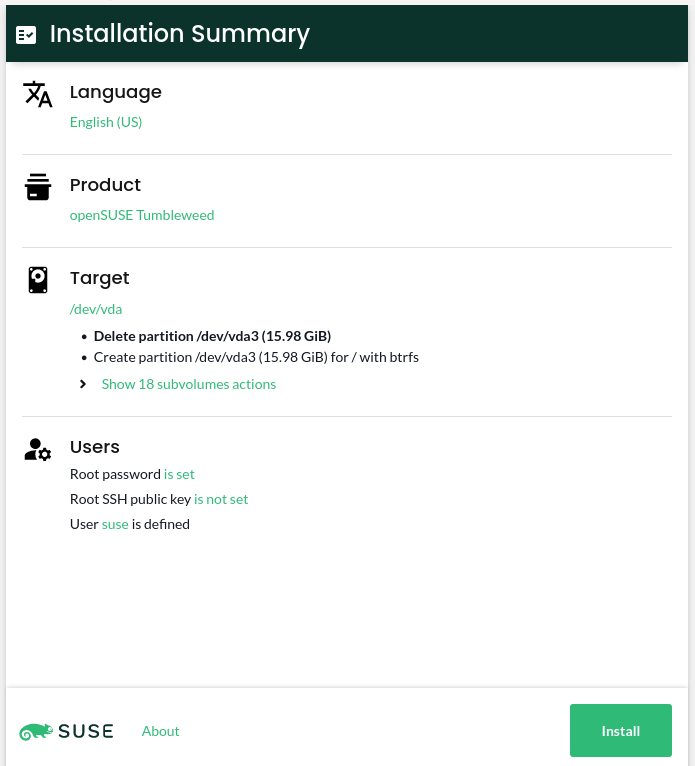
As we do not include any repository in the image, you need the machine to be connected to Internet so it can access Tumbleweed packages.
How D-Installer looks now
The "Installation Summary" page is the central point in the D-Installer's user interface. It allows the user to check the installation settings at a glance. You can think of this page as the "Installation Settings" screen in YaST. The main difference is that, in this case, it is the starting point, so you do not need to traverse any wizard to get into it.
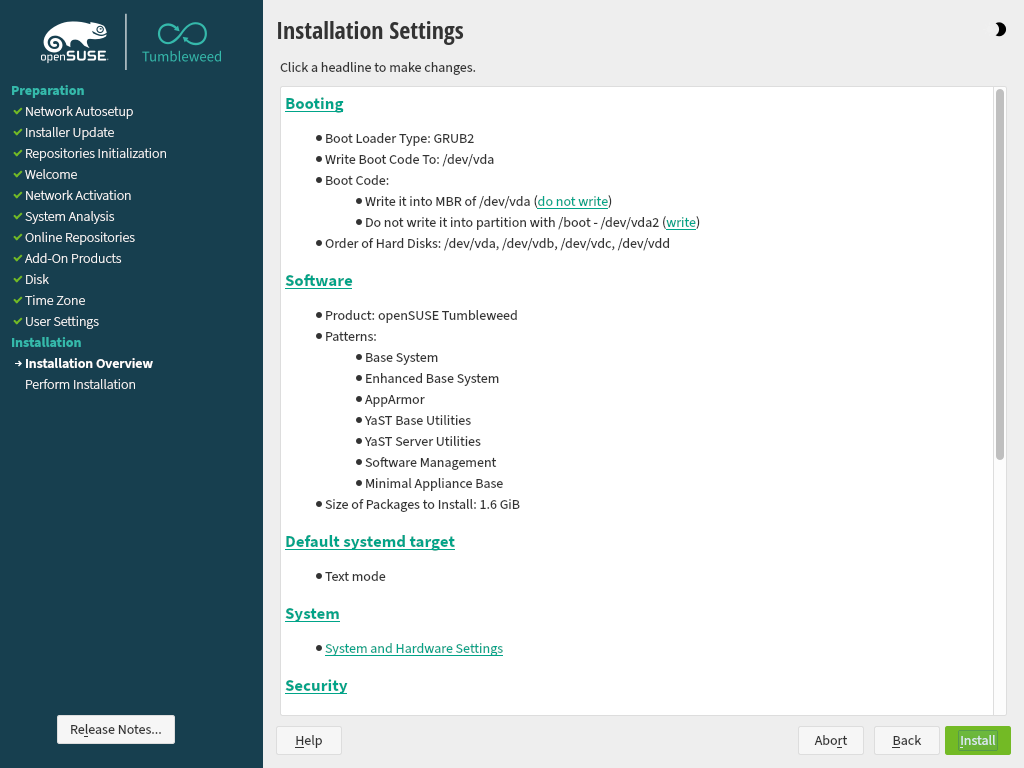
The overview is reduced to a few sections: language and product selection, partitioning settings, and users management.
Unsurprisingly, the language selector allows setting the language in the installed system. Take into account that, at this point, the user interface is not localized yet, so it does not affect the installer itself. Moreover, we would like to add support to change the keyboard layout in the future.
Software selection is pretty limited by now. D-Installer allows you to select which product to install, but that's all. Picking patterns or system roles is not supported yet.
Regarding partitioning, D-Installer relies on the YaST guided proposal, although it only allows selecting a device to install the system on. We plan to offer most of YaST's guided partitioning settings (using multiple disks, choosing a file system type, etc.).
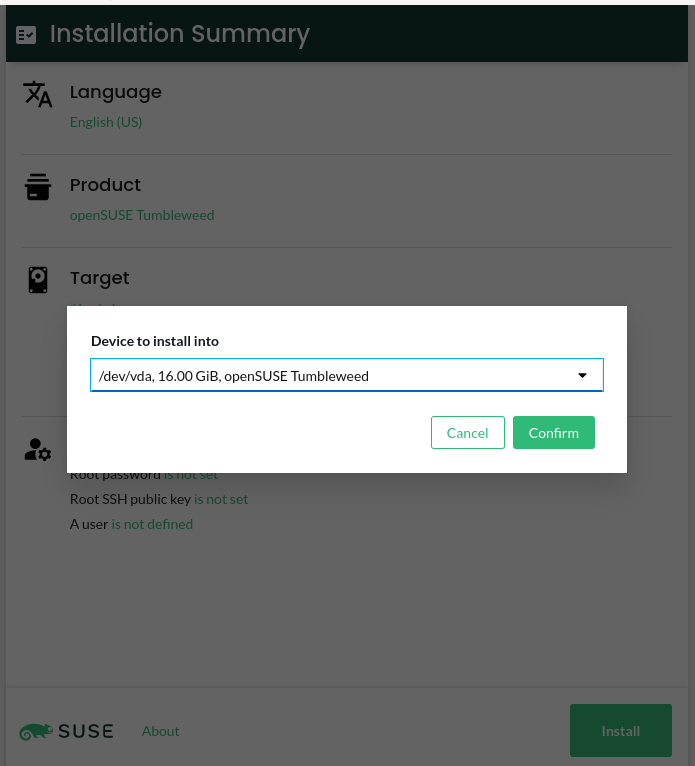
Last but not least, D-Installer allows configuring the root's authentication (password or SSH public key) and/or creating a first user to log into the installed system, similar to what YaST supports.
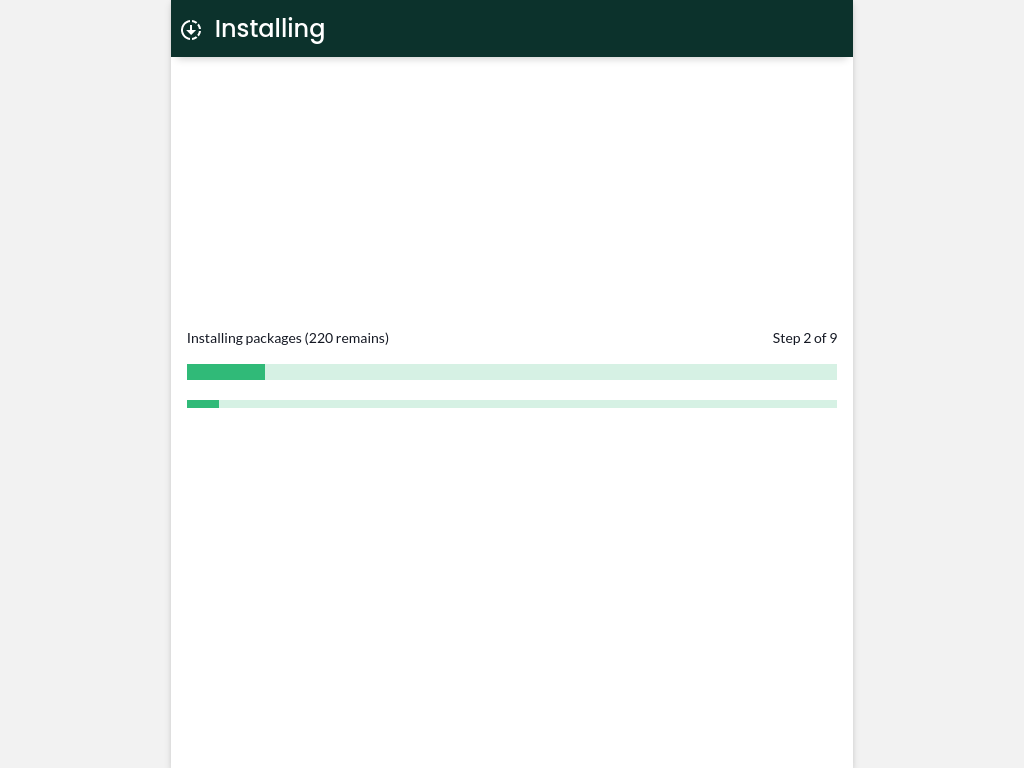
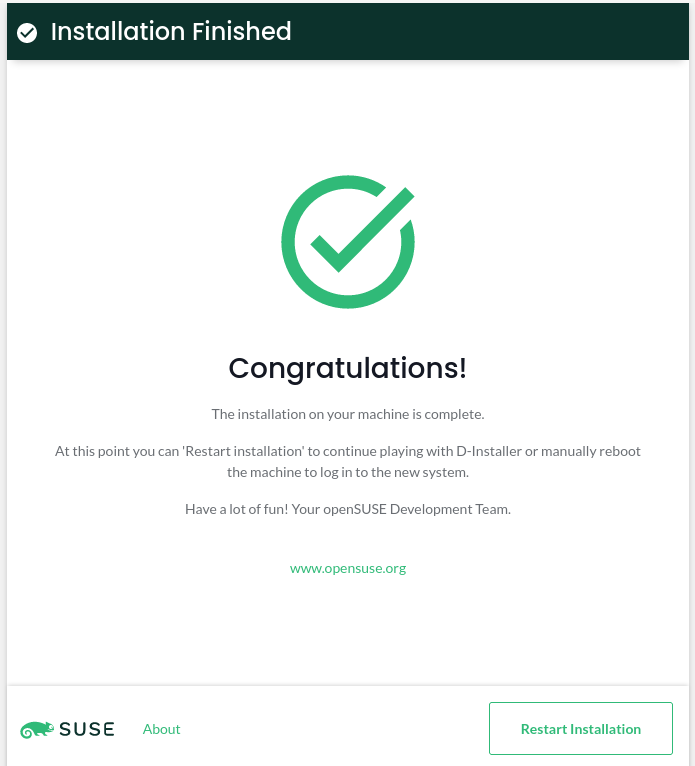
Once you tweak the installation options, clicking the Install button starts the installation.
YaST, D-Bus, React and Cockpit
We promised to dig a little into the details, so here we go. When it comes to the architecture, the approach has not changed that much from the one we described in the initial announcement. It is composed of three different parts: a system service, a D-Bus interface, and a web user interface.
The core is the D-Installer system service, which uses YaST libraries to inspect and install the system. We are reusing as much YaST code as possible, but at the same time, we are trying to use only the bits that we need. This service provides a D-Bus interface, so the user interface can interact with it. We are trying to keep the D-Bus interface decoupled from the business logic, although we do not plan to replace it for anything else.
Regarding the user interface, we decided to build a React application using PatternFly components. Why PatternFly? You will understand the reason in a minute if you keep reading. :-)
How do the components we have described talk to each other? That's an interesting question. Instead of rolling our own solution, we decided to rely on Cockpit. So we use Cockpit's infrastructure to connect the UI and the system service (through D-Bus). We even use Cockpit's web server to expose the UI in the installation medium.
And that's actually the main reason to use PatternFly. There is a chance that we can reuse parts of the installer UI in a Cockpit module in the future. Time will tell.
What to expect from now
We have learned a lot during this iteration, so we will use that knowledge to develop a roadmap. However, there are some areas we would like to work on soon that should get a prominent place in such a roadmap. Let's have a look at some of them.
Error reporting and user interaction
Our D-Installer service can send information about its current status and the installation progress. However, it is pretty bad at error reporting and cannot ask the user for additional information. For instance, it does not implement any mechanism to ask for the password if it finds an encrypted disk while analyzing the storage devices.
We consider this a critical requirement, so we would like to develop a reliable solution in the next iteration.
Better software handling
Selecting a product is not just picking a set of packages: it might affect the installer's behavior. For instance, if you want to install MicroOS, the partitioning proposal needs to be adapted to mount the root file system as read-only. Not to mention showing products' licenses or release notes. So it is not that simple.
Moreover, we have the concept of system roles, which may affect the software selection, services configuration, etc.
As there are many moving pieces, we need to define how far we are going with software handling. Of course, licenses and release notes are a must. But do we plan to support system roles? Most likely, yes. Which options would be supported? And what about selecting patterns or just individual packages? Too many open questions yet.
Full guided proposal supported
We do not plan to bring the partitioner to the web interface anytime soon. Instead, our plan is to support all the guided partitioning options, so you can select multiple devices, choose a different file system, enable LVM, use encryption, etc. So, in the medium term, it looks like a fair trade.
The user interface
We think that the user interface is good enough for the first iteration, but given that we plan to add support for more features, we need to work with our UX experts to improve the overall approach. For instance, using pop-ups all over the place is far from ideal.
Not to mention that, although we are using PatternFly, we try to stick to EOS Design System principles, so we might need some help.
Share your opinion
Now that you have something to try, it would be great if you shared your opinion. You can contact us
through the GitHub project's page or, as usual, in our
#yast channel at Libera.chat or the YaST Development mailing
list.
Have a lot of fun!

Tumbleweed updates sudo, systemd, ibus
A total of four openSUSE Tumbleweed snapshots were delivered this week to rolling release users.
Tumbleweed has consistently been releasing daily snapshots; a four-day period between two snapshots this week is the longest duration between snapshots since the fall of last year. Impressive.
The most recent snapshot, 20220330, updated just one package. The tiny update of perl-Mojolicious to version 9.23 enabled gzip compression by default with the Mojolicious renderer.
Snapshot 20220329 has several packages. Among the packages to update in the snapshot was ibus 1.5.26. The intelligent input bus for Linux enhanced Emoji features, enhanced compose keys and fixed the forward key keycode for GTK4. An update of strace 5.17, which is a diagnostic, debugging and instructional userspace, made some improvements and implemented a few decoding commands. Linux Bluetooth protocol bluez 5.64 removed a patch and created a fix for building with old glibc. The update of the INI file parser by kiwi Ben Hoyt to inih 55 improved the quality of shared objects by explicitly defining symbol visibility; it was updated from version 53. The snapshot also brought several Python Package Index updates. Two of those were python-cryptography 36.0.2, which updated operating systems to compile with OpenSSL 1.1.1n, and toolkit python-ipython 8.2.0, which allows auto-suggestion.
Updates of sudo and systemd came in snapshot 20220328. The 250.4 systemd copies holes when archiving Btrfs journal files and explicitly handles file systems that do not support hole punching. Some new options with sudo 1.9.10 will attempt to prevent passwords from being logged if log_passwords is disabled. Mozilla Firefox 98.0.2 fixed an issue preventing users from typing in address bar after opening a new tab and pressing cmd + enter. It also fixed an issue in session history that caused some sites to fail loading. Text shaping engine harfbuzz 4.1.0 had various bug fixes and libzypp fixed a possible hang. Packages gtk3 3.24.33+12, libsolv 0.7.22, xlockmore 5.69 and glib2 2.72.0 were some of the many to update in the snapshot.
The snapshot starting off the week, which was a day after GNOME 42 landed in Tumbleweed, was 20220324. There were a few 1.20.1 gstreamer packages to update in the snapshot. The GStreamer package fixed a gtk video sink involving a rotation not being applied when paused and various fixes to the webrtc-sendrecv. Text editor vim had a large amount of community contributions moving from version 8.2.4542 to 8.2.4602 and fixed some build failures with a combination of features. Gamers and musicians will appreciate the 0.4.9 pipewire update as surround sound in some games is now exposed properly and some bluetooth features were added and fixed. An update of the filesystem snapshot manager snapper 0.10.0 adjusted a transfer filelist to alleviate the message size for dbus.
Lista de vídeos de Step, el simulador de física de KDE
Hoy entrada rápida que mi vida se acelera. Os invito a conocer una poco más a fondo el simulador de física de KDE de la mano de Lista de vídeos de Step que he encontrado y que me parece interesantes compartir con vosotros. A ver qué os parece.
Lista de vídeos de Step, el simulador de física de KDE

De la mano de José Pérez he encontrado esta lista de vídeos de Step en el que podréis encontrar un poco de todo lo que puede hacer esta fabulosa aplicación educativa. Hay que destacar que no es la primera vez que aprece Sep en el blog ya que le he dedicado alguna que otra serie como la de enseñar gráficas MRU y MRUA con él.
¿Qué es Step?
Para los que no lo conozcan , Step, es un simulador de mundos físicos en 2D, con el que podremos recrear la realidad en condiciones controladas.
Con Step se puede, entre otras cosas:
- Recrear escenario de la mecánica clásica en 2 dimensiones
- Jugar con partículas, Particles,muelles, la gravedad y las fuerzas de eléctricas
- Utilizar sólidos rígidos
- Detectar colisiones (solo para partículas discretas)
- Deformaciones de cuerpos con sistemas de partícula-muelle o sonidos.
- Simular dinámicas moleculares: gases y líquidos, condensaciones y evaporaciones, cálculo de cantidades macroscópicas y sus varianzas
- Utilizar conversión de unidades y expresiones de cálculo (require libqalculate)
- Cálculo de errores y su propagación
- Controlar la velocidad de simulación
- Disponer de Herramientas para visualizar los resultados: gráficos, metros, marcadores, etc
- Ver información contextual para los objetos gracias a la integración con la wikipedia
- Disponer de una colección de experimentos ejemplos descargables desde Internet
- Tener tutoriales integrados
A ver si en un futuro le dedico más tiempo a esta increíble aplicación que, lamentablemente, parece que está necesitada de algo de amor pero que tiene un potencial fabuloso tanto a nivel de secundaria como en cursos superiores.
La entrada Lista de vídeos de Step, el simulador de física de KDE se publicó primero en KDE Blog.
Using the openSUSE Build Service to build software for POWER
My favorite and most used service for developers is the openSUSE Build Service (OBS). This is where I build syslog-ng packages first, before anywhere else. OBS is open source, highly flexible software to build software packages, and the instance at https://build.opensuse.org/ is free to use for anyone to build open source software. Best of all, it supports multiple architectures, including POWER.
Open Build Service
Actually the OBS acronym stands for two things. The software itself is called Open Build Service. It is open source and you are free to install it on your own network. You can use it to compile any software you like. The openSUSE Build Service is a public OBS instance. It is accessible to any registered user to build open source software.
OBS can be used not just to compile individual software packages, but to maintain and publish complete repositories. It can also build various images from the software compiled: both ISO images and disk images for different virtualization solutions.
The original focus of OBS was i586 and openSUSE. Soon other architectures and Linux distributions were introduced to OBS. While I only use it for openSUSE and SLES packages, many more are supported, including Fedora, RHEL, Ubuntu, Arch, even Raspbian on x86, ARM and POWER.
You can access the OBS both through its web interface and a command line client. In theory you should be able to configure everything from either of them. I tend to use both of them. I configure repositories through the web interface, but submit new builds using the CLI. If you want your software project to get compiled for POWER, it is just a few mouse clicks away. You add a distribution version to your project and then you can configure architectures. If you add an architecture only later, you do not have to re-submit packages as OBS automatically compiles all packages for the new architecture as soon as you click on “update”.

obs architecture selector
POWER
While the focus of POWER support in OBS is PPC64LE, meaning little endian 64 bit POWER, you can also use it to build both 32 bit and 64 bit big endian POWER architecture packages. There were times when the build capacity for POWER was relatively small. You had to wait long for POWER builds to complete. However, early this year the openSUSE received a huge hardware donation from SUSE and IBM: fast, new IBM POWER 9 servers. Building packages on POWER are blazing fast now, compiles finishing often before any other platforms. You can read the announcement at https://news.opensuse.org/2022/01/25/os-gains-new-hardeware/
If you take a look at https://build.opensuse.org/monitor you can see that there are now close to 300 POWER workers in OBS. 1.5x more than just a couple of months ago. They are often working close to full capacity (most likely when Factory is being rebuilt), but it seems that there are always some resources left free for random incoming jobs from users.
Why OBS?
I keep mentioning, that POWER is just one of the architectures supported by OBS. Then why I write my first blog after introducing myself as an IBM POWER Champion about the openSUSE Build Service? Because it is quite rare that you want to build a software only for a single Linux distribution on POWER. In that case OBS gives you tremendous speed and flexibility: you do a single submit and it gets compiled on a dozen of different Linux distributions and possibly also on a dozen of different architecture variants.
