
 Member
 baltolkien
Temas Moe para Plasma, perfectos para claros u oscuros
Hoy toca algo de personalización, concretamente quiero hablar de los Temas Moe para Plasma, una creaciones del gran diseñador Jorge Dangelo (aka Jomada) que nos dos variaciones perfectas tanto para escritorios claros como para oscuros. Espero que os gusten.
Temas Moe para Plasma, perfectos para claros u oscuros
A la hora de personalizar nuestro entorno de trabajo Plasma de la Comunidad KDE uno de las mejores opciones son los temas globales con los que podemos cambiar a golpe de un click todo el aspecto de nuestro escritorio.
Uno de los especialistas en ofrecer este tipo de «productos» es jomada, el cual nos ha ofrecido verdaderas maravillas, y como muestra el siguiente botón.
Se trata de los temas Moe, basados en Aether Dark de KenVermette, para Plasma, que nos ofrecen unas decoraciones para el escritorio con desenfoques, transparencias, gradientes y toques rojizos. Y dado que Jorge piensa en todo, nos lo ofrece en dos estilos: claro y oscuro.

Y, como siempre digo, si os gusta el Tema pod�is �pagarlo� de muchas formas en la p�gina de�KDE Store, que estoy seguro que el desarrollador lo agradecer�: punt�ale positivamente, hazle un comentario en la p�gina, realiza una donaci�n o ay�dale con la documentaci�n. Ayudar al desarrollo del Software Libre tambi�n se hace simplemente dando las gracias, ayuda mucho m�s de lo que os pod�is imaginar, recordad la campa�a�I love Free Software Day 2017 de la Free Software Foundation donde se nos recordaba esta forma tan sencilla de colaborar con el gran proyecto del Software Libre y que en el blog dediqu� un art�culo.
Más información: KDE Store
La entrada Temas Moe para Plasma, perfectos para claros u oscuros se publicó primero en KDE Blog.
Evento en Burgos de la comunidad de Open Street Map
Este próximo abril de 2022 las personas que disfruten creando mapas o tengan curiosidad de esta wiki de mapas tienen un encuentro con la comunidad de Open Street Map

Se recobran los eventos presenciales, ya hay ganas de juntarse y volver a vernos las caras, después de tantos meses extraños que todavía sufrimos.
En este caso la comunidad de Open Street Map propone un evento en pleno corazón de Castilla, concretamente en Burgos para los días 1, 2 y 3 de abril de 2022. ¿Te animas a participar?
En estos 3 días, habrá tiempo para socializar y encontrar a personas que también disfrutan creando mapas en Open Street Map, habrá charlas y talleres en la estación de la ciencia.
1 de abril
- Cañas de bienvenida y un poco de tapeo. Tiempo para conocerse, romper el hielo, hablar y poner en común.
2 de abril
- 10:30 Charla iniciación OSM con editor ID
- 11:00 Mapatón de introducción a OpenStreetMap, impartida por Miguel Sevilla-Callejo (@msevilla00 – Mapeado Colaborativo / Geoinquietos Zaragoza)
- 13:00 Las calles de las mujeres, impartida por Carmen Díez (@carmen10maica – GeochicasOSM / Geoinquietas Madrid)
- 14:00 Comida
- 17:00 Calidad en OSM → Cómo vigilar ediciones, calidad y reversión de vandalismo, impartida por Jorge Sanz (@jorgesanzs)
- 17:30 Datos históricos en OSM → Cómo visualizarlos impartida por Héctor Ramos (@yopaseopor – OSMCatala)
- 18:00 Charla importación catastro. (Pendiente de confirmar)
- 18:30 Discusión sobre Asociación OpenStreetMap España
- Otras propuestas: Creación y resolución de notas / OSM en 3D → Cómo mapear edificios en 3D./ Relaciones entre Wikidata y OSM
- NOTA: el horario puede ser ligeramente modificado por la organización
3 de abril
- Turismo guiado por la ciudad con visita a la catedral (7€ por la entrada a esta)
- Comida y café de despedida
Un buen plan si quieres conocer lo que hacen personas como tu o yo, actualizando, modificando y creando mapas de manera colaborativa en la plataforma Open Street Map.
Tanto si ya tienes experiencia mapeando, o si tienes curiosidad, si tienes la oportunidad no dejes de pasar por el evento y participar. Tienes hasta el 30 de marzo de 2022 para inscribirte.
Yo he hecho mis pinitos creando algunos mapas, de sitios que conozco y que no tenían mucho detalle.
Para participar tienes que rellenar un formulario de inscripción (en google docs), supongo que para tener un control estimado de las personas que van a asistir.
Más información en su página de información del evento:

#openSUSE Tumbleweed revisión de la semana 12 de 2022
Tumbleweed es una distribución «Rolling Release» de actualización contínua. Aquí puedes estar al tanto de las últimas novedades.

openSUSE Tumbleweed es la versión «rolling release» o de actualización continua de la distribución de GNU/Linux openSUSE.
Hagamos un repaso a las novedades que han llegado hasta los repositorios esta semana.
El anuncio original lo puedes leer en el blog de Dominique Leuenberger, publicado bajo licencia CC-by-sa, en este este enlace:
Una vez más se demuestra el poder que tiene OBS y openQA para los desarrolladores. Ya que ha permitido a los mantenedores de GNOME publicar en openSUSE la versión 42 el mismo día que GNOME lo publicaba, el pasado 23 de marzo.
Pero además de este gran lanzamiento, muchas otras cosas han pasado en estas 6 nuevas snapshots (0318…0323).
Los principales cambios son:
- NetworkManager 1.36.2 & 1.36.4
- Linux kernel 5.16.15
- librsvg 2.52.8
- GNOME 42.0
- VLC 3.0.17.3
- Kubernetes 1.23.4 & 1.22.7
Y nuevas actualizaciones se están preparando:
- Cambio de Java 17 openjdk en vez de Java 11 openjdk de manera predeterminada
- timezone 2022a
- systemd 250.5
- podman 4.0
- Linux kernel 5.17
- transactional-update 4.0.0
- GCC 12
Si quieres estar a la última con software actualizado y probado utiliza openSUSE Tumbleweed la opción rolling release de la distribución de GNU/Linux openSUSE.
Mantente actualizado y ya sabes: Have a lot of fun!!
Enlaces de interés
-
-
- ¿Por qué deberías utilizar openSUSE Tumbleweed?
- zypper dup en Tumbleweed hace todo el trabajo al actualizar
- ¿Cual es el mejor comando para actualizar Tumbleweed?
- Comprueba la valoración de las «snapshots» de Tumbleweed
- ¿Qué es el test openQA?
- http://download.opensuse.org/tumbleweed/iso/
- https://es.opensuse.org/Portal:Tumbleweed
-

——————————–
lanzador de aplicaciones mmck launcher plasmoides de kde 194
El escritorio Plasma de la Comunidad KDE es personalizable hasta el extremo, y para ello se suelen utilizar los plasmoides como el que os presento hoy. Se trata del lanzador de aplicaciones MMcK Launcher una alternativa original y diferente a las que estamos acostumbrados, y con el que llegamos a 194 plasmoides presentados en el blog.
Lanzador de aplicaciones MMcK Launcher ? Plasmoides de KDE (194)
Seguimos con las posibilidades de personalizaci?n de Plasma 5 en cuanto a lanzadores de aplicaciones. Al nuevo lanzador que nos vino con Plasma 5.21, a su versión cl?sica que podéis encontrar en la KDE Store, y a la infinidad de alternativas que tenemos (UMenu, Minimal Menu, Simple Menu , Ditto Menu ,Popup Launcher, Stupid Simple Launcher o OSXLaunchpad) se unen modificaciones sobre los mismos como el que os presento hoy.
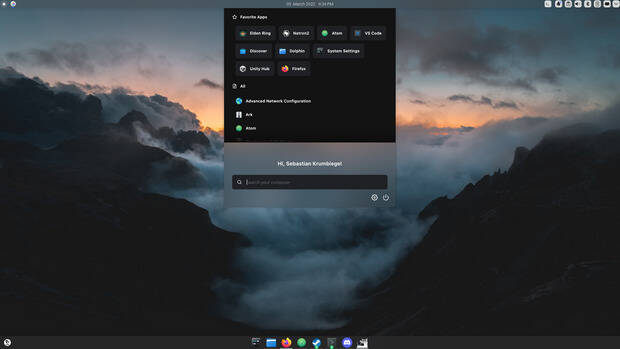
Así que espero que le deis la bienvenida a un plasmoide de snoutie llamado MMcK Launcher, un lanzador de aplicaciones que se diferencia de muchos de sus alternativas por el vistoso avatar superior y su diferente forma de presentar las aplicaciones:
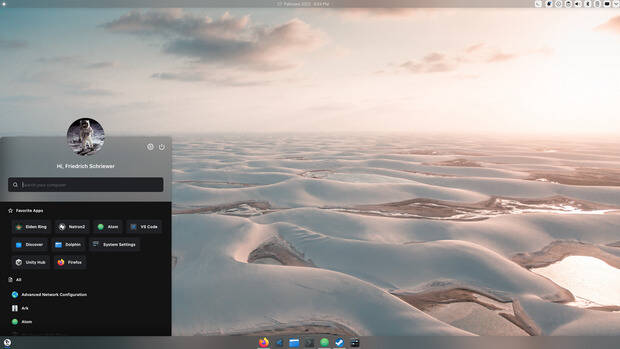
Sus características principales son:
- Cambio de categoría rápida, solo se debe hacer clic con el botón derecho e izquierdo del ratón en la cabecera, donde dice «All».
- Ajustable a diversos temas
- Se puedes situar en una esquina, flotando sobre el panel o en el centro de la pantalla
- Mensaje de bienvenida personalizado
Y como siempre digo, si os gusta el plasmoide podéis ?pagarlo? de muchas formas en la nueva página de KDE Store, que estoy seguro que el desarrollador lo agradecer?: puntúale positivamente, hazle un comentario en la página o realiza una donación. Ayudar al desarrollo del Software Libre también se hace simplemente dando las gracias, ayuda mucho más de lo que os podéis imaginar, recordad la campaña I love Free Software Day de la Free Software Foundation donde se nos recordaba esta forma tan sencilla de colaborar con el gran proyecto del Software Libre y que en el blog dedicamos un art?culo.
Más información: KDE Store
?Qué son los plasmoides?
Para los no iniciados en el blog, quizás la palabra plasmoide le suene un poco rara pero no es mas que el nombre que reciben los widgets para el escritorio Plasma de KDE.
En otras palabras, los plasmoides no son más que pequeñas aplicaciones que puestas sobre el escritorio o sobre una de las barras de tareas del mismo aumentan las funcionalidades del mismo o simplemente lo decoran.
La entrada lanzador de aplicaciones mmck launcher plasmoides de kde 194 se publicó primero en KDE Blog.
openSUSE Tumbleweed – Review of the week 2022/12
Dear Tumbleweed users and hackers,
Once again we were able to demonstrate the power of OBS and openQA by allowing the GNOME maintainers to bring the shiny new GNOME 42 into a snapshot ‘the day it is published upstream’. GNOME 42 was released on March 23, 2022, and snapshot 20220323 already contains it. But of course, this is not all that happened during the last week. After all, we had a total of 6 snapshots published (0318…0323).
The main changes in those snapshots include:
- NetworkManager 1.36.2 & 1.36.4
- Linux kernel 5.16.15
- librsvg 2.52.8
- GNOME 42.0
- VLC 3.0.17.3
- Kubernetes 1.23.4 & 1.22.7
There is a change in the build system that might be of general interest: The default builrdoot when building against openSUSE:Factory no longer contains the packages hostname and iputils2. Those have just been carried around for internal requirements of OBS, which are no longer valid. There are a few packages around that blindly relied on those packages being present that might be filing now.
Things that are currently being forged to become ready for consumption are:
- Move ot use Java 17 openjdk instead of Java 11 openjdk by default
- timezone 2022a: causes a failure in a python module; https://github.com/pganssle/zoneinfo/issues/114 any help is welcome
- systemd 250.5
- podman 4.0
- Linux kernel 5.17: another python module failing: https://build.opensuse.org/package/live_build_log/openSUSE:Factory:Staging:O/python-psutil/standard/x86_64
- transactional-update 4.0.0 (rc2 is will be shipped)
- GCC 12 work keeps on progressing

Tumbleweed Gets GNOME 42
openSUSE’s rolling release quickly gave Tumbleweed users the freshly released GNOME 42.
This highly anticipated release from GNOME contributors landed in the 20220323 snapshot.
GNOME 42 has a new global dark User Interface style preference and comes with a redesigned screenshot feature. The core GNOME 42 apps have been ported to GTK4 and provide next generation capabilities. GNOME 42 includes a valuable set of performance improvements like videos now use modern OpenGL widgets with hardware accelerated decoding; the input handling has been significantly enhanced, which results in lower input latency and improved responsiveness. Improvements in how fullscreen apps are rendered result in reduced energy consumption for video playback and increased frame rates for games. VLC 3.0.17.3 was updated in the snapshot and fixed a regression that could cause a lack of audio for adaptive streaming playback. Several other packages updated in the snapshot including NetworkManager 1.36.4, GTK4 4.6.2, webkit2gtk3 2.36.0, yast2-installation 4.4.50 and more.
The previous day’s snapshot, 20220322 provided three package updates. The Ethernet and IP address pairings package arpwatch 3.2 added a configure option to specify the path to sendmail. The aws-cli 1.22.65 updated the spec file and had some Application Programming Interfaces changes like adding an operation for custom plugin deletion DeleteCustomPlugin and adding Hybridcast as an available profile option for Dash Origin Endpoints. The python-pip 22.0.4 package updated; the package is not compatible with Python 3.6 and is not suitable for openSUSE Leap 15. However, the package fixed an issue where pip did not consider dependencies. There were a significant amount of updates from the previous 20.2.4 version that was in the rolling release.
Another three packages were updated in snapshot 20220321. This snapshot provided a minor update for GNU Compiler Collection 11, which had a patch to fix the miscompiling of an embedded premake of game 0 A.D. on i586 processors. The C/C++ code analysis tool cppcheck updated to version 2.7.1. The tool made various checker improvements and added support for container views; the view attribute has been added to the container library tag to specify the class is a view. The lifetime analysis has been updated to use this new attribute to find dangling lifetime containers. The other package to update was rpm-config-SUSE, which changed his version structure and updated from 0.g96 to 20220317.
The snapshots continued to be released over the weekend as snapshot 20220320 updated fifteen packages. This snapshot updated gnome-software to version 41.5 to add several appstream-related fixes; the update also disabled the scroll-by-mouse-wheel on the featured carousel. The update of container-selinux from 2.171.0 to version 2.180.0 provided several added options and allow container domains to be used by user roles. An updated of libstorage-ng 4.4.94 no longer blocks blkdiscard on extended partitions and whois client 5.5.12 updated the .pro top-level domain server. Other notable packages to update were librsvg 2.52.8, python-kiwi 9.24.29, yast2-installation 4.4.49 and more.
The NetworkManager 1.36.2 update in snapshot 20220319 now loads all the known plugins found in the plugin directory. NetworkManager also converted iproute2 and iputils from requires to recommends. Flatpak 1.12.7 updated in the snapshot and has a change that will allow apps built with Flatpak 1.13.x to export AppStream metadata in share/metainfo, which might be discussed in the upcoming Linux App Summit. The 5.16.15 Linux Kernel appears to have provided a few arm fixes and listed a fix for CVE-2022-0886, which is a duplicate of CVE-2022-27666.
The snapshot that started the week last Friday was 20220318. The snapshot reverted rubygem-formatador from 1.1.0 to 0.3.0. There was a cargo.lock update int he gstreamer-plugins-rs 0.8.2 release and several hundred translation were made in the sixth month desktop-translations 84.87.20220316 update 9301f89b. Other updates in the snapshot included fwupd-efi 1.2, p11-kit 0.24.1 and yast2-packager 4.4.26.
Dealing With Anxiety
Quite a few people asked me recently how I deal with anxiety. I seem to be less anxious than people around me. First of all: I also have anxiety, just like anybody else. The recent company acquisition & reorganization, the COVID-19 pandemic, the upcoming general elections, or the Russian attack all make sure that once a problem is over, there is a new problem already to worry about. However, sport, music and spending less time reading the news all help to keep my anxiety at bay.
Disclaimer: I’m not a medical expert. I just share my own experiences. I can only guess why these work for me, but I enjoy the results. Your mileage may vary.
Music
Let’s start with a less obvious one: music. It seems to help both when music is just put in the background and also when listening to music without doing anything else.
When I play music in the background, it helps focusing on what I’m working on in multiple ways. It keeps noises out, so there are less distractions. It also keeps part of the mind busy, so my mind has less capacity to think about the problems, and thus anxiety is reduced.
I also like listening to music not as background noise, but as a focused activity. In the first few minutes, I still might think about problems, current events, but then music takes over. When focusing on music, I can always hear new details even in songs I listened to hundreds of times already. Listening to music also clears my mind. And it seems to have a long-lasting effect, as I feel refreshed even hours after listening to music.
Sport
Doing some kind of sport regularly also seems to reduce anxiety levels. Of course, I can rarely do some kind of sport each and every day, but I still try to exercise. Half an hour for five days a week seems to be an achievable goal. And you do not have to think about anything special or needing lots of preparation, just something like walking or biking for half an hour in the neighborhood. When it’s too cold or raining, just jump on the exercise bike. My favorite activity is hiking. It needs a bit more preparation: driving there and driving back. But this is also the most rewarding one, thanks to the fresh air far away from the city.
Doing sports regularly helps to improve anxiety-related problems, like blood pressure and heart rate. Better physical condition also seems to reduce anxiety. As an added bonus, all these activities help to control weight as well :-)
And a few more obvious tips
I am a news maniac. I was reading the news whenever I had a little time. Not anymore. I can follow the reactions of my body when reading the news from Ukraine and it is brutal. My blood pressure and heart rate improved drastically when I skipped reading the news completely for days. Just reading the headlines and even those just 2-3 times a day allowed my situation to improve. Going back to the old me and reading everything for two days canceled the effects of two weeks of slow improvements. Reading the news is not worth your health. Donating to a charity organization helping Ukrainian refugees instead can help your anxiety a bit, and also the people in need.
Leaving social media behind as much as possible can help as well. Up until a few weeks ago, we were surrounded by COVID experts. The unfortunate events in the Ukraine changed this. One of the most unpleasant experiences is when a friend whom you admire for his technical knowledge suddenly starts pushing Russian war propaganda. Luckily, the last US elections taught me to spend less time reading Facebook and Twitter. Instead of reading the feeds, I started to just sample them. I try to post hiking and flower photos to break the constant feed of terrible news, and I got plenty of feedback that it helps those people who still read most of the posts.
I hope that my tips and tricks helped you a bit. However, remember to see a doctor if you cannot handle your anxiety!

flower
Iconos coloridos estilo neon coloridos: Miya
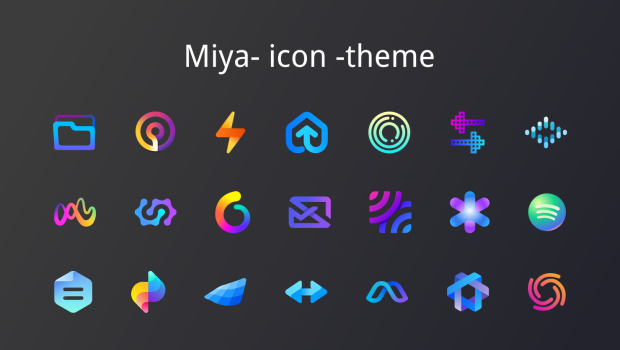
Vuelve de uno de los cl?sicos del blog, los temas de iconos. Y es que el numero de ellos es casi infinito y cada vez que encuentro uno que me llama la atenci?n me gusta presentarlo en el blog. Hoy toca hablar de Miya, un tema de iconos coloridos estilo neon, que es la forma que tengo de llamar a aquellos iconos de l?neas gruesas multicolores, ideales para temas oscuros.
Iconos coloridos estilo neon coloridos: Miya
Me fascina la variedad que tenemos a nuestra disposici?n, tanto de forma, estilo o colores. Tenemos iconos cl?sicos, minimalistas, lineales, 3D, que simulan otros sistemas operativos, imaginativos, etc.
Uno de los que m?s me est?n gustando ?ltimamente son los que se asemejan al t?oco cartel luminoso de estilo neon, y ya he presentado algunos como Oie Icons, el Epsilon Icons, Punk Theme, Abyss y BeautyLine.
A esta extensa colecci?n se le une Miya, un tema que destaca de los otros por tener las l?neas m?s gruesas y, que como siempre, son fabulosos para temas oscuros.
Y como siempre digo, si os gusta el pack de iconos pod?is ?pagarlo? de muchas formas en la p?gina en continua evoluci?n (mirad su nuevo aspecto) de KDE Store, que estoy seguro que el desarrollador lo agradecer?: punt?ale positivamente, hazle un comentario en la p?gina o realiza una donaci?n. Ayudar al desarrollo del Software Libre tambi?n se hace simplemente dando las gracias, ayuda mucho m?s de lo que os pod?is imaginar, recordad la campa?a I love Free Software Day 2017 de la Free Software Foundation donde se nos recordaba esta forma tan sencilla de colaborar con el gran proyecto del Software Libre y que en el blog dedicamos un art?culo.

M?s informaci?n: KDE Store
La entrada Iconos coloridos estilo neon coloridos: Miya se publicó primero en KDE Blog.
The system() source of syslog-ng now also works on MacOS
Most of syslog-ng works perfectly well on MacOS; however, there is no native driver to collect local log messages. Due to this, in the past, the system() source did not work on MacOS, thus the default syslog-ng configuration failed to start. Version 3.36 of syslog-ng includes a workaround: it follows /var/log/system.log.
You can read the rest of my blog at https://www.syslog-ng.com/community/b/blog/posts/the-system-source-of-syslog-ng-now-also-works-on-macos

syslog-ng logo
pinebook pro otro portatil con kde pre-instalado
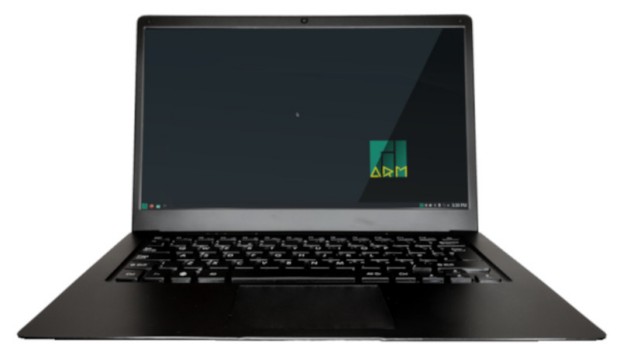
Aunque los lectores del blog sabr�n, mis preferencias en cuanto a port�tiles est�n bien definidas (me encantan los Slimbook por razones m�s que conocidas) nunca est� de m�s promocionar otras alternativas ya que, afortunadamente, no todos tenemos los mismos gustos o necesidades. Es por ello que me congratula presentar al Pinebook Pro, otro port�til con KDE Pre-instalado que ya lleva mucho tiempo en el mercado pero que todav�a no hab�a tenido hueco en esta humilde bit�cora.
Pinebook Pro, otro port�til con KDE Pre-instalado
Tener un port�til que funcionen con sistemas GNU/Linux 100% garantizados ya no es una quimera como lo fue hace unos a�os.
En la actualidad puedes encontrar estos dispositivos de la mano de varias compa��as espa�olas como Slimbook o Vant, o proyectos tan interesantes como Kubuntu Focus, que ofrecen ordenadores con distribuciones GNU/Linux de serie que garantizan una compatibilidad fuera de toda duda.
Pero, como dec�a al principio, tener alternativas es algo que siempre viene bien, y eso es lo que nos ofrece Pine 64, una compa��a que ya ha aparecido en el blog por sus m�viles, sus relojes inteligentes y por ser patrocinador de la Comunidad KDE, entre otras cosas.
A todo esto se debe sumar el Pinebook Pro, un port�til con compatible 100% con el Software Libre, econ�mico y que tiene las siguientes caracter�sticas b�sicas:
- CPU: 64-Bit Dual-Core ARM 1.8GHz Cortex A72 y Quad-Core ARM 1.4GHz Cortex A53
- GPU: Quad-Core MALI T-860
- RAM: 4 GB de memoria DRAM de sistema de doble canal LPDDR4
- Flash: 64 GB eMMC 5.0
- Inal�mbrica: WiFi 802.11AC + Bluetooth 5.0
- Un puerto USB 3.0 y un puerto USB 2.0 Tipo-A
- Puertos USB 3.0 Tipo-C con salida de pantalla en modo alt (DP 1.2) y carga de 15W 5V 3A.
- Ranura para tarjetas MicroSD: 1
- Micr�fono: Integrado
- Panel t�ctil: Gran panel t�ctil multit�ctil
- Alimentaci�n: Entrada: 100~240V, Salida: 5V3A
- Bater�a: Bater�a de pol�mero de litio (10000mA)
- Pantalla: 14.1? IPS LCD (1920 x 1080)
- C�mara frontal: 2,0 megap�xeles
- Fuente de alimentaci�n incluida, , viene con enchufes de Estados Unidos y de la UE
- Dimensiones: 329mm x 220mm x 12mm (ancho x fondo x alto)
- Peso: 1.26 kg (2.78 lbs)
- Garant�a: 30 d�as
Como podemos observar se trata de un modelo ideal para aquellos usuarios que no necesiten un equipo muy potente.
De hecho, este es el segundo port�til que nos ofrece ya que desde hace unos a�os tambi�n tenemos a nuestra disposici�n un PineBook de gama baja, ideal para peque�as tareas y que ya present� en el blog.
M�s informaci�n: Pine64 | Pinebook Pro
La entrada pinebook pro otro portatil con kde pre-instalado se publicó primero en KDE Blog.