
 Member
 baltolkien
Shutdown or Switch – Plasmoides de KDE (184)
Suma y sigue. La lista de plasmoides para Plasma sigue aumentando con nuevas alternativas para personalizar y adaptar nuestro escritorio para nuestras necesidades. En esta ocasión os presento a Shutdown or Switch, otro simple widget similar a Compact Shutdown, que nos permite añadir un menú para controlar la sesión personalizado en cualquier sitio de nuestro entorno de trabajo.
Shutdown or Switch – Plasmoides de KDE (184)
Me encantan este tipo de plasmoides ya que confieren al sistema la flexibilidad necesaria para poder personalizar nuestro sistema hasta límites insospechados como hemos visto en vídeos como en el convertíamos nuestro Plasma en un Chrome OS, en un Windows o en un MacOS.
En concreto hoy os presento Shutdown or Switch de davide-sd que nos permite poner un pequeño lanzador con los comandos de salida,suspensión, hibernación, reinicio, apagado del sistema o cambio de usuario. De hecho es una versión personalizada del widget User Switcher creado por Kai Uwe Broulik y que ofrece muchas más opciones de configuración.

Y como siempre digo, si os gusta el plasmoide podéis “pagarlo” de muchas formas en la nueva página de KDE Store, que estoy seguro que el desarrollador lo agradecerá: puntúale positivamente, hazle un comentario en la página o realiza una donación. Ayudar al desarrollo del Software Libre también se hace simplemente dando las gracias, ayuda mucho más de lo que os podéis imaginar, recordad la campaña I love Free Software Day 2017 de la Free Software Foundation donde se nos recordaba esta forma tan sencilla de colaborar con el gran proyecto del Software Libre y que en el blog dedicamos un artículo.
Más información: KDE Store
¿Qué son los plasmoides?
Para los no iniciados en el blog, quizás la palabra plasmoide le suene un poco rara pero no es mas que el nombre que reciben los widgets para el escritorio Plasma de KDE.
En otras palabras, los plasmoides no son más que pequeñas aplicaciones que puestas sobre el escritorio o sobre una de las barras de tareas del mismo aumentan las funcionalidades del mismo o simplemente lo decoran.
openSUSE Tumbleweed – Review of the weeks 2021/36 & 37
Dear Tumbleweed users and hackers,
Today, I have to span again two weeks of reviews. As you can imagine, a lot has happened in Tumbleweed and we have published 10 snapshots (0902, 0904, 0906, 0907, 0908, 0910, 0912, 0913, 0914, and 0915).
The most notable changes were:
- Bluez 5.61
- Cryptsetup 2.4.0
- Mesa 21.2.1
- Mozilla Firefox 91.0.2 & 92.0
- Mozilla Thunderbird 91.1.0
- KDE Gear 21.08.1
- KDE Plasma 5.22.5
- Linux kernel 5.14.0, 5.14.1, and 5.14.2
- Systemd 249.4
- Pipewire 0.3.35
- PostgreSQL 13.4
And as usual, we are testing a few stagings, containing these changes:
- KDE Frameworks 5.86.0
- glibc 2.34: all build fails resolved, staging QA in progress. There is a high chance that this will be merged in the next days. Note: as we always do with a glibc update, we will trigger a full rebuild of the distribution
- Linux kernel 5.14.5
- Perl 5.34.0
- shadow 4.9: boo#1190145 and boo#1190146
- openssl 3.0.0
The syslog-ng Insider 2021-09: 3.34; OpenBSD; OpenSearch; http() destination;
Dear syslog-ng users,
This is the 94th issue of syslog-ng Insider, a monthly newsletter that brings you syslog-ng-related news. Topics include:
- Version 3.34.1 of syslog-ng available
- Syslog-ng updated in OpenBSD ports
- OpenSearch and syslog-ng
- Creating a new http()-based syslog-ng destination: Seq
It is available at: https://www.syslog-ng.com/community/b/blog/posts/the-syslog-ng-insider-2021-09-3-34-openbsd-opensearch-http-destination
El comando sleep de #GNU
Veamos qué hace y cómo utilizar el comando sleep de las herramientas coreutils del sistema GNU

Los comandos de GNU coreutils son las herramientas básicas de nuestros sistemas GNU con kernel Linux similares a las de sistemas Unix, para gestionar desde la línea de comandos el sistema y operaciones con archivos de texto.
En este caso vamos a repasar para qué sirve y cómo usar el comando sleep por si tenemos que usarlo en nuestros scripts.
Al ejecutar el comando sleep, lo que hace es pausar la ejecución durante un periodo de tiempo especificado en la invocación del comando. Debemos pasarle un parámetro de tiempo o nos mostrará un error.
Para indicar el tiempo que debe pausar se le pasan valores positivos, pudiendo ser con coma flotante y un sufijo mediante una letra que indica el periodo de tiempo:
- s → para el valor en segundos (el valor predeterminado)
- m → para minutos
- h → para horas
- d → para días
¡Sí, el comando sleep puede pausar durante días! En un principio el valor mínimo que se podía especificar era de 1 segundo, ya que no admitía decimales.
Es decir, que podemos ejecutar:
sleep 0.5
Y pausará durante medio segundo. Como he dicho el valor predeterminado son los segundos, así que si no se especifica un sufijo, el comando entenderá que son segundos.
También en las primeras versiones de este comando, solo admitía un solo parámetro. Pero hoy en día, se pueden especificar varios parámetros y el resultado es que el comando sleep pausará por la suma de todos los parámetros.
Es decir, que si ejecutamos lo siguiente:
sleep 1d 2.5h 3m 4s
Se pausará durante 1 día, 2 horas y media, 3 minutos y 4 segundos.
Y esto es todo de este sencillo comando de GNU. No sé si será muy útil en el día a día, pero ahí queda la información. Más información en este enlace:


Thunar, Firefox, Python Update in Tumbleweed
Five Tumbleweed snapshots became available to users of openSUSE’s rolling release this week.
A couple smaller- and medium-sized snapshots brought new software updates for Xfce’s Thunar, the Linux Kernel, Mozilla Firefox, PostgreSQL, Python and more.
The 20210915 snapshot had two package updates. There was an update of translations for the manpages-l10n package to version 4.11.0, which enabled Hungarian translations. The tool set package for accessing and modifying virtual machine images, libguestfs 1.44.2, had a large amount of changes; it added and removed several patches and relicensed setup.py to LGPLv2+ from its original GPLv2+ license.
Xfce’s Thunar package was updated in snapshot 20210914; the update to the file manager 4.16.9 version fixed a memory leak, updated translations and disabled automatic queueing of file transfers. Linux Kernel 5.14.2 had a few USB serial control fixes and a Common Vulnerabilities and Exposures fix; the fix for CVE-2021-3640 could allow a privileged local user to crash the system or escalate their privileges on a system. The package for video and image frames, pfstools, updated to version 2.2.0 and provided many fixes allowing the package to work with newer versions of libraries. Also updated in the snapshot were aria2 1.36.0 and text browser links 2.24.
Mozilla Firefox updated to the 92.0 major version in snapshot 20210913. A new feature is the full-range color levels now has support for video playback on many systems. Firefox can now automatically upgrade to HTTPS using HTTPS RR as Alt-Svc headers. An update of postgresql 13.4 had a fix build with LLVM12 on s390x and fixed CVE-2021-3677. Application builder python-kiwi 9.23.54 made some changes to fix behavior with the rsync tool. Other updates in the snapshot wre make to KDE’s amarok, tuned 2.16.0, libsrtp2 2.4.1 and more.
The 20210912 snapshot gave an update of Mozilla Thunderbird 91.1.0. The email client fixed two CVEs and a memory safety bug. An update of pipewire 0.3.35 made adjustments to the Bluetooth codecs and now separates these as plugins to make it easier to ship. PipeWire’s audio mixer can now mix more formats. The update of python38 3.8.12 provided security updates and made email-date parsing more robust against malformed input, namely a whitespace-only. Some YaST packages were updated like yast2-installation 4.4.18, which now displays release notes during an upgrade.
YaST also had some updates in the 20210910 snapshot; the yast2-update 4.4.3 package fixed a crash during a system upgrade, which synchronized the YaST and libzypp repositories to avoid deleting caches for used repositories. The 1.5.25 version of ibus added a patch to fix a build on openSUSE Leap and nmap 7.92 had some improvements to include the Transport Layer Security 1.3 supporting most scripts for which the security scanner is relevant. The 5.14.1 Linux Kernel was also in the snapshot.

So you want to recover and old git branch because it has been overwritten?
So you just broke that PR you’ve been working on for months?
One day, you find yourself force pushing over your already existing Pull request/branch, because like me, you like to reuse funny names:
git fetch origin
git checkout tellmewhy #already exists and has a pull request still open, but you didn't know
git reset --hard origin/master
# hack hack hack
git commit $files
git push -f nameofmyremote

Panic!
Here’s when you realize that You’ve done something wrong, very very wrong, because github will throw the message:
Error creating pull request: Unprocessable Entity (HTTP 422)
A pull request already exists for foursixnine:tellmewhy.
So, you already broke your old PR with a completely unrelated change,

Don’t panic

If you happen to know what’s the previous commit id, you can always pick it up again (go to github.com/pulls for instance and look for the PR with the branch),
AND, AND, AAANDDDD, ABSOLUTELY ANDDDD, you haven’t ran git gc.
In my case:
@foursixnine foursixnine force-pushed the tellmewhy branch from 9e86f3a to **9714c93** 2 months ago
All there’s to do is:
git checkout $commit
# even better:
git checkout tellmewhy # old branch with new commits that are unrelated/overwritten over the old ones
git checkout -b tellmewhyagain # your new copy, open your pr from here
git push tellmewhyagain # now all is "safe" in the cloud
git checkout tellmewhy # Let's bring the dead back to life
git reset --hard 9714c93
git push -f tellmewhy
And this is it, you’ve brought the dead back to life

Oficina Software Libre de la Universidad de Zaragoza (OSLUZ)
Después de escuchar el podcast de Mancomún sobre el «Concilio de lo Libre» y en aras de conocer un poco mejor la relación entre Software Libre y las universidades he decidido realizar una serie de artículos donde de a conocer las Oficinas de Software Libre que tenemos en España. Y sin ninguna razón en particular he decidido empezar por la Oficina Software Libre de la Universidad de Zaragoza, conocida por su acrónimo de OSLUZ y que ofrece varios servicios interesantes y que es bastante activa en iniciativas a nivel nacional.
Las oficinas del Software Libre de las universidades son departamentos de estas instituciones que tienen como objetivo general, como no podía ser de otra forma, promocionar el Software Libre.
Lamentablemente deben su existencia a que las universidades, fuera de toda lógica, no promocionan ni utilizan prioritariamente Software Libre en sus actividades, enseñanzas o procesos, así que alguien debe hacerlo y es aquí donde entran las Oficinas de Software Libre (OSL).
Existen muchas OSL en todo el territorio español y es el momento de hacer un repaso de las mismas en el blog. Espero que os guste y que, sobre todo, os anime a acercaros a ellas para realizar todo tipo de actividades.
Oficina Software Libre de la Universidad de Zaragoza (OSLUZ)

Si estudias en Zaragoza y te interesa el Software Libre o quieres organizar un evento relacionado con este mundillo no dudes en ponerte en contacto con la Oficina de Software Libre de la Universidad de Zaragoza, también conocida como OSLUZ.
¿Qué ofrece la OSLUZ?
Esta oficina, y espero que alguien me corrija si estoy equivocado, tiene un buen nivel de actividad ya que:
- Tiene una página web activa con sección de noticias con última actualización de julio de 2021.
- Participa en «El Concilio de lo Libre«.
- Promociona el actual Concurso Universitario de Software Libre.
- Organizan los «Viernes Libres«, jornadas donde se realizan charlas y talleres sobre tecnologías libres.
- Tiene canal de Youtube y de Telegram.
- Está presente en redes como Twitter.
- Ofrece una servidor para facilitar la descarga e instalación de aplicaciones de Software Libre. Más información en su web.
- Ofrece tutoriales como «Guía de instalación de FileMaker Pro 13 en Debian» con los que ayuda a la difusión del SL.
En resumen, parece que estamos antes una OSL activa y con la que estoy seguro que se podría contar en futuros eventos.
Más información: OSLUZ
Lagrange un navegador para el protocolo Gemini
Lagrange es una interfaz gráfica multiplataforma para equipos de escritorio para navegar por los sitios que componen el Geminispace

Hace unos meses conocí el Proyecto Gemini, un proyecto comenzado en 2019 por solarpunk y respaldado por una comunidad que trata de volver a la esencia de lo que un día fue la web.
Gemini quiere ser algo más que Gopher (otro protocolo más simple y anterior) y algo menos que la web actual.
Por resumir mucho y sin ser un experto, la web comenzó con el protocolo https por medio del que equipos en red se comunicaban entre sí y servían archivos de hipertexto.
Esos comienzos sencillos y básicos han derivado en toda esta pléyade de sitios webs que conocemos y visitamos a diario. Pero mucho ha cambiado el panorama desde entonces.
Los sitios web, ahora rastrean a los usuarios recopilando mucha más información de la que podríamos pensar, las webs (algunas de ellas) también están llenas de molesta publicidad que estorba la lectura y distrae, buscando un clic para venderte algo.
Mensajes emergentes, vídeos que se ponen a reproducirse solos, advertencias de cookies, suscripciones a newsletters, peticiones de notificaciones… es un horror navegar hoy en día por la red sin un bloqueador de publicidad que remedie todo ese “ruido”.
¿Por qué no regresar a la base, a los inicios? La web actual es como una ciudad ruidosa llena de estímulos, ruido y agobiante. El Proyecto Gemini es como un paseo por el campo, disfrutando del minimalismo y la calma reposada.
El Proyecto Gemini trata de crear webs simples, escritas en un lenguaje propio, que se podría asemejar a Markdown por su sencillez y facilidad de leer.
Con Gemini se crean webs sin cookies, sin rastreo, sin código JavaScript, sin distracciones, sin imágenes, solo texto, recuperando la afición de leer aquello que queremos sin más artificios.
De manera similar a la web actual en que las direcciones url comienzan por www o https:// en Gemini las direcciones comienzan por gemini://
Y para nevegar por esas páginas es necesario un navegador especial, ya que nuestros Firefox, o similares no sirven. Aquí es donde entra en juego el navegador Lagrange para sitios Gemini.
El navegador Lagrange ofrece aquellas funcionalidades de los navegadores a los que estamos acostumbrados como un desplazamiento por la página suave, múltiples pestañas, diferentes temas visuales, fuentes Unicode, marcadores, historial de navegación y otras.
Al igual que el Proyecto Gemini, el navegador Lagrange ha sido también diseñado con ese minimalismo que ofrece el proyecto. Lagrange está escrito en C y depende de un número pequeño de librerías.
Es multiplataforma, ofreciendo binarios precompilados para sistemas operativos privativos. Y por supuesto también está disponible en los repositorios de tu distribución de GNU/Linux.
La verdad es que es un “shock” visual el encontrarse sitios de Gemini, ya que tienen ese aire retro de inicios de internet, con banners hechos con texto y una simpleza interesante.
Yo he optado por este navegador al tener que abrir enlaces Gemini. ¿Y qué sitios o blogs podemos encontrar? Pues por empezar por algún sitio, puedes hacerlo por estos agregadores de sitios Gemini:
- gemini://caracolito.mooo.com/deriva/
- gemini://elmau.net/hispanas.gmi
Sí, tendrás que abrir esos sitios con un navegador como Lagrange. Aquí podrás encontrar “cápsulas” (que es el nombre que se les da a los sitios Gemini) con contenido en español dentro del espacio Gemini.
Me estoy planteando abrirme una “cápsula” dentro de Gemini, pero con este blog creo que ya tengo más que suficiente para las pocas horas libre que me queda… 
Alternativas a Lagrange
Lagrange es solo una opción de los clientes gráficos que existen, pero hay más:
- Castor (Rust, GTK), uno de los más recientes. Admite protocolos Gemini, Gopher y finger.
- GemiNaut (C#), una interfaz amigable para sistemas privativos MS Windows.
- Kristall (C++, QT), un cliente combinado de Gopher y Gemini.
También hay clientes de Gemini para la terminal:
- Amfora (Go), un cliente de terminal “elegante”
- Asuka (Rust), un cliente para la terminal basado en NCurses
- AV-98 (Python), un cliente para la terminal derivado del cliente para Gopher VF-1
- Bombadillo (Go), un cliente combinado para Gopher y Gemini inspirado en los atajos de teclado de Vim
- Elpher (Emacs), el cliente de Gopher y Gemini para el editor Emacs
Espero haber sembrado la curiosidad y que ahora investigues más sobre el tema. Ya conoces Gemini, el navegador Lagrange y puedes empezar a navegar por la Geminiesfera descubriendo nuevos sitios.
Enlaces de interés
- https://proxy.flounder.online/gemini.bmesh.org/gemini_faq.gmi
- https://proxy.flounder.online/gemini.circumlunar.space
- https://es.wikipedia.org/wiki/Gopher
- https://codeberg.org/skyjake/lagrange
- https://gmi.skyjake.fi/lagrange/


Chafa 1.8: Terminal graphics with a side of everything
The Chafa changelog was growing long again, owing to about half a year's worth of slow accretion. Hence, a release. Here's some stuff that happened.
High-end protocols
With existing choices of the old text mode standby and its friend, the most unreasonably efficient sixel encoder known to man, I threw Kitty and iTerm2 on the pile, bringing our total number of output formats to four. I think that's all the terminal graphics anyone could want (unless you want ReGIS; in which case, tough tty).
Moar terminals
Modern terminal emulators are generally less fickle than their pre-y2k ancestors. However, sometimes it takes a little sleuthing to figure out which extended features might be hiding behind e.g. some mysterious xterm-256color façade so we can do the right thing.
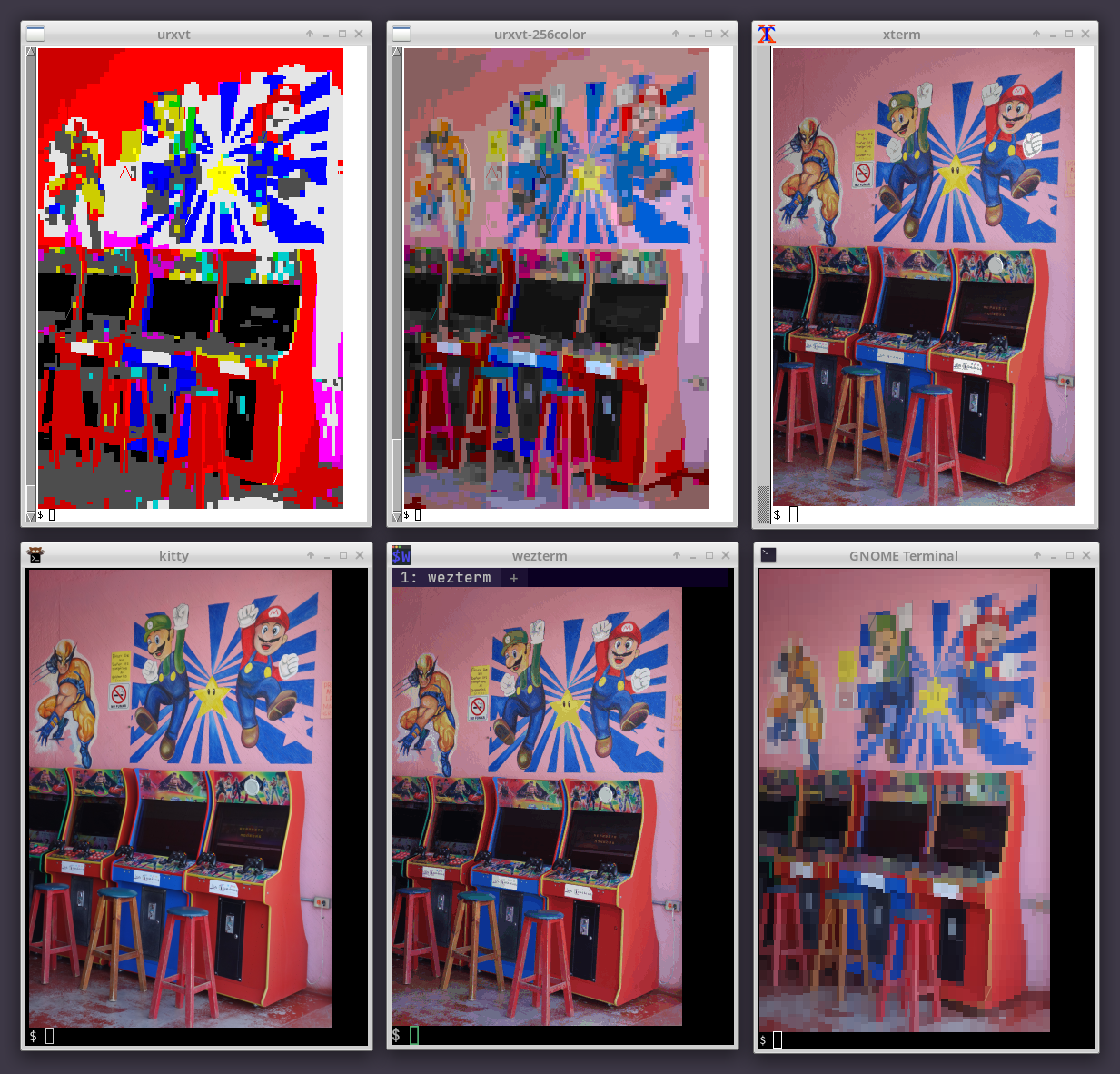
Luckily, Chafa has a steadily improving handle on terminals of the Unix/GNU/Linux world. A few examples:
- VTE-based terminals (there are many, including GNOME Terminal).
- Sixel crew: foot, mlterm, WezTerm, XTerm.
- A category unto its own: Kitty, packing one of the most featureful terminal graphics protocols around.
- Another innovative beast of genetically engineered goodness: ctx.
- Fullscreen consoles: fbterm (quirky!), yaft (yet more sixels!) and the Linux console.
- Simple and sweet: st, urxvt.
- For the Mac addicts: Apple Terminal, iTerm2.
- Sessions running in screen and tmux.
Of course, this is forever a work in progress and an area where I receive regular, highly appreciated contributions *chef's kiss – somehow still not an actual emoji*.
Funky lo-fi features
Øyvind Kolås (of GIMP and GEGL fame) swooped in with new builtins for the legacy computing block, meaning Chafa is now PETSCII Ready – or as ready as you can be with Unicode 13.0: The standard has a few annoying issues, such as not declaring any code points for the four permutations of black triangle, relying instead on existing code points in the geometric shapes block (U+25E2..U+25E5) which are typically represented by fonts as sitting on the baseline surrounded by empty space and therefore useless next to the legacy computing and block elements blocks.
Still, it's got a sweet 2×3 dot matrix (--symbols sextant) and all those nifty wedge shapes (--symbols wedge).

Øyvind also added an 8-color mode. Used together (-c 8 --symbols legacy+space), these features enable visual emulation of Teletext Level 1 and similar systems widely deployed in the late 1970s until roughly 1990 (technically into the present, albeit perhaps not so widely anymore).
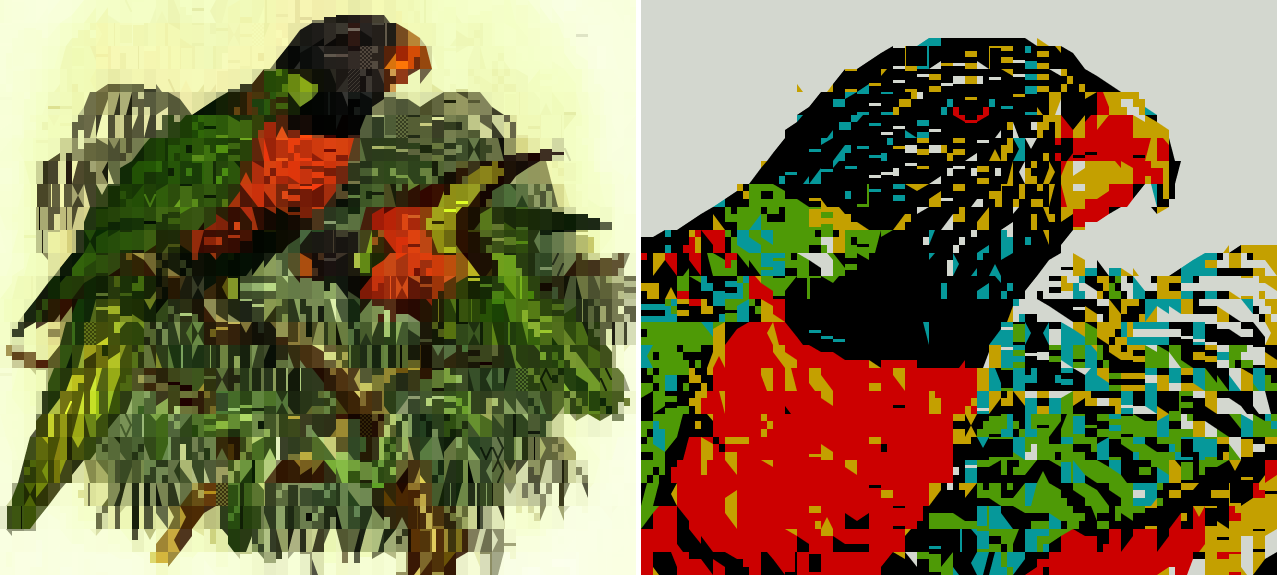
Somewhere along the way I discovered that Øyvind has a Patreon page – and if you're a GIMP user and/or care about the free software graphics ecosystem, you may want to read this article and consider its implications.
A bit of background austerity
I followed up in the retro vein with a foreground-only (--fg-only) modifier, which allows emulation of vintage systems that could only specify a single color per cell against a uniform background color. A popular example is the Commodore 64's standard character mode. It's also useful in terminals where block symbols don't render correctly (for example due to missing font support), since it prevents background color variation from drowning out details in low-coverage symbols used in their place. The Linux console tends to be among these due to hardware and font limitations that are somehow still in play today.
This is also how many classic ASCII art packages did things; so I guess I am once again asking you to party like it's 1999 (…and stay up all night trying to make your Napster killer render with AAlib).
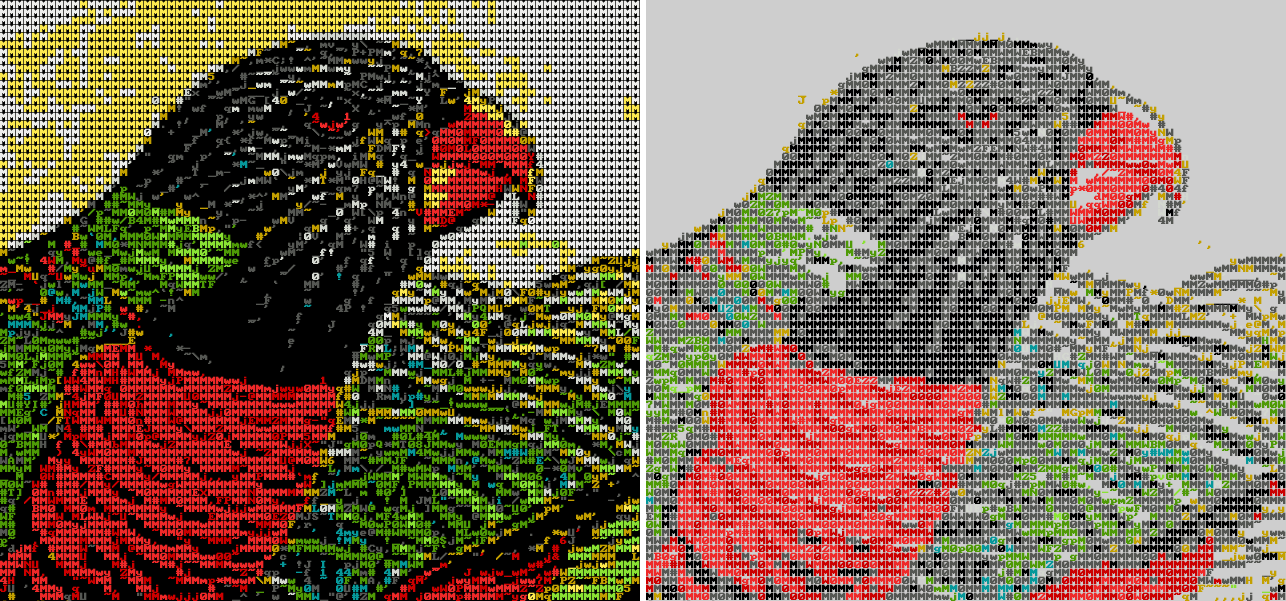
--invertWhen used with --fg-only, the existing --bg option has a greater impact than usual; in addition to being the fade color for alpha blending, it determines the relationship between symbols and blank space, including symbols where the background color "wins" part of a cell. A dark image on a bright background will have more high-coverage symbols that cover up the background as much as possible.
If your terminal has a bright background color, --invert is a shortcut to inverting the sense of --fg and --bg; the white-on-black default then becomes black-on-white.
Since foreground-only mode leaves the background color alone, you can easily experiment with setting it yourself, e.g:
echo -e '\033[41m'; \
chafa -c 16 --symbols ascii --fg-only --bg darkred birbs.png
Weird and wonderful forum art redux
If you read Steam reviews, you may be familiar with this guy:

There are layers to this, but I'll keep it brief and simply observe that people seem to like braille. Braille is popular in this context for at least four reasons. It has:
- A luxurious 2×4 dot matrix at your fingertips.
- Widespread font support.
- Consistent glyph width even in variable-width fonts.
- A special blank symbol (U+2800 BRAILLE PATTERN BLANK) for consistent spacing.
Chafa's supported this kind of output for a long time (-c none --symbols braille), but in some circumstances it could replace cells having identical foreground and background colors with a hardcoded U+0020 as an optimization. This could result in inconsistent spacing, making braille (and probably other symbol combinations) less useful. Fortunately the issue is now a thing of the past; the latest version will instead use a visually blank symbol from the user's symbol set, falling back to the lowest-coverage symbol it can find.
The GPL doesn't regulate netiquette: Please use for good, or in extreme cases, awesome.
The ever elusive practical application in the wild
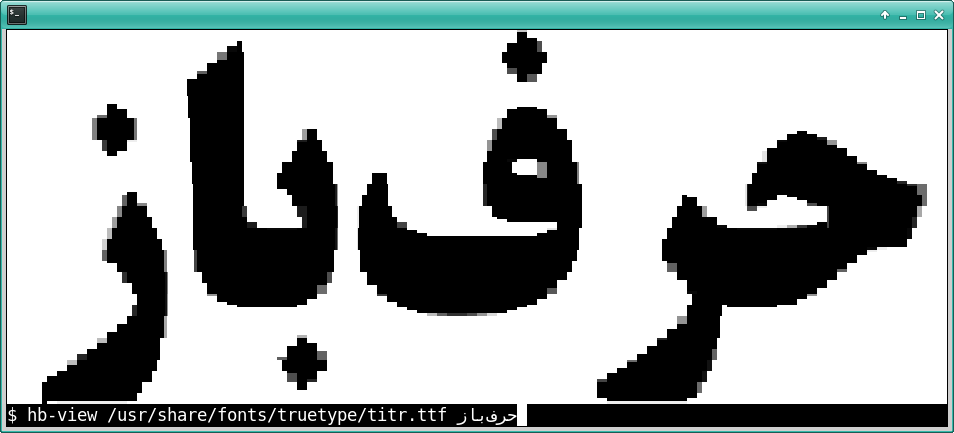
It's good to be useful. Neofetch was the first project to avail itself of Chafa's incredible power, and the latest is HarfBuzz' hb-view. And – er – I think that's all of them. For now!
2026 update: As indicated by my limited analysis, if you've landed on this page you're most likely looking for Shrek braille art. As such, your reward for scrolling this far is a Shrek you can copy and paste effortlessly:
⢀⡴⠑⡄⠀⠀⠀⠀⠀⠀⠀⣀⣀⣤⣤⣤⣀⡀
⠸⡇⠀⠿⡀⠀⠀⠀⣀⡴⢿⣿⣿⣿⣿⣿⣿⣿⣷⣦⡀
⠀⠀⠀⠀⠑⢄⣠⠾⠁⣀⣄⡈⠙⣿⣿⣿⣿⣿⣿⣿⣿⣆
⠀⠀⠀⠀⢀⡀⠁⠀⠀⠈⠙⠛⠂⠈⣿⣿⣿⣿⣿⠿⡿⢿⣆
⠀⠀⠀⢀⡾⣁⣀⠀⠴⠂⠙⣗⡀⠀⢻⣿⣿⠭⢤⣴⣦⣤⣹⠀⠀⠀⢀⢴⣶⣆
⠀⠀⢀⣾⣿⣿⣿⣷⣮⣽⣾⣿⣥⣴⣿⣿⡿⢂⠔⢚⡿⢿⣿⣦⣴⣾⠁⠸⣼⡿
⠀⢀⡞⠁⠙⠻⠿⠟⠉⠀⠛⢹⣿⣿⣿⣿⣿⣌⢤⣼⣿⣾⣿⡟⠉
⠀⣾⣷⣶⠇⠀⠀⣤⣄⣀⡀⠈⠻⣿⣿⣿⣿⣿⣿⣿⣿⣿⣿⡇
⠀⠉⠈⠉⠀⠀⢦⡈⢻⣿⣿⣿⣶⣶⣶⣶⣤⣽⡹⣿⣿⣿⣿⡇
⠀⠀⠀⠀⠀⠀⠀⠉⠲⣽⡻⢿⣿⣿⣿⣿⣿⣿⣷⣜⣿⣿⣿⡇
⠀⠀⠀⠀⠀⠀⠀⠀⢸⣿⣿⣷⣶⣮⣭⣽⣿⣿⣿⣿⣿⣿⣿
⠀⠀⠀⠀⠀⠀⣀⣀⣈⣿⣿⣿⣿⣿⣿⣿⣿⣿⣿⣿⣿⣿⠇
⠀⠀⠀⠀⠀⠀⢿⣿⣿⣿⣿⣿⣿⣿⣿⣿⣿⣿⣿⣿⣿⠃
Go wild.
Advanced dehydration
Back when i started using Let’s Encrypt I wanted a lightweight client. Danimo recommended dehydrated. Well it still had a different name back then. But details. So for years I had been a very happy camper with it. Then I learned that many daemons now support that you can run ECDSA and RSA certs at the same time and the server picks the right cert depending on the client. So we will solve this first.