
 Member
 DimStar
openSUSE Tumbleweed – Review of the week 2022/10
Dear Tumbleweed users and hackers,
Over here, the weather is getting better by the day, spring is around the corner. But the Tumbleweed developers seem not to care that much, as we managed to release a full 7 snapshots in the last week (0303…0309).
The main changes in those snapshots included:
- libva 2.14.0
- KDE Gear 21.12.3
- binutils 2.38
- Libreoffice 7.3.1.3
- Poppler 22.03.0
- Node.JS 17.6.0
- VLC 3.0.17
- openSSH 8.9p1
- Rust 1.59
- go 1.16.15 & 1.17.8
- Ruby Rails 7.0
The stagings are not overcrowded at the moment, there is space for all your submissions. But there are still things in the makings, such as:
- systemd 250.3: breaks python-pyudev
- Linux kernel 5.16.14
- util-linux 2.37.4
- Mozilla Firefox 98.0 & Thunderbird 91.7.0
- cURL 7.82.0: breaks libzypp and pycurl
- KDE Plasma 5.24.3
- dbus 1.14.0
La comunidad de #openSUSE quiere alertar sobre las amenazas de sistemas preinstalados en equipos informáticos
La Junta de openSUSE quiere poner en marcha una actividad que haga reflexionar sobre el riesgo de falta deprivacidad de los datos personales debido a los sistemas operativos privativos preinstalados

En un correo a la lista de correos del proyecto openSUSE, se ha anunciado que la Junta que representa a la comunidad de openSUSE quiere dirigir una carta abierta a todas las oficinas de protección de datos de la Unión Europea.
En esa carta, quieren expresar a esos organismos, la amenaza que existe al haber una tendencia a vender equipos informáticos con sistemas privativos (como Windows y MacOS) ya preinstalados y la supuesta incompatibilidad con las leyes de protección de datos (GPDR).
Con ese correo abren un diálogo dentro de esta comunidad de GNU/Linux que usa, soporta y desarrolla openSUSE para ver si la comunidad está de acuerdo, pudiendo alegar su posición en contra quien quiera hasta el día 20 de marzo de 2022.
A continuación os traduzco el contenido el contenido del correo, para difundir esta campaña de openSUSE.
Hoy en día, los consumidores se enfrentan regularmente a una restricción en su libertad de elección, un elemento esencial de la soberanía digital, cuando se trata de comprar una nueva
computadora (portátil o PC): el software se ofrece preinstalado sin opción para el consumidor. El 100% de los dispositivos Apple se venden con el sistema MacOS preinstalado y casi el 100% del ‘resto’ viene con Windows preinstalado como sistema operativo.
Los fabricantes imponen constantemente software preinstalado a los consumidores, afirmando que el software y el hardware son una «unidad». La mayoría de estos dispositivos funcionan perfectamente con cualquier sistema operativo se software libre y de código abierto, por lo que esta declaración es no del todo cierta. Aún así, los consumidores se ven obligados a tomar, y comprar, lo que se les ofrece, en su mayoría sin ni siquiera conocer las alternativas.
Estos sistemas operativos preinstalados van en contra no sólo de la libertad de elección y soberanía digital, además también contra la protección de datos. MacOS, Windows (y Microsoft Office, que a menudo también viene preinstalado) no son compatibles con la legislación europea GDPR.
Hace unos 3 años se puso en marcha una iniciativa para abordar estos problemas. La FSFE
lanzó las cuestiones a un miembro del parlamento europeo, quien planteó las preguntas a la comisión de la UE, y su respuesta fue que «en el área de protección de datos, bajo el régimen establecido por la Dirección General de Protección de Datos La regulación (GDPR), la supervisión y la aplicación caen dentro de la competencia de autoridades nacionales».
Habiendo tenido una discusión con la Oficina de Protección de Datos (OPD) de la UE (no se siente responsable), hemos preparó una carta a las distintas OPD nacionales que nosotros como Junta (entre otros, como la FSFE) queremos firmar, tanto como Junta a nivel personal como comunidad.
Este correo enviado a la lista de correo de openSUSE es tanto para solicitar comentarios sobre la carta, así como para la aprobación de firmar. Para acortar el proceso, la Junta de openSUSE quiere que solo se se muestren los argumentos de quienes estén en contra de dicha carta y proceso.
En cualquier caso también se realizará una votación entre la comunidad de openSUSE para pedir la aprobación de dicha resolución y poner en marcha la actividad.
Como miembro de la comunidad de openSUSE, me alegra ver cómo se abordan temas espinosos y legales y que se tome partido por el software libre, oponiéndose a comportamientos abusivos.
Y desde aquí decir que apoyo la iniciativa y que votaré afirmativamente el proceso.
También me gustaría que otras comunidades de software libre (KDE, Debian, etc) se aunaran en la petición y respaldaran esta propuesta.
¿Y a ti qué te parece? Tienes los comentarios del blog para aportar tus opiniones con criterio y respeto.
Enlaces de interés
- Correo original a la lista de correo
- Carta abierta para las oficinas nacionales de protección de datos de la UE

La gestión de ventanas en Plasma 5.24
Nueva entrada para describir una a una las novedades de Plasma 5.24 LTS. Os recuerdo que el entorno de trabajo de la Comunidad KDE que fue actualizado el pasado 8 de febrero, y nos ofrecía un buen número de nuevas o refinadas funcionalidades. Empecé el repaso de las misma con las novedades del escritorio (referido al fondo de pantalla), las mejoras visuales , las notificaciones más eficientes, la bandeja del sistema, el gestor de tareas, las Preferencias del sistema y todavía queda pendiente la gestión de ventanas en Plasma 5.24, que destaca con la vuelta de una funcionalidad que por un tiempo desapareció del escritorio KDE.
La gestión de ventanas en Plasma 5.24
Hace poco tiempo, en una de las actualizaciones de Plasma, desapareció una funcionalidad que gustaba a mucho usuarios: los efectos Selección de carátula y Selección en cascada, lo cuales muestras de una forma determinada las ventanas abiertas en nuestro entorno de trabajo.
Las razones eran que su código se había quedado obsoleto y su actualización para evitar problemas requería bastante tiempo de trabajo.
No obstante, los desarrolladores de Plasma no quisieron que se perdiera esta característica y en esta versión de Plasma 5.24 LTS han vuelto en un estado básico, ya que no ofrecen ningún tipo de personalización pero que son funcionales.
Si te interesan puede encontrarlos en la página Gestión de ventanas > Selector de tareas de las Preferencias del sistema.
Por otra parte, se ha añadido un nuevo efecto llamado Vista general, el cual se encuentra en fase de pruebas pero puede activarlo en la página Comportamiento del espacio de trabajo > Efectos del escritorio de las Preferencias del sistema para probarlo.
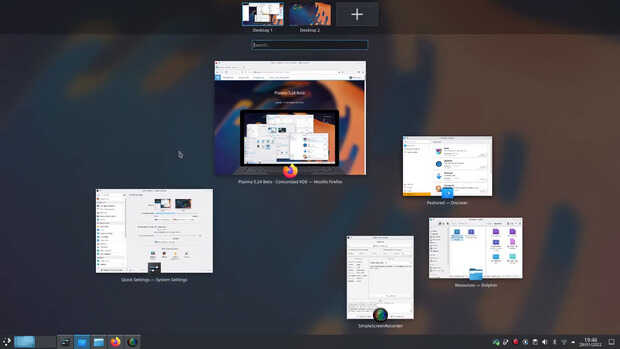
ara activarlo se debe mantener pulsada la tecla Meta (la tecla Windows) y pulsando simultáneamente la tecla w, con lo que se mostrará una vista general de todas las ventanas abiertas y de los escritorios virtuales, donde podrá activar ventanas, arrastrarlas de un escritorio a otro y usar la potencia del asistente KRunner para buscar, hacer cálculos y ejecutar tareas, todo desde el mismo lugar.
Más información: KDE
syslog-ng 4 theme: typing
As explained in my previous post, we do have some features already in mind for syslog-ng 4, even though the work on creating a long term set of objectives for the syslog-ng project is not finished yet. One of the themes that I have working code for already, is typing.
syslog-ng traditionally assumes that log data, even if it comes in a structured form (like RFC5424 structured data or JSON) is primarily textual in nature. For this reason, name-value pairs in syslog-ng are text values just as the log message as a whole. The need for typing however came up previously, most notably in cases where we sent data to a consumer that supported typing, such as:
- Elastic like other similar consumers use JSON, and attributes can have non-text types
- SQL columns have types
- Riemann metrics can have types
Read the rest of the blog at https://syslog-ng-future.blog/syslog-ng-4-theme-typing/

syslog-ng logo
Sudo 1.9.10: using regular expressions in the sudoers file
It has been possible to use wildcards in the sudoers file for many years. This can make configuration easier and more flexible, but it also introduces problems of its own. Regular expressions, introduced in in sudo 1.9.10, allow you to create more fine grained rules. From this blog you will learn about some of the problems when you use wildcards in your sudoers file, and how using regular expressions can resolve those problems.
Read the rest of my blog at https://www.sudo.ws/posts/2022/03/sudo-1.9.10-using-regular-expressions-in-the-sudoers-file/

Sudo logo
Las Preferencias del sistema en Plasma 5.24
Continuo con el trabajo de describir una a una las novedades de Plasma 5.24 LTS. Os recuerdo que el entorno de trabajo de la Comunidad KDE que fue actualizado el pasado 8 de febrero, y nos ofrecía un buen número de nuevas o refinadas funcionalidades. Empecé el repaso de las misma con las novedades del escritorio (referido al fondo de pantalla), las mejoras visuales , las notificaciones más eficientes, la bandeja del sistema, el gestor de tareas y hoy toca hablar las Preferencias del sistema de Plasma 5.24, el alma de la personalización y configuración extrema del escritorio KDE.
Las Preferencias del sistema de Plasma 5.24
Tener una gran aplicación que reúna todas las opciones de personalización, adaptación, modificación de comportamiento, control global de configuraciones, etc. es uno de los grandes aciertos de Plasma y se materializa con las Preferencias del sistema, una verdadera joya de la Comunidad KDE.
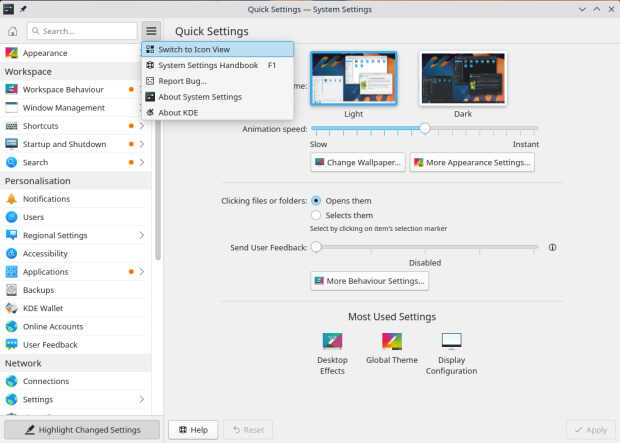
Esta nueva versión de las Preferencias del sistema de Plasma 5.24 nos ofrece las siguientes novedades:
- Las propias preferencias de las Preferencias del sistema (que eran muy pocas) han sido movidas al menú hamburguesa que se puede ver junto al cuadro para Buscar texto, evitando la sobrecarga del espacio de trabajo con otra ventana más.
- Ahora se puede usar el campo Buscar para encontrar términos tanto en su idioma como en inglés, sin necesidad de cambiar de uno al otro para el caso de que un término no haya sido traducido todavía o porque esté más familiarizado con dicho término en inglés.
- El diálogo Añadir nueva distribución de teclado se ha rediseñado para que sea más simple y más fácil de usar.
- Mejoras de diseño y de usabilidad al Color nocturno, a la hoja de prueba de los altavoces de la página Sonido de las preferencias del sistema y a la función de límite de carga de la batería.
- La sección Pantalla y monitor muestra ahora el factor de escalado que se usa para cada pantalla así como su resolución física correcta.
- Si has activado el inicio de sesión automático, se le mostrará ahora una advertencia sobre algunos cambios que tal vez desee hacer en la configuración de KWallet para permitir una usabilidad óptima.
Más información: KDE
Amfora un navegador para el protocolo Gemini para la terminal de linux
Amfora es un elegante navegador multiplataforma para el protocolo Gemini desde la terminal

El protocolo Gemini trata de devolver la simplicidad del texto plano a los sitios web, cada vez más llenos de funcionalidades algunas absurdas que dificultan el concentrarse y simplemente leer.
Rastreos, publicidad, imágenes que van y vienen, código inflado para añadir deslumbrantes funcionalidades, etc quizás no hacen más que entorpecer. ¿Por qué no volver a la esencia de un simple texto plano renderizado de manera elegante simplemente?
Hace un tiempo ya escribí por el blog sobre el navegador Lagrange para navegar por esas «caṕsulas» o sitios Gemini:
También aprendimos lo básico sobre el lenguaje de marcado de Gemini, para escribir nuestros propios sitios:
Hoy quiero daros a conocer un navegador para el protocolo Gemini pero para la terminal, es multiplataforma y con licencia GPL, se trata de Amfora.
Está disponible para distribuciones como Debian, Arch y derivadas. Y también disponible para otras distribuciones GNU/Linux en binarios desde su página de publicaciones.
En mi caso he descargado la versión linux de 64 bits y dado permisos de ejecución y lo he estado probando:
wget https://github.com/makeworld-the-better-one/amfora/releases/download/v1.9.2/amfora_1.9.2_linux_64-bit -O amfora
chmod +x amfora
Podemos mover el archivo a /usr/local/bin para poder ejecutarlo desde cualquier ruta en nuestra terminal, simplemente escribiendo amfora.
Se nos muestra una pantalla de bienvenida en una pestaña principal. Esta página la podemos adaptar a nuestros gustos y necesidades creando un archivo llamado newtab.gmi en ~/.config/amfora
Amfora se controla desde el teclado. Podemos avanzar, retroceder, abrir enlaces en una nueva pestaña, buscar, etc todo sin mover las manos del teclado en nuestra terminal preferida.
Si pulsamos sobre ? nos mostrará una lista de los atajos de teclado con los que podremos manejar el navegador:
- ? → Muestra la ayuda
- Esc → Sale de la ayuda
- Teclas de flechas h(izq)/j(abajo)/k(arriba)/l(derecha) → Se mueve por la página o hace scroll
- u, PgUp → retrocede una página en el documento
- PgDn, d → avanza una página del documento
- g, Home → Se desplaza al inicio del documento
- G, End → Va al final del documento
- Tab → Navega al siguiente elemento
- b, Alt-Izq → Retrocede en el historial de navegación
- f, Alt-Derech → Avanza en el historial de navegación
- Space → Abre una barra en la parte inferior, donde escribir un enlace, número de enlace, término de búsqueda. También puedes escribir dos puntos (..) para subir un directorio en un enlace. Escribiendo new:N abrirá el enlace número N en una nueva pestaña
- 1 a 0 → Va a los enlaces 1-10 respectivamente.
- e → Edita el enlace actual
- C → Copia el enlace de la página actual
- c → Copia el enlace actual seleccionado
- Enter, Tab → En una página abrirá el enlace resaltado. Pulsa Tab o Shift-Tab para seleccionar diferentes enlaces. Pulsa Enter de nuevo para ir a uno o Esc para detenerlo
- ! a ( → Ir a una pestaña específica (Predeterminado: Shift-NUMBER)
- ) → Ir a la última pestaña
- F1 → Pestaña anterior
- F2 → Pestaña siguiente
- Backspace → Ir al inicio
- Ctrl-T → Nueva pestaña o si hay un enlace seleccionado lo abrirá en una nueva pestaña
- Ctrl-W → Cierra una pestaña. Por ahora solo se puede cerrar la pestaña más a la derecha
- Ctrl-R, R → Recarga una página, descartando la versión en caché
- Ctrl-B → Ver marcadores
- Ctrl-D → Añadir, cambiar o eliminar marcadores de la página actual
- Ctrl-S → Guardar la página actual en tu descargas
- Ctrl-A → Ver suscripciones
- Ctrl-X → Añadir o actualizar suscripciones
- Ctrl-C, q, Ctrl-Q → Salir
Con estos atajos de teclado ya puedes navegar por la gemini esfera y ver qué se cueceen las distintas cápsulas en español que existen.
Espero que le déis una oportunidad y probéis la simplicidad y la velocidad a la hora de visitar las cápsulas Gemini que más os gusten.

Lanzada la tercera actualización de Plasma 5.24
Tal y como estaba previsto en el calendario de lanzamiento de los desarrolladores, hoy martes 8 de marzo la Comunidad KDE ha comunicado que ha sido lanzada la tercera actualización de Plasma 5.24. Una noticia que aunque es esperada y previsible es la demostración palpable del alto grado de implicación de la Comunidad en la mejora continua de este gran entorno de escritorio de Software Libre.
Lanzada la tercera actualización de Plasma 5.24
No existe Software creado por la humanidad que no contenga errores. Es un hecho incontestable y cuya única solución son las actualizaciones. Es por ello que en el ciclo de desarrollo del software creado por la Comunidad KDE se incluye siempre las fechas de las actualizaciones.

De esta forma, el martes 8 de marzo ha sido lanzada la tercera actualización de Plasma 5.24, la cual solo trae (que no es poco) soluciones a los bugs encontrados en esta semana de vida del escritorio y mejoras en las traducciones. Es por tanto, una actualización 100% recomendable.
Más información: KDE
Las novedades de Plasma 5.24 LTS
Aún tengo pendiente el resumen de las novedades pero he aquí la lista preliminar de ellas.
- Mejoras en las funciones de KRunner con el asistente de ayuda.
- Desbloqueo de la pantalla y autentificación de las aplicaciones con tus huellas dactilares.
- Nuevo y espectacular fondo de pantalla de Ken Vermette para Plasma 5.24 «Honeywave»
- Breeze amplía la función que permite elegir los colores de acento (introducida en Plasma 5.23) y ahora permite elegir cualquier color que desee, en caso de que los colores preseleccionados no sean de vuestro agrado.
- El tema por defecto Plasma Breeze ha recibido un refresco visual para que se ajuste más al estilo de Breeze de las aplicaciones, mejorando la coherencia visual entre ellas.

- Para que las notificaciones críticas de Plasma destaquen, ahora vienen con una franja naranja en el lateral para distinguirlas visualmente de los mensajes menos urgentes.
- Muchos widgets han recibido nuevas funciones y mejoras sutiles que mejoran su aspecto, la relevancia de su información y la facilidad para navegar por ellos.
- Los menús contextuales del Administrador de tareas se han aclarado y simplificado.
- Retorno de la la vista general para gestionar todos los escritorios y aplicaciones

- Se han añadido mejoras al Color Nocturno, a la hoja de pruebas de los altavoces en la página de Audio de los Ajustes del Sistema y a la función de límite de carga de la batería.
- Discover da la opción de reiniciar automáticamente después de que se haya completado una actualización., haciendo click en la casilla de verificación situada en la parte inferior de la página de Actualizaciones.
- Wayland continúa a buen ritmo con un gran número de mejoras, como la compatibilidad con colores de más de 8 bits, auriculares de RV con un rendimiento óptimo y tabletas de dibujo.
Más información: KDE
Syslog-ng 3.36 news: better TLS 1.3, basic MacOS support, and many more
Version 3.36 of syslog-ng brings us many interesting new features. There is now basic support for system() source on MacOS, TLS 1.3 ciphers can now be restricted, TLS keylog support was added, symlink creation to the latest file, and there are many new possibilities in syslog parsing.
From this blog, you can learn about some of the new 3.36 features, and we will test symlink creation, which is a community-contributed feature.
Development of syslog-ng 4.0 is already under way, and syslog-ng 3.36 already contains some under-the-hood changes for 4.0. You can learn more about this topic from Balázs Scheidler’s latest blog. Balázs is the original author and still an active developer of syslog-ng: https://syslog-ng-future.blog/syslog-ng-future-the-path-to-syslog-ng-4/
Read the rest of my blog at https://www.syslog-ng.com/community/b/blog/posts/syslog-ng-3-36-news-better-tls-1-3-basic-macos-support-and-many-more
syslog-ng logo
Enabling Calc support for 16384 columns by default
Last couple of weeks I have been working on the 16k columns support in Calc. There's been a lot of work on this already by Noel and others, but so far this has been hidden behind the experimental option, and normally documents open only with the "normal" 1024 columns support. The goal of this work is to finish the 16k support stable enough for it to be the default, so that people who need this many columns can finally get them without any complications.
As of now all Calc tests pass with the default switched to 16k, and I've also dealt with all the known problems from tdf#133764 (minus few rare corner cases that I can deal with later). But I'm pretty sure there are more hidden problems lurking, either crashes because of incorrect bounds checking, or performance problems when some code suddenly deals with 16x more columns. So the next step is to enable this by default in master and collect compl... feedback from guin... testers :).
I have the change already in Gerrit and expect to push it later today. If you'll be lucky unlucky noticing any problems, please report them in bugzilla and set your bugreport to block tdf#133764, and I'll sort it out. One of the things that remains to be decided is how to handle this from the users point of view. So far it seems to it'll be fine to just load everything in 16k without saying anything, but a part of collecting feedback is checking whether and how much backwards compatibility handling would be needed. If all goes well, and so far I don't see why it shouldn't, 7.4 will ship with 16k columns being the default.
Just to be clear, this is only about columns, not rows. The experimental option also changes rows from 1048576 to 16777216, but that's not focus of the work, so the default will stay at 1048576. First of all, Excel also only supports 1m rows, so there's not(?) such a demand for it, and it'll also require more work (16m rows is a lot of pixels, and it doesn't fit into 32bits).
This work is funded/sponsored by DEVxDAO as part of its mission to support open source and transparent research and development of emerging technologies and frameworks.
Fun meaningless fact: Column 16384 is called XFD.