
Grafana Cloud でお家サーバーをモニタリング
この記事は小江戸らぐ 5月のオフな集まりの発表ネタです。
2回目の夏を迎えるに当たり、自宅ファイルサーバーの熱とファンの音が気になり、モニタリングしてみることにしてみました。今回は他の用途でも興味があった Grafana を使ってみました。Grafana は CPU 使用率やメモリ使用量といったハードウェアから、データベースやアプリケーションの性能といった様々なメトリクスを可視化・分析するための Web アプリケーションです。インタラクティブに操作できたり、かっこいい見た目だったりで、最近よく見かけます。
小江戸らぐ向け注記: よくカロスさんの発表に出てきます。K8s のクラスタやラズパイの環境センサーの表示で使っていますね。
Grafana Cloud
今回はちょっと横着して、Grafana の SaaS である Grafana Cloud を使いました。Grafana といえば、多くの場合、メトリクス収集と時系列データベース機能を持つ Prometheus と組み合わせ、これら2つをどこかにインストールして使います。Grafana Cloud では Grafana 本体と Prometheus のデータベース部分は Grafana Cloud で動いているものを使うことができます。データの収集は Prometheus からデータベース部分などを簡略化した Grafana Agent で収集できます。
気になるお値段ですが、Free プランがあります。メトリクスの保持期間は2週間というのがポイントになりますが、ちょっと試して見るには十分です。無料プランの主なスペックはこんな感じです:
- 10,000 系列(種類)までの Prometheus または Graphite のメトリクス
- 50 GB のログ
- 14日間のメトリクスとログの保持期間
- 3人までのチームメンバー
アカウントを作るためにクレジットカードなどの情報は特に必要ありません。 Grafana Cloud のページでアカウント作成に進み、GitHub などの SSO でログインすればすぐ準備完了です。
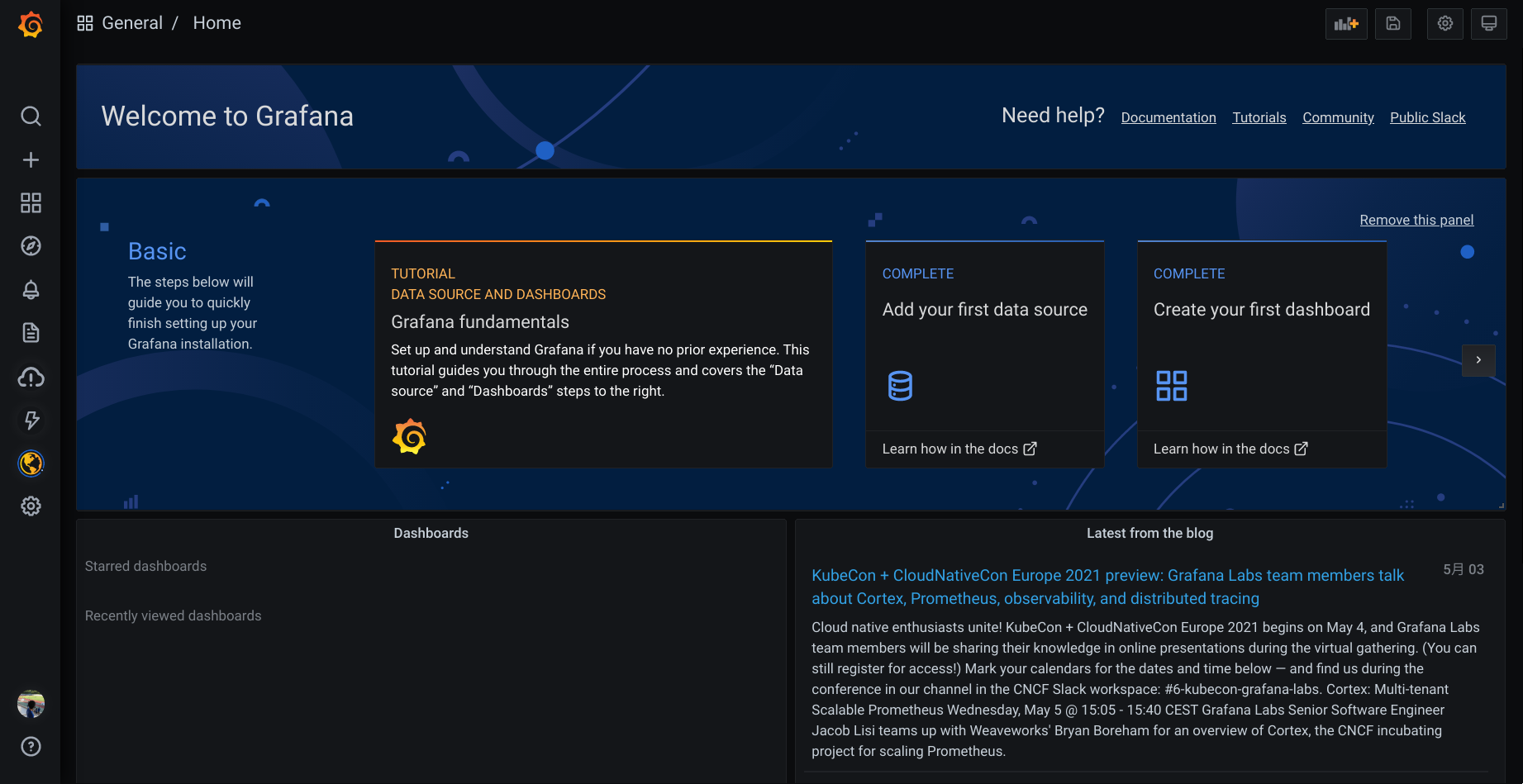
メトリクス収集
次に、メトリクスの収集を始めましょう。雷のアイコン( ) > Walk through をクリックすると、スクリーンショットのように Grafana Cloud がサポートしているプラットフォームのメトリクス収集を簡単にセットアップできるガイドが用意されています。今回は Linux Server を使用します。Prometheus では Node Exporter と呼ばれているものです。
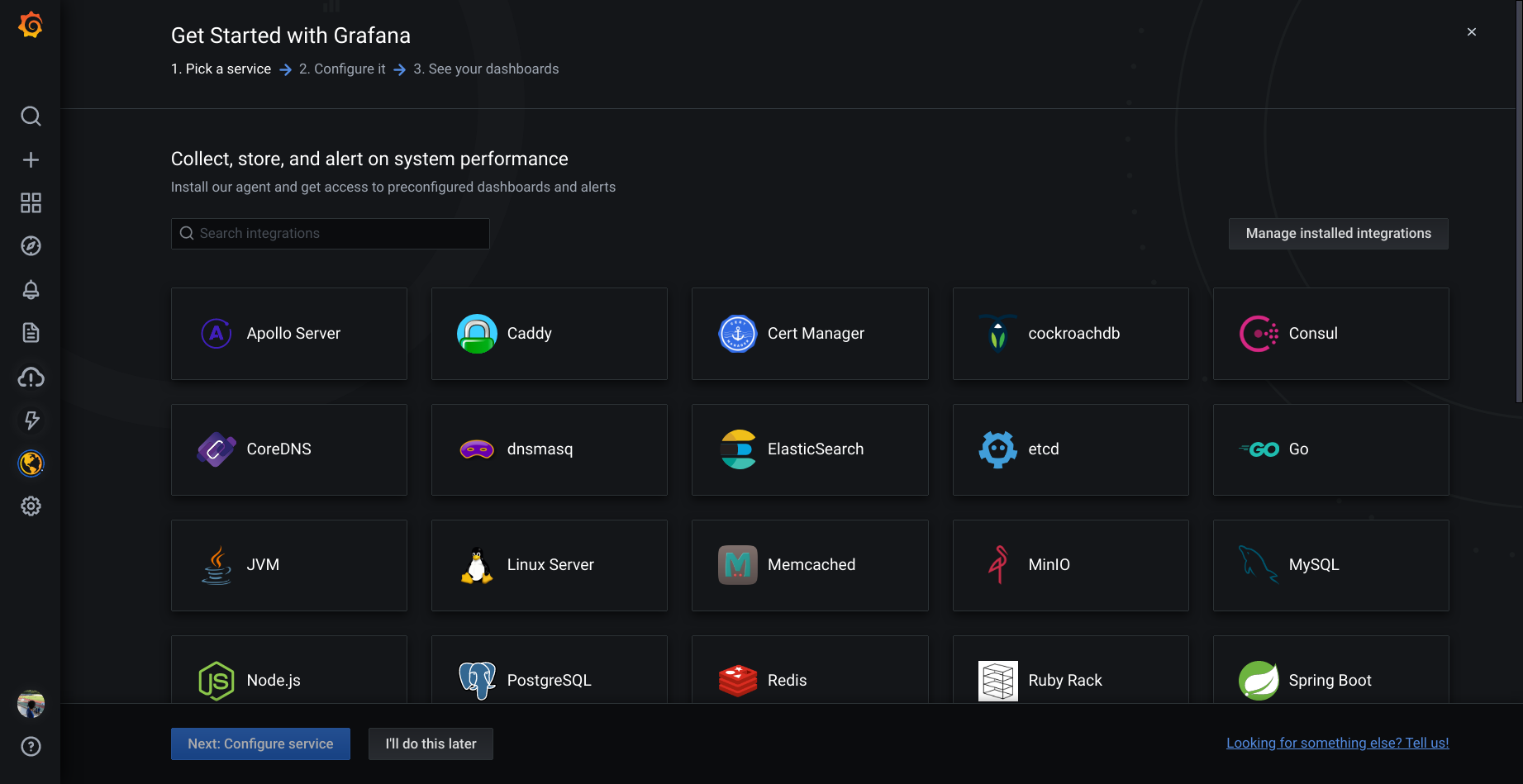
Linux Server をクリックすると、セットアップするためのスクリプトが表示されます。「Choose your OS」には openSUSE が見当たりませんが、「RedHat – based」で OK です。Go言語で実装されたアプリなので、システムライブラリにほとんど依存していません。

あとは、その下に表示されたスクリプトを実行すれば OK です。Grafana Agent の RPM のインストールと設定ファイルの作成、起動まで一気に行われます。セットアップが終わると、最初から用意されているダッシュボードに収集した情報が表示されます。(datasource で grafanacloud-xxxx-prom を選択)

ダッシュボードの作成
もちろん、ダッシュボードを自分で組み立てることもできます。ここではパネルを配置し、Visualization を Time Series にして次を追加してみました。収集されているメトリクスの一覧がドロップダウンメニューに表示されるので、ここからそれっぽいものを選んで追加することができます。
- node_cpu_scaling_frequency_hertz
- instance:node_cpu_utilisation:rate1m
- node_hwmon_temp_celsius
各系列のスタイルや、単位、Y軸の設定は、ちょっとわかりにくいですが Overrides タブで系列を選んで個別に設定できます。
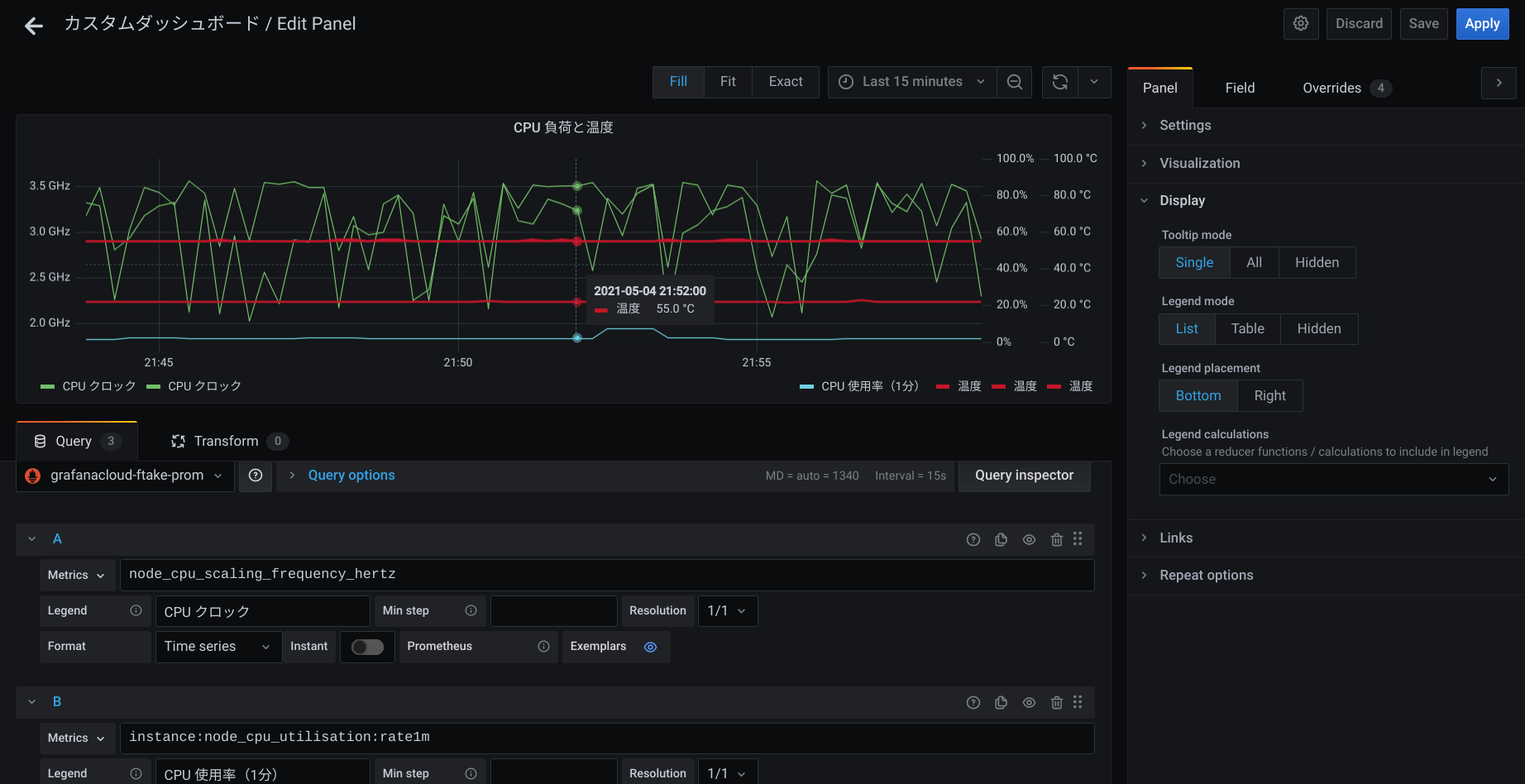
このファイルサーバーは普段ほとんどアイドル状態なのですが、CPU クロックが思った以上に落ちていないことが分かりました。ファンコントロールのターゲット温度が45℃設定なのですが、55℃くらいをキープしているようです。
おわりに
Grafana Cloud を使って自宅ファイルサーバーの監視を簡単にしてみました。そして Grafana Agent が CPU 時間を他と比較して使ってしまっていますので、場合によっては収集する項目を減らすなどを考えたほうが良いかもしれません。
 Member
 baltolkien
Disponible el vigesimoséptimo número de la revista digital SoloLinux
Ya tenemos disponible el vigesimoséptimo número de la revista digital SoloLinux la cual cumple más de 2 años de publicaciones mensuales sin interrupciones y que, como siempre, podéis leer online o descargar para poder disfrutar en vuestro lugar de vacaciones si tenéis una conexión de internet limitada o donde queráis, que para eso el Software Libre promueve la libertad.
Disponible el vigesimoséptimo número de la revista digital SoloLinux
La introducción es repetitiva, pero es que es interesante hacer un poco de historia cada mes para aquellos que llegan de rebote a esta sección.
Hubo un tiempo en que las revistas sobre Linux digitales estuvieron de moda. Tenemos todavía publicándose Atix y Full Circle Magazine (en inglés, gracias Vampiro Nocturno), pero antes teníamos a Linux+, Papirux, Begins o TuxInfo, por citar algunas discontinuadas.
Desde hace un tiempo una revista digital SoloLinux tiene su entrada mensual en el blog, tener todas las alternativas posibles para compartir conocimiento es algo que caracteriza al Conocimiento Libre.
Y como es habitual, les dejo a ellos decir unas palabras:
Ya estamos aquí de nuevo, y esta vez sí que sí presentamos novedades. El equipo de SoloLinux, os presenta oficialmente la nueva web «revistalinux.es«. Minimalista y sencilla, en revistalinux.es podrás descargar o visualizar online todos los números de la revista SoloLinux.
Si bien es cierto que aún quedan algunas correcciones y mejoras, la consideramos 100% funcional. Quiero recordar a todos los administradores de sitios web, que tienen nuestras revistas con enlaces de descarga directa a «https://www.sololinux.es/revistas», lo deben modificar por «https://revistalinux.es/revista».

Más información: Revista Sololinux N27
Así que, ya tenemos disponible el vigésimoséptimo número de la revistas digital SoloLinux, el cual llega, como siempre, cargado de contenidos y con el siguiente índice.
|
SOFTWARE GNS3 la alternativa a Cisco Packet Tracer El mejor editor PDF para Ubuntu Como instalar Snap Store en OpenSuse NOTICIAS El navegador Google Chrome usará https por defecto SEGURIDAD Desbloquear una cuenta de usuario en linux Qué es el malware y como proteger linux SCRIPT CPUFetch – Información de la CPU con logotipo REDES Uso del comando nmcli con 20 ejemplos DISTROS LINUX Huayra 5.0 – Listo para su descarga |
MANUALES Verificar el espacio del disco con 10 comandos Buscar y eliminar paquetes no depurados en Ubuntu Journalctl – Filtrar registros con 10 comandos Instalar tmux en linux – Parte 1 de 2 Los comandos de tmux más útiles – Parte 2 de 2 Novedad: Como instalar 7zip en linux Instalar Jitsi Meet Server – Videoconferencias en Ubuntu 20.04 Actualizar Cyberpanel a la versión 2.1.1 Administrar usuarios en Linux Uso del comando dpkg en Debian y derivados Uso del comando locate en linux con 8 ejemplos Uso del comando tee en linux Test de conocimientos linux en 10 preguntas Instalar Apache Kafka en Ubuntu 20.04 Instalar Epel Repository en Alma Linux 8 Clonar un disco con el comando dd y cat 8 consejos para acelerar Ubuntu y derivados |
La revista puede ser descargada o simplemente visualizarla en línea, ya que se cuelga en diferente servicios como Calameo. A continuación os dejo los enlaces de descarga y visualización directa de todos los números publicados hasta la fecha.
Además, recordar que desde el número anterior se ha abierto el canal oficial sololinux.es de Telegram: https://t.me/sololinux_es
Descarga:
Visualización directa:
Evidentemente, este proyecto no se centra en exclusivo a los contenidos de su web y está abierto a colaboraciones de todo tipo. De esta forma si estas interesado en insertar publicidad en nuestra revista, o quieres que publiquemos algún articulo que hayas escrito tu mismo, puedes contactar con «Adrián» por correo electrónico: adrian @ sololinux. com
Muchos ánimos en este proyecto que ya parecer estar consolidad y que que facilita la difusión del Software Libre de una forma que ya no es tan habitual en estos tiempos pero que es igual de válida y necesaria en algunas ocasiones.
#openSUSE Tumbleweed revisión de la semana 18 de 2021
Tumbleweed es una distribución “Rolling Release” de actualización contínua. Aquí puedes estar al tanto de las últimas novedades.

openSUSE Tumbleweed es la versión “rolling release” o de actualización continua de la distribución de GNU/Linux openSUSE.
Hagamos un repaso a las novedades que han llegado hasta los repositorios estas semanas.
El anuncio original lo puedes leer en el blog de Dominique Leuenberger, publicado bajo licencia CC-by-sa, en este enlace:
La semana 18 ha sido una de las normales, con casi 1 snapshot diaria. Se han publicado un total de 6 nuevas snapshots (0429, 0430, 0502, 0503, 0504 y 0506).
Los cambios más notables que han traido estas snapshots son:
- GTK+ 3.24.29
- TeXLive 2021
- PHP 7.4.18
- Python 3.8.9
- Hemos cambiado de openMPI2 a openMPI4
Y muchos más cambios están esperando en la recámara:
- GNOME 40.1
- KDE Plasma 5.21.5
- icu 69.1
- Cambio de go 1.15 a go 1.16
- GCC 11 como compilador predeterminado
Si quieres estar a la última con software actualizado y probado utiliza openSUSE Tumbleweed la opción rolling release de la distribución de GNU/Linux openSUSE.
Mantente actualizado y ya sabes: Have a lot of fun!!
Enlaces de interés
-
-
- ¿Por qué deberías utilizar openSUSE Tumbleweed?
- zypper dup en Tumbleweed hace todo el trabajo al actualizar
- ¿Cual es el mejor comando para actualizar Tumbleweed?
- Comprueba la valoración de las “snapshots” de Tumbleweed
- ¿Qué es el test openQA?
- http://download.opensuse.org/tumbleweed/iso/
- https://es.opensuse.org/Portal:Tumbleweed
-

——————————–
openSUSE Tumbleweed – Review of the week 2021/18
Dear Tumbleweed users and hackers,
Week 18 was a regular one with almost daily snapshots being published. A total of six snapshots went out to the users (0429, 0430, 0502, 0503, 0504, and 0506).
The main changes in those snapshots included:
- GTK+ 3.24.29
- TeXLive 2021
- PHP 7.4.18
- Python 3.8.9
- We switched from openMPI2 to openMPI4
Changes currently being prepared in the staging areas:
- GNOME 40.1
- KDE Plasma 5.21.5
- icu 69.1: for the ring packages, nodejs15 seems to be the last blocker
- Switch from go 1.15 to go 1.16: most packages fixed, the last failure in Staging:M is cilium
- GCC 11 as default compiler: Move from special-purpose Staging:Gcc7 to Staging:O (incl. openQA test coverage). There are a few more build failures to be addressed.
- UsrMerge: The current state is that we checked in all changes and are planning on actually doing the switch somewhen in the not too far future, likely together with the planned distro-rebuild for GCC 11
Novedades KDE Gear 21.04 (III): Kdenlive
El pasado 22 de abril fue anunciado KDE Gear 21.04 pero en el blog no apareció hasta principios de mayo. Además prometí que en posteriores entradas iría comentando este lanzamiento. Así pues bienvenidos a las novedades KDE Gear 21.04 (III) donde solo tenemos una aplicación protagonista Kdenlive.
Novedades KDE Gear 21.04 (III): Kdenlive
La nueva forma de conocer la gran actualización del conjunto de aplicaciones de la Comunidad KDE recibe el nombre de KDE Gear, lo cual significa que esa denominación agrupa las novedades más importantes de muchas de sus aplicaciones.
Dado que son muchas y variadas he decidido hacer varios artículos para comentarlas como se merecen, seguimos con una Killer App de la Comunidad KDE: Kdenlive.

Novedades de Kdenlive en KDE Gear 21.04

Aunque casi todo el mundo que lea asiduamente el blog lo sabrá nunca está de más recordarlo.
Kdenlive es el acrónimo del inglés: de KDE Non-Linear Video Editor y esel editor de vídeo no lineal para KDE que soporta todos los formatos de vídeos de codificador FFmpeg (DV, HDV, mpeg, avi, mp4, mov, flv, ogg, wav, mp3, vorbis, …) y los formatos de imágenes clásicas (gif, png, jpeg, xcf, exr, tiff, svg, …).
Su uso es sencillo para los que se inician en este arte de la edición de vídeo pero potente para aquellos que quieren sacarle mucho más jugo.
Esta nueva versión aparecida en KDE Gear 21.04 nos ofrece las siguientes novedades:
- Mayor facilidad para desplazarse y ampliar alrededor de las pistas usando el ratón y diferentes combinaciones de teclas
- Añadidas Barras de Ampliación: ahora las barra de desplazamiento horizontal y vertical tienen asas en ambos extremos que mejora el ajuste de pistas.
- Añadida la compatible con el formato de codificación de video AV1, un formato de vanguardia que ya están usando empresas como YouTube y Netflix.
Más información: KDE Gears 21.04
packagesの説明文書を訳しつつ、使えるものを探してみました(A編)
前回は S でしたが、今回は A です。
パッケージ名 ansifilter
バージョン ansifilter-2.18-1.5.x86_64
動作 △
詳細
テキスト中の ANSI エスケープシーケンスを取り去ったり、HTMLなどの形式に変換できます。たとえば、script コマンドで、ANSI エスケープシーケンス付きのメッセージを記録したのち、それをテキストとして利用するときなどには便利に使えます。
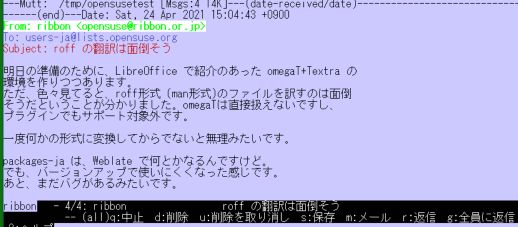
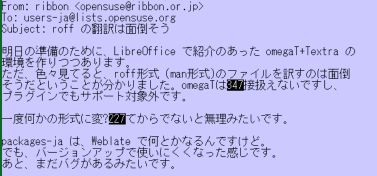
ただし、漢字についてはうまくいかない場合がかなりあります。また、HTML 変換については、エスケープシーケンスを落として変換、すなわち、色とかの情報がまるまる落ちて変換されます。ここはちょっと惜しいところです。
漢字が含まれていない、typescript の結果を整理する場合などには便利に使えそうです。
パッケージ名 arping2
バージョン arping2-2.21-1.5.x86_64
動作 ◎
詳細
ICMP のほかに、ARP を使って相手との疎通を確認するツールです。ICMP echo に反応しない機器との疎通を確認できます。但し、root でないと動きません。
# ping -c 4 192.168.A.BB
PING 192.168.A.BB (192.168.A.BB) 56(84) bytes of data.

--- 192.168.A.BB ping statistics ---
4 packets transmitted, 0 received, 100% packet loss, time 3058ms

tw:~ # arping2 -c 4 192.168.A.BB
ARPING 192.168.A.BB
42 bytes from a6:3a:xx:yy:zz:98 (192.168.A.BB): index=0 time=487.929 usec
42 bytes from a6:3a:xx:yy:zz:98 (192.168.A.BB): index=1 time=362.456 usec
42 bytes from a6:3a:xx:yy:zz:98 (192.168.A.BB): index=2 time=356.881 usec
42 bytes from a6:3a:xx:yy:zz:98 (192.168.A.BB): index=3 time=389.354 usec

--- 192.168.A.BB statistics ---
4 packets transmitted, 4 packets received,   0% unanswered (0 extra)
rtt min/avg/max/std-dev = 0.357/0.399/0.488/0.053 ms
たとえば、Windows Server の既定状態のような機器との疎通を確認するには便利に使えそうです。
Recopilación del boletín de noticias de la Free Software Foundation – mayo de 2021
Boletín de noticias relacionadas con el software libre publicado por la Free Software Foundation.

La Free Software Foundation (FSF) es una organización creada en Octubre de 1985 por Richard Stallman y otros entusiastas del software libre con el propósito de difundir esta filosofía.
La Fundación para el software libre (FSF) se dedica a eliminar las restricciones sobre la copia, redistribución, entendimiento, y modificación de programas de computadoras. Con este objeto, promociona el desarrollo y uso del software libre en todas las áreas de la computación, pero muy particularmente, ayudando a desarrollar el sistema operativo GNU.
Además de tratar de difundir la filosofía del software libre, y de crear licencias que permitan la difusión de obras y conservando los derechos de autorías, también llevan a cabo diversas campañas de concienciación y para proteger derechos de los usuarios frentes a aquellos que quieren poner restricciones abusivas en cuestiones tecnológicas.
Mensualmente publican un boletín (supporter) con noticias relacionadas con el software libre, sus campañas, o eventos. Una forma de difundir los proyectos, para que la gente conozca los hechos, se haga su propia opinión, y tomen partido si creen que la reivindicación es justa!!
- En este enlace podéis leer el original en inglés: https://www.fsf.org/free-software-supporter/2021/may
- Y traducido en español (cuando esté traducido) en este enlace: https://www.fsf.org/free-software-supporter/2021/mayo

Puedes ver todos los números publicados en este enlace: http://www.fsf.org/free-software-supporter/free-software-supporter
Después de muchos años colaborando en la traducción al español del boletín, desde inicios del año 2020 he decidido tomarme un descanso en esta tarea.
Pero hay detrás un pequeño grupo de personas que siguen haciendo posible la difusión en español del boletín de noticias de la FSF.
¿Te gustaría aportar tu ayuda en la traducción? Lee el siguiente enlace:
Por aquí te traigo un extracto de algunas de las noticias que ha destacado la FSF este mes de mayo de 2021
Cómo luché por poder graduarme sin utilizar software no libre
Del 17 de abril por Wojciech Kosior
Durante la pandemia, vimos que las instalaciones educativas adoptaron apresuradamente herramientas privativas como Microsoft Teams, Zoom y WhatsApp. Luego, las escuelas y universidades intentaron imponérselas a los estudiantes, quienes posteriormente sufrieron la pérdida de libertad de usar programas que los usuarios no controlan, así como la mala seguridad y las violaciones de la privacidad.
Debido a que me niego a utilizar software poco ético, la total dependencia de las plataformas propietarias ha creado un conflicto ético. Mi objetivo ha sido completar mi carrera universitaria sin rendirme a los servicios no libres impuestos, convenciendo a mis profesores de que me permitan utilizar únicamente software libre reemplazante de aplicaciones privativas.
No esperaba ganar una pelea contra tal poder, pero ahora, a través de una acción cortés pero firme, creo que puedo haber prevalecido. Con suerte, esta historia también te ayudará a resistir.
Identificar software “subproducido”
Del 29 de marzo por Benjamin Mako Hill y Kaylea Champion
El software crítico en el que todos confiamos puede colapsar silenciosamente debajo de nosotros. Desafortunadamente, a menudo no descubrimos que la infraestructura de software está en malas condiciones hasta que es demasiado tarde.
Durante el último año, he estado apoyando a Kaylea Champion en un proyecto que mi grupo anunció anteriormente para medir la subproducción de software, un término que usamos para describir el software que es de baja calidad pero de gran importancia.
La subproducción refleja un tipo importante de riesgo en el software libre ampliamente utilizado porque los participantes a menudo eligen sus propios proyectos y tareas. Dado que los colaboradores de software libre trabajan como voluntarios y eligen en qué trabajan, los proyectos importantes no siempre son aquellos a los que los desarrolladores de software libre prestan más atención. Incluso cuando los desarrolladores quieren trabajar en proyectos importantes, la negligencia relativa entre proyectos importantes a menudo es difícil de ver para los contribuyentes de software libre.
La obligación de forzar a utilizar software-hardware: cuando el ejercicio de tus derechos es una lucha individual, las reglas deben cambiar
Del 14 de abril por April
El Tribunal de Monza, Italia, confirmó en diciembre de 2020 que uno tiene derecho a un reembolso por una licencia de Microsoft Windows que se compró junto con una computadora, y ordenó a Lenovo a pagar 20.000 € en daños a Luca Bonissi, el demandante, por comportamiento abusivo.
Esta impresionante victoria, obtenida por un activista del software libre después de una valiente lucha legal, es un claro recordatorio de la necesidad de luchar contra la la obligación forzosa de utilizar software y hardware, y de cambiar las reglas del juego.

Estas son solo algunas de las noticias recogidas este mes, pero hay muchas más muy interesantes!! si quieres leerlas todas (cuando estén traducidas) visita este enlace:
Y todos los números del “supporter” o boletín de noticias de 2021 aquí:

—————————————————————
Novedades KDE Gear 21.04 (II): KDE Itinerary y Elisa
El pasado 22 de abril fue anunciado KDE Gear 21.04 pero en el blog no apareció hasta principios de mayo. Además prometí que en posteriores entradas iría comentando este lanzamiento. Así pues bienvenidos a las novedades KDE Gear 21.04 (II) donde KDE Itinerary y Elisa son sus protagonistas.
Novedades KDE Gear 21.04 (II): KDE Itinerary y Elisa
La nueva forma de conocer la gran actualización del conjunto de aplicaciones de la Comunidad KDE recibe el nombre de KDE Gear, lo cual significa que esa denominación agrupa las novedades más importantes de muchas de sus aplicaciones.
Dado que son muchas y variadas he decidido hacer varios artículos para comentarlas como se merecen, seguiré con dos aplicaciones emergentes: KDE Intineary y Elisa.
Novedades de KDE Itinerary en KDE Gear 21.04

Una de las aplicaciones que viene pisando fuerte aunque ahora esté poco utilizada es KDE Itinerary, una aplicación que hace que sus viajes resulten más fáciles y más placenteros, que se integra bien con Kontact aunque puede funcionar como una aplicación independiente.
Sus novedades fundamentales en KDE Gear 21.04 son las siguientes:
- Nueva fuente de información: estado de ascensores y escaleras mecánicas en tiempo real sobre el plano de las estaciones de tren.
- Posibilidad de evaluar las expresiones del horario de apertura de OpenStreetMap.
- Nueva función que nos permite distinguir entre bicicletas de alquiler en base o sin ella.
Novedades de Elisa en KDE Gear 21.04

La lucha en el ecosistema KDE por tomar el trono de reproductor de audio que dejó Amarok está siendo dura, interesante y, sobre todo, positiva para los usuarios.
Y dentro de ella destaca Elisa, que se está convirtiendo rápidamente en uno de los programas favoritos de los amantes de la música de KDE por varias razones: aspecto sencillo y atractivo que lo convierte en una alternativa de primera clase en Android y Plasma Mobile.
Pero sus desarrolladores no dejan de mejorarlo, como vemos en su versión KDE Gear 21.04 con algunas de ellas:
- Completo cambio de imagen para la plataforma móvil.
- Nuevo formato admitido: AAC.
- Posibilidad de usar archivos de lista de reproducción en formato .m3u8.
- Mejoras en la gestión de alfabetos no occidentales así como también en la gestión de acentos, caracteres en cirílico, árabe, urdu, hindi, chino o cualquier otro idioma para los títulos de las canciones, los nombres de los artistas y los álbumes.
- Menor consumo de memoria al desplazarse por la aplicación, lo que la hace más ágil y placentera de usar.
Curso de Vim: ¿qué color escoger para tu editor #Vim?
Escoger el tema de colores para tu editor Vim puede ser un poco complicado, por la variedad que existe

Cuando empiezas en Vim, los colores de tu editor no parecen tener mucha importancia, pero cuando pasa el tiempo puedes caer en la espiral de ir probando y probando temas de colores nuevos.
Lo mejor es ir probando, pero también quedarte con el que más te guste y permanecer con ese tema bastante tiempo, porque de lo contrario puede convertirse en una “adicción peligrosa” 
Este artículo es una nueva entrega del curso “improVIMsado” que desde hace meses vengo publicando en mi blog sobre el editor Vim y que puedes seguir en estos enlaces:
- https://victorhckinthefreeworld.com/tag/vim/
- https://victorhck.gitlab.io/comandos_vim/articulos.html
Y más recursos en la guía en español para aprender Vim:
Hace tiempo escribí un artículo en el que compartía mi elección en cuanto al tema de colores que utilizo en Vim y que todavía sigo utilizando.
Al principio sí que tenía tentación de ir probando temas de colores que iba encontrando, hasta que encontré uno que me gusta y con el que estoy cómodo editando. De lo contrario, podía convertirse en un no parar de probar temas de colores.
Pero ¿dónde encontrar el tema que más te guste? Para eso, hoy te traigo hasta el blog esta página llamada vimcolors:
Que recopila una gran colección de temas de colores para Vim en el que encontrar aquel tema que case con nuestro sistema y gustos.
La página nos ofrece la posibilidad de filtrar los temas de colores de los que ofrece por distintos campos, para ayudarnos en la búsqueda.
Es una buena colección de más de 900 temas de colores para Vim entre los que escoger, fíjate si no tienes posibilidad de elección… casi diría que es excesiva!
Como recordatorio, lo usual es encontrar un archivo de texto con la configuración de colores llamado “un_nombre.vim”. Donde un_nombre es el nombre fantástico que el creador ha querido darle a su tema de colores.
Descargamos ese archivo y lo ubicamos dentro de la ruta ~/.vim/colors/
Si solo lo queremos probar en Vim de manera temporal, abrimos Vim con un archivo y escribimos:
:colorscheme un_nombre
Donde un_nombre será el nombre del tema que quiera establecer. Cabe recordar, que la tecla Tabulador, funciona el autocomplementando el nombre del archivo de color que queremos establecer.
Podemos probarlo y ver si nos gusta. Con este método, al cerrar Vim, perderemos ese ajuste y volveremos a nuestro antiguo tema de color. Podemos ir probando con ese método tantos temas de colores como tengamos en la ruta mencionada antes.
Si un tema nos gusta y queremos que sea nuestro tema de color predeterminado, bastará con que lo establezcamos en nuesto archivo ~/.vimrc de la siguiente manera:
colorscheme un_nombre
Reemplazando un_nombre con el esquema de color que sea de nuestro agrado. Guardamos y cerramos Vim. La próxima vez que lo abramos nuestro Vim tendrá un nuevo aspecto.
Siempre está bien de vez en cuando darle un nuevo aspecto a nuestro Vim, o no...


Trying out Phosh shell on PinePhone and openSUSE Tumbleweed
During my time with Phosh on PinePhone and openSUSE Tumbleweed, I have stumbled on a couple of issues that made clear that the experience still needed some polish. This is not a critic against the Phosh or the GNOME project. I don’t envy the developers that need to ensure that their app works across many form factors.
However, I can see that the additional time that the KDE project has spend on polishing their experience has paid off. In this article, I will describe the issues that I encountered and how you can fix them. I like everyone to try out this GNOME based mobile experience. It’s awesome to see FOSS beyond the PC / Laptop.
Where is my keyboard?
Unlocking your phone and then your SIM card are the number 1 and 2 things to do when you boot up a smartphone. However, its hard to unlock your SIM card without a virtual keyboard. And that was exactly what I encountered.

How do you progress? Click on Cancel and go to the Settings.

There is a category for Accessibility and under Typing you find a toggle for the (on) Screen Keyboard. Hit the switch!

You will find a keyboard icon at the bottom of the phone. Touching this keyboard button automatically opens and closes the virtual keyboard.

Now it is time to unlock that Simcard. Go to the Mobile category and click on Unlock.

Enter your Pincode and now you can make phone calls. The sound quality is excellent.

The GNOME experience, but mobile
Phosh is GNOME. And that becomes very apparent when you go from the full-screen experience to the windowed experience. (Yes, you can do that.) Just drag the title-bar down and your windows are in plain sight.

In many ways you can see that most apps are plain desktop apps (up-scaled by 200%) on a mobile device screen. Take GNOME Software for instance, which is clearly not designed as a Mobile First app. However, it does everything that it needs to do.


The most funny example is when you open LibreOffice. (Yes, you can do that.) It is amazing that you can do this at all. I do recommend that you switch to a Dock and a FullHD monitor to work on your LibreOffice files. You won’t get very far on the PinePhone screen.

Phosh looks good!
The parts that are developed for Phosh are designed to be Mobile First. You can see that the experience is optimized for those parts. Scrolling is relatively smooth (the PinePhone is not the fastest device and hardware acceleration is not working). The general design direction is clean and functional. The Lock screen is a good example of that design esthetic.

When you unlock Phosh, you are greeted by the App grid.

The Phone app is clearly designed to be a Mobile First experience.

When you swipe up, you go back to the Overview, where your open windows (Yes, it does multitasking) are shown above the App grid.

GNOME already featured a very clean and functional look for its apps. That translates quite well to a mobile form factor. GNOME Maps for instance looks quite good. The buttons could be a bit bigger, but it works fine on the PinePhone.

GNOME Weather works as you expect.

And GNOME Web (or Epiphany) works very well as a mobile browser.

The Smartphone app is called Megapixels. That app is still a work in progress. In contrast to opening this app on KDE Plasma Mobile, I can now see colors. The user interface of Megapixels is easy to understand. But there are very few features to work with.

GNOME Clocks could also do better. Everything is very small and there is a lot of unused screen estate. Which is weird, because on my desktop PC the interface looks more mobile friendly. However, there is a minimum width for the window on my desktop PC. Maybe this is what happens, when you make the window even smaller.

Conclusion
I liked exploring Phosh on openSUSE Tumbleweed. I am not in love with the experience, but I do like the way it operates. It’s a very functional experience. For some people, that is all it needs to be. With some love and development from the GNOME community, I am certain that it will reach the same level as polish that the KDE community has.
What I really like about the PinePhone is that I can install any OS to the phone that I like to explore. It is a bit similar to using Virtualbox to explore the various Linux distributions and the various Desktop Environments. You can just wipe your phone and flash another Operating System on it and try it out. Every experience is unique. Although not every experience is right for me, it is fun poking around. And that is what FOSS is all about (for me).
Published on: 4 May 2021