
 Member
 Victorhck
Curso de Vim: Los registros nominales en #Vim
Veamos cómo poder utilizar los registros nominales del editor Vim

Vim dispone de unos registros en los que podemos almacenar el texto que copiamos, modificamos o borramos. Y así poder reutilizarlo una y otra vez donde nos interese.
Este artículo es una nueva entrega del curso “improVIMsado” que desde hace meses vengo publicando en mi blog sobre el editor Vim y que puedes seguir en estos enlaces:
- https://victorhckinthefreeworld.com/tag/vim/
- https://victorhck.gitlab.io/comandos_vim/articulos.html
En un artículo anterior del blog, aprendimos a utilizar y gestionar los registros numerados de Vim. Y cómo estos son generados y almacenados por el propio editor Vim.
En este caso vamos a aprender a gestionar los registros nominales de Vim. Estos registros se guardan en las letras de la a-z. Por lo que tendremos 26 opciones en los que guardar texto.
A diferencia de los registros numerados, en los registros nominales el texto lo guardamos nosotros cuando lo necesitemos y lo almacenaremos en el registro (la letra) que prefiramos.
Podemos copiar o borrar un texto y guardarlo en uno de estos registros, y quedará ahí almacenado para pegarlo en otro lugar tantas veces como deseemos. Siempre permanecerá ahí guardado incluso en otro documento de Vim.
Imaginemos que tenemos la siguiente frase en nuestro archivo:
Hola mundo. Soy un friki.
Y queremos guardar la palabra “Hola” en el registro “a”. Para ello, posicionamos el cursor sobre la palabra y en el modo normal, ejecutamos:
"ayiw
- “a → Con esto le decimos a Vim que la siguiente acción la guarde en el registro a
- yiw → Con esto realizamos la acción de copiar (yank) la palabra en la que está el cursor (iw)
Con esto ya está almacenada la palabra dentro del registro “a”. Podemos comprobarlo ejecutando el comando:
:reg
Muy bien, hemos aprendido a copiar algo al registro. Vamos a usarlo, por ejemplo pegar el contenido de un registro en otra parte del texto. Creamos una línea nueva, y en el modo normal ejecutamos:
"ap
- “a → Como antes, con esto le decimos a Vim que vamos a utilizar el registro “a” para la siguiente acción.
- p → Pegamos el contenido del registro “a”
Pero no se vayan todavía, que aún quedan más cosas que aprender. ¿Qué pasa si al registro “a” que contiene la palabra “hola” le queremos añadir un texto? Por ejemplo queremos añadir la palabra friki, de la frase anterior.
Para modificar un texto de un registro añadiéndole texto, deberemos utilizar la letra mayúscula del registro en el que queremos añadir texto. Es decir, que si queremos añadir el texto “friki” en el registro “a” deberemos utilizar la “A” de la siguiente manera.
Colocamos nuestro cursor sobre la palabra que queremos (en este caso “friki”) y sobre ella, en el modo normal ejecutamos:
"Ayiw
- “A → Le dice a Vim que la siguiente acción la añada al registro, en este caso el “a”
- yiw → Como en el caso anterior volvemos a copiar la palabra sobre la que está el cursor
Si volvemos a ejecutar el comando :reg para ver el contenido de los registros, veremos que el registro “a” ha cambiado. Se le ha añadido la palabra “friki”. Si lo pegamos (“ap) lo podremos comprobar empíricamente.
Y hasta aquí el tema de los registros nominales. ¿Te ha parecido interesante? Disponemos de texto almacenado en un “portapapeles” de Vim que tiene 26 posicione (de la “a” a la “z”) en el que guardar texto. No está nada mal.
En este ejemplo, hemos copiado una palabra, pero puedes seleccionar una línea o un párrafo… lo que necesites. Te aconsejo que abras Vim y pruebes a utilizar los registros en varias circunstancias para probar.


TiddlyWiki | Personal, non-linear, Note Taking Application on Linux
Lanzada la cuarta actualización de Plasma 5.21
Tal y como estaba previsto en el calendario de lanzamiento de los desarrolladores, hoy martes 6 de abril la Comunidad KDE ha comunicado que ha sido lanzada la cuarta actualización de Plasma 5.21. Una noticia que aunque es esperada y previsible es la demostración palpable del alto grado de implicación de la Comunidad en la mejora continua de este gran entorno de escritorio de Software Libre.
Lanzada la cuarta actualización de Plasma 5.21
No existe Software creado por la humanidad que no contenga errores. Es un hecho incontestable y cuya única solución son las actualizaciones. Es por ello que en el ciclo de desarrollo del software creado por la Comunidad KDE se incluye siempre las fechas de las actualizaciones.

De esta forma, el martes 6 de abril ha sido lanzada la cuarta actualización de Plasma 5.21, la cual solo trae (que no es poco) soluciones a los bugs encontrados en esta semana de vida del escritorio y mejoras en las traducciones. Es por tanto, una actualización 100% recomendable.
Más información: KDE
Las novedades básicas de Plasma 5.21
Os dejo las novedades más destacada de esta nueva versión son:
- Nuevo lanzador de aplicaciones que presenta una interfaz de usuario de doble panel, mejoras en la navegación con el teclado y con el ratón, mejor accesibilidad y soporte para idiomas con escritura de derecha a izquierda.
- Mejoras visuales en el tema por defecto de Plasma que disponen ahora de una combinación de colores renovada y lucen un nuevo estilo de barra de encabezado unificado con un aspecto limpio y refrescante.
- Presentación de Breeze Crepúsculo («Twilight») nevo tema oficial disponible que combina lo mejor de los temas claros y oscuros.

- Nueva interfaz de información del sistema llamdo Plasma System Monitor para monitorizar los recursos del sistema construido sobre Kirigami y un servicio de estadísticas del sistema llamado «KSystemStats».
- Mejoras y avances importantes en Kwin con Wayland cuyo código de composición de KWin se ha refactorizado mejorando la latencia (tiempo de respuesta del escritorio) .
- Nueva página para las «Preferencias del sistema»: las preferencias del cortafuegos de Plasma. Este módulo de configuración le permite ajustar y editar el cortafuegos de su sistema y constituye una interfaz gráfica para «UFW» y «firewalld».
Clang precompiled headers and improving C++ compile times, conclusion
With Clang12 almost released, I guess it's high time to write a conclusion to the Clang11 changes that improve compilation times with PCHs. I originally planned to do this after the Clang11 release, but with the process to get the changes reviewed and merged having been so tedious I was glad it was finally over and I couldn't at the time muster the little extra effort to also write this down (I spent way more time repeatedly writing 'ping' and waiting for a possible reaction than writing the code, which was really demotivating). But although the new options are described in the Clang11 release notes, I think it'd be useful to write it down in more detail.
First of all, I've already written why C++ developers might care, but a thousand pictures can be worth more than a thousand words saying how this can save you even 60% of the build time:
In case you'd like to see a similar change in your LibreOffice compilation times, it should be as simple as this:
- Get Clang11 or newer and use it to build LibreOffice.
- Use --enable-pch (preferably --enable-pch=full) to enable PCH use.
- Profit.
You may want to check that your ccache and icecream are not too ancient if you use them, but by now any reasonably recent version should do. And if you need to do changes that would repeatedly trigger larger rebuilds (such as changing a header), the trick to temporarily disable PCH builds is to do 'make BLOCK_PCH=1'. And since PCH builds sometimes cause build errors in non-PCH builds because of missing #include's of headers, it's a good idea to touch all your changed files and do 'make BLOCK_PCH=1' before pushing your change to Gerrit. This is all you should need to know, the LO build system will take care of everything else.
As for the rest of the world, this boils down to the two PCH-related sections in the Clang11 release notes.
The first one is using -fpch-instantiate-templates. It needs to be set when building the PCH, but it will work even if you just add it to the CXXFLAGS used for building everything. Recent enough CMake version should handle this option automatically, I have no idea about other build systems. It should be safe to enable the option for any building with PCH. It's not enabled by default in Clang only because of really corner cases with PCHs that are not self-contained. In other words, as long as your PCH works with an empty .cpp file, it's safe, and if your PCH is not self-contained, you'd be better off fixing that anyway.
The second part using -fpch-codegen -fpch-debuginfo is more complicated, as it requires build system support, and I'm not aware of any build system besides LibreOffice's providing it. This discussion in a CMake ticket provides an example of how to use the option that seems rather simple. For other build systems have a look at the description in the Clang11 release notes for all the details and possible complications, and consider whether it'd be worth it. Which it sometimes may not be, as this graph from my previous post shows (Clang means normal PCH build, Clang+ means only -fpch-instantiate-templates, Clang++ means all 3 options).

Note that you may get rather different results depending on how much you put in your PCHs. Unlike before, now the general rule should be that the more you add to your PCHs, even if shared only by several source files, the faster the builds usually will be. And since these options move building some code to the PCH-related object file, the improvement is usually even better for incremental builds than full rebuilds. I've been using PCHs this way for slightly more than a year, and I forgot already quite some time ago how slow it used to be.
packagesの説明文書を訳しつつ、使えるものを探してみました(Q編)
前回は D でしたが、今回は Q です。Qt関連のパッケージが多く存在していました。
パッケージ名 qdirstat
バージョン qdirstat-1.7-1.6.x86_64
動作 ◎
詳細
グラフィカルにディスクの使用量を見たり、ファイルやディレクトリの操作をするツールです。Qt ベースで動きます。見栄えはかなり良いです。
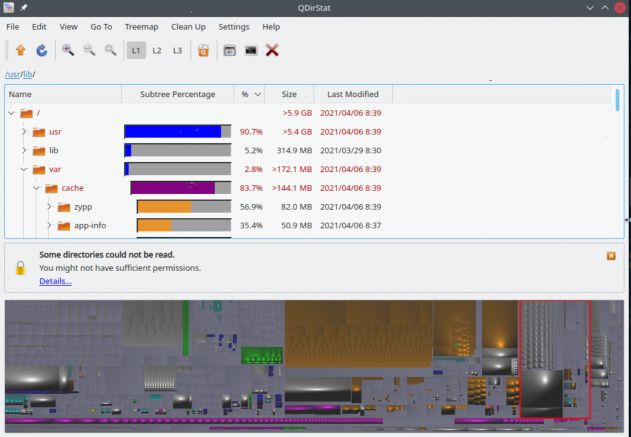
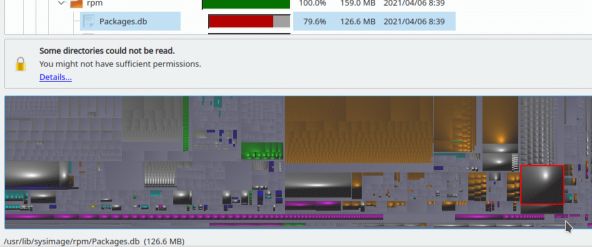
面白いのは、下部に表示されている図で、これは、各ファイルの大きさをベースにしたイメージです。例えば、ある大きな模様の所をクリックすると、そのイメージに対応するファイルに移動することが出来ます。
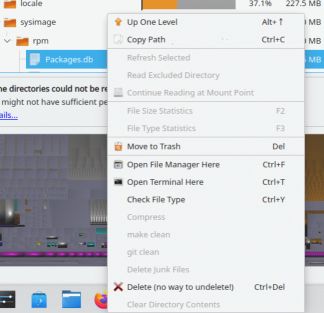
さらに、右クリックで種々の操作を選ぶことも出来ます。
qdirstat は、ディレクトリを渡りながら、ディスクの掃除をするときなどに便利に使えそうです。

OAK: Câmera com Visão Computacional e AI embarcada
OAK (OpenCV Artificial Intelligence Kit) é um hardware revolucionário, pois acredito que este equipamento será relevante para a visão computacional como o Raspberry Pi foi para o setor de embarcados. OpenCV AI Kit, ou OAK, é uma câmera que utiliza um chip de AI incorporado para processar tarefas de visão computacional, como, por exemplo, detectar objetos, medir distâncias e muitas outras tarefas comum no setor de IA.
O hardware é baseado em software livre sob a licença MIT e uma solução baseada em hardware Myriad X para visão computacional por OpenCV (se isso não fosse óbvio). O produto está disponível em duas versões: OAK e OAK-D. A diferença entre estas câmeras são a capacidade de processamento 3D e a presença de múltiplas câmeras. Além de eficaz, apresenta eficiência energética tornado uma solução de grande benefício. O produto pode executar a detecção de objeto com câmera RGB 12MP integrada, combinando ao seu recurso de profundidade estéreo integrado.

Especificação técnica
- 12MP Câmera colorida 4K integrada
- 1MP Par estéreo sincronizado com obturador global integrado
- Real-time Profundidade estéreo
- 4 TOPS de Processamento Visual
- Sem carga de computação no host
- Câmera de IA espacial com inferência em vários estágios
- Interface USB 3.0 Type-C
- Use com qualquer sistema operacional host com suporte ao OpenVINO
- 4K / 30fps Codificação H.265
- JPEG, H.264 & H.265/HEVC codificação
Onde comprar? Neste link podemos obter os equipamento : https://store.opencv.ai/collections/frontpage
O construtor de diagramas baseado em nó denominado Depthai-gui, está disponível para facilitar o uso da visão computacional, como também o desenvolvimento de trabalho de IA. Assim tornando a IA 2d e espacial de várias etapas simples, bastando arrastar e soltar apenas. Muito útil para criar um protótipo rápido (sem o conhecimento programação de visão computacional),como por exemplo criar soluções de detecção de objetos. Vejam o video demonstrativo abaixo:
Para finalizar, deixo aqui um artigo no Viva o Linux de como utilizar este brinquedo sem mistério.

Upgrading to the next PostgreSQL version
We upgraded our internal PostgreSQL cluster to the latest version last week.
Time passes by so quickly: we installed our PostgreSQL cluster around 2008. At least, this was the time of the first public MirrorBrain release 2.2, which was the reason to run a PostgreSQL installation for openSUSE. But MirrorBrain (and therefor the PostgreSQL cluster behind it) is way older. So maybe it’s fair to say that MirrorBrain started with openSUSE in 2005…?
Anyway: if you maintain a database for such a long time, you don’t want to loose data. Downtimes are also not a good idea, but that’s why we have a cluster, right?
While the MirrorBrain database is currently still the biggest one (>105GB in size and ~120 million entries alone in the table listing the files on the mirrors), our new services like Matrix, Mailman3, Gitlab, Pagure, lnt or Weblate are also not that small any more. All together use currently 142GB.
We already upgraded our database multiple times now (starting with version 7. in the past). But this time, we decided to try a major jump from PostgreSQL 11 to 13, without any step in between.
So how do we handle an upgrade of a PostgreSQL database? - In general, we just follow the documentation from upstream - only adjusting the values to our local setup:
Local setup details
- Our configuration files are stored in /etc/postgresql/ - and symlinked into the current data directory. This makes it not only easier for us to have them in a general backup, we also set their file ownership to root:postgres - editable just by root and readable just for the postgres group (file permissions: 0640).
- Below the generic data directory for PostgreSQL on openSUSE (/var/lib/pgsql), we have “data” directories for each version: data11 for the currently used PostgreSQL 11 version.
- A Symlink /var/lib/pgsql/data points to the currently active database directory (data11 in the beginning)
Step-by-Step
Preparation
First let us set up some shell variables that we will use through out the steps. As we need these variables multiple times as user ‘root’ and user ‘postgres’ later, let’s place them into a file that we can refer to (source) later…
cat > /tmp/postgresql_update << EOL
export FROM_VERSION=11
export TO_VERSION=13
export DATA_BASEDIR="/var/lib/pgsql/"
export BIN_BASEDIR="/usr/lib/postgresql"
EOL
| Note: DATA_BASEDIR you can get from the currently running postgresl instance with: ps aufx | grep ‘^postgres.* -D’ |
Don’t forget to source the file with the variables in the steps below.
Install new RPMs
Install the new binaries in parallel to the old ones (find out, which ones you need either via rpm or zypper):
source /tmp/postgresql_update
zypper in $(rpmqpack | grep "^postgresql${FROM_VERSION}" | sed -e "s|${FROM_VERSION}|${TO_VERSION}|g")
Initialize the new version
Now change into the database directory and create a new sub-directory for the migration:
su - postgres
source /tmp/postgresql_update
cd ${DATA_BASEDIR}
install -d -m 0700 -o postgres -g postgres data${TO_VERSION}
cd ${DATA_BASEDIR}/data${TO_VERSION}
${BIN_BASEDIR}/bin/initdb .
For the exact parameters for the initdb call, you can search the shell history of the last run of initdb. But we go with the standard setup above.
You should end up in a completely independent, fresh and clean PostgreSQL data directory.
Now start to backup the new config files and create Symlinks to the current ones. It’s recommended to diff the old with the new config files and have a close look at the logs during the first starts. Worst case: the new server won’t start with old settings at all. But this can be found in the log files.
su - postgres
source /tmp/postgresql_update
cd ${DATA_BASEDIR}/data${TO_VERSION}

for i in  pg_hba.conf pg_ident.conf postgresql.conf postgresql.auto.conf ; do
 old $i
 ln -s /etc/postgresql/$i .;
 # diff $i $i-$(date +"%Y%m%d")
done
Downtime ahead: do the migration
Next step is to finally do the job - this includes a downtime of the database!
rcpostgresql stop

su - postgres
source /tmp/postgresql_update
pg_upgrade --link             \
 --old-bindir="${BIN_BASEDIR}${FROM_VERSION}/bin"     \
 --new-bindir="${BIN_BASEDIR}${TO_VERSION}/bin"       \
 --old-datadir="${DATA_BASEDIR}/data${FROM_VERSION}/" \
 --new-datadir="${DATA_BASEDIR}/data${TO_VERSION}/"
The –link option is very important, if you want to have a short downtime:
–link link instead of copying files to new cluster
In our case, the operation above took ~20 minutes.
Hopefully you end up with something like:
[...]
Upgrade Complete
----------------
Optimizer statistics are not transferred by pg_upgrade so,
once you start the new server, consider running:
    ./analyze_new_cluster.sh

Running this script will delete the old cluster's data files:
    ./delete_old_cluster.sh
Switch to the new PostgreSQL version
Switch to the new database directory. In our case, we prefer a Symlink, which points to the right directory:
source /tmp/postgresql_update
cd ${DATA_BASEDIR}
ln -fs data${TO_VERSION} data
As alternative, you can switch the database directory by editing the configuration in /etc/sysconfig/postgresql:
source /tmp/postgresql_update
echo "POSTGRES_DATADIR='${DATA_BASEDIR}/data${TO_VERSION}'" >> /etc/sysconfig/postgresql
(Maybe you want to edit the file directly instead and set the correct values right at the point.) The prefix in the file should match the ${DATA_BASEDIR} variable.
Start the new server
systemctl start postgresql
Cleanup
Postgres created some scripts in the folder where the pg_upgrade started. Either execute these scripts (as postgres user) directly or use the following commands:
sudo -i -u postgres
source /tmp/postgresql_update
${BIN_BASEDIR}${TO_VERSION}/bin/vacuumdb \
 --all \
 --analyze-in-stages
${BIN_BASEDIR}${TO_VERSION}/bin/reindexdb \
 --all \
 --concurrently
Please note that the two commands above have influence on the performance of your server. When you execute them, your database might become less responsive (up to not responsive at all). So you might want to use a maintenance window for them. On the other side, your new database server will perform much better once you executed these commands. So don’t wait too long.
Check everything
Now it might be a perfect time to check monitoring, database access from applications and such. After that, you might remove the old database directory and de-install the old binaries as well together with an rm /tmp/postgresql_update.
But in general, you can mark this migration as finished.
qView el visor de imágenes rápido y ligero
qView es una aplicación multiplataforma, basada en Qt5 para ver las imágenes de distintos formatos, de nuestro equipo, de manera rápida y eficiente

A la hora de querer echar un vistazo a diferentes imágenes que guardamos en nuestro equipo, queremos acceder rápidamente a las imágenes y que sea capaz de admitir distintos formatos de archivos.
Hace unos días acabo de descubrir la aplicación qView, que está basada en Qt5 y publicada bajo una licencia libre GPLv3 y multiplataforma.
qView es una aplicación sencilla en su forma, una barra de ventana, la imagen que quiere ver y nada más, no hay barras de herramientas que distraigan ni otros accesorios.
qView apuesta por la sencillez, pero también por la potencia, porque a pesar de ser rápida y ligera, esconde un montón de opciones detrás del clic derecho sobre la imagen: podrás rotar, voltear, hacer zoom, abrir imágenes desde una URL, imágenes recientes, de otra ubicación, etc.
qView acepta muchos tipos de imágenes, y las carga rápidamente sin consumir muchos recursos. Además dispone de unas configuraciones de la aplicación para adaptarla a tus gustos o usos. Y con atajos de teclado, que puedes cambiar a tu gusto.
Además de explorar las imágenes de una carpeta simplemente con las teclas de cursor hacia la izquierda y derecha, también podrás configurar que las pase automáticamente, simplemente “dale al play”.
Quizás la quieras probar para tu sistema GNU/Linux u otros y comprobar en primera persona que ¡es lo que estabas buscando!  No olvides comentarlo!
Enlaces de interés


Telegram Bridge
Motivation
I got lucky with my original hackweek project and I have managed to set up my Leap 15.3 based NAS and private cloud running on NextCloud earlier than planned.
So I though that as an extra project I will set up a proper system monitoring service. The monit service is very handy (thanks for the idea to Paolo Stivanin) but by default it wants to send emails when something goes wrong. Instead of emails I would prefer a real instant message. I am using mostly Telegram for personal purposes. Sure I am using Signal, Matrix, Slack and Rocket.Chat too and technically I have WhatsApp account too. But I decided to start with Telegram.
Setup a Blog With Github Pages and Hugo
GitHub pages are super powerful and very easy to use for creating markdown based static websites.
In this post I will walk through how I made this very page.
My setup will be two GitHub repositories, one for the source of the page (https://github.com/bzoltan1/blog-source) and the other where the html artifacts are deployed (https://github.com/bzoltan1/bzoltan1.github.io)
Here I would like to note that it is possible to use a single repository with two branches, one for holding the the source and the other where the website is deployed. I just personally find the two repository setup more elegant without any particular reason.