
 Member
 aluna
alunaJitsi en meet.opensuse.org
Instancia Jitsi en meet.opensuse.org
Hay muchas soluciones. Pero una solución prometedora es Jitsi. Hasta ahora utilizamos las instancias proporcionadas por otras personas.
Pero ahora podemos presentar:
Se basa en openSUSE Leap 15.1 y utiliza contenedores acoplables para implementar Jitsi. También se consideraron las advertencias de seguridad actuales, además, la configuración utiliza LDAP y HTTPS seguros.
Se necesita una cuenta de bugzilla para iniciar sesión. Por el momento, solo los miembros de openSUSE pueden crear y unirse a salas.
Algunas observaciones sobre meet.opensuse.org:
Es una VM (Máquina Virtual) de 8 CPU con 16 GB de RAM
Esto sigue siendo un sistema "Beta"
No sabemos cómo escala Jitsi
Intentaremos mantener los tiempos de inactividad lo más bajos posible
El plan para el futuro es empaquetar jitsi para openSUSE e implementar una instancia con paquetes.
Si encuentran errores o tienen algún problema, informen a admin@opensuse.org o búsquenme en Freenode con el Nick: Lethliel.
Marco
Akademy 2020 se celebrará en línea en septiembre
A este paso lo de AC/DV va a convertirse en Antes de Coronavirus/Después del Coronavirus porque está cambiando todas nuestras costumbres y va a producir que nadie olvide este 2020. Como era de esperar, el gran evento comunitario de KDE no se va a celebrar físicamente, pero los intrépidos desarrolladores han encontrado de no dejar en blanco este evento. Me congratula anunciar que Akademy 2020 se celebrará en línea en septiembre, evitando así los futuros inconvenientes de la pandemia que va a marcar nuestras vidas.
Akademy 2020 se celebrará en línea en septiembre
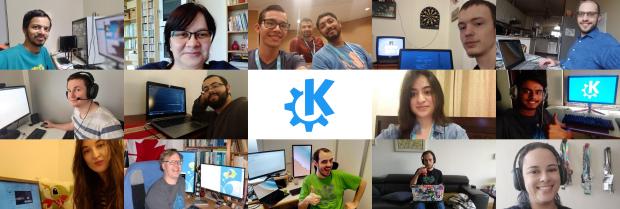
Viendo los problemas de movilidad, económicos, sociales y la incertidumbre que está acarreando esta situación a todos los niveles, la Comunidad KDE ha decidido que la próxima Akademy 2020 se celebrará en línea en septiembre, concretamente del 4 al 11 de ese mes, convirtiéndose así en un evento totalmente pionero en este tipo de reuniones.
Como es habitual, las charlas se realizarán en línea el sábado 5 y el domingo 6, dejando el resto de días para el trabajo en pequeños grupos.
Como es habitual, en breve se lanzará el «Call for Papers» y pronto tendremos más detalles, sobre todo los técnicos.
Es cierto que se perderá el factor humano pero se mantiene ese espíritu comunitario aún en tiempos difíciles.
Más información: KDE
¿Qué es Akademy?
Para los que no lo sepan, Akademy es el evento de la Comunidad KDE que aúna en una gran conferencia todo tipo de simpatizantes de KDE como desarrolladores, diseñadores, usuarios, traductores, promotores. Allí se reunirán a lo largo de una semana para compartir charlas, cenas, ponencias, talleres y, en definitiva, para trabajar juntos.
Es una gran semana que sirve para unir más fuerte los lazos que unen nuestra Comunidad, así como para crear nuevos.
Akademy lleva realizándose anualmente bajo este nombre desde 2004, en la página web oficial o en la wikipedia podéis encontrar los nombres y fechas anteriores eventos.
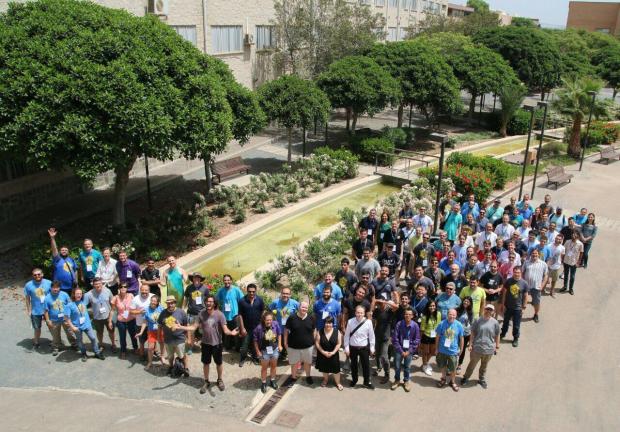
Para que os hagáis una ligera idea de la magnitud del evento, os dejo una imagen de grupo de Akademy 2017 de Almería en la que tuve la suerte de participar.
Escribir sin distracciones en el editor #Vim
Hoy veremos cómo instalar el complemento Goyo para el editor Vim con el que podremos centrarnos en escribir sin distracciones y que será una buena opción para escritores o periodistas que utilicen Vim como herramienta

El “plugin” o complemento Goyo para el editor Vim hace que nos centremos en la tarea de escribir a la hora de usar Vim, eliminando las demás distracciones e informaciones que “decoran” la ventana del editor Vim en un uso normal.
Esta utilidad quizás sea un buen complemento para aquellas personas que utilizan Vim como editor de texto como escritores o periodistas (que como ya sabes alguno hay)
Este artículo viene a formar parte de la serie de tutoriales sobre el editor Vim que desde hace ya unos cuantos meses voy escribiendo en mi blog y que puedes encontrar recopilados en este enlace:
Pero empecemos con el meollo del asunto que nos lleva al artículo de hoy. Veremos cómo instalar el complemento Goyo en Vim, y cómo utilizarlo.
Para empezar vamos a descargar los archivos correspondientes desde el repositorio de GitHub del desarrollador:
cd ~/.vim/autoload
wget https://raw.githubusercontent.com/junegunn/goyo.vim/master/autoload/goyo.vimcd ~/.vim/pluginwget https://raw.githubusercontent.com/junegunn/goyo.vim/master/plugin/goyo.vim
Con esto ya hemos descargado los dos archivos necesarios en nuestro equipo. Ahora podemos abrir un archivo de texto y ejecutar el siguiente comando para activar el complemento Goyo
:Goyo
El texto se centra en una “ventana” en medio de la pantalla y desaparece todo lo demás: números de líneas, la barra inferior de información, etc.
Este complemento lo que hace es poner el foco en el texto, podremos seguir utilizando Vim como lo veníamos haciendo, pero sin toda esa información en nuestra pantalla que podría distraernos.
Esa pantalla central se puede redimensionar de manera dinámica, para ello pulsaremos Ctrl+w y alguna de las siguientes teclas:
- < → Agrandamos la ventana por la derecha
- > → Agrandamos la ventana por la izquierda
- + → Hacemos más alta la ventana
- – → Hacemos más baja la ventana
- = → Vuelve a dejar la ventana en el tamaño inicial
También se pueden expresar las dimensiones en unidades y en porcentajes. Os recomiendo leer la información en su página en GitHub con toda la información.
Aquí tenéis una demostración práctica del complemento para Vim. Un video tutorial sobre este complemento en formato webm disponible en archive.org
También está disponible en YouTube para quien prefiera esa plataforma en este enlace:
https://www.youtube.com/watch?v=wUS79L8vSzE

Jitsi instance on meet.opensuse.org
In the times of Covid-19 and the people staying at home it is an adventure to get the tools to work from home without missing the benefits of face-to-face meetings.
There are a lot of solutions out in the wild. But one promising solution is Jitsi. Until now we used the instances provided by other people.
But now we are able to introduce:
It is based on openSUSE Leap 15.1 and uses docker containers to deploy Jitsi. The current security warnings were also considered, furthermore the setup uses secure LDAP and HTTPS.
You need an openSUSE(community) account to login.
A few remarks about meet.opensuse.org:
- It is a 8 CPU VM with 16 GB of RAM
- This is still a “Beta” system
- We don’t know how Jitsi scales
- We will try to keep the downtimes as low as possible
The plan for the future is to package jitsi for openSUSE and to deploy an instance with packages.
If you find bugs or experience any problems please report to admin@opensuse.org or find me on Freenode with the nick lethliel.
I hope you enjoy it and have fun :-)
Marco
Nicer AppArmor profiles
Usually your AppArmor profile would look something like this:
#include <tunables/global>

/usr/lib/colord {
  ...
}
Now if we check if our profile is actually used:
$ ps axZ | grep '^/usr/lib/colord'
/usr/lib/colord (enforce)  4466  ?  Ssl  0:00 /usr/lib/colord
The Z parameter makes ps print the AppArmor profile name, or in the case of selinux the context of the program.
/usr/lib/colord (enforce) tells us what AppArmor profile is used and in which mode it is.
Another option you can see there is complain. With long binary paths this can become ugly very quickly.
Aplikasi Screencast pada Sistem Linux
Seperti yang saya tuliskan kemarin : Tetap Aktif Saat Situasi Sulit : Pengorbanan Kuda, saya mencari aplikasi Screencast yang akan saya gunakan untuk merekam desktop dan aplikasi tertentu yang nantinya akan dikonversi menjadi video tutorial.
Aplikasi ini harus berjalan dengan baik pada sistem Linux, terutama Linux Zorin OS 15.1 berbasis Ubuntu 18.04 yang saya gunakan saat ini.
Ada tiga aplikasi yang kemarin saya ujicoba, yaitu ffmpeg, RecordMyDesktop dan Open Broadcaster Software (OBS) Studio.
ffmpeg merupakan aplikasi yang powerful dengan banyak pilihan. Sayangnya, dia berbasis console, jadi saya harus mempelajari perintah-perintahnya agar bisa melakukan perekaman screen/desktop yang saya gunakan.
Setelah mencoba beberapa saat, saya memutuskan beralih ke aplikasi yang lain. Selain karena berbasis perintah console yang memerlukan hapalan perintah dan adaptasi, hasilnya juga tidak sesuai dengan keinginan. Kemungkinan ini karena perintah dan parameter yang saya berikan melalui console kurang tepat.
Aplikasi kedua adalah RecordMyDesktop. Ini aplikasi yang relatif ringan dengan tampilan simple. Mudah digunakan karena berbasis GUI (Graphical User Interface) dan bisa secara to the point melaksanakan tugasnya melakukan perekaman screen/desktop.
Sayangnya, saat saya gunakan, hasilnya blur. Jika saya beralih pindah ke window/aplikasi lain, gerakannya patah-patah dan tampilannya kacau. Saya berasumsi mungkin setting FPS (Frame Per Second)-nya kurang tepat, tapi setelah saya coba sesuaikan beberapa kali masih gagal, saya beralih ke software ketiga.
Software ketiga adalah Open Broadcaster Software (OBS) Studio. Aplikasi ini tersedia pada Linux, Windows maupun Mac. Tampilannya juga GUI dan feature-nya lebih komplit dibandingkan dengan RecordMyDesktop.
Saat saya mencoba merekam, hasilnya juga bagus tidak patah-patah, padahal semua setting saya biarkan default berdasarkan deteksi awal OBS Studio.
Ini adalah hasil perekaman awal saya untuk aplikasi Chess pada Zorin OS 15.1. Abaikan suara saya yang agak-agak aneh, karena saya pribadi perlu penyesuaian bicara untuk video 
Saya juga mencoba melakukan perekaman desktop dikombinasi dengan video dari webcam dan menggunakan beberapa layar aplikasi. Misalnya saya ingin melakukan menampilkan aplikasi Terminal di satu sisi, kemudian aplikasi browser disisi lain dan ada tampilan webcam disudut layar. Hal itu mudah sekali dilakukan menggunakan OBS Studio karena dia menggunakan skema layer/tumpukan layar. Saya cukup menambahkan layer apa yang saya inginkan pada panelnya.

Pada gambar diatas, ada 4 source yang saya gunakan untuk Scene default. Ada video capture yang diambil dari webcam, ada audio input capture yang diambil dari mic, ada screen capture untuk tampilan seluruh desktop (posisi saya disable) dan terakhir ada Window capture untuk tampilan per aplikasi.
Untuk memulai perekaman, saya cukup klik tombol “Start Recording” disisi kanan dan untuk mengakhirinya saya bisa klik tombol “Stop Recording” (tombol yang sama karena sifatnya toggle). Secara default hasilnya berekstension .flv. Saya bisa melakukan konversi dari .flv menjadi .mp4 atau menjadi format lain menggunakan aplikasi ffmpeg. Jika tidak mau repot, bisa juga langsung memilih format .mp4 pada menu settings.
Untuk saat ini, OBS Studio sudah memenuhi keperluan saya dalam memulai langkah menjadi Youtuber atau dalam upaya memproduksi video tutorial. Langkah selanjutnya adalah membuat video dan menggunakan aplikasi video editor untuk merapikannya.
Actualizado Plasma Fancy Clock, reloj digital alternativo para KDE
Hablé de este plasmoide hace mucho tiempo. Concretamente en fue el plasmoide número 75 de la sección «Plasmoides de KDE», la cual ya lleva 138 capítulos. Hoy vuelve al blog porque este widget sigue su evolución y su autor ha anunciado que ha sido actualizado Plasma Fancy Clock, un reloj digital alternativo para KDE muy elegante y muy personalizable.
Actualizado Plasma Fancy Clock, reloj digital alternativo para KDE
Tener un reloj en el escritorio es una de las primeras cosas que suelo hacer cuando empiezo a personalizar mi ordenador. Evidentemente, entre los plasmoides por defecto que ofrece la Comunidad KDE se encuentran los típicos: digital, analógico, aproximado y binario.
No obstante, nunca está de más tener alternativas como el presente Fancy Clock, con el que podremos tener un simple pero elegante reloj digital decorando nuestro fondo de escritorio.
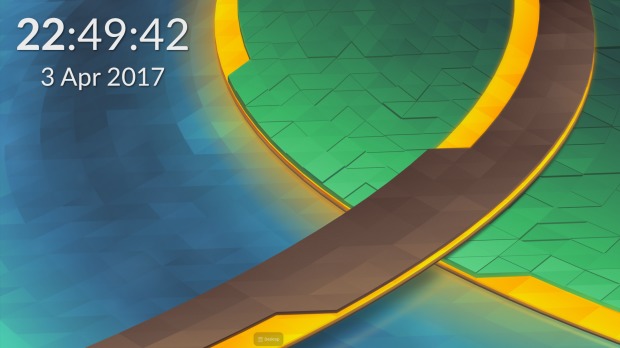
Su característica principal es que no tiene el típico marco de plasmoides y que se puede personalizar tanto color como fuente tipográfica, con lo que se puede adaptar a la perfección a temas claros y oscuros. Además, la fuente tiene un ligero sombreado que le da un toque tremendamente elegante.
Este reloj ha sido creado por Anoneemouse, el cual acaba de anunciar en la Store que ha actualizado Plasma Fancy Clock con la inclusión, además del habitual solucionado de errores, la posibilidad de controlar la opacidad del reloj, lo cual aumenta la posibilidad de configuración del mismo.

Y como siempre digo, si os gusta el plasmoide podéis “pagarlo” de muchas formas en la nueva página de KDE Store, que estoy seguro que el desarrollador lo agradecerá: puntúale positivamente, hazle un comentario en la página o realiza una donación. Ayudar al desarrollo del Software Libre también se hace simplemente dando las gracias, ayuda mucho más de lo que os podéis imaginar, recordad la campaña I love Free Software Day de la Free Software Foundation donde se nos recordaba esta forma tan sencilla de colaborar con el gran proyecto del Software Libre y que en el blog dedicamos un artículo.
Más información: KDE Store
¿Qué son los plasmoides?
Para los no iniciados en el blog, quizás la palabra plasmoide le suene un poco rara pero no es mas que el nombre que reciben los widgets para el escritorio Plasma de KDE.
En otras palabras, los plasmoides no son más que pequeñas aplicaciones que puestas sobre el escritorio o sobre una de las barras de tareas del mismo aumentan las funcionalidades del mismo o simplemente lo decoran.

Η SUSE προτείνει συγχρονισμό ροών κώδικα, την συμπερίληψη των αρχείων SLE binaries για το openSUSE Leap

Η SUSE έστειλε μια πρόταση στην κοινότητα του openSUSE σχετικά με την προσέγγιση των πηγών κώδικα τόσο του SUSE Linux Enterprise όσο και του openSUSE Leap. Η πρόταση περιλαμβάνει τα SLE binaries για την έκδοση της κοινότητας.
Η προσέγγιση των πηγών κώδικα πιο κοντά ώστε να παρέχουν πλήρη συμβατότητα παρέχει αρκετά πλεονεκτήματα στην κοινότητα, όπως η χρήση κώδικα υψηλότερης ποιότητας λόγω του καθαρισμού των αρχείων spec, η βελτίωση της σχέσης μεταξύ των δύο διανομών, η ευκολότερη αναφορά σφαλμάτων, λιγότερες ροές κώδικα για τη συντήρηση, διεξοδική δοκιμή πακέτων και συμπερίληψη υποστηριζόμενων αρχιτεκτονικών SLE όπως s390x.
«Με αυτή την αλλαγή, μπορούμε να χρησιμοποιήσουμε καλύτερα τους πόρους μας, καθώς η βάση κώδικα συγκλίνει, οπότε κατά την κατασκευή πακέτων έχουμε λιγότερη επεξεργαστική ισχύη να σπαταλήσουμε», εξέφρασε ο Axel Braun, μέλος του διοικητικού συμβουλίου του openSUSE, σε ένα μήνυμα ηλεκτρονικού ταχυδρομείου που στάλθηκε στην κοινότητα για την πρόταση. «Όσοι δημιουργούν πακέτα για την Leap και για το Hub με τα πακέτα θα επωφεληθούν αμέσως από αυτό.»
Η πρόταση προέβλεπε μια σταδιακή προσέγγιση για την εφαρμογή του οράματος. Το μήνυμα περιέγραψε τις παρακάτω επιλογές:
- • Συγχώνευση των βάσεων κώδικα για τις openSUSE Leap 15.2 και SUSE Linux Enterprise 15 SP2 όσο το δυνατόν περισσότερο χωρίς απώλεια σταθερότητας ή λειτουργικότητας. (Η SUSE έχει αρχίσει να συγχωνεύει από την Leap στην SUSE Linux Enterprise.)
- • Δημιουργία μιας ενδιάμεσης openSUSE Leap όπου τα binaries της SLE χρησιμοποιούνται παράλληλα με την κλασική Leap 15.2, μέσα στο χρονικό πλαίσιο του Οκτωβρίου 2020.
- • Δημιουργία της openSUSE Leap 15.3 με τα binaries της SLE που περιλαμβάνονται από προεπιλογή (υποθέτοντας ότι η κοινότητα συμφωνεί).
Η διανομή Leap ήδη μοιράζεται ένα σημαντικό ποσό το βασικού πηγαίου κώδικα με την SLE. Η Leap 15.2 θα βασίζεται στις πηγές από την SLE 15 SP 2, αλλά όχι στα binaries.
Η κοινότητα είναι πιθανό να συζητήσει την πρόταση για το πώς να φέρει τα binaries της SLE στη νέα εγκατάσταση του Leap και θα βοηθήσει στον εντοπισμό οποιωνδήποτε ζητημάτων που μπορεί να αλλάξουν διαδικασίες ή ροές εργασίας. Το ενδιάμεσο έργο που κατασκευάστηκε στο OBS είναι πιθανό να κυκλοφορήσει τον Μάιο. Αυτό το γεγονός θα πρέπει να δώσει στους συνεισφέροντες και στους προγραμματιστές της openSUSE την ευκαιρία να κατανοήσουν καλύτερα την πρόταση της SUSE.
«Έχουμε μια ιδέα για την εγκατάσταση στο build.opensuse.org», είπε ο Adrian Schröter από την ομάδα του OBS. «Προβλέπω να έχουμε ένα πρώτο πρωτότυπο μέσα στις επόμενες τρεις εβδομάδες. Πρέπει να έχουμε κατά νου ότι πρόκειται για έναν εντελώς νέο τρόπο ανάπτυξης μιας διανομής.»
Η ομάδα που είναι υπεύθυνση για την κυκλοφορία, έχει αξιολογήσει όλα τα πακέτα και τις τεχνικές συνέπειες για την ενσωμάτωση των πρόσθετων πακέτων της SLE, ώστε να παρέχουν κάποια σαφήνεια στην κοινότητα σχετικά με τον τρόπο με τον οποίο οι τεχνικές υλοποιήσεις θα μπορούσαν να λειτουργήσουν καλύτερα.
Υπάρχουν αρκετά πακέτα που είναι τεχνικά δύσκολο να εφαρμοστούν για πλήρη συμβατότητα διανομών επιχειρήσεων και κοινότητας.
«Χρειάστηκε αρκετή προσπάθεια για να δημιουργηθεί ένα σχέδιο αποδεκτό από όλες τις εμπλεκόμενες ομάδες», εξήγησε ο υπεύθυνος κυκλοφορίας της Leap, Lubos Kocman. «Η διάσπαση του έργου στις επόμενες δύο κυκλοφορίες φάνηκε να είναι αποδεκτή τουλάχιστον από τα εμπλεκόμενα μέρη μέχρι στιγμής. Η ιδέα της επαναχρησιμοποίησης θα πρέπει γενικά να μειώσει την προσπάθεια στην πλευρά της Leap. Ωστόσο, έρχεται με το τίμημα της αυξημένης πολυπλοκότητας να φέρει μαζί όλα τα κομμάτια.»
Οι απόψεις και οι τεχνικές συζητήσεις αποτελούν σημαντικό μέρος κάθε έργου ανοιχτού κώδικα. Το νέο ενδιάμεσο έργο θα εισαγάγει την κοινότητα στις πηγές και θα βοηθήσει με το χειρισμό διαφόρων τμημάτων κώδικα που απαιτούνται για την εφαρμογή πολλών στοιχείων των εκδόσεων σε περίπτωση αποδοχής της πρότασης από την κοινότητα.
Η ομάδα υπεύθυνη για την κυκλοφορία ενδιαφέρεται για τις απόψεις από τους συνεισφέροντες και τους χρήστες μόλις ολοκληρωθεί η δημιουργία του ενδιάμεσου έργου.
Η ανατροφοδότηση είναι ένα σημαντικό μέρος αυτής της διαδικασίας, καθώς το έργο φαίνεται να κερδίσει περισσότερο πηγαίο κώδικα της SLE, τόνισε ο Kocman.
Ένας χάρτης πορείας για το πρωτότυπο για μια προτεινόμενη έκδοση θα είναι διαθέσιμη στη διεύθυνση https://en.opensuse.org/openSUSE:Roadmap.
Οι Συχνές Ερωτήσεις σχετικά με αυτό το θέμα είναι διαθέσιμες στη διεύθυνση https://en.opensuse.org/Portal:Leap/FAQ/ClosingTheLeapGap.
Πηγή:
SUSE proposes synchronizing code streams, includes SLE binaries for openSUSE Leap
Actualización de abril del 2020 de KDE Frameworks
Hoy toca entrada recurrente ya que llegamos a la actualización mensual de rigor que demuestra que los desarrolladores de KDE no dejan de trabajar ni confinados (pero claro, es la forma habitual de trabajar de los que se dedican a esto de la programación). Así que se congratulan en anunciar la actualización de abril del 2020 de KDE Frameworks. Con esta se llega a la versión 5.6, un suma y sigue de compromiso y constancia que no parece que tenga un final cercano.
Actualización de abril del 2020 de KDE Frameworks
 A pesar de que para los usuarios corrientes esta noticia sea algo confusa ya que no se trata de realzar una nueva aplicación ni de una nueva gran funcionalidad del escritorio, el desarrollo de KDE Frameworks tiene repercusiones directas en él a medio y largo plazo.
La razón de esta afirmación es que KDE Frameworks es básicamente la base de trabajo de los desarrolladores para realizar sus aplicaciones, es como el papel y las herramientas de dibujo para un artista: cuanto mejor sea el papel y mejores pinceles tenga, la creación de una artista será mejor.
De esta forma, las mejoras en KDE Frameworks facilitan el desarrollo del Software de la Comunidad KDE, haciendo que su funcionamiento, su estabilidad y su integración sea la mejor posible,
El pasado domingo 5 de abril de 2020 fue lanzado KDE Frameworks 5.69, la nueva revisión del entorno de programación sobre el que se asienta Plasma 5, el escritorio GNU/Linux de la Comunidad KDE, y las aplicaciones que se crean con para él.
Hay que recordar que los desarrolladores de KDE decidieron lanzar actualizaciones mensuales de este proyecto y lo están cumpliendo con puntualmente. La idea es ofrecer pocas pero consolidadas novedades, a la vez que se mantiene el proyecto evolucionando y siempre adaptándose al vertiginoso mundo del Software Libre.
Una gran noticia para la Comunidad KDE que demuestra la evolución continua del proyecto que continua ganando prestigio en el mundo de los entornos de trabajo Libres.
Más información: KDE
¿Qué es KDE Frameworks?
Para los que no lo sepan, KDE Frameworks añade más de 70 librerías a Qt que proporcionan una gran variedad de funcionalidades necesarias y comunes, precisadas por los desarrolladores, testeadas por aplicaciones específicas y publicadas bajo licencias flexibles. Como he comentado, este entorno de programación es la base para el desarrollo tanto de las nuevas aplicaciones KDE y del escritorio Plasma 5.

Aquí podéis encontrar un listado con todos estos frameworks y la serie de artículos que dedico a KDE Frameworks en el blog,
Recuerda que puedes ver una introducción a Frameworks 5.0 en su anuncio de lanzamiento.
5 Tips Melakukan Meeting Online
Sejak adanya kegiatan Kerja dari Rumah (KDR) atau Work from Home (WFH), mekanisme meeting secara online semakin terbiasa dilakukan. Meski demikian, adakalanya peserta meeting lupa beberapa hal standar yang sebaiknya dipertimbangkan saat melakukan meeting online, antara lain :
1. Latar belakang/Background
Meski meeting online dilakukan dimana saja, baik di rumah, di tengah sawah maupun saat sedang aktivitas di luar ruangan lainnya, ada baiknya mempertimbangkan tampilan latar belakang.
Kurang apik rasanya jika meeting online, apalagi yang sifatnya meeting resmi, harus disuguhi pemandangan ajaib.
Jika didalam kamar, ada baiknya merapikan background tampilan jika hendak menghidupkan webcam. Kan kurang pas kalau ada jemuran atau baju berantakan atau hal-hal privacy yang tampil yang selayaknya tidak perlu ditampilkan.
Kita bisa memilih di ruangan tertentu yang relatif aman untuk meeting online, misalnya ruang kerja atau kamar khusus atau ruangan dengan latar belakang tembok yang cukup apik untuk ditampilkan.
Beberapa aplikasi meeting online bisa memilih gambar tertentu sebagai latar belakang. Kalau aplikasi yang digunakan tidak bisa mendukung hal tersebut dan semua ruangan kita berantakan, ada baiknya memilih untuk mematikan webcamnya

2. Suasana dan Noise
Saya pernah melakukan meeting online yang suasananya ramai sekali. Suara host atau presenter terdengar sayup-sayup sementara suara dari peserta meeting yang lain terdengar ramai. Pernah juga saat meeting di Excellent ada suara kukuruyuk ayam atau suara penjual ketoprak dan es potong yang sedang menjajakan jualannya.
Kadang saat meeting internal, saya sempat berhenti sejenak dan bertanya, apakah si tukang jualan bisa dipanggil sekalian supaya ke rumah saya karena saya mau beli es potongnya hehehe…
Jika kita punya anak kecil dan kita sedang meeting online resmi dengan pihak lain, ada baiknya meminta si anak untuk bermain di ruang lain atau bisa juga meminta isteri untuk mengajaknya main. Jika perlu, tombol Mic bisa dimute/dinonaktifkan sementara agar saat host melakukan presentasi, suaranya tidak tabrakan dengan suara berisik dari tempat kita.
Ukuran formal informal mungkin agak samar, namun secara prinsip, apakah kita cukup pede ada suara berisik dan tampilan berantakan jika kita meeting dengan atasan kita?
3. Berpakaian Rapi
Kerja dari Rumah bukan berarti bisa seenaknya. Boleh saja memakai kaus dan celana pendek misalnya, namun usahakan tetap rapi dan penampilannya terjaga.
Jangan meeting online dengan webcam aktif saat kita baru bangun tidur atau belum mandi. Muka masih kusut, rambut jabrik dan tidak segar. Ukurannya sama seperti diatas, apakah kita cukup pede jika berjumpa dengan orang yang kita hormati dalam tampilan seperti itu.
Saya pernah membaca, banyak perusahaan yang mewajibkan para customer services-nya berpakaian rapi dan tampil menarik, meski pihak customer mungkin tidak pernah melihat mereka karena umumnya berkomunikasi via telepon. Mengapa harus rapi, karena tetap ada rasa dan suasana berbeda dalam melakukan pekerjaan dan berkomunikasi dengan pihak klien.


4. Pastikan perangkat yang digunakan
Jika meeting online menjadi hal yang rutin dan mandatori- seperti halnya motor untuk tukang ojek-pertimbangkan untuk membeli perangkat webcam dan mic yang berkualitas. Jatuhnya memang investasi tambahan. Jika perusahaan mendukung, kita bisa melakukan pengajuan pembelian tersebut. Jika belum memungkinkan, kita bisa memilih alternatif lain yang lebih memadai, misalnya mengganti perangkat yang paling memerlukan penggantian.
Jangan sampai meeting bagus untuk project puluhan atau ratusan juta, hasilnya jadi melayang karena suara kita sember atau timbul tenggelam karena kualitas mic yang menyedihkan
5. Koneksi yang excellent
WFH itu jadi boros koneksi dan kuota. Itu keniscayaan. Makanya di Excellent ada tambahan budget untuk beli kuota. Jika koneksinya lambat, coba pilih koneksi lain yang lebih stabil dan lebih mendukung pekerjaan.
Jika memang harus keluar biaya, tidak apa-apa dilakukan, sepanjang hasilnya sepadan dengan biaya yang dikeluarkan. Itu namanya investasi, bukan pemborosan.
Analoginya begini. Jika kita bisa mendapatkan uang 100 ribu tanpa mengeluarkan biaya sepeserpun itu artinya keren. Kalau kita mengeluarkan biaya sebesar 100 ribu tapi mendapatkan hasil 1 juta, itu namanya excellent.
Tidak apa-apa keluar biaya, asal pengeluarannya masuk akal, bisa dipertanggungjawabkan dan hasilnya jauh lebih besar daripada biaya yang dikeluarkan.
Sementara itu saja ya, beberapa hal yang menurut saya bisa dipertimbangkan saat melakukan meeting online.
Catatan : Ilustrasi ini jangan dicontoh. Ini adalah contoh yang kurang pas, karena meeting dengan team Excellent dengan latar belakang tempat tidur 