
 Member
 Victorhck
Recopilación del boletín de noticias de la Free Software Foundation – febrero de 2020
Boletín de noticias relacionadas con el software libre publicado por la Free Software Foundation.

¡El boletín de noticias de la FSF está aquí!
La Free Software Foundation (FSF) es una organización creada en Octubre de 1985 por Richard Stallman y otros entusiastas del software libre con el propósito de difundir esta filosofía.
La Fundación para el software libre (FSF) se dedica a eliminar las restricciones sobre la copia, redistribución, entendimiento, y modificación de programas de computadoras. Con este objeto, promociona el desarrollo y uso del software libre en todas las áreas de la computación, pero muy particularmente, ayudando a desarrollar el sistema operativo GNU.
Además de tratar de difundir la filosofía del software libre, y de crear licencias que permitan la difusión de obras y conservando los derechos de autorías, también llevan a cabo diversas campañas de concienciación y para proteger derechos de los usuarios frentes a aquellos que quieren poner restricciones abusivas en cuestiones tecnológicas.
Mensualmente publican un boletín (supporter) con noticias relacionadas con el software libre, sus campañas, o eventos. Una forma de difundir los proyectos, para que la gente conozca los hechos, se haga su propia opinión, y tomen partido si creen que la reivindicación es justa!!
- En este enlace podéis leer el original en inglés: https://www.fsf.org/free-software-supporter/2020/february
- Y traducido en español en este enlace: https://www.fsf.org/free-software-supporter/2020/febrero

Puedes ver todos los números publicados en este enlace: http://www.fsf.org/free-software-supporter/free-software-supporter
Después de muchos años colaborando en la traducción al español del boletín, desde inicios de este año 2020 he decidido tomarme un descanso en esta tarea.
Pero hay detrás un pequeño grupo de personas que siguen haciendo posible la difusión en español del boletín de noticias de la FSF.
¿Te gustaría aportar tu ayuda en la traducción? Lee el siguiente enlace:
Por aquí te traigo un extracto de algunas de las noticias que ha destacado la FSF este mes de febrero de 2020
Saltate la trampa para ratones: No caigas en la trampa de Disney+.
Del 28 de enero
Como la bruja con su caldero, los ejecutivos de Disney prepararon algo malvado cuando hicieron Disney+. Necesitaba sólo la cantidad correcta de veneno para que fuera aceptable: no lo suficiente para que fuera rechazado por todo el mundo, pero no tan poco como para que los usuarios pudieran en realidad tomar una captura de pantalla de la película que están viendo.
Maléfico es más que un personaje de una película de Disney; es una descripciónr adecuada del comportamiento de Disney cuando se trata de su ataque a la cultura a través de la Gestión Digital de Restricciones (DRM)
Se ha publicado GNU Guile 3.0.0
Del 16 de enero por Andy Wingo
Estamos emocionados y aliviados al anunciar el lanzamiento de GNU Guile 3.0.0. Este es el primer lanzamiento de la nueva serie de lanzamientos estables 3.0. Para más detalles mira el anuncio de liberación y un enlace de descarga
Una aplicación de timbre de puerta con rastreadores de terceros
Del 27 de enero por Bill Budington
Ring no es sólo un producto que permite a los usuarios vigilar a sus vecinos. La empresa también lo utiliza para vigilar a sus clientes. Una investigación de la EFF de la aplicación de timbre de puerta Ring para Android encontró que se llenan de rastreadores de terceros enviando una plétora de información sobre identificación personal (PII) de los clientes.
Se descubrieron que cuatro importantes compañías de análisis y comercialización recibían información
tales como nombres, las direcciones IP privadas, la red móvil portadores, identificadores persistentes y datos de sensores en los dispositivos del cliente de pago.
El peligro de enviar incluso pequeños bits de información es que las empresas de análisis y rastreo son capaces de combinar estos bits para formar una imagen única del dispositivo del usuario.
Este conjunto cohesionado representa una huella que sigue al usuario mientras interactúa con otras aplicaciones y utiliza su dispositivo, en esencia proporciona a los espías la capacidad de vigilar todo lo que un usuario está haciendo en su vida digital y cuándo lo está haciendo.
Todo esto tiene lugar sin una notificación significativa al usuario o consentimiento y, en la mayoría de los casos, no hay forma de mitigar el daño causado.
¡No hay nada sorprendente en ninguna de estas noticias, pero es solo otra razón
para advertir a tus amigos y familiares que no usen esto productos!
EA a la aplicación telefónica Tetris
Del 23 de enero por Rob Beschizza
Una popular y oficial aplicación de Tetris va a ser bloqueada este abril. Los usuarios de Tetris Blitz ejecutaron el juego ayer para que el editor les mandara un elegante mensaje de “es hora de decir adiós”.
A los usuarios les encantaba esta versión del juego porque se podía jugar con una sola mano, pero en la era de la Gestión Digital de Restricciones (DRM), sólo porque hayas pagado por algo no significa que te pertenezca.

Estas son solo algunas de las noticias recogidas este mes, pero hay muchas más muy interesantes!! si quieres leerlas todas visita este enlace:
Y todos los números del “supporter” o boletín de noticias de 2020 aquí:

—————————————————————

Mise à jour Plasma, NodeJS, pip, Grep dans Tumbleweed

Trois snapshots openSUSE Tumbleweed sont arrivés cette semaine et ont fourni quelques mises à jour majeures de la version et plusieurs mises à jour mineures apportant des fonctionnalités plus récentes.
Le dernier instantané était 20200218. Cet instantané a mis à jour un sous-paquet pour btrfsprogs vers la version 5.4.1 et corrigé la construction de docbook5. Le noyau Linux a été mis à jour vers 5.5.4 et a subi quelques modifications pour KVM sur arm64. La mise à jour de glibc 2.31 prend désormais en charge une macro de test de fonctionnalité _ISOC2X_SOURCE pour activer les fonctionnalités du projet norme ISO C2X. L'utilitaire en ligne de commande grep 3.4 a corrigé certains bogues de performance et ajoute une nouvelle option --no-ignore-case qui oblige grep à respecter la casse, remplaçant toute option précédente -i (--ignore-case). Le démon activé par DBus et contrôlant les appareils mobiles et les connexions, ModemManager, a corrigé la gestion des octets hexadécimaux 0x00 à la fin des chaînes codéesGSM dans la version 1.12.6. Plusieurs autres paquets ont été mis à jour dans l'instantané. Parmi les paquets à mettre à jour figuraient flatpak 1.6.2, Epiphany 3.34.4 le navigateur Web de GNOME, le client de messagerie mutt 1.13.4,, strace 5.5, sudo 1.8.31 et whois 5.5.5.
Une note de 92 est pour le moment attribuée à ce cliché, selon le site de révision de cliché.
L'instantané 20200214 a mis à jour Mozilla Firefox et Thunderbird vers, respectivement, les versions 73.0 et 68.5. La nouvelle version majeure du navigateur a corrigé six Vulnérabilités et expositions communes (CVE) incluant ainsi un correctif de bogue qui affectait la mémoire. La nouvelle version comprend de nouvelles fonctionnalités qui aident les utilisateurs à visualiser et lire le contenu du site Web plus facilement en améliorant la fonction de zoom de page. La version a également ajouté NextDNS comme option alternative pour DNS over HTTPS. Le client de messagerie Thunderbird a adressé sept CVE et ajouté la prise en charge de l'identité du client IMAP/SMTP et de l'authentification OAuth 2.0 pour POP3. Les utilisateurs de KDE disposaient de plusieurs mises à jour de paquets à partir de Plasma Framework 5.67.0; Kirigami a supprimé la marge supérieure de l'en-tête du ScrollView privé et a correctement développé les éléments fillWidth en mode mobile. Le KTextEditor a corrigé la fonction glisser-copier, et le paquet du framework a également corrigé un crash dans l'expansion des variables avec l'utilisation d'outils externes. Le paquet pour l'environnement d'exécution JavaScript, nodejs12 mis à jour vers la version 12.16.0, a ajouté un nouveau module principal pour WebAssebly en tant que fonctionnalité expérimentale. La version NodeJS a également ajouté Hash.prototype.copy permettant de cloner un état interne de l'objet Hash. L'éditeur de texte nano 4.8 a amélioré la gestion des fichiers de verrouillage au démarrage. Deux autres mises à jour majeures de version dans l'instantané étaient python-packaging 20.1 et python-pip 20.0.2; la nouvelle version pip passe à un outil d'interface de...
Les gens d'openSUSE : Entretien avec Ish Sookun

Pouvez-vous nous parler un peu de vous ?
Je vis sur une île au milieu de l'océan Indien (20°2′ S, 57°6′ E), appelée Maurice. Je travaille pour une entreprise qui me soutient en contribuant au projet openSUSE. Cela dit, nous utilisons aussi beaucoup openSUSE sur le lieu de travail.
Parlez-nous de vos premières interactions avec les ordinateurs ? Comment votre voyage avec Linux a-t-il commencé ?
Mon interaction avec les ordinateurs n'a commencé qu'à la fin de mes études universitaires et j'ai découvert Linux après que quelques étudiants qui suivaient des cours d'informatique à l'époque m'aient murmuré que le terme "Linux" était une chose super compliquée. Cela a attiré mon attention et je suis devenu accro depuis. J'ai fait quelques années de distro hopping (changement incessant de distribution) jusqu'à ce qu'en 2009 je m'installe avec openSUSE.
Pouvez-vous nous en dire plus sur votre participation à openSUSE et pourquoi elle a commencé ?
J'ai rejoint le programme "Ambassador" en 2009, qui a ensuite été rebaptisé openSUSE Advocate, et finalement le programme a été abandonné. En 2013, j'ai rejoint les coordinateurs locaux d'openSUSE pour aider à coordonner les activités dans la région. C'était ma façon de contribuer en retour. Pendant ces années, je testais aussi les CR d'openSUSE et je signalais les bogues, j'organisais des rencontres locales sur Linux en général (parfois openSUSE en particulier) et je publiais un blog sur ces activités. Puis, en 2018, après une conversation inspirante avec Richard Brown, alors qu'il était le président d'openSUSE, je me suis engagé et j'ai rejoint le comité électoral d'openSUSE, pour me porter volontaire dans des tâches électorales. Ce fut une expérience d'apprentissage agréable et enrichissante avec mes collègues de l'époque, Gerry Makaro et Edwin Zakaria. J'ai participé à ma première conférence openSUSE en mai 2019 à Nuremberg. J'ai fait une présentation sur la façon dont nous utilisons Podman dans la production sur mon lieu de travail. J'étais extrêmement nerveux de faire cette première conférence devant la communauté openSUSE, mais j'ai rencontré des gens qui m'ont remonté le moral. Je ne peux pas oublier les encouragements de Richard, Gertjan, Harris, Doug, Marina et les innombrables amis que je me suis faits à la conférence. Plus tard pendant la conférence, j'étais de retour sur scène, pendant les discussions informelles, et j'ai parlé en tenant la bière openSUSE dans une main et le micro dans l'autre. La nervosité avait disparu grâce à la magie de la communauté.
Edwin et Ary m'ont parlé de leurs activités en Indonésie, en particulier du sommet openSUSE Asia. Lorsque le CfP pour oSAS 2019 a été ouvert, je n'ai pas hésité à soumettre un exposé, qui a été accepté, et des mois plus tard, je me suis retrouvé au milieu de quelques superbes contributeurs d'openSUSE à Bali, en Indonésie. Ce fut un grand Sommet où j'ai découvert davantage de la communauté openSUSE. J'ai rencontré Gerald Pfeifer, le nouveau président d'openSUSE, et nous avons parlé de yoga, entourés de tous les geeks amusants, des discussions et des ateliers...
Leap 15.2 entre en version Bêta

Leap 15.2 est entré en phase bêta la semaine dernière et deux instantanés sont déjà parus avec la sortie de build 581.2 et build 588.2. Leap a un modèle de développement évolutif jusqu'à sa version finale, de sorte que plusieurs versions seront publiées conformément à la feuille de route jusqu'à ce que la version GoldMaster soit publiée, ce qui est prévu pour 7 mai.
Il n'y a pas de jalons fixes dans ce modèle de développement continu. Comme les bogues sont corrigés et que de nouveaux packages sont introduits ou exclus, des instantanés des dernières versions de la phase bêta seront publiés une fois qu'ils auront passé les tests openQA.
Après la sortie de la version GoldMaster, le développement continu s'arrêtera et les mises à jour de maintenance et de sécurité seront ensuite publiées pour la nouvelle version mineure de la série Leap 15.
La phase alpha est en cours depuis plusieurs mois maintenant et les versions sont publiées régulièrement. L'alpha était suffisamment stable pour être utilisé pour les démos au FOSDEM, mais des tests sont encore nécessaires.
Les testeurs de distro, les amateurs, les utilisateurs et les passionnés de technologie peuvent télécharger les versions actuelles et aider à tester les versions sur software.opensuse.org/distributions/testing. Les personnes qui testent la version bêta sont encouragées à enregistrez leur compte-rendu de test Leap Beta sur le document suivant: https://docs.google.com/spreadsheets/d/1AGKijKpKiJCB616-bHVoNQuhWHpQLHPWCb3m1p6gXPc/edit#gid=801313279
Les testeurs Leap Beta ont la possibilité de recevoir un T-shirt, alors assurez-vous de remplir toutes les informations appropriées et les rapports de bugs pour en obtenir un.
Dans l'annonce par e-mail, le nouveau responsable de publication de Leap, Luboš Kocman, a déclaré que l'équipe de publication travaille sur une suite de tests de mise à niveau 15.1 pour obtenir des résultats de tests de mise à niveau corrects.
"Donc, tout test de mise à niveau manuelle serait extrêmement précieux", a écrit Luboš Kocman.
Kocman a également évoqué le sous-système Windows pour Linux et a déclaré que le travail acharné mis en œuvre pour les images WSL lui a permis de passer les tests haut la main que ce soit dans Open Build Service ou dans openQA.
Les personnes intéressées par les tests bêta des images WSL openSUSE Leap 15.2 peuvent contacter Kocman ou la liste de diffusion de Factory. Pour plus d'informations sur WSL, visitez https://en.opensuse.org/openSUSE:WSL.
Nextcloud en los meetups de Barcelona Free Software
Sigo promocionando los eventos que organiza los chicos y chicas de Barcelona Free Software, aunque en esta ocasión sea en el último minuto debido a un cúmulo de circunstancias. Mañana jueves 27 de febrero tendremos una más que interesante charla donde la aplicación más importante para crear una nube personal, Nextcloud, será la protagonista.
Nextcloud en los meetups de Barcelona Free Software
Hace un tiempo, un proyecto nacido de la Comunidad KDE y orientado a los servidores deslumbró a propios y extraños. Se trataba de Owncloud, una aplicación que quería convertirse en tu nube personal en la red.
Por razones que no viene el caso, Frank Karlitschek, uno de los padres de dicho proyecto, decidió realizar un fork que llamó Nextcloud y que hizo crecer, con la inestimable ayuda de un buen grupo de desarrolladores, hasta convertirse en una de las aplicaciones web más importantes para tener tu privacidad bajo control ya que te permite disponer de un servicio de alojamiento de archivos de Software Libre (¡y mucho más!).

No por nada, los pilares básicos sobre los que se cimienta Nextcloud son los siguientes:
- Comunidad: Ya que Nextcloud será desarrollador de forma complemente transparente.
- Privacidad: Nextcloud guardara de forma privada y segura tus datos. Tú decides como y con quien los compartes.
- Flexibilidad: Nextcloud es extensible con nuevas funcionalidades que se adaptarán a tus necesidades de tu vida diaria digital.
Evidentemente, la trayectoria de Nextcloud no es ignorada por los integrantes de Barcelona Free Software y aprovechando que Frank Karlitschek, fundador y CEO de Nextcloud, está por Barcelona lo han invitado para que dé una introducción de lo que es Nextcloud, todo lo que puede hacer y por qué deberías usarlo.
La información básica de la charla es:
- Día: Jueves 27 de febrero de 2020
- Hora: 19:00
- Lugar: Lleialtat Santsenca Carrer d’Olzinelles, 31 · Barcelona
Y el programa es el siguiente:
18:45 – 19:00: Networking
19:00 – 19:30: Chrarla
19:35 – 21:00: Networking
No te lo pienses. ¡Te esperamos el jueves 27 de febrero!
Más información: Barcelona Free Software
¿Qué es Meetup?
Las charlas de Barcelona Free Software se organizan mediante Meetup, una red social que tiene una diferencia básica respecto a otras redes sociales, ya que promueve la formación de grupos en torno a intereses con el fin de que sus miembros se conozcan cara a cara.
Es decir, los usuarios establecen contacto a través de grupos digitales nuevos o ya creados, partiendo de intereses comunes como política, libros, juegos, películas, salud, mascotas,
Abrir las páginas man dentro del editor Vim
Veamos cómo podemos abrir la página man de un comando o aplicación dentro del editor Vim, que nos ofrecerá resaltado de sintaxis, opción de búsqueda, una navegación por el documento más fluida, etc…

Las páginas man son la documentación oficial y de primera mano de los comandos o aplicaciones de nuestros sistemas GNU/Linux.
Muchas veces son (o deberían ser) el primer punto de consulta cuando queremos saber más de una aplicación o comando, saber qué opciones podemos utilizar, sintaxis del comando, etc.
Podemos invocarlas desde la línea de comandos o podemos hacer que Vim abra una página man que deseemos, así podremos buscar un término, copiar una parte, nos ofrecerá resaltado de sintaxis para facilitar la lectura y más…
Este artículo es parte del curso improvisado sobre el editor Vim que hace ya meses vengo publicando en mi blog, y donde puedes consultar todos los artículos publicados en este enlace:
En un artículo anterior de esta serie ya vimos cómo desde un documento abierto en Vim, podíamos abrir una página man (o lanzar una búsqueda en internet desde el navegador) de la palabra sobre la que se encontrara el cursor.
Puedes leer el artículo en cuestión en este enlace:
En este caso veremos cómo podemos abrir una página man de un término en el propio editor Vim y así poder consultarla, dentro de nuestro editor con las facilidades que ya he descrito antes, teniéndola siempre a mano para consultar.
Para poder abrir una página man en el edito Vim, primero deberemos añadir lo siguiente en nuestro archivo de configuración ~/.vimrc
runtime ftplugin/man.vim
Ahora ya podremos abrir una instancia de Vim y escribir el comando:
:Man <comando>
Lo que nos abrirá la página man correspondiente del <comando> buscado. Interesante ¿no? Y si queremos redimensionar rápidamente el tamaño de las ventanas que nos presenta, ya sabes cómo hacerlo:
Espero que esta nueva entrega del curso sobre Vim te resulte interesante.

Lanzada la segunda actualización de Plasma 5.18
Tal y como estaba previsto en el calendario de lanzamiento de los desarrolladores, hoy martes 18 de febrero la Comunidad KDE ha comunicado que ha sido lanzada la segunda actualización de Plasma 5.18. Una noticia que aunque es esperada y previsible es la demostración palpable del alto grado de implicación de la Comunidad en la mejora continua de este gran entorno de escritorio de Software Libre.
Lanzada la segunda actualización de Plasma 5.18
No existe Software creado por la humanidad que no contenga errores. Es un hecho incontestable y cuya única solución son las actualizaciones. Es por ello que en el ciclo de desarrollo del software creado por la Comunidad KDE se incluye siempre las fechas de las actualizaciones.

Las novedades básicas de Plasma 5.18
Ya he hablado en varios artículos la lista de novedades, pero he aquí un breve resumen de las mismas.
- Nuevo selector de Emojis.
- Nuevo modo de edición global que sustituye el botón del cuadro de herramientas de escritorio y le permite personalizar fácilmente la disposición del escritorio.
- Mejorado el uso del lanzador de aplicaciones Kickoff y de la edición de los widgets en dispositivos táctitles.
- Mejoras en las aplicaciones que utilicen las librerías visuales GTK.
- Múltiples mejoras en las notificaciones como la información del nivel de energía en dispositivos bluetooth vinculados.
- Posibilidad de activar una opción de comentarios de usuario (deshabilitado por omisión), que permite dar información detallada del sistema y estadísticas de la frecuencia con la que utilice las funcionalidades individuales del Plasma.
- Añadido un control deslizante para la velocidad de animación global.
- Diversas mejoras en Discover como la adición de comentarios anidados para los complementos.

Leap 15.2 Enters Beta Builds Phase
openSUSE Leap 15.2 entered the Beta phase last week and has already released two snapshots with the release of build 581.2 and build 588.2. Leap has a rolling development model until it’s final build, so multiple builds will be released according to the road map until the gold master is released, which is scheduled for May 7.
There are no concrete milestones in the rolling development model. As bugs are fixed and new packages introduced or excluded, snapshots of the latest beta phase builds will be released once they pass openQA testing.
After the gold master is released, the rolling development model will stop and maintenance and security updates will then be released for the new minor version of the Leap 15 series.
The alpha phase has been ongoing for several months now and builds have been released regularly on a rolling basis. The alpha was stable enough to use for demos at FOSDEM, but testing is still needed.
Distro hoppers, hobbyists, users and tech enthusiast can download the current builds and help test the releases at software.opensuse.org/distributions/testing. People testing the beta are encouraged to
Record their Leap Beta testing effort on the following spreadsheet: https://docs.google.com/spreadsheets/d/1AGKijKpKiJCB616-bHVoNQuhWHpQLHPWCb3m1p6gXPc/edit#gid=801313279
Leap Beta testers have an option to receive a T-shirt, so make sure to fill in all the proper information and bug reports to get one.
In the email announcement notifying the community about Leap entering the beta phase, Leap’s new release manager, Luboš Kocman stated the release team is working on a 15.1 upgrade test suite to get decent upgrade test results.
“So any manual upgrade effort would be extremely valuable,” Luboš Kocman wrote.
Kocman also highlighted Windows Subsystem for Linux and said the hard work put in for WSL images has risen it to a first-class citizen in both the Open Build Service and openQA.
Those interested in Beta testing of openSUSE Leap 15.2 WSL images can contact Kocman or the factory mailing list. For more information on WSL, visit https://en.opensuse.org/openSUSE:WSL.
#openSUSE Leap 15.2 ya está en fase Beta
La distribución de GNU/Linux openSUSE Leap publica la Beta de su versión 15.2 para testear y probar

openSUSE Leap 15.2 va tomando forma, y ha entrado en fase Beta. Desde ahora toca corregir los errores que se encuentren, finalizar traducciones a diferentes idiomas y pulir el sistema en general.
Desde ahora las versiones de los paquetes “quedan congeladas” para evitar posibles regresiones al incorporar nuevas versiones de algún paquete y toca hacer que todo funcione como se espera.
Aunque se siguen realizando test automáticos en openQA, siempre está bien hacer un llamamiento a testear la distro en distintos equipos y distintos escenarios para reportar errores.
Puedes descargar la imagen ISO desde su página oficial y probar a instalarla en una partición de pruebas, una máquina virtual, etc.
Leap es la versión de lanzamientos estables de la distribución de GNU/Linux openSUSE, frente a la versión Tumbleweed, que se refiere a la versión de actualización contínua o “rolling release”.
Esta versión 15.2 es la segunda actualización o “service pack” de la serie 15, una actualización del sistema para seguir disfrutando de una distribución estable, con software bien parcheado y probado.
Esta versión 15.2 viene a extender el tiempo de soporte oficial de este sistema por parte de la comunidad y de SUSE.
openSUSE Leap 15.2 se publicará a mediados de mayo de este año 2020 (sobre el 14 o 15) y tendrá un soporte de 12 meses, lo que hace que la serie 15 de openSUSE tenga un soporte total de 36 meses.
Si estás utilizando Leap 15.1 tendrás 6 meses de soporte hasta que el 1 de noviembre de 2020 deje de tener soporte oficial, por tanto en esos meses tendrás que prepararte para actualizar al nuevo Leap 15.2 y seguir disfrutando de un sistema actualizado y parcheado.
Descarga openSUSE Leap 15.2 en esta versión Beta y prueba qué tal funciona en tu equipo, quizás des el salto a esta distribución de GNU/Linux comunitaria basada en la versión empresarial de SUSE.
Enlaces de interés
- https://en.opensuse.org/openSUSE:Roadmap
- https://en.opensuse.org/Lifetime
- https://software.opensuse.org/distributions/testing
- https://bugzilla.opensuse.org


Το GNUHealth κερδίζει περισσότερο έδαφος

Το GNU Health είναι ένα ανοικτού κώδικα σύστημα διαχείρισης πληροφοριών νοσοκομείων (HIS). Κατασκευάστηκε με σκοπό να εξοικονομήσει ένα τεράστιο χρηματικό ποσό στην υγειονομική περίθαλψη.
Το GNU Health αναπτύχθηκε αρχικά από τον Dr. Luis Falcon, MD, έναν γιατρό και επιστήμονα ηλεκτρονικών υπολογιστών που είναι και ακριβιστής του ελεύθερου λογισμικού / λογισμικού ανοικτού κώδικα. Είναι ο ιδρυτής του GNU Solidario, του κύριου οργανισμού της GNU Health, με πρωταρχικό στόχο την υγειονομική περίθαλψη και την εκπαίδευση.
Το GNU Health είναι τώρα ο κεντρικός οικοδεσπότης πολλών άλλων προγραμμάτων υγειονομικής περίθαλψης όπως το Occhiolino (GnuLIMS), ένα εργαστηριακό σύστημα διαχείρισης πληροφοριών, την έτοιμη εγκατάσταση GNU Health για RaspberryPi, και ο Thalamus, έναν διακομιστή μηνυμάτων και ελέγχου ταυτότητας του GNU Health Federation.
Ένα από τα πιο ενδιαφέροντα χαρακτηριστικά για το GNU Health είναι ότι είναι εύκολο να εγκατασταθεί καθώς έχει ήδη αρχίσει να προστίθεται σε αποθετήρια πολλών διανομών Linux, έτσι ώστε να μπορεί να εγκατασταθεί απευθείας από το κέντρο λογισμικού και έχει πακεταρισμένες εφαρμογές πελάτες για Windows και Mac OSX.
Το GNU Health δεν λειτουργεί μόνο ως HIS. Μπορεί να λειτουργήσει ως απλό σύστημα ηλεκτρονικού ιατρικού αρχείου EMR, ώστε να μπορεί να γίνει λειτουργικό σε μικρές κλινικές και νοσοκομεία.
Πολλά έργα υγείας ανοικτού κώδικα χάνουν τον ενθουσιασμό και την αρχική ορμή τους και πεθαίνουν ή εγκαταλείπονται από τους προγραμματιστές τους. Το GNU Health υποστηρίζεται από το GNU Solidario: μια μη κερδοσκοπική μη κυβερνητική οργάνωση (ΜΚΟ) που δημιουργήθηκε για να υποστηρίξει αυτό και άλλα έργα που έχουν ήδη ξεκινήσει.
Το GNU Health βασίστηκε στο Tryton, ένα επιχειρηματικό σύστημα ERP ανοιχτού κώδικα που δημιουργήθηκε για επιχειρήσεις. Το GNU Health επεκτείνει το Tryton και το χρησιμοποιεί για νοσοκομειακή χρήση με μονάδες έτοιμες για ιατρική περίθαλψη, συμπεριλαμβανομένης της πλήρους κλινικής εργασίας, της διαχείρισης αρχείων ασθενών, της διαχείρισης του εργαστηρίου, της διαχείρισης ιατρικών αποθεμάτων και άλλων.
Τα βασικά χαρακτηριστικά του GNU Health
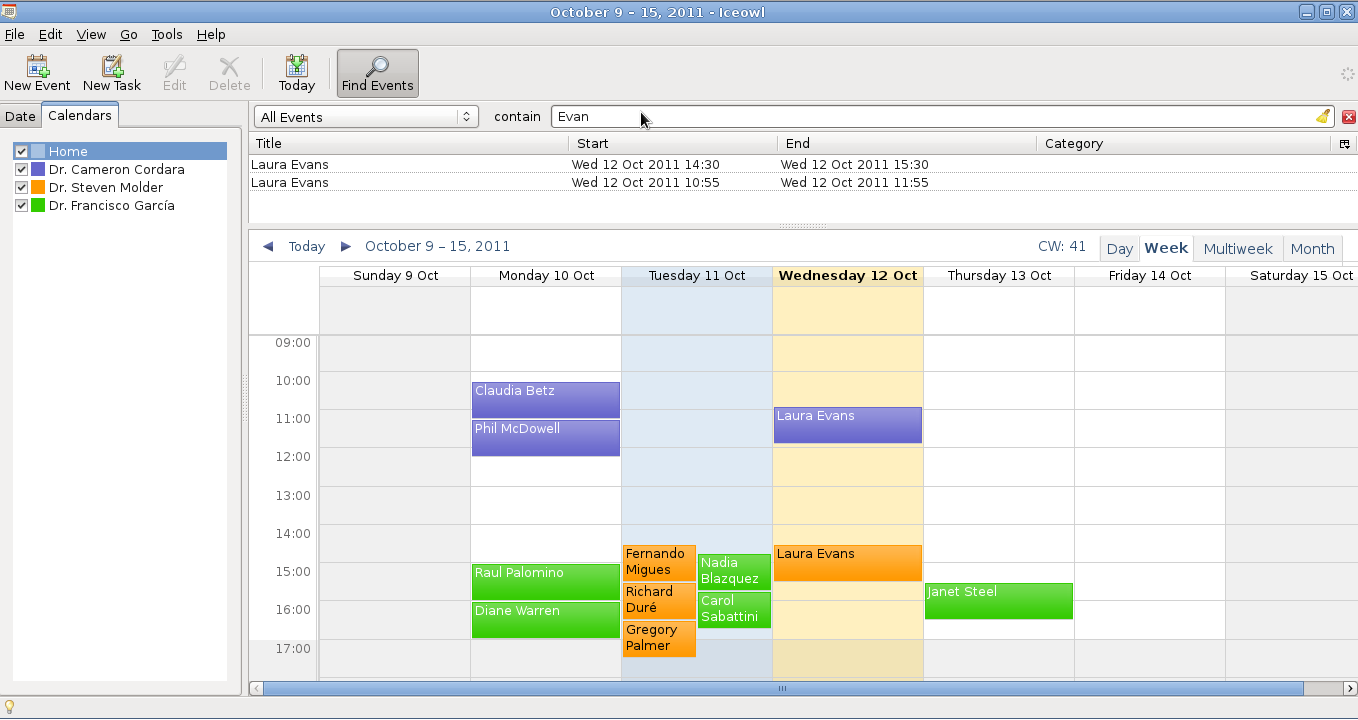
Διαχείριση ημερολογίου GNU Health
- Πρωτοβάθμια ιατρική περίθαλψη και οικογενειακό ιατρικό ιστορικό
- Διαχείριση φαρμάκων
- Πρότυπα ασθενειών και ιατρικών διαδικασιών (ICD-10 / ICD-10-PCS)
- Γενετικοί και κληρονομικοί κίνδυνοι ασθενών: Πάνω από 4200 γονίδια που σχετίζονται με ασθένειες (NCBI / Genecards)
- Επιδημιολογικές και άλλες στατιστικές εκθέσεις
- Διοίκηση γιατρών
- Διαχείριση εργαστηρίων
- Διαχείριση αποθεμάτων
- Νοσοκομειακή οικονομική διοίκηση
Τι κάνει το GNU Health ξεχωριστό;
- Κατασκευάστηκε από έναν γιατρό και βασίστηκε σε ένα καλά περιγραφόμενο κλινικό μοντέλο
- Cross-platform
- Κατασκευάστηκε σε επιχειρηματικό περιβάλλον ανοικτού κώδικα
- Πλήρης ροή εργασιών χωρίς χαρτί
- Πελάτες επιφάνειας εργασίας
- Πολλαπλές επιλογές ανάπτυξης
- Εύκολο στην ανάπτυξη, διαχείριση και χρήση
- GNU Health για RaspberryPi
- Πολυγλωσσική υποστήριξη
- Καλά αναπτυγμένη δομή δεδομένων
Το GNU Health μιλάει πολλές γλώσσες
Το GNU Health έχει μεταφραστεί σε πολλές γλώσσες και αυτό το καθιστά έτοιμο για χρήση σε πολλές χώρες και περιορίζει το χρόνο μετάφρασης / εντοπισμού καθώς και την εκπαίδευση του προσωπικού. Ορισμένες από τις μεταφρασμένες γλώσσες χρησιμοποιούνται από πολλές χώρες είναι τα Γαλλικά, Ισπανικά, Αγγλικά, Ρωσικά και Αραβικά.GNU LIMS/Occhiolino: Εργαστηριακό σύστημα πληροφοριών
Οι ομάδες GNU Solidario έχουν κυκλοφορήσει το GNU LIMS, ένα σύστημα διαχείρισης εργαστηριακών πληροφοριών, το οποίο ακολουθεί την κύρια ιδέα του GNU Health. Έχει στόχο την πλήρη εργαστηριακή ροή για την υγειονομική περίθαλψη.Τεκμηρίωση
Με κάθε έκδοση, η ομάδα GNU Health κυκλοφορεί μια νέα έκδοση του GNU Health WikiBook, το οποίο περιλαμβάνει ένα εγχειρίδιο τελικού χρήστη, τεκμηρίωση προγραμματιστών και οδηγίες σχετικά με τον τρόπο ανάπτυξης, εγκατάστασης και λειτουργίας του GNU Health.Το WikiBook περιέχει λεπτομερή τεκμηρίωση για κάθε module, δοκιμαστικό περιβάλλον, εγκατάσταση και ανάπτυξη plugins, ένα γλωσσάριο για τους όρους Υγείας GNU και μια ενότητα FAQ.
Το βιβλίο διαθέτει επίσης ειδική σελίδα για την ενεργή λίστα αλληλογραφίας για το GNU Health σε διάφορες γλώσσες
Έτοιμο σύστημα πληροφοριών νοσοκομείων στο RaspberryPi

Το GNU Health χρησιμοποιεί το RaspberryPi για να δημιουργήσει ένα πλήρως έτοιμο για χρήση σύστημα EMR, το οποίο μπορεί να χρησιμοποιηθεί χωρίς την ανάγκη δικτύου.
Ποια είναι η καλύτερη διανομή Linux για το GNU Health;
Το GNU Health λειτουργεί εξαιρετικά σε πολλές διανομές Linux, όπως το Debian, το Ubuntu, η RedHat και η openSUSE. Ωστόσο, η openSUSE έχει την ισχυρότερη υποστήριξη ακόμα για το GNU Health. Υπάρχει μια λεπτομερή σελίδα τεκμηρίωσης στο επίσημο wiki για το GNU Health. Επιλέχθηκε όπως αναφέρθηκε προηγουμένως για να είναι ο πυρήνας του συστήματος GNU Health με το RaspberryPi.Πώς να δοκιμάσετε το GNU Health
Υπάρχει μια πλήρης ενότητα στην τεκμηρίωση σχετικά με τη δοκιμή GNU Health. Περιλαμβάνονται πολλές επιλογές, με μια βάση δεδομένων επίδειξης που θα κάνει ευκολότερη τη χρήση με τα πραγματικά δοκιμαστικά δεδομένα. Ωστόσο, είναι εύκολο να το εγκαταστήσετε και να χρησιμοποιήσετε στο Linux. Για Mac OSX ή Windows, μπορείτε να δοκιμάσετε το Tryton και να συνδεθείτε στις βάσεις δεδομένων επίδειξης.Αν και μερικοί μπορεί να θεωρούν ότι είναι αργός, ειδικά με την απομακρυσμένη βάση δεδομένων επίδειξης, είτε για το Tryton είτε για το GNU Health, αλλά εξαρτάται από τη θέση της βάσης δεδομένων, καθώς η τοπική ρύθμιση και η διαμόρφωσή σας θα οδηγήσουν σε ταχύτερα αποτελέσματα. Η συμπεριφορά φόρτωσης διεπαφής χρήστη και ο τρόπος φόρτωσης των στοιχείων μπορεί να είναι ένα σημαντικό ζήτημα για χρήστες που συνήθισαν σε γρήγορο υπολογιστή ή σύνδεση στο δίκτυο, αλλά δεν έρχεται σε αντίθεση με τη χρηστικότητα ή τη λειτουργικότητα του συστήματος και επιταχύνεται επίσης με την τοπική ρυθμιση δικτυου.
Ανάπτυξη του GNU Health
Το GNU Health έχει αποκτήσει νέες βάσεις σε πολλές χώρες τα τελευταία χρόνια και πρόσφατα εγκαταστάθηκε και χρησιμοποιήθηκε στην Αϊτή και το Καμερούν.#GNUHealth lands in #Haiti ! Very excited to start cooperation with the local team!! 😻 https://t.co/7BPYWtOsuz #Freedom #PublicHealth #SocialMedicine #LibreSoftware @fsf pic.twitter.com/XTNDXTFKVw
— GNU Health (@gnuhealth) February 1, 2019
Το γεγονός ότι το GNU Health εφαρμόζεται επιτυχώς σε πολλές χώρες και τα διαφορετικά περιβάλλοντα/ρυθμίσεις υγειονομικής περίθαλψης το καθιστούν πραγματικό πλεονέκτημα για τη μεταμόρφωση των υπηρεσιών υγειονομικής περίθαλψης και τη βελτίωση της κλινικής ροής σε αυτά τα περιβάλλοντα, γεγονός που μπορεί τελικά να οδηγήσει στη βελτίωση της ποιότητας της υπηρεσίας.
Το GNU Health έχει σχεδιαστεί για την παροχή δωρεάν λύσεων ανοιχτού κώδικα, αλλά απαιτεί υποστήριξη. Αν σας ενδιαφέρει η υποστήριξη της προσπάθειας και των δραστηριοτήτων του GNU Health διαμοιράστε το παρόν άρθρο για να γνωρίσει περισσότερος κόσμος την ύπαρξη του, επίσης ρίξετε μια ματιά στα έργα και τις δραστηριότητές και συμμετέχετε με την υποστήριξή του μέσω της σελίδας για την διάδοσης της μεγάλης αυτής προσπάθειας.
Ιστοσελίδα GNU Health