
 sakana
nginx with openSUSE Leap 15.1 in Azure 小記
- Nginx 作爲靜態網頁
- Nginx 作為 Proxy Server
- 官方網站 http://nginx.org/
- 已經登入到 Azure Portal 並建立一台 openSUSE Leap 15.1
- 使用 ssh 連線在 Azure 上面的 openSUSE Leap 15.1
- 早期是用 netstat 指令, 現在是用 ss 指令了


- 這個時候會得到 403 Forbidden,
- 從這邊可以得知設定檔在 /etc/nginx/nginx.conf
- 網站的根目錄應該是在 /srv/www/htdocs
- 首頁的檔案應該是 index.html 或是 index.htm
- 觀察 /etc/nginx/conf.d/ 目錄下 - 沒有檔案
- 觀察 /etc/nginx/vhosts.d/ 目錄下 - 沒有檔案
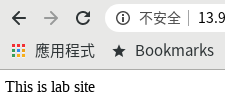
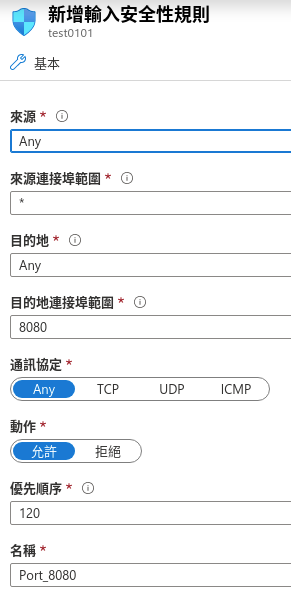
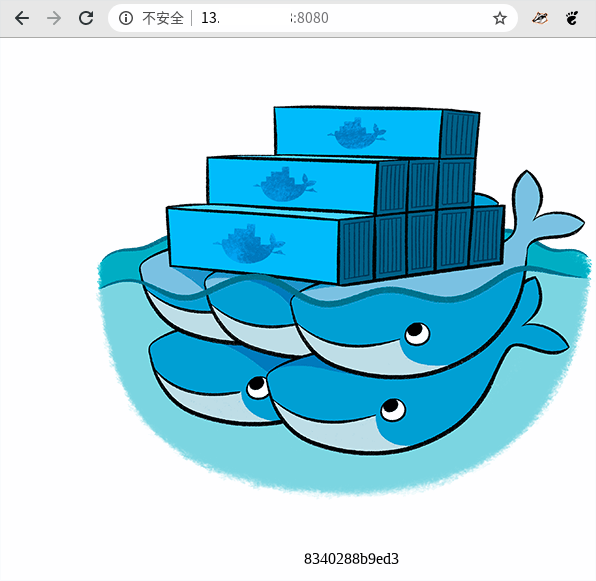
- 當使用者連線到某個網域名稱( FQDN ), 就會轉到 本機 port 8080


- 這個動作其實是會進入該公用 IP 的組態內
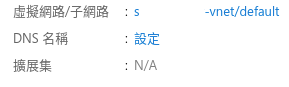
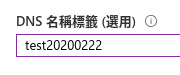
- 在 http 區段內新增一個 server 區段
- server_name 指定剛剛綁定的 FQDN
- Proxy_pass 指向 port 8080

- 設定檔 /etc/nginx/nginx.conf
- 相關目錄 /etc/nginx
- Log 目錄 : /var/log/nginx

 Member
#openSUSE Tumbleweed revisión de la semana 8 de 2020
Tumbleweed es una distribución “Rolling Release” de actualización contínua. Aquí puedes estar al tanto de las últimas novedades.

openSUSE Tumbleweed es la versión “rolling release” o de actualización continua de la distribución de GNU/Linux openSUSE.
Hagamos un repaso a las novedades que han llegado hasta los repositorios esta semana
El anuncio original lo puedes leer en el blog de Dominique Leuenberger, publicado bajo licencia CC-by-sa, en este enlace:
Durante esta semana se han publicado un total de 3 nuevas “snapsots” (0214, 0218 y 0219). El salto entre la 0214 y la 0218 fue debido a la integración de glibc 2.31.
Pero además de eso, muchos otros paquetes importantes han sido actualizados, por ejemplo:
- glibc 2.31
- Mozilla Firefox 73.0
- KDE Frameworks 5.67.0
- Linux kernel 5.5.4
- PostgreSQL 12.2
- MicroOS Desktops están disponibles como parte del DVD instalador de MicroOS DVD
Cosas que puedes esperar en próximas actualizaciones, que esperamos que no sean muy tarde:
- zsh 5.8 (Snapshot 0220+)
- libcap 2.30 (snapshot 0221+)
- GNOME 3.34.4
- llvm 6 será eliminado de los repositorios
- Linux kernel 5.5.5
- KDE Plasma 5.18.1
- Ruby 2.7 – quizás junto con la eliminación de Ruby 2.6
- GCC 10
- Python 3.8
- Eliminación de Python 2
- GNU Make 4.3
- RPM
Si quieres estar a la última con software actualizado y probado utiliza openSUSE Tumbleweed la opción rolling release de la distribución de GNU/Linux openSUSE.
Mantente actualizado y ya sabes: Have a lot of fun!!
Enlaces de interés
-
-
- ¿Por qué deberías utilizar openSUSE Tumbleweed?
- zypper dup en Tumbleweed hace todo el trabajo al actualizar
- ¿Cual es el mejor comando para actualizar Tumbleweed?
- Comprueba la valoración de las “snapshots” de Tumbleweed
- ¿Qué es el test openQA?
- http://download.opensuse.org/tumbleweed/iso/
- https://es.opensuse.org/Portal:Tumbleweed
-

——————————–
openSUSE Tumbleweed – Review of the week 2020/08
Dear Tumbleweed users and hackers,
After a week of hacking on different stuff and being in the background for Tumbleweed while Oliver took on the role of Release Manager, I am back with you. And we have released three snapshots this week (0214, 0218 and 0219). The gap between 0214 and 0218 was the integration of glibc 2.31. But of course, there was more happening this week. So here comes the list:
- glibc 2.31
- Mozilla Firefox 73.0
- KDE Frameworks 5.67.0
- Linux kernel 5.5.4
- PostgreSQL 12.2
- MicroOS Desktops are available as part of the MicroOS DVD installer
Things you can expect come to a snapshot in the (hopefully not too far) future:
- zsh 5.8 (Snapshot 0220+)
- libcap 2.30 (snapshot 0221+)
- GNOME 3.34.4
- llvm 6 will be removed from the repository
- Linux kernel 5.5.5
- KDE Plasma 5.18.1
- Ruby 2.7 – possibly paired with the removal of Ruby 2.6
- GCC 10
- Python 3.8 (unchanged, awaiting the fix for salt)
- Removal of Python 2
- GNU Make 4.3
- RPM: change of database format to ndb
Libros técnicos sobre informática, accesibles, libres y éticos
Un nuevo proyecto que trata de publicar material sobre informática en formato libro físico o en medio digital accesibles y además publicado bajo licencia libre

Cuando encuentro proyectos que me interesa me gusta publicarlo en el blog, como medio de difusión para que si también lo encuentras interesante, lo conozcas y sepas de su existencia.
Este es el caso del reciente proyecto de Ekaitz Zárraga y el empeño que ha puesto en hacer realidad la publicación de contenido propio recopilado en formato de libro físico además de liberar el contenido bajo licencias libres para compartir el conocimiento.
Ekaitz es un desarrollador que entre otras aficiones y trabajos también se ha dedicado a dar cursos relacionados con el tema de la informática, por ejemplo sobre Python.
Su mente inquieta y su cuestionamiento de muchas de las ideas preconcebidas, y con la “deformación” de óptica que le produce su pasión por el software libre le ha hecho embarcarse en este nuevo proyecto de publicación de material técnico basado en los cursos que ha impartido.
El proyecto empieza poco a poco, pero quiere convertirse en un repositorio de conocimiento accesible a todas las personas, libre y ético. Cualidad esta última que estampa también en su propia empresa, proyecto que empezó cansado de que se ofreciera siempre lo mismo de la misma manera.
Así ha empezado el proyecto “ElenQ Publishing” (en el momento de escribir esto, en fase de recaudación de fondos) para hacer posible ese proyecto de compartir el conocimiento y generar más conocimiento. Según sus propias palabras:
ElenQ Publishing es una iniciativa de publicación de libros técnicos del área de la informática, cuyo fin es empoderar a la ciudadanía con material de calidad, con licencias libres (CC-BY-SA), accesible y en su propio idioma.
Pero todo necesita de un apoyo y de una infraestructura para ponerlo en marcha, y por eso ahora mismo está llevando a cabo una campaña de financiación colectiva, para conseguir los fondos iniciales para poner en marcha la maquinaria.
Y parece que tiene tirón, en un solo día, ha conseguido el objetivo mínimo marcado gracias por el momento a 24 personas que han confiado en el proyecto. Habrá que esperar al final de la campaña y ver hasta donde puede llegar este proyecto.
Puedes ser parte de esta nueva perspectiva de crear contenido apoyándole y reservando ya tus ejemplares de libros de “Qué es la informática” o “Programando en Python”.
“El conocimiento tiene que ser libre. Si no es libre no se puede considerar conocimiento, es sólo algo que me hace más fuerte que los demás: es injusticia.
Me dí cuenta que todas estas cosas pueden solventarse (o tratar de solventarse) con un buen repositorio de conocimiento en varios lenguajes y, ya que doy clases y me gusta escribir, considero interesante dedicar algo más de tiempo a los apuntes que entrego a mis alumnos y darles forma de libro.”
Además de ese formato físico que podrás anotar a bolígrafo, llevártelo a la cama para leer, compartir, o colocar en un estante de una biblioteca, el contenido se liberará de manera libre bajo licencia CC-by-sa
Por lo que podrás leerlo en su web, podrás descargarlo e imprimirlo como material didáctico para tus clases o cursos, podrás traducirlo a otro idioma o podrás utilizarlo para crear nuevo contenido ampliándolo.
Por eso desde aquí he querido darle difusión a este proyecto, te animo a que visites los enlaces y explores por ti mismo qué puede ofrecer y si te animas, colaborar de alguna manera en el proyecto.
Enlaces de interés
- https://ekaitz.elenq.tech/elenq-publishing-es.html
- http://www.goteo.org/project/elenq-publishing
- https://elenq.tech/es/
- https://mastodon.social/@ekaitz_zarraga


Plasma, NodeJS, pip, Grep update in Tumbleweed
Three openSUSE Tumbleweed snapshots arrived this week and the snapshots provided a few major version upgrades and several minor updates with newer features.
The latest snapshot was 20200218. This snapshot updated a subpackage for btrfsprogs to version 5.4.1 and fixes the docbook5 builds. The Linux Kernel updated to 5.5.4 and had a few changes for KVM on arm64. The update of glibc 2.31 now supports a feature test macro [_ISOC2X_SOURCE](https://gitlab.com/freedesktop-sdk/mirrors/sourceware/glibc/-/commit/777d75fbc07b98115f4868c3290eb8a5d1f3a5b2) to enable features from the draft ISO C2X standard. Command line utility grep 3.4 fixed some performance bugs and adds a new –no-ignore-case option that causes grep to observe case distinctions, overriding any previous -i (–ignore-case) option. The DBus-activated daemon controlling mobile devices and connections, ModemManager fixed the handling of hexadecimal 0x00 bytes at the end of GSM encoded strings in version 1.12.6. There were several other packages updated in the snapshot. Among the packages to be updated were flatpak 1.6.2, GNOME’s web browser epiphany 3.34.4, email client mutt 1.13.4, strace 5.5, sudo 1.8.31 and whois 5.5.5. With less than a week to go until a rating is finalized, a rating of 92 was initially released for the snapshot, according to the snapshot reviewer.
Snapshot 20200214 updated both Mozilla Firefox and Thunderbird to versions 73.0 and 68.5 respectively. The new major version of the browser addressed six Common Vulnerabilities and Exposures (CVE) that included one bug fix that affected the memory. The new release includes new features that help users view and read website content more easily by enhancing the page zoom feature. The version also added NextDNS as an alternative option for DNS over HTTPS. The Thunderbird email client addressed seven CVEs and added support for client Identity IMAP/SMTP Service Extension and for OAuth 2.0 authentication for POP3 accounts. KDE users had multiple package updates from Plasma Framework 5.67.0; Kirigami removed the header top margin from private ScrollView and properly expanded the fillWidth items in mobile mode. The KTextEditor fixed the drag and copy function, and the framework’s package also fixed a crash in the variable expansion with the use of external tools. The package for the JavaScript runtime environment, nodejs12 updated to version 12.16.0 added a new core module for a WebAssebly System Interface as an experimental feature. The NodeJS version also added Hash.prototype.copy making it possible to clone an internal state of Hash object. Text editor nano 4.8 improved the handling of lock files on start-up. Two other major version updates in the snapshot were python-packaging 20.1 and python-pip 20.0.2; the new pip version switches to a dedicated command-line interface tool for vendoring dependencies and the changelog points out that the wheel cache is not retro-compatible with previous versions and that pip will continue to take advantage of existing legacy cache entries until pip 21.0 is released. Version control tool mercurial 5.3 fixed some bugs and added a new Large File Storage experimental feature. The utilities package for controlling TCP / IP networking and traffic control in Linux, iproute2, updated to version 5.5.0, which added four patches and a new timestamp format. Other packages that updated in the snapshot were babl 0.1.74, ccache 3.7.7 and gegl 0.4.20. The snapshot is currently trending moderately stable at a rating of 80, according to the Tumbleweed snapshot reviewer.
A little more than half a dozen packages were updated in snapshot 20200213. The interactive Python accessibility explorer package accerciser 3.34.4 updated translations and documented a new python-xlib dependency. The update elfutils 0.178 package fixed variable references in specfile and added a RISC-V disassembler. Windows Server 2019 support was added with the update of vm-install 0.10.08. The snapshot recorded a moderately stable rating of 75, according to the Tumbleweed snapshot reviewer.
The previous week’s 20200211 snapshot recorded a rating of 71 and brought KDE’s plasma5-desktop 5.18.0, which will be the version in openSUSE Leap 15.2 when it’s released. The new Plasma 5.18 Long Term Support (LTS) is even more user-friendly and filled with more features. The new Emoji Selector is just two keystrokes away. Hold down the Meta key and press the period (.) and it will pop up. The version also provides a new Night Color feature to relax users eyesight. KDE Applications was also updated in the snapshot. The 19.12.2 version update provided a big release of KDevelop 5.5, which is the Integrated Development Environment (IDE) that makes writing programs in C++, Python and PHP easier. . PHP gets PHP 7.4’s typed properties and support was added for array of type and class constant visibility. In Python, support was added for Python 3.8.
Cómo instalar plugins de Vim
En este artículo veremos cómo instalar complementos o plugins a nuestro editor Vim para darle más funcionalidades y adaptarlo a nuestras necesidades

Vim es un editor de texto con muchas opciones ya de manera predeterminada, pero quizás debido a tareas que realizamos, o a nuestra forma de trabajar, a veces necesitamos que haga alguna tarea extra que no viene “de serie”.
Para solucionar esas carencias o para sacarle todo el potencial a Vim están los complementos o “plugins” (de ahora en adelante utilizaré la palabra plugin) una forma de añadir funcionalidades extra al editor Vim y hacer que este se adapte a nuestras necesidades o para facilitarnos ciertas tareas.
Hay plugins para Vim para diferentes tareas, veamos en este tutorial cómo instalarlos de manera manual o mediante un gestor de plugins.
Este artículo es una traducción de un artículo en inglés escrito por Seth Kenlon que puedes leer en la web opensource.com y publicado bajo licencia CC-by-sa. Me pareció interesante y quise publicarlo en mi web para que formara parte de la serie de tutoriales sobre Vim que voy publicando y que puedes encontrar en este enlace:

Ya sea que los instales de forma manual o mediante un gestor de paquetes, los plugins para Vim te pueden ayudar a crear el Vim perfecto que mejor se adapte a tu forma de trabajo.
Aunque Vim es rápido y eficiente, con las opciones predeterminadas, no es más que un mero editor de texto. Al menos, eso es lo que sería sin ningún complemento o “plugins”, que son creados para Vim y añaden funcionalidades extra para hacer que sea mucho más que una ventana en la que escribir texto.
Con la mezcla adecuada de plugins, puedes tener el control de tu vida y forjarte tu propia y única experiencia con Vim. Puedes personalizar tu tema y puedes añadir resaltado de sintáxis, depurado de código, gestión de versiones y mucho más.
Cómo instalar complementos en Vim
Vim es extensible gracias a los plugins, pero durante mucho tiempo, no había un método oficial para instalarlos. A partir de la serie 8.x de Vim, sin embargo, existe una estructura sobre cómo los plugins tienen que ser y cómo cargarlos.
Puede que encuentres instrucciones antiguas en algún proyecto en la red o en los archivos README, pero mientras que estés ejecutando una versión de Vim 8 o superior, deberías instalarlos de acuerdo al método oficial de instalación de plugins o con un gestor de paquetes de Vim.
Puedes utilizar un gestor de paquetes de Vim independientemente de qué versión ejecutes (incluyendo versiones más antiguas que la 8.x), lo que hace el proceso de instalación más sencillo que mantener las actualizaciones por ti mismo.
Es bueno conocer tanto el método manual como automatizado, así que sigue leyendo para aprender ambos.
Instalación de plugins de manera manual (Vim 8 y superior)
Un paquete de Vim es un directorio que contiene uno o más plugins. De manera predeterminada, tienes los ajustes de Vim dentro de ~/.vim, así que ahí es donde Vim busca los plugins cuando lo lanzas. (Los siguientes ejemplos utilizan el nombre genérico externo para indicar que los plugins son obtenidos de una fuente que no eres tu mismo.)
Cuando arrancas Vim, lo que hace primero es procesar tu archivo .vimrc y después busca todas las carpetas en ~/.vim para encontrar plugins que estén contenidos en pack/<nombre_paquete>/start.
De manera predeterminada, tu directorio ~/.vim (si incluso ya tienes uno) no tiene esa estructura de archivo, así que establécela mediante:
$ mkdir -p ~/.vim/pack/externo/start
Ahora puedes poner los plugins de Vim en ~/.vim/pack/externo/start, y estos se cargarán automáticamente cuando lances Vim.
Por ejemplo, trata de instalar NERDTree, un gestor de archivos basado en texto para Vim. Primero utiliza Git para clonar una instantánea del código del repositorio de NERDTree:
$ git clone --depth 1 https://github.com/preservim/nerdtree.git ~/.vim/pack/externo/start/nerdtree
Ahora ejecuta Vim y escribe este comando:
:NERDTree
Esto abrirá una vista de los archivos en la parte izquierda de tu ventana de Vim.
Si no quieres que un plugin se cargue automáticamente cada vez que lances Vim, puedes crear un directorio opt dentro del directorio ~/.vim/pack/externo :
$ mkdir ~/.vim/pack/externo/opt
Cualquier plugin instalado dentro de la carpeta opt estará disponible para Vim pero no se cargará en memoria hasta que lo añadas a una sesión mediante el comando packadd. Por ejemplo, para un plugin de ejemplo llamado foo se haría así:
:packadd foo
Oficialmente, Vim recomienda que cada proyecto de plugin tenga su propio directorio dentro de ~/.vim/pack. Por ejemplo, si estuvieras instalando el complemento NERDTree y el del ejemplo llamado foo, deberías crear esta estructura en la carpeta:
$ mkdir -p ~/.vim/pack/NERDTree/start/ $ git clone --depth 1 https://github.com/preservim/nerdtree.git ~/.vim/pack/NERDTree/start/NERDTree
$ mkdir -p ~/.vim/pack/foo/start/ $ git clone --depth 1 https://notabug.org/foo/foo.git ~/.vim/pack/foo/start/foo
Si esto es conveniente o no, ya depende de tu criterio.
Utilizando un gestor de paquetes de Vim (cualquier versión de Vim)
Desde la versión 8 de Vim, los gestores de paquetes de Vim se han vuelto menos útiles, pero algunos usuarios todavía los prefieren debido a la posibilidad de auto actualizar varios plugins.
Existen muchos gestores de paquetes en Vim entre los que escoger y cada uno es diferente, pero quizás vim-plug tiene algunas buenas características y la mejor documentación de todos ellos, lo que lo hace muy sencillo para comenzar con él y explorarlo en profundidad más adelante.
Instalando plugins mediante vim-plug
Instala vim-plug de manera que se cargue y arranque mediante:
$ curl -fLo ~/.vim/autoload/plug.vim --create-dirs https://raw.githubusercontent.com/junegunn/vim-plug/master/plug.vim
Crea un archivo ~/.vimrc si no tiene uno ya, si ya lo tienes, añade en ese archivo:
call plug#begin()
Plug 'preservim/NERDTree'
call plug#end()
Cada vez que quieras instalar un plugin, debes introducir el nombre y la ubicación del plugin entre las líneas plug#begin() y plug#end. (En el ejemplo anterior hemos vuelto a utilizar NERDTree para ilustrarlo.)
Si el plugin que quieres no está en un repositorio en GitHub, entonces puedes añadir la URL completa en vez de solo el nombre del usuario y del proyecto en GitHub. Puedes “instalar” plugins locales fuera de tu directorio ~/.vim.
Para finalizar, arranca Vim e indícale a vim-plug que instale los plugins listados en ~/.vimrc mediante el comando:
:PlugInstall
Espera a que los plugins se descarguen.
Actualizar los plugins con vim-plug
Editar el archivo ~/.vimrc y ejecutar un comando para que realice la instalación probablemente no parece que sirva para ahorrar mucho tiempo respecto del proceso de instalación manual, pero el beneficio real de utilizar vim-plug es a la hora de realizar actualizaciones de esos plugins.
Para actualizar todos los plugins installados simplemente ejecuta en Vim el comando:
:PlugUpdate
Si no quieres actualizar todos los plugins, puedes actualizar cada uno por separado añadiendo el nombre del plugin:
:PlugUpdate NERDTree
Restablecer plugins
Otro beneficio de utilizar vim-plug es a la hora de exportar y la función de restablecer. Como sabe cada persona que utiliza Vim, la forma en la que Vim funciona es a menudo único a cada usuario, en parte debido al uso de plugins distintos.
Una vez que das con los plugins que necesitas y que tienes instalados y configurados, la última cosa que quieres que pase es perderles la pista.
Vim-plug tiene este comando para generar un script para restaurar todos los plugins actuales:
:PlugSnapshot ~/vim-plug.list
Hay muchas otras funciones para vim-plug, así que lo mejor es acudir a la página de su documentación oficial.
Crear el Vim perfecto
Cuando pasas todo el día en un programa, quieres que cada pequeño detalle te sirva de la mejor manera posible. Conoce Vim y sus muchos complementos hasta que crear la aplicación perfecta para las tareas que realices.
¿Tienes algún plugin favorito de Vim sin el que no podrías vivir? Utiliza la sección de comentarios para compartirlo


It is time for a war on tabs

We (as a UI shell project) see the limits of our territory as the window, when there is the assumption nowadays that MDI tabbed interfaces are where most significant user activity takes place. Yet interacting with different views/documents within those windows is not standardised, so the user has to remember which app they are using, then select the appropriate actions to:
- recognise the current tab
- switch tabs
- move tabs in the current window or between windows
- notice which tab is being switched to (different switcher UIs, not shown)
- open/close tabs
- be warned when closing a window with multiple tabs
- use keyboard shortcuts to switch tabs
- persist tabs between logins
- share sets of tabs between devices
I'm not saying Plasma needs to become a tabbed window manager, but we can do better, and it is definitely time to declare war on the mess above.
Lanzada la primera actualización de Plasma 5.18
Tal y como estaba previsto en el calendario de lanzamiento de los desarrolladores, hoy martes 18 de febrero la Comunidad KDE ha comunicado que ha sido lanzada la segunda actualización de Plasma 5.18. Una noticia que aunque es esperada y previsible es la demostración palpable del alto grado de implicación de la Comunidad en la mejora continua de este gran entorno de escritorio de Software Libre.
Lanzada la tercera actualización de Plasma 5.18
No existe Software creado por la humanidad que no contenga errores. Es un hecho incontestable y cuya única solución son las actualizaciones. Es por ello que en el ciclo de desarrollo del software creado por la Comunidad KDE se incluye siempre las fechas de las actualizaciones.

Las novedades básicas de Plasma 5.18
Ya he hablado en varios artículos la lista de novedades, pero he aquí un breve resumen de las mismas.
- Nuevo selector de Emojis.
- Nuevo modo de edición global que sustituye el botón del cuadro de herramientas de escritorio y le permite personalizar fácilmente la disposición del escritorio.
- Mejorado el uso del lanzador de aplicaciones Kickoff y de la edición de los widgets en dispositivos táctitles.
- Mejoras en las aplicaciones que utilicen las librerías visuales GTK.
- Múltiples mejoras en las notificaciones como la información del nivel de energía en dispositivos bluetooth vinculados.
- Posibilidad de activar una opción de comentarios de usuario (deshabilitado por omisión), que permite dar información detallada del sistema y estadísticas de la frecuencia con la que utilice las funcionalidades individuales del Plasma.
- Añadido un control deslizante para la velocidad de animación global.
- Diversas mejoras en Discover como la adición de comentarios anidados para los complementos.
Hackers de openSUSE: Ish Sookun
La comunidad de openSUSE se compone de muchos usuarios y usuarias que de manera voluntaria se dedican a crear y mantener los distintos aspectos de la distribución de GNU/Linux openSUSE ¿Quieres conocer a las personas que hay detrás del nick?

La comunidad de openSUSE es global y se extiende por los 5 continentes. Personas de diferentes regiones, culturas, nacionalidades, idiomas, etc difunden y extienden el uso de GNU/Linux en general y openSUSE en particular.
Estas entrevistas acercan a esas personas que en la comunidad mantienen paquetes, reportan errores, o colaboran en alguna de las múltiples formas que se puede colaborar en este proyecto de software libre que es más que una distribución de GNU/Linux.
En esta ocasión he traducido la entrevista realizada a Ish Sookun miembro de openSUSE Asia en Isla Mauricio que colabora en diversas partes del proyecto openSUSE además de promocionarlo de manera local.
El artículo original en inglés lo puedes leer en este enlace:
Espero que te resulte interesante la lectura y quizás te sirva como aliciente para involucrarte de alguna manera en openSUSE. Comenzamos…

¿Puedes contarnos algo de ti mismo?
Vivo en una isala en el medio de océano Índico (20°2′ S, 57°6′ E), llamada Mauricio. Trabajo en una empresa que me facilita el poder contribuir con el Proyecto openSUSE. Dicho esto, también utilizamos bastante openSUSE en mi lugar de trabajo.
Mi temprana interacción con los ordenadores comenzó en la últimos años de universidad y escogí Linux después de que algunos estudiantes asistieran a unas clases de computación y mencionaran el término “Linux” como una cosa supercomplicada.
Llamó mi atención y me quedé enganchado desde entonces. Hubo unos años en los que probaba unas y otras distribuciones, hasta que me quedé con openSUSE.
¿Puedes hablarnos más de tu participación en openSUSE y cómo comenzó?
Me uní al programa de “Embajadores” en 2009, que más tarde se ha renombrado como “openSUSE Advocate” y finalmente el programa fue abandonado. En 2013, me uní a los Coordinadores Locales de openSUSE para ayudar a coordinar actividades en la región. Fue mi manera de contribuir.
Durante esos años, también probaba versiones candidatas y reportaba errores de opensUSE, organizaba encuentros sobre Linux en general (a veces sobre openSUSE en particular) y escribía artículos en el blog sobre esas actividades. Después, en 2018 inspirado por una conversación con Richard Brown, mientras era presidente del consejo de openSUSE, decidí dar un paso más y unirme al Comité de Elecciones de openSUSE.
Fue una experiencia muy enriquecedora, junto con mis compañeros Gerry Makaro y Edwin Zakaria. Asistí a mi primer openSUSE Conference en mayo de 2019 en Nuremberg. Realicé una presentación sobre cómo utilizamos Podman en producción en mi trabajo. Estaba muy nervioso para dar mi primera charla frente a la comunidad de openSUSE pero me encontré a compañeros que me felicitaron.
No me olvido de los ánimos de Richard, Gertjan, Harris, Doug, Marina y los amigos a los que dí la conferencia. Más tarde durante la conferencia, volví al escenario, durante las charlas relámpago, y hablé mientras mantenía una cerveza de openSUSE en una mano y el micrófono en la otra. Los nervios desaparecieron gracias a la magia de la comunidad.
Edwin y Ary me hablaron sobre sus actividades en Indonesia, particularmente en el openSUSE Asia Summit. Cuando se abrieron los plazos de charlas para la edición de 2019 no dudé en enviar una charla, que fue aceptadam, y meses después me reuní con una asombrosa comunidad de openSUSE en BAli, Indonesia.
Fue un gran evento donde descubrí más de la comunidad de openSUSE. Me encontré con Gerald Pfeifer, el nuevo presidente de openSUSE y hablamos sobre yoga, mientras se celebraban un montón de diversión, charlas y talleres.
Volviendo a tu pregunta, para responder a la segunda parte sobre “por qué openSUSE”, puedo decir con seguridad y orgullo que openSUSE fue (y todavía es) la comunidad más acogedora y el proyecto más sencillo al que contribuir.
¿Té o café?
Café solo sin azúcar, por favor.
¿Puedes describirnos el trabajo del Comité de Elecciones? ¿A qué desafíos se enfrentan cuando la fecha de elecciones se acerca?
Una persona que forme parte del comité, debería estar familiarizada con las reglas. Esto nos ayuda a planear una elección y establecer la duración para cada fase. Planear las fases es crucial y se necesite que las personas que forman el comité se consulten a menudo.
A veces el residir en zonas horarias que están apartadas en varias horas no hace sencillo el poder mantener largas charlas. Entonces nos comunicamos con correos electrónicos, esto hace que lleve más tiempo el llegar a un consenso en una materia.
El proceso de elección se vuelve un desafío si los miembros no se postulan para la candidatura de la junta a medida que se acerca la fecha límite. Cuando comienza la elección, el próximo desafío es no perder a ningún miembro.
Nos aseguramos de obtener una lista actualizada de los miembros de openSUSE y de que reciban su enlace / credenciales de votante. Atendemos solicitudes de miembros que tienen problemas para encontrar el correo electrónico que contiene su enlace de votante.
A menudo termina siendo algo trivial como miembros que usan dos direcciones de correo electrónico diferentes; uno en la lista de correo y otro diferente en su cuenta de openSUSE Connect.
Yo llamo a esto desafíos para reponder a la pregunta, pero en realidad es divertido ser parte de todo esto y asegurar que todo fluye sin problemas. Gerry es un buen ejemplo en las elecciones de la junta 2018-2019, que todavía continúan.
Edwin ha sido un gran apoyo en las tres elecciones en las que hemos trabajado juntos. Recientemente se ha unido Ariez Vachha que ha demostrado ser un gran fichaje para el equipo.
¿Qué es lo que más te gusta de estar involucrado en la comunidad?
Las personas.
¿Cual es la característica o proyecto que piensas que necesita más atención en openSUSE?
Documentación.
¿Con qué proyectos/aficiones trabajas fuera de openSUSE?
Experimento con contenedores utilizando Podman. Es bastante reciente pero me mantiene ocupado. En lo referente a la comunidad, me gusta asistir a encuetros locales y escribir artículos en el blog sobre esas actividades.
A menudo ayudo con la planificación o con otra tarea dentro de mi capacidad para la Developers Conference de Mauricio. Es un evento anual que reune a “geeks” locales durante tres días de diversión.
Afortunadamente, tengo una esposa que me apoya y que soporta las rabietas geek y también es voluntaria en algunas de las actividades de la comunidad. Oh! y sería imperdonable si no lo menciono y le doy crédito por los paquetes de obsequios de openSUSE que prepara para mis charlas locales.
¿Cual es el entorno de escritorio que eliges o preferido?
GNOME hasta hace poco. Cambié a KDE después de que mis colegas desarrolladores no pararan de alardear sobre lo buenos que son sus entornos KDE y además mi entorno de GNOME/Wayland empezó a hacer cosas raras.
¿Cual es tu comida preferida?
Paneer Makhani (Queso cottage indio en salsa picante de curry).
¿Qué crees que le depara el futuro al proyecto openSUSE?
Con el ejemplo dado por la comunidad de openSUSE Asia, creo que el futuro del proyecto es tener una gran presencia de openSUSE en cada continente habitado.
¿Un pensamiento final o mensaje para nuestros lectores?
¡Pintemos el mundo de verde!
Popup Launcher – Plasmoides de KDE (132)
Vuelven los plamoides otro lanzador de aplicaciones. Aunque en esta ocasión es extremadamente lo cual es ideal para seguir personalizando nuestro escritorio. Se trata de Popup Launcher, el plasmoides de 132 presentado en el blog, que nos permite añadir aplicaciones a un simple botón.
Popup Launcher – Plasmoides de KDE (132)
Seguimos con las posibilidades de personalización de Plasma 5 en cuanto a lanzadores de aplicaciones. Al lanzador tradicional, a su versión reducida, al lanzador de aplicaciones a pantalla completa y a Tiled Menu, el clon del menú de Windows, se les han unido poco a poco otros lanzadores como UMenu, Minimal Menu, Simple Menu o Ditto Menu.
En todos los anteriores, se trataba de plasmoides construían su menú a partir del menú general de Plasma, de tal forma que ya venían repletos de aplicaciones. Popup Launcher, una creación de Hessi James, es más simple ya que nos deja elegir las aplicaciones que queramos que tenga el plasmoide.
De tal forma que podemos crear una serie de lanzadores independientes organizados por cualquier criterio que sirvan de acceso directo.

Las opciones de personalización son sencillas pero suficientes: nombre del lanzador, icono, listado de aplicaciones y el tamaño de los iconos de las aplicaciones. Yo creo que debería tener un buscador de aplicaciones en la ventana de adición de las mismas… pero no me voy a quedar en creerlo sino que se lo comentaré al creador del plasmoide para colaborar en su desarrollo.

Y como siempre digo, si os gusta el plasmoide podéis “pagarlo” de muchas formas en la nueva página de KDE Store, que estoy seguro que el desarrollador lo agradecerá: puntúale positivamente, hazle un comentario en la página o realiza una donación. Ayudar al desarrollo del Software Libre también se hace simplemente dando las gracias, ayuda mucho más de lo que os podéis imaginar, recordad la campaña I love Free Software Day de la Free Software Foundation donde se nos recordaba esta forma tan sencilla de colaborar con el gran proyecto del Software Libre y que en el blog dedicamos un artículo.
Más información: KDE Store
¿Qué son los plasmoides?
Para los no iniciados en el blog, quizás la palabra plasmoide le suene un poco rara pero no es mas que el nombre que reciben los widgets para el escritorio Plasma de KDE.
En otras palabras, los plasmoides no son más que pequeñas aplicaciones que puestas sobre el escritorio o sobre una de las barras de tareas del mismo aumentan las funcionalidades del mismo o simplemente lo decoran.