
 Member
 aluna
alunaXonotic, el juego adictivo de shooting en primera persona que puedes instalar en openSUSE




Rust build scripts vs. Meson
One of the pain points in trying to make the Meson build system work
with Rust and Cargo is Cargo's use of build scripts, i.e. the
build.rs that many Rust programs use for doing things before the
main build. This post is about my exploration of what build.rs
does.
Thanks to Nirbheek Chauhan for his comments and additions to a draft of this article!
TL;DR: build.rs is pretty ad-hoc and somewhat primitive, when
compared to Meson's very nice, high-level patterns for build-time
things.
I have the intuition that giving names to the things that are
usually done in build.rs scripts, and creating abstractions for
them, can make it easier later to implement those abstractions in
terms of Meson. Maybe we can eliminate build.rs in most cases?
Maybe Cargo can acquire higher-level concepts that plug well to Meson?
(That is... I think we can refactor our way out of this mess.)
What does build.rs do?
The first paragraph in the documentation for Cargo build scripts tells us this:
Some packages need to compile third-party non-Rust code, for example C libraries. Other packages need to link to C libraries which can either be located on the system or possibly need to be built from source. Others still need facilities for functionality such as code generation before building (think parser generators).
That is,
-
Compiling third-party non-Rust code. For example, maybe there is a C sub-library that the Rust crate needs.
-
Link to C libraries... located on the system... or built from source. For example, in gtk-rs, the sys crates link to
libgtk-3.so,libcairo.so, etc. and need to find a way to locate those libraries withpkg-config. -
Code generation. In the C world this could be generating a parser with
yacc; in the Rust world there are many utilities to generate code that is later used in your actual program.
In the next sections I'll look briefly at each of these cases, but in a different order.
Code generation
Here is an example, in how librsvg generates code for a couple of things that get autogenerated before compiling the main library:
- A perfect hash function (PHF) of attributes and CSS property names.
- A pair of lookup tables for SRGB linearization and un-linearization.
For example, this is main() in build.rs:
fn main() {
    generate_phf_of_svg_attributes();
    generate_srgb_tables();
}
And this is the first few lines of of the first function:
fn generate_phf_of_svg_attributes() {
    let path = Path::new(&env::var("OUT_DIR").unwrap()).join("attributes-codegen.rs");
    let mut file = BufWriter::new(File::create(&path).unwrap());

    writeln!(&mut file, "#[repr(C)]").unwrap();

    // ... etc
}
Generate a path like $OUT_DIR/attributes-codegen.rs, create a file
with that name, a BufWriter for the file, and start outputting code
to it.
Similarly, the second function:
fn generate_srgb_tables() {
    let linearize_table = compute_table(linearize);
    let unlinearize_table = compute_table(unlinearize);

    let path = Path::new(&env::var("OUT_DIR").unwrap()).join("srgb-codegen.rs");
    let mut file = BufWriter::new(File::create(&path).unwrap());

    // ...

    print_table(&mut file, "LINEARIZE", &linearize_table);
    print_table(&mut file, "UNLINEARIZE", &unlinearize_table);
}
Compute two lookup tables, create a file named
$OUT_DIR/srgb-codegen.rs, and write the lookup tables to the file.
Later in the actual librsvg code, the generated files get included
into the source code using the include! macro. For example, here is
where attributes-codegen.rs gets included:
// attributes.rs

extern crate phf;  // crate for perfect hash function

// the generated file has the declaration for enum Attribute
include!(concat!(env!("OUT_DIR"), "/attributes-codegen.rs"));
One thing to note here is that the generated source files
(attributes-codegen.rs, srgb-codegen.rs) get put in $OUT_DIR, a
directory that Cargo creates for the compilation artifacts. The files do
not get put into the original source directories with the rest of
the library's code; the idea is to keep the source directories
pristine.
At least in those terms, Meson and Cargo agree that source directories should be kept clean of autogenerated files.
The Code Generation section of Cargo's documentation agrees:
In general, build scripts should not modify any files outside of OUT_DIR. It may seem fine on the first blush, but it does cause problems when you use such crate as a dependency, because there's an implicit invariant that sources in .cargo/registry should be immutable. cargo won't allow such scripts when packaging.
Now, some things to note here:
-
Both the
build.rsprogram and the actual library sources look at the$OUT_DIRenvironment variable for the location of the generated sources. -
The Cargo docs say that if the code generator needs input files, it can look for them based on its current directory, which will be the toplevel of your source package (i.e. your toplevel
Cargo.toml).
Meson hates this scheme of things. In particular, Meson is very systematic about where it finds input files and sources, and where things like code generators are allowed to place their output.
The way Meson communicates these paths to code generators is via command-line arguments to "custom targets". Here is an example that is easier to read than the documentation:
gen = find_program('generator.py')

outputs = custom_target('generated',
  output : ['foo.h', 'foo.c'],
  command : [gen, '@OUTDIR@'],
  ...
)
This defines a target named 'generated', which will use the
generator.py program to output two files, foo.h and foo.c. That
Python program will get called with @OUTDIR@ as a command-line
argument; in effect, meson will call
/full/path/to/generator.py @OUTDIR@ explicitly, without any magic
passed through environment variables.
If this looks similar to what Cargo does above with build.rs, it's
because it is similar. It's just that Meson gives a name to
the concept of generating code at build time (Meson's name for this is
a custom target), and provides a mechanism to say which program is
the generator, which files it is expected to generate, and how to call
the program with appropriate arguments to put files in the right
place.
In contrast, Cargo assumes that all of that information can be inferred from an environment variable.
In addition, if the custom target takes other files as input (say, so
it can call yacc my-grammar.y), the custom_target() command can
take an input: argument. This way, Meson can add a dependency on
those input files, so that the appropriate things will be rebuilt if
the input files change.
Now, Cargo could very well provide a small utility crate that build scripts could use to figure out all that information. Meson would tell Cargo to use its scheme of things, and pass it down to build scripts via that utility crate. I.e. to have
// build.rs

extern crate cargo_high_level;

let output = Path::new(cargo_high_level::get_output_path()).join("codegen.rs");
//                     ^^^^^^^^^^^^^^^^^^^^^^^^^^^^^^^^^^^ this, instead of:

let output = Path::new(&env::var("OUT_DIR").unwrap()).join("codegen.rs");

// let the build system know about generated dependencies
cargo_high_level::add_output(output);
A similar mechanism could be used for the way Meson likes to pass command-line arguments to the programs that deal with custom targets.
Linking to C libraries on the system
Some Rust crates need to link to lower-level C libraries that actually
do the work. For example, in gtk-rs, there are high-level binding
crates called gtk, gdk, cairo, etc. These use low-level crates
called gtk-sys, gdk-sys, cairo-sys. Those -sys crates are
just direct wrappers on top of the C functions of the respective
system libraries: gtk-sys makes almost every function in
libgtk-3.so available as a Rust-callable function.
System libraries sometimes live in a well-known part of the filesystem
(/usr/lib64, for example); other times, like in Windows and MacOS,
they could be anywhere. To find that location plus other related
metadata (include paths for C header files, library version), many
system libraries use pkg-config. At the highest
level, one can run pkg-config on the command line, or from build
scripts, to query some things about libraries. For example:
# what's the system's installed version of GTK?
$ pkg-config --modversion gtk+-3.0
3.24.4

# what compiler flags would a C compiler need for GTK?
$ pkg-config --cflags gtk+-3.0
-pthread -I/usr/include/gtk-3.0 -I/usr/include/at-spi2-atk/2.0 -I/usr/include/at-spi-2.0 -I/usr/include/dbus-1.0 -I/usr/lib64/dbus-1.0/include -I/usr/include/gtk-3.0 -I/usr/include/gio-unix-2.0/ -I/usr/include/libxkbcommon -I/usr/include/wayland -I/usr/include/cairo -I/usr/include/pango-1.0 -I/usr/include/harfbuzz -I/usr/include/pango-1.0 -I/usr/include/fribidi -I/usr/include/atk-1.0 -I/usr/include/cairo -I/usr/include/pixman-1 -I/usr/include/freetype2 -I/usr/include/libdrm -I/usr/include/libpng16 -I/usr/include/gdk-pixbuf-2.0 -I/usr/include/libmount -I/usr/include/blkid -I/usr/include/uuid -I/usr/include/glib-2.0 -I/usr/lib64/glib-2.0/include

# and which libraries?
$ pkg-config --libs gtk+-3.0
-lgtk-3 -lgdk-3 -lpangocairo-1.0 -lpango-1.0 -latk-1.0 -lcairo-gobject -lcairo -lgdk_pixbuf-2.0 -lgio-2.0 -lgobject-2.0 -lglib-2.0
There is a pkg-config crate which build.rs can
use to call this, and communicate that information to Cargo. The
example in the crate's documentation is for asking pkg-config for the
foo package, with version at least 1.2.3:
extern crate pkg_config;

fn main() {
    pkg_config::Config::new().atleast_version("1.2.3").probe("foo").unwrap();
}
And the documentation says,
After running pkg-config all appropriate Cargo metadata will be printed on stdout if the search was successful.
Wait, what?
Indeed, printing specially-formated stuff on stdout is how build.rs
scripts communicate back to Cargo about their findings. To quote Cargo's docs
on build scripts; the following is talking
about the stdout of build.rs:
Any line that starts with cargo: is interpreted directly by Cargo. This line must be of the form cargo:key=value, like the examples below:
# specially recognized by Cargo
cargo:rustc-link-lib=static=foo
cargo:rustc-link-search=native=/path/to/foo
cargo:rustc-cfg=foo
cargo:rustc-env=FOO=bar
# arbitrary user-defined metadata
cargo:root=/path/to/foo
cargo:libdir=/path/to/foo/lib
cargo:include=/path/to/foo/include
One can use the stdout of a build.rs program to add additional
command-line options for rustc, or set environment variables for it,
or add library paths, or specific libraries.
Meson hates this scheme of things. I suppose it would prefer to
do the pkg-config calls itself, and then pass that information down to
Cargo, you guessed it, via command-line options or something
well-defined like that. Again, the example cargo_high_level crate I
proposed above could be used to communicate this information from
Meson to Cargo scripts. Meson also doesn't like this because it would
prefer to know about pkg-config-based libraries in a declarative
fashion, without having to run a random script like build.rs.
Building C code from Rust
Finally, some Rust crates build a bit of C code and then link that
into the compiled Rust code. I have no experience with that, but
the respective build scripts generally use the cc crate to
call a C compiler and pass options to it conveniently. I suppose
Meson would prefer to do this instead, or at least to have a
high-level way of passing down information to Cargo.
In effect, Meson has to be in charge of picking the C compiler. Having the thing-to-be-built pick on its own has caused big problems in the past: GObject-Introspection made the same mistake years ago when it decided to use distutils to detect the C compiler; gtk-doc did as well. When those tools are used, we still deal with problems with cross-compilation and when the system has more than one C compiler in it.
Snarky comments about the Unix philosophy
If part of the Unix philosophy is that shit can be glued together with environment variables and stringly-typed stdout... it's a pretty bad philosophy. All the cases above boil down to having a well-defined, more or less strongly-typed way to pass information between programs instead of shaking proverbial tree of the filesystem and the environment and seeing if something usable falls down.
Would we really have to modify all build.rs scripts for this?
Probably. Why not? Meson already has a lot of very well-structured
knowledge of how to deal with multi-platform compilation and
installation. Re-creating this knowledge in ad-hoc ways in build.rs
is not very pleasant or maintainable.
Related work
Ebook dan Buku Cetak Active Directory Berbasis Linux Samba 4
Setelah disiapkan beberapa lama, akhirnya buku dan ebook Active Directory Berbasis Linux Samba 4 secara resmi dirilis dan sudah bisa didapatkan via Google Play maupun melalui Tokopedia dan Bukalapak.

Active Directory Berbasis Linux Samba 4 ini merupakan versi update dari rilis sebelumnya, dengan perbaikan-perbaikan materi dan penyesuaiannya dengan perkembangan terkini.
Apa itu Linux Samba 4?
Samba provides file and print services for various Microsoft Windows clients and can integrate with a Microsoft Windows Server domain, either as a Domain Controller (DC) or as a domain member. As of version 4, it supports Active Directory and Microsoft Windows NT domains.
Jadi Samba 4 adalah software yang berjalan pada sistem Linux yang menyediakan layanan Active Directory, Domain Controller, File dan Print Sharing dan dapat diintegrasikan dengan sistem berbasis Windows, baik dengan Windows Server maupun Windows Client. Meski memiliki basis Linux, saat klien Windows berkomunikasi dengan Samba 4, si Windows tidak merasa jika ia berhubungan dengan Linux, karena Samba 4 mimicry sifat-sifat Windows server, sehingga klien Windows maupun Windows Server akan merasa berhubungan dengan sesama sistem operasi Windows.
Ebook dan buku Active Directory Berbasis Samba 4 ini cocok bagi perusahaan yang ingin tetap memberikan layanan Active Directory dan PDC/BDC berbasis Windows namun ingin menggunakan kapabilitas Linux, selain tentunya bisa menghilangkan kebutuhan lisensi Windows Server.
Disusun dalam bentuk tutorial tahap demi tahap, buku dan ebook ini merupakan buku panduan yang digunakan untuk training dengan judul yang sama pada layanan training Excellent.
Link
Catatan
Status untuk buku cetak tertulis “Preorder” namun karena sudah diproses cetak pekan lalu, bukunya sudah bisa dikirim mulai pekan depan.
zypper-upgraderepo 1.2 is out
Fixes and updates applied with this second minor version improved and extended the main functions, let’s see what’s new.
If you are new to the zypper-upgraderepo plugin, give a look to the previous article to better understand the mission and the basic usage.
Repository check
The first important change is inherent the way to check a valid repository:
- the HTTP request sent is HEAD instead of GET in order to have a more lightweight answer from the server, being the HTML page not included in the packet;
- the request point directly to the repodata.xml file instead of the folder, that because some server security setting could hide the directory listing and send back a 404 error although the repository works properly.
Check just a few repos
Most of the times we want to check the whole repository’s list at once, but sometimes we want to check few of them to see whether or not they are finally available or ready to be upgraded without looping through the whole list again and again. That’s where the –only-repo switch followed by a list of comma-separated numbers comes in help.
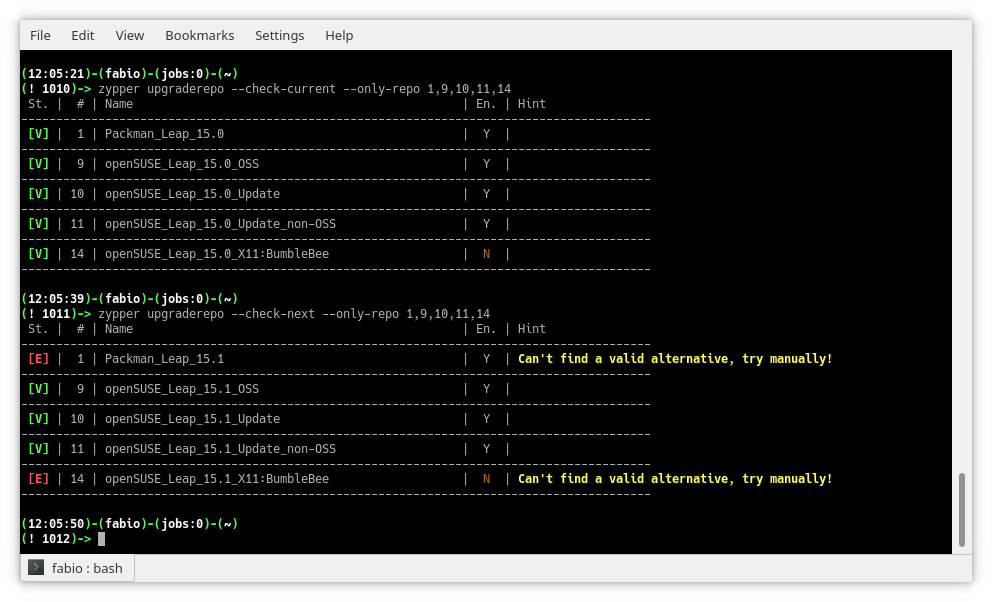
–only-repo switch
All repo by default
The disabled repositories now are shown by default and a new column highlights which of them are enabled or not, keeping their number in sync with the zypper lr output. To see only the enabled ones just use the switch –only-enabled.
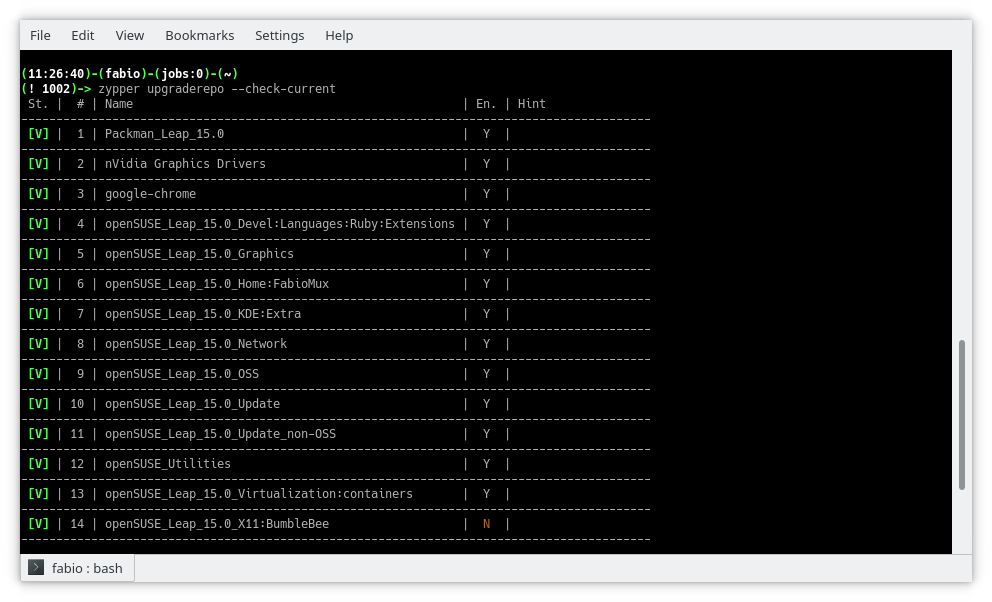
Table view
Report view
Beside the table view, the switch –report introduce a new pleasant view using just two columns and spanning the right cell to more rows in order to improve the number of info and the reading quality.
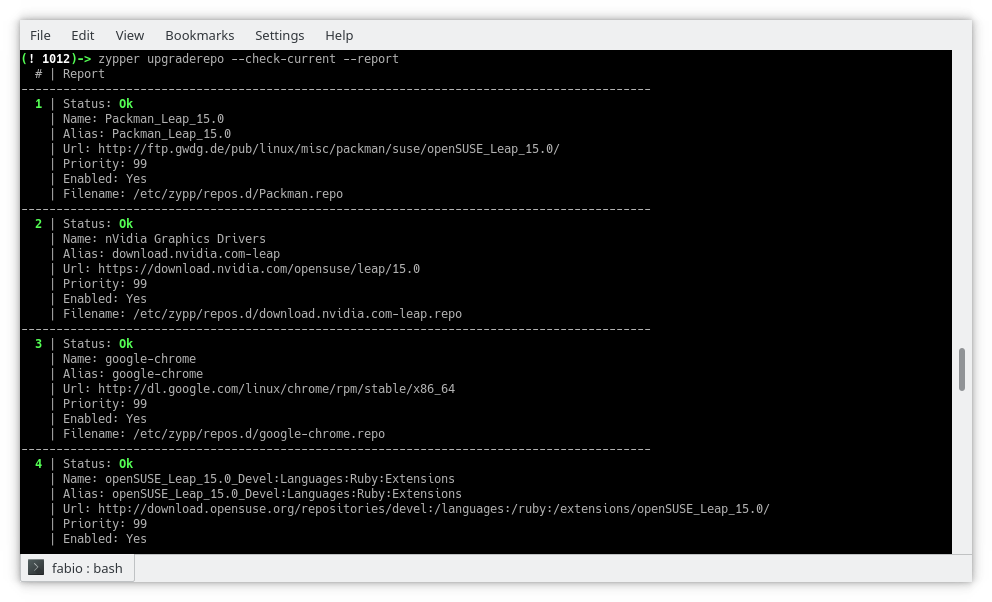
Report view
Other changes
The procedure which tries to discover an alternative URL now dives back and forth the directory list in order to explore the whole tree of folders wherever the access is allowed by the server itself. The side effect is a general improvement also in repo downgrade.
The output in upgrade mode is now verbose and shows a table similar to the checking one, giving details about the changed URLs in the details column.
The server timeout error is now handled through the switch –timeout which allows tweaking the time before to consider an error any late answer from the server itself.
Final thoughts and what’s next
This plugin is practically completed, achieving all the goals needed for its main purpose no other relevant changes are scheduled, so I started thinking of other projects to work in my spare time.
Among them, there is one I am interested in: bring the power of openSUSE software search page to the command line.
However, there are some problems:
- This website doesn’t implement any web API so will be a lot of scraping job;
- There are missing packages while switching from the global research (selecting All distribution) to the specific distribution;
- Packages from Packman are not included.
I have already got some ideas to solve them and did lay down several lines of code, so let’s see what happens!

KDE Plasma 5.15.0 on openSUSE Tumbleweed
Certified danger
Konferensi LibreOffice Asia yang Pertama Kali
Merujuk pada pemberitaan di https://blog.documentfoundation.org/blog/2019/02/19/first-libreoffice-asia-conference/ tentang acara Konferensi LibreOffice Asia yang pertama kali, berikut terjemahan dari media rilis tersebut:
Konferensi LibreOffice Asia yang pertama kali akan diadakan pada 25-26 Mei 2019 di Nihonbashi, Tokyo, Jepang
Ini adalah konferensi LibreOffice yang pertama menjangkau Asia, area yang memiliki pertumbuhan perangkat lunak berbasis FOSS yang sangat pesat.
Berlin, 18 Februari 2019 – Setelah kesuksesan besar Konferensi LibreOffice Indonesia pada tahun 2018, para anggota dari komunitas Asia memutuskan untuk mengangkat isu ini di 2019 dengan Konferensi LibreOffice Asia yang pertama kali di Nihonbashi – pusat kota Tokyo, Jepang – pada 25-26 Mei 2019.
Sebagai salah satu penyelenggara, Naruhiko Ogasawara, anggota dari komunitas LibreOffice Jepang dan The Document Foundation, tidak bisa menyembunyikan kegembiraannya. “Saat kami mengadakan LibreOffice Mini Conference Japan 2013 sebagai acara lokal, kami hanya sedikit mengetahui tentang komunitas-komunitas di belahan lain Asia,” ucap Naruhiko. “Kemudian tahun ini kami menghadiri LibreOffice Conference dan acara di Asia lainnya seperti openSUSE Asia, COSUP, dan lain sebagainya. Kami menyadari bahwa banyak rekan-rekan kami yang aktif dan bahwa komunitas kami harus belajar banyak dari mereka. Kami bangga dapat mengadakan Konferensi Asia yang pertama dengan rekan-rekan kami untuk lebih memperkuat kemitraan tersebut.
“Ini lompatan takdir yang nyata,” ucap Franklin Weng, salah seorang anggota dari Asia di Dewan Direksi The Document Foundation. “Asia adalah daerah yang perkembangannya sangat pesat dalam mengadopsi ODF dan LibreOffice, tetapi ekosistem kami untuk LibreOffice dan FOSS belum cukup baik. Dalam konferensi ini kami tidak hanya mencoba membuat ekosistem FOSS di Asia lebih baik, tetapi juga untuk mendorong anggota komunitas Asia menunjukkan potensi mereka.”
Beberapa anggota inti dari The Document Foundation akan menghadiri konferensi ini, termasuk Italo Vignoli, pimpinan tim pemasaran dan hubungan masyarakat dan wakil ketua Komite Sertifikasi LibreOffice, dan Lothar Becker, juga wakil ketua Komite Sertifikasi. Selain itu, akan ada anggota komunitas dari Indonesia, Korea Selatan, Taiwan, Jepang dan mungkin China yang hadir.
Poin dari konferensi ini meliputi:
-
Workshop bisnis – yang akan dipandu oleh Lothar Becker dan Italo Vignoli, ketua dan wakil ketua Komite Sertifikasi LibreOffice dari The Document Foundation. Lothar dan Italo akan membahas tentang layanan bisnis – apa yang mendasar dari layanan bisnis LibreOffice, status bisnis LibreOffice saat ini di Eropa, Asia dan wilayah geografis lainnya, dan bagaimana kita dapat saling mendukung, dan lain sebagainya.
-
CJK Hackfest – yang akan dipimpin oleh Mark Hung, seorang Pengembang LibreOffice Tersertifikasi di Taiwan, untuk membahas dan meretas masalah CJK di LibreOffice.
-
Wawancara Sertifikasi – Wawancara Sertifikasi LibreOffice kedua di Asia akan diadakan selama LibreOffice Asia Conference, yang dipandu oleh Italo Vignoli dan Lothar Becker, ketua dan wakil ketua Komite Sertifikasi LibreOffice saat ini. Sejauh ini total 4 atau 5 kandidat akan diwawancarai untuk Profesional Migrasi Bersertifikat LibreOffice dan Pelatih Bersertifikat LibreOffice.
-
Sertifikasi Lokal Asia untuk LibreOffice – yang akan dipandu oleh Franklin Weng dan Eric Sun, dua anggota TDF dari Taiwan, yang akan memperkenalkan ide-ide agar memiliki keterampilan LibreOffice dan sertifikasi pelatih di Asia.
Call for proposal akan segera diluncurkan pada bulan Februari. Selain topik di atas, topik terkait LibreOffice dan ODF lainnya juga diterima.
Makulu Linux 15 | Review from an openSUSE User

FOSDEM 2019 aftermath
 |
| Nextcloud group |
One more year visiting Brussels to visit the ultimate FOSS conference, FOSDEM 2019. This is my second year.
My trip was easy. A stop in Rome and then Charleroi. Bought tickets online for a shuttle bus to Brussels (I write this for the people who read this for the first time and they want to attend to FOSDEM). In Rome, I met two friends from my Nextcloud presentations in Greece. It was their first time visiting FOSDEM conference.
The first time it was all new and unknown. This time, I tried to attend as many talks as possible, but I failed. Well, the first day I had to cover Nextcloud booth and the second day (usually is calmer), after I left Nextcloud booth to walk around the campus and check if there's a talk for me, I missed the notification on signal about the group picture. So that's why I'm not in the group picture.
FOSDEM supposed to be all about the talks but usually is all about meeting new people and have a conversation outside of the talks. Also as far as I know, if I want to see a specific talk, I have to sit in the room early in the morning because rooms are crowded for the whole day. Also, there's a plus, that you can watch all the talks from your computer at home wearing slippers and pajamas.
FOSDEM usually starts on Friday at Delirium Cafe (map) with the beer event. The place is awesome and it has plenty of beers but you better go little early. It'll be crowded and you might have to wait 30 mins to get your beer.

The first conference day is all about finding the buildings, rooms, etc and also the booths of my fav projects.
One of my favs is openSUSE booth. Beer is always the no1 item that people are interested (obviously). Free stickers and Linux magazine. GNU Health was also there.
 |
| openSUSE booth |
Next stop GNOME booth. This year is special for me because GUADEC will be held at my city.
 |
| GNOME booth |
And finally Nextcloud booth where it was the place I talked to many people about the project.
 |
| Nextcloud booth |
I had the chance to take a picture with an elephant. Relax, the PostgreSQL one.

During those 2 days, I met many Greek friends from FOSS communities. I also met some friends who moved to Belgium due to Greek's financial issues.
Here is a video:
If you would like to see more video from me, press the button to subscribe:
To end this post, I would like to thank Nextcloud, that sponsored my trip.

Performance benchmark on mdds R-tree
I’d like to share the results of the quick benchmark tests I’ve done to measure the performance of the R-tree implementation included in the mdds library since 1.4.0.
Brief overview on R-tree
R-tree is a data structure designed for optimal query performance on spatial data. It is especially well suited when you need to store a large number of spatial objects in a single store and need to perform point- or range-based queries. The version of R-tree implemented in mdds is a variant known as R*-tree, which differs from the original R-tree in that it occasionally forces re-insertion of stored objects when inserting a new object would cause the target node to exceed its capacity. The original R-tree would simply split the node unconditionally in such cases. The reason behind R*-tree’s choice of re-insertion is that re-insertion would result in the tree being more balanced than simply splitting the node without re-insertion. The downside of such re-insertion is that it would severely affect the worst case performance of object insertion; however, it is claimed that in most real world use cases, the worst case performance would rarely be hit.
That being said, the insertion performance of R-tree is still not very optimal especially when you need to insert a large number of objects up-front, and unfortunately this is a very common scenario in many applications. To mitigate this, the mdds implementation includes a bulk loader that is suitable for mass-insertion of objects at tree initialization time.
What is measured in this benchmark
What I measured in this benchmark are the following:
- bulk-loading of objects at tree initialization,
- the size() method call, and
- the average query performance.
I have written a specially-crafted benchmark program to measure these three categories, and you can find its source code here. The size() method is included here because in a way it represents the worst case query scenario since what it does is visit every single leaf node in the entire tree and count the number of stored objects.
The mdds implementation of R-tree supports arbitrary dimension sizes, but in this test, the dimension size was set to 2, for storing 2-dimensional objects.
Benchmark test design
Here is how I designed my benchmark tests.
First, I decided to use map data which I obtained from OpenStreetMap (OSM) for regions large enough to contain the number of objects in the millions. Since OSM does not allow you to specify a very large export region from its web interface, I went to the Geofabrik download server to download the region data. For this benchmark test, I used the region data for North Carolina, California, and Japan’s Chubu region. The latitude and longitude were used as the dimensions for the objects.
All data were in the OSM XML format, and I used the XML parser from the orcus project to parse the input data and build the input objects.
Since the map objects are not necessarily of rectangular shape, and not necessarily perfectly aligned with the latitude and longitude axes, the test program would compute the bounding box for each map object that is aligned with both axes before inserting it into R-tree.
To prevent the XML parsing portion of the test to affect the measurement of the bulk loading performance, the map object data gathered from the input XML file were first stored in a temporary store, and then bulk-loaded into R-tree afterward.
To measure the query performance, the region was evenly split into 40 x 40 sub-regions, and a point query was performed at each point of intersection that neighbors 4 sub-regions. Put it another way, a total of 1521 queries were performed at equally-spaced intervals throughout the region, and the average query time was calculated.
Note that what I refer to as a point query here is a type of query that retrieves all stored objects that intersects with a specified point. R-tree also allows you to perform area queries where you specify a 2D area and retrieve all objects that overlap with the area. But in this benchmark testing, only point queries were performed.
For each region data, I ran the tests five times and calculated the average value for each test category.
It is worth mentioning that the machine I used to run the benchmark tests is a 7-year old desktop machine with Intel Xeon E5630, with 4 cores and 8 native threads running Ubuntu LTS 1804. It is definitely not the fastest machine by today’s standard. You may want to keep this in mind when reviewing the benchmark results.
Benchmark results
Without further ado, these are the actual numbers from my benchmark tests.

The Shapes column shows the numbers of map objects included in the source region data. When comparing the number of shapes against the bulk-loading times, you can see that the bulk-loading time scales almost linearly with the number of shapes:

You can also see a similar trend in the size query time against the number of shapes:

The point query search performance, on the other hand, does not appear to show any correlation with the number of shapes in the tree:

This makes sense since the structure of R-tree allows you to only search in the area of interest regardless of how many shapes are stored in the entire tree. I’m also pleasantly surprised with the speed of the query; each query only takes 5-6 microseconds on this outdated machine!
Conclusion
I must say that I am overall very pleased with the performance of R-tree. I can already envision various use cases where R-tree will be immensely useful. One area I’m particularly interested in is spreadsheet application’s formula dependency tracking mechanism which involves tracing through chained dependency targets to broadcast cell value changes. Since the spreadsheet organizes its data in terms of row and column positions which is 2-dimensional, and many queries it performs can be considered spatial in nature, R-tree can potentially be useful for speeding things up in many areas of the application.