
 Member
 federico1
Who wrote librsvg?
Authors by lines of code, each year:

Authors by percentage of lines of code, each year:

Which lines of code remain each year?

The shitty thing about a gradual rewrite is that a few people end up "owning" all the lines of source code. Hopefully this post is a little acknowledgment of the people that made librsvg possible.
The charts are made with the incredible tool git-of-theseus — thanks to @norwin@mastodon.art for digging it up! Its README also points to a Hercules plotter with awesome graphs. You know, for if you needed something to keep your computer busy during the weekend.

Right-to-Left Script in LibreOffice using KDE Plasma on openSUSE

Kleopatra: El administrador de claves para KDE
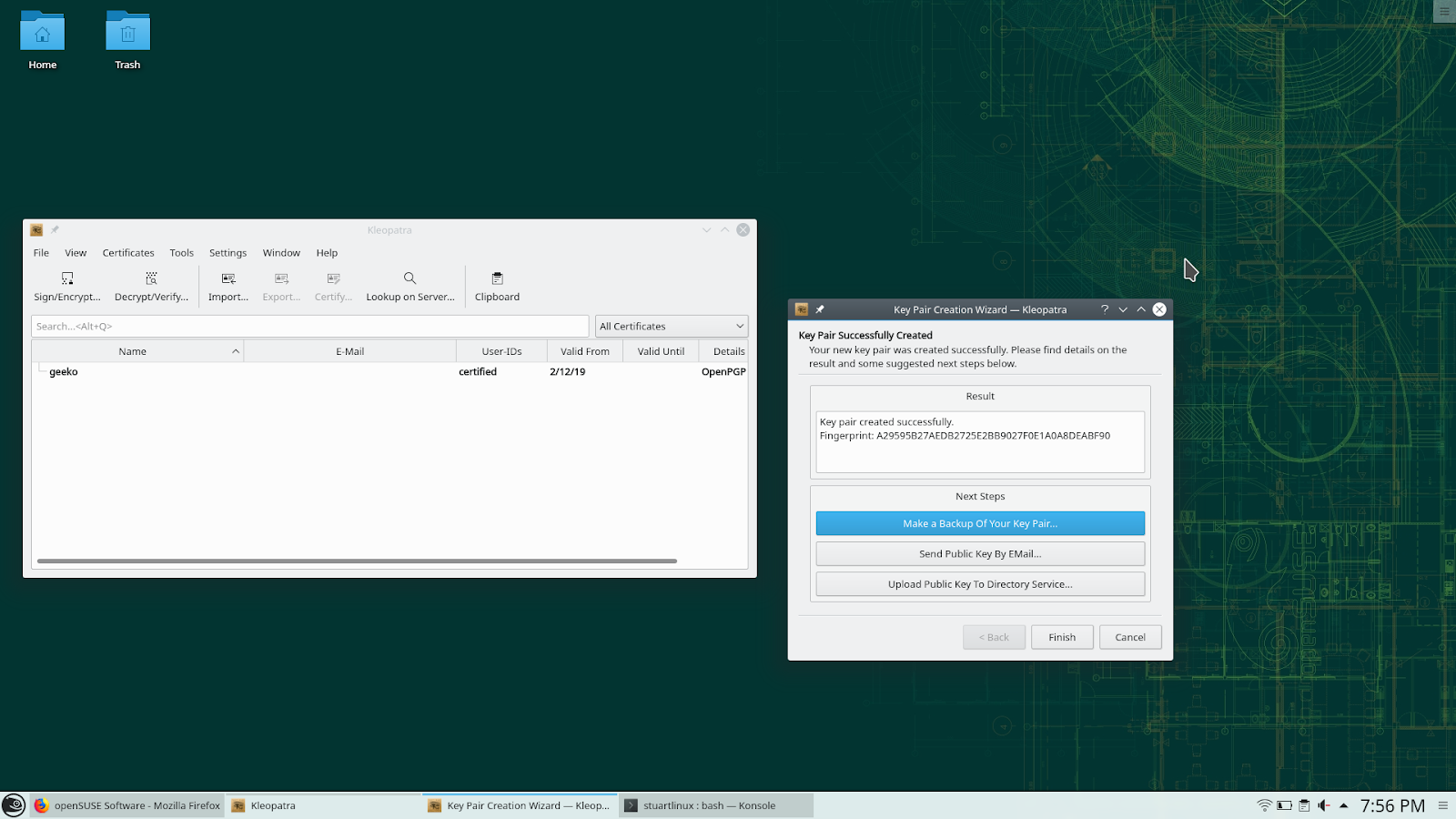
Para instalar Kleopatra en openSUSE, lo podemos hacer con la tecnología 1 Click Install
https://software.opensuse.org/package/kleopatra
Have a lot of fun!
Tuning Snapper | BTRFS Snapshot Management on openSUSE


Engaging the openSUSE community
Membership issues
On the 30th of January, openSUSE notified me that my membership was being revoked.
Everybody is welcome to participate and get involved in the openSUSE project and we grant membership for those that have shown a continued and substantial contribution to the openSUSE project. Membership officials have rejected your application since that does not apply to you. We just found too little contribution and encourage you to get more involved with openSUSE and then apply again for membership. As a person new to openSUSE you might check the "How to Participate" which gives a variety of possibilities, http://en.opensuse.org/Portal:How_to_participate to start contributing. Or you join our bi-weekly project meeting to see what' going on, http://en.opensuse.org/Portal: Meetings
As I am a fan of the openSUSE project and like to advocate the use of openSUSE through this website, I was quite disappointed. In 2018 I have written 15 articles about openSUSE Leap and about the various applications used on openSUSE. Fossadventures received 87.241 visits and 40.639 visitors over the last year. The RSS feed of this website is added to Planet openSUSE. And Fossadventures is still listed on the first page of the Google search results for “install openSUSE Leap 15”.

I have e-mailed openSUSE Membership Officials to re-activate my membership. I also have requested a membership (again) via openSUSE Connect. Almost 2 weeks later, my membership status has not been restored. Which means that I cannot participate in the openSUSE 2018-2019 Elections, as voting will close on Friday 15 Februari.

My difficulties are not limited to staying an active openSUSE member. Becoming an openSUSE member also required me to jump through a couple of hoops. After applying for an openSUSE membership, I didn’t get a response for months.
tickets #34573: Membership request still pending
...
Dear openSUSE team,

I have requested an openSUSE membership a couple of months ago. Until now this request is still
pending. I have made small contributions, including:- Helping people out on Reddit r/openSUSE-
Creating an openSUSE promotion website: www.fossadventures.com I hope that is enough to get me
a membership. I want to increase my involvement over the coming year.

Best regards, Martin de Boer
Last year I got my membership sorted out, but I needed to be very persistent! Its much easier to get kicked out, than it is to join. Which (in my opinion) is a problem for a community that relies on contributors.
Community life-cycle
In my work as an IT architect, I have learned a few things about Marketing. One of these lessons was the notion of the customer life-cycle. You can read about this phenomenon here: (1), (2), (3). The idea is that businesses not merely try to get a customer to buy your product or service once, but that you try to keep them engaged so they come back. In a typical life-cycle, the customer first visits a site, then shows interest in a certain product or service. Before the customer is ready to buy the product, (s)he might want to evaluate the product/service first. This can be achieved by offering information or for instance a trial period. This leads to a first purchase by the the customer. Most businesses (think shops, supermarkets, restaurants, dealers, etc.) benefit from returning customers. This is why they try to service these customers as good as possible. If the business offers quality products / services time and time again and the business offers quality support and the business is well regarded in the market and the business keeps in touch with the customer, that person might become a loyal customer.

Although communities have a different dynamic, there are certainly similarities. Lets discuss openSUSE for instance. Looking at the guiding principles, openSUSE wants to create the best Linux distribution in the world, which has the largest user community, and provide the primary source for getting free software.
Three questions spring to mind:
- How to get openSUSE in the hands of more users?
- How to expand the openSUSE community?
- How to get more contributors to volunteer working on openSUSE?
Suffice to say that Marketing is important to achieve these goals. openSUSE might want to use a similar life-cycle, made for the community.

A typical Linux user might encounter openSUSE as the best KDE distribution, advertised in some kind of publication or podcast. This will raise awareness about openSUSE. The user wonders what makes openSUSE unique and starts looking for information. They will soon learn about all the great tools that openSUSE has (co)developed, such as YaST, Zypper, BtrFS, Snapper, Open Build Service, Open QA, Kiwi, Portus and Machinery. And they might want to give it a spin. They will need to learn how to do certain things. Maybe they try to use KDE Discover to update their software and things don’t work out. So they go to the forums and learn that they need to use YaST Software Management or Zypper. If they like the way that openSUSE is setup and how it works, they become active users. After a while, they start to help other users to get things done. This increases their involvement and they start wanting to give back to the community. In some communities it is possible to become a supporter by donating a certain amount on Kickstarter, Indiegogo, Patreon or Liberapay. In the openSUSE community, it is valued to participate in the project, so they become contributors. After they start enjoying working together with other Geeko’s, they might end up becoming core contributors to the openSUSE project.
Contributor Journey
In Marketing its all about the Customer Journey. The underlying exercise is to create a Customer Journey Map that represents the experience of the customer in its encounters with the business. So the Customer Journey goes beyond the single purchase and focusses on the returning encounters in all phases of the life-cycle. The customer journey looks at touch points and at moments of truth. And of course it maps the experience and the emotions of the customer. But the map is only the beginning. The next exercise is to look at the bottlenecks in the current journey and start to optimize these moments. The idea is that the business tries to pull the Customer from one phase into the next one. And to track and measure this. So its all about conversion rates between phases. As a ‘tech person’ you can call this Marketing BS. You could argue: developers are just trying to build a quality product. But with that attitude, its not possible to:
- Get openSUSE in the hands of more users
- Increase the number of community members
- Increase the number of contributors
Maybe we need to look at the Journey of Linux enthousiasts from user to community member to contributor? Maybe we need to look at where people are dropping of. Maybe we need to look at the motivations of people to become an active community member or to become a contributor. So we can better target these people to engage with openSUSE.
Personal Journey
Looking at my personal Journey, I started being interested in Linux during my years in University, because I was tired of paying over and over again for the same software (especially MS Office). Software as a Service didn’t exist yet. When starting working in IT in 2009, I decided it was time to switch to Linux. I looked for a high quality distribution of European origins that looked familiar to Windows. So I ended up with openSUSE 11.1 and KDE 4.2 as my Desktop Environment. In the following years I learned more and more about Linux, openSUSE and all the cool free and open source software that is available. I started listening to podcasts (Linux Action Show, Linux Action News, Linux Unplugged). Via these podcasts, I was encouraged to go to open source conferences. So I went to FOSDEM in Brussels, which is pretty close to the Netherlands. This year (2019), I have attended FOSDEM for the 5th time. I have attended a lot of talks by Richard Brown / on openSUSE. Last year (2018) I started with my own website and posting articles on openSUSE and various applications running on openSUSE. So my personal involvement is increasing steadily. I am not a contributor to main parts of the openSUSE project, although that is likely to happen in the future.
My Journey is not without bumps in the road. I have solved a lot of problems with openSUSE over the last few years. Problems such as programs that suddenly stopped working or encountering hardware related problems. Rolling back updates, adjusting / restoring configuration files, et cetera. Because of the great build quality of openSUSE, I managed to fix these problems. However, many less technically skilled people would have given up in the same circumstances.
The same can be said of my efforts of becoming an openSUSE Member. I will likely try and try again. But many less motivated people would certainly give up in the same circumstances.
Conclusion
For me, the email that I received last month is an indication that the openSUSE community can do more to retain its users. And that the openSUSE community should have a better ‘Marketing strategy’ (for the lack of a better term) to make the Contributor Journey a smoother experience. To try to get the roadblocks out of the way for the people that want to be informed or be involved. It is an area where I could see myself contributing to in the future. For more discussions on this topic, you can message me via Mastodon: @fossadventures@fosstodon.org.
Published on: 12 February 2019

HTTP Query Params 101
Summary
A long time ago, we had simpler lives with our monolithic apps talking to relational databases. SQL supported having myriad conditions with the WHERE clause and conditions. As time progressed, every application became a webapp and we started developing HTTP services talking JSON, consumed by a variety of client applications such as mobile clients, browser apps etc. So, some of the filtering that we were doing via SQL WHERE clauses now needed a way to be represented via HTTP query parameters. This blog post tries to explain the use of HTTP Query Parameters for newbie programmers, via some examples. This is NOT a post on how to cleanly define/structure your REST APIs. The aim is to just give an introduction to HTTP Query Parameters.Action
Let us build an ebooks online store. For each book in our database, let us have the following data:BookID - String - Uniquely identifies a bookLet there be an API to get a list of books. It would be something like:
Title - String
Authors - String Array
Content - String - Base64 encoded content of the book
PublishedOn - Date
ISBN - String
Pages - Integer - Number of pages in the book
GET https://api.example.com/booksThe above API will return all the information about each of the book in our system except the Content. Though this would work for a small book shop, if you have like a billion books, this puts unnecessary stress on the server, client and the network bandwidth to hold all the book data when the user is probably not bothered to see more than, say 10 titles, in most cases. So our API could now needs a way to return only N titles. Also, from which position, we need to return the N titles also needs to be specified, say Mth position. These fields are called limit and offset usually. So our API becomes:
GET https://api.example.com/books?offset=5&limit=10
Here we have added two fields, offset and limit to our API. However there are two things that are unclear in this API definition.
The first ambiguity is: We do not know which field will be used for finding the sequence of the books. Is it the BookID ? Is it the PublishedOn Date ? The former is a string, how do we sort it to find the order (alphabetically in case-sensitive way or insensitive way). The latter is a date field and there can be multiple books which have the same published date. So, how do ensure that a book will always be in the same position in the sort order between two different HTTP requests ?
The second ambiguity is: What if these fields are not specified or if specified with invalid values ? How does the API handle it ?
To solve both of these ambiguities, our API docs need to become more precise. One possible solution (out of many solutions) to address the first ambiguity is, we will always generate only BookIDs with lower case strings and will always do a toLower conversion. We will always use BookID as the sort order and always will sort in ascending order. Our BookIDs field will always be monotonically increasing; IOW, once we have given a BookID of "abc" to a Book, we would never generate a BookID of "aba" again.
Instead of the String unique ID, we could also use numeric fields, which could directly map to a database AUTO_INCREMENT or BIGSERIAL field and ORMs can intelligently map the offset, limit fields automatically.
Note that it is not uncommon to add "sort_by" and/or "order_by" requirements, where the clients can choose to change the sort field (Publication Date instead of BookID) and also the sorting order (ascending or descending). There are multiple ways to represent this via the query parameters. Some examples are:
Sort by Title (default ascending):
GET https://api.example.com/books?sort_by=title
Sort by Title (explicitly ascending):
GET https://api.example.com/books?sort_by=asc(title)
GET https://api.example.com/books?sort_by=+(title)
GET https://api.example.com/books?sort_by=title.asc
Sort by Title (explicitly descending):
GET https://api.example.com/books?sort_by=desc(title)
GET https://api.example.com/books?sort_by=-(title)
GET https://api.example.com/books?sort_by=title.desc
Sort by Multiple Fields:
GET https://api.example.com/books?sort_by=asc(title),desc(published_on)
GET https://api.example.com/books?sort_by=title,-published_on
GET https://api.example.com/books?sort_by=+title,-published_on
For solving the second ambiguity, that we saw earlier, the safest solution is to make our HTTP APIs return 400 incase we come across invalid data, For example, if an invalid starting offset is given. We also need to explicitly document the default values for these query parameters, if nothing is specified.
Filters
We have used the GET above to get all the Books information and filter based on the cardinality. However, there may be a need for other filters. For example, we want to get the books by only a particular author. So we could add more parameters, such as:GET https://api.example.com/books?author=crichtonHere the author is a query parameter which takes a string as an argument. This API will return any book whose author name matches "crichton". Also note that, these individual filters could be then combined with other filters, for example:
GET https://api.example.com/books?author=crichton&offset=0&limit=5will return the first five books of author "crichton". So the API implementation in backend should apply the "limits" and "offset" after applying the author="crichton" filter. The API docs need to convey this in an unambigous way on what positions the "offset" would work if there are other filter conditions. The other choice is to return the books by "crichton" in the first five results in the list of all books. All your APIs need to be consistent and you can choose either of the practices, even though I prefer the former.
More Filter conditions
In the above API definition, we were returning the books whose author was "crichton" exactly. However, it may not be always possible to give an Exact Equals condition for our API. Our API may require to accept query parameters which should be loosely applied. For example, the author may be stored in our system as "Michael Crichton" so applying "crichton" may not be sufficient. Similarly, we may need to get a list of all books published after 2005 but before 2015.Our query parameters, in addition to "equal-to" may need to support, less-than, less-than-or-equal-to, greater-than, greater-than-or-equal-to, not-equal-to, contains (for string matches), not-contains and so on.
Our query parameter need to pass these operators too in addition to the parameter name and the desired value(s). One possible approach for this could be to add these operator names to the query parameter. For example:
GET https://api.example.com/books?published_on[gte]="2005-01-01"&published_on[lte]="2015-12-31"
GET https://api.example.com/books?published_on.gte="2005-01-01"&published_on.lte="2015-12-31"
assert.deepEqual(qs.parse('published_on[lte]="2015-12-31"'), {
    published_on: {
        lte: '2015-12-31'
    }
});
Note that I am using YYYY-MM-DD as the date format. It is strongly recommended to use a single date format for all your APIs, whichever format you choose. Similarly, while working with time, choose a single timezone, preferably UTC.
Instead of changing the parameter names, we can add the operator to the operand on the RHS of the equal sign too. For example:
GET https://api.example.com/books?published_on=gte:"2005-01-01"&published_on=lte:"2015-12-31"Here we are using "gte" and "lte" to denote the operator but specify it in the RHS of the equal symbol.
If you have a long list of filters and operators, you should probably avoid using HTTP Query Parameters. An API that receives these complex query strings, perhaps with your own DSL, (either as JSON or any other serialisable format), as a HTTP Request body, would make code maintenance simpler. Elasticsearch uses this method.
Conclusion
I have been trying to write this for some time now but kept on deferring for months now. So I decided to just type it out today in a stretch. The post is not as fine as I wanted it to be, but it is better to at least write an unrefined post than not writing anything at all. I hope you have found this useful. Let me know if you have any comments, feedback or corrections in this post. Thanks if you have read till here.
PEAR down – Taking Horde to Composer
Since Horde 4, the Horde ecosystem heavily relied on the PEAR infrastructure. Sadly, this infrastructure is in bad health. It’s time to add alternatives.
Everybody has noticed the recent PEAR break-in.
A security breach has been found on the http://pear.php.net webserver, with a tainted go-pear.phar discovered. The PEAR website itself has been disabled until a known clean site can be rebuilt. A more detailed announcement will be on the PEAR Blog once it’s back online. If you have downloaded this go-pear.phar in the past six months, you should get a new copy of the same release version from GitHub (pear/pearweb_phars) and compare file hashes. If different, you may have the infected file.
While I am writing these lines, pear.php.net is down. Retrieval links for individual pear packages are down. Installation of pear packages is still possible from private mirrors or linux software distribution packages (openSUSE, Debian, Ubuntu). Separate pear servers like pear.horde.org are not directly affected. However, a lot of pear software relies on one or many libraries from pear.php.net – it’s a tough situation. A lot of software projects have moved on to composer, an alternative solution to dependency distribution. However, some composer projects have dependency on PEAR channels.
I am currently submitting some changes to Horde upstream to make Horde libs (both released and from git) more usable from composer projects.
Short-term goal is making use of some highlight libraries easier in other contexts. For example, Horde_ActiveSync and Horde_Mail, Horde_Smtp, Horde_Imap_Client are really shiny. I use Horde_Date so much I even introduced it in some non-horde software – even though most functionality is also somewhere in php native classes.
The ultimate goal however is to enable horde groupware installations out of composer. This requires more work to be done. There are several issues.
- The db migration tool checks for some pear path settings during runtime https://github.com/horde/Core/pull/2 Most likely there are other code paths which need to be addressed.
- Horde Libraries should not be web readable but horde apps should be in a web accessible structure. Traditionally, they are installed below the base application (“horde dir”) but they can also be installed to separate dirs.
- Some libraries like Horde_Core contain files like javascript packages which need to be moved or linked to a location inside another package. Traditionally, this is handled either by the “git-tools” tool linking the code directory to a separate web directory or by pear placing various parts of the package to different root paths. Composer doesn’t have that out of the box.
Horde already has been generating composer manifest files for quite a while. Unfortunately, they were thin wrappers around the existing pear channel. The original generator even took all package information from the pear manifest file (package.xml) and converted it. Which means, it relied on a working pear installation. I wrote an alternative implementation which directly converts from .horde.yml to composer.json – Calling the packages by their composer-native names. As horde packages have not been released on packagist yet, the composer manifest also includes repository links to the relevant git repository. This should later be disabled for releases and only turned on in master/head scenarios. Releases should be pulled from packagist authority, which is much faster and less reliant on existing repository layouts. https://github.com/horde/components/pull/3
To address the open points, composer needs to be amended. I currently generate the manifests using package types “horde-library” and “horde-application” – I also added a package type “horde-theme” for which no precedent exists yet. Composer doesn’t understand these types unless one adds an installer plugin https://github.com/maintaina-com/installers. Once completed and accepted, this should be upstreamed into composer/installers. The plugin currently handles installing apps to appropriate places rather than /vendor/ – however, I think we should avoid having a super-special case “horde-base” and default to installing apps directly below the project dir. Horde base should also live on the same hierarchy. This needs some additional tools and autoconfiguration to make it convenient. Still much way to go.
That said, I don’t think pear support should be dropped anytime soon. It’s the most sensible way for distribution packaging php software. As long as we can bear the cost involved in keeping it up, we should try.
Rambox | Chat Message Unification Application for openSUSE
Coherent Color Scheme Creation for Qt and GTK on openSUSE
Raspberry Pi: "Bluetooth: hci0 link tx timeout"
Bluetooth: hci0 link tx timeoutThis happened with different USB bluetooth dongles. Googling the problem found mostly unrelated articles, or advice that was obviously plain wrong.
Bluetooth: hci0 killing stalled connection xx:xx:xx:xx:xx:xx
Long story short: moving the dongle to a powered USB hub solved the issue.
(Just for the record: the raspi is powered by a good power supply...)