
LibreOffice and Google Summer of Code 2014
Hello, dear students!
This little blog is to remind you that in a bit more then 24 hours, the student applications for the 10th edition of Google Summer of Code will be closed. It is always better to submit an imperfect proposal before the deadline then to miss the deadline by 5 minutes with perfect proposal. So, check our Ideas page and hurry up with applying.
Cloudy with a touch of Green
Finally there is some news regarding our public cloud presence and openSUSE 13.1. We now have openSUSE 13.1 images published in Amazon EC2, Google Compute Engine, and Windows Azure.
Well, that’s the announcement, but would make for a rather short blog. Thus, let me talk a bit about how this all works and speculate a bit why we’ve not been all that good with getting stuff out into the public cloud.
Let me start with the speculation part, i.e. hindrances in getting openSUSE images published. In general to get anything into a public cloud one has to have an account. This implies that you hand over your credit card number to the cloud provider and they charge you for the resources you use. Resources in the public cloud are anything and everything that has something to do with data. Compute resources, i.e. the size of an instance w.r.t. memory and number of CPUs are priced differently. Sending data across the network to and from your instances incurs network charges and of course storing stuff in the cloud is not free either. Thus, while anyone can put an image into the cloud and publish it, this service costs the person money, granted not necessarily a lot, but it is a monthly recurring out of pocket expense.
Then there always appears to be the “official” apprehension, meaning if person X publishes an openSUSE image from her/his account what makes it “official”. Well first we have the problem that the “official” stamp is really just an imaginary hurdle. An image that gets published by me is no more or less “official” than any other images. I am after all not the release manager or have any of my fingers in the openSUSE release in any way. I do have access to the SUSE accounts and can publish from there and I guess that makes the images “official”. But please do not get any ideas about “official” images, they do not exist.
Last but not least there is a technical hurdle. Building images in OBS is not necessarily for the faint of heart. Additionally there is a bunch of other stuff that goes along with cloud images. Once you have one it still has to get into the cloud of choice, which requires tools etc.
That’s enough speculation as to why or why not it may have taken us a bit longer than others, and just for the record we did have openSUSE 12.1 and openSUSE 12.2 images in Amazon. With that lets talk about what is going on.
We have a project in OBS now, actually it has been there for a while, Cloud:Images that is intended to be used to build openSUSE cloud images. The GCE image that is public and the Amazon image that is public both came from this project. The Azure image that is currently public is one built with SUSE Studio but will at some point also stem from the Cloud:Images OBS project.
Each cloud framework has it’s own set of tools. The tools are separated into two categories, initialization tools and command line tools. The initialization tools are tools that reside inside the image and these are generally services that interact with the cloud framework. For example cloud-init is such an initialization tool and it is used in OpenStack images, Amazon images, and Windows Azure images. The command line tools let you interact with the cloud framework to start and stop instances for example. All these tools get built in the Cloud:Tools project in OBS. From there you can install the command line tools into your system and interact with the cloud framework they support. I am also trying to get all these tools into openSUSE:Factory to make things a bit easier for image building and cloud interaction come 13.2.
With this lets take a brief closer look at each framework, in alphabetical order no favoritism here.
Amazon EC2
An openSUSE 13.1 image is available in all regions, the AMI (Amazon Machine Image) IDs are as follows:
sa-east-1 => ami-2101a23c
ap-northeast-1 => ami-bde999bc
ap-southeast-2 => ami-b165fc8b
ap-southeast-1 => ami-e2e7b6b0
eu-west-1 => ami-7110ec06
us-west-1 => ami-44ae9101
us-west-2 => ami-f0402ec0
us-east-1 => ami-ff0e0696
These images use cloud-init as opposed to the “suse-ami-tools” that has been used previously and is no longer available in OBS. The cloud-init package is developed in launchpad and was started by the Canonical folks. Unfortunately to contribute you have to sign the Canonical Contributor Agreement (CCA). If you do not want to sign it or cannot sign it for company reasons you can still send stuff to the package and I’ll try and get the stuff integrated upstream. For the interaction with Amazon we have the aws-cli package. The “aws” command line client supersedes all the ec2-*-tools and is an integrated package that can interact with all Amazon services, not just EC2. It is well documented fully open source and hosted on github. The aws-cli package replaces the previously maintained ec2-api-tools package which I have removed from OBS.
Google Compute Engine
In GCE things work by name and the openSUSE 13.1 image is named opensuse131-20140227 and is available in all regions. Google images use a number of tools for initialization, google-daemon and google-startup-scripts. All the Google specific tools are in the Cloud:Tools project. Interaction with GCE is handled with two commands, gcutil and gsutil, both provided by the google-cloud-sdk package. As the name suggests google-cloud-sdk has the goal to unify the various Google tools, same basic idea as aws-cli, and Google is working on the unification. Unfortunately they have decided to do this on their own and there is no public project for google-cloud-sdk which makes contributing a bit difficult to say the least. The gsutil code is hosted on github, thus at least contributing to gsutil is straight forward. Both utilities, gsutil for storage and gcutil for interacting with GCE are well documented.
In GCE we also were able to stand up openSUSE mirrors. These have been integrated into our mirrorbrain infrastructure and are already being used quite heavily. The infrastructure team is taking care of the monitoring and maintenance and that deserves a big THANK YOU from my side. The nice thing about hosting the mirrors in GCE is that when you run an openSUSE instance in GCE you will not have to pay for network charges to pull your updated packages and things are really fast as the update server is located in the same data center as your instance.
Windows Azure
As mentioned previously the current image we have in Azure is based on a build from SUSE Studio. It does not yet contain cloud-init and only has WALinuxAgent integrated. This implies that processing of user data is not possible in the image. User data processing requires cloud-init and I just put the finishing touches on cloud-init this week. Anyway, the image in Azure works just fine, and I have no time line when we might replace it with an image that contains cloud-init in addition to WALinuxAgent.
Interacting with Azure is a bit more cumbersome than with the other cloud frameworks. Well, let me qualify this with, if you want packages. The Azure command line tools are implemented using nodejs and are integrated into the npm nodejs package system. Thus, you can use npm to install everything you need. The nodejs implementation provides a bit of a problem in that we hardly have a nodejs infrastructure in the project. I have started packaging the dependencies, but there is a large number and thus this will take a while. Who would ever implement….. but that’s a different topic.
That’s where we are today. There is plenty of work left to do. For example we should unify the “generic” OpenStack image in Cloud:Images with the HP specific one, the HP cloud is based on OpenStack, and also get an openSUSE image published in the HP cloud. There’s tons of packaging left to do for nodejs modules to support the azure-cli tool. It would be great if we could have openSUSE mirrors in EC2 and Azure to avoid network charges for those using openSUSE images in those clouds. This requires discussions with Amazon and Microsoft, basically we need to be able to run those services for free, which implies that both would become sponsors of our project just like Google has become a sponsor of our project by letting us run the openSUSE mirrors in GCE.
So if you are interested in cloud and public cloud stuff get involved, there is plenty of work and lots of opportunities. If you just want to use the images in the public cloud go ahead, that’s why they are there. If you want to build on the images we have in OBS and customize them in your own project feel free and use them as you see fit.

 Member
 dragotin
ownCloud @ Chemnitzer Linuxtage 2014
Last weekend Daniel, Arthur, Morris and me were in Chemnitz where the Chemnitzer Linuxtage 2014 took place. We drove a booth during the two days, the CLT host around 60 boothes of companies and FOSS projects. I like to go to the CLT because it is perfectly organized with great enthusiasm of everybody involved from the organisation team. Food, schedules, the venue, everything is perfect.
Even on saturday morning, short after opening of the event, somebody from the orga team was showing up on the booth with chocolate for the volunteers, saying hello and asking if everything is in place for a successful weekend. A small detail, which shows how much effort is put into organization of the event.
As a result, visitors come to visit the event. It’s mostly a community centric event: Exhibitors are mostly representing FOSS projects such as openstreetmap.org, distributions like Fedora or openSUSE or companies from the free software market. [caption id=“attachment_428” align=“alignright” width=“595”] Morris in action on the booth[/caption]The majority of visitors are mostly interested in private use of the software. But, no rule without exception, we also had a remarkable number of people from companies, either executives or people working in the IT departments, who were interested in ownCloud.
Speaking about ownCloud, I want to say that it’s amazing to represent our project. People know it, people like it, people use it. In private, but also in professional space people work with ownCloud already or are planing to start with ownCloud. ownCloud already is the accepted solution for the problems that became so practical with the NSA scandal last year.
My talk with title A private Cloud with ownCloud on Saturday morning was very well received and went smooth. The room was too small, lots of people had to stand or sit on the stairs. It was a very positive atmosphere.
Something that changed compared to last year and the year before: Most discussions were around how ownCloud can be installed, integrated and used and not any more about which features are still missing or maybe also bugs.
So it were two very exhausting days, but big fun! Thanks to Daniel, Arthur and Morris for the work and fun we had on the booth, and thanks to the CLT team for CLT.

Distributing Free Software: Herding Cats
The basic challenge of distributing Free Software is compiling that awesome open source code into machine code for different Linux distributions so it's easily consumable for users. Sounds simple, but it isn't. If you look at the dependencies of a typical Free Software project you will find thousands of other projects in the stack. They build on top of each other, have functional dependencies, sometimes they are interdependent, they conflict with each other and what not. In short: Building Free Software is like herding cats. And rightfully users of the software expect a steady, well behaved, streamlined herd of cats! The Open Build Service (OBS) is the tool which makes this possible, it helps Free Software distributors to automatically and consistently build binary packages from free and open source code.
It goes like this: Engineers upload source code and build instructions to the OBS and the system compiles that into binary packages for different distribution versions and different CPU architectures. The build instructions say how to compile the source code into machine code, defines the dependencies and the conflicting capabilities the software has in relation to other software, itemizes which files are needed to run it, and a whole lot of other meta data. The job of the OBS is to interpret all this information, to provide a build environment matching the requirements, the execution of the build, and of course the reporting of the outcome.
The end result are multiple binary packages out of one single source. The twist is: If other software depends on the package in some way, the OBS will trigger a rebuild of the depending package afterward. This ensures that changes propagate through the whole stack and that the user gets a consistent product to install.
Updates: Nobody is perfect.

Sadly, software is sometimes defective and people make mistakes. Nobody is perfect. That's why the second basic service a Free Software distributor delivers to its users is the art of exchanging pieces without breaking the whole: Updates. Your distributor does not want to interrupt you in going about your business, and to be able to do this he needs to reproduce the software builds at any given time in the long lifetime of the software.
The OBS helps distributors to achieve this by tracking who has made changes, when changes are made, and what has changed. The OBS also helps by utilizing a clean, virtualized build environment. This is how it goes: When an engineer triggers a build in the OBS by changing the software in it, the system saves the current state, gathers all the dependencies and kicks off a virtualized environment to execute the build. As the information on how to assemble the build environment is contained in the software and as all dependent software gets rebuilt too it makes every build reproducible.
And if something is reproducible it is predictable and that is what distributors aim for. If you can predict how all of the software projects in your stack influence each other, you can make sure that a change to a single piece can be managed through all of its dependencies, ensuring that the whole system of software continues to work after a change. This is how the OBS helps you as a user because updates from the OBS don't get in the way of your business.
Collaboration: Unity is strength

Some rights reserved by opensourceway
Now the software isn't the only herd of cats that needs taming. Each of the thousands of software projects is maintained by one or more developers that collaborate with each other, that's a whole bunch of awesome people! And this is the third basic challenge a Free Software distributor solves for its users. It brings together people who collaborate on the integration of free and open source software.
The OBS formalizes this collaboration into work flows that all engineers utilize. Everybody is using the same way to submit new software, to update existing software to a new version, to submit bug fixes and features. Everyone is using the same means to branch, study, change, and improve the software.
OBS simply helps Free Software engineers to harness the power of the open source development model. And this also helps the users because they get a tightly integrated software solution.
There is more...
This is how Free Software distributors utilizes the Open Build Service for the benefit of the users: Build binary packages for a wide range of distributions and architectures from source code in an automatic, consistent, reproducible and collaborative way.
But there is more: OBS itself is free software. You can run, copy, distribute, study, change and improve it. The source code and the developers are on github. As Free Software, it is able to keep up with the ever-evolving ecosystem, which constantly produces new distributions, new package formats, new architectures, software, standards and tools. At the current time, OBS supports more than 20 different distributions, half a dozen architectures and three different package formats. It can cryptographically sign your software and products, different instances of OBS can connect to each other and OBS can be used in conjunction with source code revision systems like git/github in continuous integration work flows.
Do. Or do not. There is no try.

Some rights reserved by Dov Harrington
Enough talk, let's get practical! You have Free Software that you want to make available? Here is a nice video tutorial on how you can utilize the Open Build Service reference server which is freely available for developers to build packages for the most popular Linux distributions including openSUSE, Debian, Fedora, Ubuntu, Arch, Red Hat Enterprise Linux and SUSE Linux Enterprise.
That's how you can build and distribute binary packages for a wide range of distributions and architectures with the Open Build Service. Enjoy!
Want to learn the more about software packaging? The Linux distributions have great introductions to the RPM, DEB and PKGBUILD formats that you should review. The tutorial github repository also contains build instructions for all kinds of different distributions.
What Does It Mean To Be A Blackbelt?
{% youtube fUuIoxsm9p8 [560] [315] %}
Thanks Roy Dean !!! Great martial artist, great teacher and great inspiration. I would like to have the opportunity to train with you.

Help yourselves to our low hanging fruit!
An update on what we’re doing and a call for help!
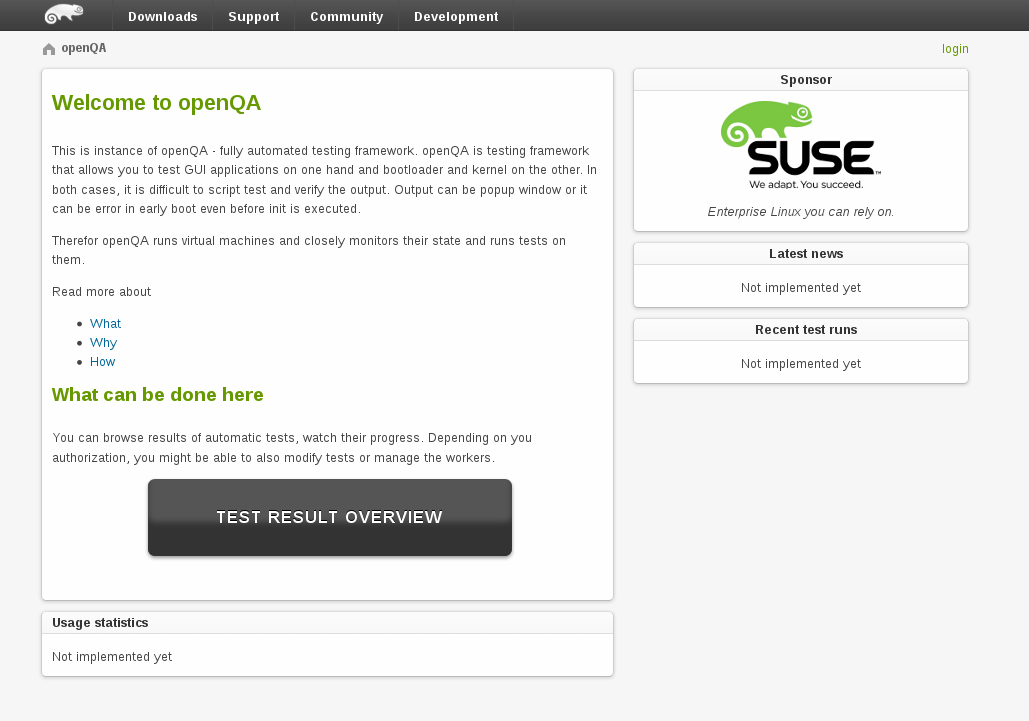
openQAv2
What was going on
From our previous posts you probably know what do we do these days. We are working on our goal to make Factory more stable by using staging projects and openQA. Both projects are close to reaching important milestones. Regarding the osc plugin that is helping out with staging, we are in the state that coolo and scarabeus can manage Factory and staging projects using it. We did some work on covering it with tests and currently we are somewhere half-way there. Yes, there is a room for improvement (patches are welcome), but it is good enough for now. We are missing integration with OBS, automation and much more. But as the most important part of all this is integration with openQA, we decided to put this sprint on hold and focus even more on openQA.
How to play with it and help move this forward?
During our work, we found some tasks that are not blocking us but would be nice to have. Some of these are quite easy for people interested in diving in and making a difference in these projects. We put them aside in progress.opensuse.org to make it easilly recognizable that these tasks can be taken and are relatively easy. Let’s take a closer look at what tasks are there to play with. Of course – it would be very cool if, through using the new tools, you find out other things that improve the work flow!
- Helping staging. I already mentioned one way you can help our factory staging plugin.
-
Improving test coverage. It might sound boring at first, but is a quite entertaining task. We have a short documentation explaining how tests work. In summary, we have a class simulating a limited subset of OBS and we just run commands and wait whether our fake OBS ends up in correct state. This makes writing tests much easier. To make it more interesting, we use Travis CI and Coveralls. Big advantage of those is that it does a test run on every pull request and shows you how you improved the test coverage. It also shows what is not covered yet. In other words, it shows what should be covered next

- What else needs to be done to make staging project more reliable is to fix all packages that are randomly failing. This is mostly packaging/obs debugging task. So doesn’t require any python and can be done package by package.
- Last thing on the staging projects todo list for now is making the staging api class into singletons. For those who know python this is actually really easy. But while at it, you will be taking a look at the rest of our code and we will definitely not mind anybody polishing it or removing bugs!

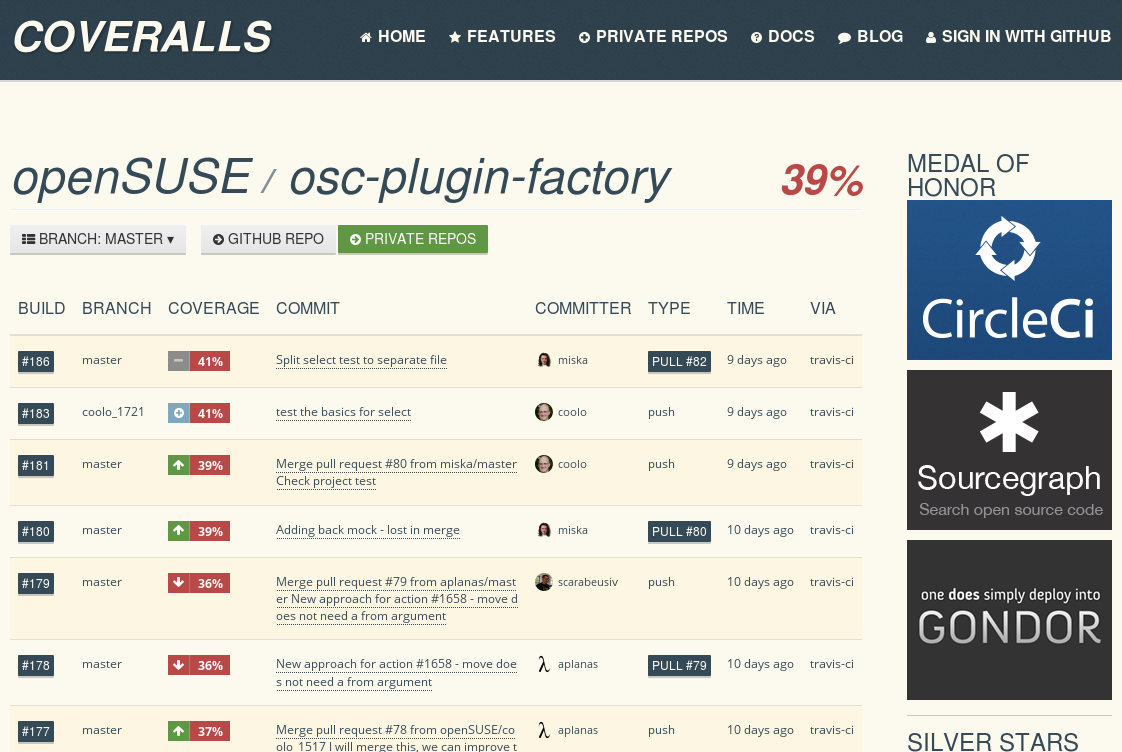
coveralls in action
Helping openQA
In openQA, currently we have code cleaning tasks. It’s about polishing the code we have – like removing useless index controller and fixing code highlighting. Or doing simple optimizations – like caching image thumbnails.
In case of openQA, you might be a little confused where to send your code. We have been doing some short and mid term planning with Bernhard M. Wiedemann, the man behind openqa.opensuse.org and one of the original openQA developers, together with Dominik Heidler. Now the code considered to be ‘upstream’ have been moved to several repositories under the os-autoinst organization in github. This code contains all the improvements introduced to extensivelly test our beloved openSUSE 13.1. The next generation of the tool is being developed right now in a separate repository and will be merged into upstream as soon as we feel confident enough, which means more automated testing, more staging deployments and more code revisions and audits. If you want to help us, you are welcome to send pull requests to either of those repositories and someone will take a look at them.
What next?
As we wrote, we are currently putting all our effort into openQA. We already have basic authentication and authorization, we are working on tests, fixing bugs and making sure the service in general is easy to deploy. And of course we are working toward our main goal – having a new openQA instance with all cool features available in public. Currently it is already kind of easy to get your own instance running, so if you are web or perl developer, nothing should stop you from playing with it and making it more awesome!

sudo authentication across sessions
Since I've been asked this recently, if you want to avoid typing your sudo password again after opening up another shell session (with konsole, gnome-terminal, screen or whatever), simply add the following to /etc/sudoers (use sudo visudo to modify the file): Read http://www.sudo.ws/sudoers.man.html for the details.

GMime gets a Speed Boost
In addition to other fixes that were in the queue, GMime 2.6.20 includes the "SIMD" optimization hack that I blogged about doing for MimeKit and I wanted to share the results. Below is a comparison of GMime 2.6.19 and 2.6.20 parsing the same 2GB mbox file on my 2011 Core-i5 iMac with the "persistent stream" option enabled on the GMimeParser:
[fejj@localhost gmime-2.6.19]$ ./gmime-mbox-parser really-big.mbox
Parsed 29792 messages in 5.15 seconds.
[fejj@localhost gmime-2.6.20]$ ./gmime-mbox-parser really-big.mbox
Parsed 29792 messages in 4.70 seconds.
That's a pretty respectable improvement. Interestingly, though, it's still not as fast as MimeKit utilizing Mono's LLVM backend:
[fejj@localhost MimeKit]$ mono --llvm ./mbox-parser.exe really-big.mbox
Parsed 29792 messages in 4.52 seconds.
Of course, to be fair, without the --llvm option, MimeKit doesn't fare quite so well:
[fejj@localhost MimeKit]$ mono ./mbox-parser.exe really-big.mbox
Parsed 29792 messages in 5.54 seconds.
I'm not sure what kind of optimizations LLVM utilizes when used from Mono vs clang (used to compile GMime via homebrew, which I suspect uses -O2), but nevertheless, it's still very impressive.
After talking with Rodrigo Kumpera from the Mono runtime team, it sounds like the --llvm option is essentially the -O2 optimizations minus a few of the options that cause problems with the Mono runtime, so effectively somewhere between -O1 and -O2.
I'd love to find out why MimeKit with the LLVM optimizer is faster than GMime compiled with clang (which also makes use of LLVM) with the same optimizations, but I think it'll be pretty hard to narrow down exactly because MimeKit isn't really a straight port of GMime (they are similar, but a lot of MimeKit is all-new in design and implementation).

GNOME.Asia summit 2014 - Call for The T-shirt Design Contest

The T-shirt Design Contest
Prizes
- Winner: A Special gift from local team and two t-shirts with your winning design

Telegram, Whatsapp en terminal con Tg-master
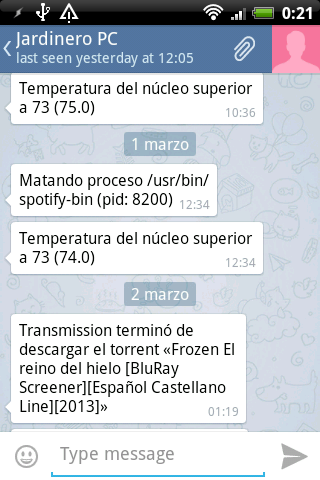 A estas alturas ya habrán oido hablar de Telegram, la alternativa libre y gratuita a Whatsapp. Visual y funcionalmente es idéntico a Whatsapp, literalmente es un clon, pero es gratuito y disfruta de las enormes ventajas del desarrollo Open source, una de las cuales es la posibilidad de que a su alrededor crezcan otros proyectos que amplían, complementan y enriquecen el original. Telegram dispone de una API de gestión y control de que se alimentan virguerías como Tg-master: un Telegram para terminal/consola.
A partir de aquí las posibilidades de usar este “Whatsapp libre” desde el ordenador y poder chatear desde un terminal con el teléfono de alguien, y viceversa. Pueden dar un juego inmenso. Podéis enviar mensajes, realizar chats y enviar/recibir archivos de vídeo/foto, mensajes privados, etc. A fecha de hoy (Marzo/2014) tg-master está en fase beta, pero ya me gustaría que programas en fase de producción tuvieran su estabilidad. Funciona perfectamente y es muy sencillo.
Podéis usar Tg-master con vuestra actual número de teléfono compartiendo la cuenta de Android con el ordenador. Al ingresar en Tg-master con el mismo número os llegará un chivatazo al móvil informando que “otro dispositivo se ha conectado a vuestra cuenta” pero sin más repercusiones. Pero claro, las posibilidades más creativas se presentan asignando una segunda cuenta de Telegram a vuestro PC. Aprovechando que tenía un número de teléfono en desuso de tarjeta prepago de mi anterior zapatófono lo he aprovechado para registrar en Telegram una segunda cuenta que es gestionada desde el PC con Tg-master y de esta manera disponer de un canal de chat entre PC y Móvil. Algo muy parecido a lo que ya hiciera con MCABBER (Jabber) (¿alguien se acuerda de aquellas charlas con la máquina?)
Para instalar Tg-master necesitáis descargar y descomprimirwget https://github.com/vysheng/tg/archive/master.zip -O tg-master.zip
unzip tg-master.zip && cd tg-master
Compilad (si es necesario tendréis que resolver dependencias)./configure --prefix=/usr
make
Ahora copiad el binario a /usr/bin y lo hacéis ejecutable para tenerlo disponible desde cualquier sitio.
cp ./telegram /usr/bin/telegram; chmod +x /usr/bin/telegram
Instalación
Una vez compilado e instalado en /usr/bin lo podéis ejecutar por primera vez para registraros en el servicio. En primer lugar Tg-master os pedirá el número de teléfono que queréis registrar en el servicio de Telegram. Introducid vuestro segundo número (con el +34 delante) y al instante os enviarán al móvil (tenedlo encendido cerca) un código de 5 dígitos que habréis de ingresar en Tg-master. Una vez validado ya estaréis listos para chatear con vuestro teléfono (claro os tenéis que agregar mutuamente en contactos).
Tg-master dispone de autocompletado con TAB (como la consola Linux) por lo que los comandos aunque no los conozcáis se escriben rápidamente.
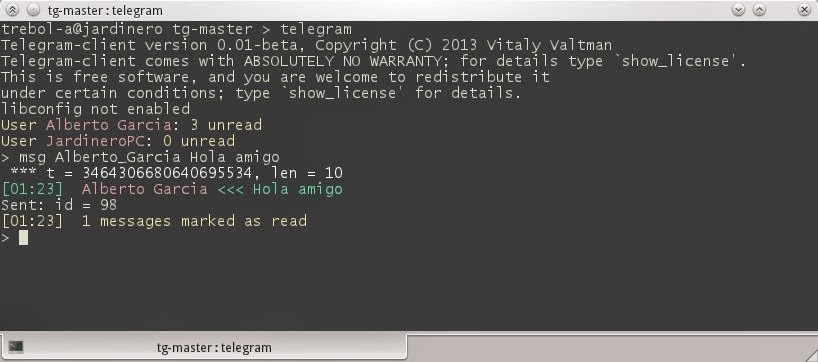
Aunque Tg-master está en fase de desarrollo admite ya un tosco método de ejecución vía stdin recibiendo ordenes directas desde terminal. Para enviar un mensaje un contacto cualquiera en Telegram sin necesidad de entrar en el programa ejecutadecho "msg user#12345678 Mi mensaje al contacto | /usr/bin/telegram -k /home/tu-usuario/.telegram/tg.pub > /dev/null & sleep 1; killall telegram
(la carpeta /home/tu-usuario/.telegram/ se crea la primera vez que ejecutáis Telegram y registráis un teléfono y contiene el archivo tg.pub con la clave pública que debéis adjuntar con cada orden)
Como veis el método es bastante tosco porque requiere matar el proceso a lo bestia dándole un segundo para que envíe el mensaje. (el número de usuario destino lo obtenéis en Telegram haciendo contact_list). Este método es probable que cambien en breve con forme avance el desarrollo del programa.