
"The first casualty of War is Truth"
Reading some blogs about the ODF/OOXML file format war the famous quote "The first casualty of War is Truth" (from Rudyard Kipling --- I guess) comes into my mind.

openSUSE LiveCD Installer
I was out of town for part of hack week, so I didn’t participate fully like my colleagues. I did get a couple evenings to mess around with something, though. I wrote an installer for KIWI-generated LiveCDs.
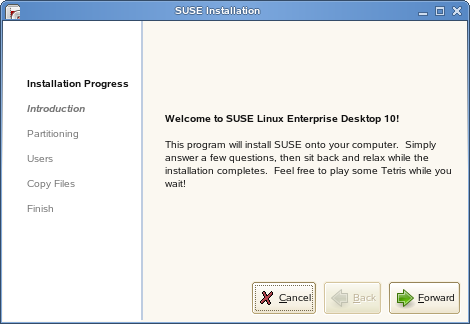
First page of live installer
It’s still in early development and has lots of hacks to make things work, but it does manage to install a working system onto your machine. The installation itself is really pretty simple. The LiveCD data is in a compressed squashfs image on the CD, and the installer just copies all of that to the disk. Then it just writes out an fstab, installs grub, etc.
As usual, however, the devil is in the details. Things like sound and video card detection are normally done by the YaST installer, so other methods must be used. It might be possible to invoke the relevant bits of YaST from the LiveCD installer to achieve the same effect, but I haven’t looked into it yet. I have everything checked into svn (svn://snorp.net/trunk/opensuse-live), so if you want to try and build a CD everything is there. I will also upload an ISO soonish.
Update: You can download a full ISO based on openSUSE Alpha 5 here.

 Member
Lots of improvements into Strigi inotify support
Some days ago I committed lots of changes regarding inotify support. Goodies and improvements have been introduced… I had this code laying on my laptop for several weeks because I wasn’t able to fully test it. An annoying bug afflicting the update index operations was blocking me. But some days ago Jos fixed it, so I didn’t have any excuse :)
These are the major changes introduced:
- event caching: using a small cache it’s now possible to simplify multiple events and prevent high cpu usage when lot of changes occur on the same files
- interruption handling during the re-index operations: changing the directories to watch during an indexing operation will break the previous job and start a new one
- other small changes for improving cpu utilization
Actually I’m very happy of the first point, but I think the second one can still be improved…
Cave mouse


It was supposed to be a 10 km walk... well, some people can read maps, others can't..

It was more than obvious were we had to go..but they just don't listen to me.
At least I got some beer and Obazder after the hell of a walk.
And now there's this frog who accompanied them to the pub. The guy who brought the beer wanted to throw him away. But somehow in the very last second he figured out that this paper thingy was a frog.. they say he can jump.. the truth is he always lands with his feet sticking out and someone has to rescue him..what a nuisance..

Remember to commit
I have to admit that lately I have a really bad habit: I forget to commit my
changes to Strigi. In this way I end-up performing multiple commits with
different changes inside: from stupid to interesting one. This is a really
bad behavior, so today I decided to perform some svn status and svn diff
and I made some commits on Strigi trunk. Most of all are just code readability
improvement == don’t exceed the 80 chars per line.
I think that Jos will be really happy to see them ;)
Work, work, work and... new house!
In my last message I promised to write some more contents on this site, in order to keep it more updated. As usual I disappointed this promise :) So, what I have been doing in these day? Just a simple answer: I’ve worked a lot. “Work” can be divided in the following categories:
- office work
- KDE & Strigi coding
- Physical work
The most important of all is the last one. I’ve spent all my week-ends working in my new house. I’ve been fixing and improving it (wow… it seems I’m talking about a piece of software ;) ) and now it’s quite finished.
I’ve to say a great “thank you” to my dad. He’s able to do everything (he’s something better than Mac Gyver) and helped me a lot (in fact he has done all the dirty jobs).
Prepare yourself, I’ll put some photos of the house really soon…
 kkaempf
openwsman-yast now returns proper datatypes
require 'rwsman'
require 'yast'
client = WsMan::Client.new( 'http', 'client.internet.org', 8889, '/wsman', 'user', 'password')
options = WsMan::ClientOption.new
schema = YaST::SCHEMA
uri = schema + "/YCP"
options.property_add( "ycp", "{ return SCR::Read( .proc.modules ); }" )
result = client.invoke( uri, "eval", options )
modhash = YaST.decode_result( result ) # hash of { modulename => { size=>1234, used=>3 } }
Supported are void, bool, integer, float, string, symbol, path, term, list, and map -- should be sufficient for most of YaST. The YaST class is here.
You need at least version 1.1.0 of openwsman and openwsman-yast, both available on the openSUSE build service.
And, btw, source code for openwsman-yast is now hosted on svn.opensuse.org
Hack week
UOF Import Filter for OpenOffice.Org
This week is a hackfest week at Novell. I am hacking a UOF( Chinese Office File Format) import filter for OpenOffice.org. This filter is an external component based on ODF-UOF Converter.
An extension is developed so that OpenOffice.Org is able to open UOF text document. Here is some screenshots.

Although some features such as paragraph style, table are supported yet, there are a lot of work need to do. I will continue to work on them when I get time.
XEMBED, Mono and OpenOffice.
In my last post I talked about the hack I did to get some Java applets running in an OpenOffice.org docking window.
I played a little more with the code and managed to get a XEMBED socket running in an OpenOffice.org docking window. The picture below shows an OpenOffice.org running with a XEMBED ready docking window:

The title bar of the docking window shows the socket id to which XEMBED applications can connect.
I used the following Mono code to connect to the XEMBED socket:
using System;
using Gtk;

// Compile with:
// mcs -pkg:gtk-sharp SamplePlug.cs

public class SamplePlug
{

 public static void Main(string[] args) {
     if (args.Length != 1) {
  Console.WriteLine("Need socket id as an argument.");
  return;
     }
     uint socket_id = UInt32.Parse(args[0]);

     Console.WriteLine("using socket "+socket_id);

     Application.Init();

     Plug plug= new Plug(socket_id);
//     plug.Add(new Label("HELLO"));
     plug.Add(new Entry("HELLO"));
     plug.ShowAll();

     Console.WriteLine("running..");
     Application.Run();
 }
}
The picture below shows it all running:

In theory this'll work not only with Mono but with any application which can talk the XEMBED protocol like e.g. GTK- and QT-based applications.