
 Member
 Victorhck
Miniflux el lector de feeds minimalista y obstinado
Miniflux es un lector de RSS que prima la sencillez, la facilidad de uso y de lectura de tus feeds favoritos ya sea de manera autohospedada o pagando una suscripción

Primero un poco de información, que nunca viene mal. ¿Qué son las RSS o feeds?
Es un formato de archivos que sirve para difundir información de fuentes que se actualizan de manera periódica a quienes se hayan suscrito para recibir esa información. Esos archivos se abren con programas específicos que leen ese tipo de formato y lo muestran de manera adecuada al ususario.
Todavía no desconectes, sigue leyendo ¿Para qué se utilizan esos archivos? Como he dicho, para difundir información sin necesidad de visitar la fuente que los genera.
En internet multitud de sitios web, blogs, etc utilizan RSS (quizás te suene ver un pequeño icono naranja con una especie de ondas) El usuario se suscribe a esos RSS usando uno de los múltiples lectores de RSS que existen y estos archivos llegan al usuario sin necesidad de visitar la web.
¿Qué ventaja tiene usar RSS? Con este método, estarás siempre al día de las novedades de esa web o blog y te llegarán los artículos recién publicados, sin necesidad de visitar la web cada día para ver si hay alguna actualización.
Con todo esto ya explicado, voy ahora sobre el tema que quería, Miniflux, un lector de RSS desarrollado como software libre que puedes instalar en tu propio servidor o pagar por una suscripción anual.
Soy usuario de RSS, y sigo varias webs y blogs por este medio. Actualmente utilizo Akregator, el lector de RSS de KDE, pero he utilizado otros: Thunderbird, Tiny Tiny RSS, RSS Guard, lector de RSS de NextCloud, Newsboat. Pero me sigo quedando con Akregator.
Akregator es sencillo, se integra con el sistema, pero es una aplicación local. Esto quiere decir, que si me conecto desde otro equipo no puedo leer esos feeds, o si los leo porque también tengo la aplicación instalada en ese equipo, no se sincronizan.
Pero a raíz de un artículo de Joselito, me enteré de la existencia de Miniflux, un lector de RSS simple y ligero, desarrollado por Frédéric Guillot y publicado como software libre, centrado en el contenido y en su sencillez. Escrito en Go y que usa PostgreSQL como base de datos.
Se puede hospedar en un servidor propio o pagar una suscripción anual de 15€ donde el desarrollador te da un espacio en su servidor ubicados en Canadá, te creas un usuario y contraseña y lo utilizas desde el navegador, accesible desde cualquier equipo incluso dispositivo móvil ya que se adapta a ese tipo de pantallas y sincronizado entre todos los dispositivos.
Puedes abrirte (como yo he hecho) una cuenta de prueba gratuita de 15 días. Para ver si el servicio te sirve, si te gusta y tiene lo que te interesa. Puedes importar un archivo de fuentes .opml que tengas y exportar tus fuentes.
En resumen, Miniflux está optimizado para facilitar la lectura de los RSS y los artículos de las fuentes a los que estás suscrito.
El diseño de la página, las fuentes y los colores están escogidos para que sean legibles en una pantalla. Lo más importante es el contenido. Con temas claros y oscuros disponibles.
Te permite marcar como favorito un artículo para no perdértelo. Puedes descargar el artículo completo si este no se muestra completo. Marcarlos como leídos de manera manual o automática.
Sin características sofisticadas Es sencillo y sin florituras, tiene lo básico que se le pide a un lector RSS. Poder marcar favoritos, poder buscar en el historial de artículos, poder crear categorías en las que clasificar nuestras RSS. Miniflux se centra en la simplicidad. ¡Menos es más! Eso le hace rápido y eficiente.
Tiene una interfaz gráfica, pero ahondando en esa eficiencia también admite atajos de teclado para navegar por la aplicación.
Al usar Miniflux tu privacidad está garantizada, ya que nadie revende sus datos privados ni rastrea su uso. Ya sea usando la versión autohospedada en tu servidor o la versión de pago de uso en el servidor del desarrollador.
Sin publicidad ni seguimiento de usuarios. Otros servicios gratuitos en los que te registras, te meten publicidad, artículos patrocinados, rastreo, etc. Miniflux tiene herramientas para mantener tu privacidad, como por ejemplo elimina automáticamente los rastreadores de píxeles.
Instalación súper sencilla en un servidor propio. Miniflux se compila estáticamente sin dependencias externas, colocas el binario en tu servidor y listo. También tiene la opción de utilizar el paquete RPM/Debian o la imagen de Docker.
Después de usarlo un par de días en la cuenta de prueba, voy a decir algunas cosas que no me terminan de convencer, dicho de manera totalmente subjetiva y quizás ignorando que algunas cosas se pueden cambiar.
- Me gustaría que la parte superior de la interfaz quedara fija al hacer scroll para leer las entradas. Esto haría más fácil ir a las diferentes secciones.
- Me gustaría que al entrar a leer un artículo, después pudiera volver a la lista fácilmente. Puedo ir al artículo anterior o próximo, pero no otra vez a la lista.
- Me gustaría que en la parte superior hubiera una forma de refrescar las fuentes de manera manual cuando yo quiera de manera rápida y que me dijera cuando fue la última actualización.
- Me gustaría que los leídos no se fueran a la sección de historial, si no que todos estuvieran visibles, de forma cronológica, pero visualment diferenciados (los leídos en un todo más oscuro, por ejemplo).
Supongo que muchas de estas cosas son manías propias que al usar el software te terminas acostumbrando y otras podrían ser mejoras sencillas que quizás fueran bien recibidas.
En resumen, te dejo a tí que lo pruebes, ya sea en tu servidor propio, en la cuenta de prueba o en la cuenta de pago y que descubras muchas más funcionalidades que tiene y que lo uses como mejor te plazca, según el modo de consumir artículos que tengas.
Quizás el primer artículo que añadas a tu Miniflux sea el de este propio blog:
Pero da alguna visita de vez en cuando y comparte tus opiniones en los artículos que más te han gustado, para dar un poco de feedback.
Enlaces de interés

Almuerzos Libres de GNU/Linux València septiembre 2024
Me complace compartir con todos vosotros la vuelta de la iniciativa de los «Almuerzos Libres de GNU/Linux València», esta ocasión se celebrará el domingo 22 de septiembre de 2024. Es un buen momento para recoradr que estos pequeños eventos tienen como objetivo principal poner en contacto a las personas que día a día trabajan en el desarrollo del Software Libre en cualquiera de sus facetas: programando, promocionando, diseñando, utilizando, etc.
Almuerzos Libres de GNU/Linux València septiembre 2024
Como es habitual en estos casos, me gusta poner la descripción que hacen del evento los organizadores:
Esmorzar a València! 🎉
El pròxim diumenge 22 de setembre, ens trobarem a les 10h a l’Estació del Nord de València per fer una bona quedada entre amants del software lliure! Buscarem un lloc per esmorzar, fer-nos amics i xarrar una estona sobre el que més ens apassiona: el software lliure!
No importa si ets un expert o si tot just estàs començant, vine a passar una estona agradable amb gent amb les mateixes inquietuds. 😉
Ens veiem allí! No t’ho perdes!
¡Almuerzo en Valencia! 🎉
El próximo domingo 22 de septiembre, nos veremos a las 10h en la Estación del Norte de Valencia para disfrutar de un encuentro entre amantes del software libre. 🚀 Buscaremos algún lugar para almorzar, hacer amigos y hablar sobre lo que más nos apasiona: ¡el software libre!
No importa si eres experto o si apenas estás empezando, ven a pasar un buen rato con gente que comparte tus mismas inquietudes. 😉
¡Nos vemos allí! ¡No faltes!
📅 Dia: 22 de setembre de 2024 | ⏰ Hora: 10:00h | 📍 Lloc: Estació del Nord, València

Si quieres apuntarte al almuerzo contacta con nosotr@s por nuestros canales de comunicación habituales Matrix (https://riot.im/#/room/%23gnulinuxvalencia:matrix.org) o Telegram (https://t.me/gnulinuxvalencia)/ etc…) lo antes posible para ayudarnos a organizar mejor el evento.
¡¡¡ANÍMATE!!!
Información completa en: GNU/Linux Valencia
¡Únete a GNU/Linux València!
Aprovecho para recordar que desde un tiempo los chicos de GNU/Linux Valencia ya tienen su menú propio en el blog, con lo que seguir sus eventos en esta humilde bitácora será más fácil que nunca, y así podréis comprobar su alto nivel de actividades que realizan que destacan por su variedad.
Y que además, GNU/Linux València creció y se convirtió en asociación. Así que si buscas una forma de colaborar con el Software Libre, esta asociación puede ser tu sitio. ¡Te esperamos!
La entrada Almuerzos Libres de GNU/Linux València septiembre 2024 se publicó primero en KDE Blog.

Mistral lança Pixtral, seu primeiro modelo multimodal

A startup francesa de inteligência artificial Mistral lançou seu primeiro modelo capaz de processar imagens e texto.
Denominado Pixtral 12B, o modelo de 12 bilhões de parâmetros tem aproximadamente 24GB de tamanho. Os parâmetros correspondem, aproximadamente, às habilidades de resolução de problemas de um modelo, e modelos com mais parâmetros geralmente apresentam melhor desempenho que aqueles com menos parâmetros.
Construído a partir de um dos modelos de texto da Mistral, o Nemo 12B, o novo modelo pode responder perguntas sobre um número arbitrário de imagens de tamanho arbitrário fornecidas por URLs ou imagens codificadas usando base64, o esquema de codificação de binário para texto. Similar a outros modelos multimodais, como a família Claude da Anthropic e o GPT-4o da OpenAI, o Pixtral 12B deveria — ao menos em teoria — ser capaz de realizar tarefas como legendagem de imagens e contagem do número de objetos em uma foto.
Disponível por meio de um link torrent no GitHub e na plataforma de desenvolvimento de IA e machine learning Hugging Face, o Pixtral 12B pode ser baixado, ajustado e usado presumivelmente sob a licença de desenvolvimento padrão da Mistral, que exige uma licença paga para aplicações comerciais, mas não para usos acadêmicos e de pesquisa.
A Mistral não esclareceu exatamente qual licença se aplica ao Pixtral 12B. A startup oferece alguns modelos sob uma licença Apache 2.0 sem restrições. Entramos em contato com a Mistral para mais informações e atualizaremos esta postagem caso tenhamos retorno.
Infelizmente, este escritor não conseguiu testar o Pixtral 12B — não havia demos web funcionando no momento da publicação. Em uma postagem no X, Sophia Yang, chefe de relações com desenvolvedores da Mistral, disse que o Pixtral 12B estará disponível para testes nas plataformas de chatbot e de serviço de API da Mistral, Le Chat e Le Platforme, em breve.
Não está claro quais dados de imagem a Mistral pode ter usado para desenvolver o Pixtral 12B.
A maioria dos modelos de IA generativa, incluindo outros modelos da Mistral, é treinada com vastas quantidades de dados públicos da web, que muitas vezes são protegidos por direitos autorais. Alguns fornecedores de modelos argumentam que os direitos de “uso justo” os autorizam a raspar qualquer dado público, mas muitos detentores de direitos autorais discordam e entraram com processos contra fornecedores maiores como OpenAI e Midjourney para interromper a prática.
O Pixtral 12B chega após a Mistral fechar uma rodada de financiamento de $645 milhões liderada pela General Catalyst, que avaliou a empresa em $6 bilhões. Com pouco mais de um ano, a Mistral — com participação minoritária da Microsoft — é vista por muitos na comunidade de IA como a resposta da Europa à OpenAI. A estratégia da empresa mais jovem até agora envolveu o lançamento de modelos “abertos” gratuitos, cobrança por versões gerenciadas desses modelos e fornecimento de serviços de consultoria para clientes corporativos.
The syslog-ng Insider 2024-09: documentation; TRANSPORT macro; rolling RPMs
The September syslog-ng newsletter is now on-line:
- You can also contribute to the syslog-ng OSE documentation
- The $TRANSPORT macro of syslog-ng
- Rolling RPM platforms added to the syslog-ng package build system
It is available at https://www.syslog-ng.com/community/b/blog/posts/the-syslog-ng-insider-2024-09-documentation-transport-macro-rolling-rpms

syslog-ng logo

Python 3.13 RC2, with and without GIL
Python 3.13 RC2 is now available in Tumbleweed. This new version of the Python interpreter will be released in October 2024.
There is a lot of changes and new features in 3.13, but we’re also bringing exiting experimental features in Tumbleweed.
Experimental JIT compiler
The default (python313) build has the flag --enable-experimental-jit=yes-off. This means that if you want to use this experimental JIT you can enable with an environment variable:
$ PYTHON_JIT=1 python3.13
You can find more information about the JIT compiler and how it can improve performance in PEP-744.
Free threaded CPython (no GIL)
With this new version of Python interpreter, there is an option to build without the famous Global Interpreter Lock, aka GIL. This is a really experimental feature, but why not have this on Tumbleweed? So we decided to build also this new version with a new package python313-nogil.
This new package is an isolated interpreter, so you can install without conflicts with python313. The package is building with the --disable-gil option and it provides the /usr/bin/python3.13t binary. It uses by default /usr/lib/python3.13t/site-packages for third-party libs so, with the default configuration, it won’t use any
python 3.13 module.
This means that now you can use threading.Thread in the Python interpreter, and it will be actual threads so, at the end using threads with python3.13t, interpreter should be a lot faster.
There’s no packages for this interpreter in Tumbleweed, at this moment. So if you want to use third party libraries you should use virtualenv and pip for that:
$ python3.13t -m venv free-threaded-env
$ source free-threaded-env/bin/activate
(free-threaded-env) $ pip install requests
(free-threaded-env) $ python3
Python 3.13.0rc2 experimental free-threading build (main, Sep 07 2024, 16:06:06) [GCC] on linux
Type "help", "copyright", "credits" or "license" for more information.
>>> import sys; sys._is_gil_enabled()
False
Quinta actualización de Plasma 6.1
Me alegra compartir con todos vosotros la quinta actualización de Plasma 6.1, iniciando así una serie de revisión de software que le dotará de más estabilidad, mejores traducción y resolución de errores. Estas actualizaciones son 100% recomendables y casi obligatorias para cualquier usuario ya que lo único que hacen es mejorar la versión sin comprometer sus funcionalidades.
Quinta actualización de Plasma 6.1
No existe Software creado por la humanidad que no contenga errores. Es un hecho incontestable y cuya única solución son las actualizaciones. Es por ello que en el ciclo de desarrollo del software creado por la Comunidad KDE se incluye siempre las fechas de las mismas siguiendo una especie de serie de Fibonacci.
La Comunidad KDE ha publicado la quinta actualización de Plasma 6.1, una versión que viene a subsanar los errores graves del gran salto en cuanto a tecnología que fue Plasma 6.
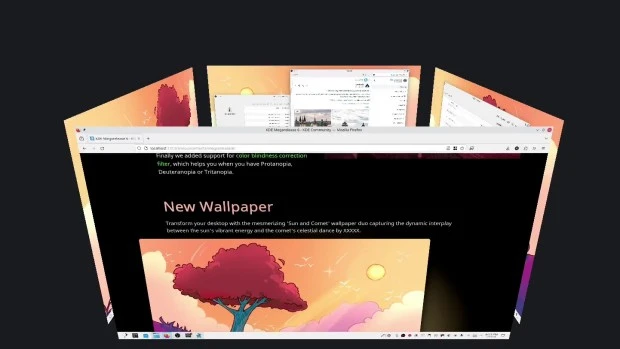
Así que me congratula en presentar que hoy martes 10 de septiembre de 2024, una semana después de liberar el código de Plasma 6.1 la Comunidad KDE presenta la quinta actualización de errores.
Más información: KDE
Las novedades básicas del Plasma 6.1
Hoy es un día de de descarga y actualizaciones, y mientras espero que esté disponible para mi KDE Neon, os comento algunas de sus novedades:
No obstante, aquí tenéis unas pinceladas de las novedades que nos facilitaron los desarrolladores en su fase beta fueron las siguientes:
- Triple búfer en KWin para una mejor renderización y animaciones más fluidas.
- Permitir el uso del protocolo de sincronización explícita de Wayland, lo que debería mejorar la vida de los usuarios de NVIDIA en particular.
- Permitir el uso del portal de captura de entrada.
- Integración del sistema de escritorio remoto para permitir conexiones de clientes RDP con el escritorio Plasma, además de una nueva página en las «Preferencias del sistema» para configurarla.
- Nueva experiencia de usuario para el modo de edición de Plasma, para hacer que su modalidad sea más obvia y visualmente más elegante.
- Se ha añadido una barrera de borde configurable entre pantallas, para que sea más fácil alcanzar los elementos de la interfaz de usuario que tocan los bordes entre pantallas. Esto también permite que los paneles que se ocultan automáticamente en los bordes entre las pantallas funcionen correctamente.
- Restauración de falsa sesión en Wayland que, por lo menos, vuelve a abrir las aplicaciones que estaban abiertas la última vez, incluso aunque no vuelvan a estar situadas en el mismo lugar. Todavía se sigue trabajando en la restauración real de la sesión.
- Compatibilidad con la sincronización del color de la luz RGB posterior del teclado con el color de acento de Plasma.
- Permitir el uso del perfil de color integrado en la pantalla, para las pantallas que lo incluyan.
- Permitir que Discover pueda sustituir aplicaciones Flatpak que han alcanzado el final de soporte con sus reemplazos.
- Compatibilidad con las funciones del modo de conservación de batería en muchos portátiles Lenovo IdeaPad y Legion.
- Compatibilidad con el bloqueo de pantalla sin contraseña, que permite usarlo como un salvapantallas en entornos sin problemas de seguridad.
- Ahora se puede hacer un clic central en el widget de «Energía y batería» para bloquear o desbloquear el reposo automático y el bloqueo de la pantalla. También se puede usar la rueda del ratón sobre él para cambiar el perfil de ahorro de energía activo.
- Esquinas ligeramente redondeadas y más coherencia entre los radios de las esquinas en todas partes.
- Mejor algoritmo de organización de ventanas para la «Vista general».
- El efecto «Mover el cursor para encontrarlo» se ha activado de forma predeterminada.
- Nuevo efecto desactivado de forma predeterminada para ocultar el puntero del ratón tras un período de inactividad.
- La página del teclado de las «Preferencias del sistema» se ha reescrito en QML.
En los próximas entradas más detalles.
La entrada Quinta actualización de Plasma 6.1 se publicó primero en KDE Blog.
Quinta actualización de Plasma 6.1 – Copy
Me alegra compartir con todos vosotros la quinta actualización de Plasma 6.1, iniciando así una serie de revisión de software que le dotará de más estabilidad, mejores traducción y resolución de errores. Estas actualizaciones son 100% recomendables y casi obligatorias para cualquier usuario ya que lo único que hacen es mejorar la versión sin comprometer sus funcionalidades.
Quinta actualización de Plasma 6.1
No existe Software creado por la humanidad que no contenga errores. Es un hecho incontestable y cuya única solución son las actualizaciones. Es por ello que en el ciclo de desarrollo del software creado por la Comunidad KDE se incluye siempre las fechas de las mismas siguiendo una especie de serie de Fibonacci.
La Comunidad KDE ha publicado la quinta actualización de Plasma 6.1, una versión que viene a subsanar los errores graves del gran salto en cuanto a tecnología que fue Plasma 6.
Así que me congratula en presentar que hoy martes 10 de septiembre de 2024, una semana después de liberar el código de Plasma 6.1 la Comunidad KDE presenta la quinta actualización de errores.
Más información: KDE
Las novedades básicas del Plasma 6.1
Hoy es un día de de descarga y actualizaciones, y mientras espero que esté disponible para mi KDE Neon, os comento algunas de sus novedades:
No obstante, aquí tenéis unas pinceladas de las novedades que nos facilitaron los desarrolladores en su fase beta fueron las siguientes:
- Triple búfer en KWin para una mejor renderización y animaciones más fluidas.
- Permitir el uso del protocolo de sincronización explícita de Wayland, lo que debería mejorar la vida de los usuarios de NVIDIA en particular.
- Permitir el uso del portal de captura de entrada.
- Integración del sistema de escritorio remoto para permitir conexiones de clientes RDP con el escritorio Plasma, además de una nueva página en las «Preferencias del sistema» para configurarla.
- Nueva experiencia de usuario para el modo de edición de Plasma, para hacer que su modalidad sea más obvia y visualmente más elegante.
- Se ha añadido una barrera de borde configurable entre pantallas, para que sea más fácil alcanzar los elementos de la interfaz de usuario que tocan los bordes entre pantallas. Esto también permite que los paneles que se ocultan automáticamente en los bordes entre las pantallas funcionen correctamente.
- Restauración de falsa sesión en Wayland que, por lo menos, vuelve a abrir las aplicaciones que estaban abiertas la última vez, incluso aunque no vuelvan a estar situadas en el mismo lugar. Todavía se sigue trabajando en la restauración real de la sesión.
- Compatibilidad con la sincronización del color de la luz RGB posterior del teclado con el color de acento de Plasma.
- Permitir el uso del perfil de color integrado en la pantalla, para las pantallas que lo incluyan.
- Permitir que Discover pueda sustituir aplicaciones Flatpak que han alcanzado el final de soporte con sus reemplazos.
- Compatibilidad con las funciones del modo de conservación de batería en muchos portátiles Lenovo IdeaPad y Legion.
- Compatibilidad con el bloqueo de pantalla sin contraseña, que permite usarlo como un salvapantallas en entornos sin problemas de seguridad.
- Ahora se puede hacer un clic central en el widget de «Energía y batería» para bloquear o desbloquear el reposo automático y el bloqueo de la pantalla. También se puede usar la rueda del ratón sobre él para cambiar el perfil de ahorro de energía activo.
- Esquinas ligeramente redondeadas y más coherencia entre los radios de las esquinas en todas partes.
- Mejor algoritmo de organización de ventanas para la «Vista general».
- El efecto «Mover el cursor para encontrarlo» se ha activado de forma predeterminada.
- Nuevo efecto desactivado de forma predeterminada para ocultar el puntero del ratón tras un período de inactividad.
- La página del teclado de las «Preferencias del sistema» se ha reescrito en QML.
En los próximas entradas más detalles.
La entrada Quinta actualización de Plasma 6.1 – Copy se publicó primero en KDE Blog.
Objetivos KDE 2024: simplicar el desarrollo de aplicaciones, opinión de los usuarios y búsqueda nuevos colaboradores
La Akademy de este año de Würtzburg ha generado, como ocurre cada ciertas ediciones del evento, una de las noticias más importantes para la Comunidad. Se han hecho público los objetivos KDE 2024, los cuales se han establecido como:simplicar el desarrollo de aplicaciones a los desarrolaldores, utilizar de forma más eficiente la opinión de los usuarios y la búsqueda nuevos colaboradores. Como ya pasó en el 2019 y 2022, estos objetivos no significan que los desarrolladores se centren solo en ellos, pero si que estarán dentro de todas las mentes pensantes del proyecto con lo que se espera dar un gran salto respecto a ellos.
Los objetivo de KDE: una líneas necesarias
Es muy complicado guiar un proyecto de Software Libre ya que gran parte de su desarrollo es voluntario y las personas que lo suelen hacer no están obligadas a hacer lo que no quieren hacer (esto ha sonado un poco extraño pero creo que me entendéis).
Por otra parte, que cada desarrollador vaya por su lado sin tener en cuenta el trabajo o las líneas maestras del resto, consigue que tengamos un buen lío (algo que suele ser habitual en el Software Libre).
Es por ello que plantear unos objetivos únicos que guíen el Proyecto KDE durante un par de años es muy complicado. No obstante, el órgano de gobierno de KDE, que se llama KDE e.V., se está esforzando mucho para encajar ambas ideas.

Para ello, cada algunos años se pide a los miembros de la Comunidad que propongan al resto cuáles son los objetivos que creen más importantes para el desarrollo del Proyecto.
Posteriormente, se realiza una votación y se seleccionan los 3 objetivos principales que los desarrolladores deberían tener en mente cuando estén desarrollando el Proyecto KDE.
Veamos que se ha decidido este año.
Objetivos KDE 2024: simplicar el desarrollo de aplicaciones, opinión de los usuarios y búsqueda nuevos colaboradores
De nuevo tres objetivos han sido seleccionados para ser añadidos a los anteriores y que reciban una merecida atención por parte de los desarrolladores del Proyecto KDE.

- Experiencia simplificada en el desarrollo de aplicaciones: este objetivo se centra en mejorar el proceso de desarrollo de aplicaciones. Al facilitar a los desarrolladores la creación de aplicaciones, KDE espera atraer a más colaboradores y ofrecer un mejor software tanto para aplicaciones propias como de terceros. Una tarea notable dentro de este objetivo es mejorar la experiencia de crear aplicaciones KDE con lenguajes más allá de C++, como Rust o Python.
- Nos importa tu opinión: KDE tiene una base de usuarios diversa con necesidades de entrada únicas: artistas que usan monitores complejos y tabletas de dibujo; jugadores con mandos, ratones extravagantes y dispositivos de mano; usuarios que requieren características de accesibilidad o que usan un lenguaje óptimo con métodos de entrada complejos; estudiantes con portátiles, 2 en 1 y tabletas… ¡y mucho más! Aunque KDE ha hecho progresos significativos en el apoyo a estas diversas fuentes de entrada a lo largo de los años, todavía hay lagunas que deben abordarse. Este objetivo pretende cerrar esas brechas y ofrecer una experiencia de entrada realmente fluida para todos.
- ¡KDE te necesita! 🫵: El crecimiento de KDE depende de nuevos colaboradores, pero la falta de participación de nuevos miembros en proyectos clave como Plasma, Kdenlive, Krita, GCompris y otros es preocupante. Este objetivo se centra en formalizar y mejorar los procesos de reclutamiento, no sólo para individuos sino también para instituciones. Garantizar que la incorporación de nuevos talentos se convierte en una prioridad continua y para toda la comunidad, vital para la sostenibilidad de KDE a largo plazo.
Como vemos, la Comunidad KDE, sin dejar de ser una Comunidad, intenta dar respuesta a las inquietudes de la mayoría de sus miembros, e intenta aunar esfuerzos para seguir creciendo.
Y vosotros, ¿qué os parecen los objetivos KDE 2024? Comentad lo que queráis en los comentarios pero, sobretodo, pensad en involucraros si pensáis que los desarrolladores están equivocados. El Software Libre lo hacen personas y su futuro lo deciden personas como tu o yo, no lo olvidéis nunca.
Más información: KDE Blogs
La entrada Objetivos KDE 2024: simplicar el desarrollo de aplicaciones, opinión de los usuarios y búsqueda nuevos colaboradores se publicó primero en KDE Blog.
Objetivos KDE 2024: simplicar el desarrollo de aplicaciones, mejorar la interacción con dispositivos y búsqueda nuevos colaboradores
La Akademy de este año de Würtzburg ha generado, como ocurre cada ciertas ediciones del evento, una de las noticias más importantes para la Comunidad. Se han hecho público los objetivos KDE 2024, los cuales se han establecido como:simplicar el desarrollo de aplicaciones a los desarrolaldores, mejorar la forma de interacción de KDE con los diferentes dispositivos y la búsqueda nuevos colaboradores. Como ya pasó en el 2019 y 2022, estos objetivos no significan que los desarrolladores se centren solo en ellos, pero si que estarán dentro de todas las mentes pensantes del proyecto con lo que se espera dar un gran salto respecto a ellos.
Los objetivo de KDE: una líneas necesarias
Es muy complicado guiar un proyecto de Software Libre ya que gran parte de su desarrollo es voluntario y las personas que lo suelen hacer no están obligadas a hacer lo que no quieren hacer (esto ha sonado un poco extraño pero creo que me entendéis).
Por otra parte, que cada desarrollador vaya por su lado sin tener en cuenta el trabajo o las líneas maestras del resto, consigue que tengamos un buen lío (algo que suele ser habitual en el Software Libre).
Es por ello que plantear unos objetivos únicos que guíen el Proyecto KDE durante un par de años es muy complicado. No obstante, el órgano de gobierno de KDE, que se llama KDE e.V., se está esforzando mucho para encajar ambas ideas.
Para ello, cada algunos años se pide a los miembros de la Comunidad que propongan al resto cuáles son los objetivos que creen más importantes para el desarrollo del Proyecto.
Posteriormente, se realiza una votación y se seleccionan los 3 objetivos principales que los desarrolladores deberían tener en mente cuando estén desarrollando el Proyecto KDE.
Veamos que se ha decidido este año.
Objetivos KDE 2024: simplicar el desarrollo de aplicaciones, mejorar la interacción con dispositivos y búsqueda nuevos colaboradores
De nuevo tres objetivos han sido seleccionados para ser añadidos a los anteriores y que reciban una merecida atención por parte de los desarrolladores del Proyecto KDE.
- Experiencia simplificada en el desarrollo de aplicaciones: este objetivo se centra en mejorar el proceso de desarrollo de aplicaciones. Al facilitar a los desarrolladores la creación de aplicaciones, KDE espera atraer a más colaboradores y ofrecer un mejor software tanto para aplicaciones propias como de terceros. Una tarea notable dentro de este objetivo es mejorar la experiencia de crear aplicaciones KDE con lenguajes más allá de C++, como Rust o Python.
- Nos importa tu opinión: KDE tiene una base de usuarios diversa con necesidades de entrada únicas: artistas que usan monitores complejos y tabletas de dibujo; jugadores con mandos, ratones extravagantes y dispositivos de mano; usuarios que requieren características de accesibilidad o que usan un lenguaje óptimo con métodos de entrada complejos; estudiantes con portátiles, 2 en 1 y tabletas… ¡y mucho más! Aunque KDE ha hecho progresos significativos en el apoyo a estas diversas fuentes de entrada a lo largo de los años, todavía hay lagunas que deben abordarse. Este objetivo pretende cerrar esas brechas y ofrecer una experiencia de entrada realmente fluida para todos.
- ¡KDE te necesita! 🫵: El crecimiento de KDE depende de nuevos colaboradores, pero la falta de participación de nuevos miembros en proyectos clave como Plasma, Kdenlive, Krita, GCompris y otros es preocupante. Este objetivo se centra en formalizar y mejorar los procesos de reclutamiento, no sólo para individuos sino también para instituciones. Garantizar que la incorporación de nuevos talentos se convierte en una prioridad continua y para toda la comunidad, vital para la sostenibilidad de KDE a largo plazo.
Como vemos, la Comunidad KDE, sin dejar de ser una Comunidad, intenta dar respuesta a las inquietudes de la mayoría de sus miembros, e intenta aunar esfuerzos para seguir creciendo.
Y vosotros, ¿qué os parecen los objetivos KDE 2024? Comentad lo que queráis en los comentarios pero, sobretodo, pensad en involucraros si pensáis que los desarrolladores están equivocados. El Software Libre lo hacen personas y su futuro lo deciden personas como tu o yo, no lo olvidéis nunca.
Más información: KDE Blogs
La entrada Objetivos KDE 2024: simplicar el desarrollo de aplicaciones, mejorar la interacción con dispositivos y búsqueda nuevos colaboradores se publicó primero en KDE Blog.

Kurz práce v příkazové řádce Linuxu nejen pro MetaCentrum 2025
Nebojte se příkazové řádky Linuxu! Je to mocný a přívětivý nástroj umožňující efektivně zpracovat i velká data a zautomatizovat činnosti. Prakticky shodně funguje příkazová řádka i v Apple macOS, BSD a dalších UNIXových systémech, nejen v Linuxu. Kurz je vhodný pro úplné začátečníky i mírně pokročilé. Jediným vstupním požadavkem je zájem (nebo potřeba) pracovat v příkazové řádce, typicky na linuxovém výpočetním serveru.