
 Member
 baltolkien
Nuevos Executive de Slimbook
Cada cierto tiempo me gusta hablar de Slimbook, la marca de dispositivos 100% compatibles con GNU/Linux por varias razones, entre las que destacan que soy usuario habitual de la marca y que tengo la convicción de que debemos promocionar las empresas que confían en el Sotware Libre. En la recta final del año pasado ya les dediqué tres artículos pero es que debería dedicarles más porque no paran. Es por ello que me complace compartir con vosotros que han sido lanzados los nuevos Executive de Slimbook, dentro de su serie de ultrabooks de alta gama ¿Tienes curiosidad? Sigue leyendo.
Nuevos Executive de Slimbook
Aunque en el mundo de las ordenadores de sobremesa o de escritorio la posibilidad de disfrutar de un sistema operativo libre es algo relativamente sencillo. De hecho, su conquista apenas tiene el problema del arranque y las tarjetas gráficas, el resto se soluciona rápido y bien (aunque las impresoras pueden ser un dolor de muelas).

No obstante siempre es de agradecer que algunas compañías como Slimbook se preocupen no solo de ofrecerte una alternativa que asegura su compatibilidad absoluta con los sistemas del GNU y el pingüino sino que te los afinen como solo los profesionales saben hacer (y si no me creéis os remito a este artículo donde un producto puesto a punto por los chicos y chicas de Slimbook barría en las pruebas de rendimiento a ordenadores en principio más potentes).
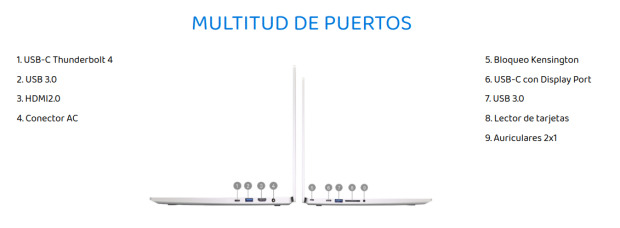
De esta forma me congratula compartir con todos vosotros que recientemente han presentado los nuevos ultrabooks Executive, una revisión de este modelo de alta gama que viene con su sello de calidad tradicional y con mejoras como:
- Memorias RAM DDR5 a 5200Mhz, en lugar de DDR4 3200Mhz.
- Procesador Intel® Core™ i7-13700H hasta 5,00 GHz, con 14 cores, 6 performance y 8 eficientes, que suman 20 hilos y caché de 24MB.
- Gráficos Intel® Iris® Xe G7 o NVIDIA® GeForce RTX™ 4060 de 8GB y TGP hasta 95W (siendo un 22% más potente que la anterior RTX 3060 de 4GB).
- Posibilidad de elegir color gris color o negro intenso.
Por cierto, y como suelo comentar en estos casos, esto tampoco es una entrada patrocinada. Mi relación con Slimbook es de cliente habitual, amistad e intereses mutuos (el dominio del mundo por parte de la filosofía GNU/Linux).
Más información: Slimbook
La entrada Nuevos Executive de Slimbook se publicó primero en KDE Blog.

Chafa 1.14: All-singing, all-dancing
Dear friends, comrades, partners in crime and moderate profit! I am pleased to announce the immediate availability of Chafa 1.14.0. There are release notes, but who's got time for that? All the fun stuff is in this post. You should be reading it instead.
Pixel perfection
Images can now be padded instead of stretched to fit their cell extent exactly –

– so I'll no longer have to explain why our 50kLOC monstrosity couldn't do pixel-perfect output, while sixcat (300LOC) did so effortlessly. Naturally, I had to make this as hard as possible for myself by splicing in padding before and after each row as they're processed for channel reordering and such, but on the plus side, this maximizes cache friendliness and parallelism behind a nice and homogeneous internal API.
You can get the old behavior back with --exact-size off. It defaults to auto, which will do the right thing (i.e. pad if image fits in viewport without scaling and scaling wasn't explicitly requested).
Another improvement in this vein is that sRGB is properly linearized in scaling operations now. This is pipelined along with everything else, and should be suitably fast.
Multiplexer passthrough
Previously, it was impossible to do better than character art inside multiplexers like tmux and GNU Screen. This is no longer the case; kitty has a new trick that allows for persistent raster image placement in these, which we implement. The above mentioned multiplexers have slight differences in their passthrough protocols; we support both with the new --passthrough argument.
We also support sixel passthrough. Sixels will be wrecked by multiplexer updates, so this is off by default. You can enable it with e.g. -f sixel --passthrough screen. tmux tends to dispose of the image immediately after we exit, so it may be a good idea to use --passthrough tmux -d 5 there so you get a chance to look at it first.
To my knowledge, Chafa is the only terminal graphics toolkit to offer passthrough for all four combinations of sixel/kitty and tmux/screen. I think the iTerm2 protocol would be doable too, if only.
MS Windows compatibility
It runs pretty well on Windows. You can use it in PowerShell. @oshaboy added support for ConHost, so it can technically be used on very old Windows versions – although this hasn't gotten much testing yet.
Python bindings
Erica Ferrua Edwardsdóttir's amazing Python bindings have been around for a while now, yet nary a peep from me on my blag. This shameful deficit stands in contrast to the stunning professionalism of her work. You need to do this:
pip install chafa.pyDo it now. Everything's well structured, the documentation is entertaining and well written, and there's even a tutorial. It's rare to see a project that simultaneously delivers and channels the spirit of F/OSS this well. You'll also find it on GitHub.
JavaScript enablement
Héctor Molinero Fernández started doing WebAssembly builds, which means you can now use the Chafa API from JavaScript. Like so:
npm install chafa-wasmHe also made a cool web app to show off all the bells and whistles!
Cheerleading aside, I've had no hand in either of these projects. The glory belongs to their respective maintainers, along with all of the praise, stars, code submissions and issue reports, heh heh.
Art!
@clort81 sent me this picture:
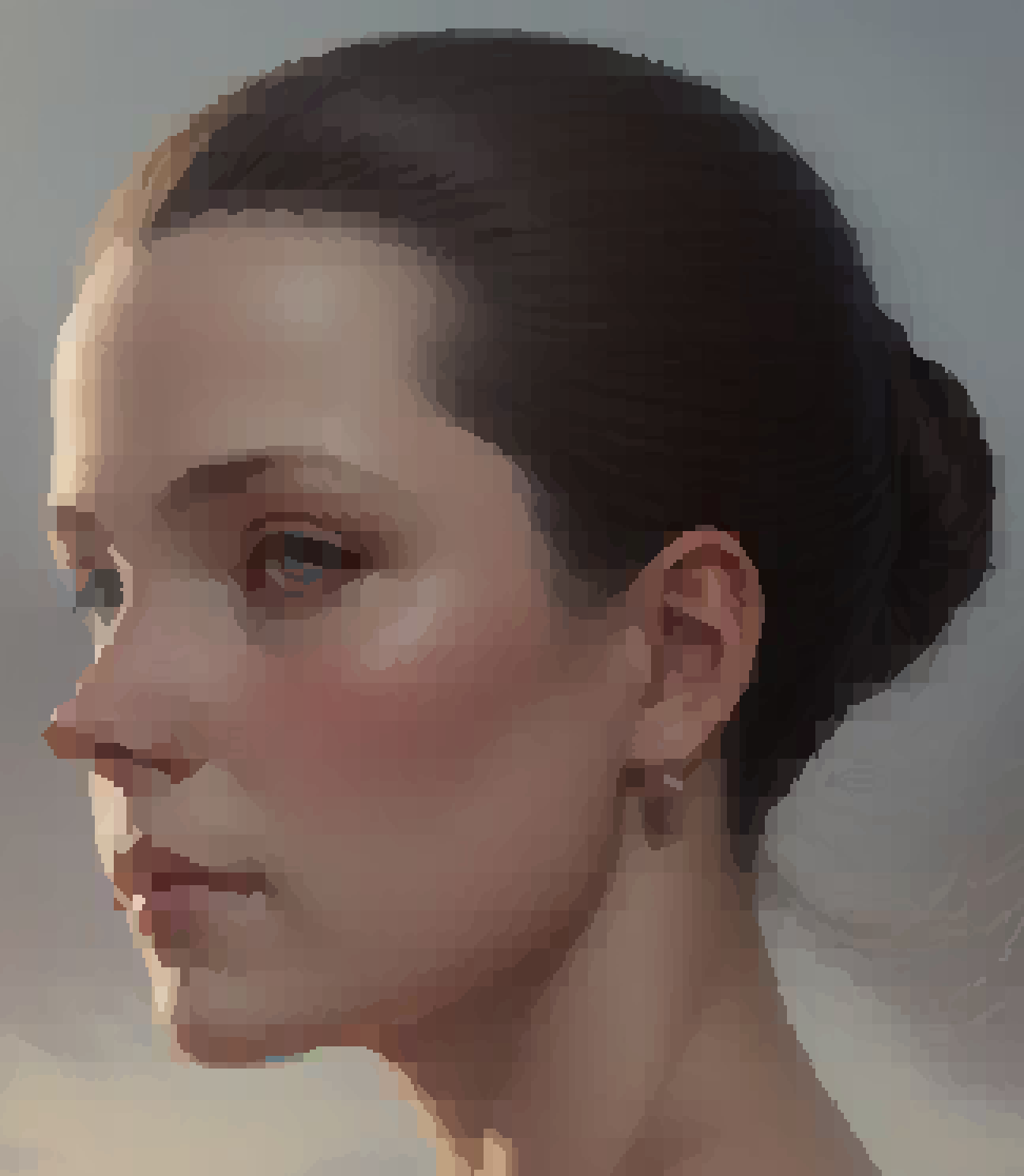
What's special about it? Well, it's character art!
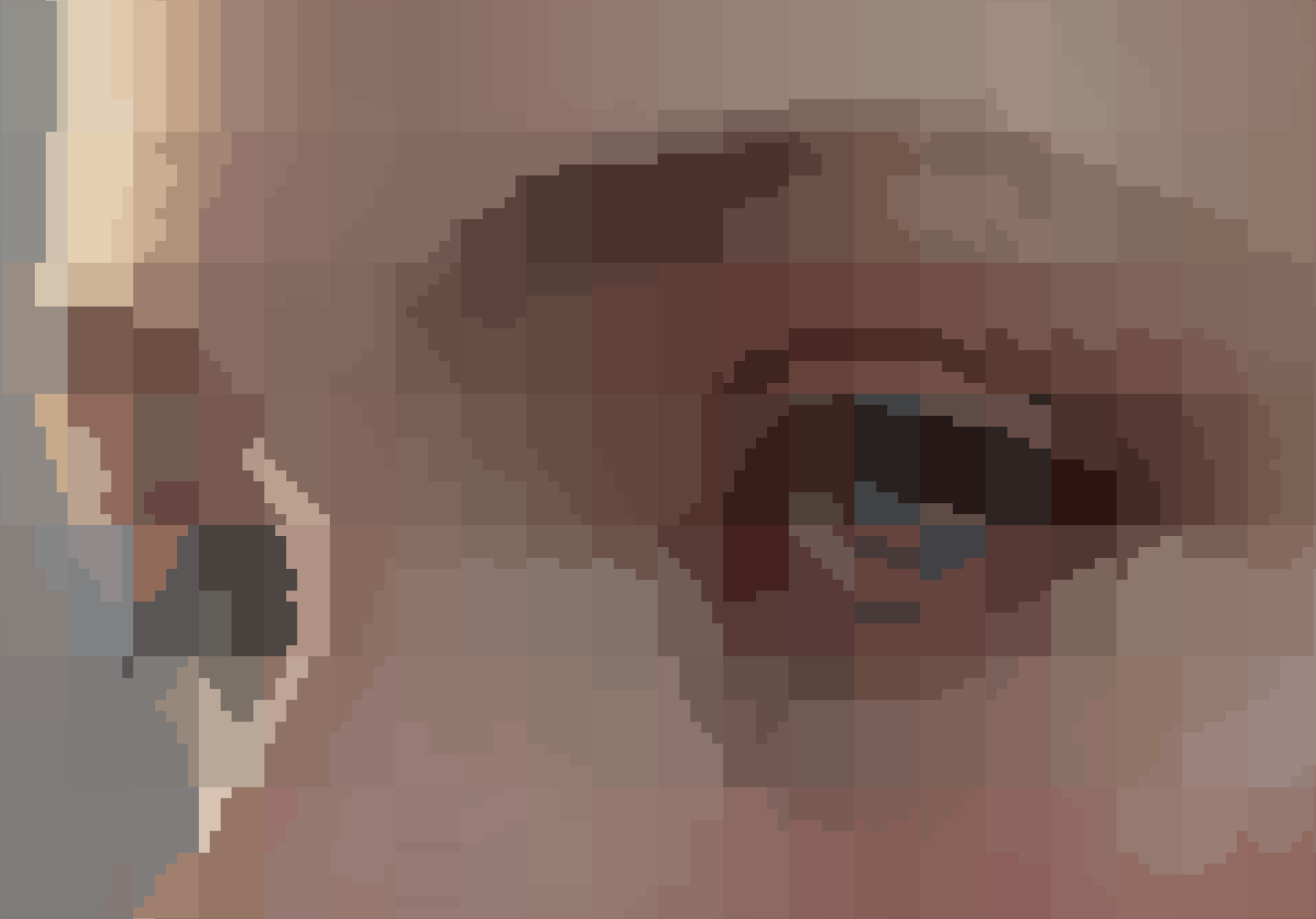
You have to zoom in a bit before it becomes obvious; there're only two colors per character cell.
The glyphs are something else, though. You see, @clort81 wasn't happy with the limited offering of block drawing symbols in Unicode, and set out to create Blapinus, a 6125-glyph (!) hand-pixeled 6×12 PCF font with all the shapes you could ever want.
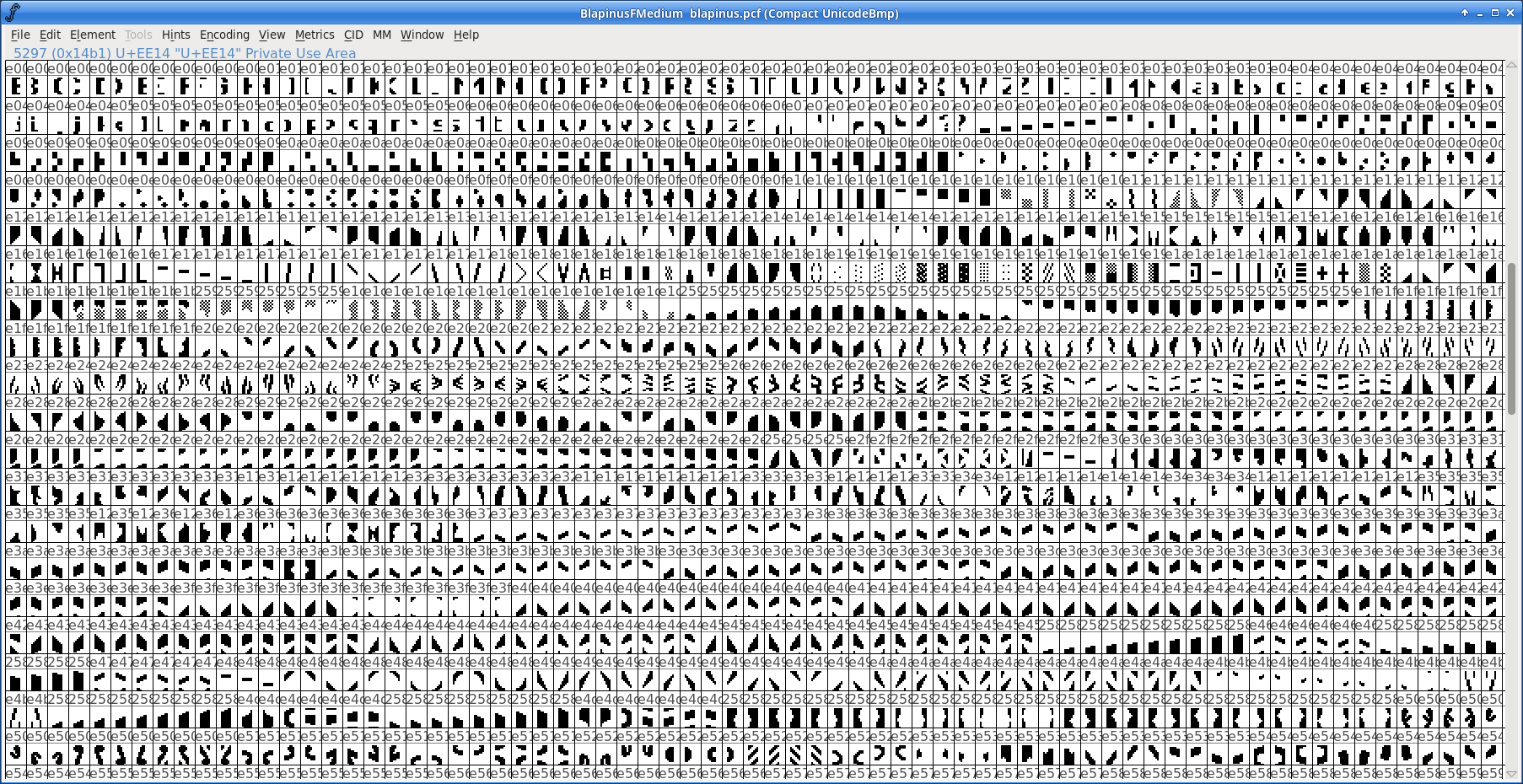
Plug that into your terminal (and Chafa), et voilà:
sudo cp blapinus.pcf.gz /usr/share/fonts/misc/
xterm -font -blap-*
Note that your fonts may live somewhere else, so relocate accordingly. Then inside XTerm, run:
chafa -f symbols --glyph-file blapinus.pcf.gz --symbols imported hello.pngIf you see strange symbols in your output, you can try excluding some wide and ambiguous code points, e.g. --symbols imported-wide-ued00..uffff.
You can probably set this up in other terminals and display servers too, but know that it could be a long and winding path you're going down. Traveler beware. Or push the pedal to the metal and write a trip report. I'd love to read it.
If your terminal renders the font correctly, this can even have somewhat practical qualities:
First, it integrates perfectly with tmux and GNU Screen. Redraw, scrollback and editing just works, no passthrough tricks required.
Second, albeit lossy, the compression ratio is surprisingly good. Assuming four bytes per pixel, a 6×12 cell is 288 bytes uncompressed. We turn this into 39 bytes at most (a maximum of 36 bytes for the direct color sequence plus 3 bytes for the UTF-8 character), or an 86% reduction. Not bad, considering the compression dictionary is a 100kB font file.
Deflate will further compress this kind of data by 3/4, so if you're running this in a compressed ssh session, you can expect the total gain to be about 95%.
Prior art!
I've mentioned Mo Zhou's work before, but I'd be remiss not to bring it up here; they focused their considerable ML skills on a generator that takes a lot of the pain out of the font creation process. Just point it at an image collection, and by the magic of k-means clustering and a minimal increase in your carbon footprint, out pops a new font brimming with delectable puzzle pieces. You get scalable TTF, with SVG as an intermediate format, which is more agreeable with modern rendering stacks. Here it is in VTE:
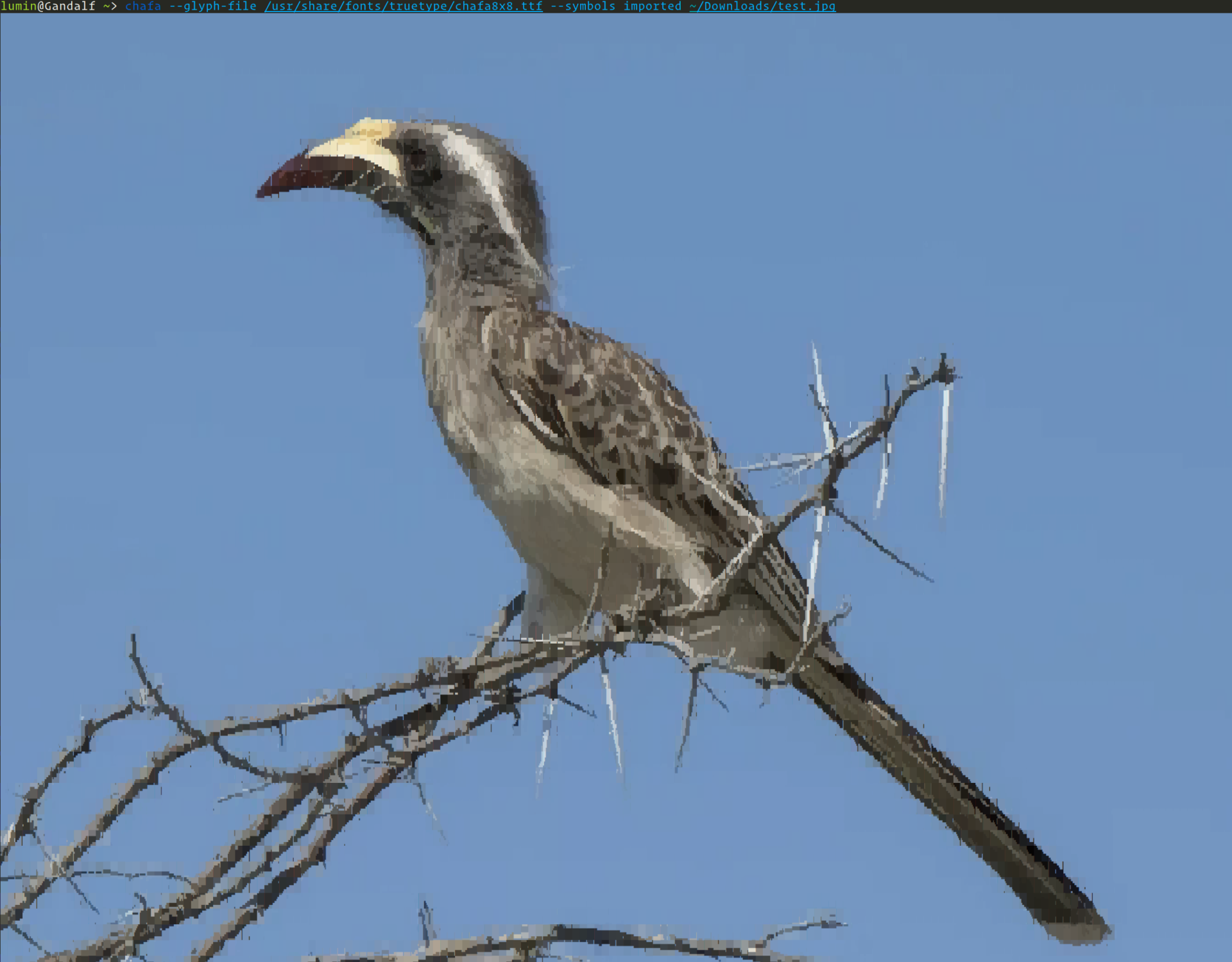
This ML-generated font makes for a more organic look. There are unfortunately still some artifacts caused – presumably – by VTE's cell padding. The generator has offset hacks to work around it, but it's hard to make custom connective glyphs look perfect in every terminal.
You can read more about it in one of our longest-running GitHub issues. We're taking it all the way.
Cool applications
Chafa's found its way into the nooks and crannies of many a sweet application by now. I'd especially like to mention these three here:

ANSIWAVE BBS, the brainchild of Zach Oakes, is written in Nim and contains an embedded build of Chafa for character graphics generation. As a one-time (and sometimes) BBS sysop and denizen, this hits me right in the feels.
Felix is a nice file browser by Kyohei Uto written in Rust. It uses Chafa as an external image previewer.
kew, a terminal music player by the mysterious @ravachol, is written in C and uses the native Chafa API to generate cover previews. Development on this has been moving very quickly.
A laid-back place to chat about all this stuff
Issue trackers are formal and supposedly high-SNR. If you'd like a more relaxed place to chat about Chafa, your own programs, terminal graphics (modern or ancient), graphics programming in general or artistic expression related to any of these, drop by our secret business Matrix channel, #chafa:matrix.org. We'll be waiting.

I'm also enjoying Mastodon these days. Occasional announcements and amusements go there. It's good.
Thanks
Last, but not least: a big thank you to everyone who wrote code, reported bugs, filed suggestions and helped test this time around. And an extra big thanks to all the packagers and distributors who make the F/OSS world turn. You're the best.
No desenchufes la memoria USB, «Do not unplug yet» – Plasmoides de KDE (243)
Como decía en la anterior entrada de la serie estoy intentando huir de los plasmoides de Zayronxyo.. y por una vez lo he conseguido. Y es que he encontrado un widget que me ha hecho mucha gracia y que tiene su utilidad. Se llama Do not unplug yet y que hace jústamente eso, te avisa de que no desenchufes la memoria USB porque el sistema todavía está copiando archivos y podría estropearla.
No desenchufes la memoria USB, «Do not unplug yet» – Plasmoides de KDE (243)
Sigo con estas pequeñas aplicaciones que se conocen como applets, widgets o plasmoides y que dotan de funcionalidades de todo tipo a nuestro entorno de trabajo KDE y que parece que van a sufrir un lavado de cara considerable en Plasma 6.
Como he comentado en otras ocasiones, de plasmoides tenemos de todo tipo funcionales, de configuración, de comportamiento, de decoración o, como no podía ser de otra forma, de información sobre nuestro sistema como puede ser el uso de disco duro, o de memoria RAM, la temperatura o la carga de uso de nuestras CPUs.
En esta caso os presento un plasmoide de Luis Bocanegra que tiene de nombre «Do not unplug yet» y que, situado en la barra o directamente en tu fondo de pantalla, hace jústamente eso, te avisa de que no desenchufes la memoria USB porque el sistema todavía está copiando archivos y podría estropearla.
De esta forma, aparecerá un icono con el mensaje de advertencia cuando se transfieren archivos en segundo plano a unidades extraíbles. En palabras de ha creado este widget porque a veces parece que ya ha terminado de hacerlo pero en realidad no, ya queel sistema operativo utiliza la caché de escritura, que copia el archivo en la memoria ram (muy rápida) y luego en la unidad a una velocidad inferior.

Y como siempre digo, si os gusta el plasmoide podéis «pagarlo» de muchas formas en la página de KDE Store, que estoy seguro que el desarrollador lo agradecer?: puntúale positivamente, hazle un comentario en la página o realiza una donación. Ayudar al desarrollo del Software Libre también se hace simplemente dando las gracias, ayuda mucho más de lo que os podéis imaginar, recordad la campaña I love Free Software Day de la Free Software Foundation donde se nos recordaba esta forma tan sencilla de colaborar con el gran proyecto del Software Libre y que en el blog dedicamos un artículo.
Más información: KDE Store
¿Qué son los plasmoides?
Para los no iniciados en el blog, quizás la palabra plasmoide le suene un poco rara pero no es mas que el nombre que reciben los widgets para el escritorio Plasma de KDE.
En otras palabras, los plasmoides no son más que pequeñas aplicaciones que puestas sobre el escritorio o sobre una de las barras de tareas del mismo aumentan las funcionalidades del mismo o simplemente lo decoran.
La entrada No desenchufes la memoria USB, «Do not unplug yet» – Plasmoides de KDE (243) se publicó primero en KDE Blog.
Musica criada por IA é destaque nas Rádios do Spotify.

Em uma iniciativa individual, estava decidindo qual tecnologia incluir no projeto JAX voltado para a criação musical. Durante a busca, avaliei várias opções como Muzic, MusicGen, stemgen, mustango, stableaudio, ultimatevocalremovergui, AudioLDM, musiclm-pytorch, dance-diffusion, Mubert-Text-to-Music, AIVA, Jukebox, magenta e audio-diffusion-pytorch. Nesse processo, descobri a plataforma SUNO, que começou a produzir músicas em português por volta de 29 de dezembro aproximadamente acho eu.
A criação da música levou cerca de 20 minutos, um processo acessível a qualquer pessoa, similar ao ChatGPT ou a geradores de imagens. É possível solicitar que a IA componha a música com base em um prompt ou fornecer versos e refrões específicos. Eu pedi uma música sobre pessoas tirando selfies no carnaval, com um ritmo pop carnavalesco. Segue abaixo o link com o resultado: https://distrokid.com/hyperfollow/jaxsuaia/carnaval-da-selfie

Abaixo o link das rádios onde a musica foi destaque:

- https://open.spotify.com/playlist/37i9dQZF1E4sAAL4UTCW33
- https://open.spotify.com/playlist/37i9dQZF1E4CU2UxdZIADr
- https://open.spotify.com/playlist/37i9dQZF1E4mYsPOMHq3AK
- https://open.spotify.com/playlist/37i9dQZF1E4ooRGfWtOa2A
- https://open.spotify.com/playlist/37i9dQZF1E4xWhB4r1fgLi
- https://open.spotify.com/playlist/37i9dQZF1E4lG1cyNGL6Mk
- https://open.spotify.com/playlist/37i9dQZF1E4rNOqTZ2jTSM
- https://open.spotify.com/playlist/37i9dQZF1E4t2U41orCEyT
- https://open.spotify.com/playlist/37i9dQZF1E4kGpcbubAz6a
- https://open.spotify.com/playlist/37i9dQZF1E4FwogHKHELkd
- https://open.spotify.com/playlist/37i9dQZF1E4rejAn0SyW5e
Publicado #Vim 9.1 la primera versión sin Bram Moolenaar
El pasado 2 de enero de 2024 se publicó la versión 9.1 del editor Vim. La primera que se ha publicado desde el fallecimiento de su creador Bram Moolenaar

A pesar de la triste e inesperada noticia del fallecimiento de Bram Moolenaar el creador y principal desarrollador del editor Vim el pasado agosto de 2023, el desarrollo del código del editor Vim sigue adelante por parte de la comunidad.
Así el pasado 2 de enero de 2024, se anunció la publicación de la versión 9.1 del editor Vim. Publicación dedicada a la memoria de Bram Moolenaar que durante 30 años se dedicó a la tarea de mantener y desarrollar Vim junto a la comunidad.
Vale, la noticia no es reciente, ya que se publicó el pasado 2 de enero de 2024, pero no me había dado cuenta hasta hoy, y no he querido dejar pasar la ocasión de escribir al respecto.
Esta versión 9.1 ha servido sobre todo para corregir un montón de errores reportados desde la publicación de la versión 9 (en la que hice alguna aportación), añadir algunas nuevas funcionalidades y algunas pequeñas mejoras.
Tienes una lista detallada de todos los cambios realizados en este enlace:
Más info en su anuncio oficial:
Vim es software benéfico (charityware). Puedes usarlo y copiarlo tanto como quieras, pero te animo a hacer una donación para los niños necesitados de Uganda.
Visita el sitio web de ICCF para obtener más información: https://iccf-holland.org

6 Características top de Plasma 6 – Vídeo de Ksk Royal
Como se nota que seestán lanzado las versiones beta y rc de Plasma 6 ya que los realizadores de vídeos (o malamente concidos como youtubers) empiezan a hacer sus creaciones. Hoy os presento el vídeo «6 Características top de Plasma 6» creado por Ksk Royal y que fue publicado el pasado 6 de enero. Un vistazo a lo que nos espera en poco más de un mes.
6 Características top de Plasma 6 – Vídeo de Ksk Royal
el pasado 10 de enero fue lanzada la primera RC de KDE 6 ( es decir, de Plasma 6, KDE Frameworks 6 y KDE Gear 24.02). Este conjunto de software está previsto que sea lanzado el 28 de febrero de 2024. Esta primera versión liberada no es apta todavía para el usuario que busquen estabilidad, así que abstenerse usuarios finales si no queréis que se os rompa el sistema.
Pero las advertecnias del párrafo anterior no es aplicable a los creadores de contenido que se dan prisa en probar los lanzamientos en estado de testeo y mostrarnos al resto de usuarios como va funcionando la siguiente versión de mi entorno de trabajo favorito.
De esta forma, en palabras del Ksk Royal:
KDE Plasma 6 Revisión y Top 6 NUEVAS características. Este es el primer vistazo a Plasma 6 la próxima versión de KDE que trae impresionantes actualizaciones y mejoras. En el momento de grabar este vídeo, Plasma 6 está en beta y las características de los cambios que se ven en la versión final parecen estables.
KDE Plasma 6 está construido usando QT 6, el framework central que asegura una integración perfecta con el entorno de escritorio plasma. Esto significa que todos los componentes principales de KDE, como aplicaciones y complementos, están portados a QT6.
En el vídeo podemos disfrutar del efecto cubo, del funcionamiento de Wayland (aunque siempre puede volver a X11), del nuevo panel de configuración de las barras de tareas, de los efectos de las barras flotantes, la renovación continua de las Preferencias del Sistema, la mejora de los efectos de escritorio o de KWin, cambios en Discover, etc. Sin más palabras, dentro vídeo:
Calendario para el lanzamiento de Plasma 6
Aprovecho la entrada para rececordar el calendario de lanzamientos previsto para el desarrollo de Plasma 6. Según el calendario oficial, estos son las fechas para anotar en el calendario, muchas de ellas han pasdo ya, casi podríamos decir:
- 8 de noviembre de 2023: Alfa – KDE Gear 24.01.75 / KDE Plasma 5.80.0 / KDE Frameworks 5.245.0.
- 29 de noviembre de 2023: Beta 1 – KDE Gear 24.01.80 / KDE Plasma 5.90.0 / KDE Frameworks 5.246.0.
- 20 de diciembre de 2023: Beta 2 – KDE Gear 24.01.85 / KDE Plasma 5.91.0 / KDE Frameworks 5.247.0.
- 10 de enero de 2024: Release Candidate 1 – KDE Gear 24.01.90 / KDE Plasma 5.92.0 / KDE Frameworks 5.248.0.
- 31 de enero de 2024: Release Candidate 2 – KDE Gear 24.01.95 / KDE Plasma 5.93.0 / KDE Frameworks 5.249.0.
- 21 de febrero de 2024: Publicación Tarball privada – KDE Gear 24.02.0 / KDE Plasma 6.0 / KDE Frameworks 6.0.
- 28 de febrero de 2024: Publicación pública – KDE Gear 24.02.0 / KDE Plasma 6.0 / KDE Frameworks 6.0.
Personalmente os anuncio que yo iré al ritmo que me marque KDE Neon, mi distribución de cabecera y que cuando se pase a Plasma 6 yo iré detrás.
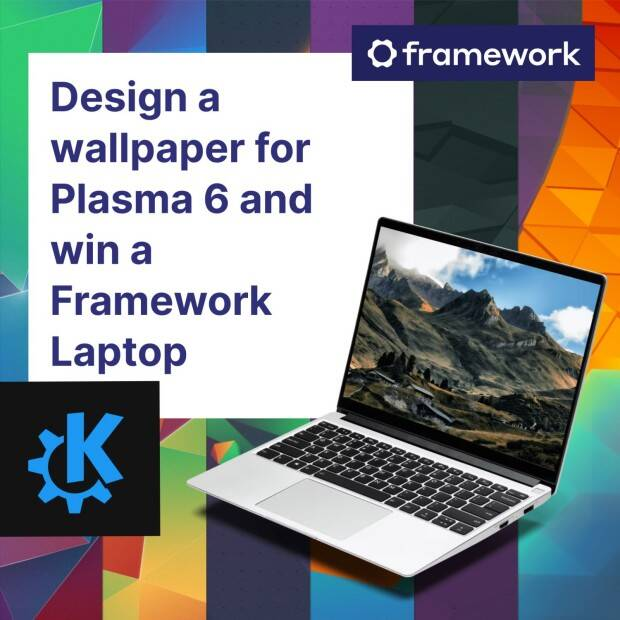
Mientras tanto, os recuerdo que sigue en marcha el concurso para buscar el nuevo fondo de pantalla por defecto del escritorio… que hay ya muchas aportaciones y que todavía estás a tiempo de participar.
Pruébalo y reporta errores

Todas las tareas dentro del mundo del Software Libre son importantes: desarrollar, traducir, empaquetar, diseñar, promocionar, etc. Pero hay una que se suele pasar por alto y de la que solo nos acordamos cuando las cosas no nos funcionan como debería: buscar errores.
Desde el blog te animo a que tú seas una de las personas responsables del éxito del nuevo lanzamiento de la Comunidad KDE. Para ello debes participar en la tarea de buscar y reportar errores, algo básico para que los desarrolladores los solucionen para que el despegue del escritorio esté bien pulido. Debéis pensar que en muchas ocasiones los errores existen porque no le han aparecido al grupo de desarrolladores ya que no se han dado las circunstancias para que lo hagan.
Para ello debes instalarte esta RC y comunicar los errores que salgan en bugs.kde.org, tal y como expliqué en su día en esta entrada del blog.Navegación de entradas
La entrada 6 Características top de Plasma 6 – Vídeo de Ksk Royal se publicó primero en KDE Blog.

Guide étape par étape : Comment supprimer une page sur Word
Dans cet article, nous allons voir comment supprimer une page sur Word. Bien que ce soit une tâche simple, il peut parfois être un peu compliqué de le faire de manière efficace. Nous allons explorer plusieurs méthodes pour supprimer une page, ainsi que des astuces pour éviter les problèmes courants liés à la mise en page sur Word.
Convertir au format PDF
La première étape pour supprimer une page sur Word consiste parfois à convertir votre document au format PDF. Cela peut être utile si vous avez des difficultés à supprimer une page spécifique, car les outils de suppression de page sur les logiciels de lecture PDF sont souvent plus simples et plus efficaces.
Il vous suffit de suivre les étapes suivantes :
- Ouvrir le document dans Word
- Aller dans Fichier > Enregistrer sous
- Choisir le format PDF
Problèmes de saut de section
Les sauts de section peuvent causer des problèmes lors de la suppression de pages sur Word. Si vous avez des sauts de section dans votre document, vous devrez peut-être les supprimer avant de pouvoir supprimer la page désirée.
Voici comment faire :
- Allez dans Affichage > Miniatures de document
- Sélectionnez la section que vous souhaitez supprimer
- Appuyez sur Suppr pour la supprimer
Impaire, Paire et Suivante entraînent des pages vierges
Un autre problème courant est lié aux sauts de section impaire, paire et suivante qui entraînent des pages vierges. Si vous avez des pages vides que vous souhaitez supprimer, voici comment vous pouvez procéder :
Assurez-vous que votre document affiche les marques de paragraphes en cliquant sur l’icône ¶ dans l’onglet Accueil de Word, puis suivez ces étapes :
- Repérez les sauts de section vides
- Cliquez après le saut de section
- Appuyez sur Suppr pour le supprimer
Ajouter une page
Il peut arriver que vous souhaitiez ajouter une page à votre document. Vous pouvez le faire en insérant un saut de section pour forcer Word à commencer une nouvelle page après la section actuelle.
Voici comment ajouter une page :
- Placez le curseur à la fin de la section précédente
- Allez dans Mise en page > Sauts > Sauts de section
- Sélectionnez Nouvelle page
Supprimer une page
Si vous souhaitez supprimer une page dans Word, vous pouvez suivre ces étapes simples. Assurez-vous que vous avez les marques de paragraphes affichées pour voir le contenu de la page clairement.
Voici comment supprimer une page :
- Placez votre curseur à la fin de la page que vous souhaitez supprimer
- Appuyez sur Suppr jusqu’à ce que la page disparaisse
Supprimer le contenu d’une page sans la supprimer elle-même
Il peut arriver que vous souhaitiez conserver la structure de votre document, mais supprimer le contenu d’une page spécifique. Vous pouvez le faire en sélectionnant le contenu de la page et en appuyant sur Suppr.
Voici comment supprimer le contenu d’une page sans supprimer la page elle-même :
- Cliquez à la fin de la page précédente
- Faites glisser votre curseur jusqu’à la fin de la page que vous souhaitez vider
- Appuyez sur Suppr pour effacer le contenu sélectionné
Ajouter ou supprimer des pages maîtres
Les pages maîtres peuvent avoir un impact sur la mise en page de votre document. Si vous souhaitez ajouter ou supprimer des pages maîtres, vous pouvez le faire en accédant à l’onglet Affichage et en sélectionnant le mode Plan.
Ajouter une page maître
Si vous avez besoin d’ajouter une nouvelle page maître, voici la marche à suivre :
Allez dans Affichage > Plan et cliquez avec le bouton droit sur une page maître existante. Ensuite, sélectionnez Insérer une page maître.
Supprimer une page maître
Si vous souhaitez supprimer une page maître, voici ce que vous pouvez faire :
Allez dans Affichage > Plan et cliquez avec le bouton droit sur la page maître que vous voulez supprimer. Ensuite, sélectionnez Supprimer la page maître.
Ajouter une page en double
Parfois, vous voudrez peut-être ajouter une page en double dans votre document. Voici comment procéder :
Allez à l’endroit où vous voulez insérer une page en double. Ensuite, allez dans Mise en page > Sauts > Sauts de section et sélectionnez Page suivante.
Supprimer une page
Nous avons déjà abordé comment supprimer une page, mais il est important de rappeler qu’il peut y avoir différentes manières de le faire en fonction de votre mise en page. Assurez-vous de bien comprendre la structure de votre document pour choisir la méthode la plus appropriée.
Supprimer le contenu d’une page sans la supprimer elle-même
Supprimer le contenu d’une page sans supprimer la page elle-même peut vous être utile si vous avez besoin de restructurer votre document. Assurez-vous de sauvegarder votre document avant d’apporter des modifications importantes à la mise en page.
| Titre | Description |
|---|---|
| Convertir au format PDF | Convertir le document Word en fichier PDF pour simplifier la suppression de page |
| Ajouter une page | Insérer une nouvelle page dans le document |
| Supprimer une page | Supprimer une page indésirable dans le document Word |
[‘Perspectives futures’]
En suivant les astuces et les méthodes décrites dans cet article, vous pourrez maîtriser la suppression de pages sur Word et éviter les problèmes courants liés à la mise en page. Avec une compréhension claire de la structure de votre document, vous pourrez gérer efficacement la suppression et l’ajout de pages pour un résultat professionnel.
FAQ
Comment supprimer une page vide dans un document Word ?
Placez le curseur à l’endroit où se trouve la page vide, puis appuyez sur la touche ‘Suppr’ de votre clavier. Si cela ne fonctionne pas, allez à ‘Affichage’>’Brouillon’, répérez le saut de page et supprimez-le. Il faut ensuite revenir à ‘Affichage’>’Mise en page standard’.
Comment supprimer une page blanche sur pages ?
Dans Pages, placer le curseur à la fin du texte précédant la page blanche, puis appuyer sur la touche ‘Supprimer’ jusqu’à ce que la page blanche disparaisse. Si cela ne fonctionne pas, vérifier la présence de sauts de pages inutiles en affichant les caractères non imprimables (shift + cmd + I) et les supprimer.
Comment supprimer n page Word ?
Pour supprimer une page Word, placez le curseur à la fin de la page précédente et appuyez sur la touche ‘Suppr’. Si elle ne se supprime pas, placez le curseur au début de la page suivante et appuyez sur ‘Retour arrière’. Répétez l’opération pour chaque page à supprimer.
Comment supprimer une page blanche après un saut de section ?
Pour supprimer une page blanche après un saut de section, allez à l’onglet «Affichage», choisissez «Mode brouillon». Puis, placez le curseur sur le saut de section que vous souhaitez supprimer et appuyez sur «Suppr» ou «Retour arrière».
L’article Guide étape par étape : Comment supprimer une page sur Word est apparu en premier sur Astuces Tech.
Episodio 23 de KDE Express: Feliz 2024 y popurri de noticias
Me congratula presentaros el primer que tenemos a nuestra disposición el episodio 23 de KDE Express, titulado «Feliz 2024 y popurri de noticias» donde David Marzal, con el apoyo de Jorge Lama en la post-producción y con un excepcional artista invitado en diferido, Yoyo Fernández , nos ofrece un excelente cóctel de noticias para este 2024.
Episodio 23 de KDE Express: Feliz 2024 y popurri de noticias
Comenté hace tiempo que había nacido KDE Express, un audio con noticias y la actualidad de la Comunidad KDE y del Software Libre con un formato breve (menos de 30 minutos) que complementan los que ya generaba la Comunidad de KDE España, aunque ahora estamos tomándonos un tiempo de respiro por diversos motivos, con sus ya veteranos Vídeo-Podcast que todavía podéis encontrar en Archive.org, Youtube, Ivoox, Spotify y Apple Podcast.

Quedan 46 días para la megapublicación de KDE 6 y eso hace que tengamos muchas noticias que comentar, así que en este episodio se trata el proximo evento de esLibre y de 24H24L, el paso de Nobara a KDE Plasma, un vídeo sobre las razones por las que no hay más distros con Plasma por defecto, la campaña de donaciones de KDE, tres maneras de abrir aplicaciones, una encuesta de uso de Muylinux y como bonus uno de los temas de Yoyo.
De esta forma, los enlaces de interés que aparecen en el audio son muchos y variados:
- Eventos
- esLibre Valencia 2024 ( 24 y 25 de Mayo ): https://eslib.re/2024/
- 24H24L 2024 : https://24h24l.org/
- Nobara se pasa a KDE Plasma por :
- Tasa de refresco variable (VRR),
- (DRM) requerido para soportar la realidad virtual en Wayland,
- Escalado fraccional
- Posibilidad de arrastrar y soltar!
- Mejor integración con Steam.
- https://www.muylinux.com/2023/12/27/nobara-39/
- https://nobaraproject.org/2023/12/26/december-26-2023/
- Why Isn’t Every Linux Distro Shipping KDE? (Brodie Robertson)
- Campaña de donaciones :
- Tres maneras de abrir programas en Plasma
- Escribir el nombre en un escritorio vacío
- Krunner : Alt + F2 o Alt + barra espaciadora
- Con la tecla «super» (o tecla windows)
- https://victorhckinthefreeworld.com/2022/09/21/tres-maneras-de-abrir-programas-en-plasma-de-kde-sin-usar-el-raton/
- GNOME vs KDE en Muylinux
- Gana Gnome en la encuesta por un 2% 30/32
- https://www.muylinux.com/2024/01/04/escritorios-2023/
- Amo a Plasma por Yoyo Fernandez : https://www.youtube.com/watch?v=Qokta5Bu400
Subtitulos disponibles en podverse.fm o en podcastindex.org si vuestra aplicación no implementa las transcripciones.
- Agradecimientos:
- Jorge Lama por su asistencia, consejo, apoyo y edición de audio en este episodio.
- Erotic by Frank Schroeter – (CC BY 4.0)
Y, como siempre, os dejo aquí el listado de los episodios. ¡Disfrutad!
Por cierto, también podéis encontrarlos en Telegram: https://t.me/KDEexpress
La entrada Episodio 23 de KDE Express: Feliz 2024 y popurri de noticias se publicó primero en KDE Blog.
#openSUSE Leap seguirá su salto a openSUSE Leap 16
El equipo de lanzamiento de openSUSE confirma que habrá un sucesor de Leap 15 y que es un salto numérico hacia adelante: openSUSE Leap 16.

openSUSE Leap 15.6 será la última versión de la serie 15 (si todo va bien) de openSUSE Leap y se publicará una versión Beta a finales de febrero de 2024 y la versión final se publicará el mes de junio de 2024.
Pero el equipo de desarrollo de openSUSE ya ha confirmado que la próxima versión será un salto hacia adelante en las versiones y llegará openSUSE Leap 16. Este es el anuncio original:
Basado en la nueva base de código de la Plataforma Linux Adaptable (ALP) de SUSE, openSUSE Leap 16 combinará los beneficios de una distribución avanzada de servidores empresariales y un mantenimiento y seguridad fáciles de usar que son el sello distintivo de la serie Leap.
Leap 16 tiene como objetivo lograr un equilibrio entre un sistema operativo Linux tradicional y de vanguardia que surge del desarrollo de ALP por parte de SUSE y de iniciativas para integrar eficazmente paquetes comunitarios.
La transición a Leap 16 no es solo un paso adelante numérico, sino que simboliza un importante camino hacia adelante en tecnología y experiencias de usuario. El futuro de openSUSE Leap se basa en el concepto innovador de la plataforma Linux adaptable de SUSE.
La plataforma Linux adaptable impulsa las soluciones openSUSE Leap, Leap Micro y SUSE de próxima generación. Hace que las distribuciones sean más adaptables y adecuadas para cargas de trabajo nativas de la nube, al mismo tiempo que es capaz de manejar un rápido ritmo de innovación.
Se anima a la comunidad a testear y probar las versiones que se vayan publicando para poner a punto esta distribución que implica un gran cambio. La comunidad openSUSE ya está mirando el horizonte con la anticipada introducción de Leap 16.
Junto al Leap 16, Leap Micro 6.0 sucederá a la serie Leap Micro 5. Está basado en SUSE Linux Enterprise Micro 6.0, que se centra en cargas de trabajo virtualizadas y en contenedores. Leap y Leap Micro brindarán a los usuarios rutas de migración claras y tiempo suficiente para actualizar.
En caso de retrasos en Leap 16, el equipo de lanzamiento puede extender el ciclo de vida de Leap 15.6 o, como último recurso, lanzar Leap 15.7 para garantizar una superposición suficiente.
Es decir, hasta que openSUSE Leap 16 con ALP no esté preparado y suficientemente maduro, no se abandonará la serie 15 de openSUSE Leap, para asegurar que cualquier persona que use Leap en un entorno de desarrollo, servidores, o equipo personal no se quede sin soporte

Clear Course is Set for openSUSE Leap
The openSUSE release team confirms there will be a successor to Leap 15 and it’s a numerical leap forward.
As many eagerly await the arrival of Leap 15.6 this year, a path for Leap 16 as a successor awaits. Based on SUSE’s new Adaptable Linux Platform (ALP) codebase, openSUSE Leap 16 will combine the benefits of an advanced enterprise server distribution and user-friendly maintenance and security that is a hallmark of the Leap series.
Leap 16 is aiming to strike a balance between a cutting-edge and a traditional Linux operating system emerging from SUSE’s development of ALP and initiatives to effectively integrate community packages.
The transition to Leap 16 is not just a numerical step-up but symbolizes a significant path forward in technology and user experiences. The future of openSUSE Leap is based on the innovative concept of SUSE’s Adaptable Linux Platform.
The Adaptable Linux Platform powers the next-generation openSUSE Leap, Leap Micro, and SUSE solutions. It makes distributions more adaptable and suitable for cloud-native workloads while also being capable of handling a rapid pace of innovation.
There are no plans to drop the classical (non-immutable) option for Leap; both non-immutable or immutable installation variants are available for Leap 15 and are planned for Leap 16. This is set to remain the preferred way for people to deploy Leap.
Everyone is encouraged to engage in the development of these new platforms by providing feedback, packaging, testing, documenting and any other way.
Leap will continue to follow the openSUSE factory development model.
The development process will involve gathering requirements, including those from community workshops, to ensure that Leap 16.0 meets the evolving needs of its users. The openSUSE community is already eyeing the horizon with the anticipated introduction of Leap 16.
Alongside Leap 16, Leap Micro 6.0 will succeed the Leap Micro 5 series. It’s based on SUSE Linux Enterprise Micro 6.0, which focuses on containerized and virtualized workloads.
Leap and Leap Micro will both provide users with clear migration paths and sufficient time to upgrade. In case of Leap 16 delays, the release team may extend the life cycle of Leap 15.6 or, as a last resort, release Leap 15.7 to ensure sufficient overlap. Leap 16 will ensure there is no gap between the release and Leap 15’s End of Life cycle.
People can find information updates about Leap 16 on the project’s roadmap page. The release team will share when Leap 16 development starts and how to get involved through official openSUSE channels.