
 Member
 baltolkien
Espeto-es 2023 Málaga Opensouthcode Edition

La entrada Espeto-es 2023 Málaga Opensouthcode Edition se publicó primero en KDE Blog.

Leap 15.5 Release Retrospective is open for feedback
openSUSE Leap 15.5 was released earlier this week and release team would like to hear from you about your experience with openSUSE Leap 15.5.
Did anything go particularly well, or perhaps did we miss something? Did you have trouble downloading, installing, or contributing to Leap 15.5? Did you like the overall communication?
Simply head to survey.opensuse.org and tell us.
About the survey
The survey is anonymous and has only two questions “What went well? and “What didn’t go too well?”.
Leap 15.5 release retrospective survey will remain open for two weeks from the release, until 21st June.
We’re using our own instance of LimeSurvey as the platform.
How will the data be used?
Past that, we’ll announce a few rounds of public review meetings, where we’ll review and categorize feedback (see feedback from previous releases) and will try to come up with action items to address issues.
Opportunity to recognize teams or individuals
If you’d like to recognize some of the contributors please do so! We’ll use it as input for release recognition e-thank-you emails. Both teams or individuals will be happy to see that you appreciate their efforts!
Everybody is welcome to help us with the recognition effort feel free to participate on Github.
Feedback from previous releases
Leap 15.2 retrospective results
Leap 15.3 retrospective results
Leap 15.4 retrospective results
KDE ofrece software para activistas
Lucha contra el poder con las aplicaciones que ofrece la comunidad de KDE

Desde KDE han creado una página en la que divulgan las bondades del software libre que desarrolla su comunidad y que son apropiadas para activistas.
Como usuario del software de KDE, en este pequeño blog quiero traducir y dar a conocer esa recopilación. Esta es la recomendación de KDE de su software para activistas.
Las personas de la comunidad de KDE desarrolla software para personas
KDE e.V. es una fundación alemana sin ánimo de lucro y nuestro software está desarrollado principalmente por voluntarios y voluntarioas de todo el mundo. A diferencia de nuestros competidores, no buscamos ganar dinero, sino que buscamos hacer del mundo un lugar mejor.
Visualizamos un mundo donde las corporaciones monopólicas y los gobiernos represivos no tengan tanto poder sobre nuestras vidas digitales. Realmente nos preocupamos por la privacidad de los datos y el bienestar digital, y luchamos por ellos.
KDE Eco
KDE apoya los programas FEEP y BE4FOSS para ayudar a las comunidades de software libre y de código abierto a producir software más respetuoso con el medio ambiente.
Los proyectos brindan a las comunidades pautas y apoyo para optimizar el software para que sea más eficiente energéticamente y tenga una vida útil más larga. ¿Quieres saber más?
El lector de documentos PDF Okular premiado con la ecoetiqueta Blue Angel
En 2022, el popular lector de PDF multiplataforma de KDE y el visor universal de documentos Okular se convirtió en el primer programa informático con certificación ecológica Blue Angel. Blue Angel es la versión alemana de la etiqueta estadounidense Energy Star.
Cifrado de extremo a extremo
Todas las personas tienen derecho a la privacidad, pero para los activistas, garantizar la privacidad y la seguridad de las comunicaciones puede convertirse en una cuestión de vida o muerte.
Mantén tus correos electrónicos privados con Kmail
El cliente de correo electrónico de KDE, KMail, proporciona una integración GnuPG de clase mundial, lo que facilita el cifrado de sus correos electrónicos. GnuPG es un estándar global que, por ejemplo, utilizó Edward Snowden para comunicarse con los periodistas.
KDE también ofrece Kleopatra, una aplicación accesible para administrar múltiples certificados criptográficos.
Mantén tus mensajes privados con NeoChat
Para la comunicación cifrada de extremo a extremo en tiempo real, KDE ha desarrollado NeoChat, un cliente para el protocolo de mensajería seguro y descentralizado: Matrix.
Es seguro y contiene muchas funciones que hacen que hablar con su comunidad sea muy fácil, incluida la compatibilidad con varias cuentas, stickers, reacciones con emojis y más.
La aplicación está disponible en GNU/Linux y Windows.
Mantén tus archivos privados con Plasma Vault
Plasma Vault te permite agregar otra capa de seguridad al almacenar archivos y carpetas en un contenedor encriptado súper seguro. Plasma Vault puede deshabilitar opcionalmente Wi-Fi y Bluetooth cuando está desbloqueado, brindando protección adicional en una red que no es de confianza.
Plasma Vault también se puede usar además del cifrado de disco completo para una mayor seguridad.

Privacidad
La privacidad es uno de nuestros valores fundamentales en KDE. No te rastreamos, no recopilamos ningún dato sobre usted o su comportamiento, no le mostramos anuncios personalizados (o anuncios en absoluto), no le lanzamos cookies y no vendemos cualquier dato a terceros.
Como regla general, el software producido por la Comunidad KDE no transmite ni transfiere información de los dispositivos de los usuarios finales, excepto como resultado de una acción explícita del usuario. Ejemplos de esto incluirían visitar páginas web, enviar correos electrónicos y descargar contenido nuevo (como fondos de escritorio).
Algunas piezas de software de KDE pueden incluir componentes de telemetría, que proporcionan detalles a KDE sobre el dispositivo en el que se está ejecutando. Cuando existe esta funcionalidad, siempre se opera de forma opcional y está desactivada de forma predeterminada, con la capacidad de cambiar sus preferencias en cualquier momento e inspeccionar los datos que envía.
En local en primer lugar
Sincronice sus dispositivos con KDE Connect utilizando su red local en lugar de almacenar sus datos en la nube, lo que consume mucha energía y expone sus datos privados al proveedor de la nube.
De manera alternativa, consulte Nextcloud, que le permite crear su propia nube en un servidor personal privado, asegurándose de que sus datos nunca salgan de su custodia. Muchas del software de KDE se integran con NextCloud.
Difunde con Tokodon
Tokodon es un cliente de Mastodon, una red social que no está a la venta y no está controlada por multimillonarios con egos demasiado inflados.
Tokodon admite la mayoría de las funciones de Mastodon, así como varias cuentas para que pueda administrar su grupo y su vida personal en una sola aplicación.
Tokodon también es compatible con otros servidores fediversos como Pixelfed, GoToSocial, Akkoma y más.


openSUSE Leap 15.5 cool packages disponível!
Instalou o openSUSE Leap 15.5? E agora o que instalar? E os codecs proprietários ? E os codecs multimídia? Demorou mas foi concluído! O Cool Package é um processo que instala alguns software necessários para a dia a dia de um SUSEIRO e resolver todas as questões de dependências. O Cool Package disponibiliza:
- Thunderbird
- Codecs
- VLC
- KDEnlive
- DVDAuthor
- MPV
- ffmpeg
- Lame
- E outros…
A seguir o botão 1-click Install. que resolver estes questionamentos, pois este botão instala os primeiros softwares principais para a tarefa do dia a dia como: o cliente de email Thunderbird, VLC, MPV, Codecs proprietários e editores de vídeos. Qualquer dúvida, críticas e sugestões em cabelo@opensuse.org

Lançado openSUSE 15.5!
Em 07 de junho de 2023, a versão estável do openSUSE Leap 15.5 foi lançada ao público. Originada a partir do código fonte do SUSE Linux Enterprise 15 Service Pack 5, o Leap 15.5 se beneficiará de atualizações de manutenção e segurança durante um período estimado de 18 meses, o que se estenderá até dezembro de 2024.
Embora esta atualização não introduza características inéditas, o openSUSE Leap 15.5 proporciona versões mais avançadas de softwares e pacotes, incluindo a prestigiosa biblioteca de gráficos 3D Mesa 22.3.5, que agora suporta novos protocolos Vulkan e hardware mais atualizado, como o Intel DG2 e RDNA 3. Analogamente ao Leap 15.4, o Linux Kernel 5.14.21 ainda persiste no Leap 15.5, mas agora com a adição de cerca de 19.000 correções focadas primordialmente no suporte a drivers de GPUs, de redes, bluetooth e de dispositivos de armazenamento. Outro aprimoramento digno de nota reside no repositório do codec OpenH264, que se encontra habilitado por padrão em todas as instalações recentes.
Download AQUI!
Segunda actualización de KDE Gear 23.04
La Comunidad KDE es una comunidad responsable y no solo se preocupa en lanzar novedades sino que también en mejorarlas. Me complace presentar la segunda actualización de KDE Gear 23.04 que apareció hace casi un mes. Más estabilidad, mejores traducciones y pequeñas mejoras para las aplicaciones de nuestro entornos de trabajo.
Segunda actualización de KDE Gear 23.04
A pesar de lo que puedan pensar muchas personas, las aplicaciones no son perfectas. Entre las líneas de código se pueden colar errores de tipografía o que el usuario realice alguna opción que en un principio no estaba prevista por los desarrollador, por poner solo un par de ejemplos de imperfecciones.
Este no es un problema del Software Libre ya que el Software actual funciona de esta manera ya que no se piensa en él como un producto final que se encierra en una caja y se olvida. En la actualidad se sabe que el Software está vivo y sería estúpido ir guardando las mejoras sin dejarlas a disposición del gran público.
Con esto se gana en rapidez y evolución pero puede aumentar el número de errores (por norma general) leves, los cuales son subsanables con pequeñas actualizaciones.
La Comunidad KDE lo tiene claro: grandes lanzamientos cada cuatro meses y actualizaciones mensuales para subsanar errores.

Aquí podéis encontrar la lista completa de cambios de KDE Gear 23.04.2 pero por poner unos cuantos ejemplos de los errores que sea han resuelto tenemos:
- Konsole: Ajusta los coordenadass del punto de selección cuando se reduce el desplazamiento hacia atrás.
- Neochat: Enfoca el campo de búsqueda de la ventana de búsqueda de mensajes por defecto.
- Yakuake: Evitar el cambio innecesario de pestaña al cerrar una pestaña.
Más información: KDE Gear 23.04.2
Y recordad que:
¡Mañana empieza Akademy-es 2023 de Málaga Opensouthcode Edition!
Así que si estás por la zona todavía puedes asistir… se espera un ambientazo nunca visto dado que tenemos más de un centenar de asistentes registrados… ¿te lo vas a perder?
La entrada Segunda actualización de KDE Gear 23.04 se publicó primero en KDE Blog.
SAHI: HyperInferência em Visão Computacional

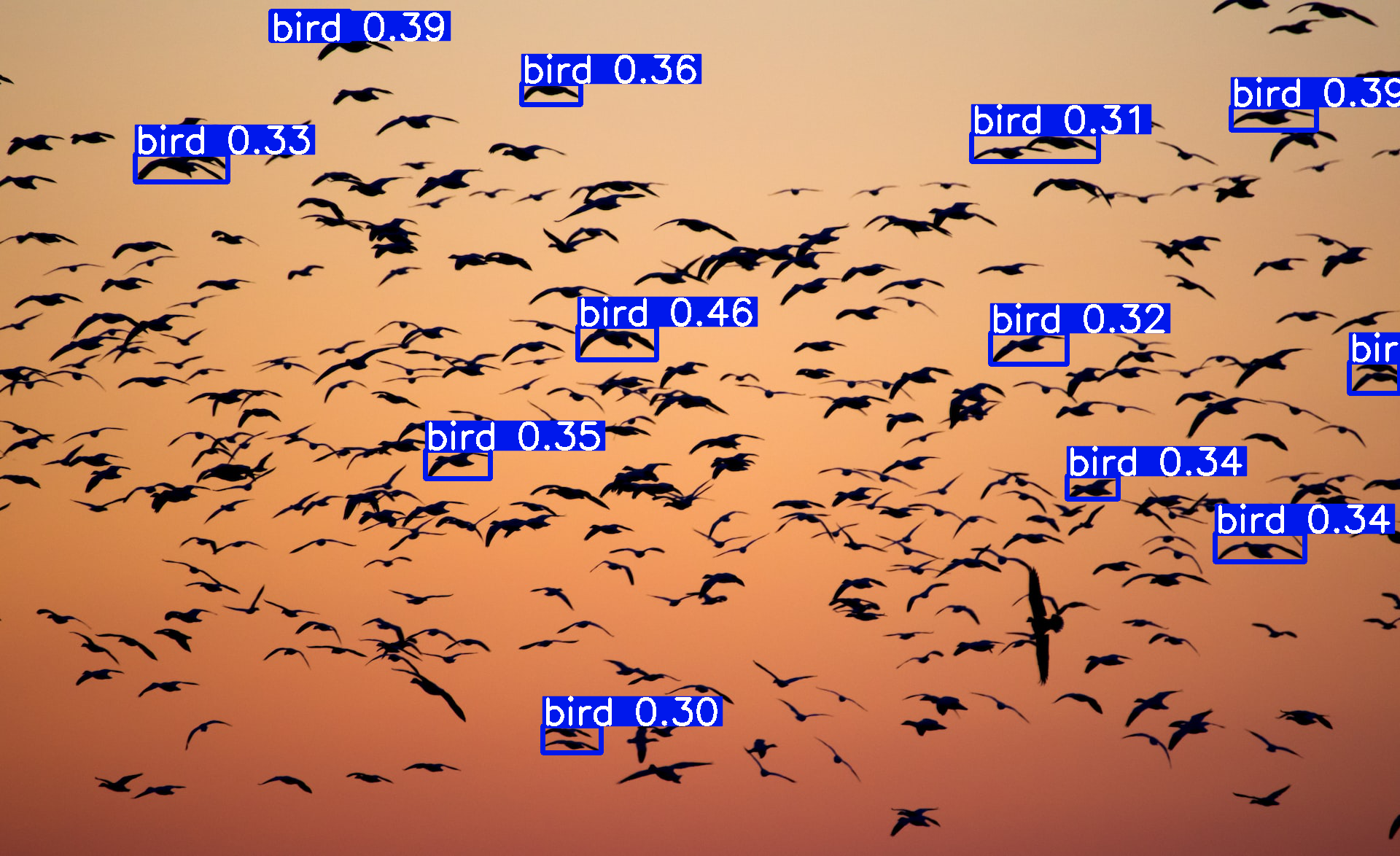
A detecção de objetos pequenos é uma tarefa de identificar e localizar objetos de tamanho relativamente pequeno em imagens digitais. Esses objetos geralmente têm extensão espacial limitada e baixa cobertura de pixel e podem ser difíceis de detectar devido à sua aparência pequena e baixa relação sinal ruído.
Existem vários algoritmos de detecção de objetos, como Faster RCNN, YOLO, SSD, RetinaNet, EfficientDet. Atualmente em grande maioria dos casos, esses modelos são treinados no conjunto de dados COCO (Common Objects in Context). É um conjunto de dados de grande escala contendo uma ampla variedade de categorias e anotações de objetos, tornando-o popular para detectores de objetos de treinamento. No entanto, verifica-se que esses modelos não conseguem detectar objetos pequenos.
O campo receptivo refere-se à extensão espacial da imagem de entrada que influencia a saída de um determinado neurônio ou filtro em uma rede neural convolucional (CNN). Em detectores de objetos normais, o campo receptivo pode ser limitado, o que significa que a rede pode não ter uma compreensão suficiente das informações contextuais que envolvem objetos menores.
Hiperinferência auxiliada por fatiamento do projeto SAHI, um pipeline de ponta projetado especificamente para detecção de objetos pequenos. O SAHI aproveita o poder da inferência auxiliada por corte e das técnicas de ajuste fino, revolucionando a forma como os objetos são detectados. O que diferencia a detecção de objetos SAHI é sua integração perfeita com qualquer detector de objetos, eliminando a necessidade de ajustes tediosos. Essa inovação permite uma adoção rápida e sem esforço, sem comprometer o desempenho. Abaixo o paper sobre SAHI.

https://arxiv.org/abs/2202.06934

Alguns Exemplos:



Publicado openSUSE Leap 15.5
Se acaba de publicar openSUSE Leap 15.5 la 5ª versión menor o «service pack» de la serie 15 de openSUSE Leap

La comunidad de openSUSE se complace en anunciar la disponibilidad de la versión estable y final de openSUSE Leap 15.5, que ya está disponible para descargar la imagen .iso o para actualizar tu versión Leap 15.4.
La publicación de openSUSE Leap 15.5 iba a ser la última de la serie 15, antes del cambio a nuevas tecnologías como es el proyecto ALP.
Pero tal como pudiste leer ayer en el blog, openSUSE ha anunciado que habrá una próxima openSUSE Leap 15.6 que se publicará en junio de 2024.
openSUSE Leap es una distribución de GNU/Linux que publica la comunidad de openSUSE y que está basada en SUSE Linux Enterprise 15 a la que la comunidad le ha añadido los repositorio y software comunitario.
openSUSE Leap encontrarás Plasma 5.27 de KDE, que es la actual versión de soporte extendido del escritorio de la comunidad KDE que tendrá soporte hasta 2024. Y KDE Gear 22.12.3 y Qt 5.15 LTS.
Junto con la disponibilidad de instalar muy fácilmente otros entornos de escritorio como GNOME, XFCE, i3wm, etc. Ya sea en el momento de la instalación o ya después de instalar.
Se incluirá la versión 9 del editor Vim con todas las mejoras y actualizaciones en Vimscript que trajo.
Las nuevas instalaciones que se realicen de openSUSE Leap 15.5 traerá ya habilitado el repositorio oficial de openH264 que ofrece Cisco de manera oficial para openSUSE.
En kernel Linux traerá la versión 5.14.21que incluye la mejoras de SUSE para este kernel específico de soporte extendido.
En Python los usuarios de openSUSE verán una gran actualización ya que se incluirá el intérprete para Python 3.11 actualizando la versión anterior ya algo obsoleta.
A nivel de software de Mozilla para Firefox se incluirá la versión 102.9.0 también una versión de soporte extendido y en Thunderbird estará la versión 102.8.0.
Como ves son versiones en el software que no están a la última, pero sí son las más pulidas y las más estables y que ofrecen soporte por parte de sus comunidades para varios años, por lo que tendrán actualizaciones de seguridad.
Con la publicación de openSUSE Leap 15.5, tienes un periodo de 6 meses para actualizar tu versión Leap 15.4 a esta nueva versión y seguir disfrutando de actualizaciones y mejoras. Después de ese tiempo, Leap 15.4 dejará de tener soporte.
openSUSE Leap 15.5 está pensada para quienes quieren un sistema operativo funcional y robusto y no se preocupan de tener las versiones más actualizadas de todos los paquetes, para eso ya está openSUSE Tumbleweed.
Descarga la ISO o actualiza tu equipo a esta nueva versión que ofrece la comunidad de openSUSE y sigue disfrutando de un GNU/Linux profesional y maduro.
Have a lot of fun!

Leap 15.5 Release Matures, Sets Up Technological Transition
EN / CA / CS / DE / ES / FR / JA / NL / ZH-TW
NUREMBERG, Germany – The release of openSUSE’s latest 15-series version marks years of maintenance and security that began more than five years ago.
The maturity of Leap 15.5 comes into play as new technological changes of the last five years have been introduced, such as container technologies, immutable systems, virtualization, embedded development, and other high-tech advances.
Entrepreneurs, hobbyists, professionals and developers use Leap as a go-to Linux distribution as seen by the increase in usage from each minor release. Traversing from legacy software to more modern systems is imminent.
Leap 15.5, which is based on SUSE Linux Enterprise 15 Service Pack 5, will receive maintenance and security updates until the end of 2024. This will provide users with plenty of time to transition to the release’s successor; a successor has yet to be confirmed. Users interested in commercial support can use a new tool to transition to commercial support. Leap can be downloaded at get.opensuse.org.
This release brings newer packages like Mesa and others, but Leap 15.5 is a non-feature release. Some of these newer packages to highlight include KDE Plasma 5.27, which is a Plasma Long Term Support version until the next one rolls out in 2024. Konqi lovers will enjoy a new welcome wizard, dynamic customization of desktop workspaces and more functionality with KRunner that includes a full desktop search, unit and currency exchange rate conversions, dictionary definitions, calculator features, and it shows graphical representations of mathematical functions. The Color Picker had a few improvements and added the possibility of displaying another preview color circle. KDE Gear 22.12.3 will be a new package in the release and complement the use of Plasma 5.27. The update fixes bugs with the Desktop Environment applications and highlights the enhancement of compression/decompression utility ark, improvements to text editor Kate and fixes some crashing of the video editor Kdenlive. Qt 5.15 LTS is available with the KDE Qt 5 patch collection.
Text editor Vim will upgrade to a new major version. Vim 9 has a new script language that drastically improves performance. Increases in execution speed of 10 to 100 times is expected for the text editor. Users are recommended to read the project’s Vim 9.0 release information to know how the upgrade affects legacy scripts, backwards compatibility and other new features added in the release.
For professionals configuring networking of Linux containers, the netavark 1.5.0 package is in the release. Users who have already transitioned to Flatpaks will have an updated 1.14.4 version that addresses a Common Vulnerability and Exposure with CVE-2023-28101. The newer version fixes the hiding of permissions for an attacker publishing a Flatpak app with malicious intent to elevate permissions.
Leap 15.5 is set to have the OpenH264 repository enabled by default for all new installations thanks to contributions from Open Source at Cisco.
Leap 15.5 comes with Linux Kernel 5.14.21 that including backports for this SUSE specific LTS kernel. Leap 15.5 shares the kernel with SLE 15 SP5 that receives the same fixes and backports along, which includes a few thousand other shared packages. The device firmware updater package fwupd will change to version 1.8.6. The newer version fixes compiling errors when building for s390x and ppc64le
Good news for Python developers. Leap 15.5 users will have a fully usable Python 3.11 stack in parallel to the system Python (python36). This provides a more modern release for users and developers. Packagers are advised to switch to Python 3.11.
Other packages users may notice a change to are updates of Ugrep 3.11.0 and NetworkManager 1.38.6. Both webkit2gtk3 and webkit2gtk4 will update to version 2.38.5. Mozilla’s internet browser Firefox will get a new Extended Support Release version - 102.9.0. Mozilla’s email client Thunderbird gains various visual and user experience improvements with version 102.8.0.
End of Life
openSUSE Leap 15.4 will have its End of Life (EOL) six months from today’s release. Users should update to openSUSE Leap 15.5 within six months of today to continue to receive security and maintenance updates.
Important for users upgrading from previous versions
A new 4096-bit RSA signing key was introduced as part of openSUSE Leap 15.5 as well as 15.4 via a maintenance update. Leap 15.4 users are expected to update their system prior to upgrade of 15.5. For more information, visit https://en.opensuse.org/SDB:System_upgrade#0._New_4096_bit_RSA_signing_key
Download Leap 15.5
To download the ISO image, visit https://get.opensuse.org/leap/
Questions
If you have a question about the release or found a bug, we’d love to hear from you at:
https://lists.opensuse.org/opensuse-support/
https://discordapp.com/invite/openSUSE
https://www.facebook.com/groups/opensuseproject
Get involved
The openSUSE Project is a worldwide community that promotes the use of Linux everywhere. It creates two of the world’s best Linux distributions, the Tumbleweed rolling-release, and Leap, the hybrid enterprise-community distribution. openSUSE is continuously working together in an open, transparent and friendly manner as part of the worldwide Free and Open Source Software community. The project is controlled by its community and relies on the contributions of individuals, working as testers, writers, translators, usability experts, artists and ambassadors or developers. The project embraces a wide variety of technology, people with different levels of expertise, speaking different languages and having different cultural backgrounds. Learn more about it on opensuse.org.
Akademy-es 2023 de Málaga aparece en Linux Express 173 #akademyes Opensouthcode Edition
Como ya sabrán los seguidores del blog, de igual forma que el año pasado, Akademy-es 2023 se celebrará en de forma presencial en Málaga el 9 y 10 de junio. Esta semana el blog se ha convertido en un monográfico y a dos días del evento me complace compartir con vosotros que Akademy-es 2023 de Málaga aparece en Linux Express 173 del gran Juan Febles. Es poco pero suficiente para captar a algún que otro despistado que esté por la zona.
Akademy-es 2023 de Málaga aparece en Linux Express 173
Cada cierto tiempo me gusta promocionar los audios de Podcast Linux, un programa de Juan Febles que hace con mucho cariño y que siempre tienen cosas interesantes que descubrir.
De esta forma, desde el pasado verano he promocionado su especial 6º aniversario, su Linux Connexión con Jorge Lama, la Academia Automatización del Hogar con Luis del Valle y Germán Martín, la reciente charla con Eduardo Moreno y su Adam Image , su proyecto «PC Reciclado de la Audiencia» o «Linux Connexion Distros no Debianitas».
Tengo pendiente el episodio con otro de los grandes, Yoyo Fernández, pero debo promocionar hoy su Linux Express 173 ya que le dedica un minuto, de los 10 que tiene este formato, a hablar de Akademy-es 2023 de Málaga Opensouthcode Edition, a la que anima a todos sus oyentes a asistir.
De esta forma. los temas que Juan Febles trata en este episodio son variados y cortos, apuntes de su día a día como linuxero convencido:
- Episodio #182 Linux Connexion con Yoyo Fernández
- Siguiente episodio: Especial Preguntas y Respuestas
- Probando SyncthingTrayQT6 para notificaciones de este servicio
- Liberando mi antiguo móvil con Twrp
- Eligiendo LineageOS como sistema Android Libre
- Aplicaciones y servicios Libres para mi Android
- Blanket, una aplicación libre para generar sonidos ambientes
- Únete a #ViernesDeEscritorio
- Base para Almacemaniemto Sata
- Nuevo Micrófono Behringer SB78A
- Evento Akademy-es: Málaga el 9 y 10 de junio
Como siempre, os animo a escuchar el episodio:
Más información: Podcast Linux
¿Qué es Akademy-es?
Akademy-es (#akademyes, que es la etiqueta para las redes sociales) es evento más importante para los desarrolladores y simpatizantes de KDE, que se ha ido celebrando desde el 2006 con éxito creciente.
En general, las Akademy-es son el lugar adecuado para conocer a los desarrolladores, diseñadores, traductores, usuarios y empresas que mueven este gran proyecto.
En ellas se realizan ponencias, se presentan programas, se hace un poco de caja para los proyectos libres (camisetas, chapas, etc) pero sobre todo se conoce a gente muy interesante y se cargan baterías para el futuro.
Podéis repasar las anteriores ediciones en estas entradas del blog:
- Camino Akademy-es 2013: Las anteriores ediciones (I): 2006 – 2008
- Camino Akademy-es 2013: Las anteriores ediciones (II): 2009-2010
- Camino Akademy-es 2013: Las anteriores ediciones (III): 2011-2012
- Anteriores ediciones de Akademy-es (IV): 2013 y 2014
La entrada Akademy-es 2023 de Málaga aparece en Linux Express 173 #akademyes Opensouthcode Edition se publicó primero en KDE Blog.