
 Member
 Victorhck
openSUSE anuncia que habrá una versión Leap 15.6
La comunidad de openSUSE ha anunciado que habrá una 6 actualización menor de openSUSE 15 para dar tiempo a preparar el nuevo proyecto ALP

Mañana mismo 7 de junio de 2023 se publicará openSUSE Leap 15.5, la quinta versión menor o «service pack» de openSUSE Leap 15, y la que iba a ser la última de las versiones menores de openSUSE Leap 15.
Pero hoy mismo el equipo de publicaciones de openSUSE ha publicado un anuncio donde dicen que tienen planeado una actualización más, la que será openSUSE Leap 15.6, para dar más tiempo a planear y definir con tiempo lo que será ALP.
Se espera que openSUSE sea publicada a principios de junio de 2024, y tendría su fin de vida a finales del año 2025, lo que da un margen de tiempo más que aceptable para seguir disfrutando de una distribución de GNU/Linux estable, robusta y potente.
Esta decisión se ha llevado a cabo en la reciente openSUSE Conference que se celebró en Nuremberg y que concentró a entusiastas y desarrolladores de openSUSE de todo el mundo.
Esto también nos permitirá proporcionar a los clientes de SUSE un módulo Package HUB actualizado, ya que tanto SLES 15 SP5 como Leap 15.6 se considerarían un lanzamiento de características basado en nuestro modelo de lanzamiento de tick-tock (nada que ver con la red social, si no con un modelo de desarrollo en el que se alternan ciertas característics).
Con la publicación de Leap 15.6, se pretende dedicar más tiempo a los esfuerzos relacionados con un sucesor de Leap 15.X basado en ALP, ya veremos en qué acaba la cosa.
Una explicación más detallada de la situación en la Conferencia de openSUSE 2023 la puedes ver en un vídeo que próximamente se publicará en YouTube.
Por tanto, creo que buenas noticias, ya que seguiremos disfrutando de una versión de openSUSE de publicaciones estables como es openSUSE Leap (y no te olvides que mañana se publicará openSUSE Leap 15.5).

Akademy-es 2023 de Málaga Opensouthcode Edition #akademyes se emitirá en directo
Como ya sabrán los seguidores del blog, de igual forma que el año pasado, Akademy-es 2023 se celebrará en de forma presencial en Málaga el 9 y 10 de junio. Y aunque mucha personas lo daban por hecho y en alguna ocasión se nos ha escapado que así sería, no estaba del todo claro si podríamos hacer streaming. Las razones de esta indecisión son varias y no vienen al caso pero me congratula anunciar oficialmente que Akademy-es 2023 de Málaga Opensouthcode Edition #akademyes se emitirá en directo para todas aquellas personas que no pueden asistir de forma presencial.
Akademy-es 2023 de Málaga Opensouthcode Edition #akademyes se emitirá en directo
En la pandemia se aprendió a realizar eventos de forma 100% en línea con gran éxito. Esto motivó que esta modalidad llegara para quedarse dado que muchos eventos se convirtieron en híbridos: parte presencial y parte online.
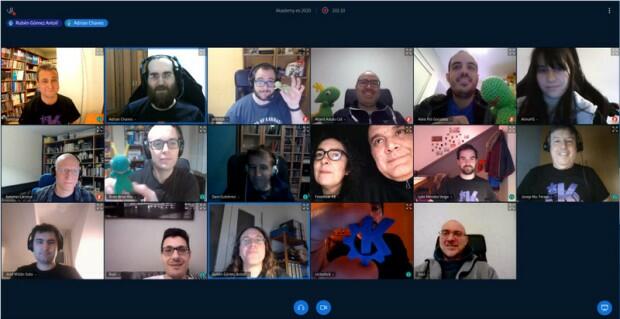
No obstante, esto acarrea un problema añadido a los eventos físicos: no es lo mismo emitir cuando todo se realiza en la mal llamada nube que cuando se plantea capturar la imagen, y sobretodo, el sonido en una sala con público. Se debe contar con una infraestructura que en ocasiones no se tiene. Además, se debe contar con otros medios técnicos que en ocasiones se deben ensamblar y no siempre se puede.
Es por ello que me complace compartir con todos vosotros que finalmente Akademy-es 2023 de Málaga Opensouthcode Edition #akademyes se emitirá en directo, es decir, en streaming utilizando tecnologías libres: Peertube y OBS, entre otro software.
De momento se ha anunciado en la web oficial del evento y el enlace estará activo en cuanto se empiecen las charlas el 9 de junio. Recordad que, rompiendo el esquema habitual y dado que se celebra de forma paralela al Opensouthcode, las charlas se celebrarán el viernes y el sábado, quedándose el domingo para realizar una actividad social con los asistentes que así lo deseen.
¿Qué es Akademy-es?
Akademy-es (#akademyes, que es la etiqueta para las redes sociales) es evento más importante para los desarrolladores y simpatizantes de KDE, que se ha ido celebrando desde el 2006 con éxito creciente.
En general, las Akademy-es son el lugar adecuado para conocer a los desarrolladores, diseñadores, traductores, usuarios y empresas que mueven este gran proyecto.
En ellas se realizan ponencias, se presentan programas, se hace un poco de caja para los proyectos libres (camisetas, chapas, etc) pero sobre todo se conoce a gente muy interesante y se cargan baterías para el futuro.
Podéis repasar las anteriores ediciones en estas entradas del blog:
- Camino Akademy-es 2013: Las anteriores ediciones (I): 2006 – 2008
- Camino Akademy-es 2013: Las anteriores ediciones (II): 2009-2010
- Camino Akademy-es 2013: Las anteriores ediciones (III): 2011-2012
- Anteriores ediciones de Akademy-es (IV): 2013 y 2014
La entrada Akademy-es 2023 de Málaga Opensouthcode Edition #akademyes se emitirá en directo se publicó primero en KDE Blog.

Project Announces Plans for Another Minor Leap 15 Release
We’d like to announce that the openSUSE Release team plans to work on openSUSE Leap 15.6.
openSUSE Leap 15.6 is expected to be released in early June 2024 and would reach its end of life by the end of the year 2025.
This decision was based on recent discussions at SUSE Labs and openSUSE Conference, and it reflects recent changes, progress on individual projects, and our new distribution architect.
This will also enable us to provide SUSE customers with an updated Package HUB module, as both SLES 15 SP5 and Leap 15.6 would be considered a feature release based on our tick-tock release model.
With a Leap 15.6, more time is given for efforts related to an ALP-based Leap 15.X successor.
A more detailed explanation of the situation at lkocman’s oSC2023 “Leap 16.0?” talk. Recording should be available within a few days at the openSUSE youtube channel.
Introducing sngbench: a shell script to performance test your syslog-ng
One of the returning syslog-ng questions I receive is how many log messages can a given hardware handle. My typical answer is that it depends on the configuration. I have now an answer, or rather a tool to answer your question: sngbench.sh. It is a shell script that runs from localhost and uses loggen, the bundled benchmarking and testing tool of syslog-ng. It comes with two configurations: a performance-optimized and a realistic one. You are also free to extend sngbench with your own configurations.

syslog-ng logo
Programa de charlas Akademy-es 2023 en Málaga
Este es el programa de charlas que KDE España ha preparado para la Akademy-es 2023 que se celebrará en Málaga el 9 y 10 de junio

Ya está todo preparado para esta edición 2023 presencial de Akademy-es, que se celebrará en Málaga los días 9 y 10 de junio dentro del Opensouthcode.
La asociación KDE España (de la que formo parte), que auna entusiastas, colaboradores y desarrolladores que forman parte de KDE, ya han dado forma a las charlas que conformarán la edición 2023 de Akademy-es en Málaga.
Akademy-es es la reunión de la comunidad de KDE en España, junto con entusiastas y colaboradores de KDE en particular y del software libre en general. En la Akademy-es se preparan una serie de charlas relacionadas con KDE.
La idea es juntarnos, poner en común, conocernos y conocer a más gente que se una a las charlas y que tenga curiosidad por KDE o lo use en su día a día.
Programa de charlas Akademy-es 2023
Viernes 9 de junio
- 10:00 – 10:15 Ceremonia de apertura de Akademy-es
- 10:15 – 10:55 Cómo se gestionan las traducciones del proyecto KDE – Albert Astals Cid, Coordinador de traduciones de KDE
- 11:00 – 11:45 Python y Qt – José Millán Soto, KDE España
- 12:00 – 12:45 Cuando llegue el año del escritorio – Aleix Pol i González, Presidente de KDE eV – En remoto
- 13:00 – 13:45 Las dificultades de las asociaciones ante las obligaciones documentales y fiscales – GNU/Linux Valencia – En remoto
Descanso - 15:30 – 16:15 Audiofilia en Linux – Antonio Larrosa, desarrollador KDE
- 16:30 – 17:15 Software libre y educación: El papel de KDE en los centros educativos de bajos recursos – Carlos Chan – En remoto
- 17:30 – 17:55 Charlas relámpago
- 18:00 – 18:20 KDE España – Adrián Chaves, presidente KDE España
- 18:30 – 19:15 Más secretos de Plasma y KDE – Baltasar Ortega, Editor de kdeblog
Sábado 10 de junio
- 10:00 – 10:45 KDE y Qt 6 – Albert Astals Cid, desarrollador de KDE
- 11:00 – 11:45 Commons el almacén multimedia de Wikimedia y otros proyectos relacionados – Pedro Pacheco, Wikimedia España
- 12:00 – 12:45 Empaquetando el software de KDE en Arch – Antonio Rojas, empaquetador de KDE y software matemático en Arch Linux
- 13:00 – 13:45 Encaminamiento en el Centro de Datos con software Open Source – Eduardo Collado
Descanso - 16:00 – 16:45 Hola soy un usuario de KDE y llevo mas de 20 años siéndolo – José Jiménez, formador y usuario de KDE y Fedora
- 17:00 – 17:45 Sostenibilidad y software/hardware libre – Paula de la Hoz, analista de ciberseguridad
- 17:50 – 18:00 Ceremonia de clausura
Para el domingo 11 habrá una actividad especial donde se nos enseñarán los rincones más bonitos de la ciudad de Málaga. Es necesario inscribirse para una correcta organización.
Las charlas realizadas se retransmitirán en streaming para quienes no podamos acudir, podamos asistir casi como si estuviéramos allí. Estad atentos a las redes sociales donde está presente KDE España donde se dará la información necesaria.
Si vas a asistir espero que pases un par de días interesantes aprendiendo y conociendo a personas con intereses similares. Yo este año no podré asistir, así que trataré de ver las charlas en streaming, pero no será lo mismo sin volver a ver en persona a Antonio, David, Baltasar, Albert, Adrián, etc…


OpenAPI 3.0.0 Specification for the Open Build Service HTTP API
Modern Python stack for Leap
Adding Python 3.11 to Leap 15.4 and newer
Leap has a default Python interpreter that’s “too old”. In Leap,
python3 is Python 3.6 that reached upstream end of life at the end
of 2021. The current version in Leap is based on SUSE SLES 15, so it’s
supported by SUSE, but it’s not something easy to use with modern
python modules.
Today it’s also possible to install a more modern Python interpreter
in Leap, the python310 and python310-pip packages are in the
repositories and you can install and use the virtualenv module to
install from PyPI, and python311 will be
available in Leap 15.5 when released.
But sometimes that’s not enough, some python modules requires non python libraries or tools to be installed and it’s not possible to use them directly from PyPI.
That’s the reason for this new Python interpreter and modules for Leap.
This Python 3.11 and modules is a solution proposed to provide a more recent Python interpreter and basic set of updated Python modules in stable SUSE solutions, SLES, and it will be supported, so it’ll be part of the Leap releases, as Leap inherits directly from there.
The first thing to keep in mind is that this solution doesn’t bring any break changes, the primary Python is the same (3.6) and existing Python modules are not updated. The current Python 3.6 interpreter and packages stay intact. The /usr/bin/python3 binary will remain Python 3.6 for software compatibility reasons, however an additional /usr/bin/python3.11 is provided as well. The new Python Stack is an addition, that doesn’t collide with existing packages, so it can be co-installed in a system without affecting any running application.
This modern Python will be available in Leap 15.4, and following releases will inherit it, so it’ll be available also in Leap 15.5. The interpreter can be found now, but the list of modules is still under development and will arrive soon.
Python Version
The python version selected is the Python 3.11. This is the best choice because:
- Is the latest official Python version, supported by the Python Foundation.
- There are some noticeable performance improvements, compared to the previous versions.
- It’s compatible with previous versions, there are no big changes that breaks not too old Python code, so code that works in Python 3.10 or Python 3.9 will work correctly in Python 3.11 or will require small changes.
With the interpreter there is a list of Python modules that will be provided with a recent version. These Python modules, that are part of the Modern Python, will be only available with the Python 3.11 interpreter, and will be the latest version released upstream, so this new stack provides a recent Python environment with a recent interpreter and Python modules from 2023.
The list of packages will be a reduced subset of modules in Leap, around 500 packages. But it’s an initial set that will allow to build a lot more modern packages and will make the life easier for people using the Python Backports.
Impact on existing systems
All python packages in the new stack will provide the “python311-” version, so for example to install Flask you will find the package python311-Flask, python3-Flask will continue being the python 3.6 version, the one that you can find in Leap 15.4 by default.
This new Python interpreter and modules will not affect the existing systems. But the new interpreter and modules will be available in Leap 15.4 and beyond, so it’s recommended to everyone to migrate from Python 3.6 to the new Python 3.11 and try to use this modern version of the interpreter and basic python modules.
Using the packages provided by the Modern Python will bring a lot of direct benefits:
- Considerably faster Python interpreter.
- Modern Python interpreter with the latest improvements in the syntax and standard library.
- Modern Python modules with improved functionality can be used, not just the provided by the distribution, but also from PyPI.
Conclusiones de los proyectos de sostenibilidad de Season of KDE 2023
Dejemos descansar este lunes los temas de Akademy-es 2023 de Málaga Opensouthcode Edition y cerremos uno de los temas de la edición de Season of KDE del 2023. Ya hemos dicho en el blog que un año más se ha celebrado una nueva edición de un programa cuyo objetivo es incorporar nuevos estudiantes al gran proyecto mundial que es KDE, una alternativa bastante fiable a otros programas como Google Summer of Code o Google Code en los que se consigue incorporar sangre nueva al proyecto. Os invito a conocer las conclusiones de los proyectos de sostenibilidad de Season of KDE 2023, uno de los objeyivos de la Comunidad KDE.
Conclusiones de los proyectos de sostenibilidad de Season of KDE 2023

Ya estamos cerrando otro ciclo de los Season of KDE que este año tenía varios proyectos centrados en los objetivos de KDE, concretamente en esta entrrada quiero destacar el trabajo realizado para mejorar la sostenibilidad de las aplicaciones KDE.
De esta forma, según leemos en KDE News, Mohamed Ibrahim se ha encargado de mejorar la herramienta de emulación KdeEcoTest. La idea detrás de KdeEcoTest es proporcionar una herramienta de scripting fácil de usar para construir scripts de Escenario de Uso Estándar y luego ejecutarlos al medir el consumo de energía del software.
Este estudiante se centró primero en mejorar la documentación para instalar y ejecutar la herramienta, y después introdujo varias mejoras para añadir funcionalidades a la herramienta.
Por otro lado, Nitin Tejuja también trabajó en scripting para mediciones de consumo de energía, pero con otro enfoque utilizando el WebDriver para Appium selenium-webdriver-at-spi. La ventaja de este enfoque es que también se utiliza el marco de accesibilidad, por lo que los colaboradores añadirán «buenos» nombres de accesibilidad — ¡múltiples ganancias con una sola adición! Nitin creó un script para probar el consumo de la suite educativa de KDE GCompris
Para finalizar destacar que Rudraksh Karpe siguió trabajando en la preparación de aplicaciones KDE para la certificación ecológica Blue Angel. Por el momento, sólo Okular cuenta con esta certificación, pero Rudraksh continuó trabajando en los scripts para GCompris y Kate utilizando la herramienta KdeEcoTest. Rudraksh también desarrolló la herramienta «SUS Log Formatter» para ofrecer una visión general de las acciones realizadas a partir de un archivo de registro de un escenario de uso estándar.
¿Qué es Season of KDE?

Uno de los objetivos del proyecto KDE es involucrar al mayor número de personas en él y para ello organiza todo tipo de acciones: eventos como Akademy, encuentros como los Sprints, blogs colaborativos como KDE Planet, participación en proyectos para estudiantes como el Google Code In o Google Summer of Code.
No contento con esto, una vez al año organiza Season of KDE, es decir, su programa para involucrar a nuevos estudiantes en KDE. Una especie de Google Summer of Code pero para colaborar directamente en KDE y con la posibilidad de desarrollar proyectos no vinculados necesariamente con la programación, es decir, proyectos de promoción, documentación, diseño, etc.

Os dejo una especie de preguntas y respuestas sobre el proyecto, que seguro que te estás haciendo como:
- ¿Qué es Season of KDE? Bueno, eso ya lo he explicado.
- ¿Quién puede formar parte? Todo el mundo que quiera.
- ¿Qué gano con ello? Aparte de colaborar con el proyecto KDE una interesante línea en tu currículo.
-
¿Cuánto tiempo tengo?
El plazo máximo para inscribirse tanto mentores como para estudiantes es del 15 de enero de 2023. - ¿Cómo empiezo? Busca un mentor y propón tu idea.
- ¿Y si no se me ocurre nada? Pues mira en las ediciones de los años anteriores.
En fin, una buena forma de poner tu granito de arena en el proyecto KDE.
La entrada Conclusiones de los proyectos de sostenibilidad de Season of KDE 2023 se publicó primero en KDE Blog.
Recopilación del boletín de noticias de la Free Software Foundation – junio de 2023
Recopilación y traducción del boletín mensual de noticias relacionadas con el software libre publicado por la Free Software Foundation.

La Free Software Foundation (FSF) es una organización creada en Octubre de 1985 por Richard Stallman y otros entusiastas del software libre con el propósito de difundir esta filosofía.
La Fundación para el software libre (FSF) se dedica a eliminar las restricciones sobre la copia, redistribución, entendimiento, y modificación de programas de computadoras. Con este objeto, promociona el desarrollo y uso del software libre en todas las áreas de la computación, pero muy particularmente, ayudando a desarrollar el sistema operativo GNU.
Además de tratar de difundir la filosofía del software libre, y de crear licencias que permitan la difusión de obras y conservando los derechos de autorías, también llevan a cabo diversas campañas de concienciación y para proteger derechos de los usuarios frentes a aquellos que quieren poner restricciones abusivas en cuestiones tecnológicas.
Mensualmente publican un boletín (supporter) con noticias relacionadas con el software libre, sus campañas, o eventos. Una forma de difundir los proyectos, para que la gente conozca los hechos, se haga su propia opinión, y tomen partido si creen que la reivindicación es justa!!
- En este enlace podéis leer el original en inglés: https://www.fsf.org/free-software-supporter/2023/june
- Y traducido en español (cuando el equipo de traducción lo tenga disponible) en este enlace: https://www.fsf.org/free-software-supporter/2023/junio

Puedes ver todos los números publicados en este enlace: http://www.fsf.org/free-software-supporter/free-software-supporter
Después de muchos años colaborando en la traducción al español del boletín, desde inicios del año 2020 decidí tomarme un descanso en esta tarea.
Pero hay detrás un pequeño grupo de personas que siguen haciendo posible la difusión en español del boletín de noticias de la FSF.
¿Te gustaría aportar tu ayuda en la traducción? Lee el siguiente enlace:
Por aquí te traigo un extracto de algunas de las noticias que ha destacado la FSF este mes de junio de 2023.
Frans de Jonge nos habla de KOReader en esta entrevista AGPLv3
Del 19 de mayo
En la última entrega de la serie de nuestro Laboratorio de Licencias y Cumplimiento sobre desarrolladores de software libre que eligen licencias GNU para sus trabajos, entrevistamos a Frans de Jonge de KOReader.
Frans comparte, entre otras cosas, cómo comenzó a contribuir con KOReader después de Hans-Werner, cómo los entusiastas de todos los conjuntos de habilidades pueden contribuir a sus mejoras y cuáles son los próximos pasos para el desarrollo de KOReader. Obtenga más información sobre este proyecto, que se enorgullece de permitir a los usuarios leer en libertad.
Gané un premio por mis contribuciones a Emacs
Del 25 de mayo por Protesilaos Stavrou
Protesilaos «Prot» Stavrou, ganador del Premio 2021 al nuevo colaborador destacado de software libre, recibió un premio este mes por su trabajo en temas de Modus. Creado con la intención de mejorar la accesibilidad de GNU Emacs, los temas son de alto contraste y están optimizados para personas con deuteranopía o tritanopía. Lea sobre el tema, así como los escritos recientes de Prot sobre accesibilidad y libertad de software.
Nota: el premio fue entregado por Google, una empresa que con demasiada frecuencia trabaja en contra de la libertad y la privacidad del usuario. Para nosotros, el aspecto importante del anuncio de Prot es que hizo una contribución significativa a GNU Emacs, no que se lo presentara una entidad en particular.
- https://protesilaos.com/codelog/2023-05-25-emacs-google-award/
- https://protesilaos.com/codelog/2023-05-11-accessibility-software-freedom/
Ley de Europa Interoperable: el Comité de las Regiones no promueve sustancialmente el software libre
Del 24 de mayo por Free Software Foundation Europe
Luego de un impulso a principios de año para revisar la Ley de Europa Interoperable para enfatizar mejor el papel crítico de la libertad del software en la interoperabilidad, el comité responsable de revisar el texto lamentablemente no ha podido incorporar completamente las recomendaciones.
Sobre los resultados, la directora del proyecto Lina Ceballos de la Free Software Foundation Europe (FSFE) dijo: «Ésta/su decisión solo reafirma la importancia de la participación de las partes interesadas, que tienen competencia real, en estos procesos de toma de decisiones. Nosotros, por lo tanto, instamos al Parlamento Europeo a incluir a la comunidad del software libre en el Consejo Europeo Interoperable para garantizar la sostenibilidad y la innovación en la digitalización».

Estas son solo algunas de las noticias recogidas este mes, pero hay muchas más muy interesantes!! si quieres leerlas todas (cuando estén traducidas) visita este enlace:
Y todos los números del «supporter» o boletín de noticias de 2023 aquí:
—————————————————————
Recordatorio Akademy-es 2023 Opensouthcode Edition de Málaga busca patrocinadores
El 9 y 10 de junio se va a celebrar el mayor evento de la Asociación KDE España. Esta semana estamos de promoción extrema es por tanto que es de recibo hacer el recordatorio: Akademy-es 2023 Opensouthcode Edition de Málaga busca patrocinadores con los que cubrir esos gastos que se generan. Una forma más que adecuada para que cualquier empresa del ramo consiga visibilidad en este extenso y creciente mundo del Software Libre.
¿Por qué patrocinar la Akademy-es 2023?
Se esperan cerca de 100 (y según las inscripciones pueden ser más) asistentes al evento de todo el mundo, ya que por su carácter en híbrido, presencial y online, se espera que algunas charlas lleguen a la Comunidad Latinoamericana.
Así que se estima que tendremos entre nosotros todo tipo de personas al evento: desarrolladores de Software Libre, miembros de la prensa, usuarios, representantes de empresas, etc.
Patrocinando este evento, tu organización recibirá visibilidad no solo en España, sino a nivel mundial en el campo del Software Libre.
El evento tendrá presentaciones de primer nivel de temas relativos a las nuevas tecnologías, incluyendo aplicaciones de escritorio, aplicaciones móviles, desarrollo de software y multimedia. La comunidad KDE ha presentado innovaciones en todos estos campos a lo largo de su historia. Como patrocinador, tu organización tendrá la oportunidad de participar en este entorno creativo y ser conocida por los asistentes.
Recordatorio Akademy-es 2023 Opensouthcode Edition de Málaga busca patrocinadores
Que este año Akademy-es se vaya a celebrar junto con Opensouthcode el 9 y 10 de junio no quita que necesite algún tipo de empujón económico para gastos y pequeños detalles para los asistentes, como suele ser el Coffe Break o alguna sorpresa más.
Debido a esto, este año se plantean modalidades plata, ora y platino para promocionar el evento que se resumen en la siguiente tabla:
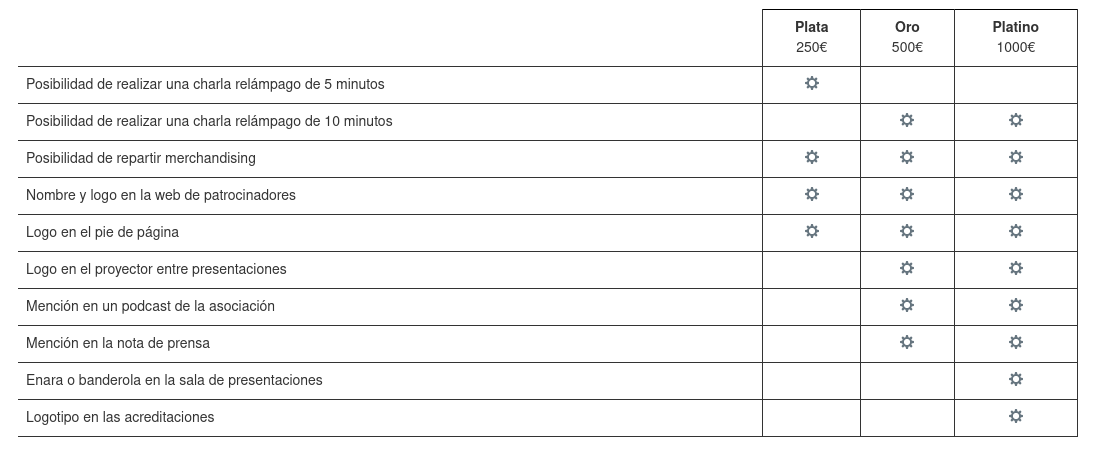
De esta forma, si quieres que tú, tu empresa, entidad o cualquier otro tipo de organización patrocine Akademy-es, como han hecho otras en pasadas ediciones simplemente se debe mandar un correo a akademy-es-org@kde-espana.org
Más información: KDE España
La entrada Recordatorio Akademy-es 2023 Opensouthcode Edition de Málaga busca patrocinadores se publicó primero en KDE Blog.