
 Member
 CzP
CzPUsing the openSUSE Build Service to build software for POWER
My favorite and most used service for developers is the openSUSE Build Service (OBS). This is where I build syslog-ng packages first, before anywhere else. OBS is open source, highly flexible software to build software packages, and the instance at https://build.opensuse.org/ is free to use for anyone to build open source software. Best of all, it supports multiple architectures, including POWER.
Open Build Service
Actually the OBS acronym stands for two things. The software itself is called Open Build Service. It is open source and you are free to install it on your own network. You can use it to compile any software you like. The openSUSE Build Service is a public OBS instance. It is accessible to any registered user to build open source software.
OBS can be used not just to compile individual software packages, but to maintain and publish complete repositories. It can also build various images from the software compiled: both ISO images and disk images for different virtualization solutions.
The original focus of OBS was i586 and openSUSE. Soon other architectures and Linux distributions were introduced to OBS. While I only use it for openSUSE and SLES packages, many more are supported, including Fedora, RHEL, Ubuntu, Arch, even Raspbian on x86, ARM and POWER.
You can access the OBS both through its web interface and a command line client. In theory you should be able to configure everything from either of them. I tend to use both of them. I configure repositories through the web interface, but submit new builds using the CLI. If you want your software project to get compiled for POWER, it is just a few mouse clicks away. You add a distribution version to your project and then you can configure architectures. If you add an architecture only later, you do not have to re-submit packages as OBS automatically compiles all packages for the new architecture as soon as you click on “update”.

obs architecture selector
POWER
While the focus of POWER support in OBS is PPC64LE, meaning little endian 64 bit POWER, you can also use it to build both 32 bit and 64 bit big endian POWER architecture packages. There were times when the build capacity for POWER was relatively small. You had to wait long for POWER builds to complete. However, early this year the openSUSE received a huge hardware donation from SUSE and IBM: fast, new IBM POWER 9 servers. Building packages on POWER are blazing fast now, compiles finishing often before any other platforms. You can read the announcement at https://news.opensuse.org/2022/01/25/os-gains-new-hardeware/
If you take a look at https://build.opensuse.org/monitor you can see that there are now close to 300 POWER workers in OBS. 1.5x more than just a couple of months ago. They are often working close to full capacity (most likely when Factory is being rebuilt), but it seems that there are always some resources left free for random incoming jobs from users.
Why OBS?
I keep mentioning, that POWER is just one of the architectures supported by OBS. Then why I write my first blog after introducing myself as an IBM POWER Champion about the openSUSE Build Service? Because it is quite rare that you want to build a software only for a single Linux distribution on POWER. In that case OBS gives you tremendous speed and flexibility: you do a single submit and it gets compiled on a dozen of different Linux distributions and possibly also on a dozen of different architecture variants.

obs logo
Sudo 1.9.10: hiding passwords in session recordings
Session recording has been available in sudo for many years, however not many people are aware of it. Even less well-known is that you can save not just the terminal output, but also what the user types. That way you can analyze what the user is doing within a shell session. Recordings may also include user passwords, which is not always desirable. Version 1.9.10 of sudo allows you to hide passwords in session recordings if it recognizes a password entry.
From this blog you will learn how to turn on session recording in sudo, how to enable or disable hiding passwords in session recordings, and how to view the results: https://www.sudo.ws/posts/2022/03/sudo-1.9.10-hiding-passwords-in-session-recordings/

Sudo logo

Desfile de moda no Metaverso ocorreu entre 24 e 27 de março

A Decentraland que movimenta compra e venda de terrenos, agora proporcionou um desfile de moda de grandes grifes entre os dias 24 e 27 de março. O Fashion Week ganhou uma versão virtual e imersiva. O espaço recebeu várias marcas, e claro com comercialização de NFT de roupas e acessórios presente nos desfiles. Existe possibilidade de compra de produtos para o mundo virtual e físico, como jaquetas, moletom e outros. A tendência deste mercado é movimentar 50 bilhões de dólares até 2030, segundo a instituição financeira Morgan Stanley.

Know the Visa, Health Requirements to Attend oSC22
For people planning on attending the openSUSE Conference 2022 in Nuremberg, Germany, from June 2 – 4, there are certain health and visa requirements that need to be met for travelers.
The openSUSE Conference will follow the Bavarian Ministry of Health’s requirements and posture regarding COVID. An FFP-2 mask and social distancing may be required. These regulations my change before or up to the day of the conference.
Those who are not a citizen of a Schengen country that are planning to attend should view the overview of visa requirements/exemptions for entry into the Federal Republic of Germany, which can be found at the Federal Foreign Office website.
Please note: the Travel Support Program has no provisions to cover the cost of a visa, so it’s the travelers responsibility for covering the additional cost.
For citizens who are not a citizen of a Schengen country, you may need a formal invitation letter that fully explains the nature of your visit. An alphabetical list of people from nations that require an invitation letter can be found on the Federal Foreign Office website. If the letter is needed, please contact the conference organizers.

openQA and dehydrated
In this blog post I’m gonna show you, how you can enable https for your openQA instance using dehydrated and the internal SUSE CA.
The same procedure should also work for Let’s Encrypt.
The difference between throttle() and rate-limit() in syslog-ng
There are multiple ways in syslog-ng to limit message rate. The throttle() option of syslog-ng destinations tries to make sure that all messages are delivered without exceeding a specified message rate. The rate-limit() filter introduced in syslog-ng 3.36 drops surplus log messages, making sure that a processing pipeline or destination is not overloaded with log messages.
Read the rest of my blog at https://www.syslog-ng.com/community/b/blog/posts/the-difference-between-throttle-and-rate-limit-in-syslog-ng

syslog-ng logo
Lanzada la cuarta actualización de Plasma 5.24
Tal y como estaba previsto en el calendario de lanzamiento de los desarrolladores, hoy martes 29 de marzo la Comunidad KDE ha comunicado que ha sido lanzada la cuarta actualización de Plasma 5.24. Una noticia que aunque es esperada y previsible es la demostración palpable del alto grado de implicación de la Comunidad en la mejora continua de este gran entorno de escritorio de Software Libre.
Lanzada la cuarta actualización de Plasma 5.24
No existe Software creado por la humanidad que no contenga errores. Es un hecho incontestable y cuya única solución son las actualizaciones. Es por ello que en el ciclo de desarrollo del software creado por la Comunidad KDE se incluye siempre las fechas de las actualizaciones.

De esta forma, el martes 29 de marzo ha sido lanzada la cuarta actualización de Plasma 5.24, la cual solo trae (que no es poco) soluciones a los bugs encontrados en esta semana de vida del escritorio y mejoras en las traducciones. Es por tanto, una actualización 100% recomendable.
Más información: KDE
Las novedades de Plasma 5.24 LTS
Aún tengo pendiente el resumen de las novedades pero he aquí la lista preliminar de ellas.
- Mejoras en las funciones de KRunner con el asistente de ayuda.
- Desbloqueo de la pantalla y autentificación de las aplicaciones con tus huellas dactilares.
- Nuevo y espectacular fondo de pantalla de Ken Vermette para Plasma 5.24 ?Honeywave?
- Breeze amplía la función que permite elegir los colores de acento (introducida en Plasma 5.23) y ahora permite elegir cualquier color que desee, en caso de que los colores preseleccionados no sean de vuestro agrado.
- El tema por defecto Plasma Breeze ha recibido un refresco visual para que se ajuste más al estilo de Breeze de las aplicaciones, mejorando la coherencia visual entre ellas.

- Para que las notificaciones críticas de Plasma destaquen, ahora vienen con una franja naranja en el lateral para distinguirlas visualmente de los mensajes menos urgentes.
- Muchos widgets han recibido nuevas funciones y mejoras sutiles que mejoran su aspecto, la relevancia de su información y la facilidad para navegar por ellos.
- Los menús contextuales del Administrador de tareas se han aclarado y simplificado.
- Retorno de la la vista general para gestionar todos los escritorios y aplicaciones

- Se han añadido mejoras al Color Nocturno, a la hoja de pruebas de los altavoces en la página de Audio de los Ajustes del Sistema y a la función de límite de carga de la batería.
- Discover da la opción de reiniciar automáticamente después de que se haya completado una actualización., haciendo click en la casilla de verificación situada en la parte inferior de la página de Actualizaciones.
- Wayland continúa a buen ritmo con un gran número de mejoras, como la compatibilidad con colores de más de 8 bits, auriculares de RV con un rendimiento óptimo y tabletas de dibujo.
Más información: KDE
La entrada Lanzada la cuarta actualización de Plasma 5.24 se publicó primero en KDE Blog.
openSUSE Finalizes New Code of Conduct
The openSUSE Community is proud to announce its new Code of Conduct as approved by the openSUSE Board.
The openSUSE Code of Conduct was written during several community meetings as a collaborative project and reports were sent to the project mailinglists. The input from the openSUSE community members was sent to the openSUSE Board and discussed at length during two public openSUSE Board meetings.
During the February 28, 2022, public Board Meeting, it was recognized that openSUSE did not have an adequate Code of Conduct; as such, the board asked if any attendees were willing to take the initiave to work with the community to develop one. Through the regulary scheduled community meetings, one was written, and subsequently proposed to the Board.
We hope that by having a clear and concise Code of Conduct for the project that the openSUSE Community can continue to grow and prosper in the years to come.
The openSUSE Code of Conduct can be found at https://en.opensuse.org/Code_of_Conduct.

Fujitsu Lifebook T725 with openSUSE
Cómo rotar un archivo pdf de forma sencilla
Los archivos pdf se han convertido en un est?ndar muy adecuado para este mundo multisistema. Aunque tienen algunos inconvenientes, frutos de sus ventajas, enviarlo como archivos de solo lectura que conserva el formato es todo un alivio cuando dicho documento tiene im?genes o tablas. No obstante, en ocasiones debemos modificarlos de alguna forma, es por ello que hoy os explico c?mo rotar un archivo pdf de forma sencilla mediante 3 opciones: okular, service menu y en l?nea.
C?mo rotar un archivo pdf en linux
Lo cierto es que existen muchas formas de rotar archivos pdf, tanto de forma local como en las numerosas herramientas en l?nea como formatpdf.com, tantas que es algo sumamente sencillo. No obstante, no todo el mundo sabe y creo que vale la pena explicarlo de forma que todo el mundo pueda hacer la operaci?n.
Con Okular
El gran visor de universal de documentos Okular tiene muchas funciones que lo hacen una navaja suiza para los pdf, desde anotaciones hasta poder extraer partes del pdf mediante la impresi?n del mismo seleccionando las hojas que queramos.
Evidentemente, rotar un pdf en Okular es posible simplemente utilizando el men? superior y siguiendo la ruta:
Ver-> Orientaci?n
Como subacciones tendremos: rotar a la derecha, rotar a la izquierda u Orientaci?n Original.
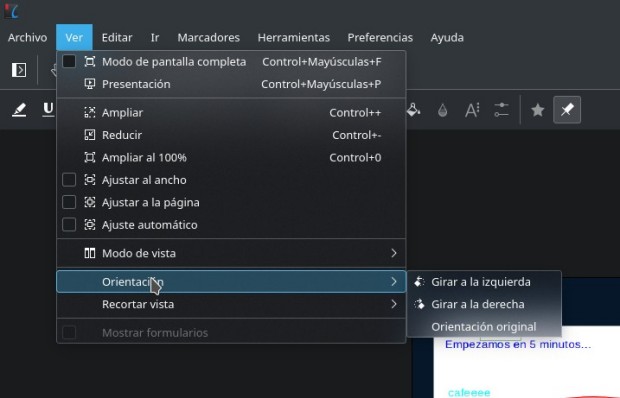
Al cerrar el pdf se quedar? guardada la rotaci?n del documento de forma autom?tica.
Con un Service Menu
La segunda opci?n que os presento es hacerlo con los Service Menu de KDE, es decir, con el men? contextual de Dolphin.
Ya he hablado en el blog de algunas opciones como Do All With PDF en el 2016 o KDE Service Menu del 2014, pero hoy os comento uno que me acabo de instalar en mi sistema.
Se trata de KDE 5 Service Menu PDF que pod?is encontrar en la KDE Store, que se instala directamente desde el mismo Dolphin y que nos a?ade decenas de opciones para trabajar con nuestros pdf.
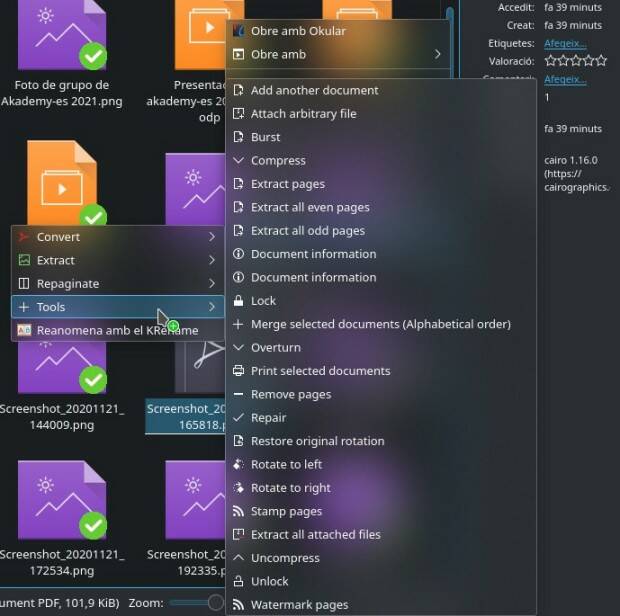
Como podemos ver en la imagen superior, podemos «Rotate to left» o «Rotate to right», y al hacerlo nos crear? un archivo que se nombrar? igual pero a?adiendo la frase «(left rotated)» o «(right rotated)» al nombre original de nuestro archivo.
Con un servicio en l?nea
Por ?ltimo, no podemos olvidarnos de los servicios de la nube, que siempre podemos utilizar por si no tenemos a nuestra disposici?n las aplicaciones antes mencionadas o simplemente no nos encontramos en nuestro ordenador.
En el caso de formatpdf.com simplemente debemos seguir los siguientes pasos:
Vamos a la web.
Pulsamos en Girar pdf
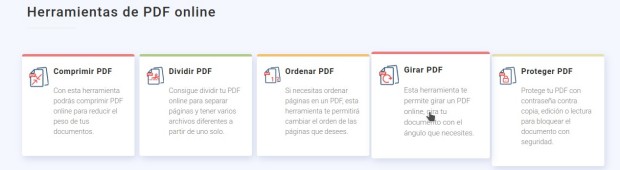
Nos aparecer? una p?gina donde nos pedir? que subamos el archivo.
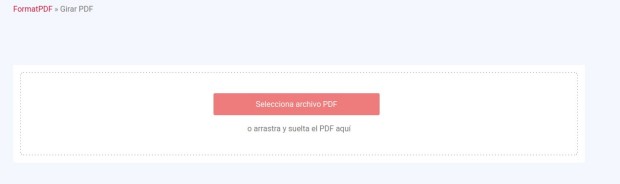
Una vez subido nos aparecer? el mismo con las opciones de rotaci?n: ha, rotar a la izquierda u Orientaci?n Original.

Pulsamos la que nos interesa y pulsamos en Rotar.
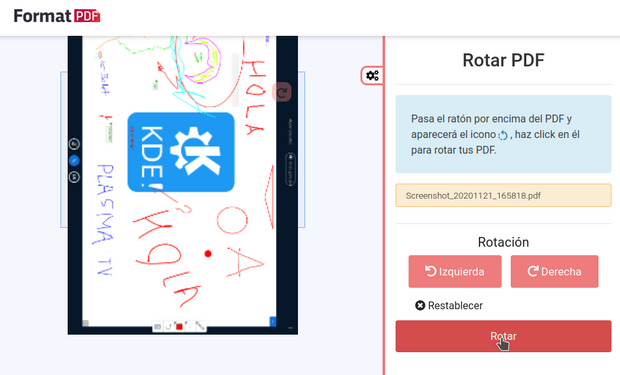
Una vez realizada la rotaci?n, simplemente debemos descargar el archivo y listo.

Como vemos, una soluci?n r?pida que podemos utilizar siempre que tengamos un navegador web y conexi?n a la red.
La entrada Cómo rotar un archivo pdf de forma sencilla se publicó primero en KDE Blog.