
 Member
 Victorhck
Cómo escribir en Vim caracteres unicode que no existen en el teclado
Veamos cómo escribir en el editor Vim caracteres especiales como € ł ŋ u muchos otros que no existen en el teclado, llamados en Vim digraph

Quizás en alguna ocasión mientras editabas con el editor Vim, has tenido la necesidad de tener que añadir caracteres que no aparecían en tu teclado, como letras griegas Σ, letras hebreas א símbolos como © ✓ o expresiones matemáticas como ≠ ¾
Pero esos símbolos y muchos otros no aparecen en tu teclado. En Vim se llaman digraph y en este tutorial veremos cómo consultar la tabla de símbolos disponibles y cómo añadirlos en nuestro archivo.
Este artículo es una nueva entrega del curso “improVIMsado” que desde hace meses vengo publicando en mi blog sobre el editor Vim y que puedes seguir en estos enlaces:
- https://victorhckinthefreeworld.com/tag/vim/
- https://victorhck.gitlab.io/comandos_vim/articulos.html
Y para aprender Vim (de la manera más inteligente) aquí tienes esta útil guía:
Tabla de símbolos disponibles
Para ver la tabla de símbolos disponibles en Vim, escribiremos: :help digraph o :help digraph-table
Ahí aparecerá una tabla con símbolos, números, etc. A continuación reproduzco un extracto de esa tabla:
char digraph hex dec official name
☻ 0U 263B 9787 BLACK SMILING FACE
☼ SU 263C 9788 WHITE SUN WITH RAYS
 Fm 2640 9792 FEMALE SIGN
 Ml 2642 9794 MALE SIGN
 cS 2660 9824 BLACK SPADE SUIT
♡ cH 2661 9825 WHITE HEART SUIT
cS 2660 9824 BLACK SPADE SUIT
♡ cH 2661 9825 WHITE HEART SUIT
 Fm 2640 9792 FEMALE SIGN
 Ml 2642 9794 MALE SIGN
Aparece el símbolo, unos caracteres, un valor en hexadecimal, un valor en decimal y una descripción del símbolo.
Cómo añadir un símbolo
Imaginemos que queremos añadir el símbolo de la carita sonriente primera que aparece en el extracto de la tabla que he reproducido.
En modo insertar pulsamos Ctrl+k y a continuación introducimos los dos caracteres del símbolo que deseamos, en el ejemplo 0U y aparecerá el símbolo deseado. Siempre que queramos otro podremos introducirlo de la misma manera.
Si queremos introducir un símbolo que sabemos que estará en el listado, pero no recordamos su código (cosa lógica) podremos abrir la tabla con :help digraph-table y en esa ventana hacer una búsqueda, por ejemplo /face para buscar el símbolo anterior del ejemplo.
Cómo crear nuestra tabla personalizada de símbolos
Si utilizamos algunos símbolos de manera usual, quizás queramos crear unos nemónicos más amigables para nuestra memoria a la hora de llamarlos.
Para eso tenemos la posibilidad de establecer en nuestro archivo vimrc otros nombres a la hora de llamar a los símbolos que usamos de manera usual. Por ejemplo, para añadir el símbolo  habría que escribir cS, pero nosotros queremos cambiarlo por ap (as de picas)
Para ello, en nuestro archivo vimrc, escribiremos lo siguiente: dig ap 9824
Ahora cuando queramos añadir ese símbolo utilizaremos la combinación ap que hemos establecido en el archivo vimrc. Lo mismo para los símbolos que necesitemos.
Espero que te haya resultado útil el tutorial. Usa los comentarios del blog para aportar tu punto de vista u opinión.
Enlaces de interés

Vídeo de Plasma 5.26, plasmoides y Bigscreen
Ayer fue lanzado Plasma 5.26 que destacaba por su trabajo en mejorar los plasmoides y en la inclusión de nuevas aplicaciones para Plasma Bigscreen, la entorno de trabajo especialmente diseñado para pantallas grandes y para ser usado con un mando a distancia. Ya ha pasado un día y ya tengo actualizado mi KDE Neon, es hora de promocionar esta actualización mostrando el vídeo de Plasma 5.26 y ver unas pinceladas de sus novedades.
Vídeo de Plasma 5.26, plasmoides
La Comunidad KDE ha publicó ayer Plasma 5.26, una versión que nos ofrecen un gran conjunto de novedades y propuestas que nos acercan a lo que vendrá cuando se realice la transición a Plasma 6. No obstante, en esta versión se han dedicado a, entre otras cosas, a pulir las funcionalidades de los widget, algo que en el blog conocemos como plasmoides.
Además, esta nueva versión de Plasma nos presenta la puesta de largo Plasma Bigscreen, una nueva forma de visualizar el escritorio en pantallas grandes y muchas pequeñas mejoras en aspectos tan importantes de un entorno de trabajo como la gestión de fondos, la instalación de aplicaciones o el manejo de las conexiones de audio.
Hoy me complace compartir con vosotros, mientras preparo la entrada con el gran repaso a las novedades, el vídeo que suele acompañar el lanzamiento.
Más información: KDE
Las novedades de Plasma 5.26
Hoy es un día de descarga y actualizaciones, y mientras espero que esté disponible para mi KDE Neon, os comento algunas de sus novedades:
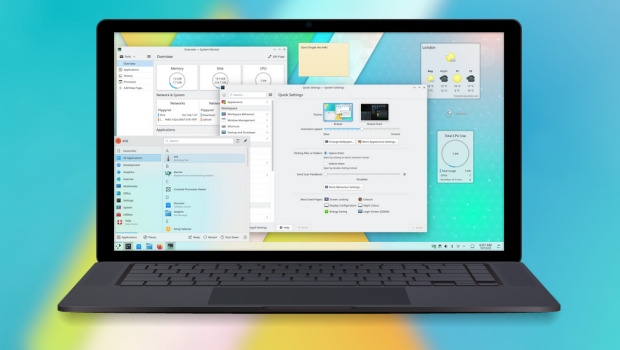
- Posibilidad de redimensionar los plasmoides emergentes incrustados en una barra de tareas.
- Timer: nuevo plasmoide que nos sirve para tener un simple temporizador para las tareas que lo requieran o, inlcuso, asignarle acciones como ejecutar un comando.
- Añadido el navegador Aura especialmente diseñado para la pantalla grande del modo Plasma Bigscreen que destaca por tener mosaicos grandes y claramente etiquetados te permiten navegar por la red mundial con tu mando a distancia desde el sofá.
- También se une a Bigscreen Plank Player, un reproductor multimedia sencillo y fácil de usar que te permitirá reproducir vídeos desde un dispositivo de almacenamiento que conectes a tu televisor.
- Mejoras en el entonor Plasma que utiliza el servidor gráfico Wayland, el cual sigue mejroando y hace que las aplicaciones XWayland escaladas ahora se ven más hermosas, nítidas y claras.
La entrada Vídeo de Plasma 5.26, plasmoides y Bigscreen se publicó primero en KDE Blog.

Kurz práce v příkazové řádce Linuxu nejen pro MetaCentrum 2023
Nebojte se příkazové řádky Linuxu! Je to mocný a přívětivý nástroj umožňující efektivně zpracovat i velká data a zautomatizovat činnosti. Prakticky shodně funguje příkazová řádka i v Apple macOS, BSD a dalších UNIXových systémech, nejen v Linuxu. Kurz je vhodný pro úplné začátečníky i mírně pokročilé. Jediným vstupním požadavkem je zájem (nebo potřeba) pracovat v příkazové řádce, typicky na linuxovém výpočetním serveru.
Kmon una herramienta para gestionar los módulos del kernel #Linux
Con la herramienta Kmon podrás gestionar módulos del kernel Linux con una interfaz gráfica desde la terminal

Kmon es una herramienta desarrollada por Orhun y escrita en Rust y publicada como software libre bajo una licencia GPL3.0 con la que podrás consultar y gestionar los módulos cargados en el kernel Linux de tu sistema.
Dispone de una interfaz para la línea de comandos en la que muestra información de los módulos cargados en el kernel Linux de nuestro sistema, información y desde la que podremos realizar diferentes acciones.
Desde la interfaz de Kmon, podrás:
- ver la información de un módulo
- buscar un módulo en concreto
- cargar/eliminar un módulo
- meter un módulo en la lista negra
- y muchas otras cosas…
A diferencia de los kernels monolíticos estándar, el kernel Linux es modular y acepta módulos de kernel cargables (LKM) que generalmente se usan para agregar soporte para nuevo hardware (como controladores de dispositivos) y/o sistemas de archivos, o para agregar llamadas al sistema.
Dado que los LKM pueden cargarse y descargarse en el sistema durante el tiempo de ejecución, tienen la ventaja de extender el kernel sin reiniciar ni volver a compilar. Por lo tanto, las funcionalidades del kernel proporcionadas por los módulos no residirían en la memoria sin ser utilizadas y el módulo relacionado se puede descargar para liberar memoria y otros recursos.
Kmon proporciona una interfaz de usuario basada en texto para administrar los módulos del kernelde Linux y monitorear las actividades del kernel.
Administrar significa cargar, eliminar, poner en lista negra y mostrar la información de un módulo. Estas actualizaciones en los módulos del kernel, los registros sobre el hardware y otros mensajes del kernel se pueden rastrear con el monitor de actividad en tiempo real en kmon.
Dado que se requiere el uso de diferentes herramientas como dmesg y kmod para estas tareas en Linux, kmon tiene como objetivo reunirlas en una sola ventana de terminal y facilitar el uso tanto como sea posible manteniendo la funcionalidad.
Instalar Kmon
El paquete está disponible para algunas distribuciones de GNU/Linux como Arch y derivadas o Debian y derivadas.
También puedes descargar el binario desde GitHub y ejecutarlo en tu sistema. En el momento de escribir este artículo está disponible la versión 1.6.2. Por tanto ejecutaremos los siguientes comandos:
wget https://github.com/orhun/kmon/releases/download/v1.6.2/kmon-1.6.2-x86_64-unknown-linux-gnu.tar.gz
tar -xvzf kmon-1.6.2-x86_64-unknown-linux-gnu.tar.gz
cd kmon-1.6.2
./kmon
Si queremos, podemos mover el binario kmon a un lugar de nuestro $PATH para poder ejecutarlo desde cualquier parte del sistema.
Navegar por la interfaz
Una vez ejecutado kmon, veremos unas cuantas ventanas que nos ofrecen distinta información y en las que podremos interactuar. Para movernos por ellas lo haremos con las teclas de las flechas del teclado.
Tiene un montón de atajos de teclado con los que podremos movernos por la interfaz e interactuar con la herramienta. Pulsando ? obtendremos un listado de todos los atajos de teclado disponibles.
Buscar un módulo
Accediendo al cuadro de búsqueda de la parte superior, podremos introducir el nombre o parte del nombre un módulo y en la vista de módulos se filtrarán, mostrando los que cumplen los requisitos de la búsqueda.
Cargar un módulo
La caja de búsqueda anterior, se convierte en una caja para cargar un módulo al pulsar sobre + o i y en ella escribiremos el nombre del módulo que queremos cargar. Deberemos confirmar esta acción.
Eliminar un módulo
De igual forma, podremos eliminar un módulo del kernel situándonos sobre él y pulsando - o u
Poner un módulo en la lista negra
Con esta acción haremos que el kernel no cargue el módulo seleccionado. Para ello, sobre el módulo en cuestión pulsaremos x o b
Dale color a kmon
De manera predeterminada kmon se ejecuta en blanco y gris. Si esa combinación de colores no la vemos bien o no nos gusta, podremos cambiarla ejecutando al inicio ./kmon --color green para verlo en verde, por ejemplo.
O en cyan y azul: ./kmon -a cyan -c blue
Enlaces de interés
- https://blog.orhun.dev/introducing-kmon/
- https://kmon.cli.rs/
- https://github.com/orhun/kmon
- https://github.com/orhun/kmon/releases


An awesome KDE Akademy is over. Hello Thessaloniki!!!

For KDE friends who don't know me, I mainly contribute to openSUSE, GNOME, Nextcloud, ownCloud and GNU Health. I have fewer contributions to Fedora, Ubuntu and ONLYOFFICE and a few here and there to FOSS projects.
Question. Why did you attend KDE Akademy? Two were the reasons. The first and main reason was to see the organization of the conference from the inside, since my University will host the next KDE Akademy. The second reason was to "introduce" myself to the KDE community, since I contribute to other projects. Actually, I know a person from the KDE board but community is not only one person.
The only familiar person I could meet was openSUSE's community manager. Unfortunately he couldn't attend, so he asked me to represent openSUSE. The duties were to have a booth and present something openSUSE related for 3 minutes. I had an idea to propose my friend George to do his first presentation to an open source conference and start his open source journey. He was very excited and he did it.
Day 0
There was a welcome event on Friday for us, where attendees got to know each other. Unfortunately, my flight was delayed and I arrived too late to attend the event. So I stayed at the hotel and tried to rest for my first Akademy day. I felt like going to school.Day 1
The first thing we had to do was set up our booth. Well, the only promo material we had was stickers. I think all geeks like stickers so it was the best gift for everyone. I love stickers, not only from openSUSE but from other projects as well.
I attended quite a few interesting talks:
- Building the Future of Qt, Together: What have happened in The Qt Project during the last two years
-
Goals old and new! : What are Goals that were the focus of the community for the next year

- A Brief History of Terminals, and what the future holds for Konsole: Moto was "Trying to sell konsole to non kde users". I am not a KDE user and I really liked some cool stuff you can do with terminal
- Full Steam ahead! :Seen how Plasma fits into the Steamdeck and what aspects of KDE made us the right choice for their new userbase

You can see the first day, Room 1 here:
Day 2
After having fun the first day, I was excited for the second day. The first reason was that George and I (actually only George) will have the sponsor talk and the second reason was that the fact that the organizers would announce the place of next year's Akademy. Of cource that place is Thessaloniki and my University.I attended quite a few interesting talks:
- Launching an application - How hard can it be? It was what I wanted actually since we are going to launch an application with the Open Source Team of our Univeristy.
- Healthy Mind, Healthy Code : Maybe this was my favourite talk
We didn't join the trip to the mountain. We went to see the city. It was my second time and I skipped some sites.
I really loved my first KDE Akademy. I would like to thank KDE ev that sponsored my trip to attend the Akademy.
I have a lot of stuff to work here with the organizing committee.
We are working to host you all next year.
Lanzado Plasma 5.26, mejorando los plasmoides
Han pasado ya los cuatro meses de rigor desde la última gran actualización del entorno de trabajo Plasma de la Comunidad KDE, la 5.25. Esto significa que los desarrolladores han estado trabajando en el siguiente paso y que se congratulan en anunciar que ha sido lanzado Plasma 5.26 que destaca por su trabajo en mejorar los plasmoides y en la inclusión de nuevas aplicaciones para Plasma Bigscreen.
Lanzado Plasma 5.26, mejorando los plasmoides
La Comunidad KDE ha publicado hoy Plasma 5.26, una versión que nos ofrecen un gran conjunto de novedades y propuestas que nos acercan a lo que vendrá cuando se realice la transición a Plasma 6. No obstante, en esta versión se han dedicado a, entre otras cosas, a pulir las funcionalidades de los widget, algo que en el blog conocemos como plasmoides.
Además, esta nueva versión de Plasma nos presenta la puesta de largo Plasma Bigscreen, una nueva forma de visualizar el escritorio en pantallas grandes y muchas pequeñas mejoras en aspectos tan importantes de un entorno de trabajo como la gestión de fondos, la instalación de aplicaciones o el manejo de las conexiones de audio .
Más información: KDE
Las novedades de Plasma 5.26
Hoy es un día de descarga y actualizaciones, y mientras espero que esté disponible para mi KDE Neon, os comento algunas de sus novedades:
- Posibilidad de redimensionar los plasmoides emergentes incrustados en una barra de tareas.
- Timer: nuevo plasmoide que nos sirve para tener un simple temporizador para las tareas que lo requieran o, inlcuso, asignarle acciones como ejecutar un comando.
- Añadido el navegador Aura especialmente diseñado para la pantalla grande del modo Plasma Bigscreen que destaca por tener mosaicos grandes y claramente etiquetados te permiten navegar por la red mundial con tu mando a distancia desde el sofá.
- También se une a Bigscreen Plank Player, un reproductor multimedia sencillo y fácil de usar que te permitirá reproducir vídeos desde un dispositivo de almacenamiento que conectes a tu televisor.
- Mejoras en el entonor Plasma que utiliza el servidor gráfico Wayland, el cual sigue mejroando y hace que las aplicaciones XWayland escaladas ahora se ven más hermosas, nítidas y claras.
La entrada Lanzado Plasma 5.26, mejorando los plasmoides se publicó primero en KDE Blog.
Actualización de octubre del 2022 de KDE Frameworks
Pasadas Akademy-es y Akademy híbridas de Barcelona siguen las entradas recurrentes de las actualizaciones mensuales de rigor que demuestra que los desarrolladores de KDE no dejan de trabajar en sus librerías. Así que se congratulan en anunciar la actualización de octubre del 2022 de KDE Frameworks. Con esta se llega a la versión 5.99, un suma y sigue de compromiso y constancia que no parece que tenga un final cercano, y que ofrece una novedad, como mínimo, controvertida.
Actualización de octubre del 2022 de KDE Frameworks
La razón de esta afirmación es que KDE Frameworks es básicamente la base de trabajo de los desarrolladores para realizar sus aplicaciones, es como el papel y las herramientas de dibujo para un artista: cuanto mejor sea el papel y mejores pinceles tenga, la creación de una artista será mejor.

De esta forma, las mejoras en KDE Frameworks facilitan el desarrollo del Software de la Comunidad KDE, haciendo que su funcionamiento, su estabilidad y su integración sea la mejor posible.
El 9 de octubre de 2022 ha sido lanzado KDE Frameworks 5.99, la nueva revisión del entorno de programación sobre el que se asienta Plasma 5, el escritorio GNU/Linux de la Comunidad KDE, y las aplicaciones que se crean con para él.
Más información: KDE
La constancia del equipo de desarrollo de la Comunidad KDE
Hay que recordar que los desarrolladores de KDE decidieron lanzar actualizaciones mensuales de este proyecto y lo están cumpliendo con puntualmente. La idea es ofrecer pocas pero consolidadas novedades, a la vez que se mantiene el proyecto evolucionando y siempre adaptándose al vertiginoso mundo del Software Libre.
Una gran noticia para la Comunidad KDE que demuestra la evolución continua del proyecto que continua ganando prestigio en el mundo de los entornos de trabajo Libres.
¿Qué es KDE Frameworks?
Para los que no lo sepan, KDE Frameworks añade más de 70 librerías a Qt que proporcionan una gran variedad de funcionalidades necesarias y comunes, precisadas por los desarrolladores, testeadas por aplicaciones específicas y publicadas bajo licencias flexibles. Como he comentado, este entorno de programación es la base para el desarrollo tanto de las nuevas aplicaciones KDE y del escritorio Plasma 5.

Aquí podéis encontrar un listado con todos estos frameworks y la serie de artículos que dedico a KDE Frameworks en el blog,
Recuerda que puedes ver una introducción a Frameworks 5.0 en su anuncio de lanzamiento.
La entrada Actualización de octubre del 2022 de KDE Frameworks se publicó primero en KDE Blog.

openSUSE Leap 15.4 安裝小記
openSUSE Leap 15.4 安裝小記
openSUSE Leap 15.3 Lifetime 到 2022/11
15.4 可以撐到 2023/11
過了一年又到升級的時候 :)
安裝前處理
使用 imagewriter 建立 openSUSE 安裝USB
整理 /home/sakana 目錄
使用 du -h --max-depth=1 /home/sakana 檢查
清掉不要的檔案, 特別是 ~/.cache , ~/.config 內兩大瀏覽器內有佔很大空間的 cache ( 這次懶得刪就沒有這樣做 )
因為有很多相關的 config 在個人家目錄內, 所以先把舊的 openSUSE Leap 15.3 的 /home 目錄, 切換到隨身碟的目錄中
使用# tar cvf home.tar /home 進行打包到隨身碟 ( 不要使用 .gz 方式, 會比較快速 )
如果剛剛的光碟 ISO 放在下載目錄, 記得刪除來節省空間
新機器再使用 tar 指令還原回來
這次先在 console F1 以 root 使用者,
使用 tar 指令解壓縮 home.tar 到隨身碟目錄
刪除 /home/sakana 目錄, 將解壓縮的檔案直接移動過去
這次也是使用 USB 來進行安裝
== 安裝過程小記==
這次建立的時候我還是選擇 GNOME 桌面
磁碟區分割的部分, 使用引導的方式安裝, 因為一直出線開機分割區的警告, 所以我就用引導模式
刪除所有分割區
建立獨立分割區 XFS
根目錄取消 Btrfs 快照
===============
Network Manager:
openSUSE Leap 15.4 預設為 Network Manager
Google Chrome:106
https://www.google.com/intl/zh-TW/chrome/browser/
還是會有驗證性問題, 但是功能沒有差異
為了進行google 登入,先使用 Google 驗證App, 後面來處理yubikey
home 資料回復:
因為有很多相關的 config 在個人家目錄內, 所以先把舊的 openSUSE Leap 15.0 的 /home 目錄, 使用# tar cvf home.tar /home 進行打包到隨身碟 ( 不要使用 .gz 方式, 會比較快速 )
新機器再使用 tar 指令還原回來
這次先在 console F1 以 root 使用者,
使用 tar 指令解壓縮 home.tar 到隨身碟目錄
刪除 /home/sakana 目錄, 將解壓縮的檔案直接移動過去
Notes
Ifconfig 預設沒有安裝, 要使用 ip address show
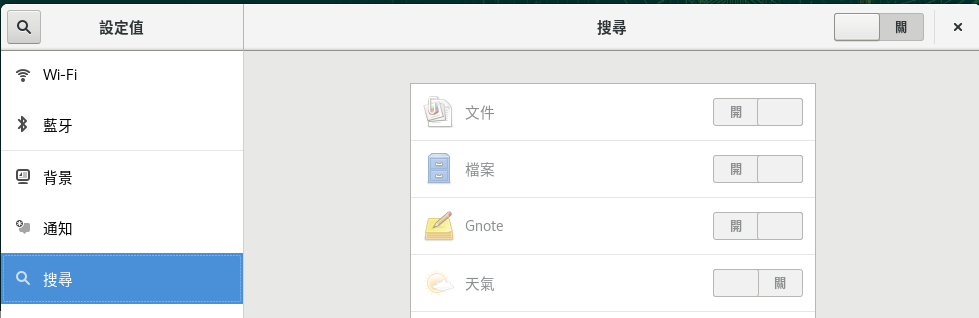
關閉GNOME裡面的搜尋功能預設關閉 (點選右上角的設定按鈕), 因為我覺得用不到
中文輸入法問題:
這次預設是 ibus 輸入法
取消 USB 為安裝來源:
# yast2 repositories
Snapd:
因有些軟體可能會透過 snap 來安裝
安裝方式紀錄
# zypper addrepo --refresh https://download.opensuse.org/repositories/system:/snappy/openSUSE_Leap_15.4 snappy
# zypper --gpg-auto-import-keys refresh
# zypper dup --from snappy
# zypper install snapd
Additional rpm output:
Please reboot, logout/login or source /etc/profile to have /snap/bin added to PATH.
On a Tumbleweed and Leap 15.3+ systems you need to run: systemctl enable snapd.apparmor.service
可以重開機, 登出登入, 讓 路徑變數內有 /snap/bin 這個路徑
在 X 11 下就是開一個新的終端機切換為 root, 檢查 $PATH
建議使用重開機的方式
# systemctl enable snapd
# systemctl start snapd
# systemctl enable snapd.apparmor
# systemctl start snapd.apparmor
如果安裝應用程式, 可能重開機才會找的到
Freemind:
因為 Freemind 在 Leap 15.4 只有社群維護套件
之前是用 snap 安裝, 但是這次有問題,
所以先用社群維護版本來安裝 https://software.opensuse.org/package/freemind
我用 home:beyerle:IAC 那個版本, 然後把他 repo 裡面的 SLE-15-SP1 ~ SLE-15-SP4 停用了
將.mm 的檔案指定用 freemind 開啟
以後應該要考慮其他的方案
有看到 freeplane https://docs.freeplane.org/ 下次試試看
新增 Packman 套件庫:
使用 #yast2 repositories 加入社群版本的Packman
#yast2 repositories
除了 Packman 順便加入 nVidia 套件庫
Firefox Sync:
登入 Firefox Sync, 會處理之前有下載的 Plugin
例如 https://addons.mozilla.org/zh-TW/firefox/addon/video-downloadhelper/
這次因為沒有刪除 .cache 的關係, 所以好像相關設定都在
flash-player:
# zypper install flash-player
Telegram desktop:
最後的解法是 使用 Web 的方式來使用 Telegram
軟體 ( Flatpak ) 安裝可以輸入中文 - 但是版本太舊會被 Telegram 說會被停用
snap 版本 / 下載 telegram 的 .xz 解壓縮, 不能輸入中文
在 ~/.local/share/applications 目錄下找出 telegram-desktop.desktop 設定檔, 加入 QT_IM_MODULE=gin 也無效
播放器:
Codecs 的部分參考網路上找到的
# zypper install opi
# opi codecs
這邊會裝 ffmpeg-4 以及一堆套件
之後就可以使用播放器看 .mp4
Skype:
使用網頁版的 Skype 不另外安裝
因為網址都會被轉到 www.pchomeskype.com.tw 太煩了
GNOME Extension:
參考調校小記
主要是裝 chrome 內的 GNOME Shell integration
然後到 https://extensions.gnome.org/
選想裝的 Extension, 調爲 on 就好
裝了
NetSpeed
RunCat
Show External IP
Tray Icons: Reloaded
過期
TopIcons Plus (現在都在右上角, 所以就不需要)
.7z 支援:
# zypper install p7zip
imagewriter:
# zypper install imagewriter
用來製作開機 USB
rdesktop 安裝與測試:
#zypper install freerdp
執行方式
#xfreerdp -g 1280x1024 -u administrator HOST_IP
修改 LS_OPTIONS 變數
# vi /etc/profile.d/ls.bash
把 root 的 LS_OPTIONS 的 -A 移除
修改 HISTSIZE 變數
# vi /etc/profile
修改 HISTSIZE 的筆數
ansible 安裝:
目前版本 2.9.27
#zypper install ansible
變更主機名稱:
#yast2 lan
Dropbox 158.4.4564版 :
openSUSE Leap 15.4 預設不支援 dropbox
參考官方網站上面斷頭的安裝方式來安裝
> cd ~ && wget -O - "https://www.dropbox.com/download?plat=lnx.x86_64" | tar xzf -
接下來,請從新建立的 .dropbox-dist 資料夾執行 Dropbox 精靈。
> ~/.dropbox-dist/dropboxd
順便安裝 Nautilus 相關套件
# zypper install nautilus-extension-dropbox
Filezilla 安裝:
#zypper install filezilla
Brave 安裝:
# rpm --import https://brave-browser-rpm-release.s3.brave.com/brave-core.asc
# zypper addrepo --refresh https://brave-browser-rpm-release.s3.brave.com/x86_64/ brave-browser
# zypper install brave-browser
Azure-cli 安裝:
版本: 2.38.0
參考
http://sakananote2.blogspot.com/2018/07/kubernetes-in-azure-with-opensuse-leap.html
https://docs.microsoft.com/zh-tw/cli/azure/install-azure-cli-linux?pivots=zypper
匯入 rpm key
# rpm --import https://packages.microsoft.com/keys/microsoft.asc
新增 Azure CLI 的 repo
# zypper addrepo --name 'Azure CLI' --check https://packages.microsoft.com/yumrepos/azure-cli azure-cli
安裝 azure-cli 套件
# zypper install --from azure-cli -y azure-cli
使用互動的方式登入 azure ( 現在已經不需要輸入機器碼, 直接驗證帳號就可以 )
> az login
AWS Cli 安裝:
版本: 2.8.2
# curl "https://awscli.amazonaws.com/awscli-exe-linux-x86_64.zip" -o "awscliv2.zip"
# unzip awscliv2.zip
# ./aws/install
# aws --version
aws-cli/2.8.2 Python/3.9.11 Linux/5.14.21-150400.22-default exe/x86_64.opensuse-leap.15 prompt/off
將補齊的指令 寫到或是修改到個人家目錄的 .bashrc 內
echo "complete -C '/usr/local/bin/aws_completer' aws" >> /root/.bashrc
Google Cloud SDK ( gcloud )安裝:
參考 http://sakananote2.blogspot.com/2019/04/gsutil-google-cloud-storage-in-opensuse.html
安裝 gcloud
但是目前實務上是使用容器的方式來執行
使用一般使用者安裝
> tar zxvf google-cloud-sdk-405.0.0-linux-x86_64.tar.gz
> ./google-cloud-sdk/install.sh
透過 gcloud 安裝 kubectl
> gcloud components install kubectl
確認版本
> kubectl version --client
Visual Studio Core 相關 :
安裝 git
# zypper install git
參考 http://sakananote2.blogspot.com/2019/01/visual-studio-code-with-opensuse-leap-15.html
安裝 vscode
# rpm --import https://packages.microsoft.com/keys/microsoft.asc
# sh -c ' echo -e "[code]\nname=Visual Studio Code\nbaseurl=https://packages.microsoft.com/yumrepos/vscode\nenabled=1\ntype=rpm-md\ngpgcheck=1\ngpgkey=https://packages.microsoft.com/keys/microsoft.asc" > /etc/zypp/repos.d/vscode.repo '
# zypper refresh
# zypper install code
安裝 vscode extension ( 這次沒有作, 因為將舊的 /home 還原回來, 另外目前 vscode 也有同步機制 )
AWS Toolkit for Visual Studio Code
Bracket Pair Colorizer
Code Time
Git Graph
GitHub Pull Requests
GitLens
Kubernetes
Python
REST Client
GitHub Pull Requests and Issues
Podman 安裝:
參考官方網頁
# zypper install podman
看起來目前的階段 docker 與 podman 還是要並存 - 生態系支援與 rootless podman 相關考量
Docker 安裝:
目前版本 20.10.17
#zypper install docker
將使用者 sakana 加入 docker 群組
# usermod -a -G docker sakana
#systemctl start docker
#systemctl enable docker
PPPoE 設定:
目前光世代有配一個固定 IP
參考 http://sakananote2.blogspot.com/2021/05/nmcli-network-manager-pppoe-ip.html
設定 PPPoE 以及固定 IP
這個版本沒有安裝的, 以後要安裝就看之前的筆記
http://sakananote2.blogspot.com/2019/08/opensuse-leap-151.html
Sqlitebrowser
VMware workstation Pro 15
Nextcloud client 安裝, crontab 設定
PDF Viewer - Foxit:
hexchat
youtube-dl
Yubico Key ( 現在 google 已經可以直接手機驗證 )
smartgit 安裝 ( 現在使用 vscode )
PPSSPP ( 沒時間 …. )
這樣又可以再戰一年 :p
~ enjoy it
參考
https://sakananote2.blogspot.com/2021/11/opensuse-leap-153.html
http://sakananote2.blogspot.com/2020/08/opensuse-leap-152.html
http://sakananote2.blogspot.com/2019/08/opensuse-leap-151.html
http://sakananote2.blogspot.com/2019/01/opensuse-leap-15-2.html
http://sakananote2.blogspot.com/2017/11/opensuse-leap-423.html
http://sakananote2.blogspot.tw/2017/07/opensuse-leap-423-beta.html
http://sakananote2.blogspot.tw/2016/11/opensuse-leap-422.html
http://sakananote2.blogspot.tw/2016/12/opensuse-leap422-gnomeextension.html
http://sakananote2.blogspot.com/2018/07/kubernetes-in-azure-with-opensuse-leap.html
http://sakananote2.blogspot.com/2019/01/visual-studio-code-with-opensuse-leap-15.html
http://sakananote2.blogspot.com/2019/03/aws-cli-with-opensuse-leap-15.html

More API Endpoint Documentation for Project and Package Sources

Diffusion Models 3D: IA que cria trabalhos/objetos 3D para o Metaverso e Games.
Ultimamente um assunto muito presente e popular no mundo da tecnologia é os modelo generativos denominado Diffusion Models. Entendemos que os modelo de difusão tem capacidade de superar GANS (Rede Adversárias Generativas), tudo isto devidos algumas publicações entre 2020 e 2021.
O que é o Modelo de Difusão:
Aprendi este termo nos livros de Física 2 nos capítulos de termodinâmica. Um sistema desequilibrado possui uma grande concentração de um determinado material (exemplo vazamento de gás que resulta no cheiro forte localmente). A difusão coloca o sistema em equilíbrio, como por exemplo a moléculas de perfume se difunde a partir de uma região para todo sistema assim causando o equilíbrio. Ou seja, tudo torna-se homogêneo.
Esta é toda origem motivacional dos modelos de difusão, que utilizam uma série de variáveis onde o valor de cada uma depende do estado do evento anterior. A difusão usa rede neural durante o processo, tentando prever o ruído a cada fase assim simplificando a tarefa.
Tomando este conceito como base científica, diversos projetos surgiram que alcançam o desempenho humano em tarefas de criação de imagens. A função desta IA é gerar imagens a partir de descrições de texto e também utiliza aprendizado multimodal para conectar a semântica entre texto e imagens. Além de revolucionário iram mudar a área de design de produtos e conteúdo visual para diversas finalidades. Existem alguns projetos famoso como Dall E, Midjourney e Stable Diffusion.
Stablle difusion é opensource, inclusive tenho instalado na minha máquina. E justamente por ser opensource, já avançou para uma segunda geração. A criação de modelos e artes 3D, o paper podemos encontrar neste link https://arxiv.org/abs/2209.14988
Em … o projeto foi implementado em pytorch de toda teoria. O projeto foi batizado como Stable-Dreamfusion similar ao modelos de difusão para criar imagens e artes mas agora em 3D. Com isto este modelos poderão ser utilizados no metaverso e também jogos. Abaixo um exemplo gerado com este projeto https://github.com/ashawkey/stable-dreamfusion, digitando o texto “Um fantasmas comendo um harmburger” ! Vale a pena ressaltar que o projeto pioneiro foi o GET3D da Nvidia https://github.com/nv-tlabs/GET3D.
