
Content Moderation Becomes Stronger

 Member
 Victorhck
Kew el reproductor de música minimalista e inmersivo para la terminal
El reproductor Kew está pensado para quien desea una experiencia limpia y sin distracciones a la hora de escuchar música de tu colección propia desde la terminal

kew es un reproductor de música para utilizar en la terminal. El proyecto nació en 2022 y está escrito en C y publicado bajo licencia GPLv2+, cuyo desarrollo se realiza en un repositorio en Codeberg. (aunque hay un mirror en GitHub). Ha sido diseñado desde cero para ser rápido, minimalista, inmersivo y divertido de usar.
Este reproductor lo conocí gracias a un comentario de «el chino» a un artículo de Fanta en su web. Así que gracias por dármelo a conocer y hoy quiero darlo a conocer yo en mi blog.
Hace tiempo, para la terminal utilizaba el reproducto moc (del que he publicado varios artículos en mi blog), pero este reproductor ya hace tiempo que está un poco abandonado. Y gracias al comentario en la web de Fanta conocí Kew y lo instalé en mi openSUSE Tumbleweed desde los repositorios.
La verdad es que es muy visual, y sencillo de utilizar. Al ejecutarlo por primera vez, le das la ruta donde se almacena tu música y a partir de ahí ya puedes ir explorando todas sus funcionalidades, mientras tu propia música.
Puedes familiarizarte con el navegador pulsando F6. Aunque el navegador es para la terminal y su uso mediante el teclado, también se integra muy bien el uso del ratón, pudiendo manejarlo y hacer clic con el cursor en muchas partes.
Quizás lo primero sería darle nuestro toque propio, para eso podemos explorar los diferentes temas de color mediante la tecla «t» (theme). Lo más curioso, es que existe un tema en el que los colores se ajustan dependiendo de los colores de la portada del disco que se está mostrando en ese momento.
También podemos ir descubriendo las diferentes formas de mostrarse que tiene mediante la tecla del tabulador. El reproductor muestra una imagen en pantalla de la portada del disco si la guardamos dentro de la carpeta de reproducción que se está reproduciendo en la lista.
Una de nuestra biblioteca de música desde la que podemos reproducir temas mediante Ctrl+g para añadirlos a la lista de reproducción y añadir o quitar nuevos temas o carpetas mediante Enter.
Pulsando el tabulador pasamos a la vista de la carátula con un espectómetro de audio (similar a chafa), e información de la pista y la lista que se está reproduciendo. Otra en la que buscar un término en nuestra colección, para encontrar justo la canción o artista que queremos. Otra con la ayuda y los atajos de teclado con los que podemos controlar el reproductor. Y la última con la lista de reproducción completa.
Todas estas vistas, además de poder recorrerlas con la tecla tabulador, podemos acceder a ellas con las teclas de función de F2 a F6.
El reproductor Kew reproduce los formatos de música más habituales como son: mp3, flac, opus, ogg, m4a (incluyendo alac), raw aac, wav, webm.
Funcionalidades:
- Puede crear listas de reproducción generadas automáticamente basadas en palabras del artista, álbum o nombre de la canción. Por ejemplo: ‘kew nirvana’.
- Reproducción sin espacios en blanco entre temas.
- Prácticamente no requiere ninguna configuración. Funciona nada más instalarlo, aunque después podamos configurar algunas partes.
- Privado y sin necesidad de estar conectado a servidores externos. Tu propia música.
- Música sin distracciones ni manipulación algorítmica.
- Muestra las portadas guardadas de tus discos a todo color en terminales compatibles con sixel.
- Visualizador de espectro.
- Temas generados automáticamente basados en los colores de los álbumes y temas personalizados
- Explorador de bibliotecas musicales.
- Edición de listas de reproducción (añadir, reordenar, eliminar).
- Puedes buscar en tu colección.
- Puede mostrar las letras de las canciones, incluyendo letras de karaoke.
- Integración de escritorio (tanto Linux como macOS).
- Importar/exportar listas de reproducción.m3u.
- Diseños personalizados.
- Disponible en GNU/Linux, FreeBSD, Android, macOS, Windows y otros.
Y además, como he visto que no estaba disponible en español, me he arremangado y me he puesto mi gorra de traducir y he traducido la aplicación para que esté disponible en español:
Y pronto supongo que se incluya. ¡Incluso el desarrollador me ha incluido en la página de créditos! Y algo que me ha gustado es que el desarrollo se realiza en un repositorio de Codeberg.
Prueba esta pequeña joya para escuchar tu música en la terminal. Sin complicaciones, solo tu música local.
Enlaces de interés

Welcome to openSUSE Asia Summit in Yogyakarta
The wait is almost over! 🎉
The openSUSE.Asia Summit 2026 will begin on Oct. 3-4 at UIN Sunan Kalijaga, Yogyakarta.
On behalf of the organizing committee, we would like to warmly welcome everyone to Yogyakarta and to this year’s Summit. We hope you enjoy the talks, workshops, discussions, and all the activities we have prepared for you.
For those visiting Yogyakarta for the first time, don’t forget to enjoy the city as well. Take some time to explore its food, culture, streets, and atmosphere. Yogyakarta has plenty to offer beyond the conference venue.
And for those meeting old friends again, we hope this summit becomes a warm opportunity to reconnect, catch up, share stories, and spend some good time together with the community. ❤️
Let’s make openSUSE.Asia Summit 2026 a memorable gathering!
Welcome to Yogyakarta, and enjoy the Summit! 🦎💚
Kudos Now Recognizes Whole Teams
The openSUSE Kudos recognition platform has a new feature: teams. You can now thank a whole team at once, see who is part of which team, and join or start a team yourself.

Why teams
Peer-to-peer recognition is at the heart of Kudos, and it works well when the work was done by one person. A lot of what happens in openSUSE is not like that, though. A release, an installer, a conference booth or a wiki cleanup is usually the effort of an entire group.
One piece of feedback kept coming back: when someone wanted to thank a team, the kudos landed on the one or two people they happened to know by name. The rest of the people who did the work got nothing, simply because the person saying thanks could not name them.
Some contributors are also simply less visible than others. They do not post much, they do not show up in every chat, and their work happens quietly in the background. That does not mean they do less. Recognizing the team as a whole makes sure that thanks reaches them too.
What you can do
- Thank a team, or a team and individuals together. When giving kudos, teams show up in the recipient picker next to people. You can thank a team on its own, or combine it with individual contributors in the same kudo. That comes in handy because teams rarely work alone: a release team may get help from translators, testers or packagers outside the team, and now one thank-you can include all of them. Team members can thank their own team as well.
- See who is in which team. Every team has its own page with its roster, and every profile now shows the teams that person belongs to. Former members stay listed as alumni, so past contributions are not forgotten.
- Join or start a team. Click the Join Team button in the header, search for your team, and ask to join. If your team is not there yet, create it right from the same box. No admin approval is needed to start a team; only linking it to a badge goes through an admin (more on that below).
- Invite people. Team members can invite other Kudos users by their username. The invitation arrives by email and in the app, and the person joins once they accept.
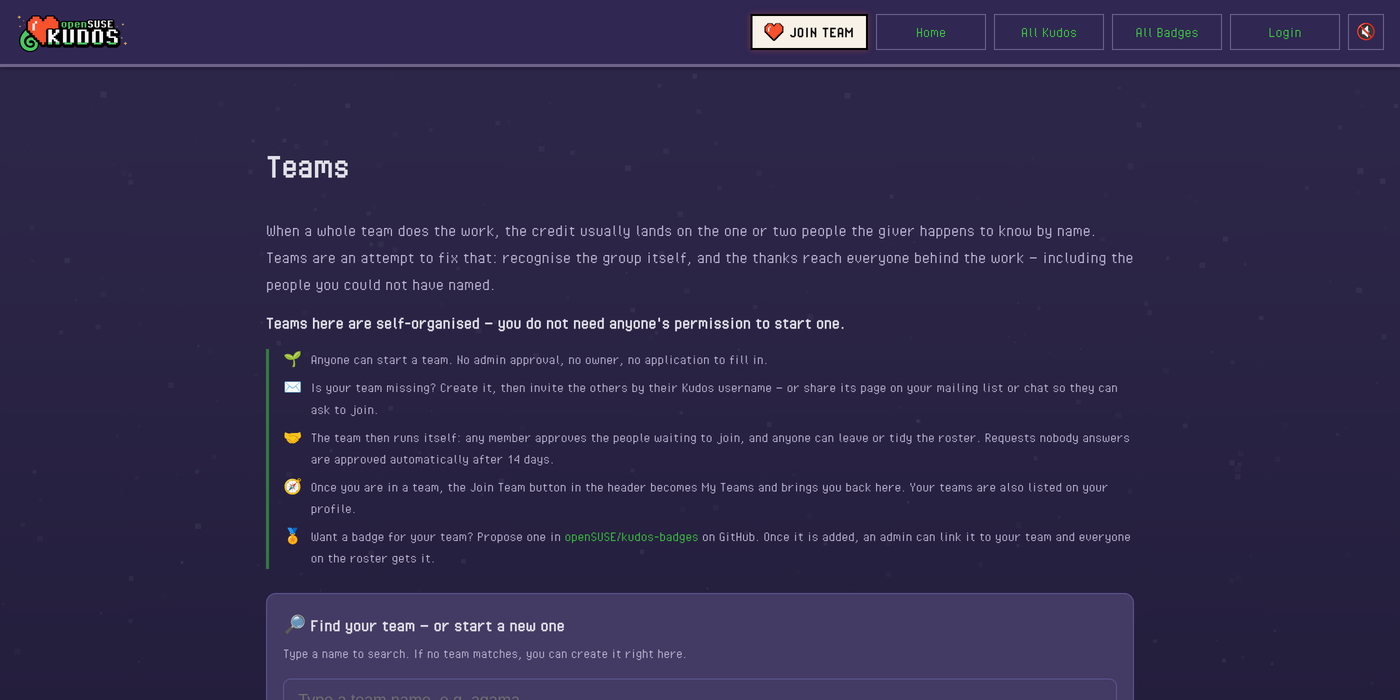
Once you are in a team, the button in the header turns into My Teams, and it lets you know when an invitation or a join request is waiting for you.
Self-managed teams
Teams run themselves. There is no owner and no manager role. Any member can approve people who asked to join, invite others, or tidy up the roster, and anyone can leave at any time. Requests that nobody answers are approved automatically after 14 days, so nobody gets stuck waiting.
Teams can also be linked with a badge. This is the one step that needs an admin, and for a good reason: a linked badge adds every holder of that badge to the team. If anyone could link any badge, a brand-new team could claim the Tumbleweed contributor badge and instantly “have” hundreds of members who never asked to join. So an admin checks that the badge really belongs to the team before linking it.
Once an admin links a badge to a team, everyone on the roster gets it, and anyone who later earns the badge through other means is added to the team automatically. Until now, team badges were handed out by hand, one person at a time. Now the team keeps its own roster, and the badge follows.
Every team page has a badge slot, and for most teams it still reads “Badge: TBD”. Badges live in openSUSE/kudos-badges on GitHub, where new ideas and artwork arrive as ordinary pull requests, so a team that wants to fill its slot is only a pull request away. Designing the badge together can be a fun first thing for a new team to do.
Badges are never taken away when someone leaves a team. A badge records what you did; the team roster shows who is there now.
Get started
Log in to kudos.opensuse.org, click Join Team, and find your team or start a new one. Then invite the people you work with, and the next time your team ships something great, thank all of them at once.
Feedback is welcome, as always. Kudos is developed in the open at github.com/openSUSE/kudos.
Episodio 77 de KDE Express: La komunidad que se ha pasado por KDE Express hasta la fecha
David ha vuelto con fuerza. Me congratula presentaros el episodio 77 de KDE Express, titulado «La komunidad que se ha pasado por KDE Express hasta la fecha» donde David Marzal hace un repaso de la gente comprometida que ha pasado por el podcast más activo actualmente de la comunidad KDE hispana.
Episodio 77 de KDE Express: La komunidad que se ha pasado por KDE Express hasta la fecha
Comenté hace ya bastante tiempo que había nacido KDE Express, un audio con noticias y la actualidad de la Comunidad KDE y del Software Libre con un formato breve (menos de 30 minutos) que complementan los que ya generaba la Comunidad de KDE España, aunque ahora estamos tomándonos un tiempo de respiro por diversos motivos, con sus ya veteranos Vídeo-Podcast que todavía podéis encontrar en Archive.org, Youtube, Ivoox, Spotify y Apple Podcast.

De esta forma, a lo largo de estos 77 episodios, promovidos principalmente por David Marzal, nos han contado un poco de todo: noticias, proyectos, eventos, etc., convirtiéndose (al menos para mi) uno de los podcast favoritos que me suelo encontrar en mi reproductor audio.
En este caso nos obsequia con un simple repaso a las personas que han participado de forma ordinaria o extraordinaria en el podcast. Además, os anima a participar el el próximo Akademy-es de Madrid 2026: no olvides reservar su alojamiento o mirar cómo llegar para estar con la Comunidad KDE española.

En palabras de David:
Recopilatorio de todas las personas y voces que han pasado por KDE Express. Solo se menciona la primera aparición, porque algunos como Jose, Brais, Baltasar o Jorge Lama participan en varios episodios.
Artículo original con los enlaces en https://kdeexpress.gitlab.io/77/
Si no ves nada tras esta linea, es que tu app no sabe leer bien el feed RSS, avisales o prueba otra
19-07-2021
    #00 - Nos Presentamos
    Jose Picon, Brais Arias y yo.
14-08-2021
    #03 - Komunidad: Juan Febles
28-08-2021
    #04 - Komunidad: Walter de HSL
16-09-2021
    #06 - Komunidad: Adolfo Barrios HSL
15-10-2021
    #08 - Komunidad: Ignacio Serantes Iglesias de Cañas y Bravas.
30-12-2021
    #10 - Novedades fin de 2021
    Baltasar Ortega de KDE Blog
Salto en el tiempo sin novedades y con pocos episodios
12-02-2023
    #13 - Car Edition + I love Free Software Day
    Jorge Lama empieza a encargarse de la edición
15-07-2024
    Komunidad con Ivan GJ
18-05-2025
    Como informar de un error para que Albert lo arregle
    Tiene trampa porque es una charla de Albert Astals Cid en la Akademy_ES
28-07-2025
    50 Komunidad con Ismael Asensio. QR power
18-11-2025
    Compilando Comunidad con Paco Estrada
14-01-2026
    65 - esLibre2026 José Castillo Lema - OCaml y Containerlab
21-01-2026
    esLibre2026 Laura M. Castro - "Psicología inversa" de los grandes modelos de lenguaje
10-02-2026
    esLibre2026 dixit editora. Diseño editorial con software libre
    Mario Spina
29-03-2026
    esLibre2026 Guía de Autodefensa Digital con Enxeñería Sen Fronteiras
    Laura Salgueiro nos mando una promo de su charla
En total 16 participantes + Jorge Lama que ha estado muchos episodios regalándonos su talento editando.
Listado de todos los episodios con la etiqueta Komunidad.

Por cierto, también podéis encontrarlos en Telegram: https://t.me/KDEexpress
-
10 razones para asistir a Akademy-es 2026 de Madrid #akademyes
 Del 23 al 25 de octubre, es decir, a menos de un mes vista, se va a celebrar en Madrid la esperada Akademy-es 2026, el encuentro organizado por KDE España para todos los simpatizantes del proyecto que este año será presencial y en línea (si es posible), y es una edición muy especial por muchas… Leer más: 10 razones para asistir a Akademy-es 2026 de Madrid #akademyes
 -
Foto de grupo Akademy 2026 de Graz, Austria
 Foto de grupo Akademy 2026 de Graz realizada del 19 al 24 de septiembre. Una edición donde se celebró el 30 aniversario de KDE.
 -
Episodio 77 de KDE Express: La komunidad que se ha pasado por KDE Express hasta la fecha
 Episodio 77 de KDE Express: La komunidad que se ha pasado por KDE Express hasta la fecha
 -
Objetivos KDE 2026: KDE para empresas, mejorar en la documentación y mejorar la aplicación de estilos
 La Akademy de este año de Graz ha generado, como ocurre cada ciertas ediciones del evento, una de las noticias más importantes para la Comunidad. Se han hecho público los objetivos KDE 2026, los cuales se han establecido como: KDE para empresas, mejorar en la documentación y mejorar la aplicación de estilos. Como ya pasó… Leer más: Objetivos KDE 2026: KDE para empresas, mejorar en la documentación y mejorar la aplicación de estilos
 -
Recordatorio: abierto el registro a Akademy-es 2026 de Madrid #akademyes
 El próximo encuentro de la Comunidad española de KDE se celebrará en Madrid del 23 al 25 de octubre en una edición muy especial porque la celebraremos en un entorno muy comunitario: en el Camping Arco Iris (Villaviciosa de Odón). Estamos a menos de un mes, y como no voy a poder asistir, voy a… Leer más: Recordatorio: abierto el registro a Akademy-es 2026 de Madrid #akademyes
 -
Trigesimosexto audio de Podcast Linux – «Linux Connexion con Atareao» (Podcast Linux #36)
 Trigesimosexto audio de Podcast Linux – «Linux Connexion con Atareao» (Podcast Linux #36)


La entrada Episodio 77 de KDE Express: La komunidad que se ha pasado por KDE Express hasta la fecha se publicó primero en KDE Blog.

validate_script_output over grep
In OpenQA one has often to check the output of a command. Now most of us think foremost “this is a task for my beloved grep”:
Objetivos KDE 2026: KDE para empresas, mejorar en la documentación y mejorar la aplicación de estilos
La Akademy de este año de Graz ha generado, como ocurre cada ciertas ediciones del evento, una de las noticias más importantes para la Comunidad. Se han hecho público los objetivos KDE 2026, los cuales se han establecido como: KDE para empresas, mejorar en la documentación y mejorar la aplicación de estilos. Como ya pasó en el 2019, 2022 y 2024, estos objetivos no significan que los desarrolladores se centren solo en ellos, pero si que estarán dentro de todas las mentes pensantes del proyecto con lo que se espera dar un gran salto respecto a ellos.
Los objetivo de KDE: unas líneas necesarias
Es muy complicado guiar un proyecto de Software Libre ya que gran parte de su desarrollo es voluntario y las personas que lo suelen hacer no están obligadas a hacer lo que no quieren hacer (esto ha sonado un poco extraño pero creo que me entendéis).
Por otra parte, que cada desarrollador vaya por su lado sin tener en cuenta el trabajo o las líneas maestras del resto, consigue que tengamos un buen lío (algo que suele ser habitual en el Software Libre).
Es por ello que plantear unos objetivos únicos que guíen el Proyecto KDE durante un par de años es muy complicado. No obstante, el órgano de gobierno de KDE, que se llama KDE e.V., se está esforzando mucho para encajar ambas ideas.

Para ello, cada algunos años se pide a los miembros de la Comunidad que propongan al resto cuáles son los objetivos que creen más importantes para el desarrollo del Proyecto.
Posteriormente, se realiza una votación y se seleccionan los 3 objetivos principales que los desarrolladores deberían tener en mente cuando estén desarrollando el Proyecto KDE.
Veamos que se ha decidido este año.
Objetivos KDE 2026: KDE para empresas, mejorar en la documentación y mejorar la aplicación de estilos
De nuevo tres objetivos han sido seleccionados para ser añadidos a los anteriores y que reciban una merecida atención por parte de los desarrolladores del Proyecto KDE.

- KDE para empresas y despliegues: un objetivo centrado a nivel empresarial y para las administraciones públicas, KDE necesita abordar mejoras clave como la integración avanzada de directorios (SSO y LDAP), una gestión robusta de redes y archivos compartidos (NFS/SMB estables y soporte de impresoras), y herramientas esenciales para administradores de sistemas, incluyendo control centralizado y soporte de contraseñas.
- Mejorar la documentación: Para ser útil, la documentación debe ser breve, pertinente, fácil de mantener, no duplicada y estar traducida. La documentación de KDE necesita atención para cumplir este objetivo.
- Estilos de nueva generación para KDE: En la actualidad cualquier cambio en los estilos en KDE es increíblemente laborioso, para ello se busca solucuionar esto mediante los proyectos Ocean y Union. De esta forma, este objetivo se divide en dos partes, dirigidas a distintos grupos de personas: El equipo de diseño trabajará en el diseño de Ocean con herramientas como PenPot y modificando el CSS de Union; El equipo técnico trabajará en el propio motor de temas Union, probándolo y asegurándose de que funcione en todo el conjunto de tecnologías de KDE.
Como vemos, la Comunidad KDE, sin dejar de ser una Comunidad, intenta dar respuesta a las inquietudes de la mayoría de sus miembros, e intenta aunar esfuerzos para seguir creciendo.
Y vosotros, ¿qué os parecen los objetivos KDE 2026? Comentad lo que queráis en los comentarios pero, sobretodo, pensad en involucraros si pensáis que los desarrolladores están equivocados. El Software Libre lo hacen personas y su futuro lo deciden personas como tu o yo, no lo olvidéis nunca.
Más información: KDE Blogs
La entrada Objetivos KDE 2026: KDE para empresas, mejorar en la documentación y mejorar la aplicación de estilos se publicó primero en KDE Blog.
Tiny Wins for Packagers: End-of-Week Update (2026-09-25)
Deadline Extended Call for Host openSUSE Asia Summit 2027
The openSUSE.Asia Summit Organizing Committee has extended the deadline for the Call for Host to submit proposals for the 2027 Summit. Communities now have until 30 November, 2026 to apply.
The extension comes in response to requests from local communities seeking more time to prepare their proposals. This is a great opportunity to showcase your region and bring the openSUSE community together in your city.
If your community is interested in hosting the openSUSE.Asia Summit 2027, come and join us at openSUSE.Asia Summit 2026 in Yogyakarta this October. The organizing committee can provide presentation slots for communities interested in hosting the 2027 Summit, giving them an opportunity to introduce their community, city, and vision for the next Summit.
For more information, visit https://news.opensuse.org/2026/07/14/osas-cfh/.
openSUSE Leap 16.1 tendrá un modo inmutable que tomará el relevo a openSUSE Micro
openSUSE Micro, la inmutable de openSUSE dejará de existir y openSUSE 16.1 tendrá un modo inmutable

La nueva openSUSE Leap 16.1 ha entrado en modo de Release Candidate y se irán publicando versiones de prueba desde ahora hasta su publicación a inicios del próximo mes de noviembre de 2016 para poder probar en nuestros equipos y reportar errores.
Pero además de la novedad de una nueva actualización o «service pack» de openSUSE Leap 16, esta próxima Leap 16.1 trae la novedad de poder instalarlo en modo inmutable, tomando el relevo a la existente hasta ahora openSUSE Micro que dejará de existir.
En este periodo de pulido y afinado de openSUSE Leap 16.1 hasta la publicació final se pueden probar en equipos físicos muchas cosas para ir puliendo la versión final que llegará a inicios de noviembre de 2026.
En Leap 16.1 habrá una actualización en paquetes como:
| Paquete | Leap 16.0 | Leap 16.1 |
|---|---|---|
| KDE Plasma | 6.4.2 | 6.6.4 |
| KDE Frameworks | 6.16.0 | 6.25.0 |
| Qt | 6.9.1 | 6.11.0 |
| GNOME Shell | 48.4 | 48.8 |
| LibreOffice | 25.2.5 | 26.2.5 |
| PipeWire | 1.4.6 | 1.6.8 |
| NetworkManager | 1.52.0 | 1.54.3 |
| GRUB | 2.12 | 2.14 |
| QEMU | 10.0.13 | 11.0.3 |
| Podman | 5.4.2 | 5.8.2 |
| LLVM | 19 | 21 |
| PHP | 8.4.24 | 8.5.8 |
| MariaDB | 11.8.8 | 12.3.2 |
| Samba | 4.22.11 | 4.23.10 |
| Git | 2.51.0 | 2.53.0 |
Pero quizás la novedad más llamativa es que Leap 16.1 es la primera versión de Leap que ofrece un modo inmutable, un sistema actualizado transaccionalmente con un sistema de archivos raíz de solo lectura.
Ese sistema inmutable hasta ahora se ofrecía en Leap Micro, ahora eso cambiará para ofrecer un sistema inmutable integrado directamente en Leap.
Leap 16.1 en modo inmutable reemplaza a Leap Micro. No habrá un Leap Micro 6.3 o 7.0; Leap Immutable es el camino a seguir para los hosts de contenedores y máquinas virtuales, y cualquiera que prefiera las actualizaciones atómicas con una fácil reversión.
El modo Inmutable se agregó hace poco en el nuevo instalador Agama hace poco, por lo que es bueno probar esta novedad antes de la versión final para ir solucionando problemas. Simplemente inicia la imagen de instalación habitual de Leap 16.1 y en el instalador Agama selecciona el modo Inmutable.
Y ya sabes que estos sistemas inmutables debes actualizarse con actualizaciones transaccionales, que actualiza todo el sistema al completo, creando una nueva snapshot o punto de recuperación para revertir los cambios si fuera necesario.
Quienes ya están utilizando Leap Micro, pueden migrar a Leap 16.1 inmutable, mediante la herramienta de migración de openSUSE.
Por tanto, siempre está bien que colabores en el desarrollode openSUSE Leap 16.1 y hagas tus pruebas, consultes los bugs reportados, y aportes tus propios reportes.