
 Member
 CzP
CzPMy new toy: Back to high-end audio
My AI mini workstation from HP has seen some non-AI workloads this weekend. I installed Capture One for photo editing and a couple of software synthesizers. And realized along the way that while built-in speakers are nice, high-end audio is a lot better! :-)
For months, I have been listening to music on devices that are designed for speech: a pair of Jabra headphones and the speakers of my various laptops. There were many reasons for this, including peer pressure, and some hearing loss at a way too loud concert. I was also lazy to use my high-end devices and tried to persuade myself that audio equipment designed for meetings is good enough for music too. Well…
This weekend, I installed various software synthesizers on my new computer. Not that I learned music or could play any instruments, but I still enjoy experimenting with music (well, with noise, actually :-) ). As I connected the machine to the big screen in the living room, I also connected it to my HiFi system. Suddenly, I realized how much better it sounds than my laptop or anything I’ve listened to in the past few months.
While making noise with a couple of software synths and listening to music from my TIDAL subscription, I also recharged my Focal headphones. My Focal Bathys is not as good as my HiFi, but also has a wonderful sound regardless.
So I guess that after a few months long detour, I am back to using high-end audio gear whenever it is technically possible. I love the extra detail I can hear on my Heed Enigma speakers or on my Focal headphones. Of course, nothing can replace listening to live music at concerts, but high-end gear is much better at approximating the vibe of various live events than anything below it.
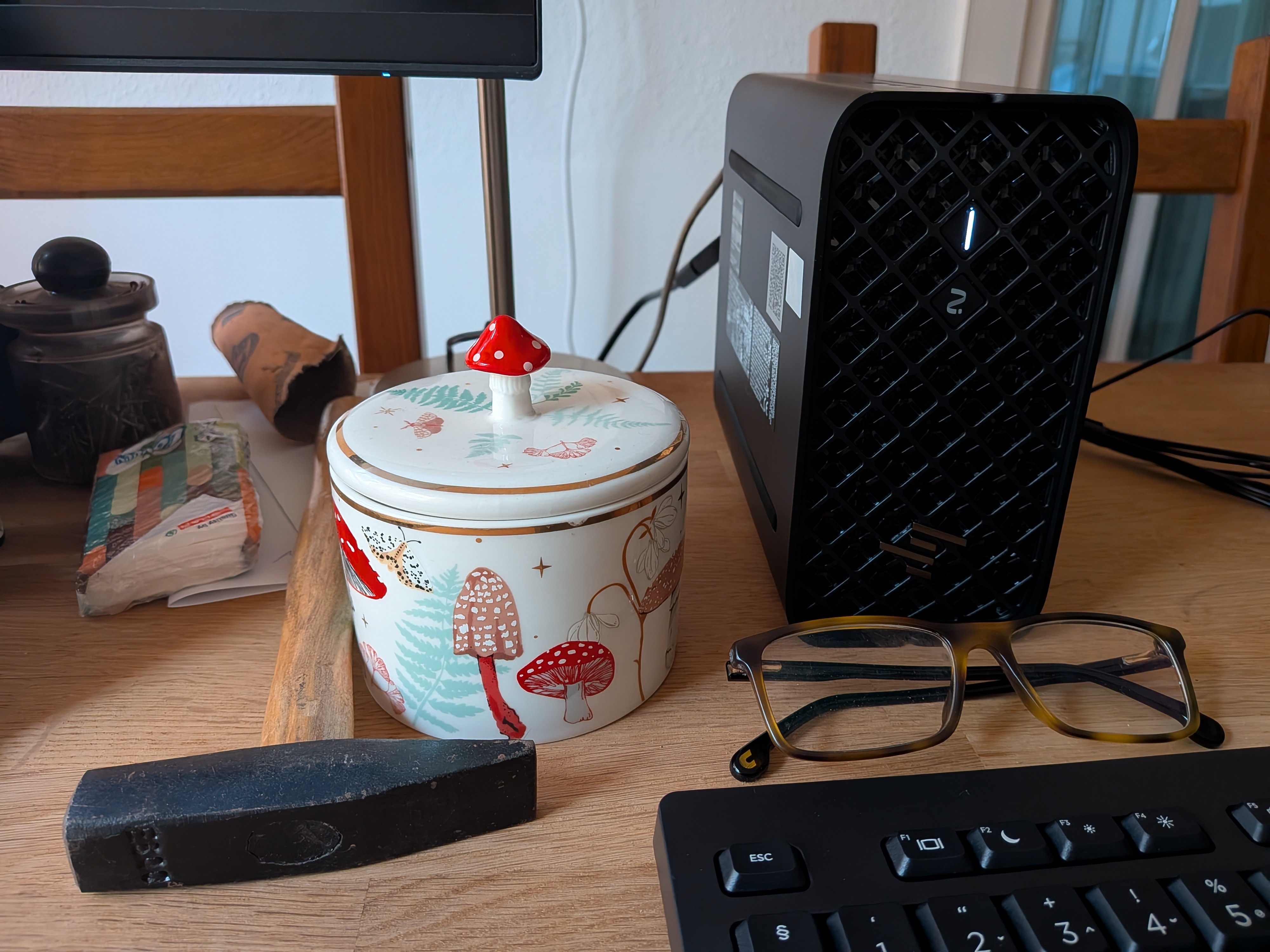
AI in a miniature box :-)
This blog is part of a longer series about my adventures with my new machine and AI. You can reach me to discuss this blog on one of the contacts listed in the upper right corner. You can read the rest of the blogs under the toy tag.
Episodio 71 de KDE Express: esLibre2026 Guía de Autodefensa Digital con Enxeñería Sen Fronteiras
Con este creo que ya me pongo al día con los últimos episodios del podcast más regular e informativo de la Comunidad KDE. Me congratula presentaros el episodio 71 de KDE Express, titulado «esLibre2026 Guía de Autodefensa Digital con Enxeñería Sen Fronteiras» donde David Marzal sigue promocionando el evento de la Comunidad del Software Libre de abril.
Episodio 71 de KDE Express: esLibre2026 Guía de Autodefensa Digital con Enxeñería Sen Fronteiras
Comenté hace ya bastante tiempo que había nacido KDE Express, un audio con noticias y la actualidad de la Comunidad KDE y del Software Libre con un formato breve (menos de 30 minutos) que complementan los que ya generaba la Comunidad de KDE España, aunque ahora estamos tomándonos un tiempo de respiro por diversos motivos, con sus ya veteranos Vídeo-Podcast que todavía podéis encontrar en Archive.org, Youtube, Ivoox, Spotify y Apple Podcast.
De esta forma, a lo largo de estos 71 episodios, promovidos principalmente por David Marzal, nos han contado un poco de todo: noticias, proyectos, eventos, etc., convirtiéndose (al menos para mi) uno de los podcast favoritos que me suelo encontrar en mi reproductor audio.
En palabras de David:

Bueno, con esto de los PrestoCast me ha costado volver a los podcast normales (que llevan bastante más trabajo), pero la ocasión lo merece porque os traigo información de primera mano de otra charla de esLibre. Hoy tenemos a Laura Salgueiro Sánchez voluntaria de Enxeñería Sen Fronteiras.
Vivimos en un mundo que, con su parte buena y su parte mala, avanza hacia lo digital a pasos agigantados y, en demasiadas ocasiones, dejando a mucha gente atrás. Este mundo digital, al igual que el presencial, también tiene una serie de riesgos de los que hay que protegerse. Muchas de vosotras quizás tenéis a esa persona de confianza (hija, sobrina, amiga…) a quien consultarle dudas o pedirle consejo en cosas relacionadas con las tecnologías de la información (TIC), pero no todo el mundo tiene esa opción. Además, tendemos a caer en el uso de herramientas de Google, Microsoft y otras grandes multinacionales, cediendo completamente nuestra soberanía digital. Por eso hacemos esta guía, explicando de forma clara y detallada cómo puedes mejorar tu seguridad digital, recuperando tu soberanía digital, tengas o no conocimientos previos de ciberseguridad. Es importante tener claro que la seguridad absoluta no existe, y siempre hay riesgo. Lo que podemos hacer como personas usuarias es poner barreras que nos protejan.
Laura es estudiante del último curso de Ingeniería Informática y Matemáticas. Le interesa especialmente utilizar sus conocimientos para mejorar la igualada de genero, el medio ambiente y la educación. Imparte como voluntaria de Ingeniería Sin Fronteras charlas en institutos sobre el impacto medioambiental de la nube, la privacidad digital o ciberseguridad.
Web personal: https://galicia.isf.es/ Mastodon (u otras redes sociales libres): https://mastodon.gal/@ESFGalicia GitLab (u otra forja o portfolio general): https://gitlab.com/esfgalicia/guia_autodefensa_dixital
Que nos trae la charla:
Guía de Autodefensa Digital: recupera tu soberanía digital. Tipo de propuesta: Charla larga (alrededor de 30 minutos)
Público objetivo: Todo tipo de público. No se requieren conocimientos previos de ningún tipo.
https://propuestas.eslib.re/2026/charlas/guia-de-autodefensa-digital-recupera-tu-soberania-digital

Por cierto, también podéis encontrarlos en Telegram: https://t.me/KDEexpress
La entrada Episodio 71 de KDE Express: esLibre2026 Guía de Autodefensa Digital con Enxeñería Sen Fronteiras se publicó primero en KDE Blog.
¿Qué es Mejor Windows o Linux? Mi Experiencia 1 año Después
No es la primera vez que Guillem Cortés (GCtech) se asoma por el blog, lo tuvimos cuando hablaba de su experiencia instalando en un MacOS un sistema libre como Asahi Linux . En esta ocasión, GCtech vuelve para compartir una de sus mayores aventuras digitales: su primer año completo utilizando Linux como sistema operativo principal intentando contestar a la pregunta del millón: ¿Qué es Mejor Windows o Linux? Evidentemente la respuesta no es categórica ya que depende de la persona pero gracias a este vídeo podemos tener las cosas más claras.
¿Qué es Mejor Windows o Linux? Mi Experiencia 1 año Después
Hoy toca un excelente vídeo de GCtech donde explica de forma muy didáctica las bases de Linux, sus ventajas e inconvenientes, comparándolo con Windows.
En palabras de Guillem:
¿Puede Linux realmente reemplazar a Windows en el día a día? En este video comparto mi experiencia completa tras un año usando Linux a diario: desde mis inicios hasta usarlo como sistema operativo principal. Te explico sus diferencias técnicas con Windows, las ventajas, los retos reales, y por qué creo que probar Linux debería ser obligatorio en un mundo cada vez más digital.
De esta forma, a lo largo de casi 30 minutos nos cuenta las bondades, y los inconvenientes de Linux (o GNU/Linux siendo precisos). Unos problemas que se centran en las aplicaciones que no existen en el sistema del pingüino, el tema de los videojuegos (aunque estos problemas tienen solución como la búsqueda de las alternativas o en el desarrollo de Protón) o en eterno problema del hardware no compatible.
Aunque hayáis visto el vídeo, creo que es bueno tener una lista de cosas buenas y malas:
Lo Bueno
Gestión de recursos. Linux no solo es más ligero, sino que es capaz de devolver a la vida hardware que Windows 11 daría por muerto.
Guillem pone como ejemplo su ThinkPad de séptima generación, que pasó de la pesadez de Windows a la agilidad total con una distro ligera.
Además, resalta la transparencia y la seguridad: en Linux, el usuario tiene el control real a través de un sistema de permisos mucho más robusto.
Lo Malo
Carencias en software profesional (como la suite de Adobe).
Las limitaciones que aún persisten en ciertos títulos de videojuegos Triple A, aunque reconoce que herramientas como Proton están acortando distancias a pasos agigantados.
La que pueden causar los drivers de periféricos muy específicos.

Más allá de las comparativas técnicas, el mensaje de Guille es una invitación a la curiosidad. Defiende que Linux debería enseñarse en las escuelas para entender la tecnología que sostiene el mundo (desde servidores hasta Android).
Si tienes un PC antiguo acumulando polvo o simplemente quieres recuperar la soberanía sobre tu ordenador, este vídeo es la guía perfecta para perder el miedo a la terminal y descubrir que, como bien dice Guillem, en Linux «el límite lo pones tú».
La entrada ¿Qué es Mejor Windows o Linux? Mi Experiencia 1 año Después se publicó primero en KDE Blog.
Mejoras en la accesibilidad de Plasma 6.6
El pasado 17 de febrero fue lanzado Plasma 6.6, el mejor escritorio del universo conocido (según nosotros). Ha pasado mucho tiempo y es el momento de hablar de las mejoras en la accesibilidad de Plasma 6.6, uno de los ejes en los que los desarrolladores de la Comunidad KDE trabajan con más ahinco.
Mejoras en la accesibilidad de Plasma 6.6
Tras comprobar que esta nueva versión de Plasma 6 sigue centrada en la mejora de la usabilidad, hoy tocar destacar también que la accesibilidad es muy importante. Veamos estas mejoras.

Si tienes daltonismo, consulta los filtros en la página Accesibilidad de las Preferencias del sistema, en la sección Corrección de daltonismo. Plasma 6.6 añade un nuevo filtro de escala de grises, lo que eleva el total a cuatro filtros que abarcan diferentes tipos de daltonismo:
Uno de los grandes aspectos mejorados, clave para para personas con discapacidad visual, es la función Ampliación y lupa que ha ganado un nuevo modo de seguimiento que siempre mantiene el puntero centrado en la pantalla, lo que eleva el total a cuatro modos:
Seguimos con un regreso, el de las Teclas lentas (Slow Keys) en Wayland, una función diseñada para personas que tienen dificultades con el control motor fino o temblores en las manos.
Para los que no sepan ¡, cuando las «Teclas lentas» están activadas, el sistema no registrará una pulsación de tecla a menos que esta se mantenga presionada durante un periodo de tiempo determinado (que puedes configurar). Esto evita que se escriban caracteres por error si rozas accidentalmente una tecla mientras te desplazas por el teclado.
Aunque esta función existía en el antiguo servidor X11, traerla a Wayland es un paso técnico importante para que Plasma pueda abandonar por completo las tecnologías antiguas sin dejar atrás a los usuarios que dependen de estas herramientas.

Y para finalizar, se ha mejorado el movimiento reducido (Reduced Motion), una configuración de accesibilidad indicada para personas con trastornos vestibulares, cinetosis (mareo por movimiento) o epilepsia fotosensible.
Al hacer que Plasma 6.6 la introduzca de forma estandarizada hace que el sistema operativo le diga a todas las aplicaciones y al propio escritorio que eliminen o simplifiquen las animaciones no esenciales.
De esta forma. e lugar de que una ventana se «deslice» desde una esquina, podría simplemente aparecer con un fundido suave o de forma instantánea. También pueden eliminar efectos de rebote, zooms y desplazamientos cinéticos.
Debo confesar que estoy buscando esta opción y no me aparece, así que si alguien sabe donde activarla, rogaría que lo pusiera en comentarios.
Más información: Plasma 6.6
La entrada Mejoras en la accesibilidad de Plasma 6.6 se publicó primero en KDE Blog.
Ajuste sencillo de la sensibilidad del micrófono – Esta semana en Plasma
Es increíble el trabajo de promoción que está realizando Nate (ahora con ayuda de otros desarrolladores) en su blog, desde hace más del tiempo que puedo recordar. Cada semana hace un resumen de las novedades más destacadas, pero no en forma de telegrama, sino de artículo completo. Su cita semanal no falla y voy a intentar hacer algo que es simple pero requiere constancia. Traducir sus artículos al castellano utilizando los magníficos traductores lo cual hará que la gente que no domine el inglés esté al día y que yo me entere bien de todo. Bienvenidos pues a «Ajuste sencillo de la sensibilidad del micrófono» de Esta semana en Plasma. Espero que os guste.
Ajuste sencillo de la sensibilidad del micrófono – Esta semana en Plasma
Nota: Artículo original en Blogs KDE. Traducción realizada utilizando Perplexity. Esta entrada está llena de novedades de la Comunidad KDE. Mis escasos comentarios sobre las mejoras entre corchetes. Por cierto, ya se nota que la resaca de 6.6 ya está pasando, grandes cosas nos vienen para 6.7.
¡Bienvenido a una nueva edición de This Week in Plasma!
Esta semana se han visto una gran variedad de mejoras en campos tan diversos como un mejor soporte para configuraciones multimonitor y multi‑GPU, soporte para nuevos portales, mejoras de rendimiento, mejoras de la interfaz de usuario, correcciones de fallos y mucho más. ¡Hay mucho de lo que entusiasmarse esta semana:
Nuevas funciones destacables nuevas
Plasma 6.7
Se ha implementado una función que permite grabarse con el micrófono y reproducir la grabación, facilitando detectar cuándo el nivel de grabación es demasiado alto o demasiado bajo. A continuación, puedes ajustar el nivel hasta que quede justo. KDE Bugzilla #435256 (Ramil Nurmanov) [Esto nos puede venir muy bien ahora que casi todos nos comunicamos vía webconferencias].
Se ha implementado soporte para el portal de notificaciones, que, entre otras cosas, permite configurar las notificaciones enviadas por Flatpak y otras aplicaciones sandboxed que utilizan portales del mismo modo en que se pueden configurar las notificaciones de aplicaciones empaquetadas tradicionalmente. plasma-workspace MR #6312 (Kai Uwe Broulik)
Frameworks 6.25
Las búsquedas impulsadas por KRunner ahora pueden convertir a y desde la unidad “momme”, que mide el peso de los textiles de seda. kunitconversion MR #82 (Nate Graham) [Software para todo el mundo].

Mejoras en la interfaz de usuario
Plasma 6.6.4
La animación de retroalimentación de lanzamiento de aplicación “saltarina” alrededor del puntero ahora se ve mejor al usar un factor de escala fraccionario. KDE Bugzilla #489403 (Vlad Zahorodnii)
Se ha acelerado el proceso de selección de una estación meteorológica para el widget Informe meteorológico usando el teclado. kdeplasma-addons MR #1016 (Nate Graham)
Ahora puedes arrastrar los elementos recientes de los menús del lanzador hasta el escritorio. plasma-workspace MR #6431 (Christoph Wolk) [Más eficiencia].
El widget de Redes ahora indica al instante la última red utilizada, en lugar de hacerlo solo después de reiniciar Plasma. KDE Bugzilla #512951 (Aviral Singh) [Información útil].
El widget Administrador de tareas ahora actualiza al instante el icono de una aplicación fijada o en ejecución cuyo icono hayas cambiado, en lugar de solo hacerlo tras reiniciar Plasma. plasma-workspace MR #6443 (Kai Uwe Broulik)
Plasma 6.7
La interfaz de selección de pantalla (por ejemplo, para compartir o transmitir pantalla) ahora incluye visualizaciones más atractivas para las pantallas, mostrando sus fondos de pantalla en el fondo. xdg-desktop-portal-kde MR #532 y plasma-workspace MR #6409 (Harald Sitter)
Se ha eliminado el diálogo superpersonalizado de selección de carpetas que se veía en todo el software de KDE; ahora elegir una carpeta usa el diálogo estándar de “Abrir” y solo muestra carpetas. KDE Bugzilla #197938 (Akseli Lahtinen)
Los cofres Plasma bloqueados ahora tienen sus puntos de montaje en solo lectura y marcados con un icono de candado, de modo que queda más claro qué son y que tú ni tus aplicaciones podéis guardar archivos en ellos por accidente, lo que bloquearía el montaje del cofre. plasma-vault MR #72 (Matthias Pleschinger)
Ahora puedes limitar la banda Wi‑Fi para redes en modo infraestructura. plasma-nm MR #536 (Piotr Balwierz)
Frameworks 6.25
Distintos cuadros de diálogo de mensaje en todo el software de KDE ahora ajustan su texto aproximadamente a los 70 caracteres, en lugar de hacerlo en función del ancho de pantalla. kwidgetsaddons MR #339 (Thomas Friedrichsmeier) [Puliendo visualizaciones].
Corrección de errores importantes
[No comento las correcciones de errores ya que son bastante evidentes].
Plasma 6.5.6
Se ha corregido un caso en el que Plasma podía bloquearse al conectar otra pantalla. KDE Bugzilla #477941 (Harald Sitter)
Se ha corregido un caso en el que Plasma podía bloquearse cuando los servicios subyacentes de aplicaciones con iconos en la Bandeja del sistema desaparecían. KDE Bugzilla #518128 (Nicolas Fella)
Se ha corregido un caso en el que Spectacle podía bloquearse bajo ciertas circunstancias al usar varias pantallas. layer-shell-qt MR #95 (Vlad Zahorodnii)
Se ha corregido un problema que podía hacer que OBS se bloqueara al salir en ciertas circunstancias. KDE Bugzilla #517599 (Nicolas Fella)
La función del widget Reloj digital para copiar la fecha y la hora actuales al portapapeles en varios formatos ahora usa la hora correcta de tu zona horaria local, no la hora UTC. KDE Bugzilla #517692 (David Edmundson)
Se han corregido varios casos de transparencia perdida en ciertos iconos de aplicaciones de la Bandeja del sistema. plasma-workspace MR #6427 (Qiancheng Sun)
Se ha corregido un problema revelado por la actualización a Qt 6.11 que aplicaba el color incorrecto al recuadro de ajuste de ventanas (snapping). KDE Bugzilla #518178 (Nicolas Fella)
Plasma 6.7
Se ha corregido un problema que hacía que la aplicación y los widgets Monitor del sistema mostraran nombres incorrectos para los núcleos de la CPU en sistemas con más de una CPU física. KDE Bugzilla #515435 (Kevin Tipping)
Mejoras de rendimiento y aspectos técnicos
Plasma 6.6.4
El desenfoque en Konsole ahora funciona correctamente con el efecto Wobbly Windows. KDE Bugzilla #474196 (Jérôme Lécuyer)
Plasma 6.7
Las grabaciones de pantalla hechas usando Spectacle y otros programas basados en KPipeWire ahora usan el dispositivo de renderizado correcto en sistemas con varias GPU, por lo que las grabaciones resultantes son siempre correctas y válidas. KDE Bugzilla #518008 (Marsh Land)
Se ha implementado una “cadena de intercambio multi‑GPU” (multi‑GPU swapchain) para KWin, que abre la puerta a futuras mejoras de rendimiento en casos de uso de varias GPU y con soporte de Vulkan. kwin MR #8926 (Xaver Hugl)
Se ha mejorado la capacidad de la aplicación y widgets Monitor del sistema para detectar múltiples GPUs. ksystemstats MR #130 y ksystemstats MR #132 (Michael Bauer)
Se ha hecho que la aplicación y widgets Monitor del sistema ya no ignoren discos completamente cifrados y elementos RAID a efectos de recopilar estadísticas de I/O de disco. ksystemstats MR #86 (Christoph Cullmann)
Se ha mejorado el rendimiento del cambiador de ventanas Alt+Tab cuando el efecto “Highlight Window” está activo (como está por defecto) y hay muchas ventanas minimizadas. kwin MR #8997 (Sushi Trash)
Wayland 1.48
Tras más de 6 años en desarrollo, ¡el protocolo de restauración de sesiones de Wayland está completo y fusionado! KWin ya dispone de una implementación preliminar, por lo que deberíamos empezar a ver pronto avances serios en este tema tan reclamado. wayland‑protocols MR #18 (Jonas Ådahl y muchos otros)
Cómo puedes ayudar
KDE se ha vuelto importante en el mundo, y tu tiempo y contribuciones han ayudado a llegar hasta aquí. A medida que crecemos, necesitamos tu apoyo para mantener KDE sostenible.
¿Te gustaría ayudar a preparar este informe semanal? Preséntate en la sala de Matrix y únete al equipo.
Más allá de eso, puedes ayudar a KDE involucrándote directamente en cualquier otro proyecto. Donar tiempo es realmente más impactante que donar dinero. Cada colaborador marca una gran diferencia en KDE — ¡no eres un número ni un engranaje en una máquina! No tienes que ser programador, existen muchas otras oportunidades.
También puedes ayudar haciendo una donación. Esto ayuda a cubrir costes operativos, salarios, gastos de viaje para colaboradores y, en general, a mantener KDE llevando Software Libre al mundo.
La entrada Ajuste sencillo de la sensibilidad del micrófono – Esta semana en Plasma se publicó primero en KDE Blog.
#openSUSE Tumbleweed revisión de la semana 13 de 2026
Tumbleweed es una distribución de GNU/Linux «Rolling Release» o de actualización contínua. Aquí puedes estar al tanto de las últimas novedades.

openSUSE Tumbleweed es la versión «rolling release» o de actualización continua de la distribución de GNU/Linux openSUSE.
Hagamos un repaso a las novedades que han llegado hasta los repositorios esta semana.
Y recuerda que puedes estar al tanto de las nuevas publicaciones de snapshots en esta web:
El anuncio original lo puedes leer en el blog de Dominique Leuenberger, publicado bajo licencia CC-by-sa, en este este enlace:
Esta semana por diversas circunstancias solo se publicaron un par de snapshots (0324 y 0326). Ahora está claro que el paso anterior a grub2-bls fue un error. Se está corrigiendo esa decisión cambiando los sistemas modernos a systemd-boot.
Si bien el cambio a systemd-boot es un punto destacado importante para las instalaciones nuevas, fue solo una de las muchas actualizaciones que llegaron esta semana:
- systemd-boot: Ahora es el valor predeterminado para instalaciones nuevas (los aquellos sistemas que simplemente actualicen permanecen en su gestor de arranque existente).
- AppArmor 4.1.7
- KDE Plasma 6.6.3
- ffmpeg 8.1
- FreeRDP 3.24.1
- gettext 1.0
- Linux kernel 6.19.9
- qemu 10.2.2
- SQLite 3.51.3
Y para próximas snapshots, ya se están preparando las siguientes actualizaciones:
- GNOME 50
- Autoconf 2.73
- Linux kernel 6.19.10
- Qt 6.11.0
- Mozilla Firefox 149.0
- GCC 16
- LLVM 22
- glibc 2.43
Si quieres estar a la última con software actualizado y probado utiliza openSUSE Tumbleweed la opción rolling release de la distribución de GNU/Linux openSUSE.
Mantente actualizado y ya sabes: Have a lot of fun!!
Enlaces de interés
- ¿Por qué deberías utilizar openSUSE Tumbleweed?
- zypper dup en Tumbleweed hace todo el trabajo al actualizar
- ¿Cual es el mejor comando para actualizar Tumbleweed?
- ¿Qué es el test openQA?
- http://download.opensuse.org/tumbleweed/iso/
- https://es.opensuse.org/Portal:Tumbleweed
——————————–
Tumbleweed – Review of the week 2026/13
Dear Tumbleweed users and hackers,
After a high-speed run, we hit a wall this week: only two snapshots (0324 and 0326) reached the mirrors. The culprit was a combination of bad timing and a necessary course correction regarding our bootloader defaults.
It is now clear that the previous move to grub2-bls was a mistake. We are correcting that decision by switching modern systems to systemd-boot. This transition caused a “weekend blackout” because openQA changes for the new default were deployed last Friday, but the actual distribution changes didn’t land until Sunday. We spent Monday and Tuesday ironing out the resulting kinks, which cost us the weekend snapshots.
While the change to systemd-boot is a significant highlight for fresh installations, it was just one of many updates that landed this week:
- systemd-boot: Now the default for fresh installations (upgraders remain on their existing bootloader).
- AppArmor 4.1.7
- KDE Plasma 6.6.3
- ffmpeg 8.1
- FreeRDP 3.24.1
- gettext 1.0
- Linux kernel 6.19.9
- qemu 10.2.2
- SQLite 3.51.3
The package maintainers and release engineers are busy preparing the next few changes for the upcoming days. These include:
- GNOME 50: matplotlib’s test suite needs to accept deprecations in glib 2.88.0
- Autoconf 2.73
- Linux kernel 6.19.10
- Qt 6.11.0
- Mozilla Firefox 149.0
- GCC 16 as the default distro compiler
- LLVM 22
- glibc 2.43: metabug: https://bugzilla.opensuse.org/show_bug.cgi?id=1257250

Planet News Roundup
This is a roundup of articles from the openSUSE community listed on planet.opensuse.org.
The community blog feed aggregator lists the featured highlights below from March 13 to March 19.
Blogs this week highlight Agama 19’s major architectural overhaul and new installation modes, the simultaneous release of Krita 5.3 and Krita 6.0, and Hyprland arriving on Tumbleweed with an official installation pattern. Blogs also cover Peter Czánik’s first steps running hardware-accelerated AI on Linux, animation smoothness improvements coming in Plasma 6.7, Mozilla’s new official RPM repository for Firefox Beta on openSUSE, the Himmelblau Workshop for Linux and Entra ID integration in Germany, an offline AI-powered child protection system for Linux using PAM, and more.
Here is a summary and links for each post:
My New Toy: OpenWebUI First Steps
Peter Czánik’s Blog continues his AI mini workstation series by documenting his first steps with Open WebUI on Fedora. He settled on running Ollama directly from the Fedora package repository after upgrading to Fedora 44 beta.
Install Firefox Beta on openSUSE
Victorhck explains how to add Mozilla’s new official RPM repository to install Firefox Beta on openSUSE alongside the stable and Nightly versions. Installing from the official Mozilla repository offers advantages including advanced compiler optimizations, faster updates, and hardened security binaries. The post provides the exact zypper commands needed to import the GPG key and install the package.
The New Features of Plasma 6.6
The KDE Blog takes a detailed look at the new features introduced in the Plasma 6.6 desktop release. The blog highlights a new global theme that automatically switches between light and dark mode by time of day, easier emoji skin tone selection via Meta+., and quick Wi-Fi connection by scanning a QR code with the device’s camera.
Trying Hyprland for the First Time on openSUSE Tumbleweed
Victorhck shares his first hands-on experience with the Hyprland tiling window manager on openSUSE Tumbleweed, which was made much easier by a new official installation pattern contributed by Lubos Kocman. The pattern bundles a minimal but functional setup including waybar, greetd, hyprpaper with an openSUSE wallpaper, and sensible keyboard defaults.
Compiling syslog-ng on an Old Mac
Peter Czánik’s Blog addresses the problem of Homebrew dropping full support for older Intel-based Macs and explains how to compile the latest syslog-ng release on these aging but still functional machines.
My New Toy: First Steps with AI on Linux
Peter Czánik’s Blog documents his first attempts at running hardware-accelerated AI workloads on his HP Z2 Mini under Linux, covering both Ubuntu 25.10 and Fedora 43. While Ubuntu proved difficult due to ROCm packaging limitations, Fedora’s Heterogeneous Computing SIG wiki provided a clear path to getting AMD ROCm working, with both llama-cpp and PyTorch successfully detecting and using the GPU.
Krita 5.3 and Krita 6.0 Released
The KDE Blog announces the simultaneous stable releases of Krita 5.3 and Krita 6.0. Krita 5.3 introduces a fully rewritten text tool with direct canvas editing and advanced OpenType support. Krita 6.0 builds on all of 5.3’s additions while completing the migration to Qt6.
Animation Improvements Coming in Plasma 6.7
The KDE Blog reports on work by KWin developer Vlad Zahorodnii to smooth out animation in the upcoming Plasma 6.7. The fix addresses the “jump” effect that occurs when a brief system stall causes an animation to skip several frames to catch up. The change affects compositor-managed animations such as window open/close effects and desktop transitions.
Himmelblau Workshop – Hands-On Integration on April 21 in Germany
Just Another Tech Blog announces the first official Himmelblau Workshop taking place on April 22 in Göttingen, Germany, which is the day after sambaXP 2026. The hands-on session targets Linux system administrators and IT professionals managing hybrid environments, covering Entra ID authentication, multi-factor authentication, Intune-based device management, and policy enforcement using the current stable Himmelblau release.
Agama 19 – A New Start for the SUSE and openSUSE Installer
Victorhck provides a thorough Spanish-language overview of the Agama 19 release and its significance for SUSE and openSUSE users. The post walks through the architectural renovation, the redesigned web interface with dynamic network configuration, the rewritten user and software management subsystems, and newly added features such as LVM volume group installation and SSH key authentication.
3 Top Features of Plasma 6.6
The KDE Blog spotlights three standout features from the Plasma 6.6 release. The completely redesigned “Plasma Keyboard” on-screen keyboard offers instant appearance, automatic window repositioning, and a mobile-style layout with emoji support and cursor control via the spacebar.
3 Sports Games for Linux
The KDE Blog continues its native Linux games series with three free and open-source sports titles. Freetennis is a realistic tennis simulator featuring advanced AI and LAN/internet multiplayer; Tux Football is a fast-paced 2D arcade football game inspired by Sensible Soccer; and Foobillard++ is a 3D OpenGL billiards simulator supporting 8-ball, 9-ball, snooker, and carom modes. All three games are natively available on Linux at no cost.
VLM + CNN + Agents: Solving Digital Child Protection on Linux Without the Cloud
Alessandro’s Blog presents a technical proposal for implementing Brazil’s “Digital Statute for Children and Adolescents” (ECA Digital) on Linux using a fully offline AI pipeline. The system combines Vision-Language Models, convolutional neural networks for facial age estimation, and intelligent agents integrated directly into Linux’s PAM authentication layer to block privilege escalation by minors.
Linux Saloon 192 – Storm OS Distribution Exploration
The CubicleNate Blog recaps a Linux Saloon podcast episode focused on Storm OS, a new Arch-based Linux distribution created by contributor Ben. Participants discussed what productivity applications the distro would need to attract intermediate users and shared their own experiences testing distributions including openSUSE Tumbleweed.
Time Zone Offsets and Type-Ahead on the Desktop – This Week in Plasma
The KDE Blog translates and covers the latest “This Week in Plasma” development report. Plasma 6.7 gains time zone offset display in the Digital Clock widget, type-ahead file selection on the desktop when KRunner is disabled, and the ability to reverse the system tray item order. Performance improvements include reduced OpenGL context creation per application (saving 10–15 MB RAM each) and optimized direct scanout on fullscreen windows.
I Installed Linux on an Apple Silicon MacBook – No Going Back!
The KDE Blog highlights a video by content creator Guillem Cortés documenting his experience running Fedora Asahi Remix natively on a MacBook Pro with an M1 Pro chip. Battery life, audio, and display brightness perform comparably to macOS, though the screen is currently limited to 60 Hz instead of the original 120 Hz.
openSUSE Tumbleweed Weekly Review – Week 12 of 2026
Victorhck and dimstar report on a very active week for Tumbleweed with seven consecutive snapshots (0312 through 0318) delivered without any issues reaching users. Major updates include Mesa 26.0.2, cURL 8.19.0, Linux kernel 6.19.7 and 6.19.8, KDE Frameworks 6.24.0, GIMP 3.2.0, systemd 259.5, Ruby 4.0.2, and pipewire 1.6.2. Upcoming changes include switching the default UEFI bootloader to systemd-boot, GCC 16 as the default compiler, GNOME 50, glibc 2.43, and LLVM 22.
Agama 19 Released – A New Beginning
The Agama Installer Blog announces Agama 19. The release features a major architectural overhaul that establishes a clean, stable API as the foundation for the web UI, command-line tools, and unattended installs alike. Internal components for user and software management have been rewritten from scratch to replace aging YaST modules, and the web UI has been reorganized around a new overview page.
Passing of bear454
The openSUSE project mourns the passing of long-time community member James Mason. James, who is also known amongst the community as bear454, has a long connection with the project that stretches back to its beginnings. He was a member since 2009, an openSUSE Ambassador and dedicated much of his life’s work to open-source. He was often at LinuxFest Northwest helping several in attendance. He will be deeply missed.

James pictured at LinuxFest Northwest in 2014. left to right: Peter Linnell, Bryan Lunduke, Jon Hall (with the SUSE Chameleon), James Mason, and Michael Miller at LinuxFest Northwest 2014
View more blogs or learn to publish your own on planet.opensuse.org.
Mi escritorio Plasma de marzo 2026 #viernesdeescritorio
Sigo con la iniciativa #viernesdeescritorio. Bienvenidos a mi escritorio Plasma de marzo 2026, que en esta ocasión la voy a realizar sobre mi ultrabook Slimbook Pro, con el que llegamos a las 70 entregas compartiendo «Mi escritorio» de forma mensual.
Mi escritorio Plasma de marzo 2026 #viernesdeescritorio
Esta va a ser la entrega número 70 en la que muestro mi escritorio Plasma 6 en público, lo cual es número nada desdeñable de entradas que sigue creciendo de forma constante.
Como decía en la introducción la realizo de nuevo sobre mi Slimbook Pro, el cual tiene instalado un KDE Neon con Plasma 6.6.3, sobre una versión de KDE Frameworks 6.24.0 y una versión de Qt 6.10.2. El servidor gráfico es Wayland y el Kernel es 6.17.0-19-generic (64 bits).
En este equipo sigo utilizando un aspecto oscuro, utilizando el tema global Brisa Oscura, el que lleva por defecto Plasma, con los iconos Brisa.
La barra de tareas se la tengo en la parte izquierda dado que no tengo dos monitores que me hagan moverme de derecha a izquierda y viceveres, y contiene de arriba a abajo.
- Selector de escritorios virtuales
- Reloj digital
- Widget de Clima Plus
- Gestor de tareas solo iconos
- Bandeja del sistema
- Un pequeño bloc de notas para acceder de forma rápida a esas cosas que pasan por mi mente y necesito apuntar para recordar después.
- Flex Hub para el control de aspecto de mi plama.
- Lanzador de aplicaciones.
Para el fondo también tengo e activado el complemento Wallhaven, el cual conecta con la página web https://wallhaven.cc/ y que permite que te cambie dicho fondo según los parámetros que definas.

En esta ocasión he seleccionado uno de una Tormenta (Storm) icónica, uno de mis personajes favoritos de la Patrulla, sobre todo en tiempos de Claremont. Ese contraste de oscuro y blanco creo que los deja muy elegante.
Además, el fondo contiene el reloj ClearClock por Modern Clear Clock, ya que este plasmoide coge bien la información del idioma de mi sistema, y por ello aparece el día de la semana en valenciano.
El resultado de mi escritorio Plasma de marzo de 2026 es un entorno de trabajo oscuro y, como siempre, funcional que podéis ver en la imagen inferior (pinchad sobre ella para verlo un poco más grande).

La entrada Mi escritorio Plasma de marzo 2026 #viernesdeescritorio se publicó primero en KDE Blog.
My new toy: Openwebui First Steps
Once I got hardware-accelerated AI working under Linux on my AI mini workstation from HP, my next goal was to make it easier to use. From this blog, you can read about my initial experiments with Open WebUI on Fedora Linux.
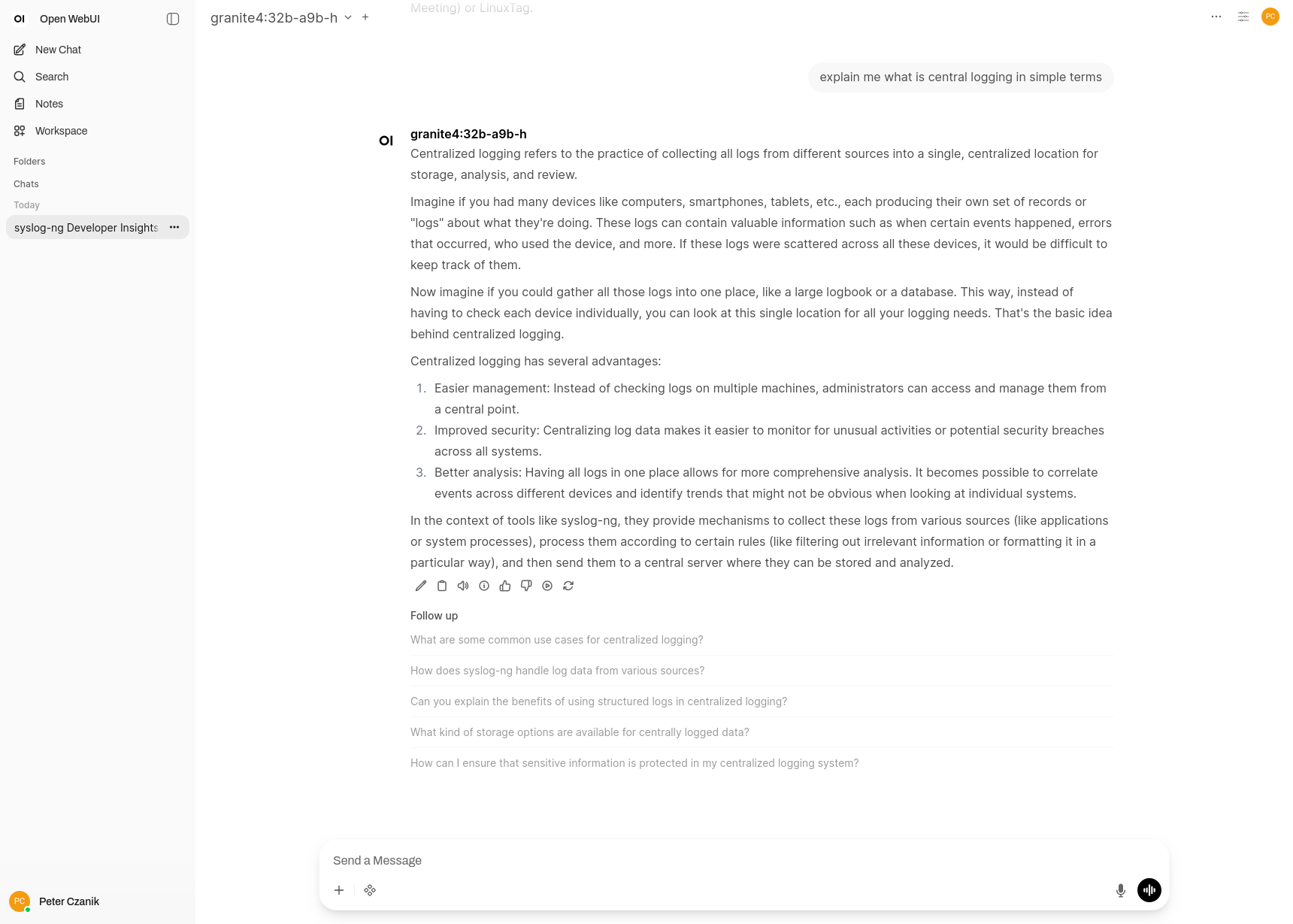
Open WebUI talking about central log collection :-)
Everything in containers
As Open WebUI is not yet available as a package in Fedora, my initial approach was to use containers. I found a Docker compose setup which was tested on Fedora Linux 43 according to its documentation: https://github.com/jesuswasrasta/ollama-rocm-webui-docker. As I (also) use Fedora 43, it sounded like a good choice.
It worked; however, I quickly realized that hardware acceleration for AI was not working. Instead of that, most CPUs were running close to 100%. It was a good test for cooling: I could hear the miniature box from the next room through closed doors :-)
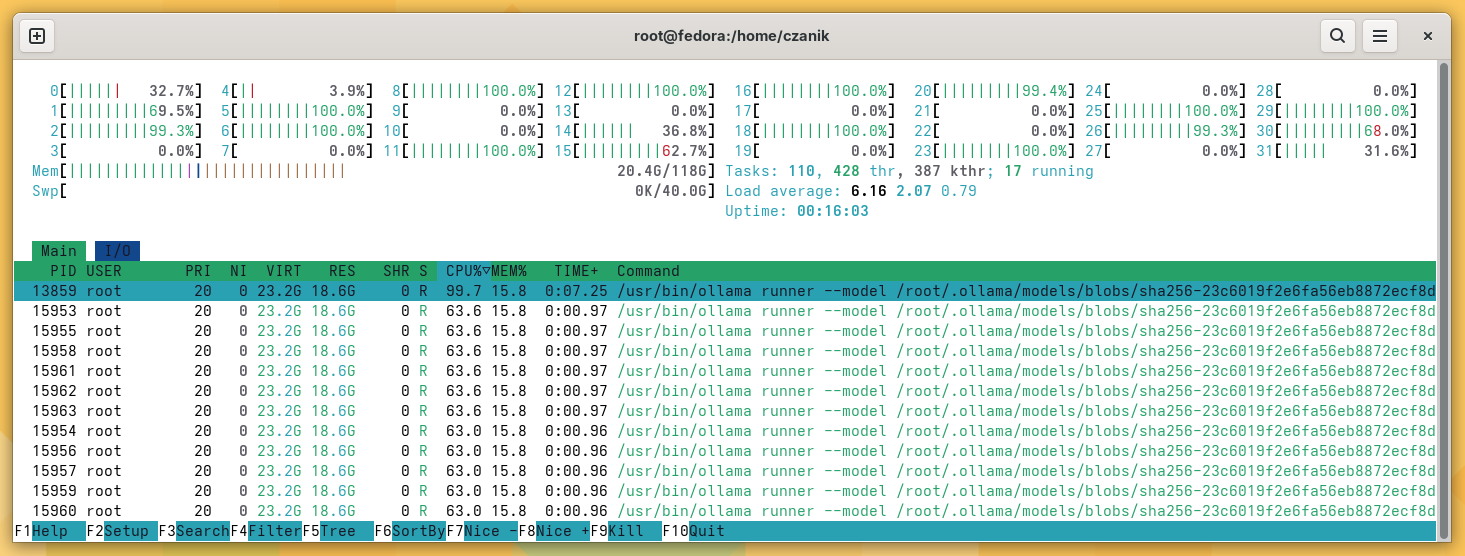
ollama eating CPU :-)
As it turned out, the content of the HSA_OVERRIDE_GFX_VERSION environment variable was incorrect. When I set it according to the docs, hardware acceleration still did not work. Removing the environment variable ollama found the hardware, but never answered a prompt anymore.
Ollama from the system
My next experiment was that I kept using Open WebUI from the container, but I installed ollama from the Fedora package repository directly on the system. The good news? Some smaller models ran really fast, using hardware acceleration. The bad news: most models failed to load with an error message that the given model format is unknown.
Update to Fedora 44 beta
I guessed that ollama was too old in Fedora 43. Solution? Update the whole system to Fedora 44 beta. It seems to have helped. A lot more models work now, including the largest freely available Granite models from IBM.
Why Granite?
First of all: I’m an IBM Champion, and thus using IBM technologies is for granted. But also because I learned some background stories from a friend working at IBM on LSF, which makes it also a personal choice.
What I’ve been showing here is AI inferencing on my HP AI system. But before the model can be used (for inferencing), it needs to be trained. These models are trained on large, GPU rich conpute clusters. To get an idea of the scale of such clusters, you can learn more in this research paper (https://arxiv.org/abs/2407.05467). It duscusses the IBM Blue Vela system which supports IBMs’ GenAI mission. What’s interesting is the Blue Vela uses a more traditional HPC software stack including IBM LSF for workload management and Storage Scale (GPFS) for rapid access to large data sets.
AI in a miniature box :-)
This blog is part of a longer series about my adventures with my new machine and AI. You can reach me to discuss this blog on one of the contacts listed in the upper right corner. You can read the rest of the blogs under the toy tag.